Plan-and-Execute Agent - Practice and Next Steps
You Built an Agent!
Congratulations! You’ve built a complete plan-and-execute agent with:
- ✅ Tool calling loop
- ✅ Approval gates for safety
- ✅ Budget and resource controls
- ✅ Debugging and logging
- ✅ Dry-run mode for testing
This is the foundation of production agentic systems.
Exercises
Try these exercises to deepen your understanding:
Exercise 1: Add search_notes Tool
Goal: Add a tool that searches for keywords in notes.
Requirements:
- Tool name:
search_notes - Parameters:
keyword(string) - Returns: List of files containing the keyword with matching lines
- Safety: Read-only (no approval needed)
Starter code:
Success criteria:
- Agent uses
search_notesbefore reading all files - Returns accurate matches with line numbers
- Handles case-insensitive search
Exercise 2: Add Dry-Run Flag
Goal: Add a command-line flag to enable dry-run mode.
Requirements:
- Accept
--dry-runflag when running agent - Print clear indication that dry-run is active
- No real file writes or sends in dry-run mode
Starter code:
Success criteria:
--dry-runflag works correctly- Clear indication when dry-run is active
- Help text explains all options
Exercise 3: Add Policy Gate
Goal: Block send_message if text contains secrets.
Requirements:
- Check message text for patterns like API keys, tokens, passwords
- Deny automatically if secrets detected
- Explain why it was denied
Starter code:
Success criteria:
- Detects API keys and tokens in messages
- Denies automatically without user prompt
- Returns clear explanation of violation
Final Knowledge Check
Test your understanding of the complete agent system:
What You Can Do Now
Your agent can:
- ✅ Plan and execute multi-step tasks
- ✅ Call tools to interact with the world
- ✅ Ask for approval before risky operations
- ✅ Handle errors gracefully
- ✅ Stay within budgets to prevent runaway costs
- ✅ Run in dry-run mode for safe testing
- ✅ Log everything for debugging
What Your Agent Cannot Do
Be realistic about limitations:
- ❌ Guarantee correctness - LLMs can still make mistakes
- ❌ Handle all edge cases - You need to add validation
- ❌ Scale infinitely - You need rate limits and quotas
- ❌ Understand complex context - Keep tasks focused
- ❌ Replace human judgment - Approval gates are essential
Scaling to Production
From Demo to Production
This animated concept requires JavaScript to be enabled.
Frames:
-
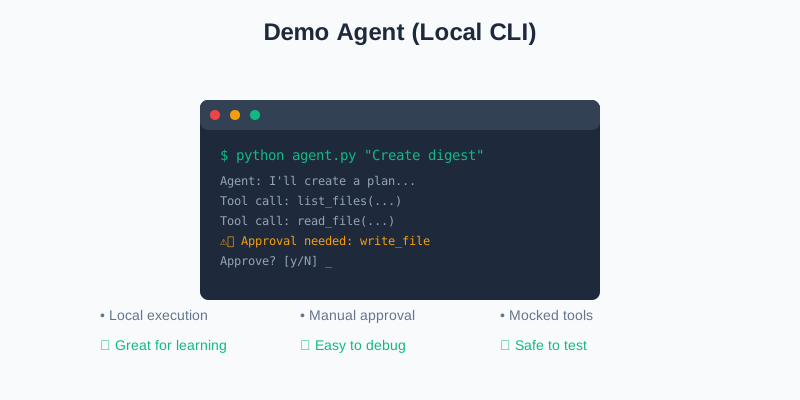
Demo Agent: Local CLI, mocked tools, manual approval. Good for learning and testing.
-

Production Agent: API service, real integrations, policy engine, monitoring, multi-user. Ready for real workloads.
Moving to Production
When you’re ready to deploy, consider:
1. Architecture
- Move from CLI to API service
- Add authentication and authorization
- Support multiple concurrent users
- Use async/await for better performance
2. Tool Integration
- Replace mocked tools with real APIs
- Add retry logic and error handling
- Implement rate limiting per tool
- Cache expensive operations
3. Safety and Compliance
- Replace manual approval with policy engine
- Log all actions for audit
- Add role-based access control
- Implement data privacy controls
4. Monitoring
- Track success/failure rates
- Monitor costs per user/session
- Alert on anomalies
- Measure latency and throughput
5. Scaling
- Use message queues for async processing
- Add load balancing
- Implement circuit breakers
- Cache model responses where appropriate
Advanced Patterns
Once you master the basics, explore:
1. Multi-Agent Systems
- Specialized agents for different tasks
- Agents that delegate to other agents
- Consensus mechanisms for decisions
2. Graph-Based Agents
- Use LangGraph or similar for complex flows
- Define explicit state machines
- Handle branching and loops explicitly
3. Memory Systems
- Long-term memory across sessions
- Vector databases for semantic search
- Conversation summarization
4. Advanced Tool Calling
- Parallel tool execution
- Tool chaining and composition
- Dynamic tool generation
5. Evaluation
- Automated testing of agent behavior
- Benchmark suites for common tasks
- A/B testing different prompts
Recommended Resources
OpenAI Documentation
- Function Calling Guide
- Agents SDK (for production systems)
Frameworks
- LangChain - Agent framework with many integrations
- LangGraph - Graph-based agent orchestration
- AutoGPT - Autonomous agent examples
Papers
- “ReAct: Synergizing Reasoning and Acting in Language Models”
- “Toolformer: Language Models Can Teach Themselves to Use Tools”
- “Chain-of-Thought Prompting Elicits Reasoning in Large Language Models”
Next Steps
Here’s what to do next:
- Complete the exercises above
- Extend your agent with new tools for your use case
- Test in dry-run mode before running for real
- Add monitoring to understand agent behavior
- Share your agent and get feedback
Final Thoughts
You’ve learned the fundamentals of agentic AI:
- Plan-and-execute pattern - The foundation of goal-oriented agents
- Tool calling - How agents interact with the world
- Safety controls - Budgets, approval gates, dry-run mode
- Debugging - Logging, tracing, and troubleshooting
These patterns scale from demos to production systems. The agent you built is simple, but it contains all the core concepts you need.
The key insight: Agents are loops. They plan, act, observe, and repeat. Everything else is details.
Now go build something amazing! 🚀
Complete Code Repository
The full working code for this tutorial is available in the GitHub repository:
git clone https://github.com/appropri8/plan-execute-agent-tutorial.git
cd plan-execute-agent-tutorial
Or check it out in the githubRepo/ directory of this project.
Thank You!
Thanks for completing this tutorial. If you found it helpful, consider:
- Sharing it with others learning about agents
- Building on these concepts for your projects
- Contributing improvements to the code
Happy building! 🎉
Discussion
Loading comments...