Plan-and-Execute Agent - Adding Safety Controls
Why Controls Matter
Agents can be expensive and unpredictable. Without controls, they might:
- Read 1000 files when you expected 10
- Make 100 API calls that cost real money
- Write to the wrong directory and overwrite important data
- Loop forever trying to fix an unfixable problem
Controls are your safety net.
Three Essential Controls
We’ll add three simple but powerful controls:
- Tool call budget - Limit total number of tool calls
- Dry-run mode - Simulate actions without side effects
- Resource tracking - Monitor what the agent does
These patterns scale to production systems.
Control 1: Tool Call Budget
Limit how many times the agent can call tools:
Integrate into agent loop:
def run_agent(goal: str, max_tool_calls: int = 20) -> str:
    budget = AgentBudget(max_tool_calls)
    input_list = [{"role": "user", "content": goal}]

    for iteration in range(MAX_ITERS):
        # ... call model ...

        for tool_call in message.tool_calls:
            # Check budget before executing
            if not budget.can_call(tool_call.function.name):
                return f"Budget exhausted: {budget.get_stats()}"

            # Execute tool
            tool_output = dispatch_tool(name, args)
            budget.record_call(name)

    return f"Complete. {budget}"
Control 2: Dry-Run Mode
Test agent behavior without side effects:
Why dry-run matters:
- Test agent logic without making real changes
- Debug tool calls and see what the agent would do
- Validate plans before execution
- Safe experimentation with new prompts or tools
Control 3: Resource Tracking
Monitor what the agent does:
Putting It All Together
Here’s the agent with all three controls:
Comparing Control Strategies
Agent Control Strategies
This animated concept requires JavaScript to be enabled.
Frames:
-
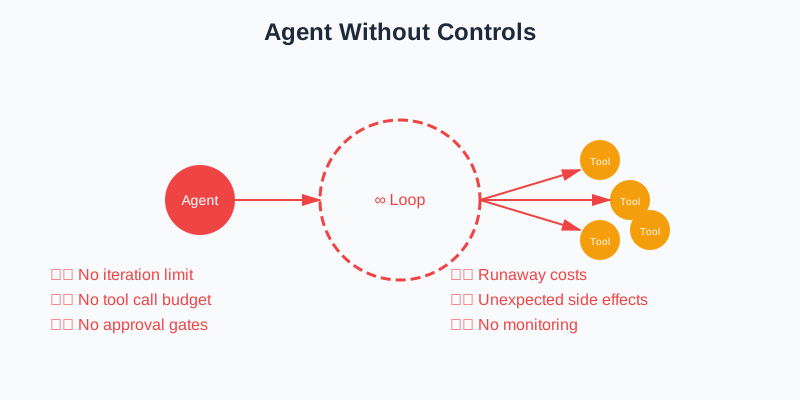
No Controls: Agent can run indefinitely, make unlimited tool calls, and cause unexpected side effects. Risky for production.
-
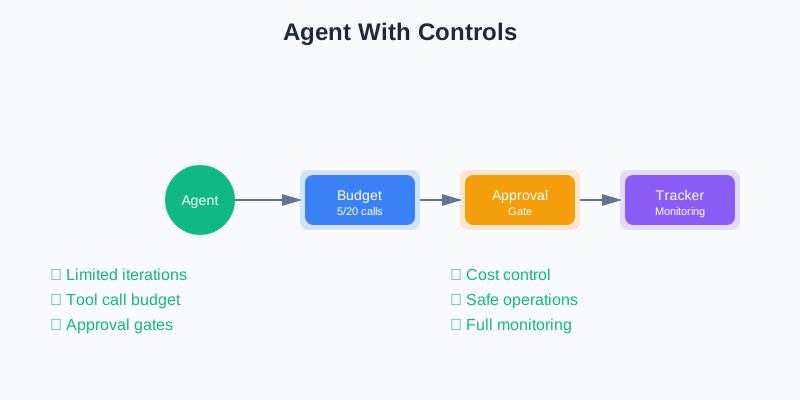
With Controls: Budget limits tool calls, dry-run mode tests safely, tracking monitors usage. Production-ready.
Quick Knowledge Check
Production Considerations
When deploying agents to production, consider:
1. Cost controls
- Set budgets per user or per session
- Track API costs in real-time
- Alert when costs exceed thresholds
2. Rate limiting
- Limit tool calls per minute
- Prevent abuse or runaway loops
- Protect downstream services
3. Audit logging
- Log all tool calls and results
- Track who approved what
- Enable compliance and debugging
4. Graceful degradation
- Handle budget exhaustion gracefully
- Provide partial results when possible
- Explain what the agent couldn’t complete
Key Takeaways
You’ve added production-ready controls:
- ✅ Tool call budgets - Prevent unlimited tool calls
- ✅ Dry-run mode - Test safely without side effects
- ✅ Resource tracking - Monitor agent behavior
- ✅ Graceful limits - Handle exhaustion cleanly
These patterns scale to real-world systems.
What’s Next?
In the next page, we’ll cover debugging and testing: how to trace agent behavior, replay runs, and troubleshoot issues.
Discussion
Loading comments...