Plan-and-Execute Agent - Understanding Agent Behavior
How Agents Think and Act
An agent isn’t just a chatbot. It’s a system that can:
- Understand a goal (“create a weekly digest”)
- Make a plan (list files → read them → summarize → write output)
- Execute steps by calling tools
- Observe results and decide what to do next
- Loop until the goal is complete
This is the plan-and-execute pattern. It’s how modern agentic systems work.
The Agent Loop in Plain Terms
Here’s what happens inside an agent:
Step 1: You give it a goal
"Create a weekly digest from ./notes"Step 2: The agent writes a plan
1. List files in ./notes
2. Read each file
3. Extract key points
4. Write summary to output file
Step 3: The agent executes the plan
- Calls
list_files("./notes")→ gets["2026-01-20.md", "2026-01-21.md"] - Calls
read_file("./notes/2026-01-20.md")→ gets file content - Calls
read_file("./notes/2026-01-21.md")→ gets file content - Calls
write_file("./output/digest.md", "...")→ asks for approval first
Step 4: The agent reports results
"Done! Created weekly digest at ./output/digest.md"The key insight: The model proposes tool calls. Your code runs them. Results go back to the model.
Visualizing the Agent Loop
Let’s see how data flows through the agent system:
The loop continues until the agent decides it’s done (or hits a safety limit).
Standard Tool-Calling Flow
This pattern follows the standard tool-calling flow used by OpenAI and other LLM providers:
- Send messages + tool definitions to the model
- Model responds with either:
- A text message (if done)
- A tool call request (if it needs to do something)
- Your code executes the tool
- Send tool result back to the model
- Repeat until the model stops calling tools
This is the foundation of agentic systems.
Interactive: Build the Flow
Drag the steps into the correct order to build an agent loop:
Why Approval Gates Matter
Not all tools are safe to run automatically. Some have side effects:
- Writing files - Could overwrite important data
- Sending messages - Could spam users or leak information
- Deleting data - Irreversible and dangerous
- Making API calls - Could cost money or trigger external actions
Safe tools (read-only):
list_files()- Just lists files, doesn’t change anythingread_file()- Reads content, no side effects
Risky tools (side effects):
write_file()- Changes disk statesend_message()- External communicationdelete_file()- Destructive action
The solution: Add an approval gate. Before running a risky tool, ask the user:
Approval needed: write_file({"path": "./output/digest.md", "content": "..."})
Approve? [y/N]
This is a simple but powerful guardrail. In production systems, you might:
- Log all tool calls for audit
- Require approval from multiple people
- Check against a policy engine
- Simulate the action first (dry run)
Comparing Agent Approaches
Agent Patterns: Reactive vs Plan-and-Execute
This animated concept requires JavaScript to be enabled.
Frames:
-
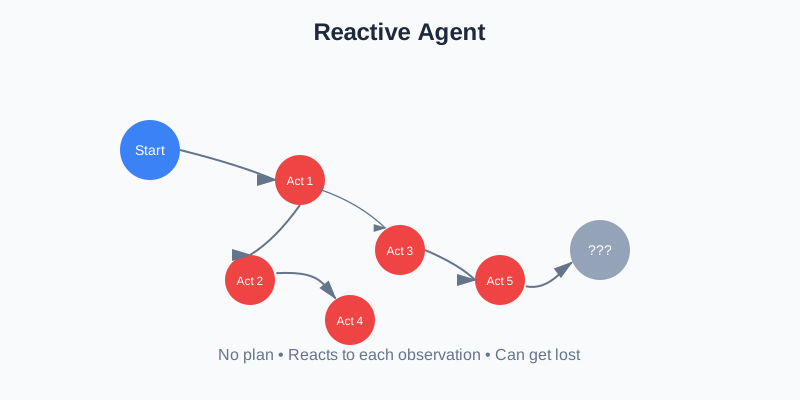
Reactive Agent: Responds to each observation without a plan. Can be inefficient and lose track of the goal.
-
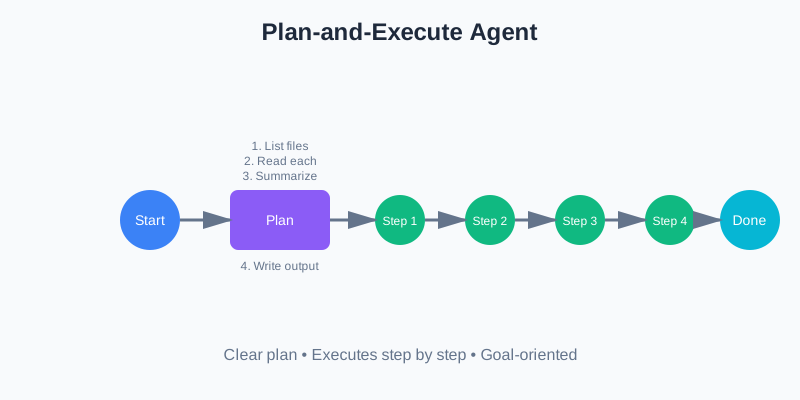
Plan-and-Execute Agent: Creates a plan first, then executes it step by step. More efficient and goal-oriented.
The plan-and-execute pattern is more reliable because:
- The agent has a clear roadmap
- You can review the plan before execution
- It’s easier to debug when something goes wrong
- The agent is less likely to get stuck in loops
Key Takeaways
Before moving to the next page, remember:
- Agents loop: They don’t just respond once—they plan, act, observe, and repeat
- Tool calling is the core: The model proposes tools, your code runs them
- State matters: The conversation history grows with each step
- Approval gates are essential: Don’t let agents run risky operations automatically
- Plan-and-execute is powerful: Having a plan makes agents more reliable
What’s Next?
In the next page, we’ll set up your environment and install the dependencies you need to build the agent. It’s quick and straightforward.
Discussion
Loading comments...