Understanding RAG - Retrieval Process
The Retrieval Process
Retrieval is the heart of RAG. It determines which information the LLM will use to generate its response. Let’s break down how retrieval works and why it’s so effective.
Vector Embeddings: The Foundation
Text is converted into high-dimensional vectors (typically 768-1536 dimensions) that capture semantic meaning. This is what makes semantic search possible.
How Embeddings Work
Text to Vector Embedding
This animated concept requires JavaScript to be enabled.
Frames:
-
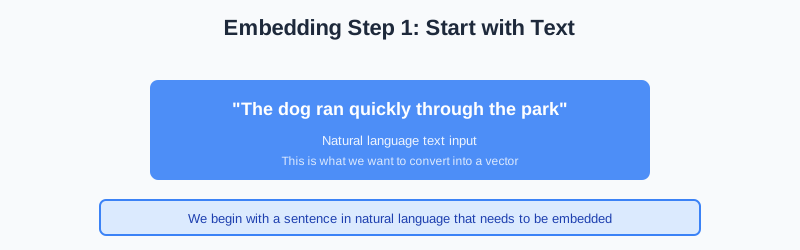
Start with text: 'The dog ran quickly through the park'
-
![Text is tokenized into smaller units: ['The', 'dog', 'ran', 'quickly', 'through', 'the', 'park']](/2025/11/19/rag-fundamentals/concepts/embedding-step-2.svg)
Text is tokenized into smaller units: ['The', 'dog', 'ran', 'quickly', 'through', 'the', 'park']
-
![Embedding model converts tokens to a dense vector: [0.23, -0.45, 0.67, ..., 0.12] (1536 dimensions)](/2025/11/19/rag-fundamentals/concepts/embedding-step-3.svg)
Embedding model converts tokens to a dense vector: [0.23, -0.45, 0.67, ..., 0.12] (1536 dimensions)
-
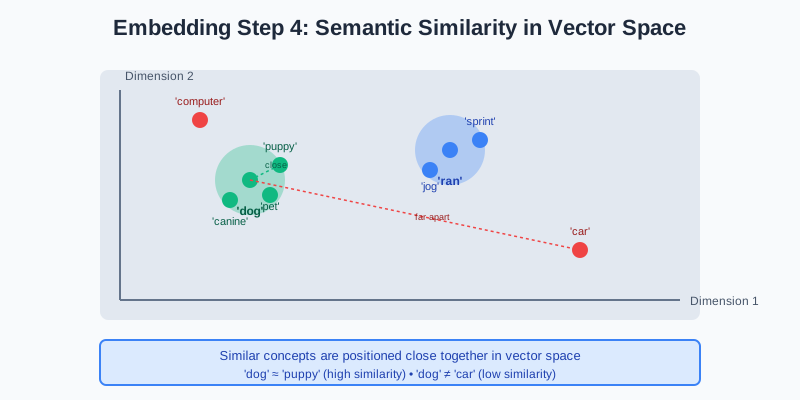
Similar concepts are positioned close together in vector space. 'dog' and 'puppy' have similar embeddings, while 'dog' and 'car' are far apart.
Semantic Similarity
The magic of embeddings is that they capture meaning, not just keywords:
Example Similarities:
- “dog” ≈ “puppy” ≈ “canine” (high similarity)
- “dog” ≠ “car” ≠ “computer” (low similarity)
- “machine learning” ≈ “artificial intelligence” ≈ “neural networks”
This means a query about “resetting password” will match documents about “password recovery” even though they don’t share exact words!
Similarity Search
The system compares the query embedding against all document embeddings in the knowledge base using distance metrics.
Distance Metrics
1. Cosine Similarity (most common)
- Measures the angle between vectors
- Range: -1 to 1 (1 = identical, 0 = orthogonal, -1 = opposite)
- Ignores magnitude, focuses on direction
- Best for text similarity
2. Euclidean Distance
- Measures straight-line distance between vectors
- Lower distance = more similar
- Considers magnitude
- Good for spatial data
3. Dot Product
- Measures alignment of vectors
- Higher value = more similar
- Fast to compute
- Used in many vector databases
How Similarity Search Works
1. Query: "How to reset password"
   Query Vector: [0.12, -0.34, 0.56, ...]

2. Compare against all documents:
   Doc 1: [0.15, -0.32, 0.54, ...] → Similarity: 0.95 ✓
   Doc 2: [0.89, 0.23, -0.12, ...] → Similarity: 0.23
   Doc 3: [0.14, -0.35, 0.57, ...] → Similarity: 0.97 ✓✓
   Doc 4: [-0.45, 0.67, 0.12, ...] → Similarity: 0.15
   ...

3. Return top-k most similar documents (e.g., Doc 3, Doc 1)
Try It Yourself: Calculate Cosine Similarity
Run this code to see how cosine similarity works in practice:
Document Ranking
Retrieved documents are ranked by relevance score, and the top-k results (typically 3-10) are selected for context augmentation.
Choosing Top-k
Too Few Documents (k=1-2):
- ❌ May miss important context
- ❌ Limited information for LLM
- ✅ Faster processing
- ✅ Lower costs
Optimal Range (k=3-5):
- ✅ Good balance of context and relevance
- ✅ Enough information without noise
- ✅ Reasonable processing time
- ✅ Most common in production
Too Many Documents (k=10+):
- ❌ May include irrelevant information
- ❌ Longer prompts = higher costs
- ❌ Can confuse the LLM
- ✅ Comprehensive coverage
Re-ranking
Sometimes, initial retrieval results are re-ranked using more sophisticated models:
- First Pass: Fast vector search retrieves top-20 candidates
- Re-ranking: More expensive model re-scores the top-20
- Final Selection: Top-5 after re-ranking are used
This two-stage approach balances speed and accuracy.
Hands-On: Build the RAG Pipeline
Now it’s your turn! Arrange the RAG components in the correct order to build a functioning pipeline.
Retrieval Strategies
Different retrieval strategies work better for different use cases:
1. Dense Retrieval (Semantic)
How it works: Uses vector embeddings and similarity search
Pros:
- ✅ Captures semantic meaning
- ✅ Finds conceptually similar documents
- ✅ Works across languages
Cons:
- ❌ May miss exact keyword matches
- ❌ Requires embedding model
- ❌ Computationally intensive
Best for: Conceptual queries, semantic search
2. Sparse Retrieval (Keyword)
How it works: Traditional keyword matching (BM25, TF-IDF)
Pros:
- ✅ Fast and efficient
- ✅ Exact keyword matching
- ✅ No embedding needed
Cons:
- ❌ Misses semantic similarity
- ❌ Sensitive to exact wording
- ❌ No cross-language support
Best for: Exact term matching, technical queries
3. Hybrid Retrieval
How it works: Combines dense and sparse retrieval
Pros:
- ✅ Best of both worlds
- ✅ Robust to different query types
- ✅ Higher accuracy
Cons:
- ❌ More complex to implement
- ❌ Requires tuning weights
- ❌ Slightly slower
Best for: Production systems, diverse queries
Retrieval Quality Metrics
How do we measure if retrieval is working well?
Key Metrics
1. Precision@k
- What percentage of retrieved documents are relevant?
- Higher is better
- Example: If 4 out of 5 retrieved docs are relevant, Precision@5 = 0.8
2. Recall@k
- What percentage of all relevant documents were retrieved?
- Higher is better
- Example: If 4 out of 10 total relevant docs were retrieved, Recall@10 = 0.4
3. Mean Reciprocal Rank (MRR)
- How quickly do we find the first relevant document?
- Higher is better
- Example: If first relevant doc is at position 2, MRR = 1/2 = 0.5
4. NDCG (Normalized Discounted Cumulative Gain)
- Considers both relevance and ranking position
- Range: 0 to 1 (1 = perfect)
- Penalizes relevant docs appearing lower in results
Key Takeaways
Before moving to the next page, remember:
- Vector embeddings capture semantic meaning, enabling similarity search
- Similarity metrics (cosine, euclidean, dot product) measure document relevance
- Top-k selection balances context quality and quantity (typically 3-5)
- Hybrid retrieval combines semantic and keyword search for best results
- Retrieval quality can be measured with precision, recall, and ranking metrics
What’s Next?
In the next page, we’ll explore the Generation Process - how the LLM uses retrieved context to generate accurate, grounded responses. You’ll see a direct comparison between standard LLM and RAG-enhanced responses!
Discussion
Loading comments...