Build an MQTT IoT "Digital Twin" on Your Laptop (Mosquitto + Node-RED + Python)
Welcome to MQTT IoT Digital Twin Tutorial! 🏠
You’re about to build a complete IoT system on your laptop. No hardware needed. Just Docker, Python, and Node-RED. By the end, you’ll have a working “digital twin” that simulates IoT devices, processes their data, and shows it on a dashboard.
What You’ll Build
- MQTT Broker (Mosquitto) running in Docker
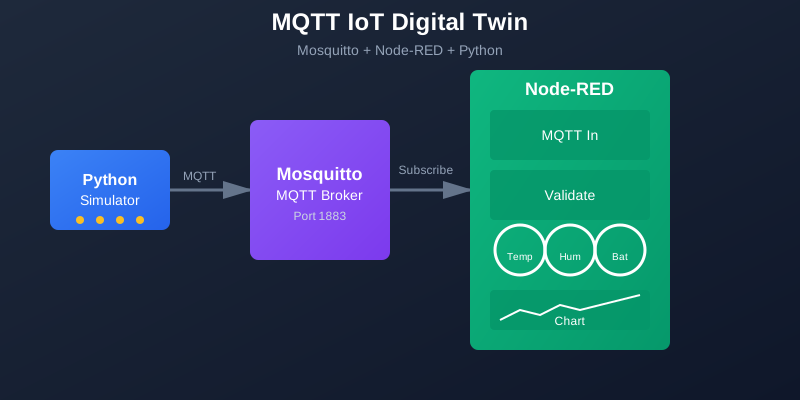
- Python Device Simulator that publishes temperature, humidity, and battery data
- Node-RED Flow that subscribes to MQTT, validates data, and shows a dashboard
- Alert System that triggers when battery is low or temperature exceeds thresholds
- Digital Twin Dashboard with real-time gauges and charts
What You’ll Learn
By the end of this tutorial, you’ll understand:
- ✅ MQTT Basics: What MQTT is, how brokers work, and why they’re perfect for IoT
- ✅ Topic Design: How to structure MQTT topics for scalable IoT systems
- ✅ Publish/Subscribe: How devices publish data and consumers subscribe to topics
- ✅ Data Processing: How to validate, transform, and process IoT telemetry
- ✅ Visualization: How to build dashboards that update in real-time
- ✅ Alert Rules: How to create simple but effective alerting logic
Tutorial Structure
This tutorial is divided into 7 interactive pages (approximately 30 minutes):
- Introduction & Mental Model (4 min) - Understanding MQTT and the system architecture
- Start the MQTT Broker (3 min) - Docker Compose setup and broker configuration
- Test Pub/Sub from Terminal (3 min) - Manual testing to understand MQTT basics
- Define Message Schema (4 min) - Design consistent JSON payloads
- Build Python Device Simulator (6 min) - Create a publisher that sends telemetry
- Node-RED Flow & Dashboard (7 min) - Subscribe, validate, and visualize data
- Alerts & Production Notes (3 min) - Add alert rules and learn production considerations
Interactive Features
Throughout this tutorial, you’ll experience:
- 🎬 Animated Flows - See how data moves through the MQTT system
- 📊 Animated Diagrams - Visualize the complete architecture
- 💻 Live Code Runner - Test Python code snippets interactively
- ✅ Knowledge Checks - Test your understanding with quizzes
- 🎯 Step-by-Step Guides - Follow along with copy-paste code blocks
Prerequisites
Before starting, make sure you have:
- Docker and Docker Compose installed and running
- Python 3.8+ installed
- Node.js installed (for Node-RED)
- Basic familiarity with terminal/command line
- A code editor (VS Code recommended)
No IoT hardware required - everything runs on your laptop!
Estimated Time
⏱️ 30 minutes to complete all 7 pages
You can take breaks between pages and resume anytime. Your progress will be tracked as you navigate through the tutorial.
Quick Mental Model (2 minutes)
Here’s how the system works in 6 lines:
- Device publishes telemetry to an MQTT topic (e.g.,
iot/devices/sensor-01/telemetry) - MQTT broker receives the message and routes it to subscribers
- Node-RED subscribes to the topic and receives the message
- Node-RED processes the data (validates, transforms, stores)
- Node-RED dashboard displays the data in real-time
- Alert rules trigger when conditions are met (battery low, temperature high)
Think of MQTT like a postal service: devices drop messages into topic “mailboxes,” and subscribers check their mailboxes for new messages. The broker is the post office that routes everything.
Why This Tutorial Matters
MQTT is the de facto standard for IoT messaging. It’s lightweight, efficient, and perfect for devices with limited resources. By building this system, you’ll learn:
- Real IoT patterns used in production
- How to structure topics for scalability
- How to process and validate device data
- How to build dashboards that update in real-time
Ready to build? Click the button below to start!
What is MQTT?
Quick Preview: MQTT (Message Queuing Telemetry Transport) is a lightweight messaging protocol designed for IoT. It uses a publish/subscribe model where devices publish messages to topics, and applications subscribe to topics to receive messages. It’s perfect for IoT because it’s efficient, reliable, and works well on low-power devices.
Why it matters: Most IoT platforms (AWS IoT, Azure IoT Hub, Google Cloud IoT) use MQTT. Understanding it is essential for building IoT systems.
Ready to dive in? Click the button above to start building your digital twin!
Discussion
Loading comments...