Build an Event-Driven Serverless Notification on the Cloud (File Upload → Email)
Welcome to Event-Driven Serverless Notifications! 🚀
You’ll build a real workflow that automatically sends email notifications when files are uploaded to cloud storage. This pattern appears everywhere: document management systems, data pipelines, content processing workflows.
What You’ll Build
By the end of this tutorial, you’ll have a working system where:
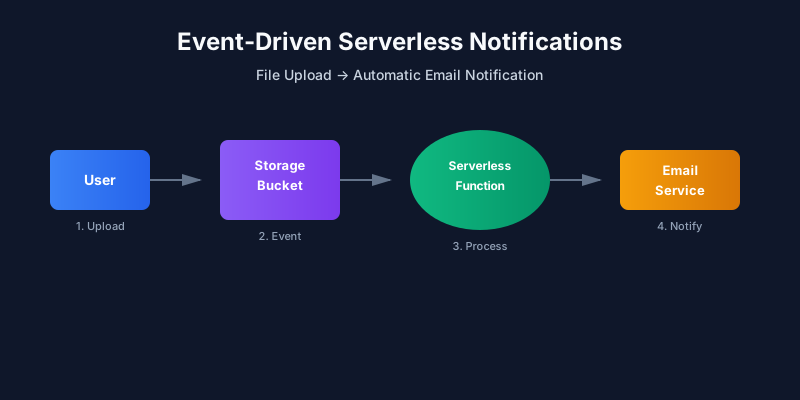
- User uploads a file to a cloud storage bucket
- Storage service emits an event automatically
- Serverless function runs in response to the event
- Email notification is sent with file details
No servers to manage. No infrastructure to maintain. Just code that runs when it needs to.
Real-World Use Cases
This pattern powers many products:
📄 Document Management
- Notify team when a new contract is uploaded
- Alert stakeholders when reports are ready
📊 Data Pipelines
- Trigger processing when raw data arrives
- Send alerts when datasets are complete
🖼️ Content Processing
- Notify when images are uploaded
- Alert when videos finish processing
📋 Compliance & Auditing
- Log file uploads automatically
- Send alerts for sensitive document uploads
What You Need
Before starting, make sure you have:
- Basic HTTP and JSON knowledge - You understand how web requests work
- Programming experience - Comfortable with Node.js or Python
- Cloud account - AWS, Azure, or GCP (free tier works fine)
- Email service - SendGrid, Mailgun, or cloud-native email service
Tutorial Structure
This tutorial is divided into 8 pages (approximately 45 minutes):
- Introduction (5 min) - What you’ll build and key concepts
- Prerequisites and Architecture (6 min) - Understanding the components
- Step 1: Create Storage Bucket (6 min) - Set up object storage
- Step 2: Write Serverless Function (10 min) - Core notification logic
- Step 3: Connect Trigger and Function (6 min) - Link storage to function
- Step 4: Send Email Notification (6 min) - Integrate email service
- Test, Debug, and Observe (4 min) - Verify everything works
- Security, Cost, and Cleanup (2 min) - Best practices and cleanup
Interactive Features
Throughout this tutorial, you’ll experience:
- 🎯 Architecture Diagrams - Visual flow of events through the system
- 💻 Code Examples - Working code for AWS, Azure, and GCP
- 📊 Interactive Components - Step-by-step visualizations
- ✅ Knowledge Checks - Test your understanding
- 🔧 Debugging Guides - Troubleshoot common issues
Estimated Time
⏱️ 45 minutes to complete all 8 pages
You can take breaks between pages. Your progress will be tracked as you navigate.
Key Concepts Preview
Before we start, here are the main concepts you’ll learn:
Event - Something that happens (file uploaded, message received, timer fired)
Trigger - A connection between an event source and your function
Serverless Function - Code that runs automatically, no server management
Notification Service - Sends emails, SMS, or other alerts
Ready to build? Click the button above to start!
Discussion
Loading comments...