Prompt Caching in Large Language Models: Reducing Latency and Cost Without Changing Your Application Logic
Token costs add up fast in production. A chat app with 10,000 daily users can burn through thousands of dollars monthly. Most teams optimize by switching models or tuning prompts. They miss something simpler: caching.
The fastest prompt is the one the model has already processed.
This article focuses on prompt caching for production LLM applications. You’ll see how it works, when it helps, and how to design prompts that hit the cache more often.
Why Prompt Caching Matters
Token costs aren’t just about the model you choose. They’re about how many tokens you send and how often you send the same ones.
Here’s the problem. Your chat application sends a system prompt with every request. That prompt is 500 tokens. It never changes. You’re processing it from scratch every time. At $0.01 per 1K input tokens, that’s $0.005 per request just for the system prompt.
10,000 requests per day. That’s $50 daily. $1,500 monthly. Just for the system prompt.
Prompt caching fixes this. Process the system prompt once. Reuse it. Cut that $1,500 to near zero.
Token Costs Explode in Production
Token costs scale with usage. Early prototypes don’t feel expensive. Then you launch. Users multiply. Requests multiply. Costs multiply faster.
# Example: Chat application token costs
COST_PER_1K_INPUT_TOKENS = 0.01
COST_PER_1K_OUTPUT_TOKENS = 0.03

system_prompt_tokens = 500
user_message_tokens = 50
assistant_response_tokens = 150

requests_per_day = 10_000

# Without caching
input_tokens_daily = (system_prompt_tokens + user_message_tokens) * requests_per_day
output_tokens_daily = assistant_response_tokens * requests_per_day

daily_cost = (
    (input_tokens_daily / 1000) * COST_PER_1K_INPUT_TOKENS +
    (output_tokens_daily / 1000) * COST_PER_1K_OUTPUT_TOKENS
)

print(f"Daily cost without caching: ${daily_cost:.2f}")
# Daily cost without caching: $100.00
print(f"Monthly cost without caching: ${daily_cost * 30:.2f}")
# Monthly cost without caching: $3000.00
That’s $3,000 monthly. System prompts account for most input tokens. Caching them cuts costs dramatically.
Repeated System Prompts and Conversation Prefixes
System prompts repeat across requests. So do conversation prefixes in multi-turn chats.
# Every request sends this
system_prompt = """You are a customer support assistant for TechCorp.
Guidelines:
- Be helpful and professional
- Check our knowledge base before answering
- Escalate to human agents for refunds, complaints, or complex issues
- Never make promises about product timelines
- Always cite sources from our documentation
"""

# In a 5-turn conversation, you send the same messages 5 times
conversation = [
    {"role": "system", "content": system_prompt},
    {"role": "user", "content": "How do I reset my password?"},
    {"role": "assistant", "content": "..."},
    {"role": "user", "content": "I didn't get the email"},
    {"role": "assistant", "content": "..."},
    {"role": "user", "content": "Still nothing"}
]

# The system prompt and first 4 messages are sent every time
# That's wasteful
Caching the prefix means you only pay for new tokens. The rest is free (or much cheaper).
Enterprise Workloads Where the Same Context Is Used Thousands of Times
Enterprise applications have stable context. Legal documents. Product catalogs. Internal policies. This context is large. It doesn’t change often. It’s used thousands of times daily.
# Example: Internal policy chatbot
policy_document = """
[Large 10,000-token policy document that updates quarterly]
"""

# Every employee query sends this
def answer_policy_question(question: str) -> str:
    prompt = f"""Context: {policy_document}

Question: {question}

Answer based only on the provided context."""

    return llm.generate(prompt)

# 1,000 employees, 10 questions each per month
# 10,000 requests * 10,000 tokens = 100M tokens monthly
# Just for the policy document that rarely changes
That’s 100 million tokens monthly for static context. Caching makes this nearly free.
What Prompt Caching Actually Is
Prompt caching is simple. The model processes a prompt. It saves the intermediate computation. Next time the same prompt appears, it skips recomputation.
Token Prefix Matching
Caching works on prefixes. If the first N tokens of a prompt match a cached entry, the model reuses the cached computation.
# Request 1
prompt_1 = "You are a helpful assistant. User question: What is Python?"
# Model processes all tokens, caches the prefix

# Request 2
prompt_2 = "You are a helpful assistant. User question: What is JavaScript?"
# First 6 tokens ("You are a helpful assistant.") match
# Model reuses cached computation for those tokens
# Only processes the rest
This is why prompt structure matters. Stable prefixes get cache hits. Random prefixes don’t.
Cache Lookup Before Inference
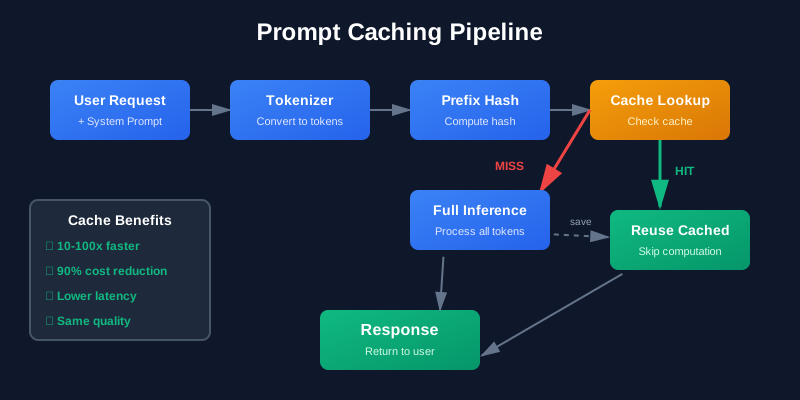
The model checks the cache before processing. If there’s a hit, it skips work.
1. User sends prompt
2. Tokenizer converts to tokens
3. Compute prefix hash
4. Check cache
   - Hit? Reuse cached KV pairs, process only new tokens
   - Miss? Process all tokens, cache the result
5. Generate response
Cache hits skip most computation. That means lower latency and lower cost.
Provider-Managed vs Application-Managed Caches
There are two cache types:
Provider-managed caching: The LLM provider (OpenAI, Anthropic) handles caching automatically or with special API flags. You don’t manage cache storage. You just get cheaper/faster requests when cache hits happen.
Application-managed caching: You cache responses yourself (in Redis, Memcached, etc.). You control cache invalidation, TTL, and eviction. More work, but more control.
# Provider-managed: Anthropic's prompt caching
response = anthropic.messages.create(
    model="claude-3-5-sonnet-20241022",
    max_tokens=1024,
    system=[
        {
            "type": "text",
            "text": "You are a helpful assistant.",
            "cache_control": {"type": "ephemeral"}  # Cache this
        }
    ],
    messages=[{"role": "user", "content": "What is Python?"}]
)

# Application-managed: Redis cache
import hashlib
import redis

r = redis.Redis()

def get_cached_response(prompt: str):
    cache_key = hashlib.sha256(prompt.encode()).hexdigest()
    cached = r.get(cache_key)

    if cached:
        return cached.decode()

    response = llm.generate(prompt)
    r.setex(cache_key, 3600, response)  # Cache for 1 hour
    return response
Provider-managed caching is easier. Application-managed caching gives you more control.
Types of Prompt Caching
Different caching strategies work for different use cases.
Automatic Provider Caching
Some providers cache automatically. You don’t do anything. If your prompts have stable prefixes, you get cache hits.
OpenAI and Anthropic have some level of automatic caching, though details vary. Check provider docs for specifics.
Explicit Prompt Caching
You mark parts of the prompt for caching explicitly. Anthropic’s cache_control parameter is an example.
# Anthropic explicit caching
response = anthropic.messages.create(
    model="claude-3-5-sonnet-20241022",
    max_tokens=1024,
    system=[
        {
            "type": "text",
            "text": large_policy_document,
            "cache_control": {"type": "ephemeral"}
        }
    ],
    messages=[{"role": "user", "content": user_question}]
)
This tells the provider: cache this part. Use it across requests. Don’t recompute it.
Semantic Caching
Semantic caching matches prompts by meaning, not exact text. Two similar prompts hit the same cache entry.
# Example: Semantic cache using embeddings
from sentence_transformers import SentenceTransformer
import numpy as np

model = SentenceTransformer('all-MiniLM-L6-v2')

def semantic_cache_lookup(query: str, cache: dict, threshold: float = 0.9):
    """Look up query in cache using semantic similarity."""
    query_embedding = model.encode(query)

    for cached_query, cached_response in cache.items():
        cached_embedding = model.encode(cached_query)
        similarity = np.dot(query_embedding, cached_embedding) / (
            np.linalg.norm(query_embedding) * np.linalg.norm(cached_embedding)
        )

        if similarity >= threshold:
            return cached_response

    return None

# Usage
cache = {}

query1 = "What is the refund policy?"
response1 = llm.generate(query1)
cache[query1] = response1

query2 = "How do refunds work?"
# These are semantically similar
cached_response = semantic_cache_lookup(query2, cache)
# Returns response1 if similarity >= 0.9
Semantic caching increases hit rate but adds complexity. You need embedding models and similarity thresholds.
Response Caching vs Prompt Caching
Prompt caching: Caches intermediate computation (key-value pairs) during prompt processing. Reduces processing cost for shared prefixes.
Response caching: Caches the final response. If the exact prompt repeats, return the cached response without calling the model.
# Response caching
response_cache = {}

def get_response(prompt: str):
    if prompt in response_cache:
        return response_cache[prompt]

    response = llm.generate(prompt)
    response_cache[prompt] = response
    return response
Response caching is simpler. Prompt caching is more flexible (works for partial matches).
Designing Prompts for Maximum Cache Hits
Cache hits depend on prompt structure. Stable prefixes get hits. Random prefixes don’t.
Stable System Prompts
Put your system prompt first. Keep it stable. Don’t change it across requests.
# Good: Stable system prompt
system_prompt = "You are a helpful customer support assistant."

# Every request uses the same system prompt
# High cache hit rate

# Bad: Dynamic system prompt
def get_system_prompt(user_id: int):
    return f"You are assistant #{user_id}. User ID: {user_id}."

# Every user gets a different system prompt
# Zero cache hit rate
Stable system prompts maximize cache hits.
Static Instructions at the Start, Dynamic Variables at the End
Put dynamic parts at the end. Put static parts at the start.
# Bad: Dynamic variable in the middle
def make_prompt(username: str, question: str):
    return f"""You are a helpful assistant.
User {username} asks: {question}
Please provide a detailed answer."""

# The username breaks the prefix
# Low cache hit rate

# Good: Dynamic variables at the end
def make_prompt(username: str, question: str):
    return f"""You are a helpful assistant.
Please provide a detailed answer to the following question.

User: {username}
Question: {question}"""

# Static prefix is long
# High cache hit rate for the prefix
Longer stable prefixes mean bigger cache savings.
Version Your Prompts Explicitly
If you update prompts, version them. This helps with cache invalidation and debugging.
# Good: Versioned prompt
PROMPT_VERSION = "v2.1"
SYSTEM_PROMPT = f"""[Version: {PROMPT_VERSION}]
You are a customer support assistant.
Guidelines:
- Be helpful and professional
- Check knowledge base first
- Escalate complex issues
"""

# When you update the prompt, bump the version
# Old cached entries won't match
# Clear separation between prompt versions
Versions make it obvious when cache behavior changes.
Avoid Unnecessary Timestamps
Timestamps break caching. Avoid them unless necessary.
# Bad: Timestamp in every request
import datetime

def make_prompt(question: str):
    timestamp = datetime.datetime.now().isoformat()
    return f"""[Request time: {timestamp}]
You are a helpful assistant.
Question: {question}"""

# Every request has a different timestamp
# Zero cache hit rate

# Good: No timestamp
def make_prompt(question: str):
    return f"""You are a helpful assistant.
Question: {question}"""

# Stable prefix
# High cache hit rate
Only include timestamps if the model needs them.
Avoid Random Ordering
If your prompt includes a list, keep the order stable.
# Bad: Random order
import random

def make_prompt(items: list[str]):
    random.shuffle(items)
    items_str = ", ".join(items)
    return f"Available items: {items_str}"

# Order changes every time
# Low cache hit rate

# Good: Stable order
def make_prompt(items: list[str]):
    items_str = ", ".join(sorted(items))
    return f"Available items: {items_str}"

# Order is always the same
# High cache hit rate
Sort lists before adding them to prompts.
Architecture Patterns
Cache at multiple levels for maximum benefit.
Multi-Layer Caching Architecture
User Request
    ↓
API Gateway
    ↓
Response Cache (Redis) ← Full response cache
    ↓
Prompt Cache (Provider) ← Prefix cache
    ↓
LLM Model
    ↓
Vector Cache (for RAG) ← Embedding cache
Each layer catches different patterns:
- Response cache: Exact prompt matches
- Prompt cache: Shared prefixes
- Vector cache: Repeated retrievals in RAG
# Multi-layer cache implementation
import redis
import hashlib

r = redis.Redis()

def get_llm_response(prompt: str):
    # Layer 1: Full response cache
    response_key = f"response:{hashlib.sha256(prompt.encode()).hexdigest()}"
    cached_response = r.get(response_key)

    if cached_response:
        return cached_response.decode()

    # Layer 2: Prompt cache (provider-managed)
    # Provider handles this automatically
    response = llm.generate_with_cache(prompt)

    # Cache the response
    r.setex(response_key, 3600, response)

    return response
This gives you fast exact matches (response cache) and cheaper partial matches (prompt cache).
Cache Warming
Pre-populate the cache with common prompts.
# Cache warming on startup
COMMON_QUERIES = [
    "What is your refund policy?",
    "How do I reset my password?",
    "What are your shipping rates?",
    "How do I contact support?"
]

def warm_cache():
    """Pre-populate cache with common queries."""
    for query in COMMON_QUERIES:
        prompt = make_prompt(query)
        response = llm.generate(prompt)
        cache_response(prompt, response)
        print(f"Warmed cache for: {query}")

# Run on startup
warm_cache()
Cache warming improves hit rates for common requests.
Measuring Cache Effectiveness
Track metrics to know if caching is working.
Cache Hit Ratio
class CacheMetrics:
    def __init__(self):
        self.hits = 0
        self.misses = 0

    def record_hit(self):
        self.hits += 1

    def record_miss(self):
        self.misses += 1

    def hit_ratio(self) -> float:
        total = self.hits + self.misses
        if total == 0:
            return 0.0
        return self.hits / total

    def report(self):
        return {
            "hits": self.hits,
            "misses": self.misses,
            "hit_ratio": self.hit_ratio(),
            "total_requests": self.hits + self.misses
        }

metrics = CacheMetrics()

def get_cached_response(prompt: str):
    cached = cache.get(prompt)

    if cached:
        metrics.record_hit()
        return cached

    metrics.record_miss()
    response = llm.generate(prompt)
    cache.set(prompt, response)
    return response
Track hit ratio. Aim for 60%+ for stable workloads.
Cost Saved
def calculate_cost_savings(
    requests: int,
    avg_prompt_tokens: int,
    cache_hit_ratio: float,
    cost_per_1k_tokens: float
):
    """Calculate cost savings from caching."""

    # Without cache
    total_tokens = requests * avg_prompt_tokens
    cost_without_cache = (total_tokens / 1000) * cost_per_1k_tokens

    # With cache (hits cost 10% of full price)
    cache_hit_cost = (
        (requests * cache_hit_ratio * avg_prompt_tokens / 1000) *
        cost_per_1k_tokens * 0.1
    )
    cache_miss_cost = (
        (requests * (1 - cache_hit_ratio) * avg_prompt_tokens / 1000) *
        cost_per_1k_tokens
    )
    cost_with_cache = cache_hit_cost + cache_miss_cost

    savings = cost_without_cache - cost_with_cache
    savings_percent = (savings / cost_without_cache) * 100

    return {
        "cost_without_cache": cost_without_cache,
        "cost_with_cache": cost_with_cache,
        "savings": savings,
        "savings_percent": savings_percent
    }

# Example
result = calculate_cost_savings(
    requests=10_000,
    avg_prompt_tokens=500,
    cache_hit_ratio=0.7,
    cost_per_1k_tokens=0.01
)

print(f"Cost without cache: ${result['cost_without_cache']:.2f}")
print(f"Cost with cache: ${result['cost_with_cache']:.2f}")
print(f"Savings: ${result['savings']:.2f} ({result['savings_percent']:.1f}%)")
Calculate savings to justify caching infrastructure.
Latency Reduction
import time

class LatencyTracker:
    def __init__(self):
        self.cache_hit_latencies = []
        self.cache_miss_latencies = []

    def record(self, latency: float, cache_hit: bool):
        if cache_hit:
            self.cache_hit_latencies.append(latency)
        else:
            self.cache_miss_latencies.append(latency)

    def report(self):
        return {
            "avg_cache_hit_latency": sum(self.cache_hit_latencies) / len(self.cache_hit_latencies) if self.cache_hit_latencies else 0,
            "avg_cache_miss_latency": sum(self.cache_miss_latencies) / len(self.cache_miss_latencies) if self.cache_miss_latencies else 0,
            "latency_reduction": (
                sum(self.cache_miss_latencies) / len(self.cache_miss_latencies) -
                sum(self.cache_hit_latencies) / len(self.cache_hit_latencies)
            ) if self.cache_hit_latencies and self.cache_miss_latencies else 0
        }

tracker = LatencyTracker()

def get_response_with_timing(prompt: str):
    start = time.time()
    cached = cache.get(prompt)

    if cached:
        latency = time.time() - start
        tracker.record(latency, cache_hit=True)
        return cached

    response = llm.generate(prompt)
    latency = time.time() - start
    tracker.record(latency, cache_hit=False)

    cache.set(prompt, response)
    return response
Cache hits are typically 10-100x faster than misses.
Cache Eviction Rate
def monitor_cache_evictions(cache_size: int, max_size: int):
    """Monitor how often cache entries are evicted."""
    if cache_size >= max_size:
        print(f"Warning: Cache is full ({cache_size}/{max_size})")
        print("Consider increasing cache size or reducing TTL")
High eviction rates mean you need more cache memory or shorter TTL.
Common Mistakes
Mistakes that kill cache hit rates.
Personalizing Too Early
Don’t put user-specific data in the prefix.
# Bad: User ID in prefix
def make_prompt(user_id: int, question: str):
    return f"""User ID: {user_id}
You are a helpful assistant.
Question: {question}"""

# Every user has different prefix
# Zero cache hits

# Good: User ID at the end
def make_prompt(user_id: int, question: str):
    return f"""You are a helpful assistant.
Question: {question}
User ID: {user_id}"""

# Stable prefix shared across users
# High cache hits
Move user-specific data to the end.
Random UUIDs or Session IDs
Don’t include random IDs unless necessary.
# Bad: Random session ID
import uuid

def make_prompt(question: str):
    session_id = uuid.uuid4()
    return f"""Session: {session_id}
You are a helpful assistant.
Question: {question}"""

# Every request has different session ID
# Zero cache hits

# Good: No session ID in prompt
def make_prompt(question: str):
    return f"""You are a helpful assistant.
Question: {question}"""

# Track session ID separately in your application
# Don't send it to the model
Keep random data out of prompts.
Including Current Timestamps
Timestamps break caching.
# Bad: Current time in prompt
from datetime import datetime

def make_prompt(question: str):
    current_time = datetime.now().isoformat()
    return f"""Current time: {current_time}
You are a helpful assistant.
Question: {question}"""

# Every request has different time
# Zero cache hits

# Good: No timestamp
def make_prompt(question: str):
    return f"""You are a helpful assistant.
Question: {question}"""

# If you need time-aware responses, pass time as metadata
# Or use time bucketing (hour, day) instead of exact timestamp
Only include time if the model needs it for reasoning.
Different JSON Formatting
JSON formatting matters for exact matching.
# Bad: Inconsistent JSON formatting
import json

def make_prompt(data: dict):
    # Sometimes pretty, sometimes compact
    data_json = json.dumps(data, indent=2 if random.random() > 0.5 else None)
    return f"Data: {data_json}"

# Same data, different formatting
# Low cache hits

# Good: Consistent JSON formatting
def make_prompt(data: dict):
    # Always compact, always sorted keys
    data_json = json.dumps(data, sort_keys=True)
    return f"Data: {data_json}"

# Same data always produces same string
# High cache hits
Normalize JSON before including in prompts.
Frequent Prompt Edits During Development
During development, prompt edits break the cache constantly.
# Development: Frequent changes
# Day 1: "You are a helpful assistant."
# Day 2: "You are a very helpful assistant."
# Day 3: "You are an extremely helpful assistant."
# Cache is useless during this period

# Production: Stable prompts
# Prompt locked for weeks or months
# Cache works well
Accept that caching doesn’t help much during active prompt development. It helps in production when prompts stabilize.
Production Best Practices
Cache Warming on Deployment
Warm the cache when you deploy new prompts.
def deploy_new_prompt():
    """Deploy new prompt version and warm cache."""

    # Update prompt
    update_prompt_version()

    # Warm cache with common queries
    warm_cache()

    # Monitor hit rate
    monitor_cache_metrics()
This reduces cold start impact.
Cache Invalidation Strategy
Invalidate the cache when prompts change.
def invalidate_cache_for_prompt_version(version: str):
    """Invalidate cache entries for specific prompt version."""
    pattern = f"prompt:{version}:*"
    keys = r.keys(pattern)

    if keys:
        r.delete(*keys)
        print(f"Invalidated {len(keys)} cache entries for version {version}")
Version-based invalidation is clean and predictable.
Set Appropriate TTL
Cache TTL depends on how often your context changes.
# Static content: Long TTL
STATIC_CONTENT_TTL = 86400  # 24 hours

# Dynamic content: Short TTL
DYNAMIC_CONTENT_TTL = 3600  # 1 hour

# User session: Medium TTL
SESSION_TTL = 7200  # 2 hours

def cache_response(prompt: str, response: str, content_type: str):
    """Cache with appropriate TTL."""
    if content_type == "static":
        ttl = STATIC_CONTENT_TTL
    elif content_type == "dynamic":
        ttl = DYNAMIC_CONTENT_TTL
    else:
        ttl = SESSION_TTL

    cache_key = hash_prompt(prompt)
    r.setex(cache_key, ttl, response)
Longer TTL means higher hit rate but more stale responses. Balance freshness and efficiency.
Observability
Monitor cache behavior in production.
import prometheus_client as prom

# Prometheus metrics
cache_hits = prom.Counter('cache_hits_total', 'Total cache hits')
cache_misses = prom.Counter('cache_misses_total', 'Total cache misses')
cache_latency = prom.Histogram('cache_latency_seconds', 'Cache lookup latency')
llm_latency = prom.Histogram('llm_latency_seconds', 'LLM generation latency')

def get_cached_response_with_metrics(prompt: str):
    """Get response with metrics tracking."""

    # Cache lookup
    with cache_latency.time():
        cached = cache.get(prompt)

    if cached:
        cache_hits.inc()
        return cached

    cache_misses.inc()

    # LLM generation
    with llm_latency.time():
        response = llm.generate(prompt)

    cache.set(prompt, response)
    return response
Metrics let you see cache effectiveness in production and debug issues.
Code Samples Summary
The GitHub repository includes working examples:
- Simple Response Cache (Redis): Hash prompts, cache responses, measure hit ratio
- Prompt Normalization: Whitespace removal, JSON key sorting, stable ordering
- Semantic Cache: Embedding-based similarity matching
- Multi-Layer Cache: Response cache + prompt cache coordination
- Cache Metrics Dashboard: Hit ratio, cost savings, latency reduction
- Provider-Specific Examples: Anthropic’s explicit caching, OpenAI patterns
- Benchmark Script: Compare no cache vs response cache vs prompt cache
See the GitHub repository for complete runnable code.
Summary
Prompt caching cuts LLM costs and latency without changing application logic. It works by reusing computation for repeated prompt prefixes.
Key points:
- Stable prefixes get cache hits. Put static instructions first.
- Dynamic variables at the end preserve the cacheable prefix.
- Avoid timestamps, random IDs, and inconsistent formatting.
- Version prompts explicitly for clean cache invalidation.
- Use provider-managed caching when available (easier).
- Use application-managed caching for more control.
- Measure hit ratio, cost savings, and latency reduction.
- Monitor cache behavior in production.
Start with stable system prompts. Move dynamic data to the end. Track your hit ratio. You’ll see cost drops immediately.
Prompt caching is the fastest optimization you’re not using yet.
Discussion
Loading comments...