Stop Building Retry Glue: Design Long-Running Workflows with Durable Execution
Most production outages aren’t caused by bad code. They’re caused by workflows that forget what they were doing.
A user places an order. Payment succeeds. The inventory service goes down. The order sits in a database with status = PAYMENT_DONE and nobody knows what to do next. Support finds it weeks later, or never.
This is the hidden cost of treating long-running workflows like normal API requests. You wouldn’t build a cross-country trip by calling a taxi one leg at a time with no itinerary. But that’s exactly what most systems do with business workflows that span minutes, hours, or days.
The problem: business workflows are not normal API calls
An API call is: receive request, do work, return response. It happens in milliseconds. If it fails, you retry.
An order fulfillment workflow is different. It might take hours because humans can approve refunds, shipping partners can be down, or warehouse systems can lose network connectivity for an entire afternoon. Payment providers settle asynchronously. Notification services have their own retry storms.
Here’s the failure modes that break everything:
- Payment succeeds, then inventory reservation fails. You have a charged customer with no reserved stock.
- A worker crashes after calling an external API. When it restarts, it has no idea what already completed.
- Retrying the full workflow may charge the customer twice because the first charge succeeded but the confirmation got lost in a network timeout.
- Cron-based repair jobs are hard to reason about. One team writes a script to fix stuck orders. Six months later, nobody remembers what “stuck” means or why the script runs at 3 a.m.
- Logs tell you what happened, but not always what should happen next. You can see “inventory reservation failed” in the logs. What you can’t easily see is whether payment already succeeded and whether the customer is waiting for an update.
If you treat these workflows like single API requests, you will end up with a web of manual recovery scripts and support tickets. The complexity doesn’t come from the business. It comes from pretending a multi-step, multi-service process fits into a request/response box that was never designed for it.
I’ve watched teams spend weeks building retry glue for a process that takes two hours end to end. The retry code eventually becomes the most complex part of the system, not the business logic.
The old approach: status columns, queues, and manual retries
Most teams start with what feels simple: a status column on the order table.
UPDATE orders SET status = 'PAYMENT_DONE' WHERE id = ?;
UPDATE orders SET status = 'INVENTORY_RESERVED' WHERE id = ?;
UPDATE orders SET status = 'SHIPPED' WHERE id = ?;
UPDATE orders SET status = 'EMAIL_SENT' WHERE id = ?;
If a worker crashes after step 2, a new worker reads the row, sees INVENTORY_RESERVED, and continues from there. Simple, right?
Except the status is only one piece of the state. Which inventory item was reserved? What shipping label was generated? What was the exact notification payload? You need more tables, more queues, more logs. The state lives in five places instead of one.
Then you add retries. Each service writes its own retry loop. Payment retries 3 times with exponential backoff. Inventory retries 5 times with a fixed delay. Shipping has a 30-minute timeout. The notification service doesn’t retry because “emails are cheap to send twice” until you realize the customer now has two confirmation emails and two support tickets.
Partial failure handling grows over time. Someone adds a compensation step: if shipping fails, release the inventory. But what if shipping completed, the acknowledgment got lost, and the compensation releases stock someone just bought? Now you have negative inventory.
Developers end up manually inspecting stuck records. They run SQL queries looking for orders stuck in PAYMENT_DONE for more than an hour. They write scripts to fix them. The scripts become part of the codebase, and soon you have more repair code than business code.
Here’s the naive implementation in a modern service:
class NaiveOrderService {
  async fulfillOrder(orderId: string) {
    const order = await db.orders.find(orderId);

    try {
      order.status = 'PAYMENT_STARTED';
      order.paymentId = await payment.charge(orderId, 4999);
      order.status = 'PAYMENT_DONE';

      order.inventoryId = await inventory.reserve(orderId, 'WIDGET-001');
      order.status = 'INVENTORY_RESERVED';

      order.shipmentId = await shipping.createShipment(orderId);
      order.status = 'SHIPPED';

      await notifications.sendConfirmation(orderId);
      order.status = 'EMAIL_SENT';
    } catch (error) {
      order.status = `FAILED:${error.message}`;
      throw error;
    }
  }
}
If the worker crashes after payment.charge but before inventory.reserve, the service restarts from the top. The payment charge runs again because the naive code has no memory of what already happened. The customer gets charged twice.
This design accumulates technical debt because it conflates two concerns: what the business wants to happen, and how the system recovers when it doesn’t happen. When those are tangled together, recovery logic wins by default, because it grew organically to handle emergencies.
The better mental model: workflow history, not workflow hope
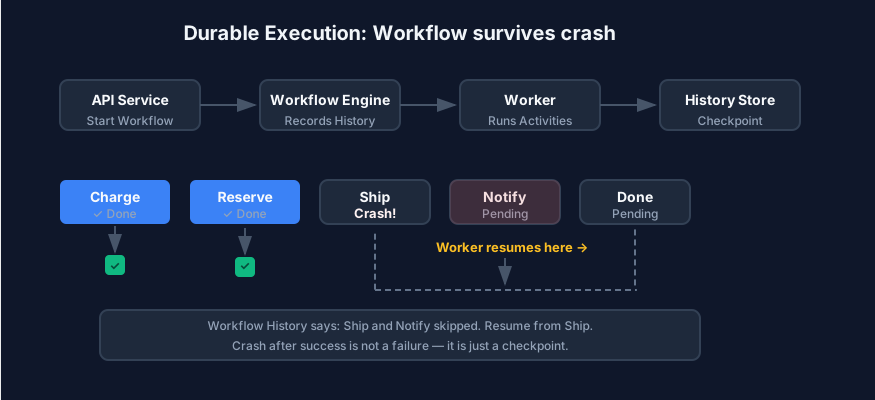
Durable execution changes the model. Instead of hoping workers finish and manually patching things when they don’t, the workflow engine records every important step in a history store.
If a worker crashes after charging payment, another worker picks up the same workflow from the history. It sees: chargePayment completed. It doesn’t run it again. It resumes with reserveInventory.
This isn’t magic. The workflow logic stays deterministic. If step A happened, the engine replaying the workflow will always see step A in the history and skip it. Only steps after the last recorded event actually execute.
Think of it like a game save file. When the player loses power, they don’t restart from the beginning. They resume from the last checkpoint. Durable execution does the same for worker processes.
Here’s how the same order looks in a durable workflow:
async function fulfillOrder(orderId: string) {
  await chargePayment(orderId);
  await reserveInventory(orderId);
  await createShipment(orderId);
  await sendConfirmation(orderId);
}
Each of those functions is an activity — a discrete, side-effecting step that the engine runs one at a time. The engine records each activity in durable history. If chargePayment completed and the worker crashed before reserveInventory started, a new worker replays the workflow, sees chargePayment in the history, and resumes with reserveInventory. The function reads like a clean business flow because the engine handles the messy coordination underneath.
The key concepts:
Durable workflow state. The engine persists the workflow’s progress. When the worker dies, this state survives. A new worker instance loads it and continues.
Deterministic workflow logic. The workflow code must produce the same result given the same input and history. No random numbers, no current timestamps in the workflow logic itself. Those belong in activities.
Activity retries. An activity is an individual step that talks to the outside world. If it times out, the engine retries it automatically. The retry policy lives with the activity, not scattered across services.
Timers. Some steps need to wait. “If the customer doesn’t respond in 24 hours, cancel the reservation.” Timers are first-class citizens in the engine. They survive crashes too.
Compensation steps. When a multi-step flow genuinely cannot continue, you undo the parts that already happened. Release inventory. Void the payment if the provider allows it. Compensation is a design path, not a footnote you add at 2 a.m.
Idempotent external calls. Every external API receives a stable idempotency key. Here’s what the activity wrapper looks like:
async function chargePayment(orderId: string) {
  const idempotencyKey = `payment:charge:${orderId}`;
  return await registry.call('payment.charge', {
    orderId,
    amountCents: 4999,
    idempotencyKey,
  });
}
If the workflow engine retries the activity, the external service sees the same key and returns the cached result. Charge the customer once, not once per retry.
Reference architecture
For order fulfillment, the pieces look like this:
- API service receives the order request. It validates input and starts the workflow.
- Workflow engine stores the workflow definition and its execution history.
- Worker service runs the workflow steps. Multiple workers can run; the engine coordinates them.
- Workflow history store is where the engine writes each event: started, step completed, step failed, timer fired.
- Payment provider is the external service that charges the customer.
- Inventory service reserves stock.
- Shipping provider prints labels and books pickup.
- Notification service sends the confirmation email.
- Observability dashboard shows workflow progress. Support can see where an order is stuck without querying the database directly.
The separation matters. The workflow engine doesn’t process payments. It tells the worker, “run the chargePayment activity.” The worker calls the provider. If the provider is down, the engine retries the activity. The workflow continues. The retry policy lives next to the activity definition, not in a config file on a server halfway across the network.
Failure scenarios
Here are four scenarios that break naive systems but durable execution handles cleanly.
Worker crashes after payment succeeds. The engine recorded chargePayment completed. A new worker picks up the workflow from the history and continues with reserveInventory. The customer is charged once. The history proves it.
Inventory service is down for 15 minutes. The activity retries automatically. The wait timer in the workflow doesn’t start until inventory is actually reserved. The customer sees a brief delay, not a duplicate charge or a support ticket. When the service recovers, the resume is invisible to the customer.
Shipping provider times out but later completes the shipment. This is the hardest one. Shipping generates a label asynchronously. The activity polls until the label is ready or the timeout fires. If the label arrives after the workflow thinks it failed, the compensation has already released inventory. This is where workflow monitors and human review matter. You want the history to show what happened so a human can decide whether to reverse the compensation.
Notification fails but should not roll back the order. Email is fire-and-forget. If the notification service returns a 500 three times, the workflow should not cancel the order. It should mark the notification as failed and move on. In durable execution, you configure the activity with a “best effort” policy. It retries a few times, then the workflow continues.
Design rules
These are the rules I’d recommend after building systems both ways.
Keep workflow logic deterministic. If your workflow reads the current time or generates a random number inside the workflow function, replays break. Put anything non-deterministic inside an activity.
Put side effects inside activities. The workflow function decides what to do. The activity actually does it. Don’t call the payment provider directly from the workflow definition. Define an activity, and let the engine invoke it.
Give every external call an idempotency key. This is non-negotiable. The engine may retry. The network may retry. Your external call will be seen multiple times. const idempotencyKey = payment:${orderId} isn’t enough. Include the activity name too, like payment:charge:${orderId}, so different retry attempts of different activities don’t collide.
Store business IDs, not random retry state. Your state should be expressible in business terms: order ID, shipment ID, notification ID. If you can’t explain your state to a customer support agent, the schema is wrong.
Avoid mixing workflow orchestration with business validation. The workflow engine shouldn’t decide if an order is valid. It should orchestrate the steps that verify that. Validation belongs in the API service or a domain service. The workflow calls it.
Treat compensation as a real design path, not a footnote. When you design the workflow, design the compensation at the same time. If chargePayment succeeds and reserveInventory fails, should you void the payment? What if the provider doesn’t support void after 24 hours? Know these answers before the outage happens.
When not to use durable execution
If your workflow is just “create a user record,” use a normal API call. Durable execution adds operational complexity.
Don’t use it for simple CRUD requests that finish in under a second.
Don’t use it for high-frequency low-value events. If you’re processing 50,000 web events per second, event streaming is cheaper and faster.
Don’t use it for stateless transformations. If step 2 doesn’t depend on step 1’s result, they’re not a workflow. They’re parallel jobs.
Don’t use it when your team isn’t ready to operate the workflow runtime. You still need monitoring, deployment, backups, and someone who knows how to debug a stuck workflow. The engine removes some complexity but adds other kinds.
Final checklist
Before you reach for durable execution, check these:
- Can the workflow run longer than one request? If yes, you’re in the right territory.
- Can a step succeed while the next step fails? If no, you probably don’t need a workflow engine.
- Are retries safe? Can you charge twice or reserve the same inventory twice?
- Are external calls idempotent? If not, fix that first.
- Can support teams see workflow progress? A dashboard beats a database dump any day.
- Can you replay or inspect history? This is the whole point. If you can’t inspect it, the engine isn’t helping.
Discussion
Loading comments...