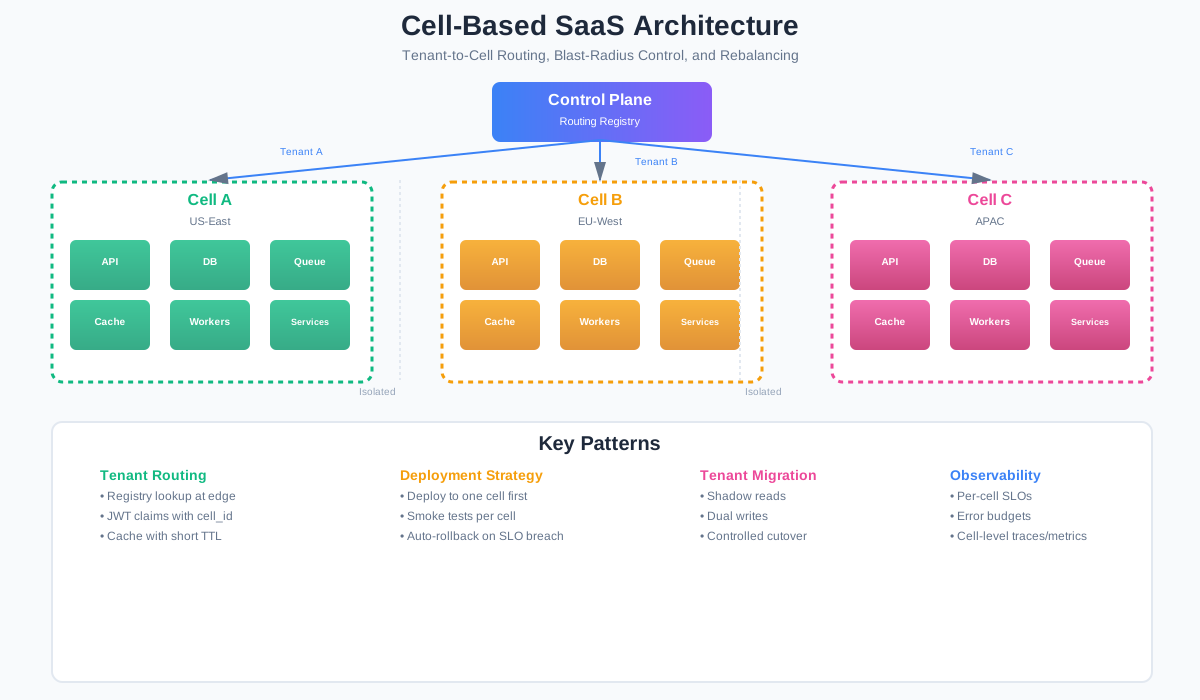
Cell-Based SaaS Architecture: Designing Tenant Isolation Beyond Database Multi-Tenancy
Multi-tenancy scales until it does not
Here’s a pattern I’ve seen play out at multiple SaaS companies.
You start with a shared database. All tenants in one pool. It works fine for the first year. Then a big customer runs a heavy query and the database CPU spikes. Every other tenant slows down. Someone calls it a “noisy neighbor problem” and you add read replicas.
Then you deploy a bad migration. It locks a table. All tenants are down for 12 minutes. The postmortem says “we need better testing.” You add staging environments and more CI checks.
Then a tenant hits the rate limit on your shared email queue. Their welcome emails get delayed. But because the queue is shared, other tenants’ emails get delayed too. Now you have a queue backlog problem on top of the original issue.
Each time, you fix the symptom. More replicas. Better tests. Bigger queues. But the underlying problem stays the same: everything is shared, so everything can break together.
This is the limit of the “one big pool” approach. Database multi-tenancy solves the storage problem — one schema per tenant, or a tenant_id column on every table. But it doesn’t solve the runtime isolation problem. A bad deployment, a noisy query, or a misconfigured job can still take down every tenant at once.
More replicas don’t fix this. Replicas help with read load. They don’t help when a deployment corrupts shared state, or when a runaway worker consumes all the queue capacity, or when a schema migration locks a table that every tenant uses.
The real question is: how do you limit the damage when something goes wrong?
That’s where cell-based architecture comes in.
Define the cell
A cell is a bounded deployment unit. It contains a mostly complete slice of your platform:
- API services
- Background workers
- Message queues
- Caches
- Databases or database partitions
- Observability scope (metrics, logs, traces)
- Deployment pipeline boundary
The key property: cells do not share mutable runtime state. Each cell has its own database, its own queue, its own cache. If cell A’s database goes down, cell B keeps running. If you deploy a bad version to cell A, cell B is unaffected.
AWS’s cell-based architecture documentation describes this well: each cell is independent, non-state-sharing, and responsible for only a subset of requests. The cell is the unit of isolation, the unit of deployment, and the unit of failure.
A cell is not just a database shard. A shard splits data across databases but often shares the application layer, the queue, and the deployment pipeline. A cell splits everything. The application, the data, the infrastructure, the deployment. Everything.
Cell design principles
There are a few rules that make cell-based architecture work. Break them and you’re back to shared-state problems with extra complexity.
Cells should not share mutable runtime state. This is the hard line. If two cells write to the same database, they’re not really cells. They’re application instances pointing at a shared database. That’s fine for many use cases, but it’s not cell-based architecture. Shared caches, shared queues, shared file systems — same problem. If you need cross-cell data, use eventual replication or a control plane, not direct reads.
Tenant traffic must be deterministically routed. Given a tenant ID, the routing layer must always resolve to the same cell. No randomness. No load-balancing across cells. Deterministic routing means you can reason about blast radius: if cell C is down, you know exactly which tenants are affected.
A cell should be independently deployable. You should be able to deploy version 2.3 to cell A while cell B stays on 2.2. This means your deployment pipeline must be cell-aware. No monolith deploys that touch all cells at once.
Cross-cell communication should be rare and explicit. If cells need to talk to each other, it should be through a well-defined interface — an event bus, a shared lookup table, a control plane API. Not direct database queries. Not shared queues. The default should be no cross-cell communication. If you find yourself building a lot of cross-cell features, your cell boundaries might be wrong.
Control plane and data plane should be separated. The control plane handles routing, tenant management, cell provisioning, and deployment orchestration. The data plane is the cells themselves. The control plane can be shared. The data plane should not be.
Tenant-to-cell routing model
Routing is where the rubber meets the road. You need a way to map each tenant to a cell, and you need to do it at request time with minimal latency.
The simplest approach is a tenant registry table. This is a database that maps tenant_id to cell_id. It’s read at the edge — API gateway, load balancer, or a routing middleware — before the request reaches the application.
Here’s what the schema looks like:
CREATE TABLE tenant_registry (
    tenant_id    VARCHAR(64) PRIMARY KEY,
    cell_id      VARCHAR(64) NOT NULL,
    region       VARCHAR(32) NOT NULL,
    status       VARCHAR(16) NOT NULL DEFAULT 'active'
                 CHECK (status IN ('active', 'suspended', 'migrating')),
    migration_state VARCHAR(32) NOT NULL DEFAULT 'none'
                    CHECK (migration_state IN ('none', 'draining', 'shadowing', 'cutover', 'rolled_back')),
    version      INTEGER NOT NULL DEFAULT 1,
    updated_at   TIMESTAMPTZ NOT NULL DEFAULT NOW(),
    created_at   TIMESTAMPTZ NOT NULL DEFAULT NOW()
);

CREATE INDEX idx_tenant_registry_cell ON tenant_registry(cell_id);
The version field is for optimistic concurrency. When you move a tenant between cells, you increment the version. If two processes try to move the same tenant at the same time, one fails.
Example data:
| tenant_id | cell_id | region | status | migration_state |
|---|---|---|---|---|
| t_001 | cell-a | eu-1 | active | none |
| t_002 | cell-b | eu-1 | active | moving |
| t_003 | cell-c | us-1 | suspended | none |
At the application layer, you need middleware that reads this mapping and routes the request. Here’s a Node.js implementation:
// tenant-routing.middleware.js
// Express middleware that resolves tenant_id to cell_id and forwards the request.

const { createClient } = require('redis');

// Tenant registry client (could be PostgreSQL, DynamoDB, etc.)
const tenantRegistry = {
  async getTenantCell(tenantId) {
    // In production, query your tenant registry database
    // This example uses an in-memory map for illustration
    const registry = {
      't_001': { cellId: 'cell-a', region: 'eu-1', status: 'active' },
      't_002': { cellId: 'cell-b', region: 'eu-1', status: 'active' },
      't_003': { cellId: 'cell-c', region: 'us-1', status: 'suspended' },
    };
    return registry[tenantId] || null;
  }
};

// Optional: cache cell mappings in Redis to reduce registry lookups
const cache = createClient({ url: process.env.REDIS_URL });

async function getCellForTenant(tenantId) {
  // Try cache first
  const cached = await cache.get(`tenant:${tenantId}:cell`);
  if (cached) {
    return JSON.parse(cached);
  }

  // Fall back to registry
  const mapping = await tenantRegistry.getTenantCell(tenantId);
  if (!mapping) {
    return null;
  }

  // Cache with short TTL (30 seconds) so tenant moves propagate quickly
  await cache.setEx(`tenant:${tenantId}:cell`, 30, JSON.stringify(mapping));
  return mapping;
}

async function tenantRoutingMiddleware(req, res, next) {
  // Extract tenant_id from JWT, header, or subdomain
  const tenantId = req.headers['x-tenant-id']
    || req.user?.tenant_id
    || req.subdomain;

  if (!tenantId) {
    return res.status(400).json({ error: 'Missing tenant_id' });
  }

  const cell = await getCellForTenant(tenantId);

  if (!cell) {
    return res.status(404).json({ error: 'Tenant not found' });
  }

  if (cell.status === 'suspended') {
    return res.status(403).json({ error: 'Tenant account is suspended' });
  }

  // Attach cell info to the request for downstream services
  req.tenant = { id: tenantId, cellId: cell.cellId, region: cell.region };

  // If this service is cell-local, just continue
  // If this is a global router, forward to the correct cell endpoint
  if (process.env.IS_CELL_ROUTER === 'true') {
    const cellBaseUrl = `https://${cell.cellId}.${cell.region}.internal:3000`;
    // Forward the request to the cell's internal endpoint
    // (Implementation depends on your proxy/gateway setup)
    req.cellTargetUrl = `${cellBaseUrl}${req.originalUrl}`;
  }

  next();
}

module.exports = { tenantRoutingMiddleware, getCellForTenant };
A few things to notice about this middleware:
- It reads from cache first, then falls back to the registry. The cache TTL is short — 30 seconds — so tenant movements propagate quickly.
- It handles stale mappings gracefully. If the cache returns a cell that’s no longer valid, the downstream service should detect this and return a redirect or error.
- It checks tenant status. Suspended tenants get a 403 before they reach any cell.
- The
IS_CELL_ROUTERflag lets you use the same middleware in both the global routing layer and the cell-local services.
For JWT-based routing, you can embed the cell_id as a claim in the token:
{
  "sub": "user_abc",
  "tenant_id": "t_001",
  "cell_id": "cell-a",
  "region": "eu-1",
  "exp": 1893456000
}
This lets the edge layer route without a registry lookup at all. The trade-off is that JWT claims are static until the token expires. If you move a tenant to a different cell, the old JWT still points to the old cell. You need a short token expiry (15-30 minutes) or a token refresh mechanism to handle this.
Cell sizing and isolation trade-offs
How big should a cell be? There’s no single answer. It depends on your blast radius target and your operational budget.
Small cells — say, 10-50 tenants per cell — give you tight blast radius. A bad deployment affects at most 50 tenants. A noisy tenant can be isolated to its own cell. But small cells mean more infrastructure to manage. More databases, more queues, more deployment pipelines. The operational overhead is real.
Large cells — 500-5000 tenants per cell — are cheaper to operate. You get better resource utilization. But the blast radius is larger. A bad deployment affects more tenants. A noisy tenant has more neighbors to disturb.
Dedicated cells for enterprise or regulated tenants. Some customers will pay for isolation. Give them a cell with only their tenants. This is the “single-tenant” experience built on a cell-based platform. The architecture supports it without special-casing the code.
Trial or free-tier tenants can be grouped differently. Put them in larger cells with lower resource guarantees. If a trial tenant runs a bad query, the blast radius is contained to other trial tenants. Paying customers are unaffected.
The sizing decision is a business trade-off, not a technical one. Your blast radius target determines your cell size. If you can tolerate 5% of tenants being affected by a bad deployment, your cells can be larger. If you need 99.99% availability per tenant, your cells need to be smaller.
Deployment strategy
Cell-based architecture changes how you deploy. Instead of rolling out to all instances at once, you deploy cell by cell.
Here’s a GitHub Actions workflow that does this:
# .github/workflows/deploy-cell.yml
name: Deploy to Cell

on:
  workflow_dispatch:
    inputs:
      cell_id:
        description: 'Target cell (e.g., cell-a, cell-b)'
        required: true
        type: string
      version:
        description: 'Release version (e.g., v2.3.1)'
        required: true
        type: string

env:
  CELL_ID: ${{ inputs.cell_id }}
  VERSION: ${{ inputs.version }}
  REGION: eu-1

jobs:
  deploy:
    runs-on: ubuntu-latest
    environment: production
    steps:
      - uses: actions/checkout@v4

      - name: Configure cell-specific credentials
        run: |
          echo "Deploying to ${{ env.CELL_ID }} in ${{ env.REGION }}"
          # Load cell-specific secrets (database URL, queue connection, etc.)
          echo "DB_URL=${{ secrets[format('DB_URL_{0}', env.CELL_ID)] }}" >> $GITHUB_ENV
          echo "QUEUE_CONN=${{ secrets[format('QUEUE_{0}', env.CELL_ID)] }}" >> $GITHUB_ENV

      - name: Build and push image
        run: |
          docker build -t app:${{ env.VERSION }} .
          docker tag app:${{ env.VERSION }} registry.internal/${{ env.CELL_ID }}:${{ env.VERSION }}
          docker push registry.internal/${{ env.CELL_ID }}:${{ env.VERSION }}

      - name: Deploy to cell
        run: |
          # Deploy to the cell's Kubernetes namespace or service
          kubectl set image deployment/app \
            -n cell-${{ env.CELL_ID }} \
            app=registry.internal/${{ env.CELL_ID }}:${{ env.VERSION }}

      - name: Run smoke tests against cell
        run: |
          CELL_URL="https://${{ env.CELL_ID }}.${{ env.REGION }}.internal"

          # Test basic health
          curl -f --max-time 10 "$CELL_URL/health" || exit 1

          # Test tenant routing for a tenant in this cell
          curl -f --max-time 10 \
            -H "x-tenant-id: t_001" \
            "$CELL_URL/api/v1/status" || exit 1

      - name: Check cell-level metrics
        run: |
          # Query metrics to verify the cell is healthy after deploy
          # This is a simplified check — in production, use your monitoring API
          echo "Checking error rate for cell ${{ env.CELL_ID }}..."

          # Example: check if error rate is below threshold
          ERROR_RATE=$(curl -s "http://metrics.internal/api/v1/query?query=cell_error_rate%7Bcell%3D%22${{ env.CELL_ID }}%22%7D" | jq -r '.data.result[0].value[1]')

          if (( $(echo "$ERROR_RATE > 0.01" | bc -l) )); then
            echo "Error rate $ERROR_RATE exceeds threshold 0.01. Rolling back..."
            kubectl rollout undo deployment/app -n cell-${{ env.CELL_ID }}
            exit 1
          fi

          echo "Cell ${{ env.CELL_ID }} healthy after deploy."

      - name: Mark deployment complete
        run: |
          echo "Deployment to ${{ env.CELL_ID }} complete at version ${{ env.VERSION }}"
          # Update deployment tracking (e.g., in a status page or database)
The workflow does a few important things:
- Deploys to one cell at a time. You trigger it manually or as part of a rollout pipeline. Each cell gets its own deployment.
- Uses cell-specific credentials. Each cell has its own database URL, queue connection, and secrets. The workflow loads them by cell name.
- Runs smoke tests against the cell. Not against staging. Against the actual cell, with real tenant traffic (or synthetic traffic that mimics real tenants).
- Checks cell-level metrics before declaring success. If the error rate spikes, it rolls back automatically.
- Doesn’t proceed to the next cell automatically. In production, you’d add a manual approval step or a cooldown period between cells.
The rollout strategy for a full release looks like:
- Deploy to cell A (smallest, lowest-value tenants).
- Wait 15 minutes. Monitor metrics.
- Deploy to cell B.
- Wait 15 minutes. Monitor metrics.
- Deploy to cells C through Z, one at a time, with monitoring pauses.
If cell A shows problems, you stop the rollout. Only cell A’s tenants are affected. Everyone else stays on the previous version.
Tenant rebalancing and migration
Tenants need to move between cells. Maybe a tenant outgrew its cell. Maybe you’re splitting a large cell into smaller ones. Maybe you’re migrating to a new region.
Moving a tenant is the hardest operation in cell-based architecture. You’re moving live data from one isolated unit to another, without downtime, without data loss, and without the tenant noticing.
Here’s the approach I’ve seen work:
Phase 1: Prepare. Provision the target cell. Set up the database schema, queues, and infrastructure. Mark the tenant as migrating in the registry so the routing layer knows something is happening.
Phase 2: Shadow reads. Route read traffic to both cells. The source cell handles writes. The target cell receives copies of read queries. Compare results. This validates that the target cell can serve the tenant’s data correctly.
Phase 3: Dual writes. Write to both cells. The source cell is the authority. The target cell receives the same writes. Monitor for divergence. Fix any issues.
Phase 4: Cutover. Switch the tenant’s routing to the target cell. All traffic now goes to the new cell. The source cell becomes read-only for this tenant.
Phase 5: Verify. Run validation queries against the target cell. Check that all data is present and consistent. If something is wrong, switch back to the source cell.
Phase 6: Clean up. Remove the tenant’s data from the source cell. Update the registry to mark migration as complete.
Here’s a simplified migration function:
// tenant-migration.js
// Handles the cutover phase of tenant migration between cells.

async function migrateTenant(tenantId, sourceCellId, targetCellId) {
  const registry = await getRegistryClient();

  // Step 1: Mark tenant as migrating (prevents conflicting migrations)
  const current = await registry.getTenant(tenantId);
  if (current.migration_state !== 'none') {
    throw new Error(`Tenant ${tenantId} is already in migration state: ${current.migration_state}`);
  }

  await registry.updateTenant(tenantId, {
    migration_state: 'draining',
    version: current.version + 1,
  });

  try {
    // Step 2: Drain in-flight requests from source cell
    await drainConnections(tenantId, sourceCellId);

    // Step 3: Final sync — copy any data that changed during draining
    await syncDelta(tenantId, sourceCellId, targetCellId);

    // Step 4: Switch routing — update the registry
    await registry.updateTenant(tenantId, {
      cell_id: targetCellId,
      migration_state: 'cutover',
      version: current.version + 2,
    });

    // Step 5: Invalidate cache entries pointing to the old cell
    await invalidateTenantCache(tenantId);

    // Step 6: Verify the tenant is reachable in the new cell
    const health = await checkTenantHealth(tenantId, targetCellId);
    if (!health.ok) {
      throw new Error(`Tenant health check failed in target cell: ${health.error}`);
    }

    // Step 7: Mark migration complete
    await registry.updateTenant(tenantId, {
      migration_state: 'none',
      version: current.version + 3,
    });

    return { success: true, tenantId, newCell: targetCellId };
  } catch (error) {
    // Rollback: switch routing back to source cell
    await registry.updateTenant(tenantId, {
      cell_id: sourceCellId,
      migration_state: 'rolled_back',
      version: current.version + 4,
    });
    await invalidateTenantCache(tenantId);
    throw error;
  }
}
The rollback plan is critical. If the cutover fails — the target cell has issues, data is inconsistent, latency spikes — you need to switch back to the source cell immediately. The registry update and cache invalidation should be fast enough that the tenant experiences at most a few seconds of degraded performance.
Observability requirements
Cell-based architecture makes observability more important and more complex. You need to see what’s happening in each cell, compare cells, and detect when one cell is behaving differently from the others.
OpenTelemetry is the right tool for this. It’s vendor-neutral, supports traces, metrics, and logs, and lets you attach resource attributes that identify the cell.
Here’s how to tag your telemetry with cell and tenant information:
// telemetry.js
// OpenTelemetry setup with cell-aware attributes.

const { NodeTracerProvider } = require('@opentelemetry/sdk-trace-node');
const { Resource } = require('@opentelemetry/resources');
const { SemanticResourceAttributes } = require('@opentelemetry/semantic-conventions');
const { OTLPTraceExporter } = require('@opentelemetry/exporter-trace-otlp-http');
const { BatchSpanProcessor } = require('@opentelemetry/sdk-trace-base');
const { metrics } = require('@opentelemetry/api-metrics');
const { MeterProvider } = require('@opentelemetry/sdk-metrics');

function setupTelemetry(cellId, region, deploymentVersion) {
  // Resource attributes identify the cell in every signal
  const resource = new Resource({
    [SemanticResourceAttributes.SERVICE_NAME]: 'saas-platform',
    [SemanticResourceAttributes.SERVICE_VERSION]: deploymentVersion,
    'cell.id': cellId,
    'cell.region': region,
    'deployment.version': deploymentVersion,
  });

  // Traces
  const tracerProvider = new NodeTracerProvider({ resource });
  const traceExporter = new OTLPTraceExporter({
    url: process.env.OTEL_EXPORTER_OTLP_ENDPOINT,
  });
  tracerProvider.addSpanProcessor(new BatchSpanProcessor(traceExporter));
  tracerProvider.register();

  // Metrics
  const meterProvider = new MeterProvider({ resource });
  const meter = meterProvider.getMeter('saas-platform');

  // Cell-level metrics
  const requestCounter = meter.createCounter('cell.requests.total', {
    description: 'Total requests handled by this cell',
  });

  const latencyHistogram = meter.createHistogram('cell.request.duration', {
    description: 'Request duration in milliseconds',
    unit: 'ms',
  });

  const activeTenantsGauge = meter.createUpDownCounter('cell.active_tenants', {
    description: 'Number of active tenants in this cell',
  });

  return {
    tracer: tracerProvider.getTracer('saas-platform'),
    meter,
    requestCounter,
    latencyHistogram,
    activeTenantsGauge,
  };
}

// Usage in a request handler
function createTraceMiddleware(telemetry) {
  return function traceMiddleware(req, res, next) {
    const span = telemetry.tracer.startSpan('handle-request', {
      attributes: {
        'tenant.id': req.tenant?.id || 'unknown',
        'cell.id': req.tenant?.cellId || process.env.CELL_ID || 'unknown',
        'cell.region': process.env.REGION || 'unknown',
        'deployment.version': process.env.DEPLOY_VERSION || 'unknown',
        'http.method': req.method,
        'http.route': req.route?.path || req.path,
      },
    });

    // Record request count with tenant and cell attributes
    telemetry.requestCounter.add(1, {
      'tenant.id': req.tenant?.id || 'unknown',
      'cell.id': req.tenant?.cellId || process.env.CELL_ID || 'unknown',
    });

    const startTime = Date.now();
    res.on('finish', () => {
      const duration = Date.now() - startTime;
      span.setAttribute('http.status_code', res.statusCode);
      span.end();

      telemetry.latencyHistogram.record(duration, {
        'cell.id': req.tenant?.cellId || process.env.CELL_ID || 'unknown',
        'http.status_code': String(res.statusCode),
      });
    });

    next();
  };
}

module.exports = { setupTelemetry, createTraceMiddleware };
With this setup, every trace, metric, and log is tagged with cell.id, tenant.id, deployment.version, and region. You can answer questions like:
- Which cells have elevated error rates?
- Is the new deployment causing latency spikes in cell C but not cell A?
- Which tenants are in the cell with the queue backlog?
- Did the error rate increase after the last deployment to cell B?
The key metrics to track per cell:
- Request latency (p50, p95, p99). Compare across cells. If one cell is slower, investigate.
- Error rate. A spike in one cell after a deployment means roll back that cell.
- Queue depth. If one cell’s queue is growing, it might have a noisy tenant or a processing bottleneck.
- Active tenant count. Know how many tenants are in each cell for capacity planning.
- Deployment version. Track which version is running in each cell. This is critical for correlating incidents with deployments.
When not to use cell-based architecture
Cell-based architecture is not free. It adds complexity to routing, deployment, data management, and observability. There are situations where it’s not worth it.
Early-stage products. If you have fewer than 100 tenants and a small team, cell-based architecture will slow you down. You don’t have the operational capacity to manage multiple cells. A well-designed multi-tenant database with good query isolation is enough.
Small internal tools. If your platform serves 50 internal users and downtime means “someone can’t access the dashboard for 10 minutes,” you don’t need cells. The blast radius is already small.
Low-scale CRUD systems. If your system handles a few thousand requests per day and has no strict availability requirements, cells add complexity without benefit. A single deployment with proper monitoring is fine.
Systems without strict availability or tenant-isolation needs. If your SLA allows for occasional downtime and your tenants don’t care about noisy neighbors, cells are overkill. The operational overhead of managing multiple cells will outweigh the reliability benefits.
The right time to adopt cell-based architecture is when you can answer “yes” to at least two of these questions:
- Can one tenant’s behavior degrade the experience for other tenants?
- Would a bad deployment affecting all tenants be a serious incident?
- Do you have tenants with different availability or isolation requirements?
- Are you running into scaling limits with a shared infrastructure pool?
Final checklist
If you’re considering cell-based architecture, here’s a practical readiness checklist:
- Do we know our tenant blast-radius target? How many tenants should be affected by a single failure? This number determines your cell size.
- Can one tenant saturate shared resources? If yes, you need isolation at the cell level, not just the database level.
- Can we deploy to one subset of tenants? Your deployment pipeline needs to be cell-aware. If you can only deploy to all instances at once, you’re not ready for cells.
- Can we move a tenant safely? Tenant migration is the hardest operation. You need a tested process for moving tenants between cells without downtime.
- Can we observe failure by cell? Your monitoring must distinguish between cells. If you can’t tell which cell is failing, you can’t limit blast radius.
- Do we have the operational capacity? Cells mean more infrastructure to manage. More databases, more queues, more deployment pipelines. Make sure your team can handle the overhead.
- Is our routing layer deterministic? Given a tenant ID, the routing must always resolve to the same cell. No randomness. No load-balancing across cells.
Cell-based architecture is not the right choice for every SaaS platform. But if you’re growing past the point where a shared pool works, and you need real isolation — not just database partitioning — it’s a pattern worth understanding. The code samples in this article (routing middleware, registry schema, deployment pipeline, and telemetry setup) give you a starting point. Adapt them to your stack, start with a small pilot cell, and expand from there.
The goal is not to build the perfect cell architecture on day one. It’s to make sure that when something breaks, only a few tenants notice.
Discussion
Loading comments...