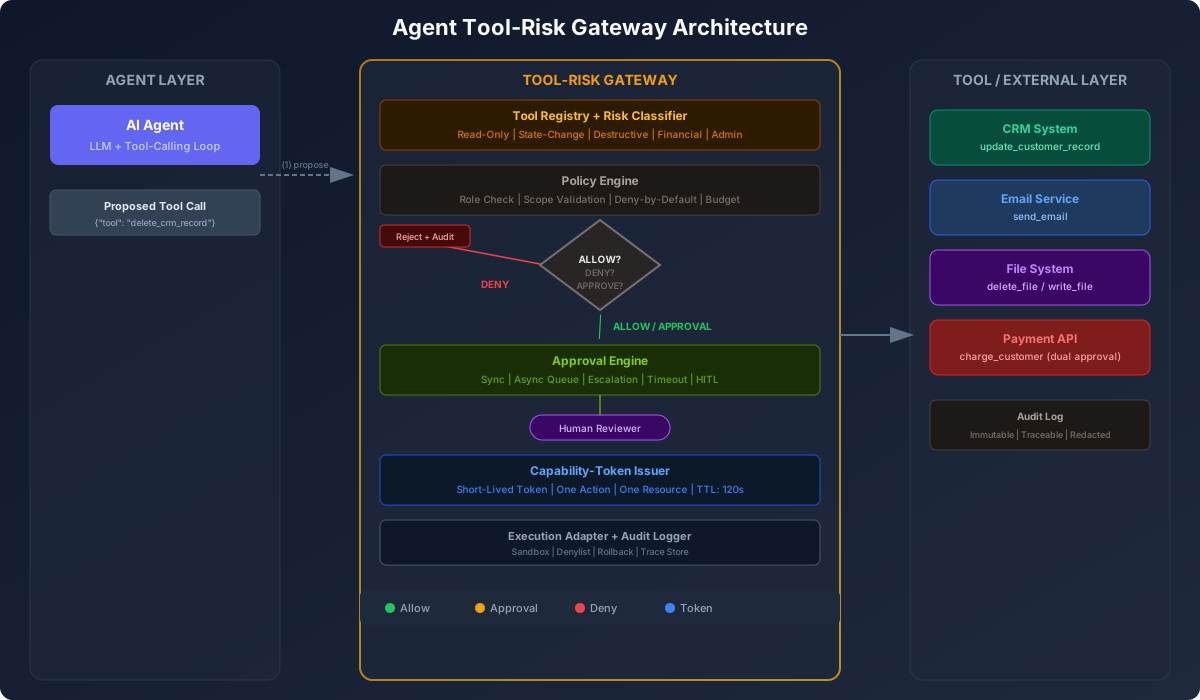
The Agent Tool-Risk Gateway: Designing Approval, Policy, and Capability Boundaries Before Tool Execution
Tool execution is where agent risk becomes real
Here’s something I’ve noticed watching teams deploy AI agents into production. Everyone worries about prompt injection and jailbreaking. And those are real problems. But the thing that actually causes damage is usually much simpler: an agent called a tool it shouldn’t have called.
Think about it. An LLM generates text. That text sits in a buffer. Nobody gets hurt.
But the moment that LLM output turns into a tool call — “send this email,” “delete that file,” “update this CRM record,” “charge this customer” — you’ve crossed from words into actions. And actions have consequences.
I’ve seen a staging agent send a real email campaign to 50,000 users. I’ve seen a hallucinated customer ID trigger a data merge in production. I’ve seen an agent delete files it mistook for cache artifacts. In every case, the model did what models do: it made a reasonable guess. The problem was the system let that guess become an action without a real control in between.
This isn’t a prompt engineering problem. You can’t fix it with “remember, never delete data without asking” in the system prompt. The enforcement layer has to live outside the model, in application code.
That’s what this article is about. A specific architectural pattern I’ll call the tool-risk gateway: a control plane that sits between your agent and every external action it can take. It intercepts every proposed tool call and decides: allow, deny, transform, require approval, require stronger identity, execute in a sandbox, or log-only.
Let me show you how to build one.
Define the Tool-Risk Gateway pattern
The idea is straightforward. Your agent doesn’t call tools directly. It sends a proposed tool call — tool name and arguments — to the gateway. The gateway decides what to do.
The gateway can return one of several verdicts:
- Allow — Execute the call, return the result.
- Deny — Reject the call, return an error, log the attempt.
- Transform — Modify the arguments before executing (e.g., scope a query to the current user’s tenant).
- Require approval — Pause execution. Wait for a human to approve or reject.
- Require stronger identity — Ask for step-up auth before proceeding.
- Execute in sandbox — Run in an isolated environment with restricted permissions.
- Log only / dry run — Simulate the execution and record the outcome, but don’t actually perform it.
The key insight: the model proposes, the gateway disposes. The LLM never has the final say on whether an action executes. That’s a property of the system.
Here’s a minimal request flow:
Agent → Gateway → [Registry → Policy Engine → Approval? → Token Issuer → Adapter] → ToolLet’s walk through each piece.
Classify tools by risk, not by name
The first thing you need is a way to classify tools by what they do, not just what they’re called. A tool named update_customer could mean anything. Is it updating a name and address, or is it updating a credit score?
I organize tools into a risk taxonomy. This isn’t new — MCP-style annotations already distinguish read-only from destructive tools, and Anthropic’s guidance around tool definitions points in the same direction. But most teams I see skip this step and go straight to per-tool allowlists. That’s not enough.
Here’s the taxonomy I use:
| Risk Level | Category | Examples |
|---|---|---|
| 1 | Read-only internal lookup | search_knowledge_base, get_user_profile |
| 2 | Read-only external lookup | lookup_company_duns, check_weather |
| 3 | State-changing internal action | update_ticket_status, add_comment |
| 4 | Destructive action | delete_file, remove_user |
| 5 | Irreversible external action | send_email, post_to_social |
| 6 | Financial / legal / compliance | charge_customer, sign_document |
| 7 | Cross-tenant or privileged admin | create_workspace, impersonate_user |
The risk class drives the gateway’s response. Risk 1 tools can auto-approve. Risk 3 tools might need role validation. Risk 5+ tools almost always need human approval.
Why prompt guardrails are insufficient
Before I go deeper into the architecture, I want to make a strong argument about why this can’t live in the prompt.
I was on a call with a team that had spent two weeks tuning their system prompt. They had paragraphs like:
You are a helpful assistant. Under no circumstances should you delete data
without first asking the user for explicit confirmation. Always double-check
before performing destructive operations.
And it mostly worked. During testing, the model would ask for confirmation. But in production, with a slightly different context window and a user who said “go ahead and clean things up,” the model called delete_file on a directory containing customer data.
The model didn’t misbehave. It did what LLMs do — it followed the most recent user instruction with the highest probability token. The prompt was just another token sequence. It had no real force.
A prompt is a suggestion. A gateway is a constraint.
This distinction matters. When a prompt-based guardrail fails, you get an incident and you blame the model. When a gateway-based guardrail fails, you get a bug in your code and you fix it. One is probabilistic. The other is deterministic.
Always put enforcement in application code, not in model instructions.
Architecture of the gateway
Let me describe the main components and then show you the code.
Tool registry
The tool registry is a catalog of every tool the agent can call. Each entry includes metadata: name, schema, risk class, required roles, approval requirements, and scope constraints.
Here’s a Python implementation:
from enum import Enum
from typing import Dict, List, Optional
from pydantic import BaseModel

class RiskClass(Enum):
    READ_INTERNAL = 1
    READ_EXTERNAL = 2
    STATE_CHANGE = 3
    DESTRUCTIVE = 4
    IRREVERSIBLE = 5
    FINANCIAL = 6
    CROSS_TENANT_ADMIN = 7

class ToolDefinition(BaseModel):
    name: str
    description: str
    input_schema: Dict
    risk_class: RiskClass
    allowed_roles: List[str]
    requires_approval: bool = False
    requires_dual_approval: bool = False
    max_scope: Optional[Dict] = None  # e.g., {"customer_ids": "requested_only"}
    token_ttl_seconds: int = 120
    audit_required: bool = True
    dry_run_supported: bool = False
    sandbox_required: bool = False

# Loaded from config or registry service
TOOL_REGISTRY: Dict[str, ToolDefinition] = {
    "crm.update_customer_status": ToolDefinition(
        name="crm.update_customer_status",
        description="Update a customer's status in the CRM",
        input_schema={
            "type": "object",
            "properties": {
                "customer_id": {"type": "string"},
                "status": {"type": "string", "enum": ["active", "inactive", "lead"]},
            },
            "required": ["customer_id", "status"],
        },
        risk_class=RiskClass.STATE_CHANGE,
        allowed_roles=["account_manager", "admin"],
        requires_approval=True,
        token_ttl_seconds=120,
    ),
    "email.send": ToolDefinition(
        name="email.send",
        description="Send an email to a customer",
        input_schema={
            "type": "object",
            "properties": {
                "to": {"type": "string"},
                "subject": {"type": "string"},
                "body": {"type": "string"},
            },
            "required": ["to", "subject", "body"],
        },
        risk_class=RiskClass.IRREVERSIBLE,
        allowed_roles=["marketing", "admin"],
        requires_approval=True,
        sandbox_required=True,  # Preview in sandbox first
    ),
    "crm.get_customer": ToolDefinition(
        name="crm.get_customer",
        description="Look up a customer by ID",
        input_schema={
            "type": "object",
            "properties": {
                "customer_id": {"type": "string"},
            },
            "required": ["customer_id"],
        },
        risk_class=RiskClass.READ_INTERNAL,
        allowed_roles=["*"],  # All roles
        requires_approval=False,
    ),
}
Policy engine
The policy engine takes a proposed tool call, the agent’s identity and role, and the current context. It returns a decision.
from enum import Enum

class Decision(Enum):
    ALLOW = "allow"
    DENY = "deny"
    APPROVAL_REQUIRED = "approval_required"
    SANDBOX_REQUIRED = "sandbox_required"
    DRY_RUN = "dry_run"

class PolicyRequest(BaseModel):
    agent_id: str
    agent_role: str
    tool_name: str
    arguments: Dict
    request_id: str

class PolicyResult(BaseModel):
    decision: Decision
    reason: str = ""
    approval_id: Optional[str] = None
    transformed_args: Optional[Dict] = None

def evaluate_policy(request: PolicyRequest) -> PolicyResult:
    tool_def = TOOL_REGISTRY.get(request.tool_name)
    if not tool_def:
        return PolicyResult(decision=Decision.DENY, reason="Tool not found in registry")

    # Role check
    if "*" not in tool_def.allowed_roles and request.agent_role not in tool_def.allowed_roles:
        return PolicyResult(
            decision=Decision.DENY,
            reason=f"Role '{request.agent_role}' not allowed to call '{request.tool_name}'"
        )

    # Schema validation
    try:
        from jsonschema import validate
        validate(instance=request.arguments, schema=tool_def.input_schema)
    except Exception as e:
        return PolicyResult(
            decision=Decision.DENY,
            reason=f"Schema validation failed: {str(e)}"
        )

    # Scope check: ensure agent isn't requesting access outside its scope
    if tool_def.max_scope:
        for key, constraint in tool_def.max_scope.items():
            if constraint == "requested_only" and key in request.arguments:
                # In production, verify the agent is allowed to access this specific resource
                pass

    # Approval check
    if tool_def.requires_dual_approval:
        return PolicyResult(
            decision=Decision.APPROVAL_REQUIRED,
            reason="Dual approval required for this action"
        )
    if tool_def.requires_approval:
        return PolicyResult(
            decision=Decision.APPROVAL_REQUIRED,
            reason="Approval required for this action"
        )

    # Sandbox check
    if tool_def.sandbox_required:
        return PolicyResult(decision=Decision.SANDBOX_REQUIRED)

    return PolicyResult(decision=Decision.ALLOW)
Capability-token issuer
Once a decision is made, the gateway shouldn’t hand broad credentials to the agent. Instead, it mints a short-lived capability token scoped to exactly one action, one resource, and one time window.
import time
import uuid
import hmac
import hashlib
import json

class CapabilityToken(BaseModel):
    token_id: str
    agent_id: str
    tool_name: str
    resource_id: Optional[str]  # e.g., specific customer ID
    action: str  # e.g., "update_customer_status"
    issued_at: float
    expires_at: float
    scope: Dict
    signature: str = ""

class CapabilityTokenIssuer:
    def __init__(self, secret_key: str):
        self.secret_key = secret_key

    def mint_token(self, agent_id: str, tool_def: ToolDefinition,
                   arguments: Dict, ttl_seconds: int = 120) -> CapabilityToken:
        now = time.time()
        resource_id = arguments.get("customer_id") or arguments.get("file_id")

        token = CapabilityToken(
            token_id=uuid.uuid4().hex[:16],
            agent_id=agent_id,
            tool_name=tool_def.name,
            resource_id=resource_id,
            action=tool_def.name.split(".")[-1],
            issued_at=now,
            expires_at=now + ttl_seconds,
            scope=arguments,
        )

        # Sign the token so the execution adapter can verify it
        payload = json.dumps(token.model_dump(exclude={"signature"}), sort_keys=True)
        token.signature = hmac.new(
            self.secret_key.encode(),
            payload.encode(),
            hashlib.sha256
        ).hexdigest()

        return token

    def verify_token(self, token: CapabilityToken) -> bool:
        if token.expires_at < time.time():
            return False  # Token expired

        payload = json.dumps(token.model_dump(exclude={"signature"}), sort_keys=True)
        expected_sig = hmac.new(
            self.secret_key.encode(),
            payload.encode(),
            hashlib.sha256
        ).hexdigest()

        return hmac.compare_digest(token.signature, expected_sig)
The agent only gets this token. Not an API key. Not a session cookie. A narrow token that says “you may do exactly this one thing for the next 120 seconds.” If the token isn’t used before expiry, the agent has to propose the call again.
Approval engine
The approval engine handles the human-in-the-loop flow. When a tool requires approval, the gateway queues the request and waits for a human response.
from fastapi import FastAPI, HTTPException
from pydantic import BaseModel
import asyncio
from datetime import datetime

app = FastAPI()

# In-memory approval store; use a database in production
pending_approvals = {}

class ApprovalRequest(BaseModel):
    approval_id: str
    agent_id: str
    tool_name: str
    arguments: Dict
    status: str = "pending"  # pending | approved | rejected | expired
    created_at: float
    timeout_seconds: int = 300
    approved_by: Optional[str] = None

@app.post("/agent/propose-tool-call")
async def propose_tool_call(request: PolicyRequest):
    """Step 1: Agent proposes a tool call. Gateway evaluates policy."""
    result = evaluate_policy(request)

    if result.decision == Decision.DENY:
        return {"status": "denied", "reason": result.reason}

    if result.decision == Decision.APPROVAL_REQUIRED:
        approval_id = uuid.uuid4().hex[:16]
        pending_approvals[approval_id] = ApprovalRequest(
            approval_id=approval_id,
            agent_id=request.agent_id,
            tool_name=request.tool_name,
            arguments=request.arguments,
            created_at=time.time(),
        )
        return {
            "status": "pending_approval",
            "approval_id": approval_id,
            "message": "This action requires human approval"
        }

    if result.decision == Decision.ALLOW:
        # Mint capability token and execute
        token = issuer.mint_token(request.agent_id,
                                   TOOL_REGISTRY[request.tool_name],
                                   request.arguments)
        result = await execute_tool(request.tool_name, request.arguments, token)
        return {"status": "executed", "result": result}

    return {"status": "denied", "reason": f"Unexpected decision: {result.decision}"}

@app.post("/approve")
async def approve_action(approval_id: str, approver: str, approve: bool = True):
    """Step 2: A human approves or rejects the pending action."""
    approval = pending_approvals.get(approval_id)
    if not approval:
        raise HTTPException(status_code=404, detail="Approval request not found")

    if approval.status != "pending":
        raise HTTPException(status_code=400, detail="Approval already processed")

    if time.time() - approval.created_at > approval.timeout_seconds:
        approval.status = "expired"
        return {"status": "expired", "message": "Approval request timed out"}

    if not approve:
        approval.status = "rejected"
        approval.approved_by = approver
        return {"status": "rejected", "message": "Action rejected by approver"}

    approval.status = "approved"
    approval.approved_by = approver

    # Execute the tool call
    token = issuer.mint_token(
        approval.agent_id,
        TOOL_REGISTRY[approval.tool_name],
        approval.arguments,
    )
    result = await execute_tool(approval.tool_name, approval.arguments, token)
    return {"status": "approved_and_executed", "result": result}

async def execute_tool(tool_name: str, args: Dict, token: CapabilityToken) -> Dict:
    """Step 3 (mocked): Execute the tool with the capability token."""
    if not issuer.verify_token(token):
        return {"error": "Token verification failed"}

    # In production: dispatch to the actual tool adapter
    print(f"Executing {tool_name} with args {args} (token: {token.token_id})")
    return {"tool": tool_name, "status": "success", "executed_at": datetime.now().isoformat()}
Approval design: sync vs async
A question that comes up quickly: should approval be synchronous or asynchronous?
For most cases, I recommend asynchronous approval with a callback. Here’s why.
Synchronous approval means the agent sits and waits. That blocks the entire agent loop. If the approver is slow, the agent stalls. If the approver never responds, the agent times out and the user gets an error. For a chat interface where a human is already in the loop, synchronous can work — the human is right there. But for background agents or scheduled workflows, it’s a bad fit.
Asynchronous approval works differently:
- Agent proposes a tool call. Gateway returns
pending_approvalwith anapproval_id. - Agent continues working on other tasks or reports back to the user.
- A human (or automated policy) calls the approval endpoint.
- Gateway executes the tool and either returns the result or notifies the agent.
Design decisions for the approval flow:
- Timeout. Every approval request should have a timeout. Default to 5 minutes. If no one approves or rejects within that window, mark it expired. Decide whether to deny by default or escalate to a fallback approver.
- Escalation. For critical actions, define an escalation path. If the primary approver doesn’t respond in 2 minutes, notify a secondary approver. If that also times out, deny by default.
- Audit requirement. Every approval action — approve, reject, expire — gets logged with the approver’s identity, the action, and the timestamp.
- Approval UX. Don’t make approvers go through a CLI. Build a simple dashboard or a Slack integration where they can see pending requests with enough context to make a decision.
Runtime enforcement examples
Here are some concrete policies I’ve implemented or seen work well:
“Send email” requires preview + approval. The gateway transforms the request into a draft mode. The agent gets a preview link. A human reviews the email content, checks the recipient list, and then approves or rejects. No email is sent without a human clicking “send.”
“Delete file” requires explicit resource list. The agent can’t say “delete everything in /tmp.” It has to list specific files. The gateway validates each path against an allowlist of deletable directories and denies any request that uses wildcards.
“Update CRM” requires user role match. Only agents running with account_manager role can call crm.update_customer_status. If an agent with read_only role tries, the gateway denies the call and logs the mismatch.
“Execute shell command” requires sandbox and denylist. Shell commands run in a container with no network access. The gateway checks the command against a denylist of dangerous patterns (rm -rf, sudo, curl to internal IPs). Commands that match are rejected outright.
“Call payment API” requires dual approval. Two different humans must approve a payment before the gateway executes it. This catches mistakes and acts as a fraud control. The gateway doesn’t even mint the capability token until both approvals are in.
Metrics to prove the gateway works
Once you have this running, measure the right things:
- Percentage of tool calls auto-approved. High is good for velocity. Track this per role and per risk class.
- Percentage requiring approval. If it’s too high, you’re bottlenecking on humans. Too low and you might be approving too much risk.
- Rejection rate. Policy violations, schema errors, role mismatches. Spikes in this metric often mean something is wrong — either the policy is too strict or an agent is behaving unexpectedly.
- Approval latency. How long do humans take to approve or reject? If it’s over your timeout, requests expire.
- Policy violation attempts. How many times do agents try to call tools they’re not allowed to? This is a leading indicator of either hallucination or misconfiguration.
- Stale approval rate. Percentage of approval requests that time out. High stale rate means either the approvers aren’t watching or the timeout is too short.
- Destructive action count. Number of risk-4+ calls attempted, approved, and executed. Keep a running total.
- Rollback frequency. How often does an executed tool call need to be undone? This is your failure metric.
Here’s a simple metrics structure:
class GatewayMetrics(BaseModel):
    total_proposed: int = 0
    auto_approved: int = 0
    approval_required: int = 0
    denied: int = 0
    rejected: int = 0  # Human said no
    expired: int = 0
    policy_violations: int = 0
    destructive_executions: int = 0
    avg_approval_latency_ms: float = 0.0
Log these metrics per agent, per role, and per tool. Use them in dashboards. Set alerts on the ones that matter to your team.
End-to-end example: CRM update with approval
Let me walk through a complete flow so you can see how the pieces connect.
An agent is helping a sales rep update a customer’s status. The rep says “Mark Acme Corp as active.” The agent proposes a tool call.
# Step 1: Agent proposes
proposal = PolicyRequest(
    agent_id="sales_agent_v2",
    agent_role="account_manager",
    tool_name="crm.update_customer_status",
    arguments={"customer_id": "acme_123", "status": "active"},
    request_id="req_001",
)

# Step 2: Gateway evaluates
#   - Tool exists in registry
#   - Role "account_manager" is in allowed_roles
#   - Schema validates
#   - requires_approval is True → return pending_approval

# Step 3: Gateway returns
response = await propose_tool_call(proposal)
# {
#   "status": "pending_approval",
#   "approval_id": "appr_abc",
#   "message": "This action requires human approval"
# }

# Step 4: Sales rep sees pending request in dashboard
#   "Agent 'sales_agent_v2' wants to update Acme Corp (acme_123) from 'inactive' to 'active'"
#   Rep clicks "Approve"

# Step 5: Gateway executes
response = await approve_action(
    approval_id="appr_abc",
    approver="yusuf.elborey@company.com",
    approve=True
)
# {
#   "status": "approved_and_executed",
#   "result": {
#     "tool": "crm.update_customer_status",
#     "status": "success",
#     "executed_at": "2026-06-30T12:00:00Z"
#   }
# }

# Step 6: Everything is logged
#   audit_entry = {
#     "request_id": "req_001",
#     "approval_id": "appr_abc",
#     "agent": "sales_agent_v2",
#     "tool": "crm.update_customer_status",
#     "arguments_redacted": {"customer_id": "acme_***", "status": "active"},
#     "policy_decision": "approval_required",
#     "approved_by": "yusuf.elborey@company.com",
#     "outcome": "success",
#     "timestamp": "2026-06-30T12:00:05Z"
#   }
The agent never had direct access to the CRM. It proposed an action. The system decided whether that action was safe, asked a human, and only then executed it with a tightly scoped capability token.
Closing: agents need operating boundaries, not just better prompts
I’ve been building systems that call external tools for a while now. The pattern I keep coming back to is this: the model is the imagination, and the gateway is the operating system.
The model is good at figuring out what to do. It’s bad at knowing whether it should be allowed to do it. That’s a different function. It requires deterministic rules, not probabilistic inference. It requires a control plane, not a prompt.
OWASP’s 2026 framework for agentic apps makes this explicit: autonomous systems that plan, act, and make decisions need external guardrails. OpenAI’s agent guidance says the same thing — guardrails, human-in-the-loop, well-defined tools. This is becoming standard practice.
But knowing something and doing it are different things. The teams I see that get this right don’t wait for a platform team to build a gateway. They add the control plane incrementally. Start with a tool registry and a deny-by-default policy. Add approval flows for the dangerous tools. Add capability tokens when you need stronger isolation. Add metrics when you need to prove it works.
The alternative is betting that your model will never hallucinate a dangerous tool call. That’s a bet I wouldn’t take.
The sample code for this article is on GitHub — a complete Python/FastAPI gateway with the tool registry, policy engine, capability token issuer, approval flow, and audit logging. All the examples in this article run out of the box. You can adapt the patterns to your stack, add your own tools and policies, and deploy it as a sidecar or a standalone service.
Your agent’s next tool call should go through a gateway. Not a nicer prompt.
Discussion
Loading comments...