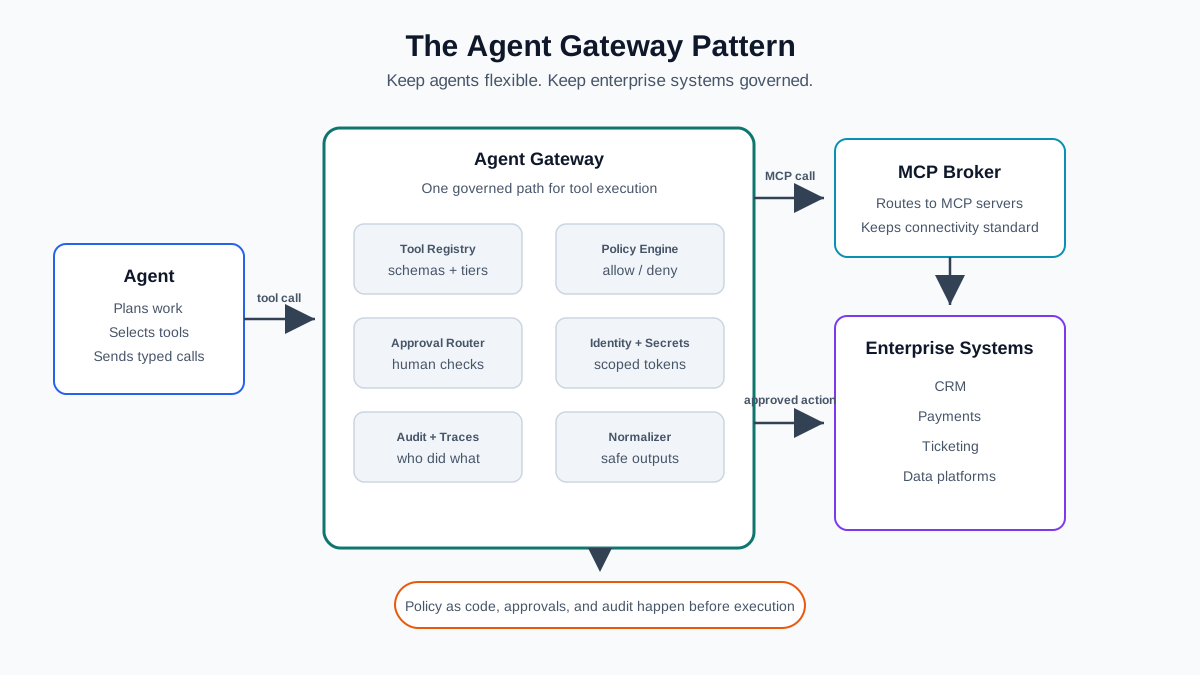
The Agent Gateway Pattern: How to Put Governance, MCP, and Tool Safety Between Your AI Agents and Enterprise Systems
Demo agents look simple.
You give the model a task. You register a few tools. The agent decides when to call them. It reads a document, searches a database, opens a ticket, or updates a record. On a slide, this looks clean.
Production is different.
The moment an agent can touch enterprise systems, every tool call becomes a real action. It can expose customer data. It can create support tickets. It can trigger a refund. It can update bank details. It can call the wrong API too many times. It can pass a payload that no backend team expected.
That is the problem the Agent Gateway pattern solves.
Do not let production agents talk to enterprise systems directly. Put a gateway in the middle. Let agents stay flexible, but keep security, policy, approvals, audit, rate limits, and safe execution in one controlled layer.
The Real Production Problem
The first agent usually has three tools. Then five. Then twenty.
One team adds Salesforce. Another adds Jira. Another adds a payment API. Someone adds a database query tool. Someone else exposes an internal search endpoint. At first, each integration looks small. Over time, you get tool sprawl.
Tool sprawl creates a few practical problems:
- Auth is inconsistent. Some tools use OAuth. Some use API keys. Some use service accounts. Some use copied tokens in environment variables.
- Policy logic gets duplicated. Each agent has its own checks for roles, environments, budgets, and blocked actions.
- Audit trails are unclear. You can see that an API was called, but not which agent chose it, which prompt led to it, which policy allowed it, or who approved it.
- Approvals are hard to manage. One tool sends Slack messages. Another writes to a queue. Another relies on the agent asking the user in chat.
- Payloads are unpredictable. Models can produce extra fields, vague strings, too much data, or values that are valid JSON but unsafe for the backend.
This is not because agents are bad. It is because direct integration gives every agent too much responsibility.
In normal software systems, we learned this lesson with APIs. We added API gateways because every client should not reimplement auth, rate limits, logging, and routing. Agents need the same idea, with a few extra controls for tool choice, approval, and model-generated arguments.
What Is the Agent Gateway Pattern?
An Agent Gateway sits between the orchestrating agent and external tools or systems.
The agent does not call a payment API, ticketing API, database, or MCP server directly. It sends a typed tool invocation to the gateway:
- tool name
- arguments
- agent identity
- user or tenant context
- trace ID
- reason for the call, if available
The gateway decides what happens next.
It acts as five things at once.
First, it is a policy enforcement point. It checks whether this agent, user, tenant, and environment can call this tool with these arguments.
Second, it is a tool broker. It maps stable tool names to real backends, including MCP servers, REST APIs, queues, databases, or internal services.
Third, it is an approval router. It decides whether a tool call can run now, needs automated approval, or must wait for a human.
Fourth, it is an observability hook. It logs the request, policy decision, approval decision, execution result, latency, and trace IDs.
Fifth, it is a response normalizer. It converts backend output into a stable, compact shape that the agent can use without receiving raw backend dumps.
The agent remains useful because it can still plan and choose tools. The enterprise remains in control because execution goes through one governed path.
Why Not Let Agents Call Tools Directly?
Direct calls are fine for experiments. They are usually wrong for production.
Every tool integration is a security boundary. If an agent can call refund_customer, that tool is now part of your payment control surface. If it can call run_query, that tool is part of your data access layer. If it can call send_email, that tool can leak data or create compliance issues.
When agents call tools directly, each agent tends to reimplement the same controls:
- Which roles can use this tool?
- Which tenants can access this data?
- Which environments are allowed?
- Which fields must be redacted?
- Which actions require approval?
- How many calls are allowed per minute?
- How do we log denied actions?
That duplication does not age well. One agent gets a new policy. Another stays stale. One tool has strict schema validation. Another accepts broad JSON. One team logs approvals. Another only logs the final API call.
Direct integration also confuses models. Tool schemas vary. One tool returns a giant backend object. Another returns a string. Another returns nested data with internal names. The model now has to reason over inconsistent contracts. That makes tool selection and follow-up calls less reliable.
And the blast radius grows. A broad tool such as update_customer_record may be convenient, but it can update email, address, payment terms, bank details, and tax status. That is too much power for one model-chosen action.
Core Components
A useful Agent Gateway is not one big proxy. It is a small control plane with clear parts.
Agent / Orchestrator
This is the planner. It reads the user request, chooses a tool, and sends a structured invocation. It should not hold backend credentials. It should not decide final approval for risky actions.
Agent Gateway
This is the only outbound path for tool execution. It validates inputs, evaluates policy, routes approvals, calls tools, normalizes responses, and writes audit records.
Tool Registry
The registry defines allowed tools. It includes the tool name, description, risk tier, auth scope, approval behavior, input schema, output schema, and backend route.
{
  "name": "refund_customer",
  "description": "Create a customer refund for a settled order.",
  "riskTier": "high",
  "authScope": "payments:refund",
  "approvalRequired": true,
  "mcpServer": "payments",
  "mcpTool": "payments.refund",
  "inputSchema": {
    "type": "object",
    "required": ["customerId", "orderId", "amount", "reason"],
    "additionalProperties": false,
    "properties": {
      "customerId": { "type": "string", "minLength": 3 },
      "orderId": { "type": "string", "minLength": 3 },
      "amount": { "type": "number", "minimum": 0.01, "maximum": 5000 },
      "reason": { "type": "string", "minLength": 10, "maxLength": 500 }
    }
  },
  "outputSchema": {
    "type": "object",
    "required": ["refundId", "status"],
    "properties": {
      "refundId": { "type": "string" },
      "status": { "type": "string" }
    }
  }
}
Policy Engine
This is where policy-as-code belongs. It makes the allow, deny, or approval-required decision. Keep this outside the prompt. Prompts can explain policy to the model, but prompts should not be the policy boundary.
Approval Service
This manages human or workflow approvals. It records who approved what, when, and why. It should bind approval to the exact tool payload so an approval cannot be reused for a different action.
MCP Broker / MCP Servers
MCP gives AI applications a standard way to connect to tools and data. The gateway can use MCP as the connectivity layer while still owning policy and audit.
Audit & Trace Store
This stores every request, decision, approval, denial, and result. Denied actions matter too. They tell you where agents are trying to go and where policy is stopping them.
Secrets / Identity Provider
Agents should not receive raw backend credentials. The gateway should use workload identity, scoped tokens, or a secrets manager at execution time.
Where MCP Fits
MCP is useful because it standardizes how AI apps discover and call tools. It gives you a common interface for tools, resources, prompts, and server capabilities. That matters because every custom integration you remove is one less thing to maintain.
But MCP is not a full governance layer by itself.
The official MCP specification includes important protocol concepts, including tool schemas and authorization for HTTP transports. It also notes that tool invocation can be model-controlled and that applications should provide clear user visibility and the ability to deny tool calls. That is a good base.
Enterprise governance still needs more:
- central policy across many agents
- risk tiers by business action
- approval workflow integration
- tenant and environment boundaries
- audit records tied to agent traces
- rate limits and budgets
- output normalization
- secrets isolation
- schema versioning
So the split is simple:
MCP is the connectivity standard. The Agent Gateway is the control layer.
You can expose tools through MCP servers and still put the gateway in front. The agent talks to the gateway. The gateway talks to MCP. That keeps the MCP ecosystem useful without giving every agent direct access to every MCP server.
Governance and Risk Tiers
Not every tool needs a human in the loop. If every call needs approval, agents become slow and people stop trusting the process.
Use risk tiers.
Low-risk tools are read-only or reversible. They can run without approval after auth and schema checks.
Example: read_order_history.
Medium-risk tools create low-impact work or make changes that are easy to review. They may need approval based on role, tenant, amount, or environment.
Example: create_support_ticket.
High-risk tools move money, change sensitive customer data, grant access, delete records, or affect regulated workflows. These should require human approval or a strict automated control.
Examples: initiate_refund, update_bank_details.
A simple policy can look like this:
version: 2026-04-30.1
rules:
  - tool: read_order_history
    decision: allow

  - tool: create_support_ticket
    decision: allow
    allowed_roles: ["support_agent", "support_manager"]

  - tool: refund_customer
    decision: approval_required
    when:
      amount_gt: 100
    approver_role: finance_approver

  - tool: update_bank_details
    decision: approval_required
    approver_role: finance_approver
The important part is separation. Tool discovery is not tool execution. Policy decision is not approval decision. Approval is not execution. Each step should be explicit.
Best Practices for Tool Contracts
Tool contracts have a big effect on agent behavior. Bad tools make agents look worse than they are.
Use small, single-purpose tools. Prefer refund_customer over update_customer. Prefer read_order_history over query_database. The narrower the tool, the smaller the blast radius.
Use explicit names. The model should not have to guess what process_record means. Names such as create_support_ticket or lookup_invoice_status are easier to choose and easier to audit.
Use narrow schemas. Require fields. Reject unknown fields. Set string lengths, enum values, number ranges, and date formats. Do not accept raw SQL, unrestricted filters, or arbitrary backend payloads.
Return stable output. A tool should return a compact object with predictable fields. Avoid dumping full backend records with internal IDs, flags, debug fields, and unrelated nested objects.
Return meaningful context. Do not return only ok: true. Tell the agent what happened in safe business terms:
{
  "refundId": "rf_10291",
  "status": "pending_settlement",
  "message": "Refund created for order ord_7781."
}
Optimize for token efficiency. Long tool outputs cost money and can distract the model. Summarize backend data before returning it. Add pagination for lists. Redact fields the agent does not need.
Version your contracts. A small schema change can break agent behavior. Treat tool contracts like APIs.
Observability and Audit
If you cannot explain why a tool call happened, you are not ready to run it in production.
Log each request. Include the agent ID, user ID, tenant ID, trace ID, tool name, arguments after redaction, and schema version.
Log the tool selection. If the orchestrator provides a reason, keep it. It helps reviewers understand intent.
Log the policy decision. Store the policy version that was applied. This matters when a rule changes later and someone asks why an old request was allowed.
Log the approval decision. Track who approved it, when, and why. If approval was automated, record the rule that made the decision.
Log denied actions. Denials are useful signals. They show missing scopes, bad schemas, unexpected payloads, or agents attempting actions outside their lane.
An audit record can be simple:
{
  "traceId": "tr_01HX7Z",
  "agentId": "support-agent-v3",
  "toolName": "refund_customer",
  "riskTier": "high",
  "decision": "approval_required",
  "policyVersion": "2026-04-30.1",
  "approver": null,
  "timestamp": "2026-04-30T14:18:03Z"
}
Preserve trace IDs end to end. The trace should connect the user request, model call, tool call, gateway decision, MCP server call, backend action, and final response.
Anti-Patterns
Avoid the one giant do-everything tool. It usually starts as a shortcut and becomes a control problem.
Avoid hidden side effects. A tool named get_customer_summary should not update a CRM field.
Avoid passing raw SQL. If the agent needs business data, expose a safe business tool.
Avoid unrestricted search access. Search tools should have scopes, filters, and result limits.
Avoid write operations without approval policy. Even if the first version auto-approves, the policy should say so.
Avoid mixing business logic and transport logic. MCP, REST, and queues are transport choices. Refund rules are business policy. Keep them separate.
Avoid unversioned schemas. Agents learn tool shapes through schemas and examples. Changing a schema without versioning is like changing an API behind a client.
Practical Implementation Walkthrough
Here is a small gateway flow in Python. The real sample code linked above is executable, but this is the core idea.
The orchestrator calls the gateway:
request = {
    "traceId": "tr_123",
    "agentId": "support-agent-v3",
    "toolName": "refund_customer",
    "arguments": {
        "customerId": "cus_42",
        "orderId": "ord_7781",
        "amount": 250.00,
        "reason": "Duplicate charge confirmed by support case."
    },
    "context": {
        "userId": "usr_9",
        "tenantId": "tenant_a",
        "scopes": ["payments:refund"]
    }
}

response = gateway.invoke(request)
The gateway validates and decides:
def invoke(request):
    tool = registry.get(request["toolName"])
    validate_json(tool.input_schema, request["arguments"])

    if tool.auth_scope not in request["context"]["scopes"]:
        return deny("missing required scope")

    decision = policy.evaluate(tool, request["arguments"], request["context"])

    if decision.status == "approval_required":
        approval_id = approvals.create(request, decision.approver_role)
        audit.log(request, tool, decision, approval_id=approval_id)
        return {"status": "pending_approval", "approvalId": approval_id}

    result = mcp_broker.call(
        server=tool.mcp_server,
        tool=tool.mcp_tool,
        arguments=request["arguments"],
        trace_id=request["traceId"]
    )

    normalized = normalize_tool_output(result)
    audit.log(request, tool, decision, result=normalized)
    return {"status": "success", "data": normalized}
The MCP adapter stays small:
class McpBroker:
    def call(self, server, tool, arguments, trace_id):
        envelope = {
            "jsonrpc": "2.0",
            "method": "tools/call",
            "params": {
                "name": tool,
                "arguments": arguments,
                "meta": {"traceId": trace_id}
            },
            "id": trace_id
        }

        response = self.servers[server].handle(envelope)
        return response["result"]["content"][0]["json"]
Approval is a separate branch, not a prompt convention:
decision = policy.evaluate(tool, args, context)

if tool.name == "refund_customer" and args["amount"] > 100:
    approval_id = approvals.create(
        tool_name=tool.name,
        arguments=args,
        approver_role="finance_approver"
    )
    return {"status": "pending_approval", "approvalId": approval_id}

if request.get("approvalId"):
    approvals.require_approved(request["approvalId"], tool.name, args)
This keeps the model out of the final control decision. The model can request a refund. It cannot approve its own refund.
When This Pattern Is Overkill
You do not need an Agent Gateway for every prototype.
If you have one local agent, read-only tools, no customer data, and no production writes, a direct integration may be fine. Keep the code simple. Add schemas and logs, but do not build a platform too early.
The gateway starts to pay for itself when you have multiple agents, multiple teams, sensitive data, write operations, regulated workflows, or MCP servers shared across the company.
The pattern is also useful when you expect tools to grow. It is easier to add a gateway before ten teams have built ten different approval systems.
Conclusion
Agents are powerful because they can choose actions at runtime. That is also what makes them risky.
The answer is not to make agents weak. The answer is to put a real control layer between model decisions and enterprise execution.
Use MCP for standardized connectivity. Use an Agent Gateway for governance. Keep tool contracts small. Put policy in code. Treat approvals as first-class workflow. Log every allow, deny, approval, and result.
This gives you a practical balance: agents can still help people get work done, but they do not get unchecked access to the systems that run the business.
If APIs needed gateways, agents need gateways too.
Sample Code
The sample repository for this article contains a small executable Agent Gateway in Python:
- tool registry with risk tiers and schemas
- policy checks with approval thresholds
- MCP-style broker and server adapter
- audit logging
- unit tests for approval, denial, and payload validation
Run it locally:
cd githubRepo/2026/04/30/agent-gateway-pattern-governance-mcp-tool-safety
python3 -m agent_gateway.demo
python3 -m unittest discover tests
Discussion
Loading comments...