Progressive Delivery for Agents: Shadow Tests, Eval Gates, and Fast Rollbacks
Teams are moving from “demo agents” to “always-on agents.” That shift forces real release discipline. You can’t just change a prompt and hope. You need replayable traces, eval gates, and rollout in shadow and canary before you flip the switch.
This article is for DevOps and platform engineers, and AI engineers who own production reliability. We’ll cover what “release” means for an agent, how to build a regression set that doesn’t lie, how to run shadow and canary, and how to keep rollback obvious.
The Problem with “Prompt Deploys”
Agent changes are risky. It’s not just the prompt. It’s tool calls, side effects, and non-determinism.
Tool calls. The agent might call the wrong tool, or the right tool with bad arguments. A small prompt tweak can change which tools get invoked and in what order. That can mean missed steps, duplicate calls, or calls that never happen.
Side effects. Agents don’t just read. They write. They send emails, update tickets, charge cards. A bad rollout doesn’t just return a wrong answer—it can take real actions in the world. You need to know before you ship that the new version isn’t going to do something unsafe.
Non-determinism. Temperature, model updates, and timing mean the same input can produce different outputs. So “it worked in staging” doesn’t guarantee “it will work in prod.” You need a way to compare versions on the same inputs.
Treating a deploy as “we updated the prompt” is not enough. You need a clear definition of what you’re releasing and how you’re testing it.
What “Release” Means for an Agent
For an agent, “release” is more than one file. It’s the whole bundle that affects behavior:
- Prompt templates – system prompt, few-shot examples, task framing
- Tool schemas – what tools exist and what arguments they accept
- Tool allowlists – which tools this agent is allowed to call
- System policies – guardrails, safety rules, output filters
- Model config – model id, temperature, max tokens
Version all of that together. One “agent bundle” artifact that you promote from dev → staging → prod. When you run evals or shadow, you’re comparing two bundles on the same inputs. No surprise changes in the middle.
Build a Regression Set That Doesn’t Lie
Your regression set should match real work. Not toy examples. Happy paths, messy inputs, and failure modes.
Golden tasks (about 30–100). Tasks that look like what users actually do. Include edge cases: empty results, timeouts, malformed input, ambiguous requests. Each task has: input (user request), expected outcome (or acceptability criteria), and allowed tool behavior (which tools may be called, and any constraints).
Store inputs and expected outcomes. For each task you need: the exact user request, the expected outcome (success/failure, key facts in the answer, or a rubric), and what tool usage is allowed. Optionally, store expected tool call sequences for strict regression.
Add cost and latency budgets. Every run in the regression set should have a max token spend and a max latency (e.g. p95). If the new version blows the budget, the run fails. That keeps speed and cost from regressing.
Run this set on every candidate version. If it doesn’t pass, don’t promote. Add new golden tasks when you fix a production bug so that regression doesn’t come back.
Offline Evals from Production Traces
Production is the best source of test cases. Record real runs and replay them.
Record: user request, tool calls (name + args), tool results, final response, and an outcome label (success/failure, or more granular). Persist traces in a simple format—e.g. one JSON object per trace in a JSONL file—so you can replay them later.
Replay: Run the same trace (same user request, same recorded tool results if you’re doing deterministic replay, or same live tools if you’re doing live replay) against the new agent version. Compare outputs and tool plans.
Score: task success (did it do the right thing?), tool correctness (right tools, right order, no unsafe calls), and optionally unsafe action counts, p95 latency, cost per task. Failing any of these can block promotion.
The sample repo includes a trace format (JSONL) and a Python script that loads traces, replays them against two agent versions, and prints a pass/fail summary (success, tool misuse, budget overruns). You can plug it into CI or run it locally before merging.
# Example: trace format (one JSON object per line)
# {"trace_id": "...", "request": "...", "tool_calls": [...], "tool_results": [...], "response": "...", "outcome": "success", "latency_ms": 1200, "cost_tokens": 500}
Shadow Mode in Production
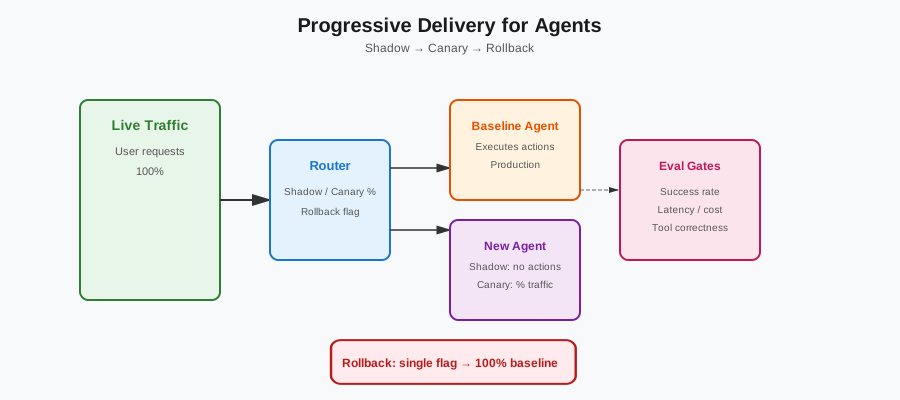
Before sending traffic to the new agent, run it in shadow. The new agent sees the same live traffic but doesn’t take actions. Only the baseline agent’s actions are executed. Users never see the new agent’s output; they only see the baseline. But you see both. You can diff outputs, compare tool plans, and measure cost and latency for the candidate.
Compare: final outputs, tool plans (which tools the new agent would have called), and cost/latency. If the new version disagrees with the baseline on critical tasks, or would have called disallowed tools, or consistently blows the budget, don’t ship it. Shadow gives you a safety net without affecting users. Run shadow for at least a few hours (or a day) so you get a representative sample.
Canary Rollout with Hard Gates
When shadow looks good, send a small fraction of traffic to the new version. Start with 1–5%. Route by user id or request id so the same user gets the same version during the window.
Gates. Define clear pass/fail criteria: error rate, task success rate, tool error rate, p95 latency, token spend. During the canary window, if any gate goes red, auto-rollback or block further promotion. No “we’ll check tomorrow.”
Promote only if gates stay green for a full window. That window might be 24 hours or a few hours depending on traffic. Don’t promote on a single green snapshot.
Keep rollback obvious. One flag or one config switch (e.g. “canary_percent”: 0) that sends everyone back to the baseline. Test that rollback path every week. When something breaks at 3 a.m., you don’t want to be hunting for the right knob.
The repo includes a small feature-flagged router that supports shadow execution, canary percentage rollout, and instant rollback. You can adapt it to your stack.
Safe Tool Execution
Agents call tools. Those tools can have side effects. Harden them:
- Idempotency keys for actions that change state. The same logical action with the same key doesn’t get applied twice. Example: “refund order X” with idempotency key “refund-X-20260130” should not double-refund if the agent retries.
- Dry-run tools in staging. Where possible, tools should support a dry-run mode so you can see what would happen without doing it. Send email? Dry-run logs the payload instead of sending. Update a ticket? Dry-run returns the patch without applying it.
- Circuit breakers and timeouts around every external call. If a tool is slow or failing, fail fast and let the agent (or operator) handle it instead of hanging. Set a max timeout per tool (e.g. 30 seconds) and open a circuit after N failures so you don’t hammer a broken API.
Operational Basics That Save You
Tracing. Every agent step is a span. Every tool call and tool result is a span. Use OpenTelemetry (or your existing tracer). Span names like agent.run, agent.step, tool.call, tool.result make it easy to see causality and latency. The sample includes a minimal snippet for spans around agent steps and tool calls.
# OpenTelemetry: agent and tool spans
with tracer.start_as_current_span("agent.run") as run_span:
    run_span.set_attribute("agent.version", version)
    for step in agent.steps():
        with tracer.start_as_current_span("agent.step") as step_span:
            step_span.set_attribute("step.index", step.index)
            with tracer.start_as_current_span("tool.call") as call_span:
                call_span.set_attribute("tool.name", step.tool_name)
                result = execute_tool(step.tool_name, step.args)
            with tracer.start_as_current_span("tool.result") as result_span:
                result_span.set_attribute("tool.success", result.ok)
Logs. Structured, with correlation ids (trace_id, request_id). Redact PII and secrets. So when you’re debugging a bad run, you have one id to grep. Every log line from that run should include the same trace_id so you can reconstruct the full flow.
Metrics. Tool error rate, retry rate, token spend per request, “action attempted” counts. Dashboard and alert on these. They’re leading indicators of agent health. If tool error rate spikes or token spend doubles after a deploy, you want to know before users complain.
A Practical Checklist
Use this as a ship/no-ship checklist. Paste it into PRs or runbooks.
- Agent bundle versioned – Prompts, tool schemas, allowlists, and model config are one artifact, versioned and promoted together.
- Regression set updated – New high-value or high-risk flows have golden tasks; set runs in CI.
- Offline evals pass – Replay suite (or subset) passes for the new version: task success, tool correctness, no budget overruns.
- Shadow run (if applicable) – New version ran in shadow on production traffic; no unsafe tool plans, outputs acceptable.
- Canary plan – Percentage and duration defined; gates (error rate, success rate, latency, cost) defined; rollback switch tested.
- Rollback tested – Rollback path (flag or config) exercised recently; on-call knows how to flip it.
- Traces and metrics – New version emits traces and key metrics; dashboards and alerts exist.
If any box is unchecked, don’t ship. When in doubt, keep the baseline and iterate.
Summary
Moving from demo agents to always-on agents means treating releases seriously. Define the agent release unit. Build a regression set that reflects real work and add cost/latency budgets. Run offline evals from production traces and, when possible, shadow the new version before switching traffic. Canary with hard gates and a single, tested rollback. Harden tool execution with idempotency, dry-runs, and circuit breakers. Keep tracing, logging, and metrics in place so you can debug and improve. Use the checklist. Ship agents like services—with discipline and a clear path back when things go wrong.
The sample repository includes a trace format (JSONL), a Python script for loading and replaying traces and computing pass/fail, a GitHub Actions workflow that runs unit tests and an offline eval suite with a quality gate that blocks merge when thresholds fail, and a feature-flagged router for shadow, canary, and rollback. Clone it, adapt it to your stack, and tighten your release loop.
Discussion
Loading comments...