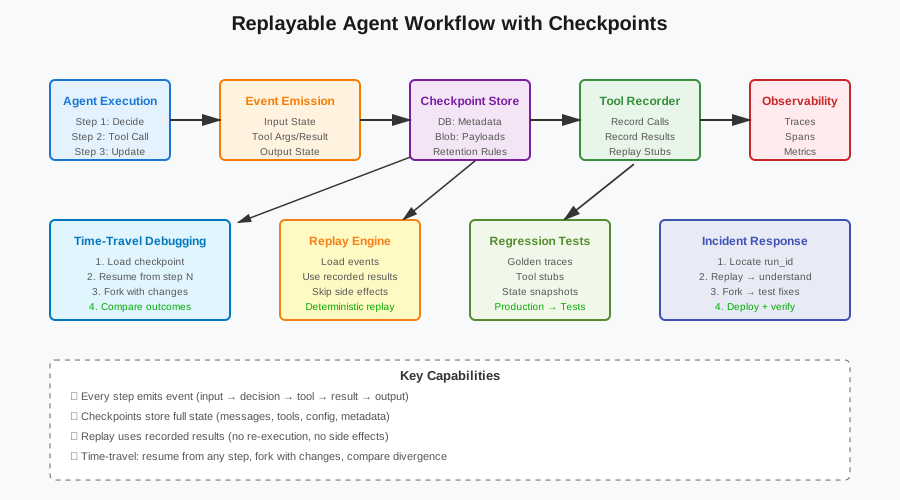
Replayable Agent Workflows: Checkpoints, Time-Travel, and Regression Tests for Tool-Using Agents
Agents fail in production. They make bad tool choices. They get stuck in loops. They produce wrong answers. And when you try to debug them, you can’t reproduce the failure.
This article shows you how to make agents reproducible. You’ll see how to checkpoint every step, replay failed runs, fork from any point, and turn production incidents into regression tests.
The Problem: Agents Are Hard to Debug
Debugging agents is different from debugging normal code. Normal code is deterministic. Same input, same output. Agents are not.
Non-Determinism Everywhere
Agents have multiple sources of randomness:
- Model sampling: Temperature > 0 means different outputs each time
- Tool variability: APIs return different results (weather changes, stock prices move, search results shift)
- Network timing: Retries, timeouts, rate limits
- Concurrent state: Multiple agents or users modifying shared state
# Same prompt, different outputs
response1 = llm.generate("Summarize this doc", temperature=0.7)
response2 = llm.generate("Summarize this doc", temperature=0.7)
# response1 != response2

# Same tool call, different results
weather1 = get_weather("San Francisco")  # "Sunny, 65°F"
weather2 = get_weather("San Francisco")  # "Cloudy, 63°F" (5 minutes later)
You can’t just re-run the agent and expect the same behavior.
Side Effects Make Things Worse
Agents don’t just read. They write. They send emails. They charge credit cards. They commit code. They delete files.
# Dangerous side effects
agent.run("Send reminder emails to all overdue customers")
# - Sends 500 emails
# - Can't undo
# - Can't safely replay

agent.run("Refund the last 10 orders")
# - Charges credit cards
# - Updates database
# - Triggers webhooks
# - Can't replay without real consequences
When debugging, you can’t just replay these operations. You’ll send duplicate emails. You’ll double-charge customers. You’ll corrupt state.
”It Worked Yesterday” Incidents
The worst debugging scenario: it worked yesterday, it fails today, and you can’t figure out why.
Maybe the model changed. Maybe a tool API changed. Maybe the data changed. Maybe it was just random. You don’t know. You can’t reproduce it. You can’t fix it.
# Production incident
run_id = "run_abc123"
# Agent failed at step 7
# Error: "Tool 'search_docs' returned empty results"
# Why? Was the query bad? Did the index break? Was it a network issue?
# Can't tell. Can't replay. Can't debug.
Without reproducibility, you’re guessing. You make a change. You hope it fixes the problem. You deploy. You wait. Maybe it works. Maybe it doesn’t.
Define “Replayable”
A replayable agent emits events for every step. You can replay those events and get the same state transitions.
Every Step Emits an Event
An event captures everything needed to reproduce a step:
- Input state: Messages, variables, context
- Decision: Which tool to call, which branch to take
- Tool call: Tool name, arguments, timestamp
- Tool result: Output, errors, duration
- New state: Updated messages, variables, context
class StepEvent:
    def __init__(
        self,
        step_id: str,
        input_state: dict,
        decision: str,
        tool_name: str,
        tool_args: dict,
        tool_result: dict,
        output_state: dict,
        timestamp: datetime
    ):
        self.step_id = step_id
        self.input_state = input_state
        self.decision = decision
        self.tool_name = tool_name
        self.tool_args = tool_args
        self.tool_result = tool_result
        self.output_state = output_state
        self.timestamp = timestamp
Every step emits one event. The event stream is the complete history of the run.
Replay Means Re-Running the Event Stream
Replay doesn’t mean re-executing the agent. It means re-running the recorded events.
def replay_run(run_id: str):
    """Replay a run from recorded events."""
    events = load_events(run_id)
    state = {}

    for event in events:
        # Restore input state
        state = event.input_state

        # Use recorded tool result (don't re-execute)
        tool_result = event.tool_result

        # Apply state transition
        state = event.output_state

        print(f"Step {event.step_id}: {event.tool_name} -> {tool_result}")

    return state
Replay uses recorded tool results. It doesn’t re-call APIs. It doesn’t re-execute side effects. It just replays the state transitions.
Checkpoint Design
Checkpoints store everything needed to resume or replay a run.
What to Store Per Step
Store these fields for each checkpoint:
- Run metadata: run_id, user_id, start_time, agent_version
- Step metadata: step_id, step_number, timestamp
- Messages: Full conversation history up to this point
- Tool calls: Tool name, arguments, result, duration, errors
- Model config: Model name, temperature, max_tokens, prompt version
- State: All variables, context, flags
class Checkpoint:
    def __init__(
        self,
        run_id: str,
        step_id: str,
        step_number: int,
        timestamp: datetime,
        messages: list[dict],
        tool_calls: list[dict],
        model_config: dict,
        state: dict,
        agent_version: str
    ):
        self.run_id = run_id
        self.step_id = step_id
        self.step_number = step_number
        self.timestamp = timestamp
        self.messages = messages
        self.tool_calls = tool_calls
        self.model_config = model_config
        self.state = state
        self.agent_version = agent_version
Store enough to resume from any step. Store enough to understand what happened. Store enough to debug.
Where to Store: Database + Blob Store
Use a database for metadata and a blob store for large payloads.
class CheckpointStore:
    def __init__(self, db, blob_store):
        self.db = db
        self.blob_store = blob_store

    def save_checkpoint(self, checkpoint: Checkpoint):
        """Save checkpoint to DB + blob store."""
        # Save metadata to DB
        self.db.execute("""
            INSERT INTO checkpoints (
                run_id, step_id, step_number, timestamp, agent_version
            ) VALUES (?, ?, ?, ?, ?)
        """, (
            checkpoint.run_id,
            checkpoint.step_id,
            checkpoint.step_number,
            checkpoint.timestamp,
            checkpoint.agent_version
        ))

        # Save large payloads to blob store
        blob_key = f"{checkpoint.run_id}/{checkpoint.step_id}"
        self.blob_store.put(blob_key, {
            "messages": checkpoint.messages,
            "tool_calls": checkpoint.tool_calls,
            "state": checkpoint.state
        })
def load_checkpoint(self, run_id: str, step_id: str) -> Checkpoint:
"""Load checkpoint from DB + blob store."""
# Load metadata from DB
row = self.db.execute("""
SELECT step_number, timestamp, agent_version
FROM checkpoints
WHERE run_id = ? AND step_id = ?
""", (run_id, step_id)).fetchone()
# Load payloads from blob store
blob_key = f"{run_id}/{step_id}"
blob_data = self.blob_store.get(blob_key)
return Checkpoint(
run_id=run_id,
step_id=step_id,
step_number=row[0],
timestamp=row[1],
messages=blob_data["messages"],
tool_calls=blob_data["tool_calls"],
state=blob_data["state"],
agent_version=row[2],
model_config={}
)
Database for queries. Blob store for large data. Keep them in sync.


### Redaction Boundaries

Don't store secrets or PII in checkpoints. Redact them.

```python
import re

def redact_sensitive_data(data: dict) -> dict:
    """Redact PII and secrets from checkpoint data."""
    redacted = data.copy()

    # Redact API keys
    if "api_key" in redacted:
        redacted["api_key"] = "REDACTED"

    # Redact email addresses
    if "email" in redacted:
        redacted["email"] = re.sub(
            r'[a-zA-Z0-9._%+-]+@[a-zA-Z0-9.-]+\.[a-zA-Z]{2,}',
            'user@REDACTED.com',
            redacted["email"]
        )

    # Redact credit card numbers
    if "credit_card" in redacted:
        redacted["credit_card"] = "XXXX-XXXX-XXXX-XXXX"

    return redacted
Redact before storing. Keep a separate secure store for sensitive data if you need it for debugging.
Retention Rules
Don’t store checkpoints forever. Set retention policies.
RETENTION_POLICIES = {
    "successful_runs": timedelta(days=7),
    "failed_runs": timedelta(days=30),
    "flagged_runs": timedelta(days=90),
    "test_runs": timedelta(days=1)
}

def cleanup_old_checkpoints():
    """Delete checkpoints older than retention policy."""
    for run_type, retention in RETENTION_POLICIES.items():
        cutoff = datetime.now() - retention

        db.execute("""
            DELETE FROM checkpoints
            WHERE run_type = ? AND timestamp < ?
        """, (run_type, cutoff))
Keep failed runs longer. Keep successful runs shorter. Keep test runs shortest.
Determinism Rules That Actually Hold Up
You can’t make agents fully deterministic. But you can make them deterministic enough to replay.
Wrap Side Effects Into Idempotent Tasks
Make side effects idempotent. Same input, same effect (even if called multiple times).
class IdempotentTask:
    def __init__(self, task_id: str):
        self.task_id = task_id
        self.executed = set()

    def execute(self, operation: callable, *args, **kwargs):
        """Execute operation idempotently."""
        # Check if already executed
        op_key = f"{self.task_id}:{operation.__name__}:{args}:{kwargs}"

        if op_key in self.executed:
            print(f"Task {op_key} already executed, skipping")
            return

        # Execute
        result = operation(*args, **kwargs)

        # Mark as executed
        self.executed.add(op_key)

        return result

# Usage
task = IdempotentTask("send_email_task_123")
task.execute(send_email, to="user@example.com", subject="Reminder")
task.execute(send_email, to="user@example.com", subject="Reminder")  # Skipped
Idempotent tasks can be replayed safely. They won’t duplicate side effects.
Separate Read Tools from Write Tools
Read tools are safe to replay. Write tools are dangerous.
class ToolRegistry:
    def __init__(self):
        self.read_tools = {}
        self.write_tools = {}

    def register_read_tool(self, name: str, func: callable):
        """Register a read-only tool."""
        self.read_tools[name] = func

    def register_write_tool(self, name: str, func: callable):
        """Register a write tool (has side effects)."""
        self.write_tools[name] = func

    def is_write_tool(self, name: str) -> bool:
        """Check if tool has side effects."""
        return name in self.write_tools

# Register tools
registry = ToolRegistry()
registry.register_read_tool("search_docs", search_docs)
registry.register_read_tool("get_weather", get_weather)
registry.register_write_tool("send_email", send_email)
registry.register_write_tool("charge_card", charge_card)
When replaying, skip write tools. Use recorded results instead.
Freeze Randomness Where Possible
Use seeds for model sampling. Record tool results for everything else.
def run_agent_with_seed(query: str, seed: int = 42):
    """Run agent with fixed random seed."""
    # Set seed for model
    model_config = {
        "temperature": 0.7,
        "seed": seed  # Some models support this
    }

    # Run agent
    response = llm.generate(query, **model_config)
    return response

# Same seed, same output (if model supports it)
response1 = run_agent_with_seed("Summarize this", seed=42)
response2 = run_agent_with_seed("Summarize this", seed=42)
# response1 == response2 (hopefully)
Not all models support seeds. For those that don’t, record the actual output and replay it.
class RecordedTool:
    def __init__(self, tool_func: callable, recorder):
        self.tool_func = tool_func
        self.recorder = recorder

    def __call__(self, *args, **kwargs):
        """Call tool and record result."""
        result = self.tool_func(*args, **kwargs)
        self.recorder.record(self.tool_func.__name__, args, kwargs, result)
        return result
Record everything that’s non-deterministic. Replay from recordings.
Time-Travel Debugging
Time-travel debugging lets you resume from any checkpoint, fork the run, and compare outcomes.
Resume from Checkpoint
Load a checkpoint and continue from there.
def resume_from_checkpoint(run_id: str, step_id: str):
    """Resume agent execution from a checkpoint."""
    # Load checkpoint
    checkpoint = checkpoint_store.load_checkpoint(run_id, step_id)

    # Restore state
    state = checkpoint.state
    messages = checkpoint.messages

    # Continue execution
    agent = Agent(state=state, messages=messages)
    result = agent.run()

    return result

# Resume from step 5
result = resume_from_checkpoint("run_abc123", "step_5")
This lets you continue a failed run. Fix the issue. Resume. See if it works.
Fork the Run with Modified State
Load a checkpoint, modify the state, and continue. See what happens.
def fork_run(run_id: str, step_id: str, state_modifications: dict):
    """Fork a run with modified state."""
    # Load checkpoint
    checkpoint = checkpoint_store.load_checkpoint(run_id, step_id)

    # Apply modifications
    state = checkpoint.state.copy()
    state.update(state_modifications)

    # Create new run ID for fork
    fork_run_id = f"{run_id}_fork_{uuid.uuid4().hex[:8]}"

    # Continue with modified state
    agent = Agent(state=state, messages=checkpoint.messages)
    result = agent.run(run_id=fork_run_id)

    return fork_run_id, result

# Fork and remove a document from context
fork_id, result = fork_run(
    "run_abc123",
    "step_5",
    {"retrieved_docs": []}  # Remove docs
)
Forking lets you test “what if” scenarios. What if we removed this doc? What if we changed this parameter? What if we used a different tool?
Compare Forks: Where Did They Diverge?
Run two forks and compare where they diverged.
def compare_runs(run_id_1: str, run_id_2: str):
    """Compare two runs and find where they diverged."""
    events_1 = load_events(run_id_1)
    events_2 = load_events(run_id_2)

    divergence_point = None

    for i, (e1, e2) in enumerate(zip(events_1, events_2)):
        if e1.tool_name != e2.tool_name or e1.tool_args != e2.tool_args:
            divergence_point = i
            break

    if divergence_point is None:
        print("Runs are identical")
        return

    print(f"Runs diverged at step {divergence_point}")
    print(f"Run 1: {events_1[divergence_point].tool_name}({events_1[divergence_point].tool_args})")
    print(f"Run 2: {events_2[divergence_point].tool_name}({events_2[divergence_point].tool_args})")

    return divergence_point

# Compare original and fork
compare_runs("run_abc123", "run_abc123_fork_a1b2c3d4")
This shows you exactly where behavior changed. Which tool choice was different. Which argument was different. Why the outcome changed.
Turn Production Runs Into Regression Tests
The best test cases come from production. Real failures. Real edge cases. Real user queries.
Golden Traces: Store Real “Bad” Runs
When a run fails or produces a bad result, save it as a golden trace.
class GoldenTrace:
    def __init__(self, run_id: str, description: str, expected_outcome: str):
        self.run_id = run_id
        self.description = description
        self.expected_outcome = expected_outcome

    def save(self):
        """Save golden trace for regression testing."""
        db.execute("""
            INSERT INTO golden_traces (run_id, description, expected_outcome)
            VALUES (?, ?, ?)
        """, (self.run_id, self.description, self.expected_outcome))

# Save a bad run
trace = GoldenTrace(
    run_id="run_abc123",
    description="Agent got stuck in loop when docs were empty",
    expected_outcome="Should refuse and say 'no docs found'"
)
trace.save()
Golden traces become regression tests. Every time you change the agent, replay the golden traces. Make sure they pass.
Record/Replay Tool Stubs
Record tool calls during production. Replay them in tests.
class ToolRecorder:
    def __init__(self):
        self.recordings = []

    def record(self, tool_name: str, args: dict, result: dict):
        """Record a tool call."""
        self.recordings.append({
            "tool_name": tool_name,
            "args": args,
            "result": result
        })

    def save(self, run_id: str):
        """Save recordings to file."""
        with open(f"recordings/{run_id}.json", "w") as f:
            json.dump(self.recordings, f)

class ToolReplayer:
    def __init__(self, run_id: str):
        with open(f"recordings/{run_id}.json", "r") as f:
            self.recordings = json.load(f)
        self.index = 0

    def replay(self, tool_name: str, args: dict) -> dict:
        """Replay a recorded tool call."""
        recording = self.recordings[self.index]
        self.index += 1

        # Verify tool name and args match
        assert recording["tool_name"] == tool_name
        assert recording["args"] == args

        return recording["result"]
In tests, use the replayer instead of real tools. Tests run fast. Tests are deterministic. Tests don’t hit real APIs.
Snapshot Tests for Intermediate States
Test intermediate states, not just final answers.
def test_agent_intermediate_states():
    """Test that agent reaches expected intermediate states."""
    # Replay run
    events = load_events("run_abc123")

    # Check state at step 3
    assert events[2].output_state["retrieved_docs_count"] == 5

    # Check state at step 5
    assert events[4].output_state["selected_tool"] == "summarize"

    # Check final state
    assert events[-1].output_state["answer_length"] > 100
Snapshot tests catch regressions in intermediate behavior. Not just final output.
Add Observability That’s Worth Keeping
Emit traces, logs, and metrics that help you debug.
Traces for Every Run
Create a trace per run. Add spans for each step and tool call.
from opentelemetry import trace
from opentelemetry.sdk.trace import TracerProvider
from opentelemetry.sdk.trace.export import ConsoleSpanExporter, BatchSpanProcessor

# Setup tracer
trace.set_tracer_provider(TracerProvider())
tracer = trace.get_tracer(__name__)

def run_agent_with_tracing(query: str, run_id: str):
    """Run agent with OpenTelemetry tracing."""
    with tracer.start_as_current_span("agent_run") as run_span:
        run_span.set_attribute("run_id", run_id)
        run_span.set_attribute("query", query)

        # Step 1: Retrieve docs
        with tracer.start_as_current_span("retrieve_docs") as step_span:
            step_span.set_attribute("step_number", 1)
            docs = retrieve_docs(query)
            step_span.set_attribute("docs_count", len(docs))

        # Step 2: Rerank
        with tracer.start_as_current_span("rerank") as step_span:
            step_span.set_attribute("step_number", 2)
            ranked_docs = rerank(docs, query)

        # Step 3: Generate
        with tracer.start_as_current_span("generate") as step_span:
            step_span.set_attribute("step_number", 3)
            answer = generate(ranked_docs, query)
            step_span.set_attribute("answer_length", len(answer))

        return answer
Traces show you the full execution path. Which steps ran. How long they took. What attributes they had.
Emit Spans for Tool Calls, Retries, Errors
Add spans for tool calls. Track latency, errors, retries.
def call_tool_with_tracing(tool_name: str, args: dict):
    """Call tool with tracing."""
    with tracer.start_as_current_span(f"tool_{tool_name}") as span:
        span.set_attribute("tool_name", tool_name)
        span.set_attribute("args", json.dumps(args))

        start_time = time.time()

        try:
            result = call_tool(tool_name, args)
            span.set_attribute("success", True)
            span.set_attribute("result_size", len(str(result)))
            return result
        except Exception as e:
            span.set_attribute("success", False)
            span.set_attribute("error", str(e))
            span.record_exception(e)
            raise
        finally:
            duration = time.time() - start_time
            span.set_attribute("duration_ms", duration * 1000)
Tool spans show you which tools were slow. Which tools failed. Which tools were retried.
Align to GenAI Semantic Conventions
Use OpenTelemetry semantic conventions for GenAI.
# GenAI semantic conventions
GENAI_SYSTEM = "gen_ai.system"  # e.g. "openai"
GENAI_REQUEST_MODEL = "gen_ai.request.model"  # e.g. "gpt-4"
GENAI_REQUEST_TEMPERATURE = "gen_ai.request.temperature"
GENAI_REQUEST_MAX_TOKENS = "gen_ai.request.max_tokens"
GENAI_RESPONSE_FINISH_REASON = "gen_ai.response.finish_reasons"
GENAI_USAGE_INPUT_TOKENS = "gen_ai.usage.input_tokens"
GENAI_USAGE_OUTPUT_TOKENS = "gen_ai.usage.output_tokens"

def call_llm_with_tracing(prompt: str, model: str, temperature: float):
    """Call LLM with GenAI semantic conventions."""
    with tracer.start_as_current_span("llm_call") as span:
        span.set_attribute(GENAI_SYSTEM, "openai")
        span.set_attribute(GENAI_REQUEST_MODEL, model)
        span.set_attribute(GENAI_REQUEST_TEMPERATURE, temperature)
        span.set_attribute(GENAI_REQUEST_MAX_TOKENS, 1000)

        response = llm.generate(prompt, model=model, temperature=temperature)

        span.set_attribute(GENAI_RESPONSE_FINISH_REASON, response.finish_reason)
        span.set_attribute(GENAI_USAGE_INPUT_TOKENS, response.usage.input_tokens)
        span.set_attribute(GENAI_USAGE_OUTPUT_TOKENS, response.usage.output_tokens)

        return response.text
Semantic conventions make traces portable. Tools can parse them. Dashboards can visualize them. Alerts can trigger on them.
Operational Checklist
Here’s how to use this in production.
Incident Workflow
When an incident happens:
- Locate the run: Find the run_id from logs or user report
- Replay the run: See what happened step by step
- Fork from the failure point: Try different fixes
- Compare forks: See which fix works
- Add regression test: Save the run as a golden trace
- Deploy the fix: Update prompt, tool, or policy
- Verify: Replay the golden trace, confirm it passes
def handle_incident(run_id: str):
    """Handle a production incident."""
    # 1. Replay
    print("Replaying run...")
    replay_run(run_id)

    # 2. Fork with fix
    print("Forking with fix...")
    fork_id, result = fork_run(run_id, "step_5", {"max_retries": 3})

    # 3. Compare
    print("Comparing runs...")
    compare_runs(run_id, fork_id)

    # 4. Save as golden trace
    print("Saving golden trace...")
    trace = GoldenTrace(run_id, "Incident XYZ", "Should succeed")
    trace.save()

    print("Incident handled")
Cost Controls
Checkpoints cost money. Storage costs. Query costs. Set limits.
# Sampling: Only checkpoint 10% of successful runs
def should_checkpoint(run_id: str, success: bool) -> bool:
    """Decide if we should checkpoint this run."""
    if not success:
        return True  # Always checkpoint failures

    # Sample 10% of successes
    return hash(run_id) % 10 == 0

# Compression: Compress large payloads
import gzip

def compress_checkpoint(checkpoint: Checkpoint) -> bytes:
    """Compress checkpoint data."""
    data = json.dumps({
        "messages": checkpoint.messages,
        "state": checkpoint.state
    })
    return gzip.compress(data.encode())

# Store only deltas
def store_delta(prev_checkpoint: Checkpoint, curr_checkpoint: Checkpoint):
    """Store only what changed."""
    delta = {
        "added_messages": curr_checkpoint.messages[len(prev_checkpoint.messages):],
        "state_changes": {
            k: v for k, v in curr_checkpoint.state.items()
            if prev_checkpoint.state.get(k) != v
        }
    }
    return delta
Sample. Compress. Store deltas. Keep costs down.
Real Incident Walkthrough
Here’s a real example. An agent got stuck in a loop. Let’s debug it.
The Incident
User reports: “Agent keeps searching the same docs over and over. Never gives an answer.”
Run ID: run_xyz789
Step 1: Replay the Run
events = load_events("run_xyz789")

for i, event in enumerate(events):
    print(f"Step {i}: {event.tool_name}({event.tool_args})")

# Output:
# Step 0: search_docs({"query": "refund policy"})
# Step 1: search_docs({"query": "refund policy"})
# Step 2: search_docs({"query": "refund policy"})
# Step 3: search_docs({"query": "refund policy"})
# ...
# (repeats 20 times, then times out)
The agent is stuck in a loop. It keeps calling search_docs with the same query.
Step 2: Inspect the Tool Results
# Check what search_docs returned
for event in events[:5]:
    print(f"Tool result: {event.tool_result}")

# Output:
# Tool result: {"docs": [], "count": 0}
# Tool result: {"docs": [], "count": 0}
# Tool result: {"docs": [], "count": 0}
# ...
The tool returns empty results every time. The agent doesn’t know how to handle empty results. It just retries.
Step 3: Fork with a Fix
The fix: Add a check for empty results. If empty, refuse instead of retrying.
# Fork from step 1 with modified agent logic
fork_id, result = fork_run(
    "run_xyz789",
    "step_1",
    {"agent_version": "v2_with_empty_check"}
)

# Check fork result
fork_events = load_events(fork_id)
print(f"Fork completed in {len(fork_events)} steps")
print(f"Final answer: {fork_events[-1].output_state['answer']}")

# Output:
# Fork completed in 2 steps
# Final answer: "I don't have any documents about refund policy. Please check with support."
The fork works. The agent refuses when docs are empty. No loop.
Step 4: Add Regression Test
def test_empty_docs_no_loop():
    """Test that agent doesn't loop when docs are empty."""
    # Replay the original bad run
    events = load_events("run_xyz789")

    # Should not have more than 3 search attempts
    search_count = sum(1 for e in events if e.tool_name == "search_docs")
    assert search_count <= 3, f"Agent looped {search_count} times"

    # Should refuse when docs are empty
    final_answer = events[-1].output_state.get("answer", "")
    assert "don't have" in final_answer.lower() or "no documents" in final_answer.lower()

# Run test
test_empty_docs_no_loop()
The test fails on the old version. It passes on the new version. Perfect.
Step 5: Deploy and Verify
Deploy the fix. Replay the golden trace. Confirm it passes.
# Deploy v2
deploy_agent_version("v2_with_empty_check")

# Replay golden trace
replay_run("run_xyz789")

# Verify it doesn't loop
events = load_events("run_xyz789_replay")
assert len(events) <= 3
Fixed. Tested. Deployed. Verified. Done.
Code Samples
The code repository includes six runnable examples:
- Minimal Agent Graph: Agent with step boundaries that emit events
- Checkpoint Store: Interface + SQLite implementation
- Record/Replay Tool Wrapper: Records tool calls, replays from fixtures
- Time-Travel Runner: Resume from checkpoint, fork state, continue
- Pytest Regression Harness: Replays known-bad runs, asserts tool sequence and state
- OpenTelemetry Instrumentation: Traces per run, spans per step/tool
See the GitHub repository for complete, runnable code.
Summary
Agents are hard to debug because they’re non-deterministic and have side effects. You can’t just re-run them and expect the same behavior.
Make agents replayable by:
- Emitting events for every step
- Storing checkpoints with full state
- Recording tool results
- Making side effects idempotent
- Separating read tools from write tools
Use time-travel debugging to:
- Resume from any checkpoint
- Fork runs with modified state
- Compare where runs diverged
Turn production incidents into regression tests by:
- Saving failed runs as golden traces
- Recording tool calls for replay
- Testing intermediate states, not just final output
Add observability with:
- OpenTelemetry traces per run
- Spans for steps, tools, retries, errors
- GenAI semantic conventions
When an incident happens: locate the run, replay it, fork with fixes, compare outcomes, add a regression test, deploy, and verify.
Replayable agents are debuggable agents. Debuggable agents are fixable agents. Fixable agents are reliable agents.
Start by adding checkpoints. Record tool results. Build replay capability. Your future self will thank you.
Discussion
Loading comments...