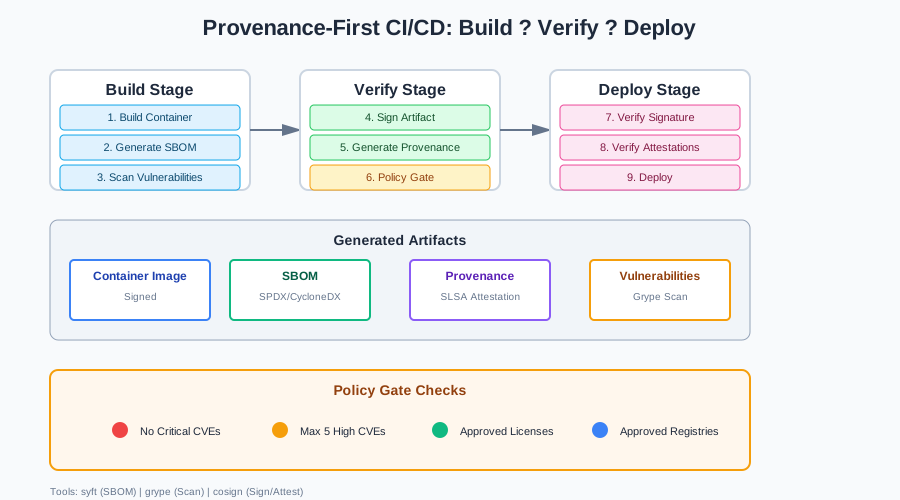
Provenance-First CI/CD: Add SLSA-style attestations + SBOM checks to one GitHub Actions pipeline
A lot of breaches aren’t “app bugs.” They’re compromised dependencies. Poisoned build steps. Untrusted artifacts moving through CI/CD.
Teams are reacting by treating provenance, signing, and SBOM validation as pipeline gates. Not “nice to have.” Mandatory checks that block releases.
This article shows how to take one real repo and ship artifacts only when:
- the build produces a provenance attestation
- the artifact is signed
- the SBOM passes a policy gate (no critical CVEs, only approved licenses, only approved registries)
The problem in plain terms
We trust artifacts we did not verify.
Here’s where it goes wrong:
Dependency confusion: An attacker publishes a package with a name similar to your internal package. Your build pulls the malicious version. The artifact contains backdoors. You ship it.
Compromised CI runners: A CI runner gets compromised. The attacker modifies build steps. They inject malicious code into your artifacts. You sign and ship the tampered artifact.
Tampered base images: Your Dockerfile uses a base image. The image gets compromised upstream. Your build uses the compromised image. You ship a container with vulnerabilities.
Untrusted sources: Your build pulls dependencies from public registries. Some registries aren’t verified. You pull a dependency from an untrusted source. It contains malware.
The common thread: we build artifacts without verifying where they came from, who built them, or what’s inside.
Provenance fixes this. It tells you who built it, from what source, using what steps. SBOM tells you what’s inside. Signing provides tamper evidence.
What “provenance-first” means
Provenance is metadata about how an artifact was built. It answers three questions:
- Who built it? The build system identity (CI runner, GitHub Actions, etc.)
- From what source? The source code commit, branch, repository
- Using what steps? The build commands, dependencies, environment
SLSA (Supply-chain Levels for Software Artifacts) defines a standard format for provenance. It’s a JSON document that includes:
- Builder identity
- Source code location and commit
- Build steps and commands
- Build environment details
- Output artifacts
SBOM (Software Bill of Materials) is a list of all dependencies in your artifact. It includes:
- Direct dependencies (what you explicitly use)
- Transitive dependencies (what your dependencies use)
- Package names, versions, licenses
- Vulnerability information (if scanned)
Signing provides cryptographic proof that an artifact hasn’t been tampered with. You sign the artifact with a private key. Consumers verify it with your public key. If the signature doesn’t match, the artifact was modified.
Pipeline design: the 3 gates
A provenance-first pipeline has three gates:
Gate A: Generate SBOM
Before building, generate an SBOM. This lists all dependencies. Use tools like syft (for containers) or cyclonedx (for other artifacts).
The SBOM becomes part of your build output. You’ll use it later for policy checks.
Gate B: Generate provenance attestation
After building, generate a provenance attestation. This documents who built it, from what source, using what steps.
Use slsa-provenance or cosign attest to generate SLSA-compliant attestations. Store them alongside your artifacts.
Gate C: Verify policy before release
Before releasing, verify the SBOM against your policy:
- No critical CVEs
- Only approved licenses
- Only approved registries
- No known malicious packages
If the policy fails, block the release. Don’t ship artifacts that don’t meet your security standards.
These gates are sequential. You can’t skip steps. Each gate must pass before moving to the next.
Hands-on: GitHub Actions implementation
Let’s build a complete pipeline. We’ll use:
syftfor SBOM generationgrypefor vulnerability scanningcosignfor signing and attestations- A policy gate script to enforce rules
Workflow overview
Here’s the complete workflow:
name: Build and Verify

on:
  push:
    branches: [main]
  pull_request:
    branches: [main]

env:
  REGISTRY: ghcr.io
  IMAGE_NAME: ${{ github.repository }}

jobs:
  build:
    runs-on: ubuntu-latest
    permissions:
      contents: write
      id-token: write
      attestations: write
      packages: write

    steps:
      - name: Checkout
        uses: actions/checkout@v4
        with:
          fetch-depth: 0

      - name: Set up Docker Buildx
        uses: docker/setup-buildx-action@v3

      - name: Log in to Container Registry
        uses: docker/login-action@v3
        with:
          registry: ${{ env.REGISTRY }}
          username: ${{ github.actor }}
          password: ${{ secrets.GITHUB_TOKEN }}

      - name: Build container image
        uses: docker/build-push-action@v5
        with:
          context: .
          push: true
          tags: ${{ env.REGISTRY }}/${{ env.IMAGE_NAME }}:${{ github.sha }}
          cache-from: type=gha
          cache-to: type=gha,mode=max

      - name: Install syft
        uses: anchore/sbom-action/download-syft@v0
        with:
          syft-version: v1.0.0

      - name: Generate SBOM
        run: |
          syft packages ${{ env.REGISTRY }}/${{ env.IMAGE_NAME }}:${{ github.sha }} \
            -o spdx-json \
            -o cyclonedx-json \
            --file sbom.spdx.json

      - name: Scan SBOM for vulnerabilities
        run: |
          grype sbom:sbom.spdx.json \
            --output json \
            --file vulnerabilities.json

      - name: Install cosign
        uses: sigstore/cosign-installer@v3

      - name: Sign container image
        run: |
          cosign sign --yes \
            ${{ env.REGISTRY }}/${{ env.IMAGE_NAME }}:${{ github.sha }}

      - name: Generate provenance attestation
        uses: actions/attest-build-provenance@v1
        with:
          subject-name: ${{ env.REGISTRY }}/${{ env.IMAGE_NAME }}
          subject-digest: ${{ github.sha }}
          push-to-registry: true

      - name: Attach SBOM to image
        run: |
          cosign attest --yes \
            --predicate sbom.spdx.json \
            --type spdx \
            ${{ env.REGISTRY }}/${{ env.IMAGE_NAME }}:${{ github.sha }}

      - name: Verify policy gate
        run: |
          chmod +x scripts/policy-gate.sh
          ./scripts/policy-gate.sh vulnerabilities.json

      - name: Upload artifacts
        uses: actions/upload-artifact@v4
        with:
          name: sbom
          path: sbom.spdx.json

      - name: Upload vulnerabilities
        uses: actions/upload-artifact@v4
        with:
          name: vulnerabilities
          path: vulnerabilities.json
This workflow:
- Builds a container image
- Generates an SBOM using
syft - Scans the SBOM for vulnerabilities using
grype - Signs the image using
cosign - Generates a provenance attestation
- Attaches the SBOM as an attestation
- Verifies the policy gate
- Uploads artifacts for review
Build container image
The build step uses Docker Buildx. It builds and pushes the image to GitHub Container Registry.
- name: Build container image
  uses: docker/build-push-action@v5
  with:
    context: .
    push: true
    tags: ${{ env.REGISTRY }}/${{ env.IMAGE_NAME }}:${{ github.sha }}
    cache-from: type=gha
    cache-to: type=gha,mode=max
The image is tagged with the commit SHA. This makes it traceable to a specific commit.
Generate SBOM
Use syft to generate an SBOM. It supports multiple formats. We’ll use SPDX (industry standard) and CycloneDX.
syft packages ${{ env.REGISTRY }}/${{ env.IMAGE_NAME }}:${{ github.sha }} \
  -o spdx-json \
  -o cyclonedx-json \
  --file sbom.spdx.json
This generates an SBOM that lists all packages in the container image. It includes:
- Package names and versions
- Package locations (which layer)
- Package licenses
- Package types (npm, pip, apk, etc.)
Scan SBOM or image
Use grype to scan the SBOM for vulnerabilities. It matches packages against vulnerability databases.
grype sbom:sbom.spdx.json \
  --output json \
  --file vulnerabilities.json
This produces a JSON file with:
- Vulnerable packages
- CVE IDs
- Severity levels (critical, high, medium, low)
- Fix versions (if available)
You can also scan the image directly:
grype ${{ env.REGISTRY }}/${{ env.IMAGE_NAME }}:${{ github.sha }} \
  --output json \
  --file vulnerabilities.json
Scanning the SBOM is faster. Scanning the image gives you more detail.
Sign artifact
Use cosign to sign the image. Cosign uses keyless signing with GitHub Actions OIDC by default.
cosign sign --yes \
  ${{ env.REGISTRY }}/${{ env.IMAGE_NAME }}:${{ github.sha }}
This creates a signature that proves:
- The image came from your CI/CD pipeline
- The image hasn’t been tampered with
- The image is authentic
The signature is stored in the registry alongside the image.
Store provenance/attestation as build output
Generate a provenance attestation using GitHub Actions’ built-in action:
- name: Generate provenance attestation
  uses: actions/attest-build-provenance@v1
  with:
    subject-name: ${{ env.REGISTRY }}/${{ env.IMAGE_NAME }}
    subject-digest: ${{ github.sha }}
    push-to-registry: true
This generates a SLSA-compliant provenance attestation. It includes:
- Builder identity (GitHub Actions)
- Source code location (repository, commit)
- Build steps (workflow file, job name)
- Build environment (runner OS, architecture)
Attach the SBOM as an attestation:
cosign attest --yes \
  --predicate sbom.spdx.json \
  --type spdx \
  ${{ env.REGISTRY }}/${{ env.IMAGE_NAME }}:${{ github.sha }}
This attaches the SBOM to the image. Consumers can verify both the image and the SBOM.
Verification at deploy time
At deploy time, verify signatures and attestations before deploying.
Verify signature
cosign verify \
  --certificate-identity-regexp "https://github.com/your-org/.*" \
  --certificate-oidc-issuer "https://token.actions.githubusercontent.com" \
  ${{ env.REGISTRY }}/${{ env.IMAGE_NAME }}:${{ github.sha }}
This verifies:
- The signature is valid
- The signature came from your GitHub Actions workflow
- The image hasn’t been tampered with
Verify attestations
cosign verify-attestation \
  --type spdx \
  --certificate-identity-regexp "https://github.com/your-org/.*" \
  --certificate-oidc-issuer "https://token.actions.githubusercontent.com" \
  ${{ env.REGISTRY }}/${{ env.IMAGE_NAME }}:${{ github.sha }}
This verifies:
- The SBOM attestation is valid
- The SBOM came from your GitHub Actions workflow
- The SBOM hasn’t been tampered with
”Fail closed” patterns
Always verify before deploying. If verification fails, don’t deploy.
#!/bin/bash
set -e

IMAGE="$1"

# Verify signature
if ! cosign verify "$IMAGE"; then
  echo "ERROR: Signature verification failed"
  exit 1
fi

# Verify SBOM attestation
if ! cosign verify-attestation --type spdx "$IMAGE"; then
  echo "ERROR: SBOM attestation verification failed"
  exit 1
fi

# Extract and verify SBOM policy
SBOM=$(cosign download attestation --type spdx "$IMAGE" | jq -r '.payload' | base64 -d | jq -r '.predicate')
if ! ./scripts/verify-sbom-policy.sh "$SBOM"; then
  echo "ERROR: SBOM policy check failed"
  exit 1
fi

echo "All verifications passed"
This script:
- Verifies the signature
- Verifies the SBOM attestation
- Extracts the SBOM
- Verifies the SBOM against your policy
- Fails if any check fails
Never deploy without verification. Fail closed.
Operational notes
Key management choices
Keyless signing (recommended for GitHub Actions):
- Uses OIDC tokens from GitHub Actions
- No key management required
- Automatic key rotation
- Works with GitHub Container Registry
Managed keys (for other CI systems):
- Use a key management service (KMS)
- Store private keys securely
- Rotate keys regularly
- Use hardware security modules (HSM) for high-security environments
For GitHub Actions, keyless signing is simpler. For other CI systems, use managed keys.
Handling exceptions
Sometimes you need to deploy with known issues. Handle exceptions with time-boxed waivers.
#!/bin/bash
# scripts/waiver-request.sh

CVE_ID="$1"
REASON="$2"
EXPIRY_DAYS="$3"

# Create waiver request
cat > "waivers/${CVE_ID}.json" <<EOF
{
  "cve_id": "$CVE_ID",
  "reason": "$REASON",
  "requested_by": "$USER",
  "requested_at": "$(date -u +%Y-%m-%dT%H:%M:%SZ)",
  "expires_at": "$(date -u -d "+${EXPIRY_DAYS} days" +%Y-%m-%dT%H:%M:%SZ)",
  "approved": false
}
EOF

# Submit for approval (in production, this would create a ticket)
echo "Waiver request created: waivers/${CVE_ID}.json"
echo "Submit for approval via your ticketing system"
Waivers should:
- Require approval from security team
- Have expiration dates
- Be audited
- Be time-boxed (no permanent waivers)
Audit trail
Log all policy decisions:
#!/bin/bash
# scripts/policy-gate.sh

VULN_FILE="$1"
LOG_FILE="policy-decisions.log"

# Check policy
if ./scripts/check-policy.sh "$VULN_FILE"; then
  DECISION="ALLOW"
else
  DECISION="DENY"
fi

# Log decision
cat >> "$LOG_FILE" <<EOF
$(date -u +%Y-%m-%dT%H:%M:%SZ) | $DECISION | $GITHUB_SHA | $GITHUB_WORKFLOW | $GITHUB_RUN_ID
EOF

if [ "$DECISION" = "DENY" ]; then
  exit 1
fi
This creates an audit trail of all policy decisions. You can use it for compliance and debugging.
What to measure
Track these metrics:
% releases with verified provenance: How many releases have provenance attestations? Target: 100%.
Mean time to patch critical dependency issues: How long does it take to patch critical CVEs? Target: < 7 days.
Policy gate failure rate: How often do policy gates fail? And why?
#!/bin/bash
# scripts/metrics.sh

# Count releases with provenance
TOTAL_RELEASES=$(gh release list --limit 100 | wc -l)
RELEASES_WITH_PROVENANCE=$(gh release list --limit 100 | grep -c "provenance" || echo "0")
PROVENANCE_RATE=$(echo "scale=2; $RELEASES_WITH_PROVENANCE / $TOTAL_RELEASES * 100" | bc)

echo "Releases with provenance: ${PROVENANCE_RATE}%"

# Count policy gate failures
FAILURES=$(grep -c "DENY" policy-decisions.log || echo "0")
TOTAL=$(wc -l < policy-decisions.log || echo "0")
FAILURE_RATE=$(echo "scale=2; $FAILURES / $TOTAL * 100" | bc)

echo "Policy gate failure rate: ${FAILURE_RATE}%"
These metrics show:
- Are you consistently generating provenance?
- Are policy gates working?
- Are you shipping secure artifacts?
Code samples
The GitHub repository includes:
- Complete GitHub Actions workflow: Build, SBOM generation, scanning, signing, attestation, policy gate
- Policy gate script: Bash script that fails builds on CVE thresholds
- SBOM verification script: Verifies SBOM at deploy time
- Waiver management: Scripts for handling exceptions
- Metrics collection: Scripts for tracking metrics
See the GitHub repository for complete, runnable code.
Policy gate script
Here’s a minimal policy gate script:
#!/bin/bash
# scripts/policy-gate.sh

set -e

VULN_FILE="$1"

if [ -z "$VULN_FILE" ]; then
  echo "Usage: $0 <vulnerabilities.json>"
  exit 1
fi

# Thresholds
MAX_CRITICAL=0
MAX_HIGH=5
MAX_MEDIUM=20

# Count vulnerabilities
CRITICAL=$(jq '[.matches[] | select(.vulnerability.severity == "Critical")] | length' "$VULN_FILE")
HIGH=$(jq '[.matches[] | select(.vulnerability.severity == "High")] | length' "$VULN_FILE")
MEDIUM=$(jq '[.matches[] | select(.vulnerability.severity == "Medium")] | length' "$VULN_FILE")

echo "Vulnerability summary:"
echo "  Critical: $CRITICAL (max: $MAX_CRITICAL)"
echo "  High: $HIGH (max: $MAX_HIGH)"
echo "  Medium: $MEDIUM (max: $MAX_MEDIUM)"

# Check thresholds
FAILED=0

if [ "$CRITICAL" -gt "$MAX_CRITICAL" ]; then
  echo "ERROR: Critical vulnerabilities exceed threshold ($CRITICAL > $MAX_CRITICAL)"
  FAILED=1
fi

if [ "$HIGH" -gt "$MAX_HIGH" ]; then
  echo "ERROR: High vulnerabilities exceed threshold ($HIGH > $MAX_HIGH)"
  FAILED=1
fi

if [ "$MEDIUM" -gt "$MAX_MEDIUM" ]; then
  echo "ERROR: Medium vulnerabilities exceed threshold ($MEDIUM > $MAX_MEDIUM)"
  FAILED=1
fi

if [ "$FAILED" -eq 1 ]; then
  echo ""
  echo "Policy gate failed. Blocking release."
  echo "Review vulnerabilities: $VULN_FILE"
  exit 1
fi

echo "Policy gate passed."
This script:
- Reads vulnerability JSON from
grype - Counts vulnerabilities by severity
- Checks against thresholds
- Fails the build if thresholds are exceeded
Deploy-stage verification
Here’s a deploy-stage verification snippet:
# .github/workflows/deploy.yml
name: Deploy

on:
  workflow_dispatch:
    inputs:
      image_tag:
        required: true

jobs:
  verify-and-deploy:
    runs-on: ubuntu-latest
    steps:
      - name: Install cosign
        uses: sigstore/cosign-installer@v3

      - name: Verify signature
        run: |
          cosign verify \
            --certificate-identity-regexp "https://github.com/${{ github.repository }}.*" \
            --certificate-oidc-issuer "https://token.actions.githubusercontent.com" \
            ${{ env.REGISTRY }}/${{ env.IMAGE_NAME }}:${{ inputs.image_tag }}

      - name: Verify SBOM attestation
        run: |
          cosign verify-attestation \
            --type spdx \
            --certificate-identity-regexp "https://github.com/${{ github.repository }}.*" \
            --certificate-oidc-issuer "https://token.actions.githubusercontent.com" \
            ${{ env.REGISTRY }}/${{ env.IMAGE_NAME }}:${{ inputs.image_tag }}

      - name: Extract and verify SBOM policy
        run: |
          SBOM=$(cosign download attestation --type spdx \
            ${{ env.REGISTRY }}/${{ env.IMAGE_NAME }}:${{ inputs.image_tag }} | \
            jq -r '.payload' | base64 -d | jq -r '.predicate')
          echo "$SBOM" > sbom.json
          ./scripts/verify-sbom-policy.sh sbom.json

      - name: Deploy
        run: |
          # Your deployment logic here
          echo "Deploying ${{ inputs.image_tag }}"
This workflow:
- Verifies the signature
- Verifies the SBOM attestation
- Extracts and verifies the SBOM policy
- Deploys only if all checks pass
Summary
Most breaches aren’t app bugs. They’re supply chain issues. Compromised dependencies. Poisoned builds. Untrusted artifacts.
Provenance-first CI/CD fixes this. It adds three gates:
- Generate SBOM (what’s inside)
- Generate provenance attestation (who built it, from what source)
- Verify policy (no critical CVEs, approved licenses, approved registries)
The approach is simple:
- Build your artifact
- Generate SBOM and scan for vulnerabilities
- Sign the artifact
- Generate provenance attestation
- Attach SBOM as attestation
- Verify policy gate
- At deploy time, verify signatures and attestations
Start with basic SBOM generation. Add signing. Add provenance. Add policy gates. Iterate.
You don’t need a giant platform. GitHub Actions + syft + grype + cosign get you 80% of the way. The rest is policy and process.
Provenance makes artifacts verifiable. It makes supply chains auditable. It makes breaches preventable.
Start adding provenance to your pipeline. Your security team will thank you.
Discussion
Loading comments...