Agent Observability That Matters: OpenTelemetry Traces for Tool Calls, Decisions, and Evals
Teams are deploying agents in production. But they’re hitting a wall: they can’t see what agents actually did.
Logs show events. They don’t show causality. An agent makes 15 tool calls, 3 LLM requests, and 2 planning steps. Which call caused the failure? Why did it retry that tool? How long did each step take?
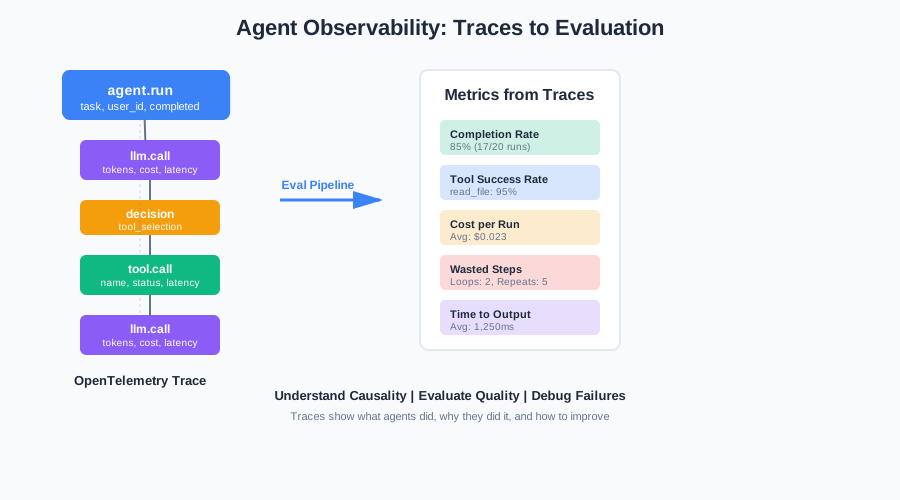
This article shows how to instrument agents with OpenTelemetry traces. Model LLM calls, tool calls, and decisions as spans. Attach attributes for evaluation. Build a lightweight eval pipeline from traces. No giant platform required.
Why “Logs” Aren’t Enough for Agents
Logs are events. Agents are workflows.
When an agent runs, it executes a sequence of steps. Each step depends on previous steps. Tool calls depend on LLM outputs. Decisions depend on tool results. Planning steps depend on context.
Logs show you what happened. They don’t show you why it happened or how steps connect.
The Causality Problem
Here’s what logs look like:
2026-01-19 10:23:45 INFO Agent started task: analyze_repo
2026-01-19 10:23:46 INFO LLM call: gpt-4, tokens: 150
2026-01-19 10:23:47 INFO Tool call: read_file, path: src/main.py
2026-01-19 10:23:48 INFO Tool call: read_file, path: tests/test_main.py
2026-01-19 10:23:50 INFO LLM call: gpt-4, tokens: 200
2026-01-19 10:23:51 ERROR Tool call failed: analyze_code, error: timeout
Which LLM call triggered which tool calls? Did the timeout happen because of a slow tool or a bad decision? You can’t tell from logs.
The Multi-Step Problem
Agents make many steps. A single run might involve:
- 5-10 LLM calls
- 15-20 tool calls
- 3-5 planning/decision steps
- Multiple retries and error handling
Logs flood you with events. But they don’t show the structure. You can’t see which steps belong to which run. You can’t see the flow.
The Evaluation Problem
You want to evaluate agent runs. Did it complete the task? How many tool calls did it make? Which tools failed? How much did it cost?
Logs don’t answer these questions easily. You’d need to parse logs, extract patterns, correlate events. It’s manual work. It doesn’t scale.
Traces solve this. They show causality. They show structure. They enable evaluation.
The Minimal Trace Model
A trace is a tree of spans. Each span represents an operation. Spans have parent-child relationships. They show how operations connect.
For agents, you need a few span types:
Root Span: agent.run
Every agent run starts with a root span. This span represents the entire run.
from opentelemetry import trace

tracer = trace.get_tracer(__name__)

def run_agent(task: str, user_id: str):
    with tracer.start_as_current_span("agent.run") as span:
        span.set_attribute("agent.task", task)
        span.set_attribute("agent.user_id", user_id)
        span.set_attribute("agent.workspace_id", get_workspace(user_id))

        # Run agent logic
        result = execute_agent(task)

        span.set_attribute("agent.completed", result.success)
        span.set_attribute("agent.final_state", result.state)

        return result
The root span captures the run-level attributes: task type, user, workspace, completion status.
LLM Call Spans
Each LLM call gets its own span. Capture model name, tokens, latency, cost.
def call_llm(prompt: str, model: str = "gpt-4"):
    with tracer.start_as_current_span("llm.call") as span:
        span.set_attribute("llm.model", model)
        span.set_attribute("llm.prompt_length", len(prompt))

        start_time = time.time()
        response = llm_client.generate(prompt, model=model)
        duration = time.time() - start_time

        span.set_attribute("llm.tokens_input", response.usage.prompt_tokens)
        span.set_attribute("llm.tokens_output", response.usage.completion_tokens)
        span.set_attribute("llm.tokens_total", response.usage.total_tokens)
        span.set_attribute("llm.latency_ms", duration * 1000)
        span.set_attribute("llm.cost_estimate", estimate_cost(model, response.usage))

        return response
These attributes let you evaluate cost, latency, and token usage per call.
Tool Call Spans
Each tool call gets its own span. Capture tool name, arguments, latency, status.
def call_tool(tool_name: str, args: dict):
    with tracer.start_as_current_span("tool.call") as span:
        span.set_attribute("tool.name", tool_name)
        span.set_attribute("tool.args_size", len(json.dumps(args)))

        start_time = time.time()
        try:
            result = execute_tool(tool_name, args)
            duration = time.time() - start_time

            span.set_attribute("tool.status", "success")
            span.set_attribute("tool.latency_ms", duration * 1000)
            span.set_attribute("tool.result_size", len(json.dumps(result)))

            return result
        except Exception as e:
            duration = time.time() - start_time
            span.set_attribute("tool.status", "error")
            span.set_attribute("tool.error", str(e))
            span.set_attribute("tool.latency_ms", duration * 1000)
            span.record_exception(e)
            raise
Tool spans show which tools were called, how long they took, and whether they succeeded.
Decision / Planner Spans
Planning and decision steps get their own spans. Capture the decision type and outcome.
def make_decision(context: dict, options: list):
    with tracer.start_as_current_span("decision") as span:
        span.set_attribute("decision.type", "tool_selection")
        span.set_attribute("decision.options_count", len(options))

        decision = planner.select_tool(context, options)

        span.set_attribute("decision.selected", decision.tool_name)
        span.set_attribute("decision.reasoning", decision.reasoning[:200])  # Truncate

        return decision
Decision spans show how the agent chose actions. This helps debug bad decisions.
Standard Attributes
Use consistent attribute names across spans. This makes querying easier.
Run-level attributes:
agent.taskoragent.goal: The task descriptionagent.task_type: Category (e.g., “code_analysis”, “data_extraction”)agent.user_id: User identifieragent.workspace_id: Workspace identifieragent.job_id: Job/run identifieragent.completed: Boolean, did the run complete?agent.final_state: Terminal state (e.g., “success”, “failure”, “timeout”)
LLM attributes:
llm.model: Model namellm.tokens_input,llm.tokens_output,llm.tokens_total: Token countsllm.latency_ms: Call latency in millisecondsllm.cost_estimate: Estimated cost
Tool attributes:
tool.name: Tool nametool.args_size: Size of arguments (bytes)tool.status: “success” or “error”tool.latency_ms: Call latencytool.error: Error message if failed
Decision attributes:
decision.type: Type of decision (e.g., “tool_selection”, “retry_decision”)decision.selected: What was selecteddecision.reasoning: Brief reasoning (truncated)
These attributes let you query traces. Find all runs that failed. Find all tool calls that errored. Find all expensive LLM calls.
Instrumentation: From Agent Code to OTel Exporter
Instrumenting an agent means wrapping operations in spans. Here’s how to do it.
Creating Spans
Use OpenTelemetry’s tracer to create spans. Spans automatically inherit parent context.
from opentelemetry import trace
from opentelemetry.sdk.trace import TracerProvider
from opentelemetry.sdk.trace.export import BatchSpanProcessor
from opentelemetry.exporter.otlp.proto.grpc.trace_exporter import OTLPSpanExporter

# Setup
trace.set_tracer_provider(TracerProvider())
tracer = trace.get_tracer(__name__)

# Add exporter
otlp_exporter = OTLPSpanExporter(endpoint="http://localhost:4317")
span_processor = BatchSpanProcessor(otlp_exporter)
trace.get_tracer_provider().add_span_processor(span_processor)
Now create spans around operations:
def agent_loop(task: str):
    with tracer.start_as_current_span("agent.run") as root_span:
        root_span.set_attribute("agent.task", task)
        root_span.set_attribute("agent.task_type", classify_task(task))

        context = {}
        max_iterations = 10

        for i in range(max_iterations):
            # LLM call
            with tracer.start_as_current_span("llm.call") as llm_span:
                llm_span.set_attribute("llm.model", "gpt-4")
                response = call_llm(build_prompt(context, task))
                llm_span.set_attribute("llm.tokens_total", response.usage.total_tokens)

            # Decision: should we call a tool?
            if response.needs_tool:
                with tracer.start_as_current_span("decision") as decision_span:
                    decision_span.set_attribute("decision.type", "tool_selection")
                    tool_name, tool_args = parse_tool_call(response)
                    decision_span.set_attribute("decision.selected", tool_name)

                # Tool call
                with tracer.start_as_current_span("tool.call") as tool_span:
                    tool_span.set_attribute("tool.name", tool_name)
                    result = call_tool(tool_name, tool_args)
                    tool_span.set_attribute("tool.status", "success")

                context["last_tool_result"] = result
            else:
                # Done
                root_span.set_attribute("agent.completed", True)
                return response.final_answer
Spans automatically form a tree. The root span is the parent. LLM, decision, and tool spans are children.
What to Store as Attributes vs Events
Attributes are key-value pairs on spans. They’re indexed. You can query them.
Events are timestamped logs on spans. They’re not indexed. Use them for detailed logs.
Use attributes for:
- Queryable fields (model name, tool name, status)
- Metrics (token counts, latency, cost)
- Identifiers (user_id, workspace_id, job_id)
- Small strings (task type, error messages)
Use events for:
- Detailed logs (full prompts, large responses)
- Debug information (intermediate states)
- Non-queryable data (large JSON payloads)
# Attributes: queryable, indexed
span.set_attribute("tool.name", "read_file")
span.set_attribute("tool.status", "error")

# Events: detailed logs, not indexed
span.add_event("tool_call_details", {
    "full_prompt": prompt,  # Large string
    "full_response": response,  # Large string
    "intermediate_state": state,  # Debug info
})
Keep attributes small. Store large data in events or external storage.
Redaction Strategy
Spans might contain sensitive data. PII. Secrets. API keys. You need to redact them.
Create a redaction helper:
import re
from typing import Any

# Deny list of patterns to redact
REDACTION_PATTERNS = [
    (r'api[_-]?key["\s:=]+([a-zA-Z0-9_\-]{20,})', 'REDACTED_API_KEY'),
    (r'password["\s:=]+([^\s"\']+)', 'REDACTED_PASSWORD'),
    (r'\b[A-Za-z0-9._%+-]+@[A-Za-z0-9.-]+\.[A-Z|a-z]{2,}\b', 'REDACTED_EMAIL'),
    (r'\b\d{3}-\d{2}-\d{4}\b', 'REDACTED_SSN'),  # SSN pattern
]

def redact_value(value: Any) -> Any:
    """Redact sensitive data from a value."""
    if isinstance(value, str):
        redacted = value
        for pattern, replacement in REDACTION_PATTERNS:
            redacted = re.sub(pattern, replacement, redacted, flags=re.IGNORECASE)
        return redacted
    elif isinstance(value, dict):
        return {k: redact_value(v) for k, v in value.items()}
    elif isinstance(value, list):
        return [redact_value(item) for item in value]
    else:
        return value

def set_attribute_safe(span, key: str, value: Any):
    """Set attribute with redaction."""
    redacted = redact_value(value)
    span.set_attribute(key, redacted)
Use it when setting attributes:
# Before: might contain secrets
span.set_attribute("tool.args", json.dumps(args))

# After: redacted
set_attribute_safe(span, "tool.args", json.dumps(args))
Redact before exporting. Never export secrets.
Sampling Without Going Blind
Traces can be expensive. High-volume agents generate many traces. You can’t keep everything. But you can’t sample randomly. You’d miss failures.
Keep 100% of Failures
Always keep traces for failed runs. These are the most valuable for debugging.
def should_sample(span_context, attributes):
    """Decide if a trace should be sampled."""
    # Always keep failures
    if attributes.get("agent.completed") == False:
        return True
    if attributes.get("tool.status") == "error":
        return True

    # Sample successes
    return random.random() < 0.1  # 10% of successes
Keep Long-Tail Latency
Keep traces for slow runs. They reveal performance issues.
def should_sample_by_latency(root_span_duration_ms):
    """Keep slow runs."""
    if root_span_duration_ms > 30000:  # > 30 seconds
        return True
    return random.random() < 0.1
Sample Successes
For successful runs, sample a percentage. 10-20% is usually enough.
SAMPLING_RATE_SUCCESS = 0.1  # 10% of successes

def should_sample_success():
    return random.random() < SAMPLING_RATE_SUCCESS
Always Keep “Golden Tasks”
Golden tasks are test cases you track for regression. Always keep their traces.
GOLDEN_TASKS = [
    "analyze_repo:test-repo-1",
    "extract_data:test-doc-1",
    # ... more test cases
]

def is_golden_task(task: str):
    return task in GOLDEN_TASKS

def should_sample(task: str, completed: bool, latency_ms: float):
    # Always keep golden tasks
    if is_golden_task(task):
        return True

    # Always keep failures
    if not completed:
        return True

    # Keep slow runs
    if latency_ms > 30000:
        return True

    # Sample successes
    return random.random() < 0.1
This sampling strategy keeps what matters. Failures. Slow runs. Golden tasks. It samples the rest.
Turning Traces into Evaluations
Traces contain evaluation data. You just need to extract it.
Tool Success Rate
Count successful vs failed tool calls per tool.
def compute_tool_success_rate(traces):
    """Compute success rate per tool from traces."""
    tool_stats = {}

    for trace in traces:
        for span in trace.spans:
            if span.name == "tool.call":
                tool_name = span.attributes.get("tool.name")
                status = span.attributes.get("tool.status")

                if tool_name not in tool_stats:
                    tool_stats[tool_name] = {"success": 0, "error": 0}

                if status == "success":
                    tool_stats[tool_name]["success"] += 1
                else:
                    tool_stats[tool_name]["error"] += 1

    # Compute rates
    rates = {}
    for tool, stats in tool_stats.items():
        total = stats["success"] + stats["error"]
        rates[tool] = {
            "success_rate": stats["success"] / total if total > 0 else 0,
            "total_calls": total,
        }

    return rates
This shows which tools are failing most.
Journey Completion
Did the agent reach a terminal state? Check the root span.
def compute_completion_rate(traces):
    """Compute how many runs completed successfully."""
    completed = 0
    failed = 0

    for trace in traces:
        root_span = find_root_span(trace)
        if root_span:
            if root_span.attributes.get("agent.completed") == True:
                completed += 1
            else:
                failed += 1

    total = completed + failed
    return {
        "completion_rate": completed / total if total > 0 else 0,
        "completed": completed,
        "failed": failed,
    }
This shows overall reliability.
Wasted Steps
Detect loops and repeated tool calls. These indicate inefficiency.
def detect_wasted_steps(trace):
    """Detect loops and repeated tool calls."""
    tool_calls = []
    for span in trace.spans:
        if span.name == "tool.call":
            tool_name = span.attributes.get("tool.name")
            tool_args = span.attributes.get("tool.args", "")
            tool_calls.append((tool_name, tool_args))

    # Detect repeated identical calls
    seen = set()
    repeats = []
    for i, (tool, args) in enumerate(tool_calls):
        key = (tool, args)
        if key in seen:
            repeats.append(i)
        seen.add(key)

    # Detect loops (same tool called 3+ times)
    tool_counts = {}
    for tool, _ in tool_calls:
        tool_counts[tool] = tool_counts.get(tool, 0) + 1

    loops = [tool for tool, count in tool_counts.items() if count >= 3]

    return {
        "repeated_calls": len(repeats),
        "looping_tools": loops,
        "total_tool_calls": len(tool_calls),
    }
This identifies inefficient runs.
Time-to-First-Useful-Output
How long until the agent produces useful output? Measure from start to first meaningful tool result.
def compute_time_to_first_output(trace):
    """Time from start to first useful tool result."""
    root_span = find_root_span(trace)
    if not root_span:
        return None

    start_time = root_span.start_time

    # Find first successful tool call
    for span in trace.spans:
        if span.name == "tool.call":
            if span.attributes.get("tool.status") == "success":
                first_output_time = span.start_time
                return (first_output_time - start_time).total_seconds() * 1000  # ms

    return None
This measures responsiveness.
Cost Per Run
Sum LLM costs from spans.
def compute_cost_per_run(trace):
    """Compute total cost for a run."""
    total_cost = 0.0

    for span in trace.spans:
        if span.name == "llm.call":
            cost = span.attributes.get("llm.cost_estimate", 0.0)
            if isinstance(cost, (int, float)):
                total_cost += cost

    return total_cost
This tracks spending.
Building the Eval Pipeline
Put it together in a script:
def evaluate_traces(traces):
    """Evaluate traces and compute metrics."""
    metrics = {
        "tool_success_rate": compute_tool_success_rate(traces),
        "completion_rate": compute_completion_rate(traces),
        "runs": [],
    }

    for trace in traces:
        run_metrics = {
            "run_id": trace.trace_id,
            "completed": find_root_span(trace).attributes.get("agent.completed"),
            "cost": compute_cost_per_run(trace),
            "time_to_first_output": compute_time_to_first_output(trace),
            "wasted_steps": detect_wasted_steps(trace),
        }
        metrics["runs"].append(run_metrics)

    return metrics
Export traces to JSON. Read them. Compute metrics. No giant platform needed.
Practical Dashboards
Use the metrics to build dashboards. Here’s what to track.
Cost Per Run
Track spending over time. Identify expensive runs.
def dashboard_cost_per_run(metrics):
    """Show cost trends."""
    costs = [r["cost"] for r in metrics["runs"]]
    return {
        "avg_cost": sum(costs) / len(costs) if costs else 0,
        "p95_cost": percentile(costs, 0.95),
        "max_cost": max(costs) if costs else 0,
    }
Failure Modes by Tool
Which tools fail most? Group failures by tool.
def dashboard_failure_modes(metrics):
    """Show failure modes by tool."""
    tool_failures = {}
    for run in metrics["runs"]:
        if not run["completed"]:
            # Extract failed tools from wasted_steps or trace
            failed_tools = extract_failed_tools(run)
            for tool in failed_tools:
                tool_failures[tool] = tool_failures.get(tool, 0) + 1

    return sorted(tool_failures.items(), key=lambda x: x[1], reverse=True)
Top Prompts Causing Retries
Find prompts that trigger retries. These might need improvement.
def dashboard_retry_prompts(traces):
    """Find prompts that cause retries."""
    retry_prompts = {}

    for trace in traces:
        llm_calls = [s for s in trace.spans if s.name == "llm.call"]
        if len(llm_calls) > 1:  # Multiple calls = retry
            first_prompt = llm_calls[0].events[0].attributes.get("prompt", "")[:100]
            retry_prompts[first_prompt] = retry_prompts.get(first_prompt, 0) + 1

    return sorted(retry_prompts.items(), key=lambda x: x[1], reverse=True)[:10]
Drift: Changes After Updates
Track metrics before and after prompt/model updates. Detect regressions.
def detect_drift(before_metrics, after_metrics):
    """Detect metric changes after update."""
    before_completion = before_metrics["completion_rate"]["completion_rate"]
    after_completion = after_metrics["completion_rate"]["completion_rate"]

    drift = {
        "completion_rate_change": after_completion - before_completion,
        "cost_change": (
            after_metrics["avg_cost"] - before_metrics["avg_cost"]
        ),
    }

    return drift
These dashboards show what leaders care about: reliability, cost, and scale.
A Rollout Plan
Don’t try to do everything at once. Roll out incrementally.
Week 1: Instrument + Collect
Add basic instrumentation. Create root spans. Add LLM and tool spans. Export to console or a simple backend.
# Minimal instrumentation
def run_agent(task):
    with tracer.start_as_current_span("agent.run") as span:
        span.set_attribute("agent.task", task)
        # ... agent logic with spans
Get traces flowing. Verify they’re being created.
Week 2: Define 5 KPIs
Pick 5 metrics that matter:
- Completion rate
- Cost per run
- Tool success rate
- Time to first output
- Wasted steps
Build scripts to compute them from traces.
Week 3: Eval Harness from Traces
Create the eval pipeline. Read traces. Compute metrics. Generate reports.
# eval_from_traces.py
traces = load_traces_from_json("traces.json")
metrics = evaluate_traces(traces)
print(json.dumps(metrics, indent=2))
Week 4: Regression Gate in CI
Add a regression check. Run golden tasks. Compare metrics to baseline. Fail if metrics degrade.
# ci_regression_check.py
baseline_metrics = load_baseline()
current_metrics = run_golden_tasks()

if current_metrics["completion_rate"] < baseline_metrics["completion_rate"] * 0.95:
    raise Exception("Completion rate regressed")
This prevents bad changes from shipping.
Code Samples
The code repository includes:
- Instrumented Agent Loop: Python agent with OpenTelemetry spans for LLM calls, tool calls, and decisions
- OTel Collector Config: Minimal config to export traces to console and OTLP endpoint
- Eval from Traces Script: Reads exported traces (JSON), computes 6 metrics (completion rate, tool error rate, cost, loops, time to first output, wasted steps)
- Redaction Helper: Removes secrets/PII from span attributes using deny-list patterns
- Bad Run Fixture: Example trace showing a failed run with loops and errors
See the GitHub repository for complete, runnable code.
Sample Metrics Table
Here are metrics for 3 sample runs:
| Run ID | Completed | Cost ($) | Tool Calls | Tool Errors | Time to Output (ms) | Wasted Steps |
|---|---|---|---|---|---|---|
| run-001 | Yes | 0.023 | 8 | 0 | 1,250 | 0 |
| run-002 | No | 0.045 | 15 | 3 | 2,100 | 2 (read_file repeated) |
| run-003 | Yes | 0.012 | 5 | 0 | 890 | 0 |
Run 002 shows a failure. It made 15 tool calls (vs 8 for successful run-001). It had 3 tool errors. It repeated read_file calls. The metrics flag it as a bad run.
Summary
Agents are multi-step workflows. Logs aren’t enough. You need traces.
Traces show causality. They show structure. They enable evaluation.
The approach is simple:
- Instrument agent runs as traces
- Model LLM calls, tool calls, and decisions as spans
- Attach attributes for evaluation (tokens, cost, status)
- Build a lightweight eval pipeline from traces
- Track metrics that matter (completion, cost, tool success)
Start with basic instrumentation. Add spans around LLM and tool calls. Export traces. Build eval scripts. Iterate.
You don’t need a giant platform. OpenTelemetry + simple scripts get you 80% of the way. The rest is iteration.
Traces make agents debuggable. They make evaluation possible. They make production deployment feasible.
Start tracing. Your future self will thank you.
Discussion
Loading comments...