Schema-First LLM Apps: Make 'Tool Calling' Reliable with JSON Schema + Validation + Repair Loops
Most LLM apps break in boring ways. Missing fields. Wrong types. Partial JSON. “Almost correct” outputs that pass parsing but fail validation.
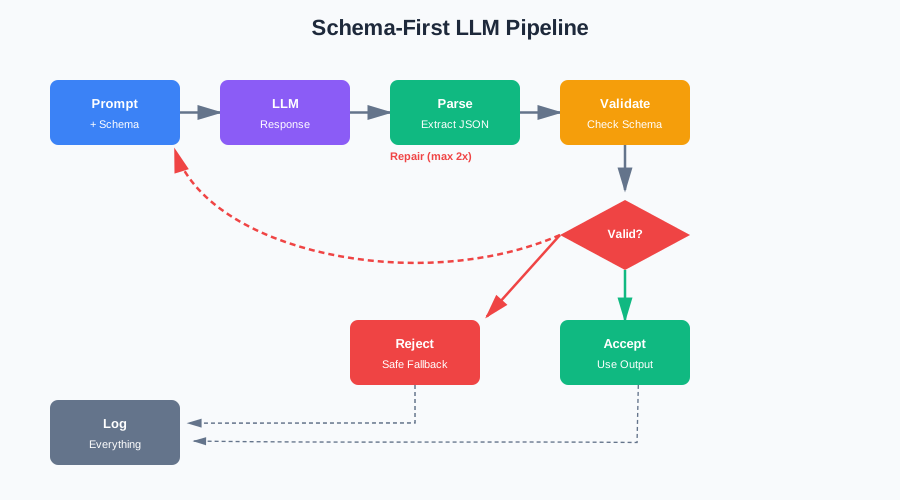
This article shows a practical pattern to make structured outputs dependable. Define a strict JSON Schema. Force the model to comply. Validate every response. Auto-repair once or twice, then fail safely. Log everything so you can fix prompts and schemas over time.
The Problem: “Structured Output” That Isn’t Structured
You ask the model to return JSON. It does. Sometimes. Other times you get trailing commas, missing keys, wrong enums, strings instead of numbers.
Here’s what happens in practice:
response = llm.generate("Extract customer info: 'John Doe, john@example.com, 555-1234'")
data = json.loads(response)
The model might return:
{"name": "John Doe", "email": "john@example.com", "phone": "555-1234"}✅ Works{"name": "John Doe", "email": "john@example.com",}❌ Trailing comma{"name": "John Doe", "email": "john@example.com"❌ Missing closing braceHere's the JSON: {"name": "John Doe", ...}❌ Extra text{"name": "John Doe", "email": null, "phone": 5551234}❌ Wrong types
One broken response breaks your entire pipeline. Your API returns 500 errors. Your workflow stops. Your users wait.
Why “Just Parse JSON” Is Not a Strategy
Parsing JSON is easy. Getting valid JSON that matches your schema is hard.
try:
    data = json.loads(response)
    # Great, it's valid JSON. But is it the right shape?
    customer_id = data["customer_id"]  # KeyError if missing
    priority = data["priority"]  # Might be "high" instead of 1-5
    tags = data["tags"]  # Might be a string instead of a list
except json.JSONDecodeError:
    # What now? Retry? Fail? Log and move on?
    pass
This approach fails because:
- Valid JSON doesn’t mean valid schema
- Missing fields cause runtime errors
- Wrong types cause downstream failures
- No feedback loop to improve
Schema-First Thinking
Start from the downstream system’s needs. What does your code expect? What shape does your database need? What format does your API require?
Design the schema like a public API contract. It’s the interface between the model and your system. Make it explicit. Make it strict. Make it testable.
Start from Downstream Needs
Don’t ask “what can the model extract?” Ask “what does my system need?”
If your database has a priority column that’s an integer 1-5, your schema should enforce that. Not “high/medium/low” that you convert later. Not a string that might be “urgent” or “critical” or “HIGH”.
# Bad: Model returns string, you convert later
priority_str = data["priority"]  # "high", "medium", "low"
priority_map = {"low": 1, "medium": 3, "high": 5}
priority = priority_map.get(priority_str, 3)  # What if it's "urgent"?

# Good: Schema enforces integer 1-5
priority = data["priority"]  # Always 1, 2, 3, 4, or 5
Design Like a Public API Contract
Your schema is a contract. It defines what’s required, what’s optional, what’s allowed.
from pydantic import BaseModel, Field
from typing import Literal

class CustomerExtraction(BaseModel):
    """Extract customer information from text."""

    name: str = Field(description="Customer's full name")
    email: str = Field(description="Email address, must be valid format")
    phone: str | None = Field(None, description="Phone number if found")
    priority: Literal[1, 2, 3, 4, 5] = Field(
        description="Priority level: 1=lowest, 5=highest"
    )
    tags: list[str] = Field(
        default_factory=list,
        description="Relevant tags for categorization"
    )
This schema is explicit. It’s testable. It’s self-documenting. The model knows exactly what to return.
Keep Schemas Small and Composable
One schema per task. Don’t create a mega-schema that handles everything. Create small, focused schemas that compose.
# Bad: One schema for everything
class MegaExtraction(BaseModel):
    customer: dict
    order: dict
    payment: dict
    shipping: dict
    # ... 50 more fields

# Good: Small, focused schemas
class CustomerInfo(BaseModel):
    name: str
    email: str

class OrderInfo(BaseModel):
    order_id: str
    total: float

# Compose when needed
class FullExtraction(BaseModel):
    customer: CustomerInfo
    order: OrderInfo
Small schemas are easier to test. Easier to validate. Easier to fix when they break.
A Practical Pipeline
Here’s the pattern: Prompt → model output → parse → validate → (optional) repair → accept/reject.
Step 1: Parse
Extract JSON from the response. Handle extra text, markdown code blocks, trailing commas.
import json
import re

def extract_json(text: str) -> dict | None:
    """Extract JSON from text, handling common issues."""
    # Remove markdown code blocks
    text = re.sub(r'```json\s*', '', text)
    text = re.sub(r'```\s*$', '', text)

    # Find JSON object
    match = re.search(r'\{.*\}', text, re.DOTALL)
    if not match:
        return None

    json_str = match.group(0)

    # Try to parse
    try:
        return json.loads(json_str)
    except json.JSONDecodeError:
        # Try fixing trailing commas
        json_str = re.sub(r',\s*}', '}', json_str)
        json_str = re.sub(r',\s*]', ']', json_str)
        try:
            return json.loads(json_str)
        except json.JSONDecodeError:
            return None
Step 2: Validate
Check that the parsed JSON matches your schema. Get specific error messages.
from pydantic import ValidationError

def validate_output(data: dict, schema: type[BaseModel]) -> tuple[BaseModel | None, str | None]:
    """Validate data against schema, return model or error."""
    try:
        model = schema(**data)
        return model, None
    except ValidationError as e:
        # Format errors for repair
        errors = []
        for error in e.errors():
            path = " -> ".join(str(x) for x in error["loc"])
            errors.append(f"{path}: {error['msg']}")
        return None, "; ".join(errors)
Step 3: Repair (Optional)
If validation fails, send the errors back to the model. Ask it to fix only the invalid parts. Retry once or twice. Don’t loop forever.
def repair_loop(
    prompt: str,
    schema: type[BaseModel],
    max_retries: int = 2
) -> BaseModel | None:
    """Call model, validate, repair if needed."""

    current_prompt = prompt
    schema_json = schema.model_json_schema()

    for attempt in range(max_retries + 1):
        # Call model
        response = llm.generate(current_prompt)
        data = extract_json(response)

        if data is None:
            if attempt < max_retries:
                current_prompt = f"{prompt}\n\nPlease return valid JSON only."
                continue
            return None

        # Validate
        model, error = validate_output(data, schema)
        if model is not None:
            return model

        # Repair
        if attempt < max_retries:
            repair_prompt = f"""Previous response had validation errors:
{error}

Please correct only the invalid fields and return valid JSON matching this schema:
{json.dumps(schema_json, indent=2)}

Original request: {prompt}"""
            current_prompt = repair_prompt
        else:
            return None

    return None
Step 4: Accept or Reject
If repair succeeds, use the output. If it fails, log the error and use a safe fallback.
def safe_extract(prompt: str, schema: type[BaseModel]) -> BaseModel:
    """Extract with repair loop, fallback on failure."""
    result = repair_loop(prompt, schema, max_retries=2)

    if result is None:
        # Log failure
        logger.error(f"Failed to extract after retries: {prompt[:100]}")
        # Return safe default
        return schema.model_validate({})  # Or raise exception

    return result
What “Repair” Means (And What It Must Not Do)
Repair means asking the model to fix validation errors. It doesn’t mean:
- Guessing missing fields
- Making up data
- Ignoring errors
- Looping forever
Repair should:
- Show specific validation errors
- Ask for corrections only
- Retry with the same prompt + error feedback
- Stop after 1-2 retries
Here’s what repair looks like:
# Model returns: {"name": "John", "priority": "high"}
# Schema expects: {"name": str, "priority": Literal[1,2,3,4,5]}

# Validation error: "priority: Input should be 1, 2, 3, 4, or 5"

# Repair prompt:
"""
Previous response had validation errors:
priority: Input should be 1, 2, 3, 4, or 5

Please correct only the invalid fields and return valid JSON matching this schema:
{
  "name": {"type": "string"},
  "priority": {"type": "integer", "enum": [1, 2, 3, 4, 5]}
}

Original request: Extract customer info...
"""
The model sees the error. It knows what to fix. It returns corrected JSON.
Validation Rules That Matter
Not all validation is equal. Some rules matter more than others.
Required Fields
Missing required fields break downstream code. Enforce them strictly.
class OrderExtraction(BaseModel):
    order_id: str  # Required
    customer_id: str  # Required
    total: float  # Required
    notes: str | None = None  # Optional
Enums
Enums prevent invalid values. Use them for fixed sets.
class TicketClassification(BaseModel):
    status: Literal["open", "in_progress", "resolved", "closed"]
    priority: Literal["low", "medium", "high", "urgent"]
Min/Max
Numbers should be in valid ranges.
class PriorityScore(BaseModel):
    score: int = Field(ge=1, le=5)  # 1-5 only
    confidence: float = Field(ge=0.0, le=1.0)  # 0.0-1.0 only
Formats
Dates, emails, URLs should match formats.
from pydantic import EmailStr, HttpUrl
from datetime import datetime

class ContactInfo(BaseModel):
    email: EmailStr  # Validates email format
    website: HttpUrl | None = None  # Validates URL format
    created_at: datetime  # Validates ISO datetime
Nested Objects
Nested objects need validation too.
class Address(BaseModel):
    street: str
    city: str
    zip: str

class Customer(BaseModel):
    name: str
    address: Address  # Nested validation
Strict vs Tolerant Validation
Be strict where it matters. Be tolerant where it doesn’t.
Be strict for:
- Required fields that break code
- Enums that route to different handlers
- Types that cause runtime errors
- Formats that downstream systems require
Be tolerant for:
- Optional fields that have defaults
- Extra fields you don’t use
- Minor formatting differences
- Fields that are “nice to have”
# Strict: This breaks if missing
class DatabaseRecord(BaseModel):
    id: str  # Required, strict
    status: Literal["active", "inactive"]  # Required, strict enum

# Tolerant: This has defaults
class UserPreferences(BaseModel):
    theme: str = "light"  # Default, tolerant
    notifications: bool = True  # Default, tolerant
    extra_data: dict = Field(default_factory=dict)  # Ignore extra fields
Repair Loop Design
The repair loop is simple. Call model. Validate. If invalid, send errors back. Retry. Stop after max retries.
How to Ask the Model to Correct Only Invalid Parts
Show specific errors. Show the schema. Ask for corrections.
def build_repair_prompt(
    original_prompt: str,
    validation_errors: str,
    schema: type[BaseModel]
) -> str:
    """Build prompt asking model to fix validation errors."""

    schema_json = schema.model_json_schema()

    return f"""Your previous response had validation errors:
{validation_errors}

Please correct ONLY the fields mentioned in the errors above. Keep all other fields exactly as they were.

Return valid JSON matching this schema:
{json.dumps(schema_json, indent=2)}

Original request:
{original_prompt}"""
Retry Limits
Retry once or twice. Not more. If it fails after 2 retries, it’s probably not going to work.
MAX_REPAIR_RETRIES = 2 # Usually 1-2 is enoughHard Stop with Safe Fallback
After max retries, stop. Don’t keep looping. Use a safe fallback.
def extract_with_fallback(
    prompt: str,
    schema: type[BaseModel],
    fallback: BaseModel | None = None
) -> BaseModel:
    """Extract with repair, use fallback on failure."""
    result = repair_loop(prompt, schema, max_retries=2)

    if result is None:
        if fallback is not None:
            logger.warning("Using fallback after repair failure")
            return fallback
        raise ValueError("Failed to extract after retries")

    return result
Security and Safety Basics
Treat model output as untrusted input. Always validate. Never trust.
Treat Model Output as Untrusted Input
The model might return anything. Validate everything.
# Bad: Trust the model
user_id = response["user_id"]
db.query(f"SELECT * FROM users WHERE id = {user_id}")  # SQL injection risk

# Good: Validate first
validated = UserIdSchema(**response)
user_id = validated.user_id  # Validated, safe
db.query("SELECT * FROM users WHERE id = ?", (user_id,))  # Parameterized
Allowlist Tool Names and Argument Shapes
Don’t let the model choose arbitrary tool names. Use an allowlist.
ALLOWED_TOOLS = {
    "get_user_info": GetUserInfoArgs,
    "update_ticket": UpdateTicketArgs,
    "send_notification": SendNotificationArgs,
}

def safe_tool_call(tool_name: str, args: dict) -> dict:
    """Execute tool only if name and args are allowed."""
    if tool_name not in ALLOWED_TOOLS:
        raise ValueError(f"Tool {tool_name} not allowed")

    validator = ALLOWED_TOOLS[tool_name]
    validated = validator(**args)
    return execute_tool(tool_name, validated)
Never Let the Model Choose Raw SQL, Shell Commands, or URLs Without Constraints
This is dangerous. Don’t do it.
# Bad: Model chooses SQL
sql = response["query"]
db.execute(sql)  # SQL injection

# Bad: Model chooses shell command
cmd = response["command"]
os.system(cmd)  # Command injection

# Bad: Model chooses URL
url = response["url"]
requests.get(url)  # SSRF risk

# Good: Model chooses from allowed options
action = response["action"]  # "read", "write", "delete"
if action == "read":
    db.read(id=response["id"])
elif action == "write":
    db.write(id=response["id"], data=response["data"])
Testing Strategy
Test your schemas. Test your validation. Test your repair loops.
Golden Test Cases
Create test cases for valid and invalid outputs.
VALID_CASES = [
    {
        "input": "Extract: John Doe, john@example.com",
        "expected": {"name": "John Doe", "email": "john@example.com"}
    },
    {
        "input": "Extract: Jane Smith",
        "expected": {"name": "Jane Smith", "email": None}
    },
]

INVALID_CASES = [
    {
        "input": "Extract: John Doe",
        "response": '{"name": "John Doe"}',  # Missing email (if required)
        "expected_error": "email: Field required"
    },
    {
        "input": "Extract: test@example",
        "response": '{"email": "test@example"}',  # Invalid email format
        "expected_error": "email: Invalid email format"
    },
]
Property-Based Testing
Test edge cases automatically.
from hypothesis import given, strategies as st

@given(
    name=st.text(min_size=1, max_size=100),
    email=st.emails(),
    priority=st.integers(min_value=1, max_value=5)
)
def test_customer_extraction(name, email, priority):
    """Test extraction with random valid inputs."""
    prompt = f"Extract: {name}, {email}, priority {priority}"
    result = extract_with_repair(prompt, CustomerExtraction)
    assert result.name == name
    assert result.email == email
    assert result.priority == priority
Regression Tests When Schemas Evolve
When you change a schema, test that old outputs still work (or fail gracefully).
def test_schema_migration():
    """Test that schema changes don't break existing code."""
    old_output = {"name": "John", "email": "john@example.com"}

    # Old schema had "email" as optional
    # New schema has "email" as required
    # Migration should handle this

    try:
        result = CustomerExtractionV2(**old_output)
        assert result.email is not None
    except ValidationError:
        # If migration fails, should have fallback
        result = migrate_old_to_new(old_output)
        assert result.email is not None
Production Checklist
Before deploying, check these:
Metrics
Track validation failure rate, repair success rate, tool error rate.
metrics = {
    "validation_failures": 0,
    "repair_attempts": 0,
    "repair_successes": 0,
    "tool_errors": 0,
}

def track_validation_failure():
    metrics["validation_failures"] += 1

def track_repair_attempt():
    metrics["repair_attempts"] += 1

def track_repair_success():
    metrics["repair_successes"] += 1
Logging
Log schema version, prompt version, model version, error class.
import logging

logger = logging.getLogger(__name__)

def log_extraction_attempt(
    prompt: str,
    schema_version: str,
    prompt_version: str,
    model_version: str,
    success: bool,
    error: str | None = None
):
    """Log extraction attempt with full context."""
    logger.info(
        f"Extraction attempt: "
        f"schema={schema_version} "
        f"prompt={prompt_version} "
        f"model={model_version} "
        f"success={success} "
        f"error={error}"
    )
Rollout: Shadow Mode for Schema Changes
When you change a schema, run both old and new in parallel. Compare results.
def shadow_mode_extract(prompt: str, new_schema: type[BaseModel]):
    """Extract with new schema, but also run old schema for comparison."""
    new_result = extract_with_repair(prompt, new_schema)
    old_result = extract_with_repair(prompt, OLD_SCHEMA)

    # Log differences
    if new_result != old_result:
        logger.warning(
            f"Schema change detected difference: "
            f"old={old_result} new={new_result}"
        )

    return new_result
Code Samples
The code repository includes three runnable examples:
- Schema + Validator: JSON Schema definition and Python validation with clear error reporting
- Repair Loop: Function that calls LLM, validates, repairs on failure, retries max 2 times
- Tool Execution Wrapper: Safe dispatcher that maps tool names to functions, validates args before calling, catches exceptions
See the GitHub repository for complete, runnable code.
Summary
Schema-first design makes LLM apps reliable. Start with schemas. Validate everything. Repair when needed. Stop after retries. Log for improvement.
The pattern is simple:
- Define strict JSON Schema
- Parse model output
- Validate against schema
- Repair on failure (1-2 retries)
- Use safe fallback if repair fails
- Log everything
This approach reduces brittle glue code and runtime surprises. It makes tool calling dependable. It makes structured outputs reliable.
Start with schemas. Validate strictly. Repair carefully. Log everything. Your future self will thank you.
Discussion
Loading comments...