Policy-Driven Agent Mesh: Enforcing Tool Access and Data Boundaries with a PEP/PDP Layer
An agent calls an admin-only tool because the prompt “sounds urgent.” It fetches data across tenants because the tool has no tenant guard. The user sees data they shouldn’t see. Compliance fails.
This happens when agents have direct tool access. No checks. No boundaries. No audit trail.
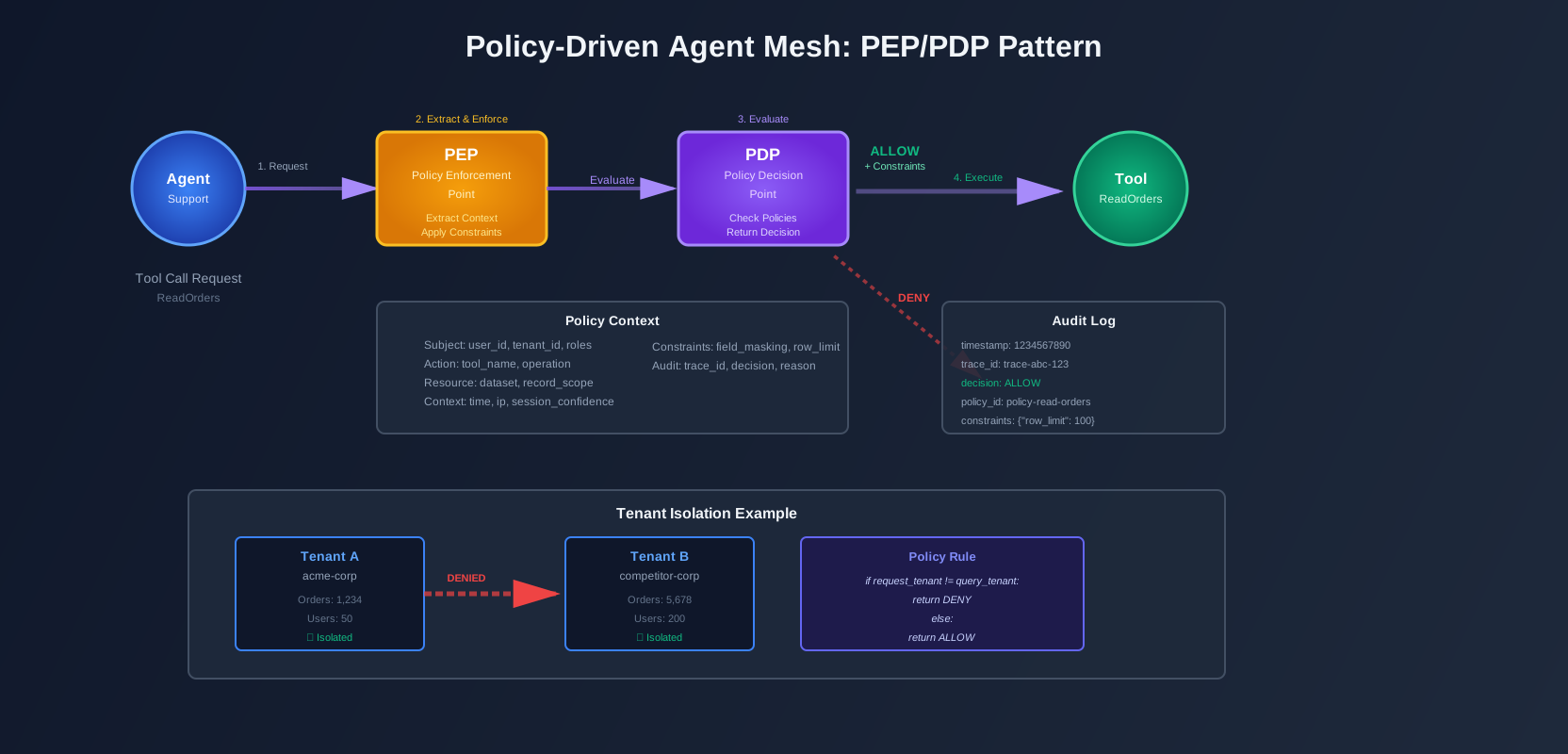
The fix is a Policy Enforcement Point (PEP) and Policy Decision Point (PDP). Every agent action goes through the PEP. The PEP asks the PDP: “Is this allowed?” The PDP checks policies and returns allow/deny plus constraints.
This isn’t optional. With Google’s Agent2Agent (A2A) standards and multi-tenant systems, access control is mandatory plumbing. Not “nice to have.”
The failure case
Here’s what breaks without policy enforcement:
Scenario 1: Admin tool access
A customer support agent processes a refund request. The user prompt says “This is urgent, please process immediately.” The agent calls IssueRefund tool. The tool works. The refund goes through.
But IssueRefund is admin-only. The agent shouldn’t have access. The prompt sounded urgent, so the agent bypassed checks that weren’t there.
Scenario 2: Cross-tenant data leak
An agent reads orders for tenant A. The tool ReadOrders doesn’t check tenant context. The agent passes tenant B’s ID in the query. The tool returns tenant B’s orders. The agent shows them to tenant A’s user.
No tenant guard. No isolation. Data leak.
Scenario 3: Unbounded exports
An agent exports customer data. The tool ExportCSV has no row limits. The agent requests all records. The tool returns 10 million rows. Memory spikes. The system slows down. The export fails halfway through.
No limits. No constraints. System failure.
These failures happen because tools trust agents. Agents trust prompts. There’s no policy layer in between.
The goal
Tool access should be explicit, auditable, and consistent.
Every action is checked:
- Who: Which agent is acting? Which user does it represent?
- Tenant: Which tenant’s data is being accessed?
- Tool: Which tool is being called?
- Data scope: What data can be accessed? What filters apply?
- Risk level: Is this a high-risk operation? Does it need approval?
The PEP/PDP pattern enforces this. Every tool call goes through the PEP. The PEP extracts context (user, tenant, tool, action). It asks the PDP. The PDP evaluates policies. It returns allow/deny plus constraints (field masking, row limits, approval flags).
The tool call only happens if allowed. Constraints are applied. Everything is logged.
Policy boundaries
Before building the PEP/PDP layer, define the boundaries.
Agent identity vs. end-user identity
An agent acts on behalf of a user. But the agent has its own identity too.
Agent identity: The agent’s role, capabilities, trust level. Example: “customer-support-agent” with role “support” and trust level “medium.”
End-user identity: The human user the agent represents. Example: user “alice@company.com” with role “customer” and tenant “acme-corp.”
When the agent calls a tool, both identities matter. The agent’s role determines which tools it can call. The user’s role determines what data it can access.
Delegation model
The delegation chain is:
User → Agent Session → Tool InvocationThe user starts a session. The session creates an agent. The agent calls tools. Each step needs authorization.
User authorization: Can this user start this agent session? Does the user have permission to use this agent?
Agent authorization: Can this agent call this tool? Does the agent’s role allow this action?
Tool authorization: Can this tool access this data? Does the tenant context match? Are constraints satisfied?
Each layer checks the next. The PEP enforces all three.
Separation of concerns
Separate three things:
Authentication: Who is this? Verify identity. Get user ID, agent ID, session ID.
Authorization: Can they do this? Check permissions. Evaluate policies. Return allow/deny.
Safety constraints: How must they do this? Apply limits. Mask fields. Require approval.
Authentication answers “who.” Authorization answers “can.” Safety constraints answer “how.”
The PEP handles authentication and constraint application. The PDP handles authorization.
The PEP/PDP pattern for agent mesh
The PEP/PDP pattern is standard in enterprise systems. It works for agent meshes too.
Architecture
Agent Request
    ↓
PEP (Policy Enforcement Point)
    ├── Extract context (user, tenant, tool, action)
    ├── Call PDP
    └── Apply constraints
    ↓
PDP (Policy Decision Point)
    ├── Evaluate policies
    ├── Check permissions
    └── Return decision + constraints
    ↓
Tool Execution (if allowed)
The PEP lives in the mesh gateway or router. It intercepts all tool calls. It doesn’t make decisions. It enforces them.
The PDP can be OPA (Open Policy Agent), Cedar, or a custom policy engine. It evaluates policies. It returns decisions. It doesn’t execute tools. It just decides.
PEP responsibilities
The PEP does four things:
-
Extract context: Parse the request. Get user ID, tenant ID, agent ID, tool name, action type, parameters.
-
Call PDP: Send context to the PDP. Wait for decision.
-
Apply constraints: If allowed, apply constraints. Mask fields. Limit rows. Add approval flags.
-
Log decision: Write audit log. Include decision, inputs, trace ID, timestamp.
The PEP is stateless. It doesn’t cache decisions (or caches with short TTL). It always asks the PDP.
PDP responsibilities
The PDP does three things:
-
Evaluate policies: Load policies. Match request to policies. Evaluate conditions.
-
Check permissions: Verify user roles. Check agent capabilities. Validate tenant access.
-
Return decision: Return allow/deny. Return constraints. Return reason (for audit).
The PDP is the source of truth. All policy logic lives here. Not in tools. Not in agents.
Policy decision structure
A policy decision includes:
Decision: allow or deny
Constraints (if allowed):
field_masking: Which fields to mask (e.g.,["email", "ssn"])row_limit: Maximum rows to return (e.g.,1000)approval_required: Whether approval is needed (e.g.,true)time_window: When the action is allowed (e.g.,"09:00-17:00")
Reason: Why this decision was made (for audit)
Policy ID: Which policy matched (for traceability)
Example decision:
{
  "decision": "allow",
  "constraints": {
    "field_masking": ["email"],
    "row_limit": 100,
    "approval_required": false
  },
  "reason": "User has finance_role, tool is ReadOrders, tenant matches",
  "policy_id": "policy-read-orders-finance"
}
Policy inputs you must standardize
The PDP needs consistent inputs. Standardize these fields:
Subject:
user_id: The end user IDtenant_id: The tenant IDroles: User roles (e.g.,["finance", "support"])risk_tier: User risk level (e.g.,"low","medium","high")
Action:
action_type: The action type (e.g.,"tool.invoke","data.read","message.send")tool_name: The tool identifier (e.g.,"ReadOrders","IssueRefund")operation: The specific operation (e.g.,"read","write","delete")
Resource:
tool_name: The tool being calleddataset: The dataset being accessed (e.g.,"orders","customers")record_scope: The scope of records (e.g.,"tenant","user","all")
Context:
time: Current timestampip: Request IP addresssession_confidence: Agent session confidence score (e.g.,0.95)prompt_risk_score: Risk score of the prompt (e.g.,0.2)
Standardize these. Use the same field names everywhere. The PDP expects them.
A2A-aware envelope
When agents coordinate across teams or systems, use an A2A-aware envelope. This carries identity and policy context.
Envelope structure
{
  "message": "Please read orders for tenant acme-corp",
  "identity": {
    "user_id": "alice@company.com",
    "tenant_id": "acme-corp",
    "agent_id": "customer-support-agent",
    "session_id": "session-abc-123",
    "roles": ["support"],
    "risk_tier": "medium"
  },
  "policy_context": {
    "request_id": "req-xyz-789",
    "trace_id": "trace-456",
    "delegation_chain": ["agent-a", "agent-b"]
  },
  "tool_call": {
    "tool_name": "ReadOrders",
    "action": "read",
    "params": {
      "tenant_id": "acme-corp",
      "limit": 100
    }
  }
}
The envelope includes:
- Identity claims: Who is making the request
- Tenant context: Which tenant’s data
- Policy decision request ID: For audit correlation
Why it matters
When agents coordinate across systems, identity must be preserved. The envelope carries it. The PEP extracts it. The PDP uses it.
Without the envelope, identity gets lost. The PEP can’t check permissions. The PDP can’t evaluate policies. Access control breaks.
The A2A standard defines this envelope format. Use it. It’s interoperable.
A small working demo
Let’s build a simple 2-agent system with 3 tools and policy enforcement.
Architecture
Two agents:
- Support Agent: Handles customer support requests
- Finance Agent: Handles financial operations
Three tools:
- ReadOrders: Read order data
- IssueRefund: Issue refunds
- ExportCSV: Export data to CSV
Policies:
- Refunds require
finance_role - Exports require
admin_roleAND row limit of 1000 - Cross-tenant reads are always denied
Policy model
First, define policies. Here’s a Rego-style policy (Open Policy Agent):
package agent_mesh.policies

import rego.v1

# Default deny
default allow = false

# Allow ReadOrders if tenant matches and user has support_role
allow if {
    input.action.tool_name == "ReadOrders"
    input.action.operation == "read"
    input.subject.tenant_id == input.resource.tenant_id
    "support_role" in input.subject.roles
}

# Allow IssueRefund if user has finance_role
allow if {
    input.action.tool_name == "IssueRefund"
    input.action.operation == "write"
    "finance_role" in input.subject.roles
}

# Allow ExportCSV if user has admin_role
allow if {
    input.action.tool_name == "ExportCSV"
    input.action.operation == "read"
    "admin_role" in input.subject.roles
}

# Constraints for ExportCSV: row limit
constraints.row_limit = 1000 if {
    input.action.tool_name == "ExportCSV"
    allow
}

# Constraints for ReadOrders: mask email field
constraints.field_masking = ["email"] if {
    input.action.tool_name == "ReadOrders"
    allow
    "support_role" in input.subject.roles
    not "admin_role" in input.subject.roles
}

# Deny cross-tenant access
allow = false if {
    input.action.tool_name == "ReadOrders"
    input.subject.tenant_id != input.resource.tenant_id
}
This policy:
- Allows ReadOrders if tenant matches and user has support_role
- Allows IssueRefund if user has finance_role
- Allows ExportCSV if user has admin_role
- Sets row limit for exports
- Masks email field for support users
- Denies cross-tenant access
PEP middleware
The PEP intercepts tool calls and asks the PDP:
# src/pep/middleware.py
from typing import Dict, Any, Optional
import json
import time

class PEPMiddleware:
    def __init__(self, pdp_client, audit_logger):
        self.pdp_client = pdp_client
        self.audit_logger = audit_logger

    def enforce(self, request: Dict[str, Any], trace_id: str) -> Dict[str, Any]:
        """Enforce policy on a tool call request."""
        # Extract context
        context = self._extract_context(request)

        # Call PDP
        decision = self.pdp_client.evaluate(context)

        # Log decision
        self.audit_logger.log_decision(
            trace_id=trace_id,
            request=request,
            context=context,
            decision=decision
        )

        # Check decision
        if decision["decision"] == "deny":
            raise PermissionError(
                f"Policy denied: {decision.get('reason', 'No reason provided')}"
            )

        # Apply constraints
        constrained_request = self._apply_constraints(request, decision.get("constraints", {}))

        return constrained_request

    def _extract_context(self, request: Dict[str, Any]) -> Dict[str, Any]:
        """Extract policy context from request."""
        identity = request.get("identity", {})
        tool_call = request.get("tool_call", {})

        return {
            "subject": {
                "user_id": identity.get("user_id"),
                "tenant_id": identity.get("tenant_id"),
                "roles": identity.get("roles", []),
                "risk_tier": identity.get("risk_tier", "medium")
            },
            "action": {
                "action_type": "tool.invoke",
                "tool_name": tool_call.get("tool_name"),
                "operation": tool_call.get("action")
            },
            "resource": {
                "tool_name": tool_call.get("tool_name"),
                "dataset": tool_call.get("params", {}).get("dataset"),
                "tenant_id": tool_call.get("params", {}).get("tenant_id")
            },
            "context": {
                "time": int(time.time()),
                "ip": request.get("ip", "unknown"),
                "session_confidence": identity.get("session_confidence", 1.0),
                "prompt_risk_score": request.get("prompt_risk_score", 0.0)
            }
        }

    def _apply_constraints(self, request: Dict[str, Any], constraints: Dict[str, Any]) -> Dict[str, Any]:
        """Apply policy constraints to request."""
        constrained = request.copy()
        tool_call = constrained.get("tool_call", {})
        params = tool_call.get("params", {})

        # Apply row limit
        if "row_limit" in constraints:
            params["limit"] = min(params.get("limit", float("inf")), constraints["row_limit"])

        # Store field masking for tool to apply
        if "field_masking" in constraints:
            params["_mask_fields"] = constraints["field_masking"]

        # Check approval requirement
        if constraints.get("approval_required", False):
            # In production, this would trigger an approval workflow
            raise PermissionError("Approval required for this action")

        tool_call["params"] = params
        constrained["tool_call"] = tool_call

        return constrained
The PEP:
- Extracts context from the request
- Calls the PDP
- Logs the decision
- Denies if policy says deny
- Applies constraints if allowed
Decision logging
Log every decision for audit:
# src/pep/audit_logger.py
from typing import Dict, Any
import json
import time

class AuditLogger:
    def __init__(self, log_store):
        self.log_store = log_store

    def log_decision(
        self,
        trace_id: str,
        request: Dict[str, Any],
        context: Dict[str, Any],
        decision: Dict[str, Any]
    ):
        """Log a policy decision for audit."""
        log_entry = {
            "timestamp": int(time.time()),
            "trace_id": trace_id,
            "decision": decision["decision"],
            "policy_id": decision.get("policy_id"),
            "reason": decision.get("reason"),
            "subject": {
                "user_id": context["subject"]["user_id"],
                "tenant_id": context["subject"]["tenant_id"],
                "roles": context["subject"]["roles"]
            },
            "action": {
                "tool_name": context["action"]["tool_name"],
                "operation": context["action"]["operation"]
            },
            "resource": {
                "dataset": context["resource"].get("dataset"),
                "tenant_id": context["resource"].get("tenant_id")
            },
            "constraints": decision.get("constraints", {}),
            "request_id": request.get("policy_context", {}).get("request_id")
        }

        self.log_store.write(log_entry)
The audit log includes:
- Decision (allow/deny)
- Policy ID (which policy matched)
- Reason (why this decision)
- Subject (who made the request)
- Action (what they tried to do)
- Resource (what data was accessed)
- Constraints (what limits were applied)
- Trace ID (for correlation with traces)
Tenant guard
Enforce tenant isolation:
# src/tools/tenant_guard.py
from typing import Dict, Any, List

class TenantGuard:
    def __init__(self):
        pass

    def enforce_tenant_isolation(
        self,
        request_tenant_id: str,
        query_params: Dict[str, Any],
        tool_name: str
    ) -> Dict[str, Any]:
        """Enforce tenant isolation in tool calls."""
        # Extract tenant from query params
        query_tenant = query_params.get("tenant_id")

        # If tenant is specified in query, it must match request tenant
        if query_tenant and query_tenant != request_tenant_id:
            raise PermissionError(
                f"Cross-tenant access denied: request tenant {request_tenant_id} "
                f"does not match query tenant {query_tenant}"
            )

        # Always set tenant filter to request tenant
        safe_params = query_params.copy()
        safe_params["tenant_id"] = request_tenant_id

        return safe_params

    def filter_results_by_tenant(
        self,
        results: List[Dict[str, Any]],
        tenant_id: str,
        tenant_field: str = "tenant_id"
    ) -> List[Dict[str, Any]]:
        """Filter results to ensure tenant isolation."""
        filtered = [
            record for record in results
            if record.get(tenant_field) == tenant_id
        ]

        # Log if filtering removed records (potential data leak)
        if len(filtered) < len(results):
            import logging
            logging.warning(
                f"Tenant guard filtered {len(results) - len(filtered)} records "
                f"that did not match tenant {tenant_id}"
            )

        return filtered
The tenant guard:
- Checks that query tenant matches request tenant
- Always sets tenant filter to request tenant
- Filters results to ensure tenant isolation
- Logs if filtering removes records (potential leak)
Example: ReadOrders tool with tenant guard
# src/tools/read_orders_tool.py
from src.tools.tenant_guard import TenantGuard
from typing import Dict, Any, List

class ReadOrdersTool:
    def __init__(self, database, tenant_guard):
        self.database = database
        self.tenant_guard = tenant_guard

    def call(self, params: Dict[str, Any], request_tenant_id: str) -> Dict[str, Any]:
        """Read orders with tenant isolation."""
        # Enforce tenant isolation
        safe_params = self.tenant_guard.enforce_tenant_isolation(
            request_tenant_id,
            params,
            "ReadOrders"
        )

        # Apply row limit
        limit = safe_params.get("limit", 100)

        # Query database
        query = f"SELECT * FROM orders WHERE tenant_id = :tenant_id LIMIT :limit"
        results = self.database.query(
            query,
            tenant_id=safe_params["tenant_id"],
            limit=limit
        )

        # Filter results (defense in depth)
        filtered_results = self.tenant_guard.filter_results_by_tenant(
            results,
            request_tenant_id
        )

        # Apply field masking if requested
        mask_fields = safe_params.get("_mask_fields", [])
        if mask_fields:
            filtered_results = self._mask_fields(filtered_results, mask_fields)

        return {
            "orders": filtered_results,
            "count": len(filtered_results)
        }

    def _mask_fields(self, records: List[Dict[str, Any]], fields: List[str]) -> List[Dict[str, Any]]:
        """Mask specified fields in records."""
        masked = []
        for record in records:
            masked_record = record.copy()
            for field in fields:
                if field in masked_record:
                    masked_record[field] = "[MASKED]"
            masked.append(masked_record)
        return masked
The tool:
- Enforces tenant isolation before querying
- Applies row limits
- Filters results (defense in depth)
- Masks fields if requested
Running the demo
Create a main script:
# examples/run_demo.py
from src.pep.middleware import PEPMiddleware
from src.pep.pdp_client import PDPClient
from src.pep.audit_logger import AuditLogger
from src.tools.read_orders_tool import ReadOrdersTool
from src.tools.issue_refund_tool import IssueRefundTool
from src.tools.export_csv_tool import ExportCSVTool
from src.tools.tenant_guard import TenantGuard
from src.storage.memory_log_store import MemoryLogStore

def main():
    # Setup
    log_store = MemoryLogStore()
    audit_logger = AuditLogger(log_store)
    pdp_client = PDPClient()  # In production, this connects to OPA or Cedar
    pep = PEPMiddleware(pdp_client, audit_logger)

    tenant_guard = TenantGuard()

    # Create tools
    read_orders = ReadOrdersTool(database=None, tenant_guard=tenant_guard)
    issue_refund = IssueRefundTool()
    export_csv = ExportCSVTool()

    # Example 1: Support agent reads orders (allowed)
    request1 = {
        "identity": {
            "user_id": "alice@company.com",
            "tenant_id": "acme-corp",
            "roles": ["support_role"],
            "risk_tier": "low"
        },
        "tool_call": {
            "tool_name": "ReadOrders",
            "action": "read",
            "params": {
                "tenant_id": "acme-corp",
                "limit": 100
            }
        },
        "policy_context": {
            "request_id": "req-1",
            "trace_id": "trace-1"
        }
    }

    try:
        constrained_request = pep.enforce(request1, trace_id="trace-1")
        print("✓ Request 1 allowed: Support agent can read orders")
    except PermissionError as e:
        print(f"✗ Request 1 denied: {e}")

    # Example 2: Support agent tries to issue refund (denied)
    request2 = {
        "identity": {
            "user_id": "alice@company.com",
            "tenant_id": "acme-corp",
            "roles": ["support_role"],
            "risk_tier": "low"
        },
        "tool_call": {
            "tool_name": "IssueRefund",
            "action": "write",
            "params": {
                "order_id": "order-123",
                "amount": 100.00
            }
        },
        "policy_context": {
            "request_id": "req-2",
            "trace_id": "trace-2"
        }
    }

    try:
        constrained_request = pep.enforce(request2, trace_id="trace-2")
        print("✓ Request 2 allowed")
    except PermissionError as e:
        print(f"✗ Request 2 denied: {e}")

    # Example 3: Cross-tenant access attempt (denied)
    request3 = {
        "identity": {
            "user_id": "alice@company.com",
            "tenant_id": "acme-corp",
            "roles": ["support_role"],
            "risk_tier": "low"
        },
        "tool_call": {
            "tool_name": "ReadOrders",
            "action": "read",
            "params": {
                "tenant_id": "competitor-corp",  # Different tenant!
                "limit": 100
            }
        },
        "policy_context": {
            "request_id": "req-3",
            "trace_id": "trace-3"
        }
    }

    try:
        constrained_request = pep.enforce(request3, trace_id="trace-3")
        print("✓ Request 3 allowed")
    except PermissionError as e:
        print(f"✗ Request 3 denied: {e}")

    # Print audit log
    print("\nAudit Log:")
    for entry in log_store.get_all():
        print(f"  {entry['timestamp']}: {entry['decision']} - {entry['action']['tool_name']}")

if __name__ == "__main__":
    main()
This demo shows:
- Support agent can read orders (allowed)
- Support agent can’t issue refunds (denied, needs finance_role)
- Cross-tenant access is denied
Operational concerns
Policy enforcement adds overhead. Here’s how to handle it.
Decision caching
PDP calls add latency. Cache decisions with short TTL.
# src/pep/cache.py
from typing import Dict, Any, Optional
import time

class DecisionCache:
    def __init__(self, ttl_seconds: int = 60):
        self.cache = {}
        self.ttl = ttl_seconds

    def get(self, cache_key: str) -> Optional[Dict[str, Any]]:
        """Get cached decision if not expired."""
        entry = self.cache.get(cache_key)
        if entry and (time.time() - entry["timestamp"]) < self.ttl:
            return entry["decision"]
        return None

    def set(self, cache_key: str, decision: Dict[str, Any]):
        """Cache a decision."""
        self.cache[cache_key] = {
            "decision": decision,
            "timestamp": time.time()
        }

    def _make_cache_key(self, context: Dict[str, Any]) -> str:
        """Create cache key from context."""
        # Cache key should include: user, tenant, tool, operation
        # But NOT dynamic params (like order_id)
        return f"{context['subject']['user_id']}:{context['subject']['tenant_id']}:{context['action']['tool_name']}:{context['action']['operation']}"
Cache for 60 seconds. Invalidate on policy changes. Don’t cache high-risk operations.
Audit logs
Store audit logs with trace IDs for correlation:
# src/pep/audit_logger.py (enhanced)
class AuditLogger:
    def log_decision(
        self,
        trace_id: str,
        request: Dict[str, Any],
        context: Dict[str, Any],
        decision: Dict[str, Any]
    ):
        log_entry = {
            "timestamp": int(time.time()),
            "trace_id": trace_id,  # For correlation with OpenTelemetry traces
            "decision": decision["decision"],
            "policy_id": decision.get("policy_id"),
            # ... rest of fields
        }

        # Store in time-series database or log aggregation system
        self.log_store.write(log_entry)
Correlate with traces. When debugging, find the trace. Find the audit log entries. See the full story.
Break-glass mode
Sometimes you need to bypass policies. Add break-glass mode. But make it audited and time-limited.
# src/pep/break_glass.py
class BreakGlassMode:
    def __init__(self, audit_logger):
        self.audit_logger = audit_logger
        self.active_sessions = {}

    def activate(self, user_id: str, reason: str, duration_minutes: int = 15) -> str:
        """Activate break-glass mode for a user."""
        session_id = f"break-glass-{int(time.time())}"
        self.active_sessions[session_id] = {
            "user_id": user_id,
            "reason": reason,
            "expires_at": time.time() + (duration_minutes * 60),
            "activated_at": time.time()
        }

        # Log activation
        self.audit_logger.log_break_glass_activation(
            session_id=session_id,
            user_id=user_id,
            reason=reason
        )

        return session_id

    def is_active(self, session_id: str) -> bool:
        """Check if break-glass mode is active."""
        session = self.active_sessions.get(session_id)
        if not session:
            return False

        if time.time() > session["expires_at"]:
            del self.active_sessions[session_id]
            return False

        return True
Break-glass mode:
- Requires reason
- Has time limit (default 15 minutes)
- Is fully audited
- Requires admin approval (in production)
Don’t make it the default. Make it hard to use. Log everything.
Checklist
If you do nothing else, add a PEP at the mesh boundary.
Minimum viable PEP:
- Extract context (user, tenant, tool, action)
- Call PDP (or simple policy function)
- Deny if policy says deny
- Log decision with trace ID
Full PEP:
- Extract context
- Call PDP (with caching)
- Deny if policy says deny
- Apply constraints (field masking, row limits)
- Log decision with trace ID
- Enforce tenant isolation
- Support break-glass mode (audited)
Policy requirements:
- Define policies (Rego, Cedar, or code)
- Test policies (unit tests)
- Version policies (Git)
- Review policy changes (PR process)
Operational requirements:
- Monitor PDP latency (p95 < 50ms)
- Alert on high deny rates
- Review audit logs weekly
- Test break-glass mode monthly
Start with the minimum. Add more as needed. But start with a PEP. It’s the foundation.
Conclusion
Agent meshes need policy enforcement. Without it, agents access tools they shouldn’t. Data leaks across tenants. Compliance fails.
The PEP/PDP pattern fixes this. Every tool call goes through the PEP. The PEP asks the PDP. The PDP evaluates policies. Access is controlled. Constraints are applied. Everything is logged.
This isn’t optional. With multi-tenant systems and A2A standards, access control is mandatory plumbing.
Start with a simple PEP. Add policies. Test them. Monitor them. Iterate.
The goal is explicit, auditable, consistent tool access. The PEP/PDP pattern gets you there.
Discussion
Loading comments...