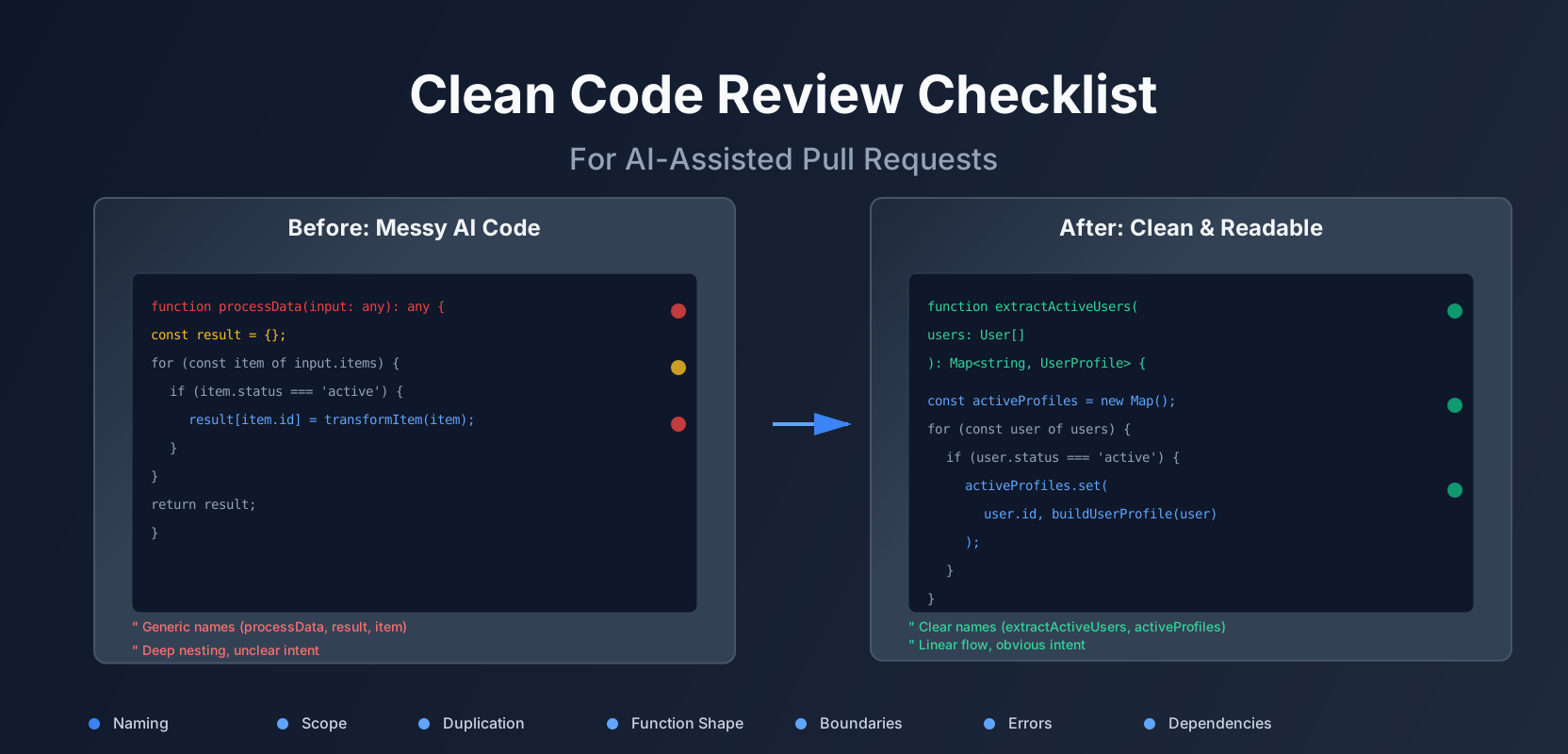
Clean Code for AI-Assisted PRs: A Practical Review Checklist That Stops 'Looks Fine' Merges
A lot of teams now ship code that was partially written by an AI assistant. The code often works, but it’s harder to read, harder to change, and inconsistent across files. This article is about making code review stricter in the right places, without slowing delivery.
The real problem with AI-assisted code
It compiles. It passes tests. But it’s noisy.
You’ve seen it. A PR comes in with 200 lines of code. It works. Tests pass. But when you read it, you can’t tell what it’s doing. The function names are generic. The logic is nested three levels deep. Error handling is inconsistent. And there’s a helper function that does three different things.
The cost shows up later: debugging and changes.
Six months from now, someone needs to add a feature. They open the file. They can’t understand the flow. They add a workaround instead of fixing the root cause. The code gets messier. The next person does the same thing. The cycle repeats.
This isn’t about style. It’s about changeability. Code that’s hard to read is code that’s hard to change. And code that’s hard to change is code that accumulates technical debt.
A review checklist that focuses on readability first
Before we get into specific checks, here’s the mindset shift:
“Can I explain this code in one sentence?”
If you can’t explain what a function does in one clear sentence, it’s doing too much. Break it down.
“Does each unit have one job?”
Functions should do one thing. Classes should represent one concept. Files should contain related functionality. If you’re describing a function with “and”, it’s doing too much.
“Are names doing the heavy lifting?”
Good names make comments unnecessary. If you need a comment to explain what a variable does, rename the variable. If you need a comment to explain what a function does, rename the function.
The 7 checks that catch most mess
Here’s a practical checklist. Use it during code review. It catches 90% of the problems without being pedantic.
1. Naming pass: nouns for data, verbs for actions, no “Handler/Manager/Util” unless it’s truly generic
Bad names are the fastest way to make code unreadable. AI tools love generic names. They’ll call everything a “handler” or a “manager” or a “util”.
Bad:
function processData(input: any): any {
  const result = {};
  for (const item of input.items) {
    if (item.status === 'active') {
      result[item.id] = transformItem(item);
    }
  }
  return result;
}
What does “processData” do? What kind of data? What does “transformItem” do? You can’t tell without reading the implementation.
Good:
function extractActiveUsers(users: User[]): Map<string, UserProfile> {
  const activeProfiles = new Map<string, UserProfile>();
  for (const user of users) {
    if (user.status === 'active') {
      activeProfiles.set(user.id, buildUserProfile(user));
    }
  }
  return activeProfiles;
}
Now you know: it extracts active users and builds profiles. The name tells you what it does.
Rules:
- Functions: verbs.
calculateTotal,validateEmail,findUserById - Variables: nouns.
userCount,orderTotal,isValid - Classes: nouns.
OrderProcessor,EmailValidator,UserRepository - Avoid:
Handler,Manager,Util,Helperunless it’s truly generic - Avoid:
data,result,item,thing- be specific
2. Scope pass: reduce variable lifetime, avoid “setup blocks” that hide intent
Variables that live too long are hard to track. AI-generated code often declares everything at the top, then uses it 50 lines later.
Bad:
function createOrder(cart: Cart, user: User): Order {
  let orderId: string;
  let orderItems: OrderItem[] = [];
  let totalAmount: number = 0;
  let shippingAddress: Address;
  let paymentMethod: PaymentMethod;
  let discountCode: string | null = null;
  let appliedDiscount: number = 0;

  // 30 lines of logic later...
  orderId = generateOrderId();
  // 20 more lines...
  orderItems = cart.items.map(item => convertToOrderItem(item));
  // etc.
}
You have to scroll up and down to see what’s happening. The variables are declared far from where they’re used.
Good:
function createOrder(cart: Cart, user: User): Order {
  const orderId = generateOrderId();
  const orderItems = convertCartItemsToOrderItems(cart.items);
  const shippingAddress = getShippingAddress(user);
  const paymentMethod = getPaymentMethod(user);

  const { discountCode, appliedDiscount } = applyDiscountIfEligible(cart, user);
  const totalAmount = calculateOrderTotal(orderItems, appliedDiscount);

  return {
    id: orderId,
    items: orderItems,
    total: totalAmount,
    shippingAddress,
    paymentMethod,
    discountCode
  };
}
Variables are declared where they’re used. The flow is linear. You can read it top to bottom.
Rules:
- Declare variables as close to use as possible
- Prefer
constoverlet(immutability helps readability) - Extract “setup blocks” into named functions
- If a variable is only used in one branch, declare it in that branch
3. Duplication pass: repeated conditionals, repeated mapping, repeated error handling
Duplication is the enemy of maintainability. If you change the logic in one place, you have to remember to change it everywhere else. AI tools often generate similar code blocks with slight variations.
Bad:
function validateOrder(order: Order): ValidationResult {
  if (!order.userId) {
    return { valid: false, error: 'User ID is required' };
  }
  if (!order.items || order.items.length === 0) {
    return { valid: false, error: 'Order must have at least one item' };
  }
  if (!order.shippingAddress) {
    return { valid: false, error: 'Shipping address is required' };
  }
  if (!order.paymentMethod) {
    return { valid: false, error: 'Payment method is required' };
  }
  return { valid: true };
}
The pattern repeats. If you need to change the error format, you change it in four places.
Good:
const validations = [
  { check: (o: Order) => !!o.userId, error: 'User ID is required' },
  { check: (o: Order) => o.items?.length > 0, error: 'Order must have at least one item' },
  { check: (o: Order) => !!o.shippingAddress, error: 'Shipping address is required' },
  { check: (o: Order) => !!o.paymentMethod, error: 'Payment method is required' },
];

function validateOrder(order: Order): ValidationResult {
  for (const validation of validations) {
    if (!validation.check(order)) {
      return { valid: false, error: validation.error };
    }
  }
  return { valid: true };
}
Now the validation logic is in one place. Adding a new validation is one line.
Rules:
- If you see the same pattern three times, extract it
- Use arrays/loops for repeated conditionals
- Extract repeated mapping logic into functions
- Consolidate error handling into a consistent pattern
4. Function shape pass: short, linear flow; early returns; avoid deep nesting
Long functions are hard to understand. Nested conditionals are hard to follow. AI-generated code often has both.
Bad:
function processPayment(order: Order, payment: Payment): PaymentResult {
  if (order) {
    if (order.status === 'pending') {
      if (payment) {
        if (payment.amount > 0) {
          if (payment.amount === order.total) {
            if (validatePaymentMethod(payment.method)) {
              const result = chargePayment(payment);
              if (result.success) {
                order.status = 'confirmed';
                return { success: true, orderId: order.id };
              } else {
                return { success: false, error: result.error };
              }
            } else {
              return { success: false, error: 'Invalid payment method' };
            }
          } else {
            return { success: false, error: 'Payment amount mismatch' };
          }
        } else {
          return { success: false, error: 'Payment amount must be positive' };
        }
      } else {
        return { success: false, error: 'Payment is required' };
      }
    } else {
      return { success: false, error: 'Order is not pending' };
    }
  } else {
    return { success: false, error: 'Order is required' };
  }
}
This is unreadable. You have to keep track of six levels of nesting. It’s hard to see what the happy path is.
Good:
function processPayment(order: Order, payment: Payment): PaymentResult {
  if (!order) {
    return { success: false, error: 'Order is required' };
  }

  if (order.status !== 'pending') {
    return { success: false, error: 'Order is not pending' };
  }

  if (!payment) {
    return { success: false, error: 'Payment is required' };
  }

  if (payment.amount <= 0) {
    return { success: false, error: 'Payment amount must be positive' };
  }

  if (payment.amount !== order.total) {
    return { success: false, error: 'Payment amount mismatch' };
  }

  if (!validatePaymentMethod(payment.method)) {
    return { success: false, error: 'Invalid payment method' };
  }

  const chargeResult = chargePayment(payment);
  if (!chargeResult.success) {
    return { success: false, error: chargeResult.error };
  }

  order.status = 'confirmed';
  return { success: true, orderId: order.id };
}
Early returns handle the error cases first. The happy path is at the bottom. It’s linear. You can read it top to bottom.
Rules:
- Functions should be short (ideally under 20 lines, max 50)
- Use early returns for error cases
- Avoid nesting deeper than 2-3 levels
- Extract complex conditionals into named functions
- The happy path should be obvious
5. Boundary pass: validate inputs at edges, not in the middle
Input validation should happen at the boundary of your system. Not in the middle of business logic. AI-generated code often mixes validation with processing.
Bad:
function calculateOrderTotal(order: Order): number {
  // Validation mixed with calculation
  if (!order) {
    throw new Error('Order is required');
  }
  if (!order.items) {
    throw new Error('Order items are required');
  }

  let total = 0;
  for (const item of order.items) {
    if (!item.price) {
      throw new Error('Item price is required');
    }
    if (item.quantity <= 0) {
      throw new Error('Item quantity must be positive');
    }
    total += item.price * item.quantity;
  }

  return total;
}
Validation is scattered. If you call this from multiple places, you validate multiple times. If you forget to validate before calling, you get runtime errors.
Good:
// At the API boundary
function createOrderHandler(request: CreateOrderRequest): Order {
  validateCreateOrderRequest(request); // Validate once at the edge
  return createOrder(request);
}

function validateCreateOrderRequest(request: CreateOrderRequest): void {
  if (!request.userId) {
    throw new ValidationError('User ID is required');
  }
  if (!request.items || request.items.length === 0) {
    throw new ValidationError('Order must have at least one item');
  }
  for (const item of request.items) {
    if (!item.productId) {
      throw new ValidationError('Item product ID is required');
    }
    if (item.quantity <= 0) {
      throw new ValidationError('Item quantity must be positive');
    }
  }
}

// Business logic assumes valid input
function calculateOrderTotal(order: Order): number {
  return order.items.reduce(
    (total, item) => total + item.price * item.quantity,
    0
  );
}
Validation happens once at the boundary. Business logic assumes valid input. It’s simpler and faster.
Rules:
- Validate at API boundaries (HTTP handlers, public functions)
- Use type systems to enforce structure (TypeScript types, JSON schemas)
- Don’t validate in the middle of business logic
- Fail fast with clear error messages
6. Error pass: consistent error model; no swallowed exceptions; actionable messages
Error handling is inconsistent in AI-generated code. Some functions return null. Some throw exceptions. Some return error objects. Some swallow errors silently.
Bad:
function processOrder(orderId: string): Order | null {
  try {
    const order = database.getOrder(orderId);
    if (!order) {
      return null; // What does null mean? Not found? Error?
    }

    const payment = paymentService.charge(order);
    // What if charge() throws? What if it returns undefined?

    order.status = 'confirmed';
    return order;
  } catch (error) {
    console.log(error); // Swallowed! No one knows it failed.
    return null;
  }
}
You can’t tell what went wrong. Null could mean “not found” or “error”. Exceptions are swallowed. There’s no way to handle different error cases.
Good:
class OrderNotFoundError extends Error {
  constructor(orderId: string) {
    super(`Order ${orderId} not found`);
    this.name = 'OrderNotFoundError';
  }
}

class PaymentFailedError extends Error {
  constructor(orderId: string, reason: string) {
    super(`Payment failed for order ${orderId}: ${reason}`);
    this.name = 'PaymentFailedError';
  }
}

function processOrder(orderId: string): Order {
  const order = database.getOrder(orderId);
  if (!order) {
    throw new OrderNotFoundError(orderId);
  }

  try {
    const payment = paymentService.charge(order);
    if (!payment.success) {
      throw new PaymentFailedError(orderId, payment.error);
    }
  } catch (error) {
    if (error instanceof PaymentFailedError) {
      throw error; // Re-throw known errors
    }
    throw new PaymentFailedError(orderId, 'Unknown payment error');
  }

  order.status = 'confirmed';
  return order;
}
Errors are explicit. You can handle different cases. Error messages are actionable.
Rules:
- Use a consistent error model (custom error classes, Result types, or error objects)
- Never swallow exceptions (at least log them)
- Error messages should be actionable (“Order not found” not “Error”)
- Distinguish between expected errors (validation) and unexpected errors (bugs)
7. Dependency pass: inject dependencies; avoid hidden globals; avoid “helper soup”
AI-generated code often uses global state, hidden dependencies, and “helper soup” (files full of unrelated utility functions).
Bad:
// Global database connection
const db = new Database();

function getUserOrders(userId: string): Order[] {
  const orders = db.query('SELECT * FROM orders WHERE user_id = ?', [userId]);
  return orders.map(order => formatOrder(order));
}

function formatOrder(order: any): Order {
  // Uses global db again
  const user = db.query('SELECT * FROM users WHERE id = ?', [order.userId]);
  return {
    id: order.id,
    user: user[0],
    items: JSON.parse(order.items),
    total: order.total
  };
}
You can’t test this without a real database. You can’t swap implementations. Dependencies are hidden.
Good:
interface OrderRepository {
  findByUserId(userId: string): Promise<Order[]>;
}

interface UserRepository {
  findById(userId: string): Promise<User>;
}

class OrderService {
  constructor(
    private orderRepo: OrderRepository,
    private userRepo: UserRepository
  ) {}

  async getUserOrders(userId: string): Promise<Order[]> {
    return await this.orderRepo.findByUserId(userId);
  }
}
Dependencies are explicit. You can inject mocks for testing. You can swap implementations. It’s testable and flexible.
Rules:
- Inject dependencies through constructors or function parameters
- Avoid global state (database connections, config objects)
- Group related functions into classes or modules
- Avoid “helper soup” files with unrelated utilities
Red flags common in AI-generated code
Here are patterns that show up a lot in AI-generated code. They’re not always wrong, but they’re warning signs.
Over-abstracted interfaces with one implementation
AI tools love abstraction. They’ll create an interface, then implement it once, then never use the interface again.
interface DataProcessor {
  process(data: any): any;
}

class OrderProcessor implements DataProcessor {
  process(data: any): any {
    // Only implementation
  }
}

// Interface is never used for polymorphism
const processor = new OrderProcessor();
If there’s only one implementation and no plans for more, the interface adds complexity without value. Remove it.
Generic utilities instead of domain concepts
AI tools generate generic utilities instead of domain-specific functions.
// Generic
function transformArray<T, R>(arr: T[], fn: (item: T) => R): R[] {
  return arr.map(fn);
}

// Domain-specific (better)
function convertCartItemsToOrderItems(items: CartItem[]): OrderItem[] {
  return items.map(item => ({
    productId: item.productId,
    quantity: item.quantity,
    price: item.price
  }));
}
The generic version is more “reusable”, but it’s harder to understand. The domain-specific version is clearer.
Too many optional parameters
AI-generated functions often have many optional parameters with default values.
function createOrder(
  userId: string,
  items: OrderItem[],
  shippingAddress?: Address,
  paymentMethod?: PaymentMethod,
  discountCode?: string,
  applyTax?: boolean,
  includeShipping?: boolean
): Order {
  // ...
}
This is hard to call and hard to test. Use an options object instead.
function createOrder(userId: string, items: OrderItem[], options: CreateOrderOptions): Order {
  // ...
}
Magic defaults and silent fallbacks
AI-generated code often has magic defaults and silent fallbacks that hide bugs.
function calculateTotal(items: OrderItem[], discount: number = 0.1): number {
  // Why is the default discount 10%? What if discount is undefined?
  const total = items.reduce((sum, item) => sum + item.price, 0);
  return total * (1 - discount);
}
Make defaults explicit. Fail fast on invalid input.
A concrete example: from “works” to “clean”
Let’s walk through a real example. Here’s a messy function that “works” but is hard to read and change.
Before: messy but working
function processUserOrder(data: any): any {
  const result: any = {};

  if (data && data.user && data.user.id) {
    const userId = data.user.id;
    const userData = getUserData(userId);

    if (userData && userData.orders) {
      const orders = userData.orders;
      const processedOrders: any[] = [];

      for (let i = 0; i < orders.length; i++) {
        const order = orders[i];

        if (order && order.status) {
          if (order.status === 'pending' || order.status === 'processing') {
            const orderTotal = calculateOrderTotal(order);
            const tax = orderTotal * 0.1;
            const finalTotal = orderTotal + tax;

            if (finalTotal > 0) {
              const processedOrder = {
                id: order.id,
                userId: userId,
                total: finalTotal,
                status: order.status,
                items: order.items || []
              };

              processedOrders.push(processedOrder);
            }
          }
        }
      }

      result.orders = processedOrders;
      result.userId = userId;
      result.count = processedOrders.length;
    } else {
      result.error = 'No orders found';
    }
  } else {
    result.error = 'Invalid user data';
  }

  return result;
}

function calculateOrderTotal(order: any): number {
  let total = 0;
  if (order && order.items) {
    for (const item of order.items) {
      if (item && item.price && item.quantity) {
        total += item.price * item.quantity;
      }
    }
  }
  return total;
}
Problems:
- Generic names (
data,result,order) - Deep nesting (4-5 levels)
- Mixed validation and processing
- Inconsistent error handling (returns error objects)
- Hidden dependencies (
getUserData) - Magic numbers (0.1 for tax)
- Unclear flow
After: clean and changeable
interface ProcessOrderRequest {
  user: { id: string };
}

interface ProcessedOrder {
  id: string;
  userId: string;
  total: number;
  status: 'pending' | 'processing';
  items: OrderItem[];
}

interface ProcessOrderResult {
  orders: ProcessedOrder[];
  userId: string;
  count: number;
}

class OrderProcessingError extends Error {
  constructor(message: string) {
    super(message);
    this.name = 'OrderProcessingError';
  }
}

class OrderService {
  constructor(
    private userRepository: UserRepository,
    private taxCalculator: TaxCalculator
  ) {}

  async processUserOrders(request: ProcessOrderRequest): Promise<ProcessOrderResult> {
    this.validateRequest(request);

    const user = await this.userRepository.findById(request.user.id);
    const activeOrders = this.filterActiveOrders(user.orders);
    const processedOrders = await this.processOrders(activeOrders, user.id);

    return {
      orders: processedOrders,
      userId: user.id,
      count: processedOrders.length
    };
  }

  private validateRequest(request: ProcessOrderRequest): void {
    if (!request?.user?.id) {
      throw new OrderProcessingError('Invalid user data: user ID is required');
    }
  }

  private filterActiveOrders(orders: Order[]): Order[] {
    return orders.filter(order =>
      order?.status === 'pending' || order?.status === 'processing'
    );
  }

  private async processOrders(orders: Order[], userId: string): Promise<ProcessedOrder[]> {
    const processedOrders: ProcessedOrder[] = [];

    for (const order of orders) {
      const orderTotal = this.calculateOrderTotal(order);
      const tax = this.taxCalculator.calculate(orderTotal);
      const finalTotal = orderTotal + tax;

      if (finalTotal > 0) {
        processedOrders.push({
          id: order.id,
          userId,
          total: finalTotal,
          status: order.status,
          items: order.items || []
        });
      }
    }

    return processedOrders;
  }

  private calculateOrderTotal(order: Order): number {
    if (!order.items || order.items.length === 0) {
      return 0;
    }

    return order.items.reduce(
      (total, item) => total + (item.price * item.quantity),
      0
    );
  }
}
Improvements:
- Clear names (
ProcessOrderRequest,ProcessedOrder,OrderService) - Linear flow (validate → fetch → filter → process)
- Early returns and guard clauses
- Explicit dependencies (injected repositories)
- Consistent error handling (custom error class)
- Single responsibility (each method does one thing)
- Type safety (TypeScript interfaces)
Test snippet
describe('OrderService', () => {
  it('processes active orders for a user', async () => {
    const mockUserRepo = {
      findById: jest.fn().mockResolvedValue({
        id: 'user123',
        orders: [
          { id: 'order1', status: 'pending', items: [{ price: 10, quantity: 2 }] },
          { id: 'order2', status: 'completed', items: [{ price: 20, quantity: 1 }] }
        ]
      })
    };

    const mockTaxCalculator = {
      calculate: jest.fn((amount) => amount * 0.1)
    };

    const service = new OrderService(mockUserRepo, mockTaxCalculator);
    const result = await service.processUserOrders({ user: { id: 'user123' } });

    expect(result.orders).toHaveLength(1);
    expect(result.orders[0].id).toBe('order1');
    expect(result.orders[0].total).toBe(22); // 20 + 2 tax
  });
});
The test is clear. Dependencies are mocked. Behavior is verified.
How to keep this lightweight
You don’t need to review every line. Use the checklist strategically.
Add checklist to PR template
Add the 7 checks to your PR template. Make it part of the process.
## Code Review Checklist

- [ ] Naming: Functions are verbs, variables are nouns, no generic "Handler/Manager"
- [ ] Scope: Variables declared close to use, no long-lived setup blocks
- [ ] Duplication: No repeated conditionals or mapping logic
- [ ] Function shape: Short functions, early returns, max 2-3 levels nesting
- [ ] Boundaries: Validation at API edges, not in business logic
- [ ] Errors: Consistent error model, no swallowed exceptions
- [ ] Dependencies: Injected, not global; no helper soup
Automate the boring parts
Don’t review formatting or basic complexity. Automate it.
- Formatting: Prettier, ESLint
- Complexity: Cyclomatic complexity limits
- Types: TypeScript strict mode
- Linting: ESLint rules for common patterns
Focus human review on intent and clarity.
Keep the human focus on intent
The checklist catches structure problems. But humans need to review:
- Does this solve the right problem?
- Is the approach correct?
- Are edge cases handled?
- Is the code secure?
- Does it fit the codebase style?
Automate structure. Review intent.
Close
Clean code is not style. It’s changeability.
Code that’s easy to read is code that’s easy to change. Code that’s easy to change is code that doesn’t accumulate technical debt.
A reviewer’s job is to protect future changes, not to “approve working code.” If the code works but is hard to change, it’s not done.
“Readability diff” matters as much as “logic diff.” If you can’t understand the code, you can’t maintain it.
Enforce a shared “definition of done” for AI-assisted PRs: naming, boundaries, and error strategy. Make it part of your process. It’ll save time in the long run.
Start with one check. Add it to your PR template. Use it for a week. Then add another. Build the habit gradually.
Your future self will thank you.
Discussion
Loading comments...