Istio Ambient Mesh: Zero-Trust L4 by Default, L7 Only Where It Pays
Teams want service-mesh security and telemetry. But many don’t want the per-pod sidecar cost and operational overhead.
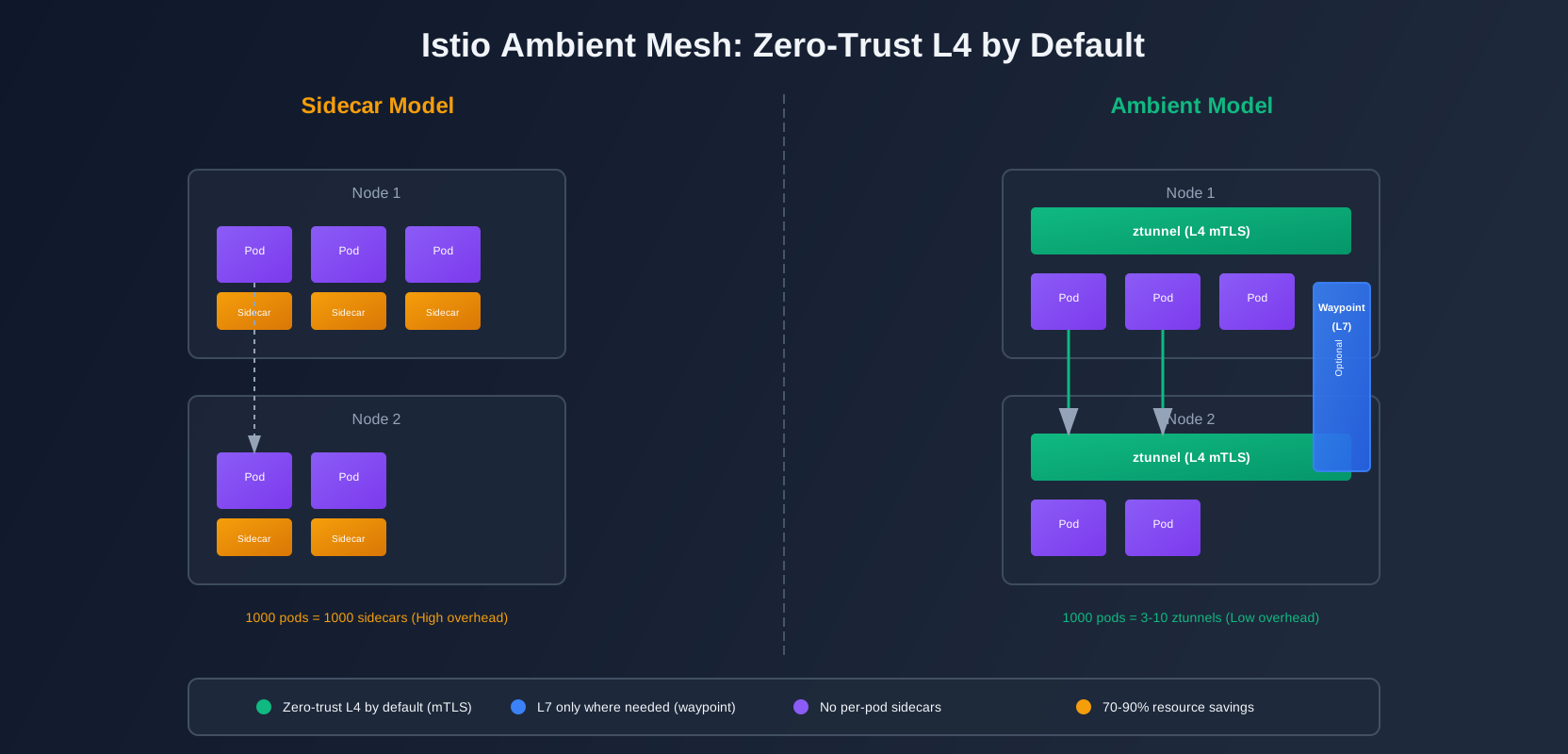
Istio’s ambient mode changes the data plane shape: a per-node ztunnel handles L4, and you add waypoint proxies only for workloads that need L7 features. No sidecars. No per-pod resource overhead. Zero-trust L4 by default.
This is how to roll it out without breaking production.
Why Teams Avoid Service Meshes
Service meshes promise a lot: mTLS, observability, traffic management, policy enforcement. But the sidecar model has real costs.
Resource Overhead
Every pod gets a sidecar. In a cluster with 1000 pods, that’s 1000 Envoy proxies. Each one consumes CPU and memory. A typical Envoy sidecar uses 50-100MB RAM and 0.1-0.5 CPU cores. At scale, that’s significant.
A 1000-pod cluster with sidecars might need:
- 50-100GB additional RAM
- 100-500 CPU cores
- Higher node counts to accommodate the overhead
The math adds up fast.
Operational Complexity
Sidecars add debugging complexity. When traffic breaks, you’re debugging two proxies: the client sidecar and the server sidecar. Logs are split. Metrics are split. Tracing spans cross multiple components.
App teams also push back. They don’t want to manage sidecar configuration. They don’t want sidecar restarts affecting their pods. They don’t want to debug proxy issues.
Deployment Friction
Sidecars require pod restarts. You can’t add a sidecar to a running pod. To enable the mesh, you need to restart every workload. That’s disruptive.
Rolling back is just as disruptive. If something breaks, you’re restarting pods again.
Ambient Mode Architecture
Ambient mode flips the model. Instead of per-pod sidecars, you get:
- ztunnel: A per-node L4 proxy that handles mTLS and identity
- waypoint proxy: Optional L7 proxies deployed separately, only where needed
What ztunnel Does
ztunnel runs as a DaemonSet, one per node. It handles:
- L4 mTLS: Encrypts traffic between workloads at the transport layer
- Identity: Assigns and validates workload identity
- L4 policy: Enforces network-level policies (allow/deny based on identity)
ztunnel intercepts traffic at the node level. It doesn’t need to be injected into every pod. Workloads opt in by labeling their namespace or pods.
What Waypoint Does
Waypoint proxies are optional. They handle L7 features:
- HTTP routing: Path-based routing, header manipulation
- L7 policy: Rate limiting, request authentication, JWT validation
- L7 observability: HTTP metrics, request tracing, access logs
You deploy waypoints per namespace or per service. Only workloads that need L7 features get a waypoint. Most workloads can run with just ztunnel (L4 only).
Sidecar vs Ambient Decision Points
Use ambient when:
- You need mTLS and identity (most teams)
- You want to reduce resource overhead
- You have workloads that don’t need L7 features
- You want simpler operations (no per-pod sidecars)
Stick with sidecars when:
- You need L7 features on every workload
- You have strict latency requirements (waypoints add a hop)
- You’re already running sidecars successfully and don’t want to migrate
Most teams fit the ambient use case. You get security (mTLS) by default, and you add L7 features only where they matter.
A Rollout Strategy That Reduces Risk
Don’t enable ambient mesh cluster-wide on day one. Start small. Validate. Expand.
Phase 1: Install Istio with Ambient Mode
Install Istio with ambient mode enabled:
# Download Istio
curl -L https://istio.io/downloadIstio | sh -
cd istio-*

# Install with ambient profile
istioctl install --set profile=ambient --set values.defaultRevision=ambient
This installs:
istiod: Control planeztunnel: DaemonSet for L4 handlingcni: CNI plugin for traffic interception
Verify the installation:
# Check ztunnel pods
kubectl get pods -n istio-system -l app=ztunnel

# Check istiod
kubectl get pods -n istio-system -l app=istiod

# Verify CNI is installed
kubectl get pods -n istio-system -l app=istio-cni-node
Phase 2: Enable Ambient for One Namespace
Pick a low-risk namespace. A test namespace. A namespace with non-critical workloads.
Label the namespace to opt into ambient:
# Label namespace for ambient mode
kubectl label namespace test-app istio.io/dataplane-mode=ambient
This tells Istio to handle traffic for pods in this namespace using ambient mode (ztunnel).
Verify it’s working:
# Check that pods are labeled
kubectl get pods -n test-app --show-labels | grep istio.io/dataplane-mode

# Check ztunnel logs
kubectl logs -n istio-system -l app=ztunnel --tail=50
Phase 3: Verify L4 Security
Test that mTLS is working. Deploy two services in the ambient namespace:
# Deploy a simple server
kubectl apply -f - <<EOF
apiVersion: v1
kind: Service
metadata:
  name: echo-server
  namespace: test-app
spec:
  ports:
  - port: 8080
    name: http
  selector:
    app: echo-server
---
apiVersion: apps/v1
kind: Deployment
metadata:
  name: echo-server
  namespace: test-app
spec:
  replicas: 1
  selector:
    matchLabels:
      app: echo-server
  template:
    metadata:
      labels:
        app: echo-server
    spec:
      containers:
      - name: echo
        image: ealen/echo-server:latest
        ports:
        - containerPort: 8080
EOF

# Deploy a client
kubectl apply -f - <<EOF
apiVersion: apps/v1
kind: Deployment
metadata:
  name: echo-client
  namespace: test-app
spec:
  replicas: 1
  selector:
    matchLabels:
      app: echo-client
  template:
    metadata:
      labels:
        app: echo-client
    spec:
      containers:
      - name: curl
        image: curlimages/curl:latest
        command: ["sleep", "3600"]
EOF
Test connectivity:
# Get client pod
CLIENT_POD=$(kubectl get pod -n test-app -l app=echo-client -o jsonpath='{.items[0].metadata.name}')

# Test connection
kubectl exec -n test-app $CLIENT_POD -- curl -s http://echo-server:8080

# Check that traffic is encrypted (look for TLS in ztunnel logs)
kubectl logs -n istio-system -l app=ztunnel --tail=100 | grep -i tls
You should see TLS handshakes in the ztunnel logs, indicating mTLS is working.
Phase 4: Add Waypoint for L7 Features
Only add a waypoint if you need L7 features. For this example, let’s add one to test L7 policy.
Deploy a waypoint for the namespace:
# Create waypoint for namespace
istioctl x waypoint apply --namespace test-app
This creates a waypoint proxy deployment and service. Traffic for workloads in this namespace that need L7 processing will route through the waypoint.
Verify the waypoint:
# Check waypoint pod
kubectl get pods -n test-app -l istio.io/gateway-name=waypoint

# Check waypoint service
kubectl get svc -n test-app -l istio.io/gateway-name=waypoint
Phase 5: Expand Gradually
Once you’ve validated ambient mode in one namespace:
- Add more test namespaces: Enable ambient for additional non-production namespaces
- Monitor metrics: Watch resource usage, latency, error rates
- Test rollback: Practice disabling ambient mode (remove the label)
- Expand to production: Start with low-traffic production namespaces
Keep a clear rollback path. To disable ambient for a namespace:
# Remove ambient label
kubectl label namespace test-app istio.io/dataplane-mode-
This immediately disables ambient mode for that namespace. Pods continue running. No restarts needed.
Policy and Security Basics
Understanding how identity and policy work in ambient mode is critical.
Identity Flow
Istio assigns identity to workloads based on:
- Service account: Each pod’s service account maps to an identity
- Namespace: Identity is scoped to namespace
- Workload: Pod labels can refine identity
When a pod starts, ztunnel:
- Reads the pod’s service account
- Requests a certificate from istiod
- Stores the certificate for mTLS
Traffic between pods is encrypted using these certificates. ztunnel validates identity on both sides.
L4 vs L7 Policy
L4 policy (handled by ztunnel):
- AuthorizationPolicy with
L4action: Allow/deny traffic based on identity - Works at the network layer
- Fast, low overhead
Example L4 policy:
apiVersion: security.istio.io/v1beta1
kind: AuthorizationPolicy
metadata:
  name: allow-frontend-to-backend
  namespace: test-app
spec:
  selector:
    matchLabels:
      app: backend
  action: ALLOW
  rules:
  - from:
    - source:
        principals: ["cluster.local/ns/test-app/sa/frontend"]
This allows only the frontend service account to reach the backend service.
L7 policy (requires waypoint):
- AuthorizationPolicy with
CUSTOMorDENYwith conditions - RequestAuthentication: JWT validation
- Works at the HTTP layer
- Requires waypoint proxy
Example L7 policy:
apiVersion: security.istio.io/v1beta1
kind: AuthorizationPolicy
metadata:
  name: require-jwt
  namespace: test-app
spec:
  selector:
    matchLabels:
      app: api
  action: ALLOW
  rules:
  - from:
    - source:
        requestPrincipals: ["*"]
    to:
    - operation:
        methods: ["GET", "POST"]
This requires a valid JWT token for GET and POST requests to the api service. It needs a waypoint.
Interaction with Kubernetes NetworkPolicy
Ambient mode works alongside Kubernetes NetworkPolicy:
- NetworkPolicy: CNI-level filtering (before ztunnel)
- Istio AuthorizationPolicy: Service-mesh-level filtering (in ztunnel or waypoint)
You can use both. NetworkPolicy for coarse-grained filtering. Istio policies for fine-grained, identity-based rules.
Example: Use NetworkPolicy to block all traffic, then use Istio policies to allow specific identity-based flows.
# NetworkPolicy: Deny all by default
apiVersion: networking.k8s.io/v1
kind: NetworkPolicy
metadata:
  name: default-deny
  namespace: test-app
spec:
  podSelector: {}
  policyTypes:
  - Ingress
  - Egress

# Istio AuthorizationPolicy: Allow specific flows
apiVersion: security.istio.io/v1beta1
kind: AuthorizationPolicy
metadata:
  name: allow-internal
  namespace: test-app
spec:
  action: ALLOW
  rules:
  - from:
    - source:
        namespaces: ["test-app"]
This creates defense in depth: NetworkPolicy blocks at the CNI level, Istio policies allow at the mesh level.
Cost and Performance
Let’s be honest about the trade-offs.
What You Save
Removing sidecars saves:
- Memory: 50-100MB per pod (at 1000 pods: 50-100GB)
- CPU: 0.1-0.5 cores per pod (at 1000 pods: 100-500 cores)
- Node capacity: Fewer nodes needed to run the same workloads
In a 1000-pod cluster, that’s roughly 10-20% resource savings.
What You Add
Ambient mode adds:
- ztunnel: One DaemonSet pod per node (typically 3-10 nodes: 3-10 pods)
- waypoint proxies: One per namespace/service that needs L7 (typically 5-20 waypoints)
ztunnel is lightweight: ~50MB RAM, ~0.1 CPU per node. Waypoints are heavier: ~100MB RAM, ~0.2 CPU each.
For most clusters, ambient mode uses 70-90% fewer resources than sidecars.
Latency Considerations
Sidecar model:
- Client pod → client sidecar → server sidecar → server pod
- Two proxy hops, but both are local to the pod
Ambient model (L4 only):
- Client pod → ztunnel (node) → ztunnel (node) → server pod
- Two proxy hops, but ztunnel is on the node (slightly higher latency)
Ambient model (with waypoint):
- Client pod → ztunnel → waypoint → ztunnel → server pod
- More hops, higher latency
For L4-only workloads, latency difference is negligible (<1ms). For L7 workloads with waypoints, expect 2-5ms additional latency.
When Sidecars Are Still Better
Stick with sidecars if:
- You need L7 features on every workload (waypoints add latency)
- You have strict latency requirements (<1ms matters)
- You’re already running sidecars successfully
- You need per-pod L7 configuration (waypoints are shared)
For most teams, ambient mode is the better choice. You get security by default, and you add L7 features only where they matter.
Operational Checklist
Here’s what to monitor and how to debug.
Telemetry Expectations
L4 telemetry (ztunnel):
- mTLS handshakes: Success/failure rates
- Connection counts: Active connections per workload
- Bytes transferred: Network throughput
- Identity validation: Failed identity checks
L7 telemetry (waypoint):
- HTTP requests: Request rate, latency, error rate
- HTTP status codes: 2xx, 4xx, 5xx breakdown
- Request tracing: Distributed traces across services
- Access logs: Request/response logs (if enabled)
Set up dashboards for:
- ztunnel metrics (istio_agent_*)
- waypoint metrics (istio_requests_total, istio_request_duration_*)
- workload identity metrics (istio_authentication_*)
Debug Flows
When traffic breaks, check in this order:
-
Is the namespace labeled?
kubectl get namespace test-app -o jsonpath='{.metadata.labels.istio\.io/dataplane-mode}'Should return
ambient. -
Are pods getting identity?
kubectl get pods -n test-app -o jsonpath='{range .items[*]}{.metadata.name}{"\t"}{.metadata.labels.istio\.io/dataplane-mode}{"\n"}{end}'Pods should have the
ambientlabel. -
Is ztunnel intercepting traffic?
kubectl logs -n istio-system -l app=ztunnel --tail=100 | grep -i "test-app"Look for traffic logs from your namespace.
-
Is the waypoint running? (if using L7)
kubectl get pods -n test-app -l istio.io/gateway-name=waypointShould show a running pod.
-
Are policies blocking traffic?
kubectl get authorizationpolicy -n test-app
kubectl describe authorizationpolicy -n test-app
Check for deny policies or misconfigured allow policies.
-
Check CNI configuration:
kubectl get pods -n istio-system -l app=istio-cni-node
kubectl logs -n istio-system -l app=istio-cni-node --tail=50
CNI must be working for ambient mode to intercept traffic.
Ownership Model
Platform team owns:
- Istio installation and upgrades
- ztunnel configuration
- Cluster-wide policies
- Waypoint deployment patterns
App teams own:
- Namespace opt-in (labeling)
- Service-level policies (AuthorizationPolicy in their namespace)
- Waypoint requests (when L7 features are needed)
Clear boundaries prevent conflicts. Platform team manages infrastructure. App teams manage their workloads.
Code Samples
Here’s a complete example you can run.
Minimal Install
# Install Istio with ambient profile
istioctl install --set profile=ambient --set values.defaultRevision=ambient

# Verify installation
kubectl get pods -n istio-system
Namespace Opt-In
# Enable ambient for a namespace
apiVersion: v1
kind: Namespace
metadata:
  name: my-app
  labels:
    istio.io/dataplane-mode: ambient
Or use kubectl:
kubectl label namespace my-app istio.io/dataplane-mode=ambientWaypoint Deployment
# Deploy waypoint for a namespace
istioctl x waypoint apply --namespace my-app

# Verify waypoint
kubectl get pods -n my-app -l istio.io/gateway-name=waypoint
kubectl get svc -n my-app -l istio.io/gateway-name=waypoint
L4 Policy Example
apiVersion: security.istio.io/v1beta1
kind: AuthorizationPolicy
metadata:
  name: allow-frontend-to-api
  namespace: my-app
spec:
  selector:
    matchLabels:
      app: api
  action: ALLOW
  rules:
  - from:
    - source:
        principals: ["cluster.local/ns/my-app/sa/frontend"]
This allows only the frontend service account to reach the api service. Works with ztunnel (L4 only).
L7 Policy Example
apiVersion: security.istio.io/v1beta1
kind: AuthorizationPolicy
metadata:
  name: rate-limit-api
  namespace: my-app
spec:
  selector:
    matchLabels:
      app: api
  action: CUSTOM
  provider:
    name: "envoy-ext-authz-http"
  rules:
  - to:
    - operation:
        paths: ["/api/*"]
This applies rate limiting to /api/* paths. Requires a waypoint proxy.
Verify Setup
Run these commands to verify everything is working:
# 1. Check namespace is labeled
kubectl get namespace my-app -o jsonpath='{.metadata.labels.istio\.io/dataplane-mode}'
# Should output: ambient

# 2. Check pods have identity
kubectl get pods -n my-app -o jsonpath='{range .items[*]}{.metadata.name}{"\t"}{.metadata.labels.istio\.io/dataplane-mode}{"\n"}{end}'
# Should show pods with "ambient" label

# 3. Check ztunnel is running
kubectl get pods -n istio-system -l app=ztunnel
# Should show one pod per node

# 4. Test connectivity between services
kubectl exec -n my-app <client-pod> -- curl -v http://api-service:8080
# Should succeed with TLS (check ztunnel logs)

# 5. Check waypoint (if using L7)
kubectl get pods -n my-app -l istio.io/gateway-name=waypoint
# Should show running waypoint pod

# 6. View ztunnel logs
kubectl logs -n istio-system -l app=ztunnel --tail=100
# Look for mTLS handshakes and traffic logs
Summary
Istio ambient mode gives you service-mesh security without per-pod sidecars. You get zero-trust L4 (mTLS, identity) by default, and you add L7 features only where they matter.
The rollout is straightforward:
- Install Istio with ambient profile
- Enable ambient for one namespace
- Verify L4 security is working
- Add waypoints only for workloads that need L7
- Expand gradually
You save 70-90% of the resource overhead compared to sidecars. Operations are simpler. Debugging is easier. App teams are happier.
Start with one namespace. Validate it works. Then expand. Keep a clear rollback path. Monitor metrics. Adjust as needed.
Most teams don’t need L7 features on every workload. Ambient mode matches that reality: secure by default, L7 only where it pays.
Discussion
Loading comments...