Gateway API in Practice: Multi-Team Routing Without Ingress Chaos
Your Kubernetes cluster has three teams. Each team creates their own Ingress resources. They use different annotations. They configure TLS differently. They step on each other’s hostnames. You end up with 50 Ingress objects, no clear ownership, and routing rules that nobody understands.
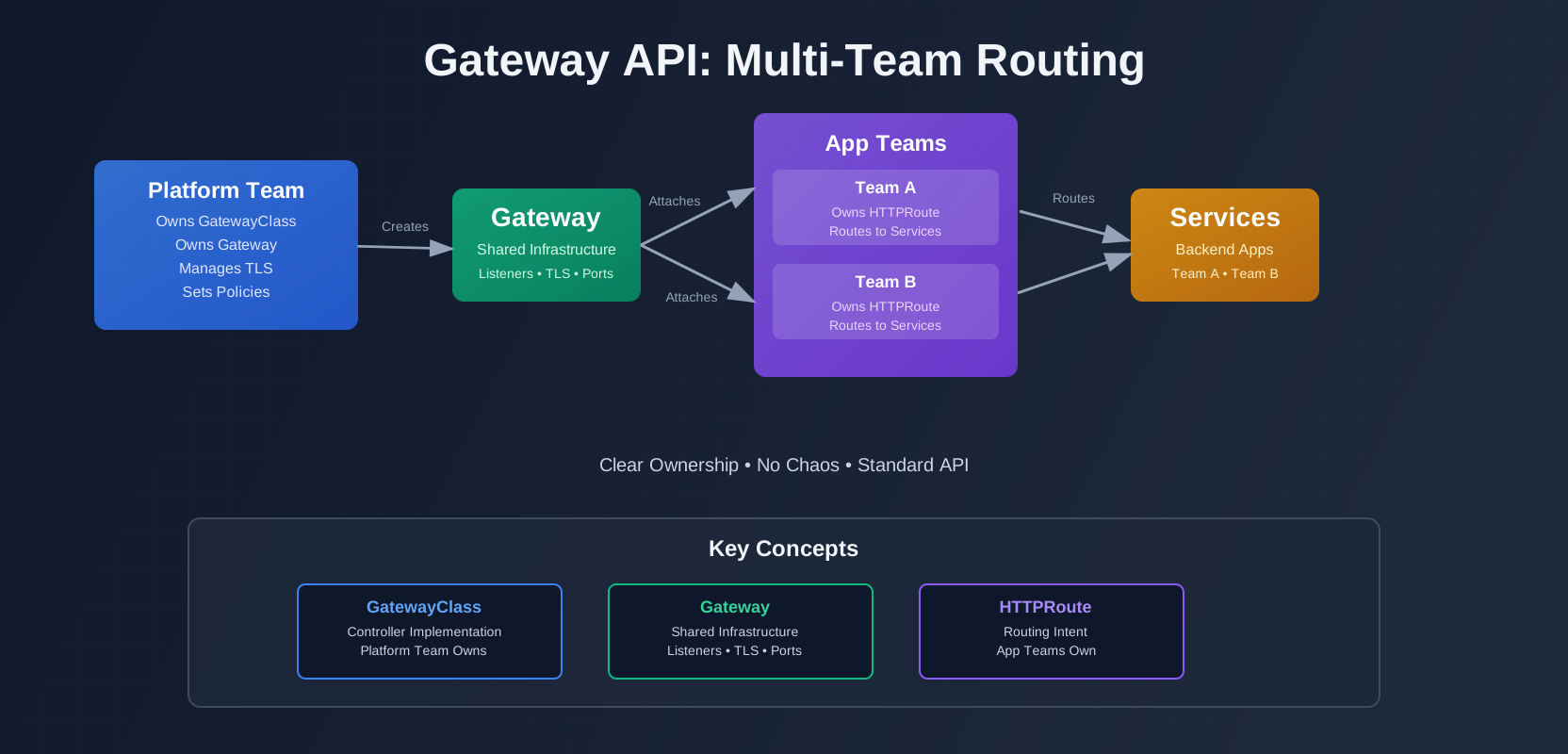
Gateway API fixes this. It’s designed for multi-team clusters from the start. Platform teams own the infrastructure. App teams own their routes. Clear boundaries. No chaos.
Here’s how to use Gateway API to replace Ingress sprawl with clean, role-oriented routing.
The Problem with “Ingress Per Team”
Ingress was built for single-tenant use. When multiple teams share a cluster, it breaks down.
Ingress Objects Become a Dumping Ground
Teams create Ingress resources in their namespaces. Each Ingress defines hostnames, paths, TLS, and backend services. There’s no coordination. No validation. No ownership model.
You end up with:
- 20 Ingress objects for the same domain
- Conflicting hostname rules
- TLS certificates configured in 10 different places
- Annotations that only work with one controller
Example: Team A creates an Ingress for api.example.com. Team B creates another Ingress for api.example.com in a different namespace. Both get applied. The controller picks one arbitrarily. The other team’s traffic breaks.
No Clear Ownership Boundaries
Ingress doesn’t separate infrastructure from routing intent. The same resource defines:
- Which controller handles it (via
ingressClassName) - Which hostnames it serves
- Which paths route where
- TLS configuration
- Rate limiting
- Auth policies
Platform teams want to control infrastructure. App teams want to control routing. Ingress mixes both.
Controller-Specific Annotations Become the Real API
Ingress has a standard spec. But real-world routing needs features the spec doesn’t cover:
- Request timeouts
- Retry policies
- Request mirroring
- Custom auth
- Rate limiting
So controllers add annotations. nginx.ingress.kubernetes.io/rewrite-target. traefik.ingress.kubernetes.io/router.middlewares. alb.ingress.kubernetes.io/target-type.
These annotations are controller-specific. You can’t switch controllers without rewriting all your Ingress resources. You can’t use multiple controllers. You’re locked in.
Worse: annotations aren’t validated. Typos fail silently. Wrong values fail silently. You only find out when traffic breaks.
Gateway API Mental Model
Gateway API separates concerns into three resources: GatewayClass, Gateway, and HTTPRoute.
GatewayClass as the “Implementation Contract”
GatewayClass defines which controller implementation you’re using. It’s cluster-scoped. You create one per controller type.
apiVersion: gateway.networking.k8s.io/v1
kind: GatewayClass
metadata:
  name: traefik
spec:
  controllerName: traefik.io/gateway-controller
This says “there’s a Traefik controller available.” It doesn’t create anything. It’s just a declaration.
Platform teams create GatewayClass resources. They choose which controllers are available. App teams reference them.
Gateway as Shared Infrastructure
Gateway defines the actual network infrastructure: listeners, ports, TLS certificates. It’s namespace-scoped, but typically lives in a shared namespace like gateway-system.
apiVersion: gateway.networking.k8s.io/v1
kind: Gateway
metadata:
  name: shared-gateway
  namespace: gateway-system
spec:
  gatewayClassName: traefik
  listeners:
  - name: https
    protocol: HTTPS
    port: 443
    hostname: "*.example.com"
    tls:
      mode: Terminate
      certificateRefs:
      - name: wildcard-cert
        kind: Secret
Platform teams own Gateway resources. They configure:
- Which hostnames are allowed
- TLS certificates
- Ports and protocols
- Rate limiting at the gateway level
App teams can’t create Gateways. They reference existing ones.
HTTPRoute as Team-Owned Routing Intent
HTTPRoute defines routing rules. It’s namespace-scoped. Each team creates HTTPRoutes in their own namespace.
apiVersion: gateway.networking.k8s.io/v1
kind: HTTPRoute
metadata:
  name: api-route
  namespace: team-a
spec:
  parentRefs:
  - name: shared-gateway
    namespace: gateway-system
  hostnames:
  - "api.example.com"
  rules:
  - matches:
    - path:
        type: PathPrefix
        value: /v1
    backendRefs:
    - name: api-service
      port: 8080
App teams own HTTPRoute resources. They define:
- Which hostnames they use
- Path-based routing
- Backend services
- Request/response modifications
They reference a Gateway owned by the platform team. They can’t modify the Gateway. They can only attach routes to it.
Why This Maps Better to Org Structure
Platform teams manage infrastructure. They care about:
- Security policies
- TLS certificate management
- Network performance
- Compliance
App teams manage applications. They care about:
- Routing traffic to their services
- A/B testing
- Canary deployments
- Feature flags
Gateway API matches this split. Platform teams own Gateway. App teams own HTTPRoute. Clear boundaries. No stepping on each other.
A Clean Multi-Tenant Ownership Pattern
Here’s a practical ownership model for multi-team clusters.
Platform Team Owns: GatewayClass, Shared Gateway, Base TLS, Base Listeners
The platform team creates one GatewayClass per controller:
apiVersion: gateway.networking.k8s.io/v1
kind: GatewayClass
metadata:
  name: traefik
spec:
  controllerName: traefik.io/gateway-controller
  description: "Traefik Gateway Controller for production traffic"
They create shared Gateway resources:
apiVersion: gateway.networking.k8s.io/v1
kind: Gateway
metadata:
  name: production-gateway
  namespace: gateway-system
spec:
  gatewayClassName: traefik
  listeners:
  - name: https-production
    protocol: HTTPS
    port: 443
    hostname: "*.prod.example.com"
    tls:
      mode: Terminate
      certificateRefs:
      - name: wildcard-prod-cert
        kind: Secret
  - name: https-staging
    protocol: HTTPS
    port: 443
    hostname: "*.staging.example.com"
    tls:
      mode: Terminate
      certificateRefs:
      - name: wildcard-staging-cert
        kind: Secret
They manage TLS certificates. They configure base listeners. They set gateway-level policies.
App Teams Own: HTTPRoute in Their Namespaces
Each team creates HTTPRoutes in their own namespace:
apiVersion: gateway.networking.k8s.io/v1
kind: HTTPRoute
metadata:
  name: user-service-route
  namespace: team-a
spec:
  parentRefs:
  - name: production-gateway
    namespace: gateway-system
  hostnames:
  - "users.prod.example.com"
  rules:
  - matches:
    - path:
        type: PathPrefix
        value: /
    backendRefs:
    - name: user-service
      port: 8080
Teams can’t create Gateways. They can’t modify the shared Gateway. They can only create HTTPRoutes that reference it.
Guardrails: Allowed Namespaces, Allowed Hostnames, Route Attachment Policies
Gateway API provides guardrails to prevent teams from stepping on each other.
Allowed Namespaces: The Gateway can restrict which namespaces can attach routes:
apiVersion: gateway.networking.k8s.io/v1
kind: Gateway
metadata:
  name: production-gateway
  namespace: gateway-system
spec:
  gatewayClassName: traefik
  listeners:
  - name: https
    protocol: HTTPS
    port: 443
    allowedRoutes:
      namespaces:
        from: Selector
        selector:
          matchLabels:
            gateway-access: enabled
Only namespaces with gateway-access: enabled can attach routes.
Allowed Hostnames: Teams can only use hostnames that match the Gateway’s listener hostname pattern. If the Gateway listens on *.prod.example.com, teams can’t create routes for *.dev.example.com.
Route Attachment Policies: You can use policies (implementation-specific) to enforce additional rules:
- Require TLS certificates for certain hostnames
- Enforce rate limits per team
- Require authentication for certain routes
These guardrails are enforced by the controller. Teams can’t bypass them.
Real Routing Patterns You Can Standardize
Gateway API standardizes common routing patterns. No more controller-specific annotations.
Host + Path Routing
Basic routing by hostname and path:
apiVersion: gateway.networking.k8s.io/v1
kind: HTTPRoute
metadata:
  name: api-route
  namespace: team-a
spec:
  parentRefs:
  - name: production-gateway
    namespace: gateway-system
  hostnames:
  - "api.prod.example.com"
  rules:
  - matches:
    - path:
        type: PathPrefix
        value: /v1/users
    backendRefs:
    - name: user-service
      port: 8080
  - matches:
    - path:
        type: PathPrefix
        value: /v1/orders
    backendRefs:
    - name: order-service
      port: 8080
This works the same across all Gateway API implementations. No annotations needed.
Weighted Backends for Progressive Delivery
Split traffic between backends by weight:
apiVersion: gateway.networking.k8s.io/v1
kind: HTTPRoute
metadata:
  name: canary-route
  namespace: team-a
spec:
  parentRefs:
  - name: production-gateway
    namespace: gateway-system
  hostnames:
  - "api.prod.example.com"
  rules:
  - matches:
    - path:
        type: PathPrefix
        value: /
    backendRefs:
    - name: api-service-v1
      port: 8080
      weight: 90
    - name: api-service-v2
      port: 8080
      weight: 10
90% of traffic goes to v1, 10% to v2. Adjust weights to roll out gradually.
Percentage-Based Request Mirroring for Safe Testing
Mirror a percentage of requests to a test backend:
apiVersion: gateway.networking.k8s.io/v1
kind: HTTPRoute
metadata:
  name: shadow-route
  namespace: team-a
spec:
  parentRefs:
  - name: production-gateway
    namespace: gateway-system
  hostnames:
  - "api.prod.example.com"
  rules:
  - matches:
    - path:
        type: PathPrefix
        value: /
    backendRefs:
    - name: api-service
      port: 8080
    filters:
    - type: RequestMirror
      requestMirror:
        backendRef:
          name: api-service-test
          port: 8080
        percentage: 10
10% of requests are mirrored to the test backend. The original request still goes to the main backend. Users don’t see test responses. You get real production traffic for testing.
Retries/Timeouts in a Consistent Place
Configure retries and timeouts per route:
apiVersion: gateway.networking.k8s.io/v1
kind: HTTPRoute
metadata:
  name: api-route
  namespace: team-a
spec:
  parentRefs:
  - name: production-gateway
    namespace: gateway-system
  hostnames:
  - "api.prod.example.com"
  rules:
  - matches:
    - path:
        type: PathPrefix
        value: /
    backendRefs:
    - name: api-service
      port: 8080
    filters:
    - type: RequestTimeout
      requestTimeout: 30s
    - type: ExtensionRef
      extensionRef:
        group: gateway.networking.k8s.io
        kind: RetryPolicy
        name: api-retry-policy
Timeouts and retries are configured in the route, not in application code. Consistent across all services. Easy to adjust without redeploying.
Auth at the Edge Without Reinventing It
Gateway API is moving toward standard auth extensions. Today, implementations vary.
Where External Auth is Heading in Gateway API
The Gateway API project is working on standard auth policies. The goal is to define auth at the route level, independent of the controller.
For now, most implementations use ExtensionRef to reference auth policies:
apiVersion: gateway.networking.k8s.io/v1
kind: HTTPRoute
metadata:
  name: protected-route
  namespace: team-a
spec:
  parentRefs:
  - name: production-gateway
    namespace: gateway-system
  hostnames:
  - "api.prod.example.com"
  rules:
  - matches:
    - path:
        type: PathPrefix
        value: /admin
    filters:
    - type: ExtensionRef
      extensionRef:
        group: gateway.networking.k8s.io
        kind: AuthenticationPolicy
        name: oidc-auth
    backendRefs:
    - name: admin-service
      port: 8080
This is implementation-specific. Traefik might use different policy resources than Envoy. But the pattern is the same: reference a policy, don’t configure auth inline.
How to Keep Auth Policy Consistent Across Teams
Platform teams create auth policies. App teams reference them:
# Created by platform team
apiVersion: traefik.io/v1alpha1
kind: Middleware
metadata:
  name: oidc-auth
  namespace: gateway-system
spec:
  plugin:
    oidc:
      issuer: "https://auth.example.com"
      clientId: "gateway-client"
# Created by app team
apiVersion: gateway.networking.k8s.io/v1
kind: HTTPRoute
metadata:
name: protected-route
namespace: team-a
spec:
parentRefs:
- name: production-gateway
namespace: gateway-system
hostnames:
- "api.prod.example.com"
rules:
- matches:
- path:
type: PathPrefix
value: /admin
filters:
- type: ExtensionRef
extensionRef:
group: traefik.io
kind: Middleware
name: oidc-auth
namespace: gateway-system
backendRefs:
- name: admin-service
port: 8080Teams can’t create their own auth policies. They can only reference platform-managed ones. Consistent auth across all services.
Rollout Plan
Migrate gradually. Don’t break existing traffic.
Phase 1: Run Gateway API Alongside Existing Ingress
Install a Gateway API controller. Create a GatewayClass. Create a test Gateway. Leave existing Ingress resources alone.
# Install Gateway API CRDs
kubectl apply -f https://github.com/kubernetes-sigs/gateway-api/releases/download/v1.0.0/standard-install.yaml

# Install Traefik Gateway API controller (or your preferred controller)
helm install traefik traefik/traefik --set gatewayAPI.enabled=true
Create a test Gateway:
apiVersion: gateway.networking.k8s.io/v1
kind: Gateway
metadata:
  name: test-gateway
  namespace: gateway-system
spec:
  gatewayClassName: traefik
  listeners:
  - name: http
    protocol: HTTP
    port: 80
    hostname: "test.example.com"
Verify it works. Check the Gateway status:
kubectl get gateway test-gateway -n gateway-systemThe status should show the Gateway is ready and has an address assigned.
Phase 2: Migrate a Single Domain/Team
Pick one team. Pick one domain. Migrate that domain to Gateway API.
Create the Gateway:
apiVersion: gateway.networking.k8s.io/v1
kind: Gateway
metadata:
  name: production-gateway
  namespace: gateway-system
spec:
  gatewayClassName: traefik
  listeners:
  - name: https
    protocol: HTTPS
    port: 443
    hostname: "api.prod.example.com"
    tls:
      mode: Terminate
      certificateRefs:
      - name: api-prod-cert
        kind: Secret
Create HTTPRoutes for the team’s services:
apiVersion: gateway.networking.k8s.io/v1
kind: HTTPRoute
metadata:
  name: api-route
  namespace: team-a
spec:
  parentRefs:
  - name: production-gateway
    namespace: gateway-system
  hostnames:
  - "api.prod.example.com"
  rules:
  - matches:
    - path:
        type: PathPrefix
        value: /
    backendRefs:
    - name: api-service
      port: 8080
Test thoroughly. Monitor traffic. Verify TLS works. Check logs.
Once stable, remove the old Ingress resources for that domain.
Phase 3: Standardize Templates and Lint Rules (Policy-as-Code)
Create Helm charts or Kustomize templates for HTTPRoutes:
# templates/httproute.yaml
apiVersion: gateway.networking.k8s.io/v1
kind: HTTPRoute
metadata:
  name: {{ .Values.routeName }}
  namespace: {{ .Values.namespace }}
spec:
  parentRefs:
  - name: {{ .Values.gatewayName }}
    namespace: {{ .Values.gatewayNamespace }}
  hostnames:
  {{- range .Values.hostnames }}
  - {{ . }}
  {{- end }}
  rules:
  {{- range .Values.rules }}
  - matches:
    - path:
        type: {{ .pathType }}
        value: {{ .path }}
    backendRefs:
    - name: {{ .backendName }}
      port: {{ .backendPort }}
  {{- end }}
Create lint rules to enforce standards:
# .gateway-lint.yaml
rules:
  - name: require-gateway-namespace
    resource: HTTPRoute
    validate: |
      spec.parentRefs[0].namespace must be "gateway-system"

  - name: require-hostname-pattern
    resource: HTTPRoute
    validate: |
      spec.hostnames[0] must match "*.prod.example.com" or "*.staging.example.com"

  - name: require-backend-service
    resource: HTTPRoute
    validate: |
      spec.rules[0].backendRefs[0].name must exist in the same namespace
Run linting in CI/CD. Reject PRs that don’t follow standards.
What to Measure
Track these metrics to verify the migration is working.
Route Change Lead Time
How long does it take for a team to add a new route? With Ingress, teams might wait for platform team approval. With Gateway API, teams create HTTPRoutes themselves.
Measure: Time from “I need a new route” to “route is live”.
Target: Under 10 minutes (teams self-service).
Number of Controller-Specific Annotations
Count annotations in Ingress resources. As you migrate to Gateway API, this number should drop to zero.
Measure: kubectl get ingress -A -o yaml | grep -c "\.ingress\.kubernetes\.io/"
Target: Zero annotations (everything uses standard Gateway API fields).
Incident Rate Tied to Routing Changes
Track incidents caused by routing configuration changes. Gateway API’s validation and guardrails should reduce these.
Measure: Incidents where root cause is Ingress/HTTPRoute misconfiguration.
Target: 50% reduction after migration.
Summary
Gateway API replaces Ingress sprawl with role-oriented routing. Platform teams own infrastructure. App teams own routes. Clear boundaries. No chaos.
Start with one Gateway. Migrate one team. Standardize the pattern. Then roll out to more teams.
Your cluster will thank you. Your teams will thank you. Your on-call engineer will definitely thank you.
Discussion
Loading comments...