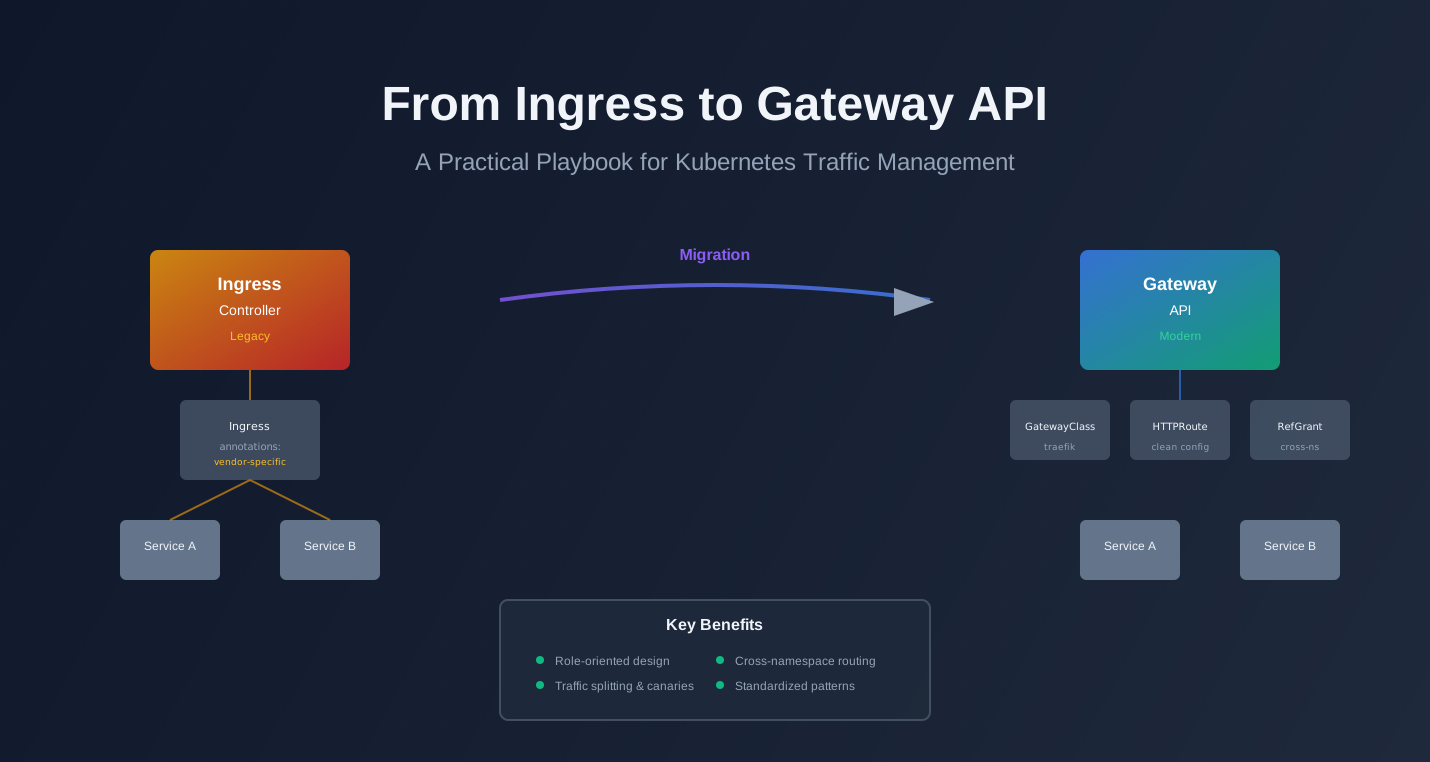
From Ingress to Gateway API: A Practical Playbook for Kubernetes Traffic Management
From Ingress to Gateway API: A Practical Playbook for Kubernetes Traffic Management
You’re running Kubernetes. You have Ingress resources. They work, but they’re getting messy. Vendor-specific annotations everywhere. Hard to express canary deployments. Limited cross-namespace patterns. Teams step on each other’s routing rules.
The Kubernetes Gateway API fixes these problems. It’s the modern standard for traffic management, designed by SIG-NETWORK as a more flexible alternative to Ingress. Recent releases (v1.2, v1.4) add WebSockets, timeouts, retries, and more. They work on current K8s versions without full cluster upgrades.
Many orgs are still on legacy Ingress. They need a clear migration path. This article shows you how to move from Ingress to Gateway API and run your HTTP traffic with better control and clearer patterns.
Why Ingress is no longer enough for many teams
Ingress was simple. It solved a real problem: exposing HTTP services in Kubernetes. But it’s showing its age.
Short history of Ingress
Ingress came early in Kubernetes. It was designed to be simple and widely supported. You define a hostname and paths. The Ingress controller routes traffic. It works.
But simplicity came with limits. Ingress is a single resource. It doesn’t separate concerns. You can’t express complex routing patterns. Cross-namespace routing is awkward. Vendor-specific annotations became the norm.
Real-world pain
Here’s what teams hit in practice:
Vendor-specific annotations all over manifests
Your Ingress resources look like this:
apiVersion: networking.k8s.io/v1
kind: Ingress
metadata:
  name: my-app
  annotations:
    nginx.ingress.kubernetes.io/rewrite-target: /
    nginx.ingress.kubernetes.io/ssl-redirect: "true"
    cert-manager.io/cluster-issuer: "letsencrypt-prod"
    traefik.ingress.kubernetes.io/router.middlewares: default-auth@kubernetescrd
spec:
  rules:
    - host: app.example.com
      http:
        paths:
          - path: /
            pathType: Prefix
            backend:
              service:
                name: my-app
                port:
                  number: 80
These annotations are controller-specific. Switch controllers, rewrite everything. They’re not portable. They’re not standardized.
Hard to express complex routing
Want a canary deployment? You need annotations. Want header-based routing? More annotations. Want traffic splitting? Controller-specific CRDs or annotations.
Different controllers do it differently. There’s no standard way.
Limited cross-namespace patterns
Ingress can reference services in the same namespace. Cross-namespace? It’s possible but awkward. You need to know service names and namespaces. There’s no clear security model.
Teams end up duplicating Ingress resources. Or they put everything in one namespace. Neither scales well.
What Gateway API is trying to fix
Gateway API is role-oriented. It separates concerns:
- GatewayClass: What kind of gateway implementation are we using?
- Gateway: The actual entry point / load balancer instance
- HTTPRoute: How to route traffic to services
- ReferenceGrant: How to safely route across namespaces
This separation lets platform teams own Gateways. Application teams own HTTPRoutes. Clear boundaries. Clear responsibilities.
It’s also more expressive. Traffic splitting, header routing, timeouts, retries—these are first-class features, not annotations.
Core concepts of Gateway API (with mental models)
Gateway API has a few core resources. Understanding them makes everything else clear.
GatewayClass – “what kind of gateway implementation are we using?”
GatewayClass is like a StorageClass. It defines a type of gateway controller.
apiVersion: gateway.networking.k8s.io/v1
kind: GatewayClass
metadata:
  name: traefik
spec:
  controllerName: traefik.io/gateway-controller
You might have multiple GatewayClasses: one for Traefik, one for NGINX, one for Envoy. Teams choose which one to use.
Gateway – “the actual entry point / load balancer instance”
Gateway is the actual entry point. It’s like a LoadBalancer Service, but smarter.
apiVersion: gateway.networking.k8s.io/v1
kind: Gateway
metadata:
  name: production-gateway
  namespace: platform
spec:
  gatewayClassName: traefik
  listeners:
    - name: http
      protocol: HTTP
      port: 80
      allowedRoutes:
        namespaces:
          from: All
    - name: https
      protocol: HTTPS
      port: 443
      allowedRoutes:
        namespaces:
          from: All
      tls:
        mode: Terminate
        certificateRefs:
          - name: production-tls
The Gateway defines listeners (ports, protocols). It controls which namespaces can attach routes. Platform teams typically own Gateways.
HTTPRoute / TCPRoute / GRPCRoute – “how to route traffic to services”
HTTPRoute defines routing rules. It attaches to a Gateway.
apiVersion: gateway.networking.k8s.io/v1
kind: HTTPRoute
metadata:
  name: my-app
  namespace: apps
spec:
  parentRefs:
    - name: production-gateway
      namespace: platform
  hostnames:
    - app.example.com
  rules:
    - matches:
        - path:
            type: PathPrefix
            value: /
      backendRefs:
        - name: my-app
          port: 80
Application teams own HTTPRoutes. They define hostnames, paths, and backends. They reference a Gateway, but don’t own it.
ReferenceGrant – how to safely route across namespaces
ReferenceGrant enables cross-namespace routing safely.
apiVersion: gateway.networking.k8s.io/v1
kind: ReferenceGrant
metadata:
  name: allow-apps-to-backend
  namespace: backend
spec:
  from:
    - group: gateway.networking.k8s.io
      kind: HTTPRoute
      namespace: apps
  to:
    - group: ""
      kind: Service
If an HTTPRoute in apps wants to route to a Service in backend, the backend namespace needs a ReferenceGrant. Explicit permission. No surprises.
Where controllers fit in
Controllers implement Gateway API. They watch Gateway and HTTPRoute resources. They configure their underlying systems (Envoy, Traefik, NGINX, cloud load balancers).
Popular controllers:
- Traefik: Full Gateway API support, good for general use
- Envoy Gateway: Official Envoy implementation
- NGINX Gateway: Official NGINX implementation
- AWS Load Balancer Controller: Maps to ALB/NLB
- GKE Gateway Controller: Google Cloud integration
You install a controller. It provides a GatewayClass. Teams use that GatewayClass to create Gateways.
Designing a traffic architecture for many teams
How you organize Gateways and HTTPRoutes depends on your org structure. Here are common patterns.
Central platform team owns Gateways
One or a few shared Gateways per environment. Platform team manages them. Application teams create HTTPRoutes that reference these Gateways.
Structure:
platform namespace:
  - production-gateway (Gateway)
  - staging-gateway (Gateway)

apps namespace:
  - frontend-route (HTTPRoute → production-gateway)
  - api-route (HTTPRoute → production-gateway)

backend namespace:
  - service-route (HTTPRoute → production-gateway)
Pros:
- Centralized TLS and listener management
- Consistent policies across teams
- Lower operational overhead
Cons:
- Platform team becomes a bottleneck
- Harder to customize per team
- All teams share the same Gateway limits
Per-team / per-product Gateways
Each team gets their own Gateway. Strong separation.
Structure:
team-a namespace:
  - team-a-gateway (Gateway)
  - team-a-route (HTTPRoute → team-a-gateway)

team-b namespace:
  - team-b-gateway (Gateway)
  - team-b-route (HTTPRoute → team-b-gateway)
Pros:
- Teams control their own Gateways
- No cross-team dependencies
- Easier to customize
Cons:
- More Gateways to manage
- Each team needs Gateway expertise
- More TLS certificates to manage
Hybrid model
Shared Gateway for low-risk stuff. Dedicated Gateways for critical domains.
Structure:
platform namespace:
  - shared-gateway (Gateway) - for internal tools, dashboards

team-critical namespace:
  - critical-gateway (Gateway) - for production APIs
  - critical-route (HTTPRoute → critical-gateway)

team-apps namespace:
  - app-route (HTTPRoute → shared-gateway) - for non-critical apps
This gives you flexibility. Most teams use the shared Gateway. Critical services get their own.
Naming, labels, and DNS conventions
Be consistent. It makes everything easier.
Naming:
- Gateways:
{environment}-gateway(e.g.,production-gateway,staging-gateway) - HTTPRoutes:
{service-name}-route(e.g.,frontend-route,api-route) - GatewayClasses:
{controller-name}(e.g.,traefik,nginx)
Labels:
metadata:
  labels:
    environment: production
    team: platform
    managed-by: gateway-api
DNS:
- Use consistent hostname patterns:
{service}.{team}.{domain} - Or:
{service}-{environment}.{domain} - Document your convention
Security and reliability best practices
Gateway API gives you tools. Use them correctly.
TLS everywhere, cert management
Always use HTTPS. Gateway API supports TLS termination at the Gateway.
apiVersion: gateway.networking.k8s.io/v1
kind: Gateway
metadata:
  name: production-gateway
spec:
  listeners:
    - name: https
      protocol: HTTPS
      port: 443
      tls:
        mode: Terminate
        certificateRefs:
          - name: production-tls
            kind: Secret
Integration with cert-manager:
cert-manager works with Gateway API. Create an Issuer, cert-manager creates Secrets, Gateway references those Secrets.
apiVersion: cert-manager.io/v1
kind: ClusterIssuer
metadata:
  name: letsencrypt-prod
spec:
  acme:
    server: https://acme-v02.api.letsencrypt.org/directory
    email: admin@example.com
    privateKeySecretRef:
      name: letsencrypt-prod
    solvers:
      - http01:
          gatewayHTTPRoute:
            parentRefs:
              - name: production-gateway
                namespace: platform
Some controllers (like Traefik) have built-in ACME support. Check your controller docs.
Auth and rate limits
Where do you put authentication? You have options.
At the Gateway level (middleware):
Many controllers support middleware or filters. You can attach auth at the Gateway or HTTPRoute level.
apiVersion: gateway.networking.k8s.io/v1
kind: HTTPRoute
metadata:
  name: api-route
spec:
  parentRefs:
    - name: production-gateway
  rules:
    - matches:
        - path:
            type: PathPrefix
            value: /api
      filters:
        - type: ExtensionRef
          extensionRef:
            group: traefik.io
            kind: Middleware
            name: auth
      backendRefs:
        - name: api-service
          port: 80
With a service mesh:
If you’re using Istio or Linkerd, you might handle auth in the mesh. Gateway API routes to mesh services. Mesh handles mTLS and policy.
API keys and JWT:
These are usually handled by:
- A dedicated auth service (API gateway pattern)
- Controller middleware (Traefik, NGINX support JWT)
- Service mesh policies
Choose based on your stack.
Per-route policies vs. sidecars
Gateway API has policy attachment (v1.2+). You can attach policies to HTTPRoutes or Gateways.
apiVersion: gateway.networking.k8s.io/v1beta1
kind: BackendTLSPolicy
metadata:
  name: backend-tls
spec:
  targetRef:
    group: gateway.networking.k8s.io
    kind: HTTPRoute
    name: api-route
  tls:
    caCertRefs:
      - name: ca-cert
        kind: ConfigMap
    verify: Required
Policies are separate from routes. You can attach them without changing HTTPRoutes.
If you’re using a service mesh, you might prefer mesh policies. Gateway API policies work without a mesh. Use what fits your architecture.
Timeouts, retries, and circuit breaking
Gateway API v1.2+ adds timeout and retry support.
apiVersion: gateway.networking.k8s.io/v1
kind: HTTPRoute
metadata:
  name: api-route
spec:
  rules:
    - matches:
        - path:
            type: PathPrefix
            value: /api
      backendRefs:
        - name: api-service
          port: 80
          weight: 100
      timeouts:
        request: 30s
        backendRequest: 10s
      filters:
        - type: RequestMirror
          requestMirror:
            backendRef:
              name: shadow-service
              port: 80
Timeouts:
request: Total time for the requestbackendRequest: Time waiting for backend response
Retries:
Retries are controller-specific. Some support them via filters or annotations. Check your controller.
Circuit breaking:
Gateway API doesn’t have built-in circuit breaking yet. Use:
- Controller features (if available)
- Service mesh (Istio, Linkerd)
- Application-level (resilience4j, Hystrix)
Handling WebSockets and long-lived connections
Gateway API v1.2+ supports WebSockets. Most controllers handle them automatically if you use HTTPRoute with WebSocket backends.
apiVersion: gateway.networking.k8s.io/v1
kind: HTTPRoute
metadata:
  name: websocket-route
spec:
  parentRefs:
    - name: production-gateway
  hostnames:
    - ws.example.com
  rules:
    - matches:
        - path:
            type: PathPrefix
            value: /ws
      backendRefs:
        - name: websocket-service
          port: 8080
The controller should handle the upgrade. Test with your controller. Some need specific configurations.
For long-lived connections, configure timeouts appropriately. WebSocket connections can last hours. Make sure your Gateway and controller support that.
Progressive delivery with Gateway API
Gateway API makes canary deployments and traffic splitting straightforward.
Simple canary with HTTPRoute
Split traffic 90/10 between two services:
apiVersion: gateway.networking.k8s.io/v1
kind: HTTPRoute
metadata:
  name: canary-route
spec:
  parentRefs:
    - name: production-gateway
  hostnames:
    - app.example.com
  rules:
    - matches:
        - path:
            type: PathPrefix
            value: /
      backendRefs:
        - name: app-v1
          port: 80
          weight: 90
        - name: app-v2
          port: 80
          weight: 10
Traffic splits 90/10. Move traffic gradually by updating weights.
Gradual rollout:
# Day 1: 95/5
weight: 95  # v1
weight: 5   # v2

# Day 2: 80/20
weight: 80  # v1
weight: 20  # v2

# Day 3: 50/50
weight: 50  # v1
weight: 50  # v2

# Day 4: 0/100
weight: 0   # v1
weight: 100 # v2
Update the HTTPRoute. The controller applies the change. No downtime.
Blue-green style deployments
Use header-based routing to switch between blue and green:
apiVersion: gateway.networking.k8s.io/v1
kind: HTTPRoute
metadata:
  name: blue-green-route
spec:
  parentRefs:
    - name: production-gateway
  hostnames:
    - app.example.com
  rules:
    # Green (new) for canary users
    - matches:
        - headers:
            - name: X-Canary
              value: "true"
      backendRefs:
        - name: app-green
          port: 80
    # Blue (current) for everyone else
    - matches:
        - path:
            type: PathPrefix
            value: /
      backendRefs:
        - name: app-blue
          port: 80
Test with X-Canary: true header. When ready, swap the rules or update weights.
Shadow traffic patterns (mirror requests)
Gateway API v1.2+ supports request mirroring:
apiVersion: gateway.networking.k8s.io/v1
kind: HTTPRoute
metadata:
  name: shadow-route
spec:
  parentRefs:
    - name: production-gateway
  hostnames:
    - app.example.com
  rules:
    - matches:
        - path:
            type: PathPrefix
            value: /
      backendRefs:
        - name: app-production
          port: 80
          weight: 100
      filters:
        - type: RequestMirror
          requestMirror:
            backendRef:
              name: app-shadow
              port: 80
All requests go to app-production. Copies also go to app-shadow. Test new versions without affecting users.
Limitations:
- Shadow responses are ignored (one-way)
- Shadow services should be read-only
- Use for testing, not for dual-write patterns
How this compares to service mesh
Service meshes (Istio, Linkerd) also do traffic splitting and canaries. When do you use Gateway API vs. mesh?
Use Gateway API when:
- You want edge-level routing (ingress)
- You don’t need mesh features (mTLS, observability between services)
- You want simpler operations
- You’re not using a mesh
Use service mesh when:
- You need service-to-service policies
- You want mTLS between all services
- You need advanced traffic management between services
- You’re already invested in a mesh
Use both:
- Gateway API at the edge (ingress)
- Service mesh for service-to-service
- They complement each other
Observability and SLOs at the edge
Routing is only useful if you can see what’s happening.
Standard metrics
Your Gateway controller should expose metrics. Common ones:
Request rate:
- Requests per second
- Requests per minute
- By route, by backend, by status code
Latency:
- P50, P95, P99 response times
- Gateway processing time
- Backend response time
Error rate:
- 4xx errors per second
- 5xx errors per second
- By route, by backend
Saturation:
- Active connections
- Connection pool usage
- CPU/memory of Gateway pods
Example Prometheus queries:
# Request rate by route
sum(rate(gateway_http_requests_total[5m])) by (route_name)

# P95 latency by route
histogram_quantile(0.95, sum(rate(gateway_http_request_duration_seconds_bucket[5m])) by (route_name, le))

# Error rate
sum(rate(gateway_http_requests_total{status=~"5.."}[5m])) by (route_name)
Log fields that help
Structure your logs. Include:
route_name: Which HTTPRoute handled thisbackend_name: Which backend servicegateway_name: Which Gatewaynamespace: Source namespacehostname: Request hostnamepath: Request pathstatus_code: HTTP statusduration: Request durationtenant: If multi-tenant (from labels or headers)environment: prod, staging, etc.
Example log entry:
{
  "timestamp": "2025-12-09T10:15:30Z",
  "route_name": "api-route",
  "backend_name": "api-service",
  "gateway_name": "production-gateway",
  "namespace": "apps",
  "hostname": "api.example.com",
  "path": "/api/v1/users",
  "method": "GET",
  "status_code": 200,
  "duration_ms": 45,
  "environment": "production"
}
SLO examples
Define SLOs for edge traffic:
Availability:
- 99.9% of requests return 2xx or 3xx
- Error budget: 0.1% can fail
Latency:
- 99% of requests complete in under 500ms
- P95 under 200ms
- Error budget: 1% can be slow
Throughput:
- Handle 10,000 requests/second
- Error budget: Can drop below 10% of the time
Example SLO definition:
slo:
  name: api-availability
  target: 99.9%
  window: 30d
  error_budget: 0.1%
  metrics:
    - name: success_rate
      query: |
        sum(rate(gateway_http_requests_total{status=~"2..|3.."}[5m]))
        /
        sum(rate(gateway_http_requests_total[5m]))
Error budget thinking for edge traffic
Error budgets help you make decisions. If you’re within budget, you can deploy. If you’re over, you stop and fix.
Example:
- SLO: 99.9% availability (0.1% error budget)
- Window: 30 days
- Budget: 0.1% of 30 days = 4.32 hours of errors allowed
If you’ve used 2 hours this month, you have 2.32 hours left. A risky deployment might use 1 hour. You can proceed.
If you’ve used 4 hours, you’re over budget. No deployments until you’re back under.
Migration playbook: Ingress → Gateway API
Moving from Ingress to Gateway API is a process. Do it gradually.
Inventory current Ingress objects and controllers
First, understand what you have:
# List all Ingress resources
kubectl get ingress --all-namespaces

# Get details of each
kubectl get ingress -n <namespace> -o yaml

# Check which controllers are installed
kubectl get ingressclass

# Check controller pods
kubectl get pods -n ingress-nginx
kubectl get pods -n traefik
Document:
- How many Ingress resources
- Which controllers (NGINX, Traefik, etc.)
- What annotations are used
- Which hostnames and paths
- Cross-namespace patterns (if any)
Map patterns
Map Ingress patterns to Gateway API:
One Ingress per service → one HTTPRoute per service
# Old Ingress
apiVersion: networking.k8s.io/v1
kind: Ingress
metadata:
  name: my-app
spec:
  rules:
    - host: app.example.com
      http:
        paths:
          - path: /
            backend:
              service:
                name: my-app
                port:
                  number: 80

# New HTTPRoute
apiVersion: gateway.networking.k8s.io/v1
kind: HTTPRoute
metadata:
  name: my-app-route
spec:
  parentRefs:
    - name: production-gateway
  hostnames:
    - app.example.com
  rules:
    - matches:
        - path:
            type: PathPrefix
            value: /
      backendRefs:
        - name: my-app
          port: 80
Many host rules → split into separate HTTPRoutes
One Ingress with multiple hosts becomes multiple HTTPRoutes. Cleaner separation.
Annotations → Gateway API features
Map annotations to Gateway API:
nginx.ingress.kubernetes.io/rewrite-target→ HTTPRoute filterscert-manager.io/cluster-issuer→ cert-manager with Gateway APInginx.ingress.kubernetes.io/ssl-redirect→ Gateway TLS redirect- Canary annotations → HTTPRoute weight splitting
Run Ingress and Gateway API side-by-side
Don’t cut over immediately. Run both.
Use separate hostnames:
# Old Ingress
host: app.example.com

# New Gateway API
host: app-v2.example.com
Test the new hostname. When confident, switch DNS.
Or use separate paths:
# Old Ingress
path: /api

# New Gateway API
path: /api/v2
Gradually migrate traffic by updating clients.
Mirror traffic if supported:
Some controllers support mirroring from Ingress to Gateway API. Test new routes with shadow traffic.
Roll cutovers gradually
Environment by environment:
- Start with dev/staging
- Move to pre-production
- Finally production
Each environment validates the process.
Domain by domain:
- Start with internal tools (low risk)
- Move to non-critical services
- Finally critical production services
Service by service:
- Pick one service
- Create HTTPRoute
- Test thoroughly
- Switch DNS
- Monitor
- Repeat
Clean up old Ingress resources and annotations
After migration:
- Remove old Ingress resources
- Remove Ingress controller if not needed
- Update documentation
- Update runbooks
- Train team on Gateway API
Don’t rush cleanup. Keep old resources for a while as backup. Remove when confident.
Example setup end-to-end
Here’s a complete example using Traefik as the controller.
Choose a controller
We’ll use Traefik. It has good Gateway API support and is easy to get started.
Install Traefik:
helm repo add traefik https://traefik.github.io/charts
helm install traefik traefik/traefik \
  --namespace traefik-system \
  --create-namespace \
  --set experimental.kubernetesGateway.enabled=true
This enables Traefik’s Gateway API implementation.
GatewayClass
Traefik creates a GatewayClass automatically. Verify:
kubectl get gatewayclassYou should see traefik or similar.
Gateway with HTTP + HTTPS listeners
Create a Gateway:
apiVersion: gateway.networking.k8s.io/v1
kind: Gateway
metadata:
  name: production-gateway
  namespace: platform
spec:
  gatewayClassName: traefik
  listeners:
    - name: http
      protocol: HTTP
      port: 80
      allowedRoutes:
        namespaces:
          from: All
    - name: https
      protocol: HTTPS
      port: 443
      allowedRoutes:
        namespaces:
          from: All
      tls:
        mode: Terminate
        certificateRefs:
          - name: production-tls
            kind: Secret
Apply it:
kubectl apply -f gateway.yamlCheck status:
kubectl get gateway production-gateway -n platform
kubectl describe gateway production-gateway -n platform
HTTPRoute with hostname and path rules
Create an HTTPRoute:
apiVersion: gateway.networking.k8s.io/v1
kind: HTTPRoute
metadata:
  name: frontend-route
  namespace: apps
spec:
  parentRefs:
    - name: production-gateway
      namespace: platform
  hostnames:
    - frontend.example.com
  rules:
    - matches:
        - path:
            type: PathPrefix
            value: /
      backendRefs:
        - name: frontend-service
          port: 80
Apply it:
kubectl apply -f httproute.yamlAdvanced HTTPRoute with traffic splitting (canary)
Split traffic between versions:
apiVersion: gateway.networking.k8s.io/v1
kind: HTTPRoute
metadata:
  name: api-canary-route
  namespace: apps
spec:
  parentRefs:
    - name: production-gateway
      namespace: platform
  hostnames:
    - api.example.com
  rules:
    - matches:
        - path:
            type: PathPrefix
            value: /api
      backendRefs:
        - name: api-v1
          port: 80
          weight: 90
        - name: api-v2
          port: 80
          weight: 10
90% to v1, 10% to v2. Adjust weights to roll out gradually.
ReferenceGrant for cross-namespace routing
Route from apps namespace to a service in backend namespace:
HTTPRoute in apps:
apiVersion: gateway.networking.k8s.io/v1
kind: HTTPRoute
metadata:
  name: api-route
  namespace: apps
spec:
  parentRefs:
    - name: production-gateway
      namespace: platform
  hostnames:
    - api.example.com
  rules:
    - matches:
        - path:
            type: PathPrefix
            value: /api
      backendRefs:
        - name: backend-service
          namespace: backend
          port: 80
ReferenceGrant in backend:
apiVersion: gateway.networking.k8s.io/v1
kind: ReferenceGrant
metadata:
  name: allow-apps-to-backend
  namespace: backend
spec:
  from:
    - group: gateway.networking.k8s.io
      kind: HTTPRoute
      namespace: apps
  to:
    - group: ""
      kind: Service
This allows HTTPRoutes in apps to reference Services in backend.
Timeout and retry settings
Add timeouts to an HTTPRoute:
apiVersion: gateway.networking.k8s.io/v1
kind: HTTPRoute
metadata:
  name: api-route
  namespace: apps
spec:
  parentRefs:
    - name: production-gateway
      namespace: platform
  hostnames:
    - api.example.com
  rules:
    - matches:
        - path:
            type: PathPrefix
            value: /api
      backendRefs:
        - name: api-service
          port: 80
      timeouts:
        request: 30s
        backendRequest: 10s
request is total time. backendRequest is backend wait time.
Retries depend on your controller. Traefik supports them via middleware. Check your controller docs.
Test routing
Check Gateway status:
kubectl get gateway production-gateway -n platform
kubectl describe gateway production-gateway -n platform
Look for Accepted: True and listener status.
Check HTTPRoute status:
kubectl get httproute frontend-route -n apps
kubectl describe httproute frontend-route -n apps
Look for Accepted: True and parent status.
Test with curl:
# Test HTTP
curl -H "Host: frontend.example.com" http://<gateway-ip>/

# Test HTTPS (if TLS configured)
curl https://frontend.example.com/

# Test with specific path
curl https://api.example.com/api/v1/users
Check controller logs:
kubectl logs -n traefik-system -l app.kubernetes.io/name=traefikLook for routing decisions and errors.
Checklist and “start small” advice
Here’s a practical checklist and a recommended first experiment.
10-step migration checklist
-
Inventory existing Ingress resources
- List all Ingress objects
- Document annotations and patterns
- Identify which controllers are used
-
Choose a Gateway API controller
- Evaluate options (Traefik, Envoy, NGINX, cloud-specific)
- Install in a test environment
- Verify GatewayClass is created
-
Create a test Gateway
- Start with HTTP only
- Test basic routing
- Verify it works
-
Create your first HTTPRoute
- Pick a low-risk service
- Map Ingress rules to HTTPRoute
- Test thoroughly
-
Set up TLS
- Configure HTTPS listener
- Set up cert-manager or controller ACME
- Test certificate provisioning
-
Test cross-namespace routing (if needed)
- Create ReferenceGrant
- Test routing to different namespace
- Verify security model
-
Implement traffic splitting
- Test canary with weight splitting
- Verify traffic distribution
- Test gradual rollout
-
Set up observability
- Configure metrics export
- Set up dashboards
- Define SLOs
-
Migrate one service to production
- Use separate hostname initially
- Switch DNS gradually
- Monitor closely
-
Scale the migration
- Migrate environment by environment
- Service by service
- Document learnings
Recommended “first experiment” for a real team
Pick one internal service. Something non-critical. A dashboard, an internal tool, a staging service.
Steps:
-
Install Gateway API controller (if not already installed)
# Example with Traefik helm install traefik traefik/traefik \ --namespace traefik-system \ --create-namespace \ --set experimental.kubernetesGateway.enabled=true -
Create a Gateway
apiVersion: gateway.networking.k8s.io/v1 kind: Gateway metadata: name: test-gateway namespace: platform spec: gatewayClassName: traefik listeners: - name: http protocol: HTTP port: 80 allowedRoutes: namespaces: from: All -
Create an HTTPRoute for your test service
apiVersion: gateway.networking.k8s.io/v1 kind: HTTPRoute metadata: name: test-service-route namespace: apps spec: parentRefs: - name: test-gateway namespace: platform hostnames: - test-service.internal rules: - matches: - path: type: PathPrefix value: / backendRefs: - name: test-service port: 80 -
Route only internal traffic first
- Use an internal hostname
- Test from within the cluster
- Don’t expose externally yet
-
Verify it works
# Check Gateway kubectl get gateway test-gateway -n platform # Check HTTPRoute kubectl get httproute test-service-route -n apps # Test from a pod curl -H "Host: test-service.internal" http://<gateway-ip>/ -
Learn and iterate
- What worked?
- What was confusing?
- What would you do differently?
- Document for the team
This experiment takes a few hours. It gives you hands-on experience. You’ll understand Gateway API before migrating critical services.
Conclusion
Gateway API is the modern way to manage traffic in Kubernetes. It fixes Ingress limitations. It gives you better control and clearer patterns.
Start small. Pick one service. Learn the concepts. Then scale.
The migration doesn’t have to be all at once. Run Ingress and Gateway API side-by-side. Move gradually. Learn as you go.
The patterns in this article work. They’re used in production. Adapt them to your needs.
Your traffic management will be cleaner. Your teams will have clearer boundaries. Your operations will be simpler.
That’s the goal. Better control. Clearer patterns. Simpler operations.
Discussion
Loading comments...