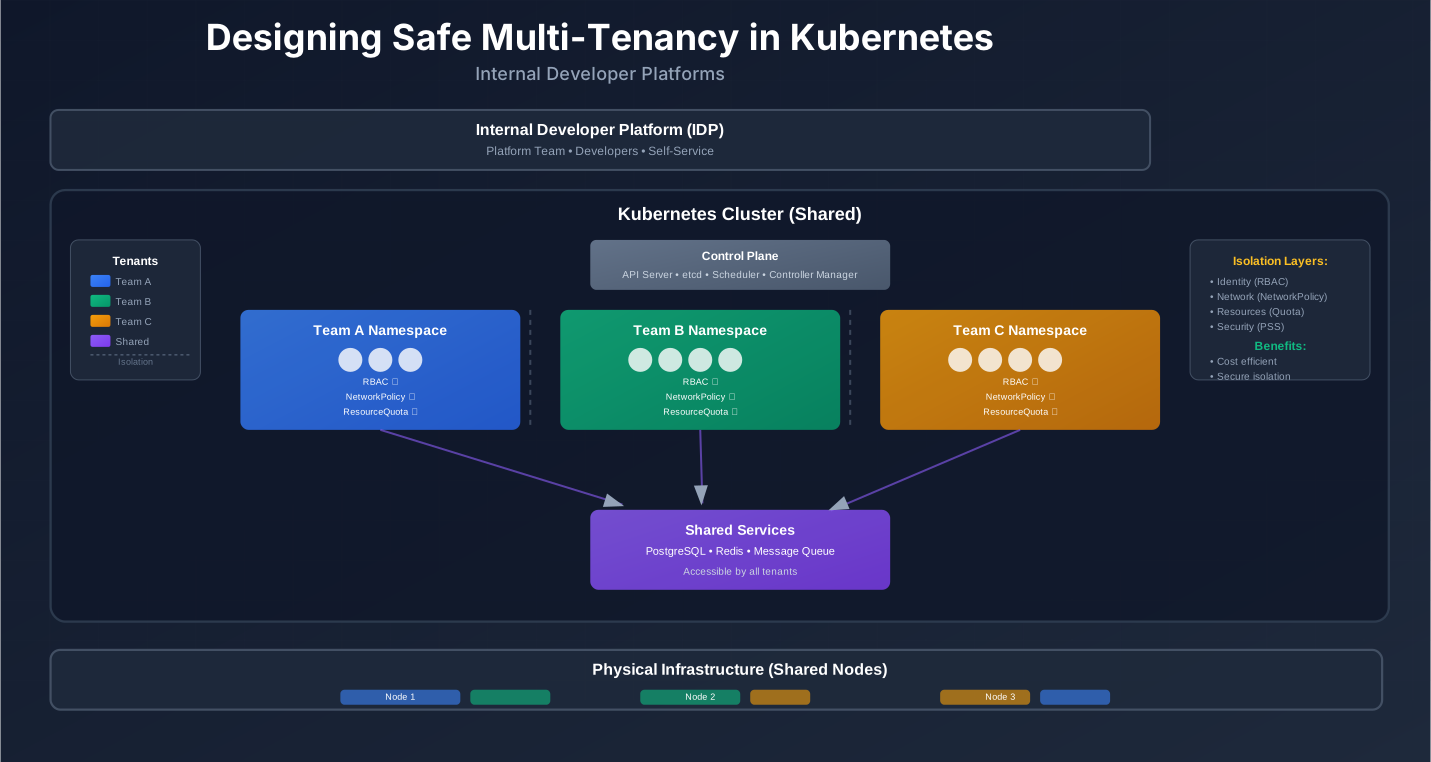
Designing Safe Multi-Tenancy in Kubernetes for Internal Developer Platforms
You have three Kubernetes clusters. One for production, one for staging, one for development. Each cluster costs $5,000 a month. You have 20 teams. That’s $300,000 a year just for infrastructure, not counting the operational overhead of managing 60 clusters.
So you consolidate. One big cluster for everyone. Teams share nodes, control plane, everything. Costs drop. Operations simplify.
Then Team A’s batch job hogs all the CPU. Team B’s app goes down. Team C accidentally deletes a namespace that Team D was using. Security finds that Team E can access Team F’s secrets.
This is the multi-tenancy problem. Kubernetes wasn’t designed for this out of the box. You have to build it yourself.
The good news: Kubernetes now has official multi-tenancy guidance. The better news: patterns and tools have matured. You can run many teams on shared clusters safely.
This guide shows you how.
The Real Problem: Many Teams, One Cluster
Let’s start with why teams end up sharing clusters, and what actually breaks.
Why Shared Clusters Happen
Cost is the obvious one. Running separate clusters for each team multiplies infrastructure costs. Each cluster needs its own control plane, monitoring, logging, ingress controllers. The math doesn’t work at scale.
Operations is another. Managing dozens of clusters means dozens of places to apply security patches, update Kubernetes versions, configure networking. Platform teams get overwhelmed.
Compliance sometimes forces it. Some organizations need all workloads in specific regions or on specific infrastructure. You can’t split teams across clusters if regulations require everything in one place.
But the real driver is platform engineering. Internal Developer Platforms (IDPs) sit on top of Kubernetes. The platform team provides Kubernetes as a product. Developers shouldn’t need to know about clusters. They should just deploy apps.
When Kubernetes is the product, you need to support many customers (teams) on shared infrastructure. That’s multi-tenancy.
What Actually Breaks
Noisy neighbors. One team’s workload consumes all CPU or memory. Other teams’ apps slow down or crash. Kubernetes scheduler tries to balance, but if nodes are full, there’s nowhere to schedule new pods.
Control plane conflicts. Team A installs a CustomResourceDefinition (CRD) that conflicts with Team B’s CRD. Both break. Or Team A uses Kubernetes 1.28 features while Team B needs 1.26. You can’t run both versions on one cluster.
Security blast radius. Team A has a compromised pod. Without proper isolation, that pod can access Team B’s secrets, services, or data. One team’s security issue becomes everyone’s problem.
Resource starvation. No quotas means one team can request all available resources. Other teams can’t deploy. Or worse: critical production workloads get evicted because a dev team’s test job requested too much memory.
Configuration conflicts. Team A sets a cluster-wide NetworkPolicy that breaks Team B’s app. Team C changes a shared ConfigMap that Team D depends on. Changes meant for one tenant affect others.
Ownership confusion. Who owns this namespace? Who’s responsible for this cost? When something breaks, who fixes it? Without clear boundaries, incidents take longer to resolve.
These aren’t theoretical. They happen in production. The solution isn’t to avoid shared clusters—it’s to design multi-tenancy properly.
Multi-Tenancy Models You Actually Use in 2025
Kubernetes doesn’t have one “multi-tenancy” feature. You choose a model based on your needs. Here are the three main approaches, and when each makes sense.
Cluster-Per-Tenant
Each team gets their own cluster. Complete isolation. No shared control plane, no shared nodes, no shared anything.
When it makes sense:
- Strong compliance requirements (PCI-DSS, HIPAA) that need physical or logical separation
- Teams need different Kubernetes versions
- Teams need different cluster configurations (different CNI plugins, different storage classes)
- You have the budget and operational capacity to manage many clusters
Trade-offs:
- Cost: High. Each cluster needs its own control plane, monitoring, logging stack
- Operations: Complex. More clusters means more places to patch, update, monitor
- Resource efficiency: Lower. Can’t share unused capacity between teams
- Isolation: Perfect. One team’s issues can’t affect another
Most organizations move away from cluster-per-tenant as they scale. The operational overhead becomes too high.
Namespace-Per-Tenant
Each team gets one or more namespaces. They share the cluster’s control plane and nodes, but workloads are isolated by namespace boundaries.
Pros:
- Simple. Uses built-in Kubernetes primitives: namespaces, RBAC, NetworkPolicy, ResourceQuota
- Cost-effective. One cluster, shared infrastructure
- Flexible. Teams can have multiple namespaces (dev, staging, prod) in the same cluster
- Familiar. Most Kubernetes users already understand namespaces
Cons:
- Noisy neighbors. All tenants share nodes. One tenant’s workload can starve others
- Shared control plane. CRD conflicts, version conflicts, cluster-scoped resources affect everyone
- Limited isolation. NetworkPolicy helps, but it’s not perfect. Bugs in the control plane can leak between tenants
- Global resources. Some Kubernetes resources are cluster-scoped (ClusterRole, PersistentVolume, etc.). Hard to isolate completely
Namespace-per-tenant is the most common model. It works for most organizations. You need to add guardrails (quotas, policies, network isolation), but the foundation is solid.
Virtual Clusters (vcluster, Loft, etc.)
Virtual clusters give each tenant their own control plane, but share the underlying nodes. Think of it as “control plane per tenant, nodes shared.”
How it works:
A virtual cluster runs inside a regular Kubernetes namespace. It has its own API server, etcd (or equivalent), scheduler. From the tenant’s perspective, it looks like a real cluster. They can install CRDs, use different Kubernetes versions, configure things independently.
But all the pods still run on the same physical nodes. The virtual cluster’s API server is just another pod in the host cluster.
When namespace-only isn’t enough:
- CRD conflicts. Teams need different CRDs with the same name, or conflicting CRD versions
- Kubernetes version differences. Team A needs 1.28 features, Team B needs 1.26
- Control plane isolation. Teams need to configure admission controllers, API server flags independently
- Complex multi-tenancy. Large organizations with many teams, strict isolation requirements
Trade-offs:
- Complexity: Higher. Virtual clusters add another layer. Debugging is harder
- Resource overhead: Each virtual cluster needs its own API server, etcd. More memory, more CPU
- Cost: Moderate. More expensive than namespace-per-tenant, less than cluster-per-tenant
- Isolation: Strong. Better than namespaces, not quite as strong as separate clusters
Virtual clusters are becoming more common. Tools like vcluster and Loft make them easier to manage. But they’re still more complex than namespace-per-tenant.
How to Choose a Model
Here’s a simple decision framework:
| Factor | Cluster-Per-Tenant | Namespace-Per-Tenant | Virtual Clusters |
|---|---|---|---|
| Team size | Any | 5-50 teams | 10-100+ teams |
| Compliance level | High (PCI, HIPAA) | Medium | Medium-High |
| K8s version needs | Different versions | Same version | Different versions |
| CRD conflicts | Not an issue | Problem | Solved |
| Operational skill | High | Medium | High |
| Cost sensitivity | Low | High | Medium |
| Isolation needs | Maximum | Good enough | Strong |
Simple decision table:
- Start with namespace-per-tenant if you have fewer than 20 teams and they can use the same Kubernetes version
- Use virtual clusters if you have CRD conflicts, version conflicts, or more than 20 teams
- Use cluster-per-tenant only if compliance or regulations require it
Most organizations start with namespace-per-tenant and move to virtual clusters as they scale.
Isolation Layers: How to Keep Tenants from Stepping on Each Other
Multi-tenancy is about isolation. You need isolation at multiple layers: identity, network, resources, and security. Let’s map each concern to actual Kubernetes features.
Identity and Access
Who can do what, and in which namespace? This is RBAC (Role-Based Access Control).
RBAC per namespace:
Each tenant gets their own namespace. Within that namespace, you create Roles (not ClusterRoles) that define what actions are allowed. Then you bind those roles to users or service accounts.
# tenant-team-a-namespace.yaml
apiVersion: v1
kind: Namespace
metadata:
  name: team-a
  labels:
    tenant: team-a
    owner: team-a@company.com
    environment: production
# tenant-team-a-admin-role.yaml
apiVersion: rbac.authorization.k8s.io/v1
kind: Role
metadata:
namespace: team-a
name: tenant-admin
rules:
- apiGroups: [""]
resources: ["*"]
verbs: ["*"]
- apiGroups: ["apps"]
resources: ["*"]
verbs: ["*"]
---
apiVersion: rbac.authorization.k8s.io/v1
kind: RoleBinding
metadata:
name: tenant-admin-binding
namespace: team-a
subjects:
- kind: User
name: alice@company.com
apiGroup: rbac.authorization.k8s.io
roleRef:
kind: Role
name: tenant-admin
apiGroup: rbac.authorization.k8s.ioPer-tenant service accounts:
Each tenant should use their own service accounts. Don’t share the default service account. Create dedicated service accounts per tenant, per app if needed.
# tenant-team-a-service-account.yaml
apiVersion: v1
kind: ServiceAccount
metadata:
  name: app-service-account
  namespace: team-a
  labels:
    tenant: team-a
Admission policies:
RBAC controls who can do what. But you also need to enforce rules about what can be created. This is where admission controllers come in.
Tools like Kyverno or OPA Gatekeeper let you write policies that validate or mutate resources before they’re created. For example:
- Require all pods to have a
tenantlabel - Block pods from using
hostNetwork: true - Enforce resource limits on all containers
- Restrict which container images can be used
# kyverno-policy-require-tenant-label.yaml
apiVersion: kyverno.io/v1
kind: ClusterPolicy
metadata:
  name: require-tenant-label
spec:
  validationFailureAction: enforce
  rules:
  - name: check-tenant-label
    match:
      resources:
        kinds:
        - Pod
        - Deployment
        - StatefulSet
    validate:
      message: "All workloads must have a 'tenant' label"
      pattern:
        metadata:
          labels:
            tenant: "?*"
This policy blocks any pod, deployment, or statefulset that doesn’t have a tenant label. It runs at admission time, before the resource is created.
Network Isolation
By default, all pods in a Kubernetes cluster can talk to each other. That’s a problem in multi-tenant clusters. Team A’s pods shouldn’t be able to reach Team B’s pods.
NetworkPolicy as default, not afterthought:
NetworkPolicy is Kubernetes’ built-in way to control pod-to-pod communication. But it’s opt-in. If you don’t create a NetworkPolicy, all traffic is allowed.
The right pattern: default deny, then allow-list what’s needed.
# tenant-team-a-network-policy.yaml
apiVersion: networking.k8s.io/v1
kind: NetworkPolicy
metadata:
  name: default-deny-all
  namespace: team-a
spec:
  podSelector: {}
  policyTypes:
  - Ingress
  - Egress
  # This policy denies all traffic by default
  # Other policies will allow specific traffic
---
apiVersion: networking.k8s.io/v1
kind: NetworkPolicy
metadata:
  name: allow-same-namespace
  namespace: team-a
spec:
  podSelector: {}
  policyTypes:
  - Ingress
  - Egress
  ingress:
  - from:
    - podSelector: {}  # Allow traffic from pods in same namespace
  egress:
  - to:
    - podSelector: {}  # Allow traffic to pods in same namespace
  - to: []  # Allow egress to external (needed for DNS, external APIs)
    ports:
    - protocol: UDP
      port: 53  # DNS
    - protocol: TCP
      port: 443  # HTTPS
    - protocol: TCP
      port: 80   # HTTP
---
apiVersion: networking.k8s.io/v1
kind: NetworkPolicy
metadata:
  name: allow-shared-services
  namespace: team-a
spec:
  podSelector: {}
  policyTypes:
  - Egress
  egress:
  - to:
    - namespaceSelector:
        matchLabels:
          name: shared-services  # Allow access to shared services namespace
    ports:
    - protocol: TCP
      port: 5432  # Example: PostgreSQL
This setup:
- Denies all traffic by default
- Allows pods in the same namespace to talk to each other
- Allows egress to external services (DNS, HTTPS)
- Allows access to a shared services namespace (databases, message queues, etc.)
Shared services pattern:
Some services are shared across tenants: databases, message queues, monitoring systems. Put these in a dedicated shared-services namespace. Then use NetworkPolicy to allow tenants to reach that namespace, but not each other.
Resource Guards
Without quotas, one tenant can consume all cluster resources. Other tenants can’t deploy. Critical workloads get evicted.
ResourceQuota per tenant:
ResourceQuota limits how much CPU, memory, storage a namespace can use.
# tenant-team-a-resource-quota.yaml
apiVersion: v1
kind: ResourceQuota
metadata:
  name: team-a-quota
  namespace: team-a
spec:
  hard:
    requests.cpu: "10"
    requests.memory: 20Gi
    limits.cpu: "20"
    limits.memory: 40Gi
    persistentvolumeclaims: "10"
    services.loadbalancers: "2"
    count/deployments.apps: "10"
    count/statefulsets.apps: "5"
This quota says:
- Team A can request up to 10 CPUs total
- Team A can request up to 20Gi memory total
- Team A can use up to 20 CPUs if needed (limits)
- Team A can use up to 40Gi memory if needed (limits)
- Team A can create up to 10 persistent volume claims
- Team A can create up to 2 load balancers
- Team A can have up to 10 deployments and 5 statefulsets
LimitRange for defaults:
ResourceQuota sets namespace-level limits. LimitRange sets defaults and constraints for individual containers.
# tenant-team-a-limit-range.yaml
apiVersion: v1
kind: LimitRange
metadata:
  name: team-a-limits
  namespace: team-a
spec:
  limits:
  - default:
      cpu: "500m"
      memory: "512Mi"
    defaultRequest:
      cpu: "100m"
      memory: "128Mi"
    max:
      cpu: "2"
      memory: "2Gi"
    min:
      cpu: "50m"
      memory: "64Mi"
    type: Container
This LimitRange:
- Sets default CPU limit to 500m, default memory limit to 512Mi
- Sets default CPU request to 100m, default memory request to 128Mi
- Prevents containers from requesting more than 2 CPU or 2Gi memory
- Prevents containers from requesting less than 50m CPU or 64Mi memory
If a pod doesn’t specify resources, it gets these defaults. This prevents “forgot to set limits” from consuming all resources.
Handling bursty workloads:
Some workloads are bursty. They need more resources sometimes, but not always. ResourceQuota is based on requests, not actual usage. So you can set requests low (for steady state) but limits high (for bursts).
The cluster needs enough capacity for all tenants’ limits, even if they don’t all burst at once. This is where cluster autoscaling helps. Add nodes when needed, remove them when not.
Security Boundaries
Isolation isn’t just about resources and network. It’s also about security.
Pod Security Standards:
Kubernetes has Pod Security Standards (PSS): Privileged, Baseline, Restricted. They define what security settings pods can use.
- Privileged: Almost everything allowed. Dangerous.
- Baseline: Prevents known privilege escalations. Good default.
- Restricted: Very strict. Best for production.
You enforce PSS using Pod Security Admission (built-in) or tools like Kyverno/OPA.
# namespace-pod-security.yaml
apiVersion: v1
kind: Namespace
metadata:
  name: team-a
  labels:
    pod-security.kubernetes.io/enforce: restricted
    pod-security.kubernetes.io/audit: restricted
    pod-security.kubernetes.io/warn: restricted
This namespace enforces Restricted mode. Pods that don’t meet the standard are rejected.
Node pools for stricter tenants:
Some tenants need extra isolation. Compliance workloads, PCI-DSS workloads, etc. You can use node pools (node groups) with taints and tolerations.
# node-pool-with-taint.yaml
apiVersion: v1
kind: Node
metadata:
  name: compliance-node-1
  labels:
    workload-type: compliance
spec:
  taints:
  - key: compliance-only
    value: "true"
    effect: NoSchedule
Then only pods with the right toleration can schedule on these nodes:
# pod-with-toleration.yaml
apiVersion: v1
kind: Pod
metadata:
  name: compliance-app
  namespace: team-a
spec:
  tolerations:
  - key: compliance-only
    value: "true"
    effect: NoSchedule
  containers:
  - name: app
    image: myapp:latest
This gives you physical or logical separation for sensitive workloads, even within a shared cluster.
Designing Multi-Tenancy as a Product in Your IDP
Multi-tenancy isn’t just a technical problem. It’s a product problem. Developers are your customers. You need to give them a good experience while keeping the cluster safe.
Tenant Onboarding Workflow
When a new team needs a “space” in the cluster, what happens?
Manual process (don’t do this):
- Team lead emails platform team
- Platform engineer creates namespace manually
- Platform engineer creates RBAC, quotas, policies manually
- Platform engineer shares kubeconfig
- Team starts deploying
This doesn’t scale. It’s error-prone. It’s slow.
Automated process (do this):
- Team lead fills out a form (or opens a PR, or runs a CLI command)
- System creates namespace with proper labels
- System creates ResourceQuota based on team tier (small/medium/large)
- System creates default NetworkPolicy (deny all, allow same namespace)
- System creates RBAC (Role + RoleBinding for team members)
- System applies admission policies
- System provisions service accounts
- System sends team their kubeconfig (or adds them to existing config)
- Team can deploy immediately
This can be a GitOps workflow, a web UI, a CLI tool, or an API. The key is automation.
Example GitOps structure:
tenants/
  team-a/
    namespace.yaml
    resource-quota.yaml
    limit-range.yaml
    network-policy.yaml
    rbac.yaml
    service-accounts.yaml
  team-b/
    namespace.yaml
    ...
When a team requests a namespace, you create a PR with these files. CI/CD applies them. Or you use a tool like Crossplane, which can provision Kubernetes resources from declarative config.
Guardrails, Not Gates
The goal isn’t to prevent developers from doing things. It’s to make the safe path easy and the unsafe path hard.
Golden paths via templates:
Provide Helm charts, Kustomize bases, or other templates that follow best practices. Developers use these templates. They get:
- Proper resource limits
- Correct labels
- Security settings
- Monitoring annotations
- Right service accounts
They don’t have to think about it.
# golden-path-deployment-template.yaml
apiVersion: apps/v1
kind: Deployment
metadata:
  name: {{ .Values.appName }}
  namespace: {{ .Values.tenant }}
  labels:
    tenant: {{ .Values.tenant }}
    app: {{ .Values.appName }}
    managed-by: platform-team
spec:
  replicas: {{ .Values.replicas | default 2 }}
  template:
    metadata:
      labels:
        tenant: {{ .Values.tenant }}
        app: {{ .Values.appName }}
    spec:
      serviceAccountName: {{ .Values.tenant }}-service-account
      securityContext:
        runAsNonRoot: true
        runAsUser: 1000
        fsGroup: 2000
      containers:
      - name: app
        image: {{ .Values.image }}
        resources:
          requests:
            cpu: {{ .Values.cpuRequest | default "100m" }}
            memory: {{ .Values.memoryRequest | default "128Mi" }}
          limits:
            cpu: {{ .Values.cpuLimit | default "500m" }}
            memory: {{ .Values.memoryLimit | default "512Mi" }}
        securityContext:
          allowPrivilegeEscalation: false
          readOnlyRootFilesystem: true
          capabilities:
            drop:
            - ALL
This template enforces:
- Tenant labels (required for policies)
- Service account (not default)
- Resource limits (prevents resource starvation)
- Security context (follows Pod Security Standards)
Developers fill in appName, tenant, image, replicas. The rest is handled.
Limit what developers can break:
Instead of saying “don’t use hostNetwork,” use admission policies to block it. Instead of saying “set resource limits,” use LimitRange to set defaults.
Make breaking things hard, not impossible. If a team really needs hostNetwork (rare), they can request an exception. But 99% of teams don’t need it, so block it by default.
Self-Service vs. Platform Team Control
What can developers do themselves? What requires platform team approval?
Self-service (developers can do):
- Deploy apps in their namespace
- Create ConfigMaps, Secrets (within their namespace)
- Scale deployments up/down
- View logs, metrics for their apps
- Create service accounts (within their namespace)
- Update their own resources
Platform team control (requires approval):
- Create new namespaces
- Modify ResourceQuota
- Modify NetworkPolicy (beyond defaults)
- Access other namespaces
- Create cluster-scoped resources
- Modify admission policies
- Change node pools or cluster config
This is enforced via RBAC. Developers get Roles (namespace-scoped). Platform team gets ClusterRoles (cluster-scoped).
Observability and Cost Tracking per Tenant
You can’t manage what you can’t measure. In multi-tenant clusters, you need to see:
- Which tenant is using how much CPU/memory
- Which tenant is spending how much money
- Which tenant has errors, slow requests, etc.
Labeling Strategy
Everything needs labels. Pods, namespaces, services, everything. Use consistent labels so you can filter and group.
Standard labels:
labels:
  tenant: team-a           # Which team owns this
  app: my-app              # Which application
  component: api           # Which component (api, worker, etc.)
  environment: production  # Which environment
  managed-by: platform     # Who manages this (platform, team, etc.)
Use these labels consistently. Admission policies can enforce them.
Prometheus / OpenTelemetry Labels
Your monitoring stack (Prometheus, Grafana, etc.) should use these labels. Then you can create dashboards per tenant.
Prometheus queries:
# CPU usage per tenant
sum(rate(container_cpu_usage_seconds_total{namespace=~"team-.*"}[5m])) by (tenant)

# Memory usage per tenant
sum(container_memory_working_set_bytes{namespace=~"team-.*"}) by (tenant)

# Error rate per tenant
sum(rate(http_requests_total{status=~"5..", namespace=~"team-.*"}[5m])) by (tenant)
These queries group by tenant label, so you see metrics per team.
Grafana dashboards:
Create dashboards that filter by tenant. Or create one dashboard per tenant. Show:
- CPU/memory usage over time
- Request rate, error rate, latency
- Pod count, deployment count
- Cost estimates
Cost Tools
Tools like Kubecost calculate cost per namespace, per label. They show:
- How much each tenant is spending
- Which resources are expensive (load balancers, GPUs, etc.)
- Cost trends over time
- Recommendations for cost optimization
This is FinOps for Kubernetes. Teams can see their spend. Platform team can see total cluster cost and how it’s distributed.
Cost allocation:
Map Kubernetes resources to cloud costs:
- Node costs → allocate by CPU/memory requests
- Load balancer costs → allocate to namespace that created it
- Storage costs → allocate to namespace that created the PVC
- Network egress costs → allocate by egress traffic per namespace
Tools like Kubecost do this automatically. You can also build it yourself using cloud provider APIs and Kubernetes metrics.
Dashboards: Per-Tenant Views
Each tenant should have a dashboard showing:
- Resources: CPU, memory, storage usage vs. quota
- Applications: Deployment status, pod count, replica counts
- Performance: Request rate, error rate, p95/p99 latency
- Cost: Estimated spend this month, trends
- Alerts: Active alerts for their namespace
Platform team needs cluster-wide dashboards:
- Total cluster utilization
- Cost per tenant
- Quota usage per tenant
- Security events
- Failed deployments, evicted pods
Concrete Reference Implementation (Namespace-Based Tenant)
Let’s walk through a complete setup for one tenant. This is what you’d actually deploy.
Step 1: Namespace with Labels
# tenants/team-a/namespace.yaml
apiVersion: v1
kind: Namespace
metadata:
  name: team-a
  labels:
    tenant: team-a
    owner: team-a@company.com
    environment: production
    pod-security.kubernetes.io/enforce: restricted
    pod-security.kubernetes.io/audit: restricted
    pod-security.kubernetes.io/warn: restricted
  annotations:
    description: "Namespace for Team A production workloads"
    cost-center: "engineering"
Labels are for filtering and policies. Annotations are for metadata.
Step 2: ResourceQuota and LimitRange
# tenants/team-a/resource-quota.yaml
apiVersion: v1
kind: ResourceQuota
metadata:
  name: team-a-quota
  namespace: team-a
spec:
  hard:
    requests.cpu: "10"
    requests.memory: 20Gi
    limits.cpu: "20"
    limits.memory: 40Gi
    persistentvolumeclaims: "10"
    services.loadbalancers: "2"
    count/deployments.apps: "10"
    count/statefulsets.apps: "5"
    count/jobs.batch: "20"
---
apiVersion: v1
kind: LimitRange
metadata:
  name: team-a-limits
  namespace: team-a
spec:
  limits:
  - default:
      cpu: "500m"
      memory: "512Mi"
    defaultRequest:
      cpu: "100m"
      memory: "128Mi"
    max:
      cpu: "2"
      memory: "2Gi"
    min:
      cpu: "50m"
      memory: "64Mi"
    type: Container
This sets namespace-level limits and container-level defaults.
Step 3: NetworkPolicy (Default Deny + Allow Same Namespace)
# tenants/team-a/network-policy.yaml
apiVersion: networking.k8s.io/v1
kind: NetworkPolicy
metadata:
  name: default-deny-all
  namespace: team-a
spec:
  podSelector: {}
  policyTypes:
  - Ingress
  - Egress
---
apiVersion: networking.k8s.io/v1
kind: NetworkPolicy
metadata:
  name: allow-same-namespace
  namespace: team-a
spec:
  podSelector: {}
  policyTypes:
  - Ingress
  - Egress
  ingress:
  - from:
    - podSelector: {}
  egress:
  - to:
    - podSelector: {}
  - to: []
    ports:
    - protocol: UDP
      port: 53
    - protocol: TCP
      port: 443
    - protocol: TCP
      port: 80
---
apiVersion: networking.k8s.io/v1
kind: NetworkPolicy
metadata:
  name: allow-shared-services
  namespace: team-a
spec:
  podSelector: {}
  policyTypes:
  - Egress
  egress:
  - to:
    - namespaceSelector:
        matchLabels:
          name: shared-services
    ports:
    - protocol: TCP
      port: 5432
    - protocol: TCP
      port: 6379
This denies all traffic by default, allows same-namespace communication, allows external egress (DNS, HTTPS), and allows access to shared services.
Step 4: RBAC (Role + RoleBinding)
# tenants/team-a/rbac.yaml
apiVersion: rbac.authorization.k8s.io/v1
kind: Role
metadata:
  namespace: team-a
  name: tenant-admin
rules:
- apiGroups: [""]
  resources: ["*"]
  verbs: ["*"]
- apiGroups: ["apps"]
  resources: ["*"]
  verbs: ["*"]
- apiGroups: ["batch"]
  resources: ["*"]
  verbs: ["*"]
- apiGroups: [""]
  resources: ["configmaps", "secrets"]
  verbs: ["create", "update", "patch", "delete", "get", "list", "watch"]
---
apiVersion: rbac.authorization.k8s.io/v1
kind: RoleBinding
metadata:
  name: tenant-admin-binding
  namespace: team-a
subjects:
- kind: User
  name: alice@company.com
  apiGroup: rbac.authorization.k8s.io
- kind: User
  name: bob@company.com
  apiGroup: rbac.authorization.k8s.io
roleRef:
  kind: Role
  name: tenant-admin
  apiGroup: rbac.authorization.k8s.io
---
apiVersion: rbac.authorization.k8s.io/v1
kind: Role
metadata:
  namespace: team-a
  name: tenant-developer
rules:
- apiGroups: [""]
  resources: ["pods", "services"]
  verbs: ["get", "list", "watch"]
- apiGroups: ["apps"]
  resources: ["deployments", "replicasets"]
  verbs: ["get", "list", "watch"]
---
apiVersion: rbac.authorization.k8s.io/v1
kind: RoleBinding
metadata:
  name: tenant-developer-binding
  namespace: team-a
subjects:
- kind: User
  name: charlie@company.com
  apiGroup: rbac.authorization.k8s.io
roleRef:
  kind: Role
  name: tenant-developer
  apiGroup: rbac.authorization.k8s.io
This creates two roles: tenant-admin (full access in namespace) and tenant-developer (read-only). Bind users to roles as needed.
Step 5: Service Accounts
# tenants/team-a/service-accounts.yaml
apiVersion: v1
kind: ServiceAccount
metadata:
  name: team-a-default
  namespace: team-a
  labels:
    tenant: team-a
---
apiVersion: v1
kind: ServiceAccount
metadata:
  name: team-a-app
  namespace: team-a
  labels:
    tenant: team-a
    app: my-app
Create service accounts per tenant, per app if needed. Don’t use the default service account.
Step 6: Admission Policy (Kyverno Example)
# policies/require-tenant-label.yaml
apiVersion: kyverno.io/v1
kind: ClusterPolicy
metadata:
  name: require-tenant-label
spec:
  validationFailureAction: enforce
  background: false
  rules:
  - name: check-tenant-label
    match:
      resources:
        kinds:
        - Pod
        - Deployment
        - StatefulSet
        - DaemonSet
        - Job
        - CronJob
    validate:
      message: "All workloads must have a 'tenant' label matching the namespace"
      pattern:
        metadata:
          labels:
            tenant: "{{request.namespace}}"
---
apiVersion: kyverno.io/v1
kind: ClusterPolicy
metadata:
  name: require-resource-limits
spec:
  validationFailureAction: enforce
  background: false
  rules:
  - name: check-resource-limits
    match:
      resources:
        kinds:
        - Pod
    validate:
      message: "All containers must have CPU and memory limits"
      pattern:
        spec:
          containers:
          - name: "*"
            resources:
              limits:
                memory: "?*"
                cpu: "?*"
              requests:
                memory: "?*"
                cpu: "?*"
These policies:
- Require all workloads to have a
tenantlabel that matches the namespace name - Require all containers to have CPU and memory limits and requests
If a pod doesn’t meet these requirements, it’s rejected.
Step 7: GitOps Layout
Organize your tenant configs in Git:
tenants/
  team-a/
    namespace.yaml
    resource-quota.yaml
    limit-range.yaml
    network-policy.yaml
    rbac.yaml
    service-accounts.yaml
  team-b/
    namespace.yaml
    ...
policies/
  require-tenant-label.yaml
  require-resource-limits.yaml
  block-privileged.yaml
shared-services/
  namespace.yaml
  postgres-service.yaml
  redis-service.yaml
Use ArgoCD, Flux, or similar to sync these to the cluster. When you add a new tenant, create a PR. When it merges, the tenant is provisioned automatically.
Advanced: Virtual Clusters for Complex Orgs
Sometimes namespace-per-tenant isn’t enough. You need virtual clusters.
When Namespace-Only Is Not Enough
- CRD conflicts: Teams need different CRDs with the same name
- Version conflicts: Teams need different Kubernetes versions
- Control plane isolation: Teams need different admission controllers, API server configs
- Scale: More than 20-30 teams, complex requirements
Example Virtual Cluster Configuration
Using vcluster (one popular tool):
# vcluster-team-a.yaml
apiVersion: v1
kind: Namespace
metadata:
  name: vcluster-team-a
  labels:
    tenant: team-a
    vcluster: "true"
---
apiVersion: apps/v1
kind: StatefulSet
metadata:
  name: vcluster-team-a
  namespace: vcluster-team-a
spec:
  serviceName: vcluster-team-a
  replicas: 1
  template:
    spec:
      containers:
      - name: kube-apiserver
        image: k8s.gcr.io/kube-apiserver:v1.28.0
        # ... API server config
      - name: etcd
        image: k8s.gcr.io/etcd:3.5.0
        # ... etcd config
      - name: controller-manager
        image: k8s.gcr.io/kube-controller-manager:v1.28.0
        # ... controller manager config
This creates a virtual cluster for Team A. From Team A’s perspective, it looks like a real cluster. They can install CRDs, use features, configure things. But it’s actually running in a namespace in the host cluster.
Migration Approach
Don’t migrate everyone at once. Move one tenant at a time:
- Create virtual cluster for one tenant
- Test that tenant’s workloads in the virtual cluster
- Migrate that tenant’s workloads
- Monitor for issues
- Repeat for next tenant
Start with teams that have the most conflicts or strictest requirements. They’ll benefit most from virtual clusters.
Failure Stories and Anti-Patterns
Here’s what happens when you don’t design multi-tenancy properly.
”One Super-Admin Kubeconfig for Everyone”
What happened: Platform team gave everyone the same kubeconfig with cluster-admin permissions. No RBAC, no namespaces, everyone could do everything.
Result: Team A accidentally deleted Team B’s production database. Team C changed a cluster-wide ConfigMap that broke everyone’s apps. No audit trail of who did what.
Fix: Use RBAC. Give each user minimal permissions. Use separate kubeconfigs or integrate with your identity provider (OIDC, LDAP, etc.).
No Quotas in a Shared Cluster
What happened: Team A deployed a batch job that requested 100 CPUs. Cluster only had 50 CPUs total. Other teams’ pods got evicted. Production workloads went down.
Result: Hours of downtime. Teams couldn’t deploy. Platform team had to manually delete Team A’s job.
Fix: Set ResourceQuota on every namespace. Use LimitRange to set defaults. Monitor quota usage.
Wide-Open Network Inside the Cluster
What happened: No NetworkPolicies. All pods could talk to all pods. Team A’s compromised pod accessed Team B’s database. Team C’s app called Team D’s internal API without permission.
Result: Security incident. Data breach. Compliance violation.
Fix: Default deny NetworkPolicy on every namespace. Allow-list only what’s needed.
All Tenants Using the Same Default Namespace
What happened: Everyone deployed to the default namespace. No isolation. No way to track who owns what. No way to set quotas or policies per team.
Result: Chaos. Can’t tell which team owns which resource. Can’t set different quotas. Can’t isolate networks.
Fix: One namespace per tenant. Enforce it with admission policies.
Checklist and Takeaways
Use this checklist to review your multi-tenant design:
Basic Multi-Tenancy
- Each tenant has their own namespace(s)
- Namespaces have proper labels (
tenant,owner,environment) - ResourceQuota set on every namespace
- LimitRange set on every namespace
- RBAC: Roles (not ClusterRoles) for tenant access
- Service accounts created per tenant (not using
default) - NetworkPolicy: default deny on every namespace
- NetworkPolicy: allow same-namespace communication
- NetworkPolicy: allow egress to external (DNS, HTTPS)
- Pod Security Standards enforced (at least Baseline, preferably Restricted)
Intermediate Multi-Tenancy
- Admission policies enforce tenant labels on all workloads
- Admission policies enforce resource limits on all containers
- Admission policies block dangerous settings (hostNetwork, privileged, etc.)
- Shared services in dedicated namespace with NetworkPolicy allowing access
- Monitoring/observability: metrics labeled by tenant
- Cost tracking: cost allocation per tenant
- Dashboards: per-tenant resource usage, performance, cost
- Automated tenant onboarding (GitOps, API, or UI)
- Documentation: how tenants request namespaces, what they can/can’t do
Advanced Multi-Tenancy
- Virtual clusters for teams with CRD/version conflicts
- Node pools with taints/tolerations for compliance workloads
- Multi-cluster setup with cluster-per-tenant for high-compliance teams
- Automated quota adjustment based on usage
- Self-service quota increases (with approval workflow)
- Cost alerts: notify teams when they approach quota or budget
- Security scanning: scan container images, detect vulnerabilities per tenant
- Backup/disaster recovery: per-tenant backup policies
Maturity Ladder
Basic: Namespaces, quotas, basic RBAC, basic NetworkPolicy. Manual provisioning. Works for 5-10 teams.
Intermediate: Admission policies, automated provisioning, monitoring per tenant, cost tracking. Works for 10-30 teams.
Advanced: Virtual clusters, node pools, multi-cluster, advanced automation. Works for 30+ teams, complex requirements.
Most organizations start at Basic and move to Intermediate as they scale. Advanced is for large enterprises with complex needs.
Key Takeaways
-
Start with namespace-per-tenant. It’s the simplest model that works for most cases.
-
Isolation at multiple layers. Identity (RBAC), network (NetworkPolicy), resources (ResourceQuota), security (Pod Security Standards).
-
Default deny, allow-list. Deny everything by default. Then allow only what’s needed.
-
Automate tenant provisioning. Don’t do it manually. Use GitOps, APIs, or tools.
-
Monitor and measure. You need observability per tenant. You need cost tracking per tenant.
-
Guardrails, not gates. Make the safe path easy. Block the unsafe path. But allow exceptions when needed.
-
Virtual clusters when needed. Use them when namespace-per-tenant isn’t enough (CRD conflicts, version conflicts, scale).
Multi-tenancy in Kubernetes is hard. But it’s necessary if you’re building an Internal Developer Platform. Start simple. Add complexity as you need it. Measure everything. Iterate.
The cluster is your product. Multi-tenancy is how you scale it.
Discussion
Loading comments...