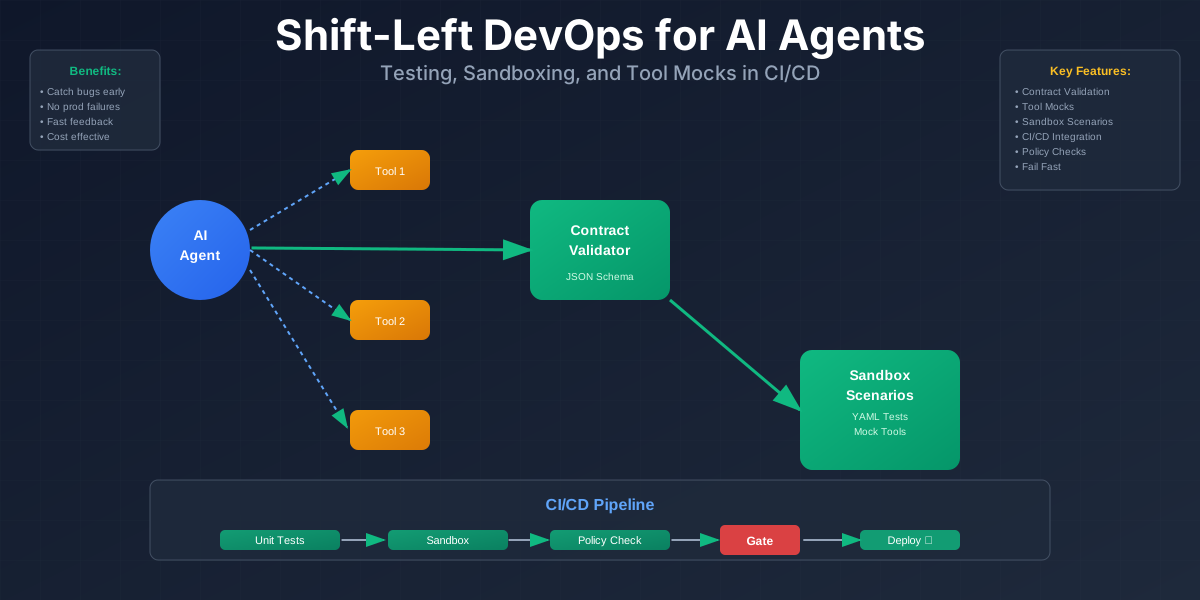
Shift-Left DevOps for AI Agents: Testing, Sandboxing, and Tool Mocks in CI/CD
Shift-Left DevOps for AI Agents: Testing, Sandboxing, and Tool Mocks in CI/CD
AI agents break in ways normal microservices don’t. They hallucinate tool calls. They loop forever. They make subtle mistakes that only show up when real users hit them.
The problem is we’re catching these bugs in production. That’s expensive. It’s risky. And it’s unnecessary.
Shift-left DevOps means testing earlier in the pipeline. For agents, that means testing tools, prompts, and workflows before deployment. This article shows you how.
Why AI agents need shift-left DevOps
Agents fail differently than traditional services. Here’s what goes wrong:
Hallucinated tool calls
An agent might call a tool that doesn’t exist. Or pass parameters that don’t match the schema. The LLM generates plausible-looking code, but it’s wrong.
Example: An agent tries to call send_email(to="user@example.com", subject="Hello") but the real API requires recipient, not to. The call fails silently or returns an error the agent doesn’t handle.
Infinite loops and runaway actions
Agents can get stuck. They call a tool, get a result, decide they need more information, call another tool, and repeat. Without limits, they’ll run until they hit a timeout or rate limit.
A customer support agent might keep querying a database, trying to find information that doesn’t exist. Each query costs money and time.
Subtle prompt regressions
You update a prompt to fix one issue. It breaks something else. The agent starts making different decisions, and you don’t notice until users complain.
Maybe you change “be concise” to “be very concise” and suddenly the agent stops including important context. Or you add a safety check that makes the agent too cautious.
Why production testing is risky
Catching these issues in production means:
- Real users see failures
- Real API calls cost money
- Real data might get corrupted
- Real services might get overwhelmed
A single agent making bad tool calls can trigger rate limits, create duplicate records, or send wrong notifications.
The goal of shift-left
Fail fast in CI. Keep production simple and boring.
If an agent breaks, the PR should fail. The deployment should be blocked. You should know before it reaches users.
Defining testable contracts for agents
Treat the agent as a black box with a contract. It takes inputs and produces outputs. You can test those inputs and outputs without understanding the internal reasoning.
The contract
Inputs:
- User message
- Available tools
- Context (conversation history, user data, etc.)
Allowed actions:
- Tool calls (which tools, with what parameters)
- Messages (what the agent says)
- State updates (what changes in the system)
Expected constraints:
- No PII in logs
- Maximum number of steps
- Never call dangerous tools in test environments
- Tool parameters match schemas
Writing contracts as code
Contracts live in your repo. They’re JSON schemas, YAML files, or Python classes. They define what’s allowed and what’s not.
Here’s a simple example using JSON Schema:
{
  "type": "object",
  "properties": {
    "tool_name": {
      "type": "string",
      "enum": ["search_database", "send_notification", "get_user_info"]
    },
    "parameters": {
      "type": "object",
      "properties": {
        "query": {"type": "string", "maxLength": 500},
        "user_id": {"type": "string", "pattern": "^user_\\d+$"}
      },
      "required": ["query"]
    }
  },
  "required": ["tool_name", "parameters"]
}
This schema says: the agent can only call these three tools, parameters must match these types, and query is required.
Policy rules
Beyond schemas, you need policy rules. These are checks that run after the agent makes a decision.
Example rules:
- Never call
/delete_userin test environments - Maximum 10 tool calls per conversation
- All database queries must include a
limitparameter - No tool calls that modify production data during testing
Where contracts live
Contracts can live in:
- The same repo as the agent code
- A separate config service
- A policy repository (like OPA policies)
For most teams, keeping them in the same repo works best. They’re versioned with the code, and changes are visible in PRs.
Code example: Contract validation
Here’s a Python example that validates an agent action:
from jsonschema import validate, ValidationError
from typing import Dict, Any

TOOL_CONTRACT = {
    "type": "object",
    "properties": {
        "tool_name": {
            "type": "string",
            "enum": ["search_database", "send_notification"]
        },
        "parameters": {
            "type": "object",
            "properties": {
                "query": {"type": "string", "maxLength": 500}
            },
            "required": ["query"]
        }
    },
    "required": ["tool_name", "parameters"]
}

def validate_agent_action(action: Dict[str, Any]) -> bool:
    """Validate an agent action against the contract."""
    try:
        validate(instance=action, schema=TOOL_CONTRACT)
        return True
    except ValidationError as e:
        print(f"Contract violation: {e.message}")
        return False

# Test
action = {
    "tool_name": "search_database",
    "parameters": {"query": "find users"}
}

assert validate_agent_action(action), "Action should be valid"
This test fails if the agent tries to call a tool that’s not in the allowed list, or if parameters don’t match the schema.
Unit tests for tools and prompt modules
Tools are just functions. Test them like normal code.
Prompt “modules” are trickier. They’re sub-prompts for planning, tool selection, or response formatting. You can test them with fixed inputs and expected outputs.
Testing tools
A tool is a function that takes parameters and returns a result. Test it with known inputs and check the outputs.
def search_database(query: str, limit: int = 10) -> list:
    """Search the database for records matching the query."""
    # Implementation here
    pass

def test_search_database():
    results = search_database("user@example.com", limit=5)
    assert len(results) <= 5
    assert all("user@example.com" in str(r) for r in results)
This is standard unit testing. Nothing special about agents here.
Testing prompt modules
Prompt modules are harder. The LLM generates text, and text is variable. You can’t test for exact matches.
Instead, test for structure and key fields. Use “good enough” matchers.
Example: You have a prompt that extracts structured data from user messages. Test that the output has the right structure, even if the exact wording varies.
def test_extract_user_intent():
    prompt = "Extract the user's intent from: 'I want to cancel my subscription'"
    response = llm.generate(prompt)

    # Check structure, not exact text
    assert "intent" in response
    assert response["intent"] in ["cancel", "unsubscribe", "cancel_subscription"]
    assert "confidence" in response
    assert 0 <= response["confidence"] <= 1
You’re checking that the response has the right shape and reasonable values, not that it matches a specific string.
Snapshot tests
Snapshot tests store a “golden” output and compare new outputs against it. They’re useful for prompt modules that should be relatively stable.
import json

def test_planning_prompt_snapshot():
    prompt = create_planning_prompt(user_message="Book a flight")
    response = llm.generate(prompt)

    # Store snapshot on first run
    snapshot_file = "snapshots/planning_prompt.json"
    if not os.path.exists(snapshot_file):
        with open(snapshot_file, "w") as f:
            json.dump(response, f, indent=2)
        return

    # Compare with snapshot
    with open(snapshot_file, "r") as f:
        expected = json.load(f)

    assert response["steps"] == expected["steps"]
    assert response["tools"] == expected["tools"]
If the prompt changes in an unexpected way, the snapshot test fails. You review the diff and either update the snapshot or fix the prompt.
Avoiding brittle tests
Prompt tests break easily. The LLM might rephrase something, and your test fails even though the behavior is correct.
To avoid brittleness:
- Check structure and key fields, not every word
- Use matchers that allow variation (e.g., “contains ‘cancel’ or ‘unsubscribe’”)
- Test behavior, not implementation (does it work, not how it’s worded)
Code example: Mocking the LLM
Here’s a pytest example that mocks the LLM and asserts the agent sends the right tool call:
import pytest
from unittest.mock import Mock, patch

def test_agent_tool_selection():
    """Test that the agent selects the correct tool for a user request."""

    # Mock the LLM response
    mock_llm_response = {
        "tool_calls": [
            {
                "tool_name": "search_database",
                "parameters": {"query": "user@example.com"}
            }
        ]
    }

    with patch('agent.llm.generate') as mock_llm:
        mock_llm.return_value = mock_llm_response

        agent = Agent()
        response = agent.process("Find the user with email user@example.com")

        # Assert the agent called the right tool
        assert len(response.tool_calls) == 1
        assert response.tool_calls[0]["tool_name"] == "search_database"
        assert "user@example.com" in response.tool_calls[0]["parameters"]["query"]
This test doesn’t call a real LLM. It mocks the response and checks that the agent handles it correctly.
Tool mocks and fake environments in CI
Never call real APIs from CI. They cost money, have rate limits, and create side effects.
Instead, use mocks. Create fake implementations of your tools that behave like the real ones but don’t make external calls.
Why mock tools
Real API calls in CI mean:
- Tests are slow (network latency)
- Tests are flaky (network failures, rate limits)
- Tests cost money (API usage)
- Tests create side effects (real emails sent, real data created)
A single test run might make hundreds of tool calls. If each call costs $0.001, that’s $0.10 per run. With 100 runs per day, that’s $10/day, $300/month. For one test suite.
Layered mocks
Use different levels of mocking depending on what you’re testing:
Level 1: In-memory stubs
Simple functions that return hardcoded responses. Fast, no dependencies.
class MockEmailService:
    def send_email(self, to: str, subject: str, body: str):
        return {"status": "sent", "message_id": "mock_123"}
Level 2: Local fake services
Docker containers that run simplified versions of real services. More realistic, but still isolated.
# docker-compose.yml
services:
  fake-database:
    image: postgres:15
    environment:
      POSTGRES_DB: test_db
Tool adapter interface
Create an interface for each tool. The real implementation and the mock implementation both implement the same interface.
from abc import ABC, abstractmethod

class DatabaseTool(ABC):
    @abstractmethod
    def search(self, query: str, limit: int = 10) -> list:
        pass

class RealDatabaseTool(DatabaseTool):
    def __init__(self, connection_string: str):
        self.conn = connect(connection_string)

    def search(self, query: str, limit: int = 10) -> list:
        # Real database query
        return self.conn.execute(f"SELECT * FROM users WHERE {query} LIMIT {limit}")

class MockDatabaseTool(DatabaseTool):
    def __init__(self):
        self.data = [
            {"id": 1, "email": "user1@example.com"},
            {"id": 2, "email": "user2@example.com"}
        ]

    def search(self, query: str, limit: int = 10) -> list:
        # Fake search
        return [r for r in self.data if query in str(r)][:limit]
The agent code uses DatabaseTool, not RealDatabaseTool or MockDatabaseTool. In tests, you inject the mock. In production, you inject the real implementation.
Dependency injection
Wire up mocks using environment variables or dependency injection.
def create_agent():
    if os.getenv("USE_MOCKS") == "true":
        db_tool = MockDatabaseTool()
        email_tool = MockEmailService()
    else:
        db_tool = RealDatabaseTool(os.getenv("DB_CONNECTION_STRING"))
        email_tool = RealEmailService(os.getenv("EMAIL_API_KEY"))

    return Agent(tools=[db_tool, email_tool])
In CI, set USE_MOCKS=true. In production, don’t set it (or set it to false).
Code example: Tool interface and mock
Here’s a complete example:
from abc import ABC, abstractmethod
from typing import List, Dict

class SearchTool(ABC):
    @abstractmethod
    def search(self, query: str) -> List[Dict]:
        pass

class RealSearchTool(SearchTool):
    def __init__(self, api_key: str):
        self.api_key = api_key

    def search(self, query: str) -> List[Dict]:
        # Real API call
        response = requests.get(
            "https://api.example.com/search",
            params={"q": query},
            headers={"Authorization": f"Bearer {self.api_key}"}
        )
        return response.json()["results"]

class MockSearchTool(SearchTool):
    def search(self, query: str) -> List[Dict]:
        # Return fake data
        return [
            {"id": 1, "title": "Result 1", "url": "https://example.com/1"},
            {"id": 2, "title": "Result 2", "url": "https://example.com/2"}
        ]

# Test
def test_agent_with_mock_tool():
    mock_tool = MockSearchTool()
    agent = Agent(tools=[mock_tool])

    response = agent.process("Search for Python tutorials")

    # Verify the tool was called
    assert len(response.tool_calls) == 1
    assert response.tool_calls[0]["tool_name"] == "search"
The test uses the mock, so it’s fast and doesn’t make real API calls.
Agent sandbox runs on every pull request
Every PR should spin up a sandbox run of the agent. Run it against fixed scenarios with mocked tools. Fail the PR if the agent misbehaves.
What is a sandbox run?
A sandbox run is a full execution of the agent in a controlled environment:
- Scripted scenarios (e.g., “user forgot password”, “failed payment”)
- Mocked tools (no real API calls)
- Policy checks (max steps, no dangerous calls)
- Structured logging
The agent runs through the scenario, and you check:
- Did it complete successfully?
- Did it call the right tools?
- Did it stay within limits?
- Did it follow policies?
Fixed scenarios
Create a set of scenarios that cover common cases:
# scenarios/forgot_password.yaml
name: "User forgot password"
steps:
  - user_message: "I forgot my password"
  - expected_tools:
      - name: "get_user_by_email"
      - name: "send_password_reset_email"
  - max_steps: 5
  - policies:
      - no_pii_in_logs: true
      - no_delete_operations: true
Each scenario defines:
- The user’s message
- Expected tool calls (or tool call patterns)
- Maximum number of steps
- Policy constraints
Running scenarios
A script runs the agent against each scenario:
def run_scenario(scenario: dict, agent: Agent) -> dict:
    """Run an agent against a scenario and return results."""
    result = {
        "scenario": scenario["name"],
        "passed": False,
        "errors": [],
        "tool_calls": [],
        "steps": 0
    }

    try:
        response = agent.process(scenario["user_message"])
        result["tool_calls"] = response.tool_calls
        result["steps"] = response.step_count

        # Check policies
        if result["steps"] > scenario["max_steps"]:
            result["errors"].append(f"Exceeded max steps: {result['steps']} > {scenario['max_steps']}")

        # Check expected tools
        expected_tools = {t["name"] for t in scenario["expected_tools"]}
        actual_tools = {tc["tool_name"] for tc in response.tool_calls}

        if not expected_tools.issubset(actual_tools):
            missing = expected_tools - actual_tools
            result["errors"].append(f"Missing tool calls: {missing}")

        result["passed"] = len(result["errors"]) == 0

    except Exception as e:
        result["errors"].append(str(e))

    return result
The script returns a pass/fail result. If it fails, the CI job fails.
Failing the PR
Fail the PR if:
- Too many steps (agent is looping)
- Wrong tool sequences (agent is making bad decisions)
- Policy violations (agent is doing something dangerous)
- Exceptions (agent crashed)
Practical tips
Start small:
- 3-5 scenarios
- 2-3 critical tools mocked
- Basic policy checks
Expand over time. Add more scenarios as you find edge cases. Add more policy checks as you discover risks.
Keep logs short but structured. You want enough information to debug failures, but not so much that it’s overwhelming.
Code example: Scenario runner
Here’s a complete scenario runner:
import yaml
import json
from pathlib import Path

def load_scenario(path: str) -> dict:
    """Load a scenario from a YAML file."""
    with open(path, "r") as f:
        return yaml.safe_load(f)

def run_scenario(scenario: dict, agent: Agent) -> dict:
    """Run agent against scenario and return results."""
    result = {
        "scenario": scenario["name"],
        "passed": False,
        "errors": [],
        "tool_calls": []
    }

    try:
        response = agent.process(scenario["user_message"])
        result["tool_calls"] = response.tool_calls

        # Check max steps
        if len(response.tool_calls) > scenario.get("max_steps", 10):
            result["errors"].append(
                f"Too many steps: {len(response.tool_calls)} > {scenario['max_steps']}"
            )

        # Check expected tools
        expected = {t["name"] for t in scenario.get("expected_tools", [])}
        actual = {tc["tool_name"] for tc in response.tool_calls}

        if expected and not expected.issubset(actual):
            result["errors"].append(f"Missing tools: {expected - actual}")

        result["passed"] = len(result["errors"]) == 0

    except Exception as e:
        result["errors"].append(str(e))
        result["passed"] = False

    return result

def main():
    """Run all scenarios and print results."""
    scenario_dir = Path("scenarios")
    scenarios = list(scenario_dir.glob("*.yaml"))

    agent = create_agent(use_mocks=True)
    results = []

    for scenario_path in scenarios:
        scenario = load_scenario(str(scenario_path))
        result = run_scenario(scenario, agent)
        results.append(result)

        status = "PASS" if result["passed"] else "FAIL"
        print(f"{status}: {result['scenario']}")
        if result["errors"]:
            for error in result["errors"]:
                print(f"  ERROR: {error}")

    # Exit with non-zero if any scenario failed
    failed = [r for r in results if not r["passed"]]
    if failed:
        print(f"\n{len(failed)} scenario(s) failed")
        exit(1)
    else:
        print("\nAll scenarios passed")
        exit(0)

if __name__ == "__main__":
    main()
Run this script in CI. If any scenario fails, the job fails and the PR is blocked.
Integrating into CI/CD
Here’s a GitHub Actions pipeline that runs all the checks:
name: Agent CI

on:
  pull_request:
    branches: [main]
  push:
    branches: [main]

jobs:
  lint:
    runs-on: ubuntu-latest
    steps:
      - uses: actions/checkout@v3
      - uses: actions/setup-python@v4
        with:
          python-version: '3.11'
      - run: pip install ruff
      - run: ruff check .

  unit-tests:
    runs-on: ubuntu-latest
    steps:
      - uses: actions/checkout@v3
      - uses: actions/setup-python@v4
        with:
          python-version: '3.11'
      - run: pip install -r requirements.txt
      - run: pip install pytest pytest-cov
      - run: pytest tests/unit/ --cov=src --cov-report=xml
      - uses: codecov/codecov-action@v3
        with:
          files: ./coverage.xml

  sandbox-scenarios:
    runs-on: ubuntu-latest
    steps:
      - uses: actions/checkout@v3
      - uses: actions/setup-python@v4
        with:
          python-version: '3.11'
      - run: pip install -r requirements.txt
      - name: Run sandbox scenarios
        run: python scripts/run_scenarios.py
        env:
          USE_MOCKS: "true"
      - name: Upload scenario logs
        if: failure()
        uses: actions/upload-artifact@v3
        with:
          name: scenario-logs
          path: logs/scenarios/

  policy-checks:
    runs-on: ubuntu-latest
    steps:
      - uses: actions/checkout@v3
      - uses: actions/setup-python@v4
        with:
          python-version: '3.11'
      - run: pip install -r requirements.txt
      - name: Run policy checks
        run: python scripts/check_policies.py
This pipeline has four stages:
- Lint + static checks: Formatting, type checking, basic validation
- Unit tests: Tool tests, prompt module tests, contract validation
- Sandbox scenario runs: Full agent runs against fixed scenarios
- Policy checks: OPA rules or custom Python checks
If any stage fails, the PR is blocked.
Exposing results
Show results in the PR:
- Status checks (green checkmark or red X)
- Comments with summaries
- Artifacts with detailed logs
GitHub Actions automatically shows status checks. For more detail, add a comment:
def post_pr_comment(results: list):
    """Post scenario results as a PR comment."""
    body = "## Sandbox Scenario Results\n\n"

    for result in results:
        status = "✅" if result["passed"] else "❌"
        body += f"{status} {result['scenario']}\n"
        if result["errors"]:
            body += "```\n"
            for error in result["errors"]:
                body += f"{error}\n"
            body += "```\n"

    # Post to GitHub PR using GitHub API
    # (implementation omitted)
Failing the job
The scenario runner exits with a non-zero code if any scenario fails. GitHub Actions treats this as a job failure, which blocks the PR from merging.
if __name__ == "__main__":
    results = run_all_scenarios()
    failed = [r for r in results if not r["passed"]]

    if failed:
        print(f"{len(failed)} scenario(s) failed")
        sys.exit(1)  # This fails the CI job
    else:
        print("All scenarios passed")
        sys.exit(0)
Practical rollout checklist
Start small. Don’t try to test everything at once.
Phase 1: Basics (Week 1)
- 3-5 sandbox scenarios
- 2-3 critical tools mocked
- Basic contract validation (tool names, parameter types)
- Simple policy: max steps = 10
Phase 2: Expand (Week 2-3)
- Add more scenarios (edge cases, error paths)
- Mock all external tools
- Add policy checks (no PII, no dangerous operations)
- Snapshot tests for prompt modules
Phase 3: Mature (Month 2+)
- Contract versioning
- Performance benchmarks (max latency)
- Cost tracking (token usage per scenario)
- Automated scenario generation
How to expand without blocking the team
- Make tests optional at first (warn, don’t fail)
- Gradually make them required
- Add tests incrementally (one scenario per PR)
- Document failures and fixes
The goal is to catch issues early, not to create friction. If tests are too strict, developers will disable them or work around them.
Conclusion
Shift-left DevOps for AI agents means testing earlier. Test tools, prompts, and workflows in CI. Use mocks, sandboxes, and contracts.
Start with a few scenarios and basic checks. Expand over time. The key is to fail fast and keep production simple.
Agents are different from traditional services, but the testing principles are the same: catch bugs early, use mocks, test contracts, and automate everything.
Discussion
Loading comments...