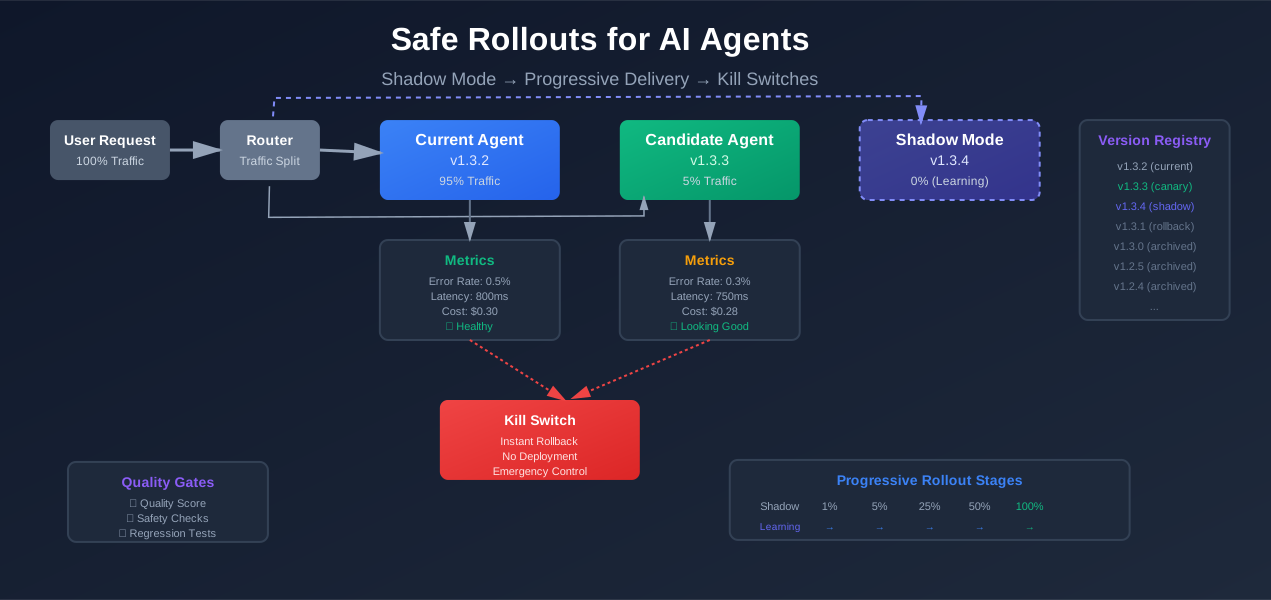
Safe Rollouts for AI Agents: Shadow Mode, Progressive Delivery, and Kill Switches
You deploy a new agent version. It works in testing. But production is different. Real users. Real edge cases. Real consequences.
The agent starts making weird decisions. It calls tools it shouldn’t. It costs more than expected. It violates policies. You need to roll back, but you can’t. You deployed everything at once.
Agents change behavior without code changes. Models update. Prompts drift. Tools evolve. Small changes can break user experience, compliance, or cost controls.
This article shows how to roll out agent versions safely. Shadow mode. Canary traffic. Quality gates. Kill switches. These patterns come from DevOps and feature flags, adapted for agents.
The problem: agents change behavior without code changes
Traditional services are predictable. Same code, same behavior. Deploy new code, get new behavior. It’s straightforward.
Agents are different. They depend on:
- Models: The underlying LLM might update. Same prompt, different output.
- Prompts: Small wording changes can change decisions.
- Tools: New tools or tool changes affect what the agent can do.
- Policies: Safety rules and constraints evolve.
A small change can have a big impact.
User experience breaks
You update a prompt to be more helpful. The agent starts being too verbose. Users get frustrated. Support tickets spike.
Or the opposite: you make it more concise. The agent stops including important context. Users get confused.
Compliance violations
The agent starts accessing data it shouldn’t. It calls tools that violate privacy rules. It logs sensitive information.
These aren’t code bugs. They’re behavior changes from prompt or model updates.
Cost blow-ups
A new model version is more thorough. It makes more tool calls. Each call costs money. Your bill doubles overnight.
Or the agent gets stuck in loops. It keeps calling the same expensive API. One request costs hundreds of dollars.
Why “big bang” deployments are unsafe
Deploying everything at once means:
- All users see the new version immediately
- If it breaks, everyone is affected
- Rollback is slow and risky
- You can’t compare old vs new behavior
You’re flying blind. You don’t know if the new version is better or worse until it’s too late.
Mindset: treat agents like risky features, not simple services
Agents are more like feature flags than microservices. They have behavior that can change unpredictably. They need gradual rollouts and quick kill switches.
Think of each agent version as a feature. Test it in shadow mode. Roll it out gradually. Monitor metrics. Have a kill switch ready.
Versioning agents as first-class artifacts
Before you can roll out safely, you need to version agents properly. An agent version isn’t just code. It’s a combination of:
- Prompt: The system prompt and instructions
- Tools: Which tools are available and their configurations
- Config: Model settings, temperature, max tokens
- Model: Which model version to use
All of these together define an agent version. If any changes, it’s a new version.
What is an “agent version”?
An agent version is a snapshot of:
version: "v1.3.2"
model:
  provider: "openai"
  name: "gpt-4"
  temperature: 0.7
  max_tokens: 2000
prompt:
  system: "You are a helpful customer support agent..."
  instructions: "Always be polite and concise."
tools:
  - name: "search_database"
    enabled: true
  - name: "send_email"
    enabled: true
  - name: "delete_user"
    enabled: false
policies:
  max_steps: 10
  max_cost_per_request: 1.00
  allowed_tools: ["search_database", "send_email"]
This is version v1.3.2. Change the prompt? That’s v1.3.3. Change the model? That’s v1.4.0. Change tools? That’s v2.0.0 (if breaking).
How to store versions
You have a few options:
Option 1: Git repo + config files
Store agent configs in your repo. Each version is a YAML or JSON file. Tag releases in git.
agents/
  support-agent/
    v1.3.2.yaml
    v1.3.3.yaml
    v1.4.0.yaml
Pros: Simple, versioned with code, easy to review in PRs.
Cons: Requires code deployment to change configs.
Option 2: Agent registry / metadata store
Store agent metadata in a database or config service. Version numbers are keys. Configs are values.
agent_registry:
  support-agent:
    v1.3.2: { config... }
    v1.3.3: { config... }
Pros: Can change configs without code deployment. Easy to query and compare versions.
Cons: More infrastructure. Need to keep registry in sync with code.
For most teams, start with git + config files. It’s simple and works well. Move to a registry later if you need dynamic config changes.
Naming and tagging versions
Use semantic versioning:
- Major (v2.0.0): Breaking changes. New tools, major prompt rewrites.
- Minor (v1.4.0): New features. New tools, prompt improvements.
- Patch (v1.3.3): Bug fixes. Small prompt tweaks, config adjustments.
Add suffixes for special versions:
v1.3.2-shadow: Running in shadow modev1.3.2-canary: Running in canary modev1.3.2-rollback: Previous version, ready for rollback
This makes it clear what each version is doing.
Why this matters for rollbacks and incident analysis
When something breaks, you need to know:
- Which version was running?
- What changed from the previous version?
- Can you roll back quickly?
Proper versioning makes this easy. You can see exactly what changed. You can roll back to a known good version. You can analyze incidents with full context.
Code example: Agent config and version loader
Here’s a simple implementation:
# src/agent_config.py
import yaml
from pathlib import Path
from typing import Dict, Any, Optional

class AgentConfig:
    """Agent configuration with versioning."""

    def __init__(self, config: Dict[str, Any]):
        self.version = config["version"]
        self.model = config["model"]
        self.prompt = config["prompt"]
        self.tools = config["tools"]
        self.policies = config.get("policies", {})

    @classmethod
    def load(cls, agent_name: str, version: str) -> "AgentConfig":
        """Load agent config from file."""
        config_path = Path(f"agents/{agent_name}/{version}.yaml")
        with open(config_path, "r") as f:
            config = yaml.safe_load(f)
        return cls(config)

    def to_dict(self) -> Dict[str, Any]:
        """Convert config to dictionary."""
        return {
            "version": self.version,
            "model": self.model,
            "prompt": self.prompt,
            "tools": self.tools,
            "policies": self.policies
        }

# Example config file: agents/support-agent/v1.3.2.yaml
# version: "v1.3.2"
# model:
#   provider: "openai"
#   name: "gpt-4"
#   temperature: 0.7
# prompt:
#   system: "You are a helpful customer support agent."
# tools:
#   - name: "search_database"
#     enabled: true
# policies:
#   max_steps: 10
# src/agent_factory.py
from .agent_config import AgentConfig
from .agent import Agent
def create_agent(agent_name: str, version: str) -> Agent:
"""Create an agent instance from a versioned config."""
config = AgentConfig.load(agent_name, version)
# Initialize agent with config
agent = Agent(
model_provider=config.model["provider"],
model_name=config.model["name"],
system_prompt=config.prompt["system"],
tools=[t["name"] for t in config.tools if t["enabled"]],
max_steps=config.policies.get("max_steps", 10)
)
return agent
# Usage
agent_v1 = create_agent("support-agent", "v1.3.2")
agent_v2 = create_agent("support-agent", "v1.3.3")This gives you versioned agents you can load and compare.
Shadow mode: learning without risk
Shadow mode runs a new agent version alongside the current one. The new version processes the same requests, but its responses aren’t shown to users. You compare outputs and learn about differences.
It’s like A/B testing, but the B version is invisible to users.
Concept
Here’s how it works:
- User sends a request
- Current agent processes it and returns response to user
- New agent processes the same request in the background
- Both responses are logged and compared
- User only sees the current agent’s response
The new agent learns from real traffic without affecting users.
Use cases
Compare decisions
See how the new agent makes different decisions. Does it call different tools? Does it handle edge cases better? Does it make mistakes the current agent doesn’t?
Check for policy violations
Does the new agent violate safety rules? Does it call forbidden tools? Does it access data it shouldn’t?
Cost analysis
How much does the new agent cost? More tool calls? Longer responses? Higher token usage?
Quality assessment
Is the new agent’s output better? More accurate? More helpful? You can score both responses and compare.
What to log
Log everything you need to compare:
- Inputs: User message, context, available tools
- Old agent decision: Tool calls, response, metadata
- New agent decision: Tool calls, response, metadata
- Scores: Quality scores, cost, latency, policy compliance
Store this in a database or log service. Query it later to analyze differences.
How long to run shadow mode
Run shadow mode for at least a few days. You need enough data to see patterns:
- Edge cases that only happen occasionally
- Different user types and behaviors
- Peak traffic vs normal traffic
- Different times of day
A week is usually enough. Longer if you have low traffic or want more confidence.
What to watch
Monitor these metrics during shadow mode:
- Decision differences: How often do agents make different decisions?
- Policy violations: Does the new agent violate rules?
- Cost differences: Is the new agent more expensive?
- Quality scores: Is the new agent better or worse?
- Error rates: Does the new agent fail more often?
If you see red flags, fix them before rolling out.
Code example: Shadow mode routing
Here’s a simple implementation:
# src/shadow_mode.py
import logging
from typing import Dict, Any, Optional
from .agent_factory import create_agent

logger = logging.getLogger(__name__)

class ShadowModeRouter:
    """Routes requests to current agent and runs candidate in shadow mode."""

    def __init__(
        self,
        agent_name: str,
        current_version: str,
        candidate_version: Optional[str] = None
    ):
        self.agent_name = agent_name
        self.current_version = current_version
        self.candidate_version = candidate_version

        # Load agents
        self.current_agent = create_agent(agent_name, current_version)
        self.candidate_agent = None
        if candidate_version:
            self.candidate_agent = create_agent(agent_name, candidate_version)

    def process(self, user_message: str, context: Dict[str, Any]) -> Dict[str, Any]:
        """
        Process request with current agent, run candidate in shadow mode.

        Returns current agent's response.
        """
        # Process with current agent (synchronous, user-facing)
        current_response = self.current_agent.process(user_message, context)

        # Process with candidate agent (asynchronous, shadow mode)
        if self.candidate_agent:
            try:
                candidate_response = self.candidate_agent.process(user_message, context)

                # Log both responses for comparison
                self._log_comparison(
                    user_message=user_message,
                    context=context,
                    current_response=current_response,
                    candidate_response=candidate_response
                )
            except Exception as e:
                logger.error(f"Shadow mode error: {e}", exc_info=True)
                # Don't fail the request if shadow mode fails

        return current_response

    def _log_comparison(
        self,
        user_message: str,
        context: Dict[str, Any],
        current_response: Dict[str, Any],
        candidate_response: Dict[str, Any]
    ):
        """Log both responses for later analysis."""
        comparison = {
            "timestamp": datetime.utcnow().isoformat(),
            "user_message": user_message,
            "context": context,
            "current_version": self.current_version,
            "candidate_version": self.candidate_version,
            "current_response": {
                "tool_calls": current_response.get("tool_calls", []),
                "response": current_response.get("response", ""),
                "cost": current_response.get("cost", 0),
                "latency_ms": current_response.get("latency_ms", 0)
            },
            "candidate_response": {
                "tool_calls": candidate_response.get("tool_calls", []),
                "response": candidate_response.get("response", ""),
                "cost": candidate_response.get("cost", 0),
                "latency_ms": candidate_response.get("latency_ms", 0)
            },
            "differences": self._compute_differences(current_response, candidate_response)
        }

        # Log to database or logging service
        logger.info("Shadow mode comparison", extra=comparison)

    def _compute_differences(
        self,
        current: Dict[str, Any],
        candidate: Dict[str, Any]
    ) -> Dict[str, Any]:
        """Compute differences between responses."""
        return {
            "tool_calls_different": (
                current.get("tool_calls", []) != candidate.get("tool_calls", [])
            ),
            "cost_difference": (
                candidate.get("cost", 0) - current.get("cost", 0)
            ),
            "latency_difference_ms": (
                candidate.get("latency_ms", 0) - current.get("latency_ms", 0)
            )
        }

# Usage in API endpoint
router = ShadowModeRouter(
    agent_name="support-agent",
    current_version="v1.3.2",
    candidate_version="v1.3.3"  # Running in shadow mode
)

@app.post("/chat")
def chat(request: ChatRequest):
    response = router.process(
        user_message=request.message,
        context=request.context
    )
    return response
This runs the candidate agent in the background and logs comparisons without affecting users.
Progressive delivery: from 1% to 100%
Once shadow mode looks good, start sending real traffic to the new version. Start small. Increase gradually. Monitor at each step.
This is progressive delivery. Also called canary rollouts or gradual rollouts.
Canary rollout stages
A typical rollout looks like this:
- 1%: Test with a small fraction of traffic
- 5%: If 1% looks good, increase to 5%
- 25%: If 5% looks good, increase to 25%
- 50%: If 25% looks good, increase to 50%
- 100%: If 50% looks good, roll out to everyone
Each stage gives you time to catch issues before they affect too many users.
You can adjust the stages based on your risk tolerance. More cautious? Use 0.1%, 1%, 5%, 25%, 100%. Less cautious? Use 5%, 25%, 100%.
What metrics to monitor
At each stage, watch these metrics:
Error rate
Is the new agent failing more? HTTP errors, exceptions, timeouts. If error rate spikes, roll back.
Tool failures
Are tool calls failing? Wrong parameters? Rate limits? API errors? Tool failures are a red flag.
Latency
Is the new agent slower? Higher latency means worse user experience. If latency increases significantly, investigate.
Safety violations / policy flags
Is the new agent violating policies? Calling forbidden tools? Accessing restricted data? These are critical.
Business KPIs
Is the new agent affecting business metrics? Conversion rates, customer satisfaction, revenue. These matter most.
Monitor all of these. Set thresholds. If any threshold is exceeded, roll back automatically.
Using feature flags or traffic rules
You can control rollouts with:
Feature flags
Use a feature flag service (LaunchDarkly, Split, etc.). Route traffic based on flag values.
if feature_flag.is_enabled("new-agent-v1.3.3", user_id):
    agent = create_agent("support-agent", "v1.3.3")
else:
    agent = create_agent("support-agent", "v1.3.2")
Traffic rules
Route based on user attributes. Percentage of users, user IDs, geographic regions, etc.
if should_use_new_agent(user_id, percentage=5):
    agent = create_agent("support-agent", "v1.3.3")
else:
    agent = create_agent("support-agent", "v1.3.2")
Load balancer rules
Route at the infrastructure level. Use load balancer rules to send X% of traffic to new version.
Choose what works for your infrastructure. Feature flags are flexible. Traffic rules are simple. Load balancer rules are infrastructure-native.
How to design thresholds and automatic rollback rules
Set clear thresholds for each metric:
rollout_thresholds:
  error_rate:
    max_increase: 0.05  # 5% increase is acceptable
    absolute_max: 0.10  # 10% error rate is unacceptable
  latency:
    max_increase_ms: 200  # 200ms increase is acceptable
    absolute_max_ms: 2000  # 2s latency is unacceptable
  cost:
    max_increase_percent: 20  # 20% cost increase is acceptable
  policy_violations:
    max_count: 0  # Zero tolerance for policy violations
If any threshold is exceeded, roll back automatically. Don’t wait for manual intervention.
Code example: Progressive rollout controller
Here’s a simple rollout controller:
# src/rollout_controller.py
import time
from typing import Dict, Any, Optional
from dataclasses import dataclass
from enum import Enum

class RolloutStage(Enum):
    SHADOW = "shadow"
    CANARY_1_PCT = "canary_1pct"
    CANARY_5_PCT = "canary_5pct"
    CANARY_25_PCT = "canary_25pct"
    CANARY_50_PCT = "canary_50pct"
    FULL = "full"
    ROLLED_BACK = "rolled_back"

@dataclass
class RolloutThresholds:
    """Thresholds for automatic rollback."""
    max_error_rate_increase: float = 0.05
    max_latency_increase_ms: int = 200
    max_cost_increase_percent: float = 20
    max_policy_violations: int = 0

class RolloutController:
    """Manages progressive rollout of agent versions."""

    def __init__(
        self,
        agent_name: str,
        current_version: str,
        candidate_version: str,
        thresholds: RolloutThresholds
    ):
        self.agent_name = agent_name
        self.current_version = current_version
        self.candidate_version = candidate_version
        self.thresholds = thresholds
        self.stage = RolloutStage.SHADOW
        self.stage_start_time = time.time()
        self.metrics_history = []

    def should_use_candidate(self, user_id: str) -> bool:
        """Determine if request should use candidate version."""
        if self.stage == RolloutStage.SHADOW:
            return False  # Shadow mode doesn't serve candidate

        if self.stage == RolloutStage.ROLLED_BACK:
            return False  # Rolled back, use current

        # Calculate percentage based on user_id hash
        user_hash = hash(user_id) % 100
        percentage = self._get_stage_percentage()

        return user_hash < percentage

    def _get_stage_percentage(self) -> int:
        """Get traffic percentage for current stage."""
        stage_percentages = {
            RolloutStage.CANARY_1_PCT: 1,
            RolloutStage.CANARY_5_PCT: 5,
            RolloutStage.CANARY_25_PCT: 25,
            RolloutStage.CANARY_50_PCT: 50,
            RolloutStage.FULL: 100
        }
        return stage_percentages.get(self.stage, 0)

    def record_metrics(
        self,
        version: str,
        error: bool,
        latency_ms: float,
        cost: float,
        policy_violations: int
    ):
        """Record metrics for a request."""
        self.metrics_history.append({
            "timestamp": time.time(),
            "version": version,
            "error": error,
            "latency_ms": latency_ms,
            "cost": cost,
            "policy_violations": policy_violations
        })

        # Keep only recent metrics (last hour)
        cutoff = time.time() - 3600
        self.metrics_history = [
            m for m in self.metrics_history
            if m["timestamp"] > cutoff
        ]

    def evaluate_and_advance(self) -> bool:
        """
        Evaluate metrics and advance to next stage if safe.

        Returns True if advanced, False if rolled back.
        """
        if self.stage == RolloutStage.SHADOW:
            # Shadow mode: just collect metrics, don't advance automatically
            return False

        if self.stage == RolloutStage.FULL:
            # Already at 100%, nothing to do
            return False

        # Check if we should roll back
        if self._should_rollback():
            self.stage = RolloutStage.ROLLED_BACK
            return False

        # Check if we've been in this stage long enough
        stage_duration = time.time() - self.stage_start_time
        min_stage_duration = 3600  # 1 hour minimum per stage

        if stage_duration < min_stage_duration:
            return False  # Not enough time in this stage

        # Advance to next stage
        self._advance_stage()
        return True

    def _should_rollback(self) -> bool:
        """Check if metrics indicate we should roll back."""
        if not self.metrics_history:
            return False

        # Calculate metrics for candidate version
        candidate_metrics = [
            m for m in self.metrics_history
            if m["version"] == self.candidate_version
        ]

        if not candidate_metrics:
            return False

        current_metrics = [
            m for m in self.metrics_history
            if m["version"] == self.current_version
        ]

        if not current_metrics:
            return True  # No baseline, roll back

        # Calculate averages
        candidate_error_rate = sum(m["error"] for m in candidate_metrics) / len(candidate_metrics)
        current_error_rate = sum(m["error"] for m in current_metrics) / len(current_metrics)

        candidate_avg_latency = sum(m["latency_ms"] for m in candidate_metrics) / len(candidate_metrics)
        current_avg_latency = sum(m["latency_ms"] for m in current_metrics) / len(current_metrics)

        candidate_avg_cost = sum(m["cost"] for m in candidate_metrics) / len(candidate_metrics)
        current_avg_cost = sum(m["cost"] for m in current_metrics) / len(current_metrics)

        candidate_violations = sum(m["policy_violations"] for m in candidate_metrics)

        # Check thresholds
        if candidate_error_rate - current_error_rate > self.thresholds.max_error_rate_increase:
            return True

        if candidate_avg_latency - current_avg_latency > self.thresholds.max_latency_increase_ms:
            return True

        if (candidate_avg_cost - current_avg_cost) / current_avg_cost > self.thresholds.max_cost_increase_percent / 100:
            return True

        if candidate_violations > self.thresholds.max_policy_violations:
            return True

        return False

    def _advance_stage(self):
        """Advance to next rollout stage."""
        stage_order = [
            RolloutStage.SHADOW,
            RolloutStage.CANARY_1_PCT,
            RolloutStage.CANARY_5_PCT,
            RolloutStage.CANARY_25_PCT,
            RolloutStage.CANARY_50_PCT,
            RolloutStage.FULL
        ]

        current_index = stage_order.index(self.stage)
        if current_index < len(stage_order) - 1:
            self.stage = stage_order[current_index + 1]
            self.stage_start_time = time.time()

# Usage
controller = RolloutController(
    agent_name="support-agent",
    current_version="v1.3.2",
    candidate_version="v1.3.3",
    thresholds=RolloutThresholds()
)

@app.post("/chat")
def chat(request: ChatRequest):
    # Determine which version to use
    use_candidate = controller.should_use_candidate(request.user_id)
    version = controller.candidate_version if use_candidate else controller.current_version

    agent = create_agent("support-agent", version)
    response = agent.process(request.message, request.context)

    # Record metrics
    controller.record_metrics(
        version=version,
        error=response.get("error", False),
        latency_ms=response.get("latency_ms", 0),
        cost=response.get("cost", 0),
        policy_violations=response.get("policy_violations", 0)
    )

    return response

# Background task to evaluate and advance rollout
def evaluate_rollout():
    controller.evaluate_and_advance()
This controller manages the rollout stages and automatically rolls back if thresholds are exceeded.
Automated quality gates and checks
Don’t rely only on charts and dashboards. Add automated checks into your pipeline. These checks block bad versions from reaching production.
Quality gates
Quality gates are automated checks that must pass before a version can advance:
Quality score from offline evals
Run the new version against a test suite. Calculate quality scores. If scores drop, block the rollout.
Safety checker score
Run safety checks. Check for policy violations, dangerous tool calls, PII leaks. If safety score is too low, block the rollout.
Regression checks on key scenarios
Run regression tests on critical scenarios. If key scenarios fail, block the rollout.
Performance benchmarks
Check latency, cost, token usage. If performance degrades significantly, block the rollout.
Pipeline view
Your rollout pipeline looks like this:
Build → Test → Shadow → Canary → Full Rollout
         ↓       ↓        ↓          ↓
      Quality  Safety  Metrics   Metrics
      Gates    Checks  Checks    Checks
Each stage has gates. If a gate fails, the rollout stops.
How to represent gates as code
Define gates as config files or code:
# quality_gates.yaml
gates:
  - name: "quality_score"
    type: "threshold"
    metric: "offline_quality_score"
    threshold: 0.85
    operator: ">="

  - name: "safety_score"
    type: "threshold"
    metric: "safety_checker_score"
    threshold: 0.95
    operator: ">="

  - name: "regression_tests"
    type: "test_suite"
    test_suite: "critical_scenarios"
    min_pass_rate: 1.0  # 100% must pass

  - name: "latency"
    type: "threshold"
    metric: "p95_latency_ms"
    threshold: 2000
    operator: "<="

  - name: "cost"
    type: "threshold"
    metric: "avg_cost_per_request"
    threshold: 0.50
    operator: "<="
Load these gates and check them at each stage.
Code example: Quality gate checker
Here’s a simple quality gate implementation:
# src/quality_gates.py
import yaml
from typing import Dict, Any, List
from pathlib import Path

class QualityGate:
    """Represents a single quality gate."""

    def __init__(self, config: Dict[str, Any]):
        self.name = config["name"]
        self.type = config["type"]
        self.metric = config.get("metric")
        self.threshold = config.get("threshold")
        self.operator = config.get("operator", ">=")
        self.test_suite = config.get("test_suite")
        self.min_pass_rate = config.get("min_pass_rate", 1.0)

    def check(self, metrics: Dict[str, Any]) -> tuple[bool, str]:
        """
        Check if gate passes.

        Returns (passed, message)
        """
        if self.type == "threshold":
            return self._check_threshold(metrics)
        elif self.type == "test_suite":
            return self._check_test_suite(metrics)
        else:
            return False, f"Unknown gate type: {self.type}"

    def _check_threshold(self, metrics: Dict[str, Any]) -> tuple[bool, str]:
        """Check threshold gate."""
        if self.metric not in metrics:
            return False, f"Metric {self.metric} not found"

        value = metrics[self.metric]
        threshold = self.threshold

        if self.operator == ">=":
            passed = value >= threshold
        elif self.operator == "<=":
            passed = value <= threshold
        elif self.operator == ">":
            passed = value > threshold
        elif self.operator == "<":
            passed = value < threshold
        elif self.operator == "==":
            passed = value == threshold
        else:
            return False, f"Unknown operator: {self.operator}"

        if passed:
            return True, f"{self.name}: {value} {self.operator} {threshold}"
        else:
            return False, f"{self.name}: {value} {self.operator} {threshold} (FAILED)"

    def _check_test_suite(self, metrics: Dict[str, Any]) -> tuple[bool, str]:
        """Check test suite gate."""
        if self.test_suite not in metrics:
            return False, f"Test suite {self.test_suite} not found"

        test_results = metrics[self.test_suite]
        total = len(test_results)
        passed = sum(1 for r in test_results if r["passed"])
        pass_rate = passed / total if total > 0 else 0

        if pass_rate >= self.min_pass_rate:
            return True, f"{self.name}: {passed}/{total} tests passed ({pass_rate:.1%})"
        else:
            return False, f"{self.name}: {passed}/{total} tests passed ({pass_rate:.1%}) < {self.min_pass_rate:.1%} (FAILED)"

class QualityGateChecker:
    """Checks quality gates for agent versions."""

    def __init__(self, gates_config_path: str):
        with open(gates_config_path, "r") as f:
            config = yaml.safe_load(f)

        self.gates = [QualityGate(g) for g in config["gates"]]

    def check_all(self, metrics: Dict[str, Any]) -> tuple[bool, List[str]]:
        """
        Check all gates.

        Returns (all_passed, messages)
        """
        results = []
        all_passed = True

        for gate in self.gates:
            passed, message = gate.check(metrics)
            results.append(message)
            if not passed:
                all_passed = False

        return all_passed, results

# Usage
checker = QualityGateChecker("quality_gates.yaml")

# After running evals, check gates
metrics = {
    "offline_quality_score": 0.87,
    "safety_checker_score": 0.96,
    "critical_scenarios": [
        {"name": "test_1", "passed": True},
        {"name": "test_2", "passed": True},
        {"name": "test_3", "passed": True}
    ],
    "p95_latency_ms": 1500,
    "avg_cost_per_request": 0.45
}

all_passed, messages = checker.check_all(metrics)
for message in messages:
    print(message)

if not all_passed:
    print("Quality gates failed. Blocking rollout.")
    exit(1)
else:
    print("All quality gates passed. Proceeding with rollout.")
This checks quality gates and blocks rollouts if they fail.
Kill switches and rollback patterns
Kill switches let you turn off a version immediately. No deployment needed. No waiting. Just flip a switch and traffic goes back to the previous version.
Why kill switches are essential
Agents can break in weird ways. They might:
- Start making expensive API calls
- Violate policies repeatedly
- Generate inappropriate content
- Get stuck in loops
You need to stop this immediately. Kill switches give you that control.
Types of kill switches
Global flag to turn off the new version
A single flag that disables the new version for everyone. All traffic goes to the current version.
Per-feature or per-tenant switches
More granular control. Turn off the new version for specific features or tenants. Useful if only some users are affected.
Percentage-based rollback
Gradually reduce traffic to the new version. 100% → 50% → 25% → 0%. Gives you a controlled rollback.
Rollback patterns
When you kill a version, you need to roll back. Options:
Roll back to previous agent version
Switch all traffic back to the previous version. Simple and fast.
Fall back to simple workflow or FAQ bot
If the agent is completely broken, fall back to a simpler system. A rule-based bot or FAQ lookup. Better than nothing.
Circuit breaker pattern
If the agent fails too many times, stop using it automatically. Fall back to a safe alternative.
Where to put controls
Edge router / gateway
Put kill switches in your API gateway or edge router. Fast and centralized.
Feature-flag system
Use a feature flag service. Easy to manage and monitor.
Internal admin panel
Build a simple admin panel. Let on-call engineers flip switches quickly.
Configuration service
Store kill switch state in a config service. Update it via API or UI.
Choose what fits your infrastructure. Feature flags are usually easiest.
Code example: Kill switch implementation
Here’s a simple kill switch:
# src/kill_switch.py
import json
from typing import Dict, Any, Optional
from pathlib import Path
from datetime import datetime

class KillSwitch:
    """Manages kill switches for agent versions."""

    def __init__(self, config_path: str = "kill_switches.json"):
        self.config_path = Path(config_path)
        self._load_config()

    def _load_config(self):
        """Load kill switch config from file."""
        if self.config_path.exists():
            with open(self.config_path, "r") as f:
                self.config = json.load(f)
        else:
            self.config = {
                "global_switches": {},
                "feature_switches": {},
                "tenant_switches": {}
            }
            self._save_config()

    def _save_config(self):
        """Save kill switch config to file."""
        with open(self.config_path, "w") as f:
            json.dump(self.config, f, indent=2)

    def is_killed(self, agent_name: str, version: str, feature: Optional[str] = None, tenant: Optional[str] = None) -> bool:
        """Check if a version is killed."""
        # Check global switch
        global_key = f"{agent_name}:{version}"
        if global_key in self.config["global_switches"]:
            if self.config["global_switches"][global_key].get("enabled", False):
                return True

        # Check feature switch
        if feature:
            feature_key = f"{agent_name}:{version}:{feature}"
            if feature_key in self.config["feature_switches"]:
                if self.config["feature_switches"][feature_key].get("enabled", False):
                    return True

        # Check tenant switch
        if tenant:
            tenant_key = f"{agent_name}:{version}:{tenant}"
            if tenant_key in self.config["tenant_switches"]:
                if self.config["tenant_switches"][tenant_key].get("enabled", False):
                    return True

        return False

    def kill_version(
        self,
        agent_name: str,
        version: str,
        reason: str,
        feature: Optional[str] = None,
        tenant: Optional[str] = None
    ):
        """Kill a version (enable kill switch)."""
        if feature:
            key = f"{agent_name}:{version}:{feature}"
            self.config["feature_switches"][key] = {
                "enabled": True,
                "reason": reason,
                "killed_at": datetime.utcnow().isoformat()
            }
        elif tenant:
            key = f"{agent_name}:{version}:{tenant}"
            self.config["tenant_switches"][key] = {
                "enabled": True,
                "reason": reason,
                "killed_at": datetime.utcnow().isoformat()
            }
        else:
            key = f"{agent_name}:{version}"
            self.config["global_switches"][key] = {
                "enabled": True,
                "reason": reason,
                "killed_at": datetime.utcnow().isoformat()
            }

        self._save_config()

    def unkill_version(
        self,
        agent_name: str,
        version: str,
        feature: Optional[str] = None,
        tenant: Optional[str] = None
    ):
        """Unkill a version (disable kill switch)."""
        if feature:
            key = f"{agent_name}:{version}:{feature}"
            if key in self.config["feature_switches"]:
                del self.config["feature_switches"][key]
        elif tenant:
            key = f"{agent_name}:{version}:{tenant}"
            if key in self.config["tenant_switches"]:
                del self.config["tenant_switches"][key]
        else:
            key = f"{agent_name}:{version}"
            if key in self.config["global_switches"]:
                del self.config["global_switches"][key]

        self._save_config()

# Usage in request handler
kill_switch = KillSwitch()

@app.post("/chat")
def chat(request: ChatRequest):
    # Check kill switch
    if kill_switch.is_killed(
        agent_name="support-agent",
        version="v1.3.3",
        feature=request.feature,
        tenant=request.tenant_id
    ):
        # Use previous version
        version = "v1.3.2"
    else:
        version = "v1.3.3"

    agent = create_agent("support-agent", version)
    return agent.process(request.message, request.context)

# Admin endpoint to kill a version
@app.post("/admin/kill")
def kill_version(request: KillSwitchRequest):
    kill_switch.kill_version(
        agent_name=request.agent_name,
        version=request.version,
        reason=request.reason,
        feature=request.feature,
        tenant=request.tenant
    )
    return {"status": "killed"}

# Admin endpoint to unkill a version
@app.post("/admin/unkill")
def unkill_version(request: KillSwitchRequest):
    kill_switch.unkill_version(
        agent_name=request.agent_name,
        version=request.version,
        feature=request.feature,
        tenant=request.tenant
    )
    return {"status": "unkilled"}
This gives you kill switches you can flip instantly without code changes.
Putting it together: a rollout playbook
Here’s a practical playbook for rolling out agent versions safely.
Checklist before enabling shadow mode
- Agent version is tagged and stored in registry
- Config file is reviewed and approved
- Offline evals pass quality gates
- Shadow mode logging is configured
- Monitoring dashboards are set up
- Team is notified about shadow mode start
Checklist before raising canary traffic
- Shadow mode ran for at least 3-7 days
- No policy violations detected
- Cost is within acceptable range
- Quality scores meet thresholds
- Key scenarios pass regression tests
- Rollout controller is configured
- Kill switch is tested and ready
- On-call engineer is available
Checklist during incident (who does what)
On-call engineer:
- Check monitoring dashboards
- Identify which version is affected
- Check kill switch status
- Kill the version if needed
- Notify team
Team lead:
- Review incident details
- Coordinate investigation
- Decide on fix or rollback
- Update playbook if needed
Metrics to check:
- Error rate dashboard
- Cost dashboard
- Policy violations log
- User complaints / support tickets
- Business KPI dashboard
Runbook template
Here’s a simple runbook template teams can adapt:
# Agent Rollout Runbook

## Pre-Rollout

1. **Version Preparation**
   - Tag version in git
   - Store config in registry
   - Run offline evals
   - Review quality gate results

2. **Shadow Mode Setup**
   - Enable shadow mode routing
   - Configure logging
   - Set up monitoring
   - Notify team

3. **Shadow Mode Duration**
   - Run for 3-7 days minimum
   - Monitor metrics daily
   - Review differences weekly

## Rollout

1. **Canary 1%**
   - Enable 1% traffic
   - Monitor for 1 hour minimum
   - Check all metrics
   - Advance if safe

2. **Canary 5%**
   - Enable 5% traffic
   - Monitor for 2 hours minimum
   - Check all metrics
   - Advance if safe

3. **Canary 25%**
   - Enable 25% traffic
   - Monitor for 4 hours minimum
   - Check all metrics
   - Advance if safe

4. **Canary 50%**
   - Enable 50% traffic
   - Monitor for 8 hours minimum
   - Check all metrics
   - Advance if safe

5. **Full Rollout**
   - Enable 100% traffic
   - Monitor for 24 hours
   - Mark rollout complete

## Rollback

1. **Trigger Rollback If:**
   - Error rate increases >5%
   - Latency increases >200ms
   - Cost increases >20%
   - Policy violations detected
   - Business KPIs degrade

2. **Rollback Steps:**
   - Activate kill switch
   - Verify traffic switched
   - Monitor previous version
   - Investigate root cause
   - Document incident

## Post-Rollout

1. **Review**
   - Compare metrics (old vs new)
   - Review user feedback
   - Update playbook if needed

2. **Cleanup**
   - Remove shadow mode config
   - Archive old version
   - Update documentation
Customize this for your team and infrastructure.
Conclusion
Rolling out agent versions safely requires:
- Versioning: Treat agents as versioned artifacts
- Shadow mode: Learn from real traffic without risk
- Progressive delivery: Roll out gradually, monitor at each step
- Quality gates: Automated checks that block bad versions
- Kill switches: Instant rollback when things go wrong
These patterns come from DevOps and feature flags. They work for agents too.
Start simple. Add shadow mode first. Then add progressive delivery. Then add quality gates and kill switches. Build up your safety net over time.
The goal is to roll out new versions confidently. You should know they’re safe before users see them. And if something goes wrong, you should be able to fix it quickly.
Agents are different from traditional services. But the rollout principles are the same: test thoroughly, roll out gradually, monitor closely, and have a kill switch ready.
Discussion
Loading comments...