Control Plane vs Data Plane: A Concrete Pattern for Modern Backend Systems
You deploy a new feature flag. A typo in the config crashes your API. All user traffic stops. Your on-call engineer pages at 2 AM.
This happens when you mix control logic with data processing. Config changes, admin operations, and heavy logic live in the same services that handle user requests. One mistake affects everything.
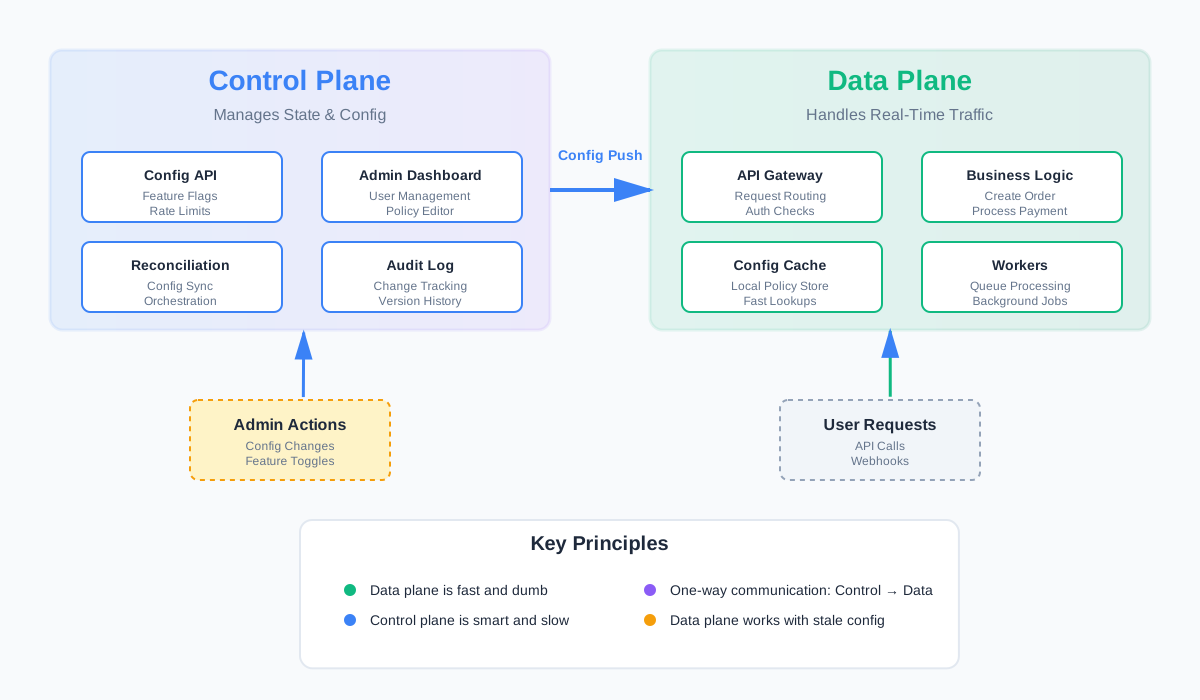
Control plane and data plane separation fixes this. Split your system into two parts: the control plane that manages state and config, and the data plane that handles traffic. They operate independently. Control plane issues don’t break user traffic.
This article shows how to apply this pattern in practice.
The Messy Reality: Everything in One Plane
Most systems start unified. One service handles everything.
Same service handles:
- User requests: API calls, webhooks, real-time traffic
- Admin operations: Config updates, feature toggles, user management
- Config changes: Rate limits, routing rules, policies
- Background tasks: Reconciliation, cleanup, reporting
This works at small scale. Then problems appear.
Problems:
Simple config bugs take down core traffic. You update a rate limit. The config parser crashes. Your API goes down. User requests fail. You can’t serve traffic because config management broke.
Hard to reason about what’s safe to change during incidents. Production is on fire. You need to disable a feature flag. But that same service handles user traffic. Is it safe to deploy? Will it make things worse? You don’t know.
No clear boundaries for ownership and SLOs. The API team owns latency. The platform team owns config. But they share the same service. When latency spikes, who fixes it? When config breaks, who’s responsible? Boundaries blur.
Deploys become risky. Every deploy touches both control and data paths. A bug in admin code can break user traffic. A bug in user code can break admin tools. You can’t deploy safely.
This is why separation matters.
Definitions in Plain Language
Before we design, let’s define terms clearly.
Data Plane
The data plane handles real-time traffic. It’s the fast path.
Characteristics:
- Simple logic: Minimal branching. Straightforward operations.
- Low latency: Milliseconds matter. Every optimization counts.
- High reliability: Must work even when control plane is down.
- Stateless or near-stateless: Can scale horizontally easily.
Think of it as the workers on an assembly line. They follow instructions. They work fast. They don’t make decisions.
Control Plane
The control plane manages state about the system. It’s the decision maker.
Characteristics:
- Slower: Can take seconds or minutes. Not in the critical path.
- More complex: Handles business logic, validation, orchestration.
- Heavily audited: Every change is logged. Changes require approval.
- Can be unavailable: Data plane should work with stale config.
Think of it as the traffic control center. It sets rules. It monitors. It makes decisions. But traffic flows even if the center is down.
Easy Analogy
Data plane = drivers and cars on the road. They follow the rules. They move fast. They don’t decide the rules.
Control plane = traffic lights, road signs, control center. They set the rules. They change slowly. They coordinate everything.
When the control center goes down, drivers still follow the last known rules. Traffic keeps moving.
What Lives in Which Plane?
Not everything fits neatly. Here’s a practical guide.
Data Plane Examples
Request routing and auth checks. User hits your API. Data plane checks auth token. Routes to the right service. Returns response. Fast. Simple.
Core business operations. Create order. Send message. Process payment. These are the core user actions. They need to be fast and reliable.
Workers processing queues. Background jobs that process user data. Image resizing. Email sending. Notification delivery. They’re part of the data flow.
Caching layers. Redis for session data. CDN for static assets. These serve traffic directly.
Control Plane Examples
Feature flags and config. Enable new checkout flow for 10% of users. Change API rate limits. Update routing rules. These are decisions about how the system behaves.
Policy and limit definitions. Rate limits per tenant. Quota rules. Access policies. These define what’s allowed.
Service discovery and registration. New service comes online. Control plane registers it. Updates routing tables. Data plane uses those tables.
Admin APIs and dashboards. Internal tools for managing the system. User management. Config editors. Analytics dashboards. These don’t serve user traffic.
Reconciliation and orchestration. Background jobs that fix inconsistencies. Sync data between systems. Coordinate multi-step operations.
Gray Areas
Some things are ambiguous.
Analytics and logging. Usually data plane. But if you’re doing heavy aggregation or reporting, that might be control plane.
User management APIs. Depends. If it’s part of the user-facing product, data plane. If it’s internal admin tooling, control plane.
Payment processing. Usually data plane. But payment rule configuration (which processors to use, when to retry) is control plane.
The rule of thumb: If it’s in the critical path for user requests, it’s probably data plane. If it’s about managing how the system works, it’s probably control plane.
Designing a Control-Plane-First System
Now let’s design a system with clear separation.
Principles
Data plane is dumb and fast. It doesn’t make decisions. It follows instructions. It optimizes for speed and reliability.
Control plane is smart and slow. It makes decisions. It validates. It orchestrates. It can take time.
Communication is mostly one-way: control → data. Control plane pushes config. Data plane consumes it. Data plane doesn’t call control plane during request handling.
Data plane works with stale config. If control plane is down, data plane uses the last known good config. It doesn’t block on control plane availability.
How They Sync
You have two main options.
Push model: Control plane pushes config changes. Data plane receives updates via streams or webhooks.
// Control plane pushes config
async function pushConfigToDataPlane(
  config: RateLimitPolicy,
  dataPlaneInstances: string[]
) {
  for (const instance of dataPlaneInstances) {
    await fetch(`${instance}/api/config/rate-limits`, {
      method: 'POST',
      body: JSON.stringify(config),
      headers: { 'Content-Type': 'application/json' }
    });
  }
}
Pull model: Data plane periodically fetches updates. Simpler. But adds latency to config changes.
// Data plane pulls config
async function fetchConfigFromControlPlane() {
  const response = await fetch(
    `${CONTROL_PLANE_URL}/api/config/rate-limits`
  );
  const config = await response.json();
  updateLocalConfig(config);
}

// Run every 30 seconds
setInterval(fetchConfigFromControlPlane, 30000);
Hybrid: Push for urgent changes. Pull for periodic refresh. Best of both worlds.
Safety Patterns
Versioned configs. Every config change gets a version. Data plane tracks which version it’s using. Control plane can roll back to previous versions.
interface RateLimitPolicy {
  id: string;
  version: number;
  tenantId: string;
  limit: number;
  window: number; // seconds
  createdAt: Date;
}

// Data plane stores current version
let currentConfigVersion = 0;
let currentConfig: RateLimitPolicy | null = null;
Staged rollout. Push config to 10% of instances. Watch metrics. If good, expand to 50%. Then 100%.
async function stagedRollout(
  config: RateLimitPolicy,
  instances: DataPlaneInstance[]
) {
  // Phase 1: 10%
  const phase1 = instances.slice(0, Math.floor(instances.length * 0.1));
  await pushConfig(config, phase1);
  await waitAndValidate(300); // 5 minutes

  // Phase 2: 50%
  const phase2 = instances.slice(0, Math.floor(instances.length * 0.5));
  await pushConfig(config, phase2);
  await waitAndValidate(300);

  // Phase 3: 100%
  await pushConfig(config, instances);
}
Safe defaults. If control plane is unavailable, data plane uses safe defaults. Maybe lower rate limits. Maybe disable new features. But it keeps serving traffic.
const DEFAULT_RATE_LIMIT = {
  limit: 100,
  window: 60
};

function getRateLimit(tenantId: string): RateLimitPolicy {
  const config = localConfigCache.get(tenantId);
  if (!config) {
    // Control plane unavailable, use safe default
    return DEFAULT_RATE_LIMIT;
  }
  return config;
}
API Design Between Planes
The interface between planes matters. Design it carefully.
Types of APIs
Control plane APIs: CRUD operations on configs/resources. Create, read, update, delete. Standard REST or gRPC. These are for admin tools and automation.
// Control plane API
POST /api/v1/rate-limit-policies
{
  "tenantId": "tenant-123",
  "limit": 1000,
  "window": 60
}

GET /api/v1/rate-limit-policies/{id}

PUT /api/v1/rate-limit-policies/{id}

DELETE /api/v1/rate-limit-policies/{id}
Data plane APIs: Read-optimized, serving traffic. Optimized for low latency. Maybe GraphQL for flexibility. Maybe gRPC for performance.
// Data plane API (internal, not exposed to users)
GET /internal/config/rate-limits?tenantId=tenant-123
// Returns: { limit: 1000, window: 60 }

// Fast, cached, versioned
Example Resources
RateLimitPolicy: Defines how many requests a tenant can make.
{
  "id": "policy-123",
  "version": 5,
  "tenantId": "tenant-123",
  "limit": 1000,
  "window": 60,
  "scope": "api",
  "createdAt": "2025-12-05T10:00:00Z",
  "updatedAt": "2025-12-05T14:30:00Z"
}
RoutingRule: Defines how requests are routed.
{
  "id": "route-456",
  "version": 3,
  "path": "/api/v2/users",
  "targetService": "user-service-v2",
  "conditions": {
    "header": "X-Tenant-Tier",
    "equals": "enterprise"
  },
  "priority": 100
}
FeatureFlag: Defines which features are enabled.
{
  "id": "flag-789",
  "version": 2,
  "name": "new-checkout-flow",
  "enabled": true,
  "rollout": {
    "percentage": 25,
    "tenantIds": ["tenant-123", "tenant-456"]
  }
}
Good Practices
Explicit versioning in URLs or payloads. Every resource has a version. Every API call specifies which version it wants.
// Version in URL
GET /api/v1/rate-limit-policies/{id}?version=5

// Version in payload
POST /api/v1/rate-limit-policies
{
  "version": 1,
  "data": { ... }
}
Idempotent updates. Same request applied twice has the same effect. Use idempotency keys.
PUT /api/v1/rate-limit-policies/{id}
Headers: {
  "Idempotency-Key": "update-123-2025-12-05"
}
Body: { ... }
Strong validation and audit logs. Validate everything. Log every change. Who changed what, when, and why.
async function updateRateLimitPolicy(
  id: string,
  update: Partial<RateLimitPolicy>,
  userId: string
) {
  // Validate
  validateRateLimitPolicy(update);

  // Update
  const policy = await db.rateLimitPolicies.update(id, update);

  // Audit log
  await auditLog.create({
    action: 'UPDATE_RATE_LIMIT_POLICY',
    resourceId: id,
    userId: userId,
    changes: update,
    timestamp: new Date()
  });

  return policy;
}
Observability and Operations
Separation changes how you monitor and operate the system.
Separate Dashboards
Data plane SLO: Latency, error rate, saturation. These are your user-facing metrics. P95 latency under 200ms. Error rate under 0.1%. CPU under 80%.
// Data plane metrics
const dataPlaneMetrics = {
  latency: {
    p50: 45,
    p95: 180,
    p99: 250
  },
  errorRate: 0.05, // 0.05%
  throughput: 10000, // requests per second
  saturation: {
    cpu: 65,
    memory: 70
  }
};
Control plane health: Config push lag, reconciliation errors, API availability. These are your operational metrics. Config changes propagate within 30 seconds. Reconciliation succeeds 99.9% of the time.
// Control plane metrics
const controlPlaneMetrics = {
  configPushLag: 15, // seconds
  reconciliationErrors: 2, // per hour
  apiAvailability: 0.999, // 99.9%
  auditLogLatency: 50 // milliseconds
};
How Incidents Change
You can often freeze the control plane during big incidents. User traffic is down. You’re debugging. You don’t want config changes making things worse. So you freeze the control plane. Data plane keeps using last known config. You fix the issue. Then unfreeze.
// Emergency freeze
await controlPlane.freeze({
  reason: 'Production incident investigation',
  frozenBy: 'oncall-engineer',
  estimatedDuration: '30 minutes'
});

// All config updates are rejected
// Data plane continues with current config
You can disable certain config changes while data plane continues. Maybe disable feature flag changes. But allow rate limit updates. Selective freezing.
// Selective freeze
await controlPlane.freezeOperations({
  operations: ['UPDATE_FEATURE_FLAG', 'UPDATE_ROUTING_RULE'],
  reason: 'Investigating routing issues'
});

// Rate limit updates still work
// Feature flag updates are blocked
You can roll back config without touching data plane code. Config bug caused issues. Roll back the config version. Data plane picks it up automatically. No code deploy needed.
// Rollback config
await controlPlane.rollbackConfig({
  resourceType: 'RateLimitPolicy',
  resourceId: 'policy-123',
  targetVersion: 4 // Roll back to version 4
});

// Data plane fetches new version on next pull
// Or receives push update
Case Study: Rate Limiting Service
Let’s walk through a concrete example: a rate limiting service.
Data Plane Implementation
Fast path to check if a request is allowed. User makes request. Data plane checks local counters. Returns allow or deny. Milliseconds.
// Data plane: Fast path check
type RateLimiter struct {
    policies map[string]*RateLimitPolicy
    counters *CounterStore // In-memory or Redis
}

func (rl *RateLimiter) IsAllowed(tenantID string, requestID string) bool {
    policy := rl.policies[tenantID]
    if policy == nil {
        // No policy, use default
        return true
    }

    key := fmt.Sprintf("%s:%d", tenantID, time.Now().Unix()/policy.Window)
    count := rl.counters.Increment(key, policy.Window)

    return count <= policy.Limit
}
Local counters, in-memory or Redis. Counters live close to the data plane. Fast access. Maybe Redis for shared state across instances. Maybe in-memory for single instance.
// Counter store interface
type CounterStore interface {
    Increment(key string, ttl int) int
    Get(key string) int
}

// In-memory implementation
type InMemoryCounterStore struct {
    counters map[string]*Counter
    mu       sync.RWMutex
}

func (s *InMemoryCounterStore) Increment(key string, ttl int) int {
    s.mu.Lock()
    defer s.mu.Unlock()

    counter, exists := s.counters[key]
    if !exists {
        counter = &Counter{
            value:     0,
            expiresAt: time.Now().Add(time.Duration(ttl) * time.Second),
        }
        s.counters[key] = counter
    }

    counter.value++
    return counter.value
}
Control Plane Implementation
API for defining per-tenant limits. Admin sets rate limit for tenant. Control plane validates. Stores it. Pushes to data plane.
// Control plane: API handler
type ControlPlaneAPI struct {
    db        *Database
    pusher    *ConfigPusher
    validator *PolicyValidator
}

func (api *ControlPlaneAPI) CreateRateLimitPolicy(
    ctx context.Context,
    req *CreateRateLimitPolicyRequest,
) (*RateLimitPolicy, error) {
    // Validate
    if err := api.validator.Validate(req); err != nil {
        return nil, err
    }

    // Create policy
    policy := &RateLimitPolicy{
        ID:        generateID(),
        Version:   1,
        TenantID:  req.TenantID,
        Limit:     req.Limit,
        Window:    req.Window,
        CreatedAt: time.Now(),
    }

    // Store
    if err := api.db.Save(policy); err != nil {
        return nil, err
    }

    // Push to data plane
    if err := api.pusher.Push(policy); err != nil {
        // Log error but don't fail the request
        log.Error("Failed to push config", err)
    }

    // Audit log
    api.auditLog.Log(ctx, "CREATE_RATE_LIMIT_POLICY", policy.ID, req.UserID)

    return policy, nil
}
Reconciliation loop that pushes limit configs to instances. Background job. Periodically checks for config changes. Pushes to all data plane instances. Handles failures. Retries.
// Control plane: Reconciliation loop
type ReconciliationLoop struct {
    db           *Database
    pusher       *ConfigPusher
    dataPlaneInstances []string
    interval     time.Duration
}

func (rl *ReconciliationLoop) Start() {
    ticker := time.NewTicker(rl.interval)
    go func() {
        for range ticker.C {
            rl.reconcile()
        }
    }()
}

func (rl *ReconciliationLoop) reconcile() {
    // Get all active policies
    policies, err := rl.db.GetAllActivePolicies()
    if err != nil {
        log.Error("Failed to fetch policies", err)
        return
    }

    // Push to all data plane instances
    for _, instance := range rl.dataPlaneInstances {
        for _, policy := range policies {
            if err := rl.pusher.PushToInstance(instance, policy); err != nil {
                log.Error("Failed to push to instance", err, "instance", instance)
                // Continue with other instances
            }
        }
    }
}
Walk Through: Adding a New Limit
Step 1: Admin creates policy via control plane API.
curl -X POST https://control-plane/api/v1/rate-limit-policies \
  -H "Authorization: Bearer $TOKEN" \
  -d '{
    "tenantId": "tenant-123",
    "limit": 1000,
    "window": 60
  }'
Step 2: Control plane validates and stores.
// Validation checks:
// - Limit > 0
// - Window > 0
// - Tenant exists
// - No conflicting policy
Step 3: Control plane pushes to data plane instances.
// Push via HTTP or gRPC
for _, instance := range dataPlaneInstances {
    pushConfig(instance, policy)
}
Step 4: Data plane updates local cache.
// Data plane receives push
func (rl *RateLimiter) UpdatePolicy(policy *RateLimitPolicy) {
    rl.mu.Lock()
    defer rl.mu.Unlock()

    // Only update if version is newer
    existing := rl.policies[policy.TenantID]
    if existing == nil || policy.Version > existing.Version {
        rl.policies[policy.TenantID] = policy
        log.Info("Policy updated", "tenant", policy.TenantID, "version", policy.Version)
    }
}
Step 5: New requests use the new limit.
// Next request checks new policy
isAllowed := rateLimiter.IsAllowed("tenant-123", "req-456")
// Uses limit: 1000, window: 60
Walk Through: Rolling Back
Step 1: Detect issue. Metrics show errors. Alerts fire. You investigate.
Step 2: Identify bad config. You find that version 5 of policy-123 is causing issues.
Step 3: Roll back via control plane.
curl -X POST https://control-plane/api/v1/rate-limit-policies/policy-123/rollback \
  -H "Authorization: Bearer $TOKEN" \
  -d '{
    "targetVersion": 4,
    "reason": "Version 5 causing errors"
  }'
Step 4: Control plane pushes old version.
// Control plane fetches version 4
oldPolicy := db.GetPolicyVersion("policy-123", 4)

// Pushes to data plane
pusher.Push(oldPolicy)
Step 5: Data plane updates. Instances receive the rollback. They update local cache. Traffic uses the old config. Issues stop.
No code deploy needed. Just config change. Fast. Safe.
Migration Approach: From Monolith to Split Planes
Most systems start unified. Here’s how to split them.
Phase 1: Identify Control Responsibilities
Audit your current services. List all operations. Categorize them.
Control responsibilities:
- Config management (feature flags, rate limits, routing rules)
- Admin operations (user management, system configuration)
- Policy definitions (access control, quotas, limits)
- Orchestration (workflow coordination, multi-step operations)
Data responsibilities:
- Request handling (API endpoints, webhooks)
- Core business logic (create order, send message)
- Real-time processing (stream processing, event handling)
Create an inventory. Document what lives where today. This becomes your migration plan.
// Migration inventory
const currentState = {
  'api-service': {
    control: [
      'Feature flag checks',
      'Rate limit config',
      'Admin user management'
    ],
    data: [
      'User API endpoints',
      'Order processing',
      'Payment handling'
    ]
  }
};
Phase 2: Pull Control into Separate Service
Create a new “admin service” or “control service”. Start simple. One service. Basic CRUD APIs.
Move one control operation at a time. Don’t move everything at once. Start with the safest one. Maybe feature flags. Maybe rate limit config.
Keep data plane calling old code initially. Data plane still has the old logic. But it’s now reading from the new control service. This is the transition state.
// Transition: Data plane reads from both
async function getFeatureFlag(flagName: string): Promise<boolean> {
  // Try new control service first
  try {
    const flag = await controlService.getFeatureFlag(flagName);
    return flag.enabled;
  } catch (error) {
    // Fallback to old local config
    return localConfig.getFeatureFlag(flagName);
  }
}
Verify it works. Test thoroughly. Monitor metrics. Make sure nothing breaks.
Phase 3: Add Versioned Configs and Control API
Add versioning to all config resources. Every config change gets a version. Store version history.
Build a proper control API. REST or gRPC. CRUD operations. Validation. Audit logging.
Add config push mechanism. Control plane can push configs to data plane. Or data plane can pull. Or both.
// Control plane API
interface ControlPlaneAPI {
  createConfig(resource: ConfigResource): Promise<ConfigResource>;
  updateConfig(id: string, update: Partial<ConfigResource>): Promise<ConfigResource>;
  getConfig(id: string, version?: number): Promise<ConfigResource>;
  deleteConfig(id: string): Promise<void>;
  pushConfig(id: string, instances: string[]): Promise<void>;
}
Phase 4: Update Data Plane to Consume Configs
Remove control logic from data plane. Delete the old code. Data plane now only reads configs.
Add config watcher. Data plane subscribes to config changes. Updates local cache when configs change.
// Data plane config watcher
class ConfigWatcher {
  private cache: Map<string, ConfigResource> = new Map();

  async start() {
    // Initial fetch
    await this.refresh();

    // Periodic refresh
    setInterval(() => this.refresh(), 30000);

    // Or subscribe to push updates
    this.subscribeToPushUpdates();
  }

  async refresh() {
    const configs = await controlPlane.getAllConfigs();
    for (const config of configs) {
      this.cache.set(config.id, config);
    }
  }

  get(id: string): ConfigResource | null {
    return this.cache.get(id) || null;
  }
}
Add safe defaults. If control plane is unavailable, use defaults. Don’t block on control plane.
Test thoroughly. Load test. Failure test. Make sure data plane works even when control plane is down.
Risks and Mitigations
Over-centralizing control plane. Don’t put everything in one control plane service. Split by domain. Maybe auth control plane. Maybe routing control plane. Maybe feature flag control plane.
Creating single point of failure. Control plane should be highly available. Multiple instances. Load balanced. But data plane should work even if control plane is down.
Config propagation lag. Config changes take time to propagate. Design for eventual consistency. Use versioning to handle race conditions.
Complexity overhead. Separation adds complexity. More services. More APIs. More things to monitor. Make sure the benefits outweigh the costs.
Trade-Offs and Anti-Patterns
Separation isn’t always the right choice. Here’s when to avoid it.
Overengineering for Small Systems
If you have one service and 100 users, don’t split. The complexity isn’t worth it. Keep it simple. Split when you have real problems.
Signs you might need separation:
- Config changes cause outages
- Admin operations affect user traffic
- You’re afraid to deploy
- Incidents are hard to contain
Signs you don’t need it yet:
- Small team
- Low traffic
- Simple system
- No operational pain
Making Data Plane Depend Synchronously on Control Plane
Don’t call control plane during request handling. If data plane calls control plane for every request, you’ve created a bottleneck. Control plane becomes a single point of failure.
Bad:
// Don't do this
async function handleRequest(req: Request) {
  const rateLimit = await controlPlane.getRateLimit(req.tenantId); // Blocking call
  if (!checkRateLimit(rateLimit)) {
    return error('Rate limit exceeded');
  }
  // Process request
}
Good:
// Do this instead
async function handleRequest(req: Request) {
  const rateLimit = localConfigCache.getRateLimit(req.tenantId); // Local lookup
  if (!checkRateLimit(rateLimit)) {
    return error('Rate limit exceeded');
  }
  // Process request
}
Building a Control Plane That’s Hard to Reason About
Keep control plane simple. It’s already complex enough. Don’t add unnecessary abstraction. Don’t over-engineer.
Use standard patterns. REST APIs. Database. Message queue. Don’t invent new patterns unless you have to.
Make it testable. Control plane logic should be easy to test. Mock dependencies. Write unit tests. Write integration tests.
Summary and Quick Starting Guide
Control plane and data plane separation lets you move fast without breaking user traffic. Config changes don’t affect requests. Admin operations don’t slow down APIs. You can deploy safely.
Check: “Do We Know What Is Control vs Data Today?”
Audit your system. List all operations. Categorize them. Control or data? Be honest. Most systems have mixed responsibilities.
Identify pain points. Where do config changes cause issues? Where do admin operations affect traffic? These are candidates for separation.
Measure impact. How often do control operations break data operations? How much does it cost? This helps justify the work.
Short List of Steps
1. Enumerate all configs and admin actions. Make a list. Feature flags. Rate limits. Routing rules. User management. Everything.
2. Model them as resources. Design the data model. What fields? What relationships? What versioning?
3. Build a minimal control API. Start simple. CRUD operations. Validation. Storage. Don’t over-engineer.
4. Make data plane consume them asynchronously. Remove control logic from data plane. Add config watcher. Use local cache. Add safe defaults.
5. Test failure modes. What happens if control plane is down? What happens if config push fails? What happens if data plane has stale config? Test these scenarios.
6. Monitor and iterate. Add metrics. Watch dashboards. Improve based on what you learn.
Key Takeaways
- Separate concerns: Control manages state. Data handles traffic.
- One-way communication: Control pushes to data. Data doesn’t call control during requests.
- Safe defaults: Data plane works even when control plane is down.
- Version everything: Configs have versions. Easy to roll back.
- Monitor separately: Different SLOs. Different dashboards. Different on-call playbooks.
Start small. Move one control operation at a time. Verify it works. Then move the next one. Don’t try to split everything at once.
The code examples in this article are available in the repository. Use them as a starting point. Adapt them to your needs. Build systems you can deploy with confidence.
Discussion
Loading comments...