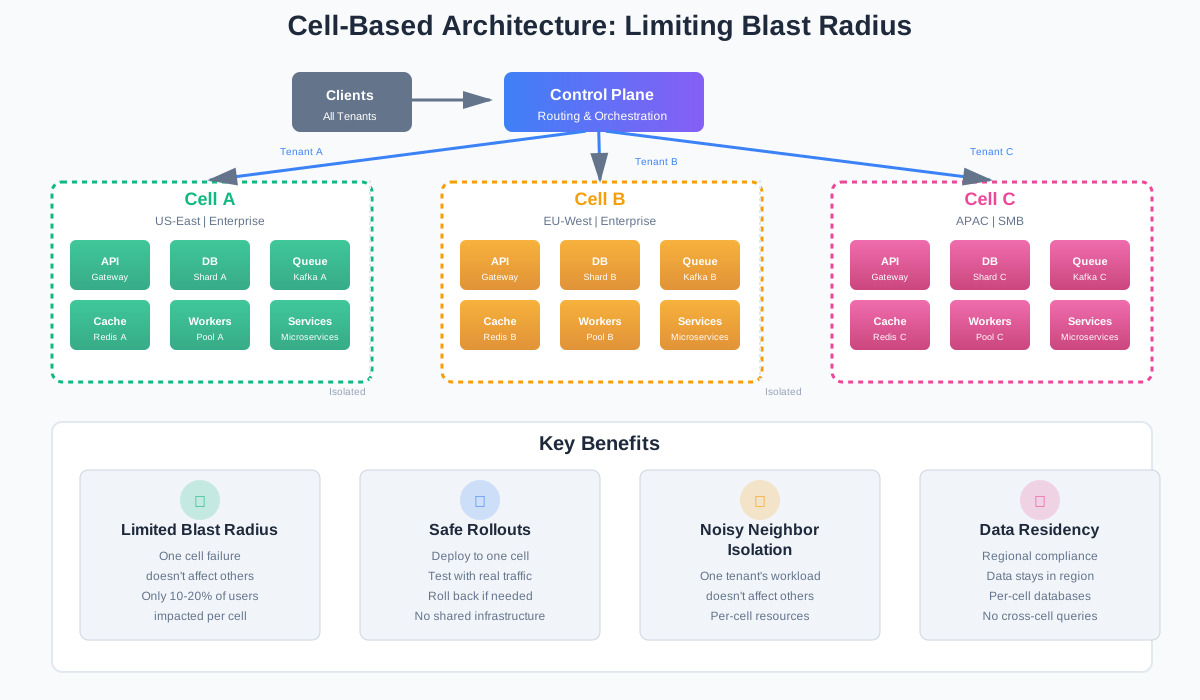
Cell-Based Architecture: A Practical Guide to Limiting Blast Radius at Scale
You have one cluster. One database. One queue. Everything works until it doesn’t.
A bad migration takes down all users. A noisy neighbor kills performance for everyone. A staged rollout still shares infrastructure, so when something breaks, it breaks everywhere.
This is the problem cell-based architecture solves. Instead of one big shared system, you split into isolated cells. Each cell serves a subset of users. When one cell breaks, the others keep running.
This article shows how to move from one big cluster to cells without turning it into a research project.
Problem: Why Scale-Out Isn’t Enough Anymore
Here’s the typical setup that leads to cell architecture.
You start with a monolith. It grows. You add replicas. You add regions. You add microservices. But you still have one database cluster. One message queue. One cache.
Then you hit these problems.
Single Blast Radius
One bad migration affects everyone. A schema change locks the database. A slow query blocks all connections. A corrupted index breaks all reads.
You can’t test everything in staging. Production has different data volumes, different access patterns, different edge cases. When something breaks, it breaks for everyone.
Noisy Neighbors
Tenant A runs a report that scans millions of rows. Tenant B’s queries slow down. Region A has a traffic spike. Region B’s latency increases.
You can’t isolate the problem. Everything shares the same infrastructure. One tenant’s workload affects everyone else.
Release Risk
You do staged rollouts. 10% of traffic, then 50%, then 100%. But you’re still sharing infrastructure. If the new code has a bug that corrupts data, it corrupts data for everyone. If it leaks memory, it affects everyone.
Staged rollouts help with detection, but they don’t limit damage.
When This Pain Usually Appears
You’ll notice these problems around:
- 50-100 microservices: Coordination gets hard. Dependencies multiply. Failures cascade.
- Multiple regions: Latency matters. Data residency matters. Regional outages affect everyone.
- Large tenant base: Some tenants drive most traffic. Some need isolation. Some have different SLOs.
If you’re seeing frequent incidents that affect “all users,” cells can help.
What Is a “Cell” in System Design Terms?
A cell is a self-contained slice of your system. It has its own API servers, workers, database, queue, and cache. It can serve a subset of users on its own.
Think of it like this: instead of one restaurant serving everyone, you have multiple restaurants. Each restaurant has its own kitchen, staff, and supplies. If one restaurant has a problem, the others keep serving.
Typical Traits
Each cell typically has:
- Own database or shard: No cross-cell queries. Data stays within the cell.
- Own queue and cache: Messages and cached data don’t leak between cells.
- Shared control plane: Configuration, routing, and orchestration live outside cells.
- Isolated data plane: Requests, data, and processing stay within the cell.
Contrast With Other Patterns
Pure sharding: Only the database is split. Everything else is shared. This helps with database load, but doesn’t limit blast radius for API or worker issues.
Region-only split: Cells can be within a region too. You might have multiple cells in the same region, each serving different tenants or segments.
Microservices: Cells are bigger than microservices. A cell contains multiple microservices. The isolation is at the cell level, not the service level.
Cell Boundaries: How to Slice Your System
How you split into cells depends on your needs. Here are common approaches.
By Tenant
Each enterprise customer gets their own cell. Or each organization. Or each workspace.
When this works:
- Large customers that drive significant traffic
- Customers that need data isolation for compliance
- Customers with different SLO requirements
Example:
- Cell A: Enterprise customer with 10M users
- Cell B: Enterprise customer with 5M users
- Cell C: All SMB customers together
By Region
Each region gets its own cell. Or multiple cells per region.
When this works:
- Data residency requirements
- Latency-sensitive workloads
- Regional compliance needs
Example:
- Cell US-East: All US customers
- Cell EU-West: All EU customers
- Cell APAC: All Asia-Pacific customers
By Segment
Free users in one cell. Paid users in another. Internal users in another.
When this works:
- Different SLOs for different segments
- Different feature sets
- Different scaling needs
Example:
- Cell Free: Free tier users
- Cell Paid: Paid tier users
- Cell Enterprise: Enterprise customers
Decision Checklist
Before choosing boundaries, ask:
- Do you need data residency? If yes, region-based cells might be required.
- Do some customers drive most traffic? If yes, tenant-based cells can isolate them.
- Are some customers okay with lower SLOs? If yes, segment-based cells can optimize costs.
- Do you need to move customers between cells? If yes, design for migration from day one.
- What’s the minimum cell size? Too small and you waste resources. Too large and you lose isolation.
Pitfalls
Too many tiny cells: Each cell has overhead. Too many cells means too much overhead. Aim for cells that can serve at least 10% of your traffic.
Cells that don’t match boundaries: If billing is per-tenant but cells are per-region, you’ll have cross-cell billing queries. If SLOs are per-segment but cells are per-tenant, you’ll have mixed SLOs in one cell.
Cells that are too large: If a cell serves 50% of traffic, you’ve only reduced blast radius by half. Aim for cells that serve 10-20% of traffic each.
Core Design Patterns Inside Each Cell
Each cell needs a minimal set of components. Here’s what goes inside.
Minimal Set of Components
API gateway + stateless services: Handle requests. Scale horizontally. No shared state.
Database (RDBMS or key-value store): Store data. Can be sharded within the cell, but not across cells.
Message queue / log (Kafka, SQS, etc.): Handle async work. Process events. Keep messages within the cell.
Cache (Redis, Memcached): Cache frequently accessed data. Isolated per cell.
Principles
No cross-cell DB queries: If you need data from another cell, use events or APIs. Don’t query across cells directly.
No synchronous RPC between cells: If you need to call another cell, use async events. Don’t make synchronous calls that create dependencies.
Use events for rare cross-cell coordination: For things like global analytics or billing, use events. But keep it rare. Most work should stay within the cell.
How to Handle Common Concerns
Authentication and authorization: The control plane handles auth. It routes authenticated requests to the right cell. Cells trust the control plane’s auth decisions.
Per-cell configuration: Feature flags, rate limits, and other config live in the control plane. Cells pull config on startup and refresh periodically.
Observability per cell: Logs, metrics, and traces are tagged with cell ID. You can filter by cell. You can alert per cell. You can compare cells.
Kubernetes Manifests for Cell Deployment
Here’s how you’d deploy a cell using Kubernetes:
# Deployment for API services in a cell
apiVersion: apps/v1
kind: Deployment
metadata:
  name: api-service-cell-a
  namespace: cell-a
  labels:
    app: api-service
    cell: cell-a
    version: v1.2.3
spec:
  replicas: 3
  selector:
    matchLabels:
      app: api-service
      cell: cell-a
  template:
    metadata:
      labels:
        app: api-service
        cell: cell-a
        version: v1.2.3
    spec:
      containers:
      - name: api-service
        image: myapp/api-service:v1.2.3
        env:
        - name: CELL_ID
          value: "cell-a"
        - name: DATABASE_HOST
          value: "db-cell-a.internal"
        - name: QUEUE_HOST
          value: "queue-cell-a.internal"
        - name: CACHE_HOST
          value: "cache-cell-a.internal"
        ports:
        - containerPort: 8080
        resources:
          requests:
            memory: "256Mi"
            cpu: "250m"
          limits:
            memory: "512Mi"
            cpu: "500m"
---
# Service for the API
apiVersion: v1
kind: Service
metadata:
  name: api-service-cell-a
  namespace: cell-a
  labels:
    app: api-service
    cell: cell-a
spec:
  selector:
    app: api-service
    cell: cell-a
  ports:
  - port: 80
    targetPort: 8080
  type: ClusterIP
---
# ConfigMap for cell-specific configuration
apiVersion: v1
kind: ConfigMap
metadata:
  name: cell-a-config
  namespace: cell-a
data:
  cell-id: "cell-a"
  region: "us-east-1"
  feature-flags.yaml: |
    enableNewFeature: true
    enableBetaFeature: false
  rate-limits.yaml: |
    api:
      requestsPerSecond: 1000
    workers:
      concurrency: 50
This shows how to deploy services in a cell with cell-specific labels, environment variables, and configuration. The cell label allows you to select all resources in a cell for operations like scaling or updates.
The Control Plane: Your “Brain” Across Cells
The control plane manages cells. It doesn’t serve user traffic. It orchestrates cells.
Responsibilities
Cell lifecycle: Create cells. Update cells. Decommission cells. Handle cell health.
Config and feature rollout orchestration: Push config to cells. Roll out features cell by cell. Manage feature flags per cell.
Global routing rules: Map tenants to cells. Map regions to cells. Handle routing decisions.
Data model: Store cell metadata. Store tenant-to-cell mappings. Store routing rules with versioning.
Data Model
Here’s a simple data model for the control plane:
interface Cell {
  id: string;
  region: string;
  status: 'active' | 'draining' | 'inactive';
  capacity: {
    maxTenants: number;
    currentTenants: number;
  };
  endpoints: {
    api: string;
    metrics: string;
  };
  createdAt: Date;
  updatedAt: Date;
}

interface Tenant {
  id: string;
  cellId: string;
  name: string;
  tier: 'free' | 'paid' | 'enterprise';
  region?: string;
  migratedAt: Date;
}

interface RoutingRule {
  id: string;
  version: number;
  tenantId?: string;
  region?: string;
  segment?: string;
  cellId: string;
  priority: number;
  active: boolean;
}
Safety
Audit logs: Log all config changes. Who changed what, when, and why.
Progressive rollout: Push config to one cell first. Watch metrics. Then expand to more cells.
Versioning: Version routing rules. Keep old versions for rollback.
Validation: Validate config before applying. Reject invalid config.
Control Plane API Schema
Here’s a simple API schema for the control plane:
# Cell resource
apiVersion: v1
kind: Cell
metadata:
  name: cell-us-east-1
  labels:
    region: us-east-1
    tier: production
spec:
  region: us-east-1
  status: active
  capacity:
    maxTenants: 100
    currentTenants: 45
  endpoints:
    api: https://api-cell-us-east-1.example.com
    metrics: https://metrics-cell-us-east-1.example.com
  resources:
    database:
      host: db-cell-us-east-1.example.com
      port: 5432
    queue:
      host: queue-cell-us-east-1.example.com
    cache:
      host: cache-cell-us-east-1.example.com
---
# Tenant resource
apiVersion: v1
kind: Tenant
metadata:
  name: tenant-acme-corp
spec:
  tenantId: tenant-acme-corp
  cellId: cell-us-east-1
  name: Acme Corporation
  tier: enterprise
  region: us-east-1
  migratedAt: "2025-12-01T00:00:00Z"
---
# Routing rule
apiVersion: v1
kind: RoutingRule
metadata:
  name: rule-tenant-acme
  version: 1
spec:
  tenantId: tenant-acme-corp
  cellId: cell-us-east-1
  priority: 100
  active: true
  createdAt: "2025-12-01T00:00:00Z"
This schema defines cells, tenants, and routing rules. The control plane uses this to manage routing and cell assignments.
Routing Requests to the Right Cell
When a request comes in, you need to route it to the right cell. Here’s how.
Flow
- Request hits edge / DNS
- Edge routes to cell-aware gateway
- Gateway extracts tenant ID / region / user ID
- Gateway looks up cell ID
- Gateway routes to specific cell
- Cell processes request
Strategy
Lookup by tenant ID: Most common. Extract tenant ID from auth token or header. Look up cell ID. Route to that cell.
Lookup by region: Extract region from request (IP, header, or user preference). Route to cell in that region.
Lookup by user ID: Hash user ID. Map to cell. Ensures same user always goes to same cell.
Caching Routing Decisions
Routing lookups can be expensive. Cache them.
In gateway: Cache tenant-to-cell mappings. Refresh every few minutes.
In sidecar: If you use service mesh, cache in sidecar. Reduces control plane load.
Fallback rules: If lookup fails, use fallback. Route to default cell. Or route based on region. Or reject the request.
Sticky Routing for Sessions
If you use sticky sessions, route the same session to the same cell. Store session-to-cell mapping. Or derive cell from session ID.
Routing Function Implementation
Here’s a simple routing function that maps tenant IDs to cell IDs:
interface CellRouter {
  getCellForTenant(tenantId: string): Promise<string | null>;
  refresh(): Promise<void>;
}

class InMemoryCellRouter implements CellRouter {
  private tenantToCell: Map<string, string> = new Map();
  private controlPlaneUrl: string;
  private refreshInterval: number = 5 * 60 * 1000; // 5 minutes
  private refreshTimer?: NodeJS.Timeout;

  constructor(controlPlaneUrl: string) {
    this.controlPlaneUrl = controlPlaneUrl;
    this.startRefresh();
  }

  async getCellForTenant(tenantId: string): Promise<string | null> {
    // Check cache first
    const cellId = this.tenantToCell.get(tenantId);
    if (cellId) {
      return cellId;
    }

    // If not in cache, fetch from control plane
    await this.refresh();
    return this.tenantToCell.get(tenantId) || null;
  }

  async refresh(): Promise<void> {
    try {
      const response = await fetch(`${this.controlPlaneUrl}/api/routing/tenants`);
      const data = await response.json();

      // Update in-memory map
      this.tenantToCell.clear();
      for (const mapping of data.mappings) {
        this.tenantToCell.set(mapping.tenantId, mapping.cellId);
      }
    } catch (error) {
      console.error('Failed to refresh routing table:', error);
      // Keep existing mappings on error
    }
  }

  private startRefresh(): void {
    // Initial refresh
    this.refresh();

    // Periodic refresh
    this.refreshTimer = setInterval(() => {
      this.refresh();
    }, this.refreshInterval);
  }

  stop(): void {
    if (this.refreshTimer) {
      clearInterval(this.refreshTimer);
    }
  }
}
This router caches tenant-to-cell mappings in memory and refreshes periodically from the control plane. If a tenant isn’t in the cache, it refreshes before returning.
Cell-Aware HTTP Middleware
Here’s middleware that extracts tenant ID and routes to the right cell:
import { Request, Response, NextFunction } from 'express';

interface CellContext {
  tenantId: string;
  cellId: string;
  region?: string;
}

declare global {
  namespace Express {
    interface Request {
      cellContext?: CellContext;
    }
  }
}

export function cellAwareMiddleware(router: CellRouter) {
  return async (req: Request, res: Response, next: NextFunction) => {
    try {
      // Extract tenant ID from auth token or header
      const tenantId = extractTenantId(req);
      if (!tenantId) {
        return res.status(401).json({ error: 'Missing tenant ID' });
      }

      // Look up cell ID
      const cellId = await router.getCellForTenant(tenantId);
      if (!cellId) {
        return res.status(503).json({ error: 'No cell available for tenant' });
      }

      // Attach cell context to request
      req.cellContext = {
        tenantId,
        cellId,
        region: extractRegion(req),
      };

      // Add cell ID to header for downstream services
      req.headers['X-Cell-ID'] = cellId;
      req.headers['X-Tenant-ID'] = tenantId;

      next();
    } catch (error) {
      console.error('Cell routing error:', error);
      res.status(500).json({ error: 'Internal routing error' });
    }
  };
}

function extractTenantId(req: Request): string | null {
  // Try JWT token first
  const authHeader = req.headers.authorization;
  if (authHeader?.startsWith('Bearer ')) {
    const token = authHeader.substring(7);
    const payload = parseJWT(token);
    if (payload?.tenantId) {
      return payload.tenantId;
    }
  }

  // Fallback to header
  return req.headers['x-tenant-id'] as string || null;
}

function extractRegion(req: Request): string | undefined {
  return req.headers['x-region'] as string ||
         req.headers['cf-ipcountry'] as string ||
         undefined;
}

function parseJWT(token: string): any {
  try {
    const parts = token.split('.');
    const payload = JSON.parse(Buffer.from(parts[1], 'base64').toString());
    return payload;
  } catch {
    return null;
  }
}
This middleware extracts tenant ID, looks up the cell, and attaches cell context to the request. Downstream services can use req.cellContext to know which cell they’re in.
Moving Tenants Between Cells
Sometimes you need to move a tenant from one cell to another. Maybe the cell is full. Maybe you’re rebalancing.
Process:
- Mark tenant as “migrating” in control plane
- Stop routing new requests to old cell
- Wait for in-flight requests to finish
- Copy data to new cell
- Verify data integrity
- Update routing to point to new cell
- Start routing to new cell
- Monitor for issues
- Decommission old cell data after grace period
This is complex. Design for it from day one. Make it a first-class operation, not an afterthought.
Deployment, Releases, and Incident Response in a Cell World
Cells change how you deploy and respond to incidents.
Rolling Out Releases
Release to 1 canary cell:
- Deploy new version to one cell
- Route small percentage of traffic to it
- Watch error budget
- Watch latency
- Watch business metrics
Watch error budget:
- Error rate should stay low
- Latency should stay low
- Business metrics should stay normal
Then expand:
- If canary looks good, expand to 10% of cells
- Watch again
- If still good, expand to 50%
- Then 100%
If canary looks bad:
- Stop rollout
- Investigate
- Fix issue
- Try again
Incident Playbook
Detect:
- Per-cell SLOs and alerts
- Compare cells to find anomalies
- Isolate which cell is affected
Contain:
- Disable routing to the sick cell
- Route traffic to healthy cells
- If cell is completely down, failover to backup cell
Recover:
- Roll back only in that cell
- Don’t roll back healthy cells
- Fix root cause
- Re-enable cell gradually
How This Changes On-Call
Incidents affect a subset of users: Instead of “all users down,” it’s “cell A users down.” This is better, but you still need to fix it.
Easier controlled experiments: Test new features in one cell. Compare metrics. Roll out if good.
More cells to monitor: You have more things to watch. But tooling helps. Dashboards per cell. Alerts per cell.
Migration Roadmap: From Monolith Cluster to Cells
Moving to cells is a journey. Here’s a practical roadmap.
Phase 1: Introduce Tenant / Region Awareness in Routing
Before you have cells, make your routing cell-aware.
Add tenant ID extraction: Extract tenant ID from every request. Log it. Track it.
Add region detection: Detect region from IP or header. Log it. Track it.
Add routing layer: Build a routing layer that can route based on tenant or region. Even if it routes to the same cluster today, make it cell-aware.
Benefits:
- You can test routing logic
- You can measure traffic patterns
- You can plan cell boundaries
Phase 2: Carve Out First Cell
Pick a safe tenant group for the first cell.
Don’t start with the largest tenant: Too risky. Too much traffic.
Don’t start with the most critical tenant: Too risky. Too important.
Start with a small, low-risk group: Maybe internal users. Maybe a test tenant. Maybe free tier users in one region.
Build the cell:
- Set up database shard
- Set up queue
- Set up cache
- Deploy services
- Point routing to new cell
Verify:
- Traffic flows correctly
- Data is correct
- Performance is good
- No regressions
Phase 3: Gradually Move Tenants and Traffic
Once the first cell works, move more tenants.
Move tenants one by one: Don’t move everything at once. Move one tenant. Verify. Move another.
Monitor closely: Watch metrics. Watch errors. Watch latency.
Have rollback plan: If something goes wrong, move tenant back to old cluster.
Gradually increase: Move 10% of tenants. Then 20%. Then 50%. Then 100%.
Phase 4: Decommission Shared “Legacy” Cluster
Once all traffic is in cells, decommission the old cluster.
Wait for grace period: Keep old cluster running for a while. In case you need to rollback.
Verify all traffic is in cells: Double-check routing. Make sure nothing is still hitting old cluster.
Decommission gradually: Turn off services one by one. Monitor for issues.
Keep data: Don’t delete data immediately. Keep backups. You might need it.
Lessons Learned
Don’t start with the largest tenant: Too risky. Start small.
Keep strong observability from day one: You need to see what’s happening. Per-cell metrics. Per-cell logs. Per-cell traces.
Design for migration: Moving tenants between cells should be a first-class operation. Not an afterthought.
Test routing logic: Routing is critical. Test it thoroughly. Test edge cases. Test failures.
Have rollback plan: Things will go wrong. Have a plan to rollback.
Trade-Offs and When Not to Do This
Cells add complexity. Here’s when it’s worth it and when it’s not.
More Complexity
Infra and ops: More clusters to manage. More databases. More queues. More caches. More things to monitor.
Config and orchestration: Control plane needs to be robust. Config needs to be versioned. Routing needs to be tested.
Cost: More duplicated components. More infrastructure. Higher costs.
When You Should Wait
Small team: Cells need operational maturity. If your team is small, focus on other things first.
Low traffic: If you don’t have traffic problems, cells might be overkill. Focus on other improvements.
Simple SLOs: If all users have the same SLOs and you don’t need isolation, cells might not help.
Early stage: If you’re still figuring out product-market fit, cells are premature. Focus on product first.
When Cells Make Sense
Large scale: 50+ microservices. Multiple regions. Millions of users.
Different SLOs: Some users need 99.99% uptime. Others are okay with 99.9%.
Compliance needs: Data residency. Tenant isolation. Regulatory requirements.
Frequent incidents: If you have frequent incidents affecting all users, cells can help.
Summary and Checklist
Cells limit blast radius. When one cell breaks, others keep running. This is valuable at scale.
Quick Checklist: Are You Ready for Cells?
- Do you have 50+ microservices or multiple regions?
- Do you have frequent incidents affecting all users?
- Do you need different SLOs for different user segments?
- Do you need data residency or tenant isolation?
- Do you have operational maturity to manage multiple cells?
- Do you have observability to monitor per-cell metrics?
If you answered yes to most of these, cells might help.
Steps to Start
- Introduce tenant/region IDs everywhere: Extract and log tenant/region in every request.
- Define clear cell boundaries: Decide how to split. By tenant? By region? By segment?
- Build a minimal control plane: Start simple. Cell registry. Tenant-to-cell mapping. Basic routing.
- Carve out a first, safe cell: Pick a low-risk tenant group. Build the cell. Verify it works.
- Gradually expand: Move more tenants. Monitor closely. Have rollback plan.
Key Takeaways
- Cells isolate failures. One cell breaking doesn’t break everything.
- Cells enable staged rollouts with real isolation. Not just traffic splitting.
- Cells require operational maturity. More things to manage. More complexity.
- Start small. Don’t start with your largest tenant. Don’t start with your most critical tenant.
- Design for migration. Moving tenants between cells should be easy.
Cells aren’t a silver bullet. But at scale, they’re often necessary. When you hit the point where more replicas don’t help and incidents get bigger, cells can help you limit blast radius and keep your system running.
Discussion
Loading comments...