Structured Outputs with LLMs: How to Get Reliable JSON Every Time
You built an API that calls an LLM. The model returns text. Your code expects JSON. You parse it. Sometimes it works. Sometimes the JSON is broken. Sometimes the model adds extra text. Sometimes it returns nothing.
Your pipeline breaks. Your users see errors. You’re debugging at 2 AM.
This article shows how to turn a chatty LLM into a reliable JSON-producing service. One that other systems can trust. One that doesn’t break when the model gets creative.
Why Structured Outputs Matter Now
Most real apps use LLMs behind APIs and workflows. The model isn’t talking to humans anymore. It’s talking to code. Code expects structure. Code breaks when structure is missing.
The Typical Failure Story
Here’s what happens when you don’t enforce structure:
# Your code
response = llm.generate("Extract the user's name and email from: 'Contact John at john@example.com'")
data = json.loads(response)  # Crashes if response isn't valid JSON
The model might return:
{"name": "John", "email": "john@example.com"}✅ WorksHere's the JSON: {"name": "John", "email": "john@example.com"}❌ Crashes{"name": "John", "email": "john@example.com",}❌ Crashes (trailing comma)I found John at john@example.com❌ Crashes (no JSON at all)
One broken response breaks your entire pipeline. Your API returns 500 errors. Your workflow stops. Your users wait.
Nice Answer vs Strict Contract
There’s a difference between “nice answer for humans” and “strict contract for machines.”
For humans:
- Natural language is fine
- Extra explanation helps
- Flexibility is good
- Errors are recoverable
For machines:
- Structure is required
- Extra text breaks parsing
- Flexibility causes bugs
- Errors cascade
When you’re building APIs, workflows, tools, or agents, you need the strict contract. The machine doesn’t care if the answer is helpful. It cares if it’s parseable.
When You Need Structure
You need structured outputs when:
APIs: Your API calls an LLM and returns JSON to clients. Broken JSON means broken API.
Workflows: Your workflow passes data between steps. Each step expects a specific format. Wrong format breaks the workflow.
Tools: Your agent uses tools that expect structured parameters. Wrong structure means the tool fails.
Agents: Your agent makes decisions based on structured data. Missing fields mean wrong decisions.
You don’t need structure when:
- The LLM talks directly to humans
- The output is displayed as-is
- You’re prototyping and errors are acceptable
But for production systems, structure is non-negotiable.
The Basic Pattern: Schema → Prompt → Parse → Validate
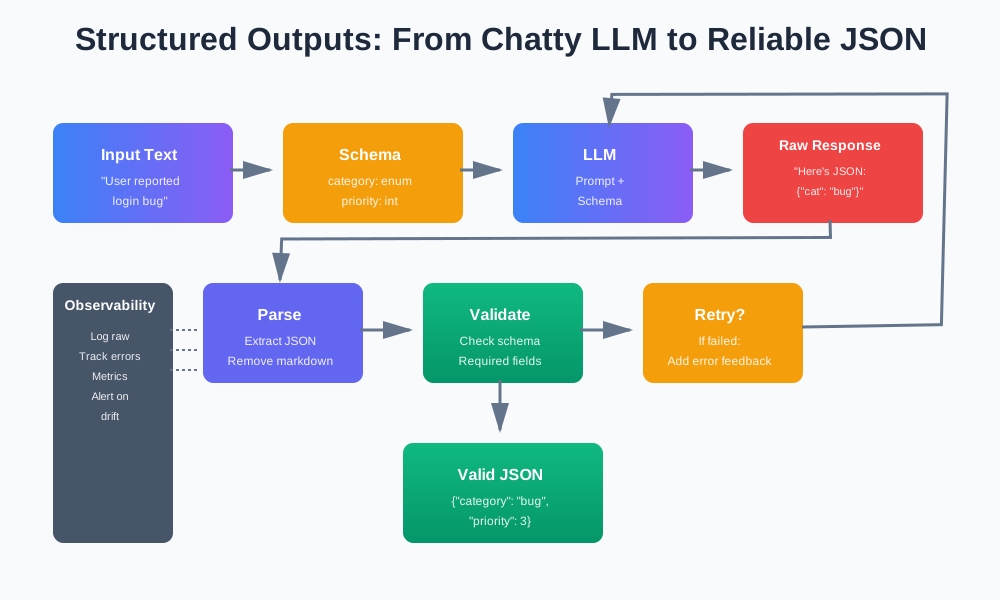
The pattern is simple. Define what you want. Ask for it. Parse it. Validate it. Retry if needed.
Define a Schema First
Start with the schema. Not the prompt. The schema defines what you need. The prompt asks for it.
TypeScript with Zod:
import { z } from 'zod';

const TaskTriageSchema = z.object({
  category: z.enum(['bug', 'feature', 'question', 'other']),
  priority: z.number().int().min(1).max(5),
  needs_human: z.boolean(),
  summary: z.string().optional(),
});

type TaskTriage = z.infer<typeof TaskTriageSchema>;
Python with Pydantic:
from pydantic import BaseModel, Field
from enum import Enum

class Category(str, Enum):
    BUG = "bug"
    FEATURE = "feature"
    QUESTION = "question"
    OTHER = "other"

class TaskTriage(BaseModel):
    category: Category
    priority: int = Field(ge=1, le=5)
    needs_human: bool
    summary: str | None = None
The schema is your contract. It defines:
- Required fields
- Field types
- Value constraints
- Optional fields
Use the Schema to Guide the Prompt
Don’t write the prompt first. Write the schema first. Then use the schema to generate the prompt.
def build_prompt(schema: type[BaseModel], input_text: str) -> str:
    schema_json = schema.model_json_schema()

    return f"""Extract information from the following text and return it as JSON.

Text: {input_text}

Return a JSON object matching this schema:
{json.dumps(schema_json, indent=2)}

Requirements:
- Return ONLY valid JSON, no other text
- Use double quotes for strings
- No trailing commas
- No comments in JSON
- Escape newlines and quotes in strings

Example output:
{json.dumps(schema.model_validate({
    "category": "bug",
    "priority": 3,
    "needs_human": True,
    "summary": "User reported login issue"
}).model_dump(), indent=2)}
"""
The prompt shows:
- The schema
- Examples
- Format requirements
- What to avoid
The Core Loop
Here’s the pattern:
def get_structured_output(
    llm: LLM,
    prompt: str,
    schema: type[BaseModel],
    max_retries: int = 3
) -> BaseModel:
    for attempt in range(max_retries):
        # Call LLM
        raw_response = llm.generate(prompt)

        # Try to parse
        try:
            json_data = extract_json(raw_response)
        except ValueError as e:
            log_parse_error(attempt, raw_response, str(e))
            if attempt < max_retries - 1:
                prompt = add_error_feedback(prompt, f"Invalid JSON: {e}")
                continue
            raise

        # Try to validate
        try:
            return schema.model_validate(json_data)
        except ValidationError as e:
            log_validation_error(attempt, json_data, str(e))
            if attempt < max_retries - 1:
                prompt = add_error_feedback(prompt, f"Schema validation failed: {e}")
                continue
            raise

    raise ValueError("Failed to get valid structured output after retries")
The loop:
- Call LLM with prompt
- Try to parse JSON
- Validate against schema
- Retry with error feedback if needed
Prompt Patterns for JSON Mode and Structured Outputs
Simple “return JSON only” prompts often fail. The model adds explanations. It adds markdown. It adds comments. You need better patterns.
The Simple Pattern (That Fails)
prompt = f"Extract information from: {text}. Return JSON only."This fails because:
- Model adds “Here’s the JSON:” prefix
- Model wraps JSON in markdown code blocks
- Model adds explanatory text
- Model uses single quotes instead of double quotes
The Better Pattern
Show the schema. Show examples. Forbid extra text.
def build_structured_prompt(
    schema: type[BaseModel],
    input_text: str,
    examples: list[dict] | None = None
) -> str:
    schema_json = schema.model_json_schema()

    examples_text = ""
    if examples:
        examples_text = "\n\nExamples:\n"
        for ex in examples:
            examples_text += json.dumps(ex, indent=2) + "\n"

    return f"""You are a JSON API. Extract information from the text and return ONLY valid JSON.

Text to process:
{input_text}

Required JSON schema:
{json.dumps(schema_json, indent=2)}
{examples_text}
Rules:
1. Return ONLY the JSON object, no other text
2. Do not include markdown code blocks
3. Do not include explanations or comments
4. Use double quotes for all strings
5. No trailing commas
6. Escape special characters in strings (\\n, \\", \\\\)
7. All required fields must be present

Return the JSON now:"""
This works better because:
- Explicit schema shown
- Examples provided
- Rules are clear
- Format is specified
Extra Tips
Avoid trailing commas:
prompt += "\nDo not use trailing commas. This is invalid: {\"key\": \"value\",}"Avoid comments inside JSON:
prompt += "\nDo not add comments. This is invalid: {\"key\": \"value\" // comment}"Escape newlines and quotes:
prompt += "\nEscape special characters. Use \\n for newlines, \\\" for quotes."Show what NOT to do:
prompt += """

Invalid examples (DO NOT DO THIS):
```json
{"key": "value"}
Here’s the JSON: {“key”: “value”} {“key”: “value”,} // trailing comma """
## Using Model Features: Tools / Functions / JSON Mode

Modern LLMs support structured outputs natively. Use these features when available.

### Function / Tool Calling

Function calling lets you define functions. The model returns function calls with parameters. The parameters are structured.

**OpenAI Function Calling:**

```python
from openai import OpenAI

client = OpenAI()

response = client.chat.completions.create(
    model="gpt-4",
    messages=[{"role": "user", "content": "Extract info from: User reported login bug"}],
    tools=[{
        "type": "function",
        "function": {
            "name": "triage_task",
            "description": "Categorize and prioritize a task",
            "parameters": {
                "type": "object",
                "properties": {
                    "category": {
                        "type": "string",
                        "enum": ["bug", "feature", "question", "other"]
                    },
                    "priority": {
                        "type": "integer",
                        "minimum": 1,
                        "maximum": 5
                    },
                    "needs_human": {
                        "type": "boolean"
                    }
                },
                "required": ["category", "priority", "needs_human"]
            }
        }
    }],
    tool_choice={"type": "function", "function": {"name": "triage_task"}}
)

# Extract structured data
function_call = response.choices[0].message.tool_calls[0]
params = json.loads(function_call.function.arguments)
# params is guaranteed to match the schema
Function calling is safer because:
- Model is constrained to the schema
- Parameters are validated by the API
- Less likely to return invalid JSON
But it’s less flexible:
- Can only return function parameters
- Harder to evolve (changing schema means changing function definition)
- Not all models support it
Built-in JSON Mode
Some models support JSON mode. They’re forced to return valid JSON.
OpenAI JSON Mode:
response = client.chat.completions.create(
    model="gpt-4",
    messages=[{"role": "user", "content": prompt}],
    response_format={"type": "json_object"}
)
JSON mode helps because:
- Model is forced to return JSON
- Less likely to add extra text
- Simpler than function calling
But it doesn’t validate:
- JSON might not match your schema
- Still need validation
- Not all models support it
When Tools Are Enough vs When You Need Flexible JSON
Use tools when:
- Schema is fixed and stable
- You need maximum reliability
- Model supports it well
- Flexibility isn’t important
Use raw JSON when:
- Schema changes frequently
- You need flexibility
- You want to support multiple models
- You need nested or complex structures
Trade-offs:
Tools:
- ✅ Safer (API validates)
- ✅ More reliable
- ❌ Less flexible
- ❌ Harder to evolve
Raw JSON:
- ✅ More flexible
- ✅ Easier to evolve
- ❌ Less safe (you validate)
- ❌ More error-prone
For production, prefer tools when possible. Use raw JSON with strong validation when you need flexibility.
Implementing Robust Parsing and Validation
Parsing and validation are separate steps. Parsing extracts JSON. Validation checks it matches your schema.
Parsing Pipeline
The parsing pipeline handles common issues:
import json
import re

def extract_json(text: str) -> dict:
    # Step 1: Trim whitespace
    text = text.strip()

    # Step 2: Remove markdown code blocks
    # Matches ```json ... ``` or ``` ... ```
    text = re.sub(r'```(?:json)?\s*\n?(.*?)\n?```', r'\1', text, flags=re.DOTALL)

    # Step 3: Find JSON object/array
    # Look for first { or [
    start = text.find('{')
    if start == -1:
        start = text.find('[')
    if start == -1:
        raise ValueError("No JSON found in response")

    # Step 4: Find matching closing brace/bracket
    depth = 0
    in_string = False
    escape_next = False

    for i in range(start, len(text)):
        char = text[i]

        if escape_next:
            escape_next = False
            continue

        if char == '\\':
            escape_next = True
            continue

        if char == '"' and not escape_next:
            in_string = not in_string
            continue

        if in_string:
            continue

        if char == '{' or char == '[':
            depth += 1
        elif char == '}' or char == ']':
            depth -= 1
            if depth == 0:
                json_str = text[start:i+1]
                return json.loads(json_str)

    raise ValueError("Unclosed JSON structure")
This handles:
- Extra text before/after JSON
- Markdown code blocks
- Unclosed structures
- Nested objects/arrays
Validation
Validation checks the parsed JSON matches your schema.
With Pydantic:
from pydantic import BaseModel, ValidationError

def validate_json(
    json_data: dict,
    schema: type[BaseModel]
) -> BaseModel:
    try:
        return schema.model_validate(json_data)
    except ValidationError as e:
        # Log detailed errors
        errors = []
        for error in e.errors():
            errors.append({
                "field": ".".join(str(loc) for loc in error["loc"]),
                "message": error["msg"],
                "type": error["type"]
            })
        raise ValueError(f"Validation failed: {errors}")
With Zod (TypeScript):
import { z } from 'zod';

function validateJson<T>(
  jsonData: unknown,
  schema: z.ZodSchema<T>
): T {
  const result = schema.safeParse(jsonData);
  if (!result.success) {
    const errors = result.error.errors.map(err => ({
      field: err.path.join('.'),
      message: err.message,
      code: err.code
    }));
    throw new Error(`Validation failed: ${JSON.stringify(errors)}`);
  }
  return result.data;
}
Handling Missing Required Fields
When fields are missing, you have options:
Option 1: Hard Failure
# Schema requires the field
class TaskTriage(BaseModel):
    category: Category  # Required, no default
    priority: int

# Validation fails if missing
try:
    data = TaskTriage.model_validate({"priority": 3})  # Fails
except ValidationError:
    # Handle missing field
    pass
Option 2: Default Values
class TaskTriage(BaseModel):
    category: Category = Category.OTHER  # Default if missing
    priority: int = 3  # Default if missing
Option 3: Optional with Explicit Handling
class TaskTriage(BaseModel):
    category: Category | None = None
    priority: int | None = None

    def ensure_complete(self) -> "TaskTriage":
        if self.category is None or self.priority is None:
            raise ValueError("Missing required fields")
        return self
For production, prefer hard failures for required fields. Missing data usually means the model didn’t understand the input. Better to fail fast than proceed with incomplete data.
Auto-Repair and Retry Strategies
When parsing or validation fails, retry. But retry smart. Give the model feedback about what went wrong.
Retry with Error Feedback
Don’t just retry with the same prompt. Tell the model what went wrong.
def get_structured_output_with_retry(
    llm: LLM,
    initial_prompt: str,
    schema: type[BaseModel],
    max_retries: int = 3
) -> BaseModel:
    prompt = initial_prompt
    last_error = None

    for attempt in range(max_retries):
        raw_response = llm.generate(prompt)

        # Try to parse
        try:
            json_data = extract_json(raw_response)
        except ValueError as e:
            last_error = f"JSON parsing failed: {str(e)}"
            if attempt < max_retries - 1:
                prompt = add_parse_error_feedback(initial_prompt, raw_response, str(e))
                continue
            raise ValueError(f"Failed to parse JSON after {max_retries} attempts: {last_error}")

        # Try to validate
        try:
            return schema.model_validate(json_data)
        except ValidationError as e:
            last_error = f"Schema validation failed: {format_validation_error(e)}"
            if attempt < max_retries - 1:
                prompt = add_validation_error_feedback(initial_prompt, json_data, e)
                continue
            raise ValueError(f"Failed to validate JSON after {max_retries} attempts: {last_error}")

    raise ValueError(f"Failed after {max_retries} attempts. Last error: {last_error}")

def add_parse_error_feedback(
    original_prompt: str,
    raw_response: str,
    error: str
) -> str:
    return f"""{original_prompt}

Previous attempt failed:
Response received: {raw_response[:200]}...
Error: {error}

Please return ONLY valid JSON with no extra text, no markdown, no comments."""
Small Repair Helpers
Sometimes you can repair common issues without retrying:
def repair_json(text: str) -> dict | None:
    # Fix single quotes to double quotes (simple cases)
    text = re.sub(r"'([^']*)'", r'"\1"', text)

    # Remove trailing commas
    text = re.sub(r',(\s*[}\]])', r'\1', text)

    # Remove comments (simple cases)
    text = re.sub(r'//.*?$', '', text, flags=re.MULTILINE)
    text = re.sub(r'/\*.*?\*/', '', text, flags=re.DOTALL)

    try:
        return json.loads(text)
    except json.JSONDecodeError:
        return None
Use repair for common issues. But don’t rely on it. If repair fails, retry with the model.
Guardrails
Set limits to prevent infinite loops:
MAX_RETRIES = 3
MAX_REPAIR_ATTEMPTS = 1

def get_structured_output_safe(
    llm: LLM,
    prompt: str,
    schema: type[BaseModel]
) -> BaseModel:
    for attempt in range(MAX_RETRIES):
        raw_response = llm.generate(prompt)

        # Try repair first (once)
        json_data = repair_json(raw_response)
        if json_data is None:
            # Repair failed, try extraction
            try:
                json_data = extract_json(raw_response)
            except ValueError as e:
                if attempt < MAX_RETRIES - 1:
                    prompt = add_error_feedback(prompt, str(e))
                    continue
                raise

        # Validate
        try:
            return schema.model_validate(json_data)
        except ValidationError as e:
            if attempt < MAX_RETRIES - 1:
                prompt = add_error_feedback(prompt, format_validation_error(e))
                continue
            raise

    raise ValueError("Max retries exceeded")
Logging Raw Output
Always log raw output on failures. It helps you:
- Debug issues
- Improve prompts
- Detect model drift
import logging

logger = logging.getLogger(__name__)

def get_structured_output_with_logging(
    llm: LLM,
    prompt: str,
    schema: type[BaseModel]
) -> BaseModel:
    for attempt in range(MAX_RETRIES):
        raw_response = llm.generate(prompt)

        try:
            json_data = extract_json(raw_response)
            validated = schema.model_validate(json_data)
            return validated
        except (ValueError, ValidationError) as e:
            # Log failure
            logger.warning(
                "Structured output failed",
                extra={
                    "attempt": attempt + 1,
                    "raw_response": raw_response,
                    "error": str(e),
                    "schema": schema.__name__
                }
            )

            if attempt < MAX_RETRIES - 1:
                prompt = add_error_feedback(prompt, str(e))
                continue
            raise
Observability for Structured Outputs
Track what’s happening. Log everything. Use metrics to detect issues.
What to Log
Log these on every call:
def log_structured_output_call(
    prompt_hash: str,
    raw_response: str,
    parsed_json: dict | None,
    validation_errors: list[str] | None,
    success: bool,
    duration_ms: int,
    schema_version: str
):
    logger.info(
        "structured_output_call",
        extra={
            "prompt_hash": prompt_hash,
            "raw_response_length": len(raw_response),
            "parsed_json": parsed_json,
            "validation_errors": validation_errors,
            "success": success,
            "duration_ms": duration_ms,
            "schema_version": schema_version,
            "timestamp": datetime.utcnow().isoformat()
        }
    )
This gives you:
- Raw output for debugging
- Parsed JSON for analysis
- Validation errors for schema issues
- Performance metrics
- Schema version for tracking changes
Metrics to Track
Track these metrics:
from prometheus_client import Counter, Histogram

parse_errors = Counter(
    'llm_json_parse_errors_total',
    'Total JSON parse errors',
    ['schema_name', 'model_name']
)

validation_errors = Counter(
    'llm_json_validation_errors_total',
    'Total schema validation errors',
    ['schema_name', 'field_name']
)

response_time = Histogram(
    'llm_structured_output_duration_seconds',
    'Time to get structured output',
    ['schema_name', 'model_name']
)

def get_structured_output_with_metrics(
    llm: LLM,
    prompt: str,
    schema: type[BaseModel]
) -> BaseModel:
    with response_time.labels(
        schema_name=schema.__name__,
        model_name=llm.model_name
    ).time():
        raw_response = llm.generate(prompt)

        try:
            json_data = extract_json(raw_response)
        except ValueError as e:
            parse_errors.labels(
                schema_name=schema.__name__,
                model_name=llm.model_name
            ).inc()
            raise

        try:
            return schema.model_validate(json_data)
        except ValidationError as e:
            validation_errors.labels(
                schema_name=schema.__name__,
                field_name=str(e.errors()[0]['loc'])
            ).inc()
            raise
Using Data to Detect Drift
Model upgrades can change behavior. Track metrics over time:
# Alert if parse error rate increases
if parse_error_rate > 0.05:  # 5% error rate
    alert("High JSON parse error rate detected")

# Alert if validation error rate increases
if validation_error_rate > 0.03:  # 3% error rate
    alert("High schema validation error rate detected")

# Alert if response time increases
if p95_response_time > previous_p95 * 1.5:
    alert("Response time degradation detected")
Finding Fragile Prompts
Some prompts produce fragile outputs. Find them:
def find_fragile_prompts(days: int = 7) -> list[dict]:
    """Find prompts with high failure rates"""
    query = """
    SELECT
        prompt_hash,
        COUNT(*) as total_calls,
        SUM(CASE WHEN success = false THEN 1 ELSE 0 END) as failures,
        AVG(duration_ms) as avg_duration
    FROM structured_output_logs
    WHERE timestamp > NOW() - INTERVAL '%s days'
    GROUP BY prompt_hash
    HAVING SUM(CASE WHEN success = false THEN 1 ELSE 0 END)::float / COUNT(*) > 0.1
    ORDER BY failures DESC
    """

    results = db.query(query, [days])
    return [
        {
            "prompt_hash": r.prompt_hash,
            "failure_rate": r.failures / r.total_calls,
            "total_calls": r.total_calls,
            "avg_duration_ms": r.avg_duration
        }
        for r in results
    ]
Use this to:
- Identify prompts that need improvement
- Find schema issues
- Detect model behavior changes
Common Pitfalls and Anti-Patterns
Avoid these mistakes. They cause production issues.
Letting the Model Invent New Fields
Don’t let the model add fields you didn’t ask for:
# Bad: Model might add "confidence" or "notes" fields
schema = {
    "type": "object",
    "properties": {
        "category": {"type": "string"}
    }
}

# Good: Explicitly forbid additional properties
schema = {
    "type": "object",
    "properties": {
        "category": {"type": "string"}
    },
    "additionalProperties": False  # Reject extra fields
}
With Pydantic:
class TaskTriage(BaseModel):
    category: Category
    priority: int

    class Config:
        extra = "forbid"  # Reject extra fields
Asking for JSON and Natural Language in the Same Response
Don’t ask for both. Pick one:
# Bad: Asks for both
prompt = "Extract the category and also explain why you chose it."

# Good: Separate calls
category_prompt = "Extract the category. Return JSON only."
explanation_prompt = "Explain why this is a bug category."
If you need both, make two calls. One for structured data. One for explanation.
Using Different Schemas with the Same Endpoint Without Versioning
Schema changes break clients. Version your schemas:
# Bad: Changing schema breaks existing clients
class TaskTriage(BaseModel):
    category: str  # Changed from enum

# Good: Version schemas
class TaskTriageV1(BaseModel):
    category: Category

class TaskTriageV2(BaseModel):
    category: str
    subcategory: str | None = None

def get_structured_output(
    prompt: str,
    schema_version: str = "v1"
) -> BaseModel:
    schema = {
        "v1": TaskTriageV1,
        "v2": TaskTriageV2
    }[schema_version]
    return schema.model_validate(extract_json(llm.generate(prompt)))
Ignoring Validation Errors in Production
Don’t ignore validation errors. They indicate real problems:
# Bad: Silently ignores errors
try:
    data = schema.model_validate(json_data)
except ValidationError:
    data = schema.model_validate({})  # Wrong! Returns invalid data

# Good: Fail fast
try:
    data = schema.model_validate(json_data)
except ValidationError as e:
    logger.error("Validation failed", extra={"errors": str(e)})
    raise  # Let caller handle it
Putting It All Together: End-to-End Example
Let’s build a complete “task triage API” that demonstrates all the patterns.
The Schema
from pydantic import BaseModel, Field
from enum import Enum

class Category(str, Enum):
    BUG = "bug"
    FEATURE = "feature"
    QUESTION = "question"
    OTHER = "other"

class TaskTriage(BaseModel):
    category: Category
    priority: int = Field(ge=1, le=5, description="Priority from 1 (low) to 5 (critical)")
    needs_human: bool
    summary: str | None = Field(None, description="Brief summary of the issue")

    class Config:
        extra = "forbid"
The Prompt Builder
def build_triage_prompt(issue_description: str) -> str:
    schema_json = TaskTriage.model_json_schema()

    example = {
        "category": "bug",
        "priority": 3,
        "needs_human": True,
        "summary": "User cannot log in after password reset"
    }

    return f"""You are a task triage API. Categorize and prioritize the following issue.

Issue description:
{issue_description}

Return a JSON object matching this schema:
{json.dumps(schema_json, indent=2)}

Example output:
{json.dumps(example, indent=2)}

Rules:
1. Return ONLY the JSON object, no other text
2. Do not include markdown code blocks (```json)
3. Do not include explanations or comments
4. Use double quotes for all strings
5. No trailing commas
6. All required fields must be present
7. Category must be one of: bug, feature, question, other
8. Priority must be between 1 and 5

Return the JSON now:"""
The LLM Call
from openai import OpenAI
import time

class StructuredLLM:
    def __init__(self, api_key: str, model: str = "gpt-4"):
        self.client = OpenAI(api_key=api_key)
        self.model = model

    def generate(self, prompt: str, timeout: int = 30) -> str:
        try:
            response = self.client.chat.completions.create(
                model=self.model,
                messages=[{"role": "user", "content": prompt}],
                temperature=0.3,  # Lower temperature for more consistent output
                timeout=timeout
            )
            return response.choices[0].message.content
        except Exception as e:
            raise ValueError(f"LLM call failed: {str(e)}")
Parsing and Validation
def extract_and_validate_json(
    raw_response: str,
    schema: type[BaseModel]
) -> BaseModel:
    # Extract JSON
    json_data = extract_json(raw_response)

    # Validate
    try:
        return schema.model_validate(json_data)
    except ValidationError as e:
        errors = [f"{'.'.join(str(loc) for loc in err['loc'])}: {err['msg']}"
                  for err in e.errors()]
        raise ValueError(f"Validation failed: {', '.join(errors)}")
Retry Logic
def get_triage_result(
    llm: StructuredLLM,
    issue_description: str,
    max_retries: int = 3
) -> TaskTriage:
    prompt = build_triage_prompt(issue_description)
    last_error = None

    for attempt in range(max_retries):
        try:
            raw_response = llm.generate(prompt)
            return extract_and_validate_json(raw_response, TaskTriage)
        except ValueError as e:
            last_error = str(e)
            if attempt < max_retries - 1:
                # Add error feedback to prompt
                prompt = f"""{prompt}

Previous attempt failed with error: {last_error}
Please fix the issue and return valid JSON."""
                continue
            raise ValueError(f"Failed after {max_retries} attempts: {last_error}")

    raise ValueError("Max retries exceeded")
Logging
import logging
from datetime import datetime

logger = logging.getLogger(__name__)

def get_triage_result_with_logging(
    llm: StructuredLLM,
    issue_description: str
) -> TaskTriage:
    start_time = time.time()
    prompt = build_triage_prompt(issue_description)
    prompt_hash = hashlib.md5(prompt.encode()).hexdigest()

    try:
        raw_response = llm.generate(prompt)
        result = extract_and_validate_json(raw_response, TaskTriage)

        duration_ms = int((time.time() - start_time) * 1000)

        logger.info(
            "task_triage_success",
            extra={
                "prompt_hash": prompt_hash,
                "duration_ms": duration_ms,
                "category": result.category.value,
                "priority": result.priority
            }
        )

        return result
    except Exception as e:
        duration_ms = int((time.time() - start_time) * 1000)

        logger.error(
            "task_triage_failure",
            extra={
                "prompt_hash": prompt_hash,
                "duration_ms": duration_ms,
                "error": str(e),
                "raw_response": raw_response if 'raw_response' in locals() else None
            }
        )
        raise
The Complete API
from fastapi import FastAPI, HTTPException
from pydantic import BaseModel as PydanticBaseModel

app = FastAPI()

llm = StructuredLLM(api_key=os.getenv("OPENAI_API_KEY"))

class TriageRequest(PydanticBaseModel):
    issue_description: str

class TriageResponse(PydanticBaseModel):
    category: str
    priority: int
    needs_human: bool
    summary: str | None

@app.post("/api/triage", response_model=TriageResponse)
async def triage_issue(request: TriageRequest):
    try:
        result = get_triage_result_with_logging(llm, request.issue_description)
        return TriageResponse(
            category=result.category.value,
            priority=result.priority,
            needs_human=result.needs_human,
            summary=result.summary
        )
    except ValueError as e:
        raise HTTPException(status_code=500, detail=str(e))
This API:
- Defines schema with Pydantic
- Builds prompts from schema
- Calls LLM with timeout
- Parses and validates JSON
- Retries with error feedback
- Logs everything
- Returns structured responses
Checklist: How to Productionize Structured Outputs
Use this checklist when building production systems:
Schema Design
- Define schema before writing prompts
- Use type-safe schemas (Pydantic, Zod, etc.)
- Forbid additional properties
- Version schemas for breaking changes
- Document all fields
Prompt Engineering
- Show explicit schema in prompt
- Include 1-2 examples
- Forbid extra text and comments
- Specify format requirements (double quotes, no trailing commas)
- Test prompts with edge cases
Parsing
- Handle markdown code blocks
- Extract JSON from mixed text
- Handle unclosed structures
- Log raw responses on failures
- Implement repair helpers for common issues
Validation
- Validate against schema after parsing
- Handle missing required fields (fail or default)
- Log validation errors with field paths
- Reject extra fields
- Validate value constraints (min/max, enums)
Retry Strategy
- Set max retry limit (3-5 attempts)
- Provide error feedback in retry prompts
- Differentiate parse errors from validation errors
- Don’t retry on timeout errors
- Log all retry attempts
Observability
- Log raw responses on failures
- Log parsed JSON and validation errors
- Track parse error rate
- Track validation error rate
- Track response time (p50, p95, p99)
- Track schema version
- Alert on error rate increases
- Alert on response time degradation
Error Handling
- Fail fast on validation errors
- Return clear error messages
- Don’t ignore validation errors
- Handle LLM API failures gracefully
- Set timeouts on LLM calls
Testing
- Test with valid inputs
- Test with invalid inputs
- Test with edge cases (empty strings, special characters)
- Test retry logic
- Test schema validation
- Load test with realistic traffic
Model Features
- Use function calling when available and appropriate
- Use JSON mode when available
- Fall back to raw JSON parsing when needed
- Support multiple models
Documentation
- Document schema versions
- Document expected error cases
- Document retry behavior
- Document observability metrics
Conclusion
Structured outputs turn chatty LLMs into reliable JSON-producing services. The pattern is simple: define schema, build prompt, parse JSON, validate, retry if needed.
But simple doesn’t mean easy. You need robust parsing. Strong validation. Smart retries. Good observability. Without these, you’ll debug broken JSON at 2 AM.
Start with the schema. Use it to guide your prompt. Parse carefully. Validate strictly. Retry with feedback. Log everything. Track metrics. Alert on issues.
Get this right, and your LLM-backed APIs become reliable. Get it wrong, and they become a source of production incidents.
The patterns in this article work together. Schema defines the contract. Prompt asks for it. Parsing extracts it. Validation enforces it. Retries fix it. Observability monitors it.
Use them all. Your production systems will thank you.
Discussion
Loading comments...