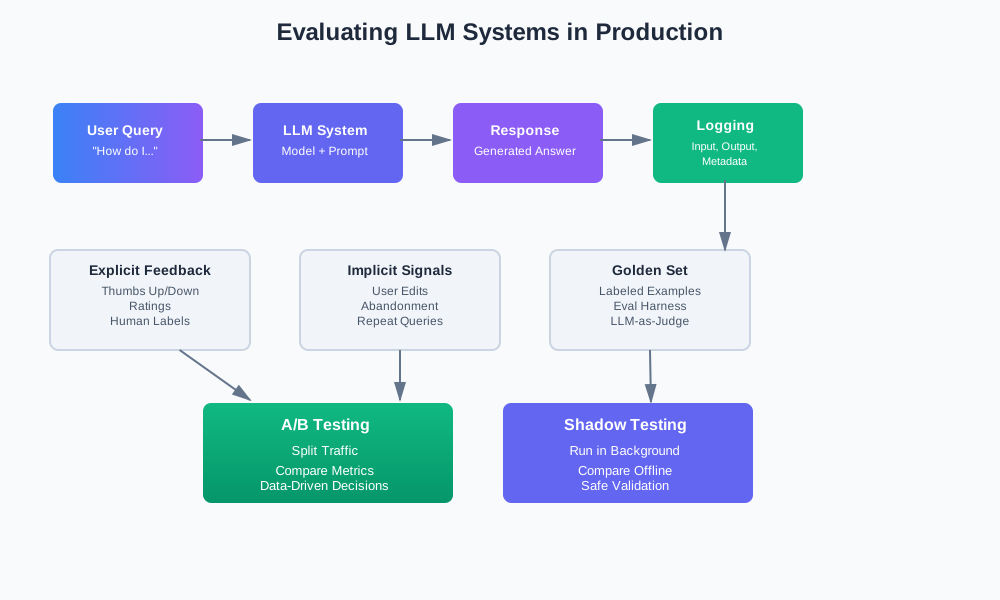
Evaluating LLM Systems in Production: From Implicit Signals to Safe Experiments
You built an LLM feature. It works in demos. Users try it. Some like it. Some don’t. You change the prompt. Does it help? You switch models. Is it better? You don’t know.
Most teams start with manual spot checks. A few canned examples. “Looks good to me.” That works for demos. It fails in production.
This article shows how to move from guessing to measuring. How to use logs, labels, and experiments to know if your changes actually help.
The Gap: Good Demo, Unknown Production Quality
Here’s what happens. You build a feature. You test it with five examples. They all work. You ship it. Users start using it. Some outputs are wrong. Some are slow. Some are confusing. You don’t know how often. You don’t know why.
How Most Teams Start
Manual spot checks:
You open the app. You try a few queries. You look at the outputs. “Seems fine.” That’s your evaluation.
A few canned examples:
You keep a list of test cases. You run them before deploying. If they pass, you ship. If they fail, you fix.
Why this fails:
Real inputs are messy. Users ask questions you didn’t think of. They use different words. They have typos. They ask for things your system can’t do.
Quality drifts over time. Models change. Prompts get stale. User behavior shifts. What worked last month might not work now.
You can’t spot-check your way to production quality. You need systematic measurement.
What We’re Not Covering
This isn’t about academic benchmarks. We’re not talking about GLUE scores or MMLU. Those measure general capability. They don’t measure your specific use case.
This is about pragmatic evaluation. Measuring what matters for your users. In production. With real data.
Define “Quality” for Your Use Case
Quality means different things for different tasks. A correct answer for Q&A isn’t the same as a helpful summary. A faithful translation isn’t the same as a creative story.
Different Tasks, Different Goals
Q&A systems:
Quality means correctness and grounding. Did the answer match the source? Is it factually accurate? Does it cite sources?
Summarization:
Quality means coverage and faithfulness. Did it capture the main points? Did it stay true to the original? Is the length appropriate?
Assistants:
Quality means helpfulness, tone, and actionability. Was the response useful? Was the tone appropriate? Can the user act on it?
Code generation:
Quality means correctness, style, and maintainability. Does it compile? Does it follow conventions? Is it readable?
Pick 2-3 Top Metrics Only
Don’t measure everything. Pick what matters. Two or three metrics. That’s enough.
For a support bot, you might care about:
- Correctness: Is the answer right?
- Helpfulness: Does it solve the user’s problem?
For a code assistant, you might care about:
- Compilation rate: Does the code compile?
- User acceptance: Do users accept the suggestions?
For a summarization tool, you might care about:
- Coverage: Does it include key points?
- Length: Is it the right size?
More metrics don’t help. They add noise. They make decisions harder.
Turn Vague Goals into Simple Labels
“Good” and “bad” aren’t measurable. Turn them into labels or scores.
Simple labels:
- Correct / Partially correct / Wrong
- Helpful / Somewhat helpful / Not helpful
- Safe / Needs review / Unsafe
Simple scores:
- 1-5 scale for usefulness
- 0-1 scale for correctness
- Binary: Accept / Reject
Keep it simple. Three categories is usually enough. Five is the max. More than that, and humans can’t agree on labels.
Capture the Right Data: Logs as Your Base
You can’t evaluate what you don’t measure. Start with logging. Log every LLM call. Log inputs, outputs, metadata. That’s your evaluation foundation.
What to Log for Each LLM Call
Input:
- The user’s query or prompt
- Any context or documents provided
- System instructions
Output:
- The model’s response
- Any extracted data
- Tokens used
Model and version:
- Model name (e.g., “gpt-4”, “claude-3”)
- Model version or date
- Temperature and other parameters
Prompt template version:
- Which prompt template was used
- Template version or hash
- Any dynamic prompt modifications
Performance:
- Latency (time to first token, total time)
- Cost (tokens, dollars)
- Retry count
Request context:
- Feature flag (which variant is active)
- User cohort (A/B test group)
- User ID (hashed)
- Session ID
- Timestamp
Privacy and Safety Basics
Don’t log everything raw. Redact PII where possible. Hash user IDs. Restrict access to raw text.
Redact PII:
import re

def redact_pii(text: str) -> str:
    # Email addresses
    text = re.sub(r'\b[A-Za-z0-9._%+-]+@[A-Za-z0-9.-]+\.[A-Z|a-z]{2,}\b', '[EMAIL]', text)
    # Phone numbers
    text = re.sub(r'\b\d{3}-\d{3}-\d{4}\b', '[PHONE]', text)
    # Credit cards
    text = re.sub(r'\b\d{4}[\s-]?\d{4}[\s-]?\d{4}[\s-]?\d{4}\b', '[CARD]', text)
    return text
Hash user IDs:
import hashlib

def hash_user_id(user_id: str) -> str:
    return hashlib.sha256(user_id.encode()).hexdigest()[:16]
Restrict access:
Store raw logs in a separate system. Only allow access to specific teams. Use audit logs for access tracking.
Example Log Structure
Here’s what a log record might look like:
{
  "request_id": "req_abc123",
  "timestamp": "2025-12-03T10:15:30Z",
  "user_id_hash": "a1b2c3d4",
  "session_id": "sess_xyz789",
  "input": {
    "query": "How do I reset my password?",
    "context": ["doc_123", "doc_456"]
  },
  "output": {
    "text": "To reset your password, go to Settings...",
    "tokens_used": 150
  },
  "model": {
    "name": "gpt-4",
    "version": "2024-11-20",
    "temperature": 0.7
  },
  "prompt": {
    "template_version": "v2.1",
    "template_hash": "abc123def456"
  },
  "performance": {
    "latency_ms": 1250,
    "cost_usd": 0.002
  },
  "experiment": {
    "variant": "baseline",
    "cohort": "control"
  }
}
Explicit Feedback vs Implicit Signals
You can ask users for feedback. You can also infer it from behavior. Both matter. Use both.
Explicit Feedback
Users tell you directly. Thumbs up. Thumbs down. “Was this helpful?” buttons. Task-specific labels from reviewers.
Thumbs up/down:
Simple. Binary. Easy to collect. Low friction for users.
Rating scales:
1-5 stars. More granular. More effort from users. Better signal if you get it.
Task-specific labels:
“Correct / Incorrect” for Q&A. “Complete / Incomplete” for tasks. “Safe / Unsafe” for content.
When to use explicit feedback:
- When you need high-quality labels
- When implicit signals are noisy
- When you have reviewers available
- For critical decisions
Implicit Signals
Users don’t tell you. But their behavior shows you.
Did the user edit the answer heavily?
If they rewrite most of it, the output probably wasn’t good.
Did they abandon the flow?
If they close the tab or navigate away, something went wrong.
Did they repeat the same query?
If they ask the same question again, the first answer didn’t help.
Did they click through to sources?
For Q&A with citations, clicks show engagement and trust.
How long did they spend?
Too short might mean they gave up. Too long might mean they’re confused.
Designing Simple Signals Per Use Case
For support bots:
- User asks follow-up question → Answer was incomplete
- User escalates to human → Answer wasn’t helpful
- User accepts answer without edits → Answer was good
For code assistants:
- User accepts suggestion → Suggestion was useful
- User edits suggestion → Suggestion was partially useful
- User rejects suggestion → Suggestion wasn’t useful
For search:
- User clicks a result → Result was relevant
- User refines query → Results weren’t relevant
- User doesn’t click anything → Results weren’t helpful
For summarization:
- User expands summary → Summary was too short
- User collapses summary → Summary was too long
- User shares summary → Summary was good
Combining Explicit and Implicit
Use both. Explicit feedback is gold standard. Implicit signals are volume.
Label a sample with explicit feedback. Use that to calibrate implicit signals. Then use implicit signals at scale.
Building a “Golden Set” and Evaluation Harness
A golden set is a small, stable dataset of real examples. You label them once. You use them forever. They’re your truth.
How to Build a Golden Set
Sample from real traffic:
Don’t make up examples. Use real user queries. They’re messier. They’re more representative.
Start small:
50-100 examples is enough to start. You can grow it later.
Cover edge cases:
Include examples that are hard. Include examples that failed before. Include examples from different user types.
Have humans label:
Humans label the outputs. Not the inputs. Label what the model produced. Label whether it’s correct, helpful, safe.
Store everything:
- Input query
- Expected behavior (if applicable)
- Model output
- Human labels
- Notes from reviewers
Example Golden Set Format
{
  "id": "example_001",
  "input": {
    "query": "How do I cancel my subscription?",
    "context": ["user_account_info"]
  },
  "expected_behavior": "Provide clear steps to cancel, mention refund policy if applicable",
  "outputs": [
    {
      "model": "baseline",
      "prompt_version": "v1.0",
      "text": "To cancel your subscription, go to Account Settings...",
      "labels": {
        "correctness": "correct",
        "helpfulness": "helpful",
        "safety": "safe"
      },
      "labeler": "reviewer_001",
      "label_date": "2025-12-01"
    }
  ],
  "notes": "User needs to know about refund window"
}
Evaluation Harness
An evaluation harness is a script that runs your golden set against different models or prompts. It produces metrics and diff reports.
What it does:
- Loads the golden set
- Runs each example through baseline and candidate
- Compares outputs
- Produces metrics
- Shows diffs
Example harness:
import json
from typing import List, Dict
from dataclasses import dataclass

@dataclass
class EvaluationResult:
    example_id: str
    baseline_output: str
    candidate_output: str
    baseline_labels: Dict[str, str]
    candidate_labels: Dict[str, str]
    metrics: Dict[str, float]

def run_evaluation_harness(
    golden_set_path: str,
    baseline_model: callable,
    candidate_model: callable,
    labeler: callable  # LLM-as-judge or human
) -> List[EvaluationResult]:
    with open(golden_set_path) as f:
        golden_set = json.load(f)

    results = []
    for example in golden_set:
        # Run baseline
        baseline_output = baseline_model(example["input"])
        baseline_labels = labeler(example["input"], baseline_output, example.get("expected_behavior"))

        # Run candidate
        candidate_output = candidate_model(example["input"])
        candidate_labels = labeler(example["input"], candidate_output, example.get("expected_behavior"))

        # Compute metrics
        metrics = compute_metrics(baseline_labels, candidate_labels)

        results.append(EvaluationResult(
            example_id=example["id"],
            baseline_output=baseline_output,
            candidate_output=candidate_output,
            baseline_labels=baseline_labels,
            candidate_labels=candidate_labels,
            metrics=metrics
        ))

    return results

def compute_metrics(baseline_labels: Dict, candidate_labels: Dict) -> Dict[str, float]:
    metrics = {}
    for key in baseline_labels:
        if baseline_labels[key] == "correct" and candidate_labels[key] == "correct":
            metrics[f"{key}_both_correct"] = 1.0
        elif baseline_labels[key] != "correct" and candidate_labels[key] == "correct":
            metrics[f"{key}_improved"] = 1.0
        elif baseline_labels[key] == "correct" and candidate_labels[key] != "correct":
            metrics[f"{key}_regressed"] = 1.0
        else:
            metrics[f"{key}_both_wrong"] = 1.0
    return metrics
Using the harness:
Run it before every deployment. Check metrics. Look for regressions. If candidate is worse, don’t ship.
LLM-as-Judge: When and How to Use It
Human labels are expensive. They’re slow. They don’t scale. LLM-as-judge uses one model to score another. It’s faster. It’s cheaper. It’s not perfect.
When Human Labels Are Too Expensive
You have 10,000 examples. Labeling them all would take weeks. You need results today. That’s when you use LLM-as-judge.
Or you’re iterating quickly. You change prompts daily. You can’t wait for human labels. LLM-as-judge gives you fast feedback.
Simple Approach: One Model Scores Another
Use a strong model (like GPT-4) to score a weaker model (like GPT-3.5). Or use the same model to score different prompts.
Pairwise comparison:
Given input and two outputs, which is better?
def llm_judge_pairwise(
    input_text: str,
    output_a: str,
    output_b: str,
    criteria: str
) -> str:
    prompt = f"""You are evaluating two LLM outputs for the same input.

Input: {input_text}

Output A:
{output_a}

Output B:
{output_b}

Criteria: {criteria}

Which output is better? Respond with only "A" or "B"."""

    response = llm.generate(prompt)
    return response.strip().upper()
Scoring:
Given input and output, score it on a scale.
def llm_judge_score(
    input_text: str,
    output: str,
    criteria: str,
    scale: str = "1-5"
) -> int:
    prompt = f"""You are evaluating an LLM output.

Input: {input_text}

Output:
{output}

Criteria: {criteria}

Score this output on a scale of {scale}. Respond with only the number."""

    response = llm.generate(prompt)
    try:
        return int(response.strip())
    except ValueError:
        return 3  # Default to middle
Risks and Limitations
Bias toward certain models:
The judge model might prefer outputs that match its own style. GPT-4 might rate GPT-4 outputs higher than Claude outputs, even if they’re equally good.
Need for spot-checking:
Don’t trust LLM-as-judge blindly. Spot-check with humans. Compare LLM labels to human labels. If they disagree often, recalibrate.
Calibration:
LLM judges can be too harsh or too lenient. Calibrate them against human labels. Adjust thresholds accordingly.
Hybrid Approach: Model as First Pass, Humans Audit
Use LLM-as-judge for everything. Then have humans audit a sample. If LLM and humans agree, trust the LLM. If they disagree, investigate.
Workflow:
- Run LLM-as-judge on all examples
- Sample 10% for human review
- Compare LLM labels to human labels
- If agreement is high (>80%), trust LLM labels
- If agreement is low, investigate and recalibrate
This gives you scale with quality checks.
Safe Experiments: A/B Tests and Shadow Tests
You want to try a new prompt. Or a new model. How do you know if it’s better? You run an experiment.
A/B Tests
Split traffic between baseline and candidate. Compare metrics. If candidate is better, ship it.
How it works:
- Randomly assign users to A or B
- A sees baseline. B sees candidate.
- Collect metrics for both groups
- Compare after enough data
- Decide: ship candidate, keep baseline, or run longer
What to compare:
- Task success rate (did users complete the task?)
- User edits (did they heavily edit the output?)
- Time on task (how long did it take?)
- Explicit feedback (thumbs up/down rates)
- Implicit signals (abandonment, repeat queries)
Example A/B test setup:
import random
import hashlib

def assign_variant(user_id: str, experiment_name: str) -> str:
    """Deterministically assign user to variant"""
    seed = f"{experiment_name}:{user_id}"
    hash_value = int(hashlib.md5(seed.encode()).hexdigest(), 16)
    return "baseline" if hash_value % 2 == 0 else "candidate"

def run_llm_with_variant(
    user_id: str,
    query: str,
    experiment_name: str = "prompt_v2"
) -> str:
    variant = assign_variant(user_id, experiment_name)

    if variant == "baseline":
        return baseline_model(query)
    else:
        return candidate_model(query)
When to use A/B tests:
- Low-risk changes (prompt tweaks, parameter changes)
- You have enough traffic (need statistical significance)
- You can handle partial rollout
Shadow Tests
New model runs in the background. Users only see baseline. You compare outputs offline.
How it works:
- User request comes in
- Run baseline (user sees this)
- Also run candidate in background
- Log both outputs
- Compare offline
- If candidate is consistently better, switch to A/B test
Example shadow test:
def run_shadow_test(
    user_id: str,
    query: str
) -> str:
    # User sees baseline
    baseline_output = baseline_model(query)

    # Also run candidate (user doesn't see this)
    candidate_output = candidate_model(query)

    # Log both for comparison
    log_comparison(
        user_id=user_id,
        query=query,
        baseline_output=baseline_output,
        candidate_output=candidate_output
    )

    return baseline_output  # User only sees baseline
When to use shadow tests:
- High-risk changes (new models, major prompt changes)
- Low traffic (can’t get statistical significance quickly)
- You want to validate before exposing users
When to Use Which
High-risk changes → shadow first:
New model. Major prompt rewrite. Big architecture change. Test in shadow first. If it looks good, move to A/B test.
Low-risk tweaks → small A/B:
Minor prompt changes. Parameter tuning. Small improvements. Go straight to A/B test.
Very low risk → ship directly:
Tiny fixes. Obvious improvements. Sometimes you just ship.
Wiring Evaluation into Your Release Process
Evaluation shouldn’t be optional. It should be part of every release. Make it a checklist item.
Before Shipping
Run eval harness on golden set:
Every change should pass the golden set. If it regresses, don’t ship.
def pre_deployment_check(
    candidate_model: callable,
    golden_set_path: str,
    min_pass_rate: float = 0.95
) -> bool:
    results = run_evaluation_harness(
        golden_set_path=golden_set_path,
        baseline_model=baseline_model,
        candidate_model=candidate_model
    )

    pass_rate = sum(1 for r in results if r.metrics.get("regressed", 0) == 0) / len(results)

    if pass_rate < min_pass_rate:
        print(f"FAILED: Pass rate {pass_rate} below threshold {min_pass_rate}")
        return False

    print(f"PASSED: Pass rate {pass_rate}")
    return True
Check key metrics:
Look at correctness, helpfulness, safety. If any drop significantly, investigate.
Check for regressions:
Compare candidate to baseline. If candidate is worse on important metrics, don’t ship.
After Shipping
Monitor errors:
Watch for spikes in errors. Parse failures. Validation failures. API errors.
Monitor user signals:
Track thumbs up/down rates. Track abandonment rates. Track repeat query rates.
Monitor key KPIs:
Task success rate. User satisfaction. Time to completion.
Set up simple alerts:
def check_quality_metrics():
    recent_feedback = get_recent_feedback(hours=24)
    baseline_feedback = get_baseline_feedback(days=7)

    recent_thumbs_up_rate = recent_feedback["thumbs_up"] / recent_feedback["total"]
    baseline_thumbs_up_rate = baseline_feedback["thumbs_up"] / baseline_feedback["total"]

    if recent_thumbs_up_rate < baseline_thumbs_up_rate * 0.9:  # 10% drop
        alert("Thumbs up rate dropped by 10%")
Make evaluation a checklist item:
Every prompt change. Every model change. Every deployment. Run evaluation. Check metrics. Verify quality.
Example: Evaluating a Support Answer Bot
Let’s walk through a complete example. A support bot that answers product questions from docs and KB.
Context
The bot:
- Takes user questions
- Searches docs and KB
- Generates answers from retrieved content
- Returns answers with citations
We want to evaluate:
- Correctness: Is the answer accurate?
- Helpfulness: Does it solve the user’s problem?
- Grounding: Are citations correct?
Logged Fields Structure
@dataclass
class SupportBotLog:
    request_id: str
    timestamp: str
    user_id_hash: str
    query: str
    retrieved_docs: List[str]
    answer: str
    citations: List[str]
    model: str
    prompt_version: str
    latency_ms: int
    tokens_used: int
    experiment_variant: str
Golden Set Examples
[
  {
    "id": "support_001",
    "input": {
      "query": "How do I reset my password?",
      "context": ["doc_account_management", "doc_security"]
    },
    "expected_behavior": "Provide clear steps, mention security considerations",
    "outputs": [
      {
        "model": "baseline",
        "prompt_version": "v1.0",
        "answer": "To reset your password, go to Account Settings > Security > Reset Password. You'll receive an email with a reset link.",
        "citations": ["doc_account_management"],
        "labels": {
          "correctness": "correct",
          "helpfulness": "helpful",
          "grounding": "correct"
        }
      }
    ]
  }
]
Evaluation Script
def evaluate_support_bot(
    golden_set_path: str,
    baseline_model: callable,
    candidate_model: callable
):
    with open(golden_set_path) as f:
        golden_set = json.load(f)

    results = {
        "correctness": {"baseline": 0, "candidate": 0, "tied": 0},
        "helpfulness": {"baseline": 0, "candidate": 0, "tied": 0},
        "grounding": {"baseline": 0, "candidate": 0, "tied": 0}
    }

    for example in golden_set:
        query = example["input"]["query"]

        # Run both models
        baseline_output = baseline_model(query)
        candidate_output = candidate_model(query)

        # Evaluate with LLM-as-judge
        for metric in ["correctness", "helpfulness", "grounding"]:
            winner = llm_judge_pairwise(
                input_text=query,
                output_a=baseline_output["answer"],
                output_b=candidate_output["answer"],
                criteria=f"Evaluate {metric}"
            )

            if winner == "A":
                results[metric]["baseline"] += 1
            elif winner == "B":
                results[metric]["candidate"] += 1
            else:
                results[metric]["tied"] += 1

    # Print results
    total = len(golden_set)
    for metric, scores in results.items():
        print(f"\n{metric}:")
        print(f"  Baseline better: {scores['baseline']}/{total} ({scores['baseline']/total*100:.1f}%)")
        print(f"  Candidate better: {scores['candidate']}/{total} ({scores['candidate']/total*100:.1f}%)")
        print(f"  Tied: {scores['tied']}/{total} ({scores['tied']/total*100:.1f}%)")

    return results
Interpretation of Results
If candidate wins on most metrics, it’s better. Ship it.
If candidate loses on important metrics, it’s worse. Don’t ship it.
If results are mixed, investigate. Maybe candidate is better on some examples but worse on others. Look at which examples. Understand why.
Playbook and Templates
Here’s a practical playbook to get started.
Start Here Playbook
Step 1: Start logging
Log every LLM call. Input, output, model, prompt version, latency, cost. That’s your foundation.
Step 2: Define 2-3 metrics
Pick what matters. Correctness. Helpfulness. Safety. Whatever fits your use case. Keep it simple.
Step 3: Build a golden set
Sample 50-100 real examples. Have humans label them. Store them. Use them forever.
Step 4: Add a simple experiment framework
Set up A/B testing or shadow testing. Start small. One experiment at a time.
Step 5: Wire into release process
Make evaluation a checklist item. Run it before every deployment. Monitor after.
Example JSON for Log Record
{
  "request_id": "req_abc123",
  "timestamp": "2025-12-03T10:15:30Z",
  "user_id_hash": "a1b2c3d4",
  "input": {
    "query": "How do I reset my password?",
    "context": ["doc_123"]
  },
  "output": {
    "text": "To reset your password...",
    "citations": ["doc_123"]
  },
  "model": {
    "name": "gpt-4",
    "version": "2024-11-20",
    "temperature": 0.7
  },
  "prompt": {
    "template_version": "v2.1",
    "template_hash": "abc123"
  },
  "performance": {
    "latency_ms": 1250,
    "cost_usd": 0.002,
    "tokens_used": 150
  },
  "experiment": {
    "variant": "baseline",
    "cohort": "control"
  },
  "feedback": {
    "thumbs_up": true,
    "timestamp": "2025-12-03T10:16:00Z"
  }
}
Example CSV/JSON Format for Golden Set
CSV format:
id,input_query,expected_behavior,baseline_output,baseline_correctness,baseline_helpfulness,candidate_output,candidate_correctness,candidate_helpfulness
example_001,"How do I reset my password?","Provide clear steps","To reset...","correct","helpful","To reset your...","correct","helpful"
JSON format:
{
  "id": "example_001",
  "input": {
    "query": "How do I reset my password?"
  },
  "expected_behavior": "Provide clear steps",
  "outputs": [
    {
      "variant": "baseline",
      "text": "To reset...",
      "labels": {
        "correctness": "correct",
        "helpfulness": "helpful"
      }
    }
  ]
}
Conclusion
Most teams guess about LLM quality. They spot-check. They hope. They don’t know if changes help.
You don’t have to guess. You can measure.
Start with logging. Log everything. That’s your foundation.
Define metrics. Pick 2-3 that matter. Keep it simple.
Build a golden set. Sample real examples. Label them once. Use them forever.
Use LLM-as-judge when you need scale. Use humans when you need quality. Use both.
Run experiments. A/B tests for low-risk changes. Shadow tests for high-risk changes. Compare metrics. Make data-driven decisions.
Wire evaluation into your process. Make it a checklist item. Run it before every deployment. Monitor after.
Get this right, and you’ll know if your changes help. Get it wrong, and you’ll keep guessing.
The patterns in this article work together. Logs give you data. Metrics give you signals. Golden sets give you truth. Experiments give you confidence.
Use them all. Your production systems will thank you.
Discussion
Loading comments...