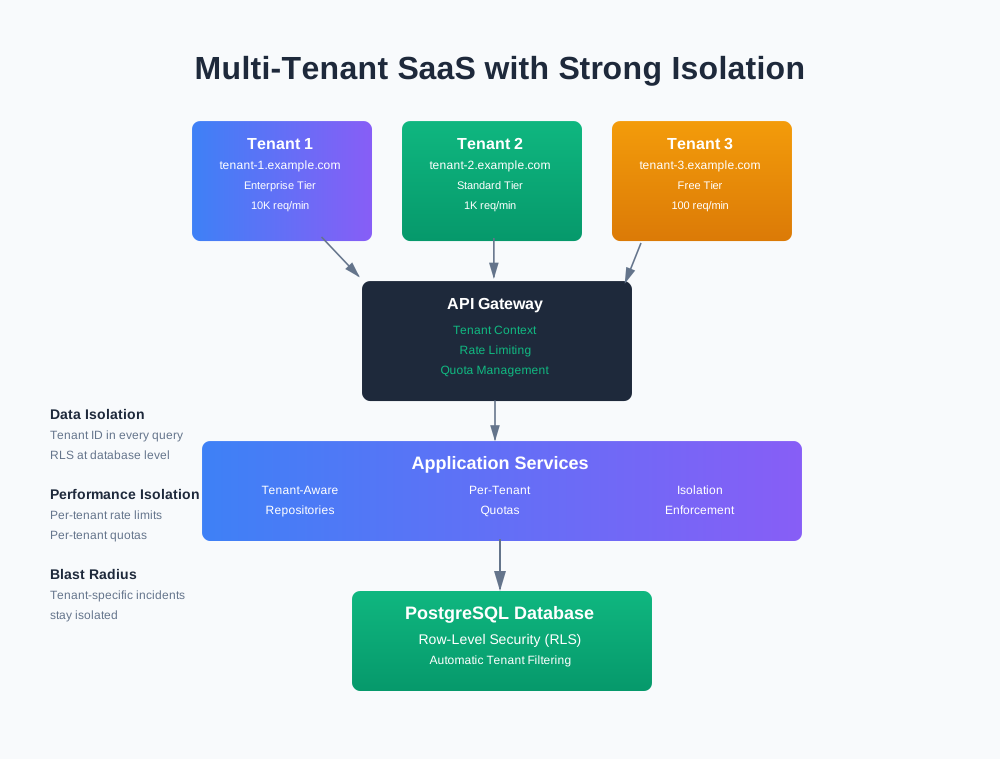
Designing Multi-Tenant SaaS with Strong Isolation by Default
You’re building a SaaS platform. Multiple customers share your infrastructure. That’s the business model. But when one tenant’s query slows down everyone, or a bug leaks data between tenants, you have a problem.
This article shows how to design multi-tenant systems with strong isolation by default. Tenants share the platform, but they don’t share failure modes, noisy neighbors, or data.
What Tenant Isolation Actually Means
Isolation isn’t one thing. It’s multiple dimensions working together.
Data Isolation
Data isolation means tenant A can’t see tenant B’s data. Ever. Even if your code has a bug.
This sounds obvious, but it’s easy to get wrong. A missing WHERE clause. A bug in your ORM. A misconfigured database view. Any of these can leak data.
Strong data isolation means:
- Every query filters by tenant ID
- The database enforces this at the row level
- Missing tenant context causes errors, not silent failures
Performance Isolation
Performance isolation means one tenant’s heavy workload doesn’t slow down others.
A tenant running a report that scans millions of rows shouldn’t make everyone else’s queries slow. A tenant making 10,000 API calls per minute shouldn’t degrade response times for others.
Strong performance isolation means:
- Per-tenant quotas and rate limits
- Separate queues or priorities per tenant tier
- Resource limits that degrade gracefully for individual tenants
Blast Radius
Blast radius is how many tenants an incident affects.
A bug in your code shouldn’t take down all tenants. A database connection pool exhaustion shouldn’t affect everyone. A deployment issue shouldn’t impact every customer.
Strong blast radius control means:
- Tenant-specific incidents stay tenant-specific
- Platform-wide incidents are rare and contained
- You can migrate problematic tenants to isolated infrastructure
Weak vs Strong Isolation
Here’s what weak isolation looks like:
// Weak: Easy to forget tenant filter
async function getOrders(userId: string) {
  return db.query('SELECT * FROM orders WHERE user_id = ?', [userId]);
  // What if someone calls this without tenant context?
}
And strong isolation:
// Strong: Tenant context required, enforced by type system
async function getOrders(tenantId: string, userId: string) {
  if (!tenantId) {
    throw new Error('Tenant ID required');
  }
  return db.query(
    'SELECT * FROM orders WHERE tenant_id = ? AND user_id = ?',
    [tenantId, userId]
  );
}
The difference is making it impossible to forget the tenant filter.
Tenant Models: Choosing Your Base
You have three main options for organizing tenant data. Each has trade-offs.
Shared Database, Tenant ID Per Row
All tenants share one database. Every table has a tenant_id column. Queries filter by tenant_id.
Pros:
- Low cost. One database to manage.
- Simple schema. No per-tenant complexity.
- Easy cross-tenant analytics. Query all data in one place.
Cons:
- Noisy neighbors. One tenant’s heavy query affects everyone.
- Hard to scale. Database becomes a bottleneck.
- Limited isolation. Bugs can leak data between tenants.
- Compliance challenges. Hard to prove data separation.
When to use:
- Early stage SaaS with < 100 tenants
- Low compliance requirements
- Cost is the primary constraint
Shared Database, Separate Schemas Per Tenant
All tenants share one database server, but each tenant gets their own schema (namespace). tenant_123.orders vs tenant_456.orders.
Pros:
- Better isolation. Schema-level separation.
- Easier migrations. Migrate one tenant at a time.
- Simpler queries. No
tenant_idfilter needed.
Cons:
- More complex. Schema management overhead.
- Still shared resources. Database server is still shared.
- Harder analytics. Need to query across schemas.
When to use:
- Mid-stage SaaS with compliance needs
- Need tenant-level migrations
- Want better isolation than row-level
Separate Database Per Tenant
Each tenant gets their own database. Complete physical separation.
Pros:
- Maximum isolation. No shared resources.
- Easy compliance. Clear data boundaries.
- Independent scaling. Scale tenants separately.
- No noisy neighbors. One tenant can’t affect others.
Cons:
- High cost. Many databases to manage.
- Operational complexity. More moving parts.
- Harder analytics. Need to aggregate across databases.
When to use:
- Enterprise SaaS with high-value tenants
- Strict compliance requirements (HIPAA, SOC 2)
- Need to scale tenants independently
Pragmatic Default for Most B2B SaaS
For most B2B SaaS, start with shared database + tenant_id per row. It’s the simplest and cheapest option.
But design for migration. Make it easy to move a tenant to their own schema or database later. High-value tenants or compliance requirements might need stronger isolation.
The key is making tenant context a first-class concept in your code. That way, moving to separate databases later is just changing the connection string, not rewriting all your queries.
Designing the Tenant Boundary in Code
The tenant boundary is where tenant context enters your system and flows through it. Get this right, and isolation becomes natural. Get it wrong, and you’ll fight bugs forever.
Tenant Context as a Core Primitive
Tenant context is the tenant ID plus any tenant-specific configuration. It should be a first-class concept in your codebase.
interface TenantContext {
  tenantId: string;
  tier: 'free' | 'standard' | 'enterprise';
  features: string[];
  rateLimit: number;
}
Every request should have tenant context. Every service should require it. Every database query should use it.
How Tenant ID Enters the System
Tenant ID can come from multiple places:
JWT Token:
// Extract from JWT after authentication
const token = jwt.verify(req.headers.authorization);
const tenantId = token.tenantId;
API Key:
// Extract from API key lookup
const apiKey = req.headers['x-api-key'];
const tenant = await getTenantByApiKey(apiKey);
const tenantId = tenant.id;
Subdomain:
// Extract from subdomain
const subdomain = req.hostname.split('.')[0];
const tenant = await getTenantBySubdomain(subdomain);
const tenantId = tenant.id;
Path Parameter:
// Extract from URL path
const tenantId = req.params.tenantId;
Pick one primary method. Support others for flexibility. But always validate. Never trust client input.
How Tenant Context Flows Through Services
Tenant context should flow through your entire request lifecycle. Use middleware to extract it and attach it to the request object.
interface RequestWithTenant extends Request {
  tenant: TenantContext;
}

async function tenantMiddleware(
  req: RequestWithTenant,
  res: Response,
  next: NextFunction
) {
  const tenantId = extractTenantId(req);

  if (!tenantId) {
    return res.status(401).json({ error: 'Tenant ID required' });
  }

  const tenant = await getTenantContext(tenantId);
  if (!tenant) {
    return res.status(404).json({ error: 'Tenant not found' });
  }

  req.tenant = tenant;
  next();
}
Then every handler has access to tenant context:
app.get('/api/orders', tenantMiddleware, async (req: RequestWithTenant, res) => {
  const orders = await orderService.getOrders(req.tenant.tenantId);
  res.json(orders);
});
Avoiding Footguns
The biggest footgun is forgetting the tenant filter. Make it impossible.
No Queries Without Tenant Filters:
// Bad: Easy to forget tenant filter
class OrderRepository {
  async findById(id: string) {
    return db.query('SELECT * FROM orders WHERE id = ?', [id]);
  }
}

// Good: Tenant required by design
class OrderRepository {
  async findByIdForTenant(id: string, tenantId: string) {
    return db.query(
      'SELECT * FROM orders WHERE id = ? AND tenant_id = ?',
      [id, tenantId]
    );
  }
}
Guardrails in the ORM/Repository Layer:
class TenantAwareRepository<T> {
  constructor(
    private table: string,
    private tenantId: string
  ) {
    if (!tenantId) {
      throw new Error('Tenant ID required');
    }
  }

  async findAll(): Promise<T[]> {
    return db.query(
      `SELECT * FROM ${this.table} WHERE tenant_id = ?`,
      [this.tenantId]
    );
  }

  async findById(id: string): Promise<T | null> {
    return db.query(
      `SELECT * FROM ${this.table} WHERE id = ? AND tenant_id = ?`,
      [id, this.tenantId]
    );
  }
}
Safe Defaults: Deny Access When Tenant is Missing:
function requireTenant(req: RequestWithTenant): TenantContext {
  if (!req.tenant) {
    throw new Error('Tenant context required');
  }
  return req.tenant;
}

app.get('/api/orders', tenantMiddleware, async (req, res) => {
  const tenant = requireTenant(req);
  // Now tenant is guaranteed to exist
});
Routing and API Design for Tenants
How tenants access your API affects isolation and security.
Tenant ID in Headers
// Client sends tenant ID in header
GET /api/orders
Headers: X-Tenant-Id: tenant-123
Pros:
- Simple. Works with any client.
- Flexible. Easy to support admin/cross-tenant operations.
Cons:
- Easy to spoof. Client can send wrong tenant ID.
- Requires validation on every request.
Security: Always validate tenant ID against the authenticated user. Don’t trust the header alone.
async function validateTenantAccess(
  userId: string,
  tenantId: string
): Promise<boolean> {
  const user = await getUser(userId);
  return user.tenantId === tenantId;
}
Subdomains
// Each tenant gets their own subdomain
https://tenant-123.yourapp.com/api/orders
Pros:
- Clear tenant identity. URL shows which tenant.
- Easy SSL. Wildcard certificate works.
- Natural isolation. Each subdomain feels separate.
Cons:
- DNS complexity. Need to manage subdomains.
- Client complexity. Need to know tenant subdomain.
Implementation:
async function subdomainTenantMiddleware(req, res, next) {
  const subdomain = req.hostname.split('.')[0];
  const tenant = await getTenantBySubdomain(subdomain);

  if (!tenant) {
    return res.status(404).json({ error: 'Tenant not found' });
  }

  req.tenant = tenant;
  next();
}
Path Parameters
// Tenant ID in URL path
GET /api/tenants/tenant-123/orders
Pros:
- RESTful. Clear resource hierarchy.
- Easy to understand. URL shows tenant scope.
Cons:
- Verbose. Longer URLs.
- Easy to mess up. Forgetting path param breaks everything.
Handling Admin/Cross-Tenant Operations Safely
Sometimes you need admin operations that span tenants. Be careful.
Option 1: Separate Admin API
// Regular tenant API
GET /api/orders  // Scoped to req.tenant

// Admin API (separate, requires admin role)
GET /admin/api/tenants/:tenantId/orders
Option 2: Explicit Tenant Parameter with Admin Check
app.get('/admin/api/tenants/:tenantId/orders',
  adminMiddleware,
  async (req, res) => {
    // Admin can access any tenant
    const tenantId = req.params.tenantId;
    const orders = await orderService.getOrders(tenantId);
    res.json(orders);
  }
);
Option 3: Service Account with Tenant Scope
// Service account has explicit tenant access list
const serviceAccount = {
  id: 'service-123',
  allowedTenants: ['tenant-1', 'tenant-2']
};

async function validateServiceAccountAccess(
  accountId: string,
  tenantId: string
): Promise<boolean> {
  const account = await getServiceAccount(accountId);
  return account.allowedTenants.includes(tenantId);
}
Rate Limits Per Tenant vs Global
Rate limits should be per tenant, not global.
Per-Tenant Rate Limiting:
class PerTenantRateLimiter {
  private limits = new Map<string, RateLimit>();

  allow(tenantId: string): boolean {
    const limit = this.limits.get(tenantId) || this.createLimit(tenantId);
    return limit.allow();
  }

  private createLimit(tenantId: string): RateLimit {
    const tenant = getTenant(tenantId);
    const limit = new RateLimit(tenant.rateLimitPerMinute);
    this.limits.set(tenantId, limit);
    return limit;
  }
}
Different Limits for Different Tiers:
const RATE_LIMITS = {
  free: 100,      // 100 requests per minute
  standard: 1000, // 1000 requests per minute
  enterprise: 10000 // 10000 requests per minute
};

function getRateLimitForTenant(tenant: TenantContext): number {
  return RATE_LIMITS[tenant.tier];
}
Feature Flags and Configs at Tenant Level
Feature flags should be tenant-scoped, not global.
interface TenantConfig {
  tenantId: string;
  features: {
    [feature: string]: boolean;
  };
  settings: {
    [key: string]: any;
  };
}

async function isFeatureEnabled(
  tenantId: string,
  feature: string
): Promise<boolean> {
  const config = await getTenantConfig(tenantId);
  return config.features[feature] ?? false;
}
This lets you:
- Roll out features to specific tenants
- A/B test per tenant
- Disable features for problematic tenants
Data Isolation Patterns
Data isolation is the foundation. Get this wrong, and nothing else matters.
Enforcing Tenant Filters in Code
Every repository method should require tenant ID.
class OrderRepository {
  constructor(private tenantId: string) {
    if (!tenantId) {
      throw new Error('Tenant ID required');
    }
  }

  async findAll(): Promise<Order[]> {
    return db.query(
      'SELECT * FROM orders WHERE tenant_id = ?',
      [this.tenantId]
    );
  }

  async findById(id: string): Promise<Order | null> {
    return db.query(
      'SELECT * FROM orders WHERE id = ? AND tenant_id = ?',
      [id, this.tenantId]
    );
  }

  async create(order: Omit<Order, 'id' | 'tenantId'>): Promise<Order> {
    return db.query(
      'INSERT INTO orders (tenant_id, ...) VALUES (?, ...)',
      [this.tenantId, ...]
    );
  }
}
Use a base repository class to enforce this pattern:
abstract class TenantAwareRepository<T> {
  constructor(protected tenantId: string) {
    if (!tenantId) {
      throw new Error('Tenant ID required');
    }
  }

  protected addTenantFilter(query: string, params: any[]): [string, any[]] {
    return [`${query} AND tenant_id = ?`, [...params, this.tenantId]];
  }
}
Row-Level Security in Postgres
Row-level security (RLS) enforces tenant isolation at the database level. Even if your code has a bug, the database won’t return wrong data.
Enable RLS:
-- Enable RLS on orders table
ALTER TABLE orders ENABLE ROW LEVEL SECURITY;

-- Create policy: users can only see their tenant's orders
CREATE POLICY tenant_isolation ON orders
  FOR ALL
  USING (tenant_id = current_setting('app.current_tenant_id')::uuid);
Set Tenant Context:
async function setTenantContext(connection: PoolClient, tenantId: string) {
  await connection.query(
    "SET LOCAL app.current_tenant_id = $1",
    [tenantId]
  );
}

// Use in transaction
await db.transaction(async (client) => {
  await setTenantContext(client, tenantId);
  const orders = await client.query('SELECT * FROM orders');
  // RLS automatically filters to tenant's data
});
Test That RLS Works:
// This should return empty even if buggy code forgets tenant filter
async function testRLS() {
  await setTenantContext(db, 'tenant-1');
  const orders = await db.query('SELECT * FROM orders');
  // Only returns tenant-1's orders, even without WHERE clause

  await setTenantContext(db, 'tenant-2');
  const orders2 = await db.query('SELECT * FROM orders');
  // Only returns tenant-2's orders
}
Views That Always Filter by Tenant
Create database views that automatically filter by tenant:
-- View that requires tenant context
CREATE VIEW tenant_orders AS
SELECT * FROM orders
WHERE tenant_id = current_setting('app.current_tenant_id')::uuid;

-- Application queries the view, not the table
SELECT * FROM tenant_orders;
This makes it harder to accidentally query without tenant filter.
Encryption and Key Management Per Tenant
For sensitive data, encrypt per tenant with tenant-specific keys.
class TenantEncryption {
  async encrypt(tenantId: string, data: string): Promise<string> {
    const key = await getTenantEncryptionKey(tenantId);
    return encrypt(data, key);
  }

  async decrypt(tenantId: string, encrypted: string): Promise<string> {
    const key = await getTenantEncryptionKey(tenantId);
    return decrypt(encrypted, key);
  }
}
This means:
- One tenant’s key compromise doesn’t affect others
- You can rotate keys per tenant
- Compliance is easier (tenant-specific key management)
Backups and Restores at Tenant Granularity
Backups should be tenant-scoped, not just database-wide.
async function backupTenant(tenantId: string): Promise<string> {
  const backup = await db.query(
    'SELECT * FROM orders WHERE tenant_id = $1',
    [tenantId]
  );
  // ... backup other tenant tables
  return saveBackup(tenantId, backup);
}

async function restoreTenant(tenantId: string, backupId: string) {
  const backup = await loadBackup(backupId);
  // Restore only this tenant's data
  await db.query(
    'INSERT INTO orders ... WHERE tenant_id = $1',
    [tenantId]
  );
}
This lets you:
- Restore one tenant without affecting others
- Meet compliance requirements (tenant-specific backups)
- Test with production-like data (restore one tenant to staging)
Performance and Noisy Neighbor Controls
Performance isolation prevents one tenant from degrading others’ experience.
Per-Tenant Quotas
Set quotas per tenant, not globally.
Requests Per Minute:
class TenantQuotaManager {
  private quotas = new Map<string, Quota>();

  async checkQuota(tenantId: string, resource: string): Promise<boolean> {
    const quota = await this.getQuota(tenantId, resource);
    return quota.allow();
  }

  private async getQuota(tenantId: string, resource: string): Promise<Quota> {
    const tenant = await getTenant(tenantId);
    const limits = tenant.quotaLimits[resource];

    if (!this.quotas.has(tenantId)) {
      this.quotas.set(tenantId, new Quota(limits));
    }

    return this.quotas.get(tenantId)!;
  }
}
Jobs Per Minute:
class JobQuotaManager {
  async canScheduleJob(tenantId: string): Promise<boolean> {
    const tenant = await getTenant(tenantId);
    const jobsThisMinute = await getJobCount(tenantId, '1 minute');
    return jobsThisMinute < tenant.jobQuotaPerMinute;
  }
}
Storage Size:
async function checkStorageQuota(tenantId: string, sizeBytes: number): Promise<boolean> {
  const tenant = await getTenant(tenantId);
  const currentUsage = await getStorageUsage(tenantId);
  return (currentUsage + sizeBytes) <= tenant.storageQuotaBytes;
}
Query Cost:
async function checkQueryQuota(tenantId: string, estimatedCost: number): Promise<boolean> {
  const tenant = await getTenant(tenantId);
  const costThisMonth = await getQueryCost(tenantId, 'this month');
  return (costThisMonth + estimatedCost) <= tenant.queryQuotaPerMonth;
}
Scheduling and Queueing
Separate queues or priorities per tenant tier prevent noisy neighbors.
Separate Queues Per Tenant Tier:
class TenantAwareQueue {
  private queues = {
    free: new Queue('free-tier'),
    standard: new Queue('standard-tier'),
    enterprise: new Queue('enterprise-tier')
  };

  async enqueue(tenantId: string, job: Job) {
    const tenant = await getTenant(tenantId);
    const queue = this.queues[tenant.tier];
    await queue.add(job);
  }
}
Priority Queues:
class PriorityQueue {
  async enqueue(tenantId: string, job: Job, priority: number) {
    const tenant = await getTenant(tenantId);
    // Enterprise tenants get higher priority
    const adjustedPriority = tenant.tier === 'enterprise'
      ? priority + 100
      : priority;
    await this.queue.add(job, { priority: adjustedPriority });
  }
}
Per-Tenant Queue Limits:
class BoundedTenantQueue {
  async enqueue(tenantId: string, job: Job): Promise<boolean> {
    const tenant = await getTenant(tenantId);
    const queueSize = await this.getQueueSize(tenantId);

    if (queueSize >= tenant.maxQueueSize) {
      return false; // Queue full for this tenant
    }

    await this.queue.add(job, { tenantId });
    return true;
  }
}
Degrading Gracefully for Individual Tenants
When a tenant hits their quota, degrade gracefully for them, not everyone.
async function handleQuotaExceeded(
  tenantId: string,
  resource: string
): Promise<Response> {
  const tenant = await getTenant(tenantId);

  // Log the quota exceed
  await logQuotaExceeded(tenantId, resource);

  // Return specific error for this tenant
  return {
    status: 429,
    body: {
      error: 'Quota exceeded',
      resource,
      retryAfter: getRetryAfter(tenantId, resource),
      upgradeMessage: tenant.tier === 'free'
        ? 'Upgrade to increase quota'
        : 'Contact support'
    }
  };
}
This way:
- One tenant’s quota issue doesn’t affect others
- You can monitor which tenants are hitting limits
- You can offer upgrades or support proactively
Observability with Tenants in Mind
Observability should be tenant-aware. Logs, metrics, and traces should include tenant ID.
Logging Keyed by Tenant ID
Every log entry should include tenant ID.
function logWithTenant(tenantId: string, level: string, message: string, data?: any) {
  logger.log(level, message, {
    tenantId,
    ...data,
    timestamp: new Date().toISOString()
  });
}

// Usage
logWithTenant(tenantId, 'info', 'Order created', { orderId });
This lets you:
- Filter logs by tenant
- Debug tenant-specific issues
- Audit tenant activity
Metrics Keyed by Tenant ID
Metrics should be per-tenant, not just global.
class TenantMetrics {
  recordRequest(tenantId: string, duration: number, status: number) {
    metrics.increment('requests.total', { tenantId, status });
    metrics.histogram('requests.duration', duration, { tenantId });
  }

  recordError(tenantId: string, error: Error) {
    metrics.increment('errors.total', {
      tenantId,
      errorType: error.constructor.name
    });
  }
}
Per-Tenant Dashboards
Create dashboards that show per-tenant metrics:
- Error rate per tenant
- Latency per tenant
- Throughput per tenant
- Quota usage per tenant
This helps you:
- Identify noisy neighbors
- Spot tenant-specific issues
- Plan capacity per tenant
Top N Tenants by Load
Track which tenants are using the most resources:
async function getTopTenantsByLoad(limit: number = 10) {
  return db.query(`
    SELECT
      tenant_id,
      COUNT(*) as request_count,
      AVG(duration_ms) as avg_duration,
      MAX(duration_ms) as max_duration
    FROM request_logs
    WHERE timestamp > NOW() - INTERVAL '1 hour'
    GROUP BY tenant_id
    ORDER BY request_count DESC
    LIMIT $1
  `, [limit]);
}
Use this to:
- Identify tenants that need their own infrastructure
- Spot abuse or misconfigured integrations
- Plan capacity upgrades
Noisy Neighbor Detection
Detect tenants that are degrading others’ performance:
async function detectNoisyNeighbors(): Promise<string[]> {
  // Find tenants with high query times that correlate with others' slowdowns
  const noisy = await db.query(`
    WITH tenant_stats AS (
      SELECT
        tenant_id,
        AVG(query_duration_ms) as avg_duration,
        PERCENTILE_CONT(0.95) WITHIN GROUP (ORDER BY query_duration_ms) as p95_duration
      FROM query_logs
      WHERE timestamp > NOW() - INTERVAL '1 hour'
      GROUP BY tenant_id
    )
    SELECT tenant_id
    FROM tenant_stats
    WHERE p95_duration > 1000  -- P95 > 1 second
      AND avg_duration > 500   -- Average > 500ms
    ORDER BY p95_duration DESC
  `);

  return noisy.rows.map(r => r.tenant_id);
}
How This Helps Support and SRE Teams
Tenant-aware observability helps support and SRE teams:
Support:
- “Why is tenant-123 slow?” → Check tenant-123’s metrics
- “Did tenant-456’s deployment cause issues?” → Check tenant-456’s error logs
- “Is tenant-789 hitting quota limits?” → Check tenant-789’s quota usage
SRE:
- “Which tenant is causing database slowdown?” → Check top tenants by query time
- “Should we move tenant-123 to isolated infrastructure?” → Check tenant-123’s resource usage
- “Is this a platform issue or tenant-specific?” → Compare tenant metrics to global metrics
Migration and Evolution
Most systems don’t start with strong isolation. You evolve to it. Here’s how.
Phase 1: Introduce Tenant ID and Context
Add tenant ID to your data model and make it required.
// Add tenant_id column to all tables
ALTER TABLE orders ADD COLUMN tenant_id UUID NOT NULL;
ALTER TABLE users ADD COLUMN tenant_id UUID NOT NULL;
// ... for all tables

// Create index for performance
CREATE INDEX idx_orders_tenant_id ON orders(tenant_id);
Add tenant context to your request flow:
// Extract tenant ID from request
const tenantId = extractTenantId(req);

// Attach to request
req.tenant = { tenantId };

// Pass to services
const orders = await orderService.getOrders(req.tenant.tenantId);
Phase 2: Enforce Tenant Filters and RLS
Update all queries to include tenant filter:
// Before
async function getOrders() {
  return db.query('SELECT * FROM orders');
}

// After
async function getOrders(tenantId: string) {
  return db.query('SELECT * FROM orders WHERE tenant_id = ?', [tenantId]);
}
Enable row-level security:
ALTER TABLE orders ENABLE ROW LEVEL SECURITY;

CREATE POLICY tenant_isolation ON orders
  FOR ALL
  USING (tenant_id = current_setting('app.current_tenant_id')::uuid);
Phase 3: Split High-Value Tenants to Their Own DB/Cluster
For high-value tenants or compliance requirements, move them to isolated infrastructure.
class TenantConnectionManager {
  private connections = new Map<string, Database>();

  async getConnection(tenantId: string): Promise<Database> {
    const tenant = await getTenant(tenantId);

    if (tenant.isolated) {
      // Use dedicated database
      if (!this.connections.has(tenantId)) {
        this.connections.set(
          tenantId,
          new Database(tenant.databaseUrl)
        );
      }
      return this.connections.get(tenantId)!;
    } else {
      // Use shared database
      return this.sharedDatabase;
    }
  }
}
Handling Legacy Tenants and Exceptions
Some tenants might not have tenant ID yet. Handle them carefully.
Option 1: Default Tenant
const LEGACY_TENANT_ID = 'legacy-tenant';

async function getTenantId(userId: string): Promise<string> {
  const user = await getUser(userId);
  return user.tenantId || LEGACY_TENANT_ID;
}
Option 2: Migration Script
async function migrateLegacyData() {
  // Assign all legacy data to a default tenant
  await db.query(`
    UPDATE orders
    SET tenant_id = 'legacy-tenant'
    WHERE tenant_id IS NULL
  `);
}
Option 3: Gradual Migration
// Support both old and new patterns during migration
async function getOrders(userId: string, tenantId?: string) {
  if (tenantId) {
    return db.query(
      'SELECT * FROM orders WHERE tenant_id = ?',
      [tenantId]
    );
  } else {
    // Legacy: filter by user_id (assuming one user = one tenant)
    const user = await getUser(userId);
    return db.query(
      'SELECT * FROM orders WHERE user_id = ?',
      [userId]
    );
  }
}
Security and Compliance Notes
Strong isolation helps with security and compliance.
Access Control
Every request should verify tenant access:
async function verifyTenantAccess(
  userId: string,
  tenantId: string
): Promise<boolean> {
  const user = await getUser(userId);
  return user.tenantId === tenantId;
}

app.get('/api/orders', async (req, res) => {
  const tenantId = req.tenant.tenantId;
  const userId = req.user.id;

  if (!await verifyTenantAccess(userId, tenantId)) {
    return res.status(403).json({ error: 'Access denied' });
  }

  const orders = await getOrders(tenantId);
  res.json(orders);
});
Auditing
Log all tenant data access:
async function auditDataAccess(
  userId: string,
  tenantId: string,
  action: string,
  resource: string
) {
  await db.query(`
    INSERT INTO audit_logs (user_id, tenant_id, action, resource, timestamp)
    VALUES ($1, $2, $3, $4, NOW())
  `, [userId, tenantId, action, resource]);
}
Data Export Per Tenant
Support exporting all data for a tenant (for compliance):
async function exportTenantData(tenantId: string): Promise<TenantData> {
  const orders = await db.query(
    'SELECT * FROM orders WHERE tenant_id = $1',
    [tenantId]
  );
  const users = await db.query(
    'SELECT * FROM users WHERE tenant_id = $1',
    [tenantId]
  );
  // ... export all tenant tables

  return {
    tenantId,
    exportedAt: new Date(),
    data: {
      orders: orders.rows,
      users: users.rows,
      // ...
    }
  };
}
Data Deletion Per Tenant (Right to be Forgotten)
Support deleting all data for a tenant:
async function deleteTenantData(tenantId: string): Promise<void> {
  await db.transaction(async (client) => {
    await client.query('DELETE FROM orders WHERE tenant_id = $1', [tenantId]);
    await client.query('DELETE FROM users WHERE tenant_id = $1', [tenantId]);
    // ... delete from all tenant tables
  });
}
How Design Choices Affect Audits
Your isolation design affects how easy audits are:
Shared DB + tenant_id:
- Harder to prove separation
- Need to show all queries filter by tenant_id
- RLS helps, but still shared infrastructure
Separate schemas:
- Easier to prove separation
- Clear schema boundaries
- Still shared database server
Separate databases:
- Easiest to prove separation
- Clear physical boundaries
- Simplest audit trail
Choose based on your compliance requirements.
Conclusion
Strong tenant isolation isn’t optional for multi-tenant SaaS. It’s the foundation that lets you scale safely.
Start simple: shared database with tenant_id per row. But design for evolution. Make tenant context a first-class concept. Enforce it in code and database. Monitor per tenant. Then evolve to stronger isolation as needed.
The patterns in this article work together. Tenant context flows through your system. Queries filter by tenant. The database enforces it. Quotas limit per tenant. Observability tracks per tenant. Security verifies per tenant.
Get isolation right, and you can scale to thousands of tenants safely. Get it wrong, and you’ll fight data leaks and noisy neighbors forever.
Discussion
Loading comments...