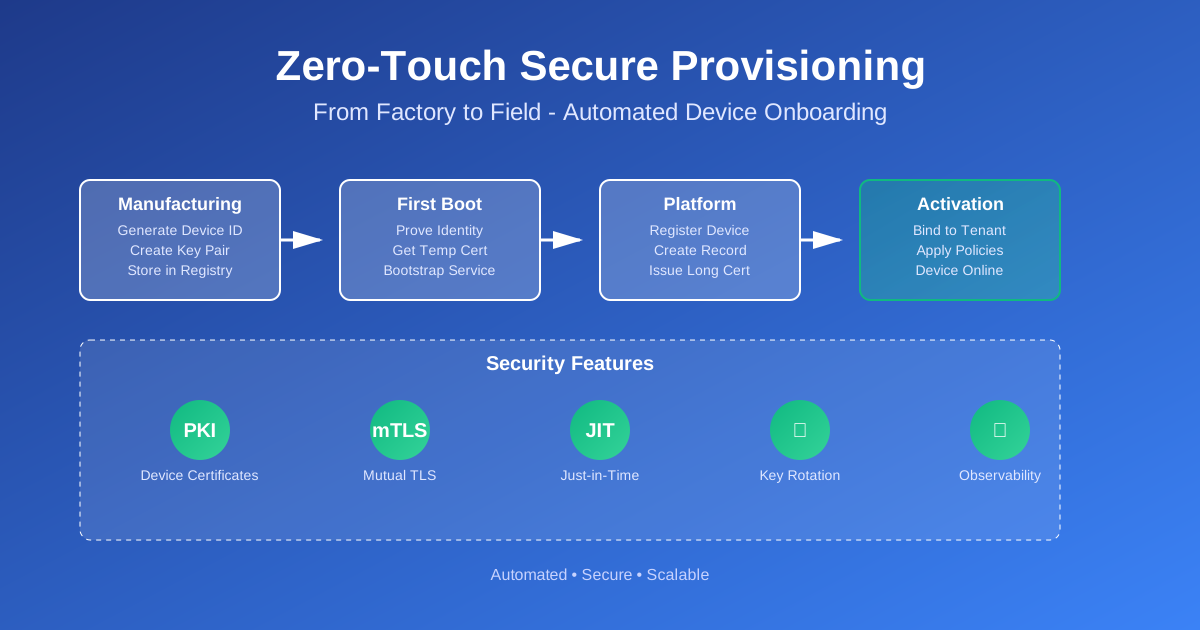
Zero-Touch Secure Provisioning for Large IoT Fleets: A Practical Blueprint
You build an IoT device. You test it. It works. You manufacture a thousand of them. They ship to customers. Then the problems start.
Someone needs to configure each device. Someone needs to enter Wi-Fi passwords. Someone needs to assign device IDs. Someone needs to track which device belongs to which customer. Someone needs to manage certificates and keys.
This is where most IoT projects crack. Not because the hardware is bad. Not because the firmware is buggy. Because provisioning doesn’t scale.
This article shows how to build zero-touch provisioning for large IoT fleets. No manual setup. No stickers with passwords. No Excel spreadsheets tracking device IDs. Devices boot up, prove who they are, and get online automatically.
Why Provisioning is Where Most IoT Projects Crack
Let’s start with the horror stories. These are real problems I’ve seen in production.
Shared Passwords
A company ships devices with the same Wi-Fi password on every unit. Or the same API key. Or the same certificate. One device gets compromised, and the attacker has access to the entire fleet.
This happens because it’s easier to hardcode credentials than to generate unique ones per device. But it’s a security disaster waiting to happen.
Pre-Shared Keys in Firmware
Some teams embed pre-shared keys directly in firmware. Anyone who extracts the firmware image gets the key. Anyone who reverse engineers the binary gets the key. The key is the same across all devices.
This is symmetric-only authentication at its worst. It doesn’t scale. It doesn’t revoke. It doesn’t rotate.
Excel Device Lists
I’ve seen teams track device ownership in Excel spreadsheets. Device serial number in column A. Customer name in column B. Wi-Fi password in column C. API key in column D.
This works for ten devices. It breaks at a hundred. It’s impossible at a thousand. And it’s a compliance nightmare. Passwords in spreadsheets? That’s a GDPR violation waiting to happen.
What “Zero-Touch Provisioning” Really Means
Zero-touch provisioning means a device can get online without human intervention. No technician pressing buttons. No customer entering passwords. No admin clicking through a web interface.
The device boots. It proves its identity. It gets credentials. It connects to your platform. All automatically.
But zero-touch doesn’t mean zero security. It means security is built into the process. The device has a unique identity from the factory. It uses that identity to prove who it is. It gets temporary credentials. It rotates to long-lived credentials. All without anyone touching it.
Constraints You Can’t Ignore
Real devices have limits. You can’t assume unlimited RAM or flash. You can’t assume perfect network connectivity. You can’t assume expensive hardware.
Cost of manufacturing changes: Every change to the manufacturing process costs money. Adding a secure element? That’s a dollar per device. Changing the PCB layout? That’s weeks of delay. You need a solution that works with what you have.
Weak field connectivity: Devices might boot in basements. Or parking garages. Or remote locations. The first connection might be slow. It might fail. It might timeout. Your provisioning flow needs to handle this.
Limited RAM/flash: An ESP32 has 520KB of RAM. An STM32 might have 64KB. You can’t load a full TLS stack and a JSON parser and a certificate chain all at once. You need a minimal bootstrap flow.
These constraints shape the design. You can’t use the same approach for a Raspberry Pi and a microcontroller. But the principles are the same.
Core Concepts Behind Secure Provisioning
Before we build the flow, let’s understand the building blocks.
Device Identity vs. User/Tenant Identity
This is the most important distinction. A device has an identity. A user has an identity. A tenant (customer organization) has an identity. These are different things.
Device identity: Who is this physical device? This is established at manufacturing. It’s tied to hardware. It doesn’t change when the device is sold. It doesn’t change when the customer changes.
User identity: Who is using the device? This might be a person logging into a dashboard. Or an API key used by a customer’s system. This can change. Users can be added. Users can be removed.
Tenant identity: Which organization owns this device? This is the customer. The company that bought the device. This can change if the device is resold. But it’s separate from the device identity.
Why does this matter? Because you need to bind them together. A device proves its identity. Then you map that device to a tenant. Then you give the device credentials that work for that tenant’s resources.
If you mix these up, you get security problems. If you use device identity as tenant identity, you can’t resell devices. If you use tenant identity as device identity, you can’t track which physical device is which.
Hardware vs. Software Roots of Trust
A root of trust is something you trust to be secure. It’s the foundation of your security model.
Hardware roots of trust:
- TPM (Trusted Platform Module): A dedicated chip that stores keys securely
- Secure elements: Chips like ATECC608 that handle crypto operations
- Hardware security modules: More powerful, more expensive
These are the gold standard. Keys never leave the secure hardware. Operations happen inside the chip. Even if someone dumps your firmware, they can’t extract the keys.
But they cost money. A TPM adds a dollar or two per device. A secure element adds fifty cents. For high-volume devices, that adds up.
Software roots of trust:
- Keys stored in flash memory (encrypted or obfuscated)
- Keys derived from device-unique IDs
- Keys stored in secure boot partitions
These are cheaper. They work on any hardware. But they’re less secure. If someone extracts your firmware, they might extract the keys. If someone clones your flash, they clone your keys.
For most IoT devices, software roots of trust are good enough. You encrypt the keys. You obfuscate the storage. You make extraction harder. It’s not perfect, but it’s practical.
The key is: don’t use the same key for everything. Use a factory key for bootstrap. Use that to get a device-specific key. Use that for operations. If the factory key leaks, you can rotate. If the device key leaks, only one device is affected.
PKI Basics for IoT
Public Key Infrastructure (PKI) is how you manage certificates and keys at scale.
Device certificates: Each device gets a certificate. The certificate proves the device’s identity. It’s signed by a Certificate Authority (CA). The device uses its private key to prove it owns the certificate.
Certificate Authorities: You run your own CA. Or you use a cloud CA service. The CA signs device certificates. Devices trust the CA’s root certificate. When a device connects, it presents its certificate. The server verifies it’s signed by your CA.
Short-lived credentials: Device certificates can be long-lived (years) or short-lived (hours or days). Short-lived certificates are more secure. If a device is compromised, the certificate expires soon. But they require renewal. Long-lived certificates are simpler but riskier.
For provisioning, you want short-lived credentials. The device gets a temporary certificate during bootstrap. It uses that to register with your platform. Then it gets a long-lived certificate for normal operations.
Why avoid symmetric-only credentials: Symmetric keys (like pre-shared keys) are simple. But they don’t scale. If you use the same key for all devices, one leak compromises everything. If you use unique keys, you need to distribute them securely. That’s hard.
PKI solves this. Each device has a unique key pair. The public key is in the certificate. The private key never leaves the device. You can revoke certificates. You can rotate them. You can track which device is which.
Certificate Revocation
What happens when a device is compromised? You need to revoke its certificate. The device can’t connect anymore.
The standard way is Certificate Revocation Lists (CRLs) or Online Certificate Status Protocol (OCSP). But these add complexity. For IoT, you might use a simpler approach: maintain a blocklist of device IDs. When a device connects, check the blocklist. If it’s there, reject it.
This isn’t perfect. But it’s practical. And it works for most use cases.
Designing a Zero-Touch Flow End-to-End
Now let’s build the actual flow. This is a reference design. Adapt it to your constraints.
During Manufacturing
This is where device identity is established. This happens once, at the factory.
Step 1: Generate unique device IDs and key pairs
Each device needs a unique identifier. This could be:
- A serial number burned into hardware
- A MAC address
- A UUID generated at manufacturing
- A combination of these
The device also needs a key pair. Generate this at manufacturing. Store the private key securely on the device. Store the public key (or a certificate) in your database.
Step 2: Embed public key or client cert
You have two options:
- Embed the public key in firmware: The device has its private key. Your database has the public key. When the device connects, it signs a challenge. You verify the signature.
- Embed a client certificate: The device has a certificate signed by your manufacturing CA. The device has the private key. When it connects, it presents the certificate. You verify it’s signed by your CA.
The certificate approach is better. It’s standard. It works with TLS. But it requires a CA setup.
Step 3: Store minimal metadata in a secure database
You need a database that maps device IDs to public keys (or certificates). This is your device registry. It should be:
- Secure: Encrypted at rest. Access controlled.
- Minimal: Just device ID, public key, manufacturing date. Don’t store customer info here yet.
- Fast: You’ll query this during bootstrap. It needs to be quick.
Step 4: Keep “who owns this device?” separate from “what is the device?”
The device registry knows what the device is. It doesn’t know who owns it. That comes later, during activation.
This separation is important. It lets you:
- Manufacture devices before you know who will buy them
- Resell devices to different customers
- Track device history separately from ownership history
First Boot in the Field
The device boots for the first time. It’s never been online. It needs to prove who it is and get credentials.
Step 1: Device discovers bootstrap endpoint
The device needs to know where to connect. Options:
- Hardcoded URL:
https://bootstrap.yourapp.com. Simple, but hard to change. - DNS-based discovery:
bootstrap-{region}.yourapp.com. More flexible. - Local gateway: Device connects to a local gateway first. Gateway forwards to cloud. Useful for devices behind firewalls.
For most cases, a hardcoded URL is fine. You can update it via firmware updates later.
Step 2: Device proves identity
The device connects to the bootstrap endpoint. It needs to prove it’s a legitimate device. Options:
Option A: Signed nonce
- Server sends a random nonce.
- Device signs the nonce with its private key.
- Device sends device ID and signature.
- Server looks up device ID in database, gets public key, verifies signature.
Option B: Certificate Signing Request (CSR)
- Device generates a new key pair (different from factory key).
- Device creates a CSR with device ID and new public key.
- Device signs CSR with factory private key.
- Device sends CSR and signature to server.
- Server verifies factory key, issues certificate for new key.
Option C: Present factory certificate
- Device presents its factory certificate.
- Server verifies certificate is signed by manufacturing CA.
- Server looks up device ID in database to confirm it’s registered.
Option B (CSR) is best for security. The device gets a new key pair for operations. The factory key is only used for bootstrap. If the factory key leaks, you can rotate. The operational key is separate.
Step 3: Bootstrap service issues short-lived certificate or token
The server verifies the device’s identity. Now it issues temporary credentials. Options:
Short-lived certificate:
- Valid for 24 hours or 7 days
- Signed by your operational CA
- Device uses this for TLS connections
JWT token:
- Valid for a short time
- Contains device ID and permissions
- Device uses this for API authentication
The certificate approach is better for MQTT and other TLS-based protocols. The token approach is simpler for REST APIs.
Step 4: Device stores credentials securely
The device receives the credentials. It stores them securely:
- Encrypted flash partition
- Secure element (if available)
- Encrypted filesystem
The device is now provisioned. But it’s not yet registered with your IoT platform. That’s the next step.
Handover to Main IoT Platform
The device has temporary credentials. Now it needs to register with your main platform and get long-lived credentials.
Step 1: Device uses short-lived credentials to register
The device connects to your IoT platform. It uses the temporary certificate or token. It calls a registration endpoint.
The registration request includes:
- Device ID
- Device type/model
- Firmware version
- Capabilities (what the device can do)
Step 2: Platform creates device record
The platform receives the registration. It:
- Creates a device record in the database
- Links device ID to the record
- Sets initial state (unassigned, pending activation)
The device is now in your system. But it’s not yet assigned to a customer. That happens during activation.
Step 3: Attach policy and tenant ID
During activation (see next section), the device gets assigned to a tenant. The platform:
- Updates device record with tenant ID
- Applies tenant-specific policies
- Sets device tags/labels
Step 4: Rotate into long-lived credentials
The device has temporary credentials. These will expire. The device needs long-lived credentials for normal operations.
The platform issues a new certificate:
- Valid for 1-2 years (or whatever your policy is)
- Signed by your operational CA
- Includes device ID and tenant ID in the certificate
The device stores this. It uses it for all future connections. The temporary credentials expire. The device is now fully provisioned.
Tenant and Ownership Binding
A device is manufactured. It’s provisioned. But who owns it? That’s determined during activation.
Mapping Physical Device to Customer Account
You need a way to link a physical device to a customer account. Common approaches:
Claim codes:
- Each device has a unique code (printed on label or in packaging)
- Customer enters code in web portal or mobile app
- System links device ID to customer account
QR codes:
- Device has QR code with device ID or claim code
- Customer scans code with phone
- System links device to account
Activation flows:
- Customer receives device
- Customer creates account (or logs into existing)
- Customer enters claim code or scans QR
- System activates device and links to account
The key is: the device doesn’t know who owns it until activation. The device ID is separate from the tenant ID. During activation, you bind them together.
Multi-Tenant Isolation
Once a device is assigned to a tenant, you need isolation. Tenant A’s devices shouldn’t access Tenant B’s data.
Topic namespaces (MQTT):
devices/{tenant_id}/{device_id}/telemetry
devices/{tenant_id}/{device_id}/commands
Each tenant has its own namespace. Devices can only publish/subscribe to their tenant’s topics.
Policies:
- Device certificates include tenant ID
- Authorization rules check tenant ID
- Devices can only access their tenant’s resources
Device twins:
- Each tenant has its own view of device state
- Tenant A sees Device 1’s state
- Tenant B sees Device 2’s state
- No cross-tenant access
Handling Re-Sell and Re-Use
What happens when a device is resold? Or returned? Or needs to be reassigned?
Device reset:
- Device has a reset function (physical button or command)
- Reset clears tenant assignment
- Reset clears long-lived credentials
- Device returns to “unassigned” state
Reprovisioning:
- Device goes through bootstrap again
- Gets new temporary credentials
- New owner activates device
- Device gets new tenant assignment
Ownership transfer:
- Current owner releases device
- Device is reset
- New owner claims device
- Device is reassigned
The key is: make reset easy. Make reprovisioning automatic. Don’t lock devices to one owner forever.
Security Best Practices (2025 View)
Security isn’t optional. Here’s what you need in 2025.
Mutual TLS Almost Everywhere
TLS (Transport Layer Security) encrypts connections. Mutual TLS (mTLS) requires both sides to present certificates. The server verifies the device. The device verifies the server.
This prevents:
- Man-in-the-middle attacks
- Impersonation
- Eavesdropping
Use mTLS for:
- Bootstrap endpoint
- IoT platform connections
- OTA update servers
- Any sensitive communication
Don’t use mTLS for:
- Public APIs (use API keys or OAuth)
- Customer-facing web portals (use regular TLS)
But for device-to-cloud, mTLS is the standard. It’s what AWS IoT Core uses. It’s what Azure IoT Hub uses. It’s what you should use.
Just-in-Time Provisioning vs. Bulk Pre-Registration
Just-in-time (JIT) provisioning: Device is manufactured. It’s not registered until it boots. When it boots, it registers itself.
Bulk pre-registration: You register all devices in advance. You know all device IDs before they ship. When a device boots, it’s already in the system.
JIT is simpler. You don’t need to track devices before they exist. But it requires the device to be online to register.
Pre-registration is more controlled. You know exactly which devices exist. But it requires coordination between manufacturing and software.
For most cases, JIT is fine. The device registers itself on first boot. It’s automatic. It scales.
Rate Limiting, Backoff, and Lockouts
Your bootstrap endpoint will be attacked. Someone will try to brute force device IDs. Someone will try to DoS your service.
Rate limiting:
- Limit requests per IP address
- Limit requests per device ID
- Use exponential backoff
Backoff:
- If bootstrap fails, wait before retrying
- Exponential backoff: 1 second, 2 seconds, 4 seconds, 8 seconds
- Max backoff: 5 minutes
Lockouts:
- If a device ID fails too many times, lock it
- Require manual unlock
- Log all failed attempts
Monitoring:
- Alert on unusual patterns
- Alert on high failure rates
- Alert on potential attacks
Storing Secrets on Device
Where do you store private keys and certificates on the device?
Secure element (best):
- Keys never leave the chip
- Crypto operations happen in hardware
- Even if firmware is extracted, keys are safe
Encrypted flash:
- Keys stored in encrypted partition
- Encryption key derived from device-unique ID
- If flash is cloned, keys are still encrypted
Obfuscated storage:
- Keys stored with obfuscation
- Not truly secure, but better than plaintext
- Makes extraction harder
Plaintext (worst):
- Keys stored in plaintext
- Anyone who extracts firmware gets keys
- Don’t do this
For most devices, encrypted flash is good enough. For high-security devices, use a secure element.
Planning for Compromise
Assume a device will be compromised. Plan for it.
Key rotation:
- Devices should rotate keys periodically
- If compromise is detected, force rotation
- Old keys stop working
Certificate revocation:
- Maintain a revocation list
- Check revocation on every connection
- Revoked devices can’t connect
Fleet-wide re-provisioning:
- If a vulnerability is found, you might need to re-provision all devices
- Have a process for this
- Test it before you need it
Incident response:
- Know how to detect compromise
- Know how to isolate affected devices
- Know how to revoke credentials
- Know how to update firmware
Observability for Provisioning
You can’t fix what you can’t see. Provisioning needs observability.
Minimal Events to Log
Log these events:
- Device ID
- Bootstrap attempt (success/failure)
- Failure reason (if failed)
- Timestamp
- IP address (for security)
- Firmware version
- Device model/SKU
Don’t log:
- Private keys (obviously)
- Full certificates (just the fingerprint)
- Customer information (until device is activated)
Dashboards
Build dashboards showing:
- Success rate over time
- Success rate by SKU/model
- Success rate by firmware version
- Failure reasons breakdown
- Geographic distribution (if available)
- Time to provision (how long does bootstrap take?)
These metrics tell you:
- If manufacturing quality is declining
- If a firmware version has problems
- If your bootstrap service is having issues
- If there are regional connectivity problems
Using Provisioning Metrics as Quality Signals
Provisioning failures often indicate other problems:
- High failure rate for a SKU → manufacturing issue
- High failure rate for a firmware version → firmware bug
- High failure rate in a region → connectivity issue
- Sudden spike in failures → service outage or attack
Use provisioning metrics as an early warning system. If provisioning success rate drops, investigate. It might be a provisioning problem. It might be a bigger problem.
Practical Checklist & Failure Modes
Here’s a checklist you can use when designing your own flow.
Design Checklist
- Each device has a unique identity (device ID + key pair)
- Device identity is established at manufacturing
- Public keys/certificates are stored in a secure database
- Bootstrap endpoint uses mTLS
- Device proves identity using signed challenge or CSR
- Bootstrap issues short-lived credentials (certificate or token)
- Device registers with platform using temporary credentials
- Platform issues long-lived credentials
- Device can be reset and reprovisioned
- Activation flow binds device to tenant
- Multi-tenant isolation is enforced
- Rate limiting and backoff are implemented
- Provisioning events are logged
- Dashboards show success rates and failures
- Certificate revocation is supported
- Key rotation is supported
Common Mistakes
Hard-coding URLs:
- Don’t hardcode bootstrap URLs in firmware
- Use DNS or make URLs configurable
- You’ll need to change them eventually
No retry strategy:
- Devices will fail to connect
- Implement exponential backoff
- Don’t retry forever (max attempts)
One CA for everything:
- Use separate CAs for manufacturing and operations
- If manufacturing CA is compromised, you can rotate
- Don’t put all eggs in one basket
No way to wipe ownership:
- Devices need to be resettable
- Make reset easy and secure
- Test reset flow
No observability:
- You need to see what’s happening
- Log provisioning events
- Build dashboards
- Set up alerts
Symmetric keys everywhere:
- Use PKI, not pre-shared keys
- Each device gets unique credentials
- Don’t share keys across devices
If You Can Only Fix Three Things
If you’re retrofitting an existing system, and you can only fix three things:
-
Use PKI instead of symmetric keys. Each device gets a unique certificate. No shared secrets.
-
Separate device identity from tenant identity. Device ID is separate from customer account. Bind them during activation.
-
Add observability. Log provisioning events. Build dashboards. Know what’s happening.
These three changes will solve most provisioning problems. They’re not easy. But they’re necessary.
Code Examples
Let’s look at concrete code. These are simplified examples. Adapt them to your stack.
Device-Side Provisioning (Python)
import ssl
import socket
import json
import hashlib
from cryptography.hazmat.primitives import hashes, serialization
from cryptography.hazmat.primitives.asymmetric import rsa, padding
from cryptography import x509
from cryptography.hazmat.backends import default_backend

class DeviceProvisioner:
    def __init__(self, device_id, factory_private_key_path, factory_cert_path):
        self.device_id = device_id
        self.factory_private_key = self._load_private_key(factory_private_key_path)
        self.factory_cert = self._load_certificate(factory_cert_path)
        self.bootstrap_url = "https://bootstrap.yourapp.com"

    def _load_private_key(self, path):
        with open(path, 'rb') as f:
            return serialization.load_pem_private_key(
                f.read(), password=None, backend=default_backend()
            )

    def _load_certificate(self, path):
        with open(path, 'rb') as f:
            return x509.load_pem_x509_certificate(f.read(), default_backend())

    def generate_csr(self):
        """Generate a Certificate Signing Request for operational credentials."""
        # Generate new key pair for operations
        operational_key = rsa.generate_private_key(
            public_exponent=65537,
            key_size=2048,
            backend=default_backend()
        )

        # Create CSR
        csr = x509.CertificateSigningRequestBuilder().subject_name(
            x509.Name([
                x509.NameAttribute(x509.NameOID.COMMON_NAME, self.device_id),
            ])
        ).sign(operational_key, hashes.SHA256(), default_backend())

        # Sign CSR with factory key
        csr_bytes = csr.public_bytes(serialization.Encoding.PEM)
        signature = self.factory_private_key.sign(
            csr_bytes,
            padding.PSS(
                mgf=padding.MGF1(hashes.SHA256()),
                salt_length=padding.PSS.MAX_LENGTH
            ),
            hashes.SHA256()
        )

        return {
            'device_id': self.device_id,
            'csr': csr_bytes.decode('utf-8'),
            'signature': signature.hex(),
            'factory_cert': self.factory_cert.public_bytes(
                serialization.Encoding.PEM
            ).decode('utf-8')
        }

    def sign_challenge(self, challenge):
        """Sign a challenge from the server using factory private key."""
        challenge_bytes = challenge.encode('utf-8')
        signature = self.factory_private_key.sign(
            challenge_bytes,
            padding.PSS(
                mgf=padding.MGF1(hashes.SHA256()),
                salt_length=padding.PSS.MAX_LENGTH
            ),
            hashes.SHA256()
        )
        return {
            'device_id': self.device_id,
            'challenge': challenge,
            'signature': signature.hex(),
            'factory_cert': self.factory_cert.public_bytes(
                serialization.Encoding.PEM
            ).decode('utf-8')
        }

    def bootstrap(self):
        """Connect to bootstrap endpoint and get temporary credentials."""
        import urllib.request
        import urllib.error

        # Generate CSR for operational credentials
        csr_data = self.generate_csr()

        # Create request
        request_data = json.dumps(csr_data).encode('utf-8')
        req = urllib.request.Request(
            f"{self.bootstrap_url}/bootstrap",
            data=request_data,
            headers={'Content-Type': 'application/json'}
        )

        # Use factory certificate for mTLS
        context = ssl.create_default_context()
        context.load_cert_chain(
            certfile='factory_cert.pem',
            keyfile='factory_key.pem'
        )

        try:
            with urllib.request.urlopen(req, context=context, timeout=30) as response:
                result = json.loads(response.read().decode('utf-8'))
                return result
        except urllib.error.HTTPError as e:
            print(f"Bootstrap failed: {e.code} {e.reason}")
            return None
        except Exception as e:
            print(f"Bootstrap error: {e}")
            return None

# Usage
provisioner = DeviceProvisioner(
    device_id="DEV-12345",
    factory_private_key_path="factory_key.pem",
    factory_cert_path="factory_cert.pem"
)

result = provisioner.bootstrap()
if result:
    # Store temporary certificate
    with open('temp_cert.pem', 'w') as f:
        f.write(result['certificate'])
    print("Bootstrap successful")
else:
    print("Bootstrap failed, will retry with backoff")
Bootstrap Service (Python/Flask)
from flask import Flask, request, jsonify
from cryptography import x509
from cryptography.hazmat.primitives import hashes, serialization
from cryptography.hazmat.primitives.asymmetric import padding
from cryptography.hazmat.backends import default_backend
import jwt
import datetime
import logging

app = Flask(__name__)
logging.basicConfig(level=logging.INFO)

# In production, load from secure storage
DEVICE_REGISTRY = {
    'DEV-12345': {
        'public_key': None,  # Load from database
        'manufacturing_date': '2025-11-01',
        'model': 'Sensor-V2'
    }
}

# CA for signing operational certificates
OPERATIONAL_CA_KEY = None  # Load from secure storage
OPERATIONAL_CA_CERT = None  # Load from secure storage

def verify_factory_signature(device_id, csr_bytes, signature_hex, factory_cert_pem):
    """Verify that CSR is signed by device's factory key."""
    # Load factory certificate
    factory_cert = x509.load_pem_x509_certificate(
        factory_cert_pem.encode('utf-8'),
        default_backend()
    )

    # Get public key from certificate
    factory_public_key = factory_cert.public_key()

    # Verify signature
    try:
        factory_public_key.verify(
            bytes.fromhex(signature_hex),
            csr_bytes.encode('utf-8'),
            padding.PSS(
                mgf=padding.MGF1(hashes.SHA256()),
                salt_length=padding.PSS.MAX_LENGTH
            ),
            hashes.SHA256()
        )
        return True
    except Exception as e:
        logging.error(f"Signature verification failed: {e}")
        return False

def verify_device_in_registry(device_id):
    """Check if device ID exists in registry."""
    return device_id in DEVICE_REGISTRY

def issue_short_lived_certificate(csr_pem, device_id):
    """Issue a short-lived certificate (24 hours) for the device."""
    # Load CSR
    csr = x509.load_pem_x509_csr(csr_pem.encode('utf-8'), default_backend())

    # Create certificate (simplified - in production use proper CA)
    # Valid for 24 hours
    from datetime import datetime, timedelta
    builder = x509.CertificateBuilder()
    builder = builder.subject_name(csr.subject)
    builder = builder.issuer_name(OPERATIONAL_CA_CERT.subject)
    builder = builder.public_key(csr.public_key())
    builder = builder.serial_number(x509.random_serial_number())
    builder = builder.not_valid_before(datetime.utcnow())
    builder = builder.not_valid_after(datetime.utcnow() + timedelta(hours=24))

    # Add device ID as extension
    builder = builder.add_extension(
        x509.SubjectAlternativeName([
            x509.DNSName(device_id)
        ]),
        critical=False
    )

    certificate = builder.sign(
        OPERATIONAL_CA_KEY,
        hashes.SHA256(),
        default_backend()
    )

    return certificate.public_bytes(serialization.Encoding.PEM).decode('utf-8')

@app.route('/bootstrap', methods=['POST'])
def bootstrap():
    """Bootstrap endpoint: verify device identity and issue temporary credentials."""
    try:
        data = request.json
        device_id = data.get('device_id')
        csr = data.get('csr')
        signature = data.get('signature')
        factory_cert = data.get('factory_cert')

        # Verify device exists in registry
        if not verify_device_in_registry(device_id):
            logging.warning(f"Unknown device ID: {device_id}")
            return jsonify({'error': 'Unknown device'}), 403

        # Verify factory signature
        if not verify_factory_signature(device_id, csr, signature, factory_cert):
            logging.warning(f"Invalid signature for device: {device_id}")
            return jsonify({'error': 'Invalid signature'}), 403

        # Issue short-lived certificate
        temp_cert = issue_short_lived_certificate(csr, device_id)

        # Log provisioning event
        logging.info(f"Device provisioned: {device_id}")

        return jsonify({
            'certificate': temp_cert,
            'expires_in': 86400,  # 24 hours in seconds
            'platform_url': 'https://iot.yourapp.com'
        })

    except Exception as e:
        logging.error(f"Bootstrap error: {e}")
        return jsonify({'error': 'Internal error'}), 500

if __name__ == '__main__':
    app.run(ssl_context='adhoc', host='0.0.0.0', port=443)
IoT Platform Registration (Python)
import ssl
import socket
import json
import urllib.request
from datetime import datetime, timedelta

class IoTPlatformClient:
    def __init__(self, device_id, temp_cert_path, temp_key_path, platform_url):
        self.device_id = device_id
        self.temp_cert_path = temp_cert_path
        self.temp_key_path = temp_key_path
        self.platform_url = platform_url

    def register(self):
        """Register device with IoT platform using temporary credentials."""
        # Create registration request
        registration_data = {
            'device_id': self.device_id,
            'device_type': 'sensor-v2',
            'firmware_version': '1.2.3',
            'capabilities': ['temperature', 'humidity', 'motion']
        }

        # Use temporary certificate for mTLS
        context = ssl.create_default_context()
        context.load_cert_chain(
            certfile=self.temp_cert_path,
            keyfile=self.temp_key_path
        )

        request_data = json.dumps(registration_data).encode('utf-8')
        req = urllib.request.Request(
            f"{self.platform_url}/devices/register",
            data=request_data,
            headers={'Content-Type': 'application/json'}
        )

        try:
            with urllib.request.urlopen(req, context=context, timeout=30) as response:
                result = json.loads(response.read().decode('utf-8'))
                return result
        except Exception as e:
            print(f"Registration failed: {e}")
            return None

    def get_long_lived_credentials(self):
        """Request long-lived credentials from platform."""
        context = ssl.create_default_context()
        context.load_cert_chain(
            certfile=self.temp_cert_path,
            keyfile=self.temp_key_path
        )

        req = urllib.request.Request(
            f"{self.platform_url}/devices/{self.device_id}/credentials",
            method='POST'
        )

        try:
            with urllib.request.urlopen(req, context=context, timeout=30) as response:
                result = json.loads(response.read().decode('utf-8'))
                return result
        except Exception as e:
            print(f"Failed to get credentials: {e}")
            return None

# Usage
client = IoTPlatformClient(
    device_id="DEV-12345",
    temp_cert_path="temp_cert.pem",
    temp_key_path="temp_key.pem",
    platform_url="https://iot.yourapp.com"
)

# Register device
registration_result = client.register()
if registration_result:
    print(f"Device registered: {registration_result['device_record_id']}")

    # Get long-lived credentials
    credentials = client.get_long_lived_credentials()
    if credentials:
        # Store long-lived certificate
        with open('device_cert.pem', 'w') as f:
            f.write(credentials['certificate'])
        print("Long-lived credentials received")
Simple Policy Example (MQTT)
# MQTT topic namespace with per-tenant isolation
def get_telemetry_topic(tenant_id, device_id):
    return f"devices/{tenant_id}/{device_id}/telemetry"

def get_command_topic(tenant_id, device_id):
    return f"devices/{tenant_id}/{device_id}/commands"

def get_status_topic(tenant_id, device_id):
    return f"devices/{tenant_id}/{device_id}/status"

# Authorization rule example
def can_publish(device_cert, topic):
    """Check if device can publish to topic based on certificate."""
    # Extract tenant_id and device_id from certificate
    tenant_id = extract_tenant_id_from_cert(device_cert)
    device_id = extract_device_id_from_cert(device_cert)

    # Parse topic
    parts = topic.split('/')
    if len(parts) != 4 or parts[0] != 'devices':
        return False

    topic_tenant_id = parts[1]
    topic_device_id = parts[2]

    # Device can only publish to its own topics
    return tenant_id == topic_tenant_id and device_id == topic_device_id

# IAM policy document (JSON format)
policy = {
    "Version": "2012-10-17",
    "Statement": [
        {
            "Effect": "Allow",
            "Action": ["iot:Connect"],
            "Resource": "arn:aws:iot:region:account:client/${iot:Connection.Thing.ThingName}"
        },
        {
            "Effect": "Allow",
            "Action": ["iot:Publish"],
            "Resource": "arn:aws:iot:region:account:topic/devices/${iot:Connection.Thing.Attributes[tenant_id]}/${iot:Connection.Thing.ThingName}/*"
        },
        {
            "Effect": "Allow",
            "Action": ["iot:Subscribe"],
            "Resource": "arn:aws:iot:region:account:topicfilter/devices/${iot:Connection.Thing.Attributes[tenant_id]}/${iot:Connection.Thing.ThingName}/*"
        }
    ]
}
Conclusion
Zero-touch provisioning isn’t magic. It’s careful design. It’s separating concerns. It’s using the right tools.
The flow is:
- Device gets identity at manufacturing
- Device proves identity at bootstrap
- Device gets temporary credentials
- Device registers with platform
- Device gets long-lived credentials
- Device is activated and assigned to tenant
Each step is simple. The complexity comes from doing it securely, at scale, with real-world constraints.
Start with the basics. Use PKI. Separate device identity from tenant identity. Add observability. Then iterate. Add secure elements if you need them. Add more sophisticated policies. Add better revocation.
But don’t skip the basics. Don’t use shared passwords. Don’t hardcode credentials. Don’t skip observability.
Your devices will thank you. Your customers will thank you. Your security team will thank you.
Discussion
Loading comments...