Resilient OTA Updates for IoT: Rollout, Rollback, and Safety Checks That Actually Work
You’ve built your IoT device. You’ve tested it. You’ve shipped it. Then you find a bug. Or a security vulnerability. Or you need to add a feature.
You need to update thousands of devices. But you can’t send a technician to each one. You need over-the-air (OTA) updates.
The problem is that OTA updates are where things break. One bad update can brick your entire fleet. One corrupted download can leave devices stuck. One failed rollout can wake your on-call team at 3 a.m.
This article shows how to build an OTA system that actually works. One that rolls out updates safely. One that rolls back when things go wrong. One that checks device health before and after updates. One that doesn’t break your fleet.
Why OTA is Where Reliability and Security Meet
OTA updates cover more than just firmware. They include configuration changes, feature flags, security patches, and application updates. Each one needs to be safe. Each one needs to be reversible.
What “OTA” Really Covers
Firmware updates: The core device software. Bootloader, kernel, application code. This is the most critical update. Get it wrong, and the device might not boot.
Configuration updates: Wi-Fi settings, API endpoints, feature toggles. These are less risky but still need to be atomic. A partial config update can leave a device in a broken state.
Feature flags: Enable or disable features remotely. These are the safest updates. They don’t change code. They just change behavior.
Security patches: Critical fixes for vulnerabilities. These need to roll out fast. But they also need to be safe. A rushed security patch can break more than it fixes.
The Cost of Getting It Wrong
I’ve seen what happens when OTA goes wrong.
A company pushed a firmware update to 10,000 devices. The update had a bug. Devices started rebooting in a loop. The company had to send technicians to every device. That’s 10,000 truck rolls. At $200 per visit, that’s $2 million. Plus the cost of customer downtime. Plus the cost of lost trust.
Another company pushed an update during business hours. The update required a reboot. All devices went offline for 10 minutes. During peak usage. Customers couldn’t access their systems. The company lost contracts.
A third company didn’t have rollback. A bad update went out. Devices were stuck. The company had to recall devices. Replace them. That’s millions in hardware costs.
These aren’t edge cases. They’re what happens when OTA isn’t designed for failure.
Why 2025 Fleets Need More Than “Download and Reboot”
Simple OTA systems work like this: device checks for updates, downloads a file, reboots. That’s it.
This breaks at scale. It doesn’t handle network failures. It doesn’t handle corrupted downloads. It doesn’t handle devices that can’t boot after an update. It doesn’t handle partial rollouts. It doesn’t handle rollback.
Modern fleets need more. They need staged rollouts. They need health checks. They need automatic rollback. They need observability. They need to handle flaky networks. They need to handle constrained devices.
Anatomy of a Modern OTA Pipeline
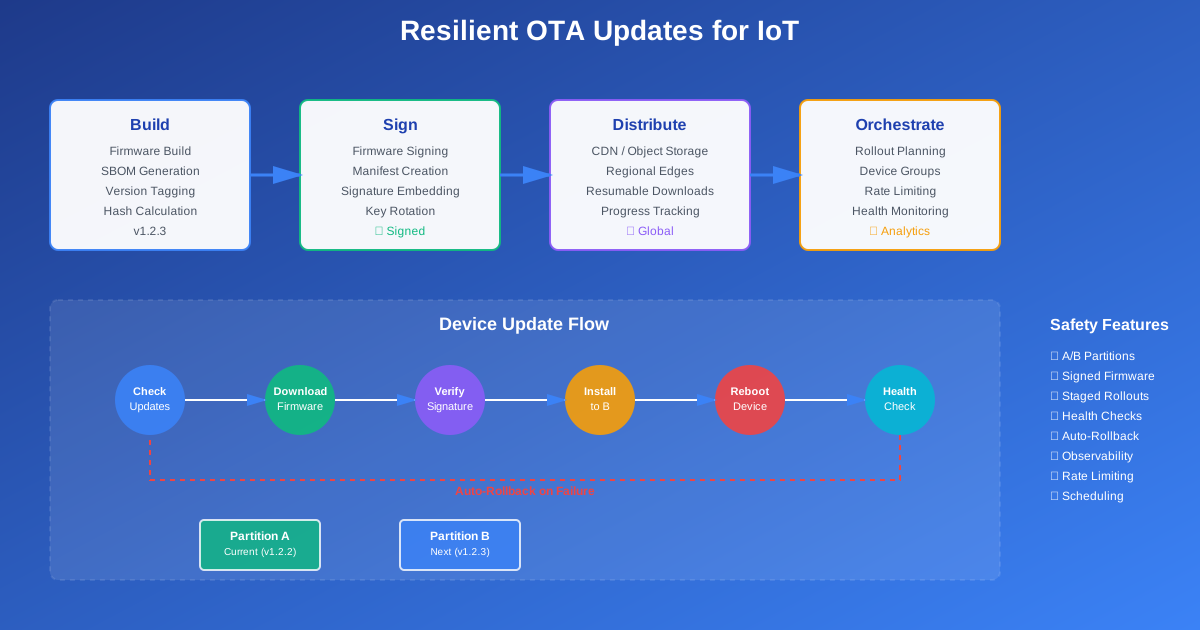
An OTA pipeline has four stages: build, sign, distribute, and orchestrate. Each stage has specific requirements.
Build Stage: Reproducible Firmware Builds
The build stage creates your firmware image. This needs to be reproducible. Same inputs should produce the same output. This lets you verify what you’re deploying.
It also needs to generate a Software Bill of Materials (SBOM). This lists all components in your firmware. Dependencies, versions, licenses. This is important for security. If a dependency has a vulnerability, you need to know.
Here’s what a build process looks like:
# Build configuration
firmware:
  version: "1.2.3"
  target_hardware: "esp32-v2"
  build_id: "20251124-143022"
  components:
    - name: "bootloader"
      version: "2.1.0"
      hash: "sha256:abc123..."
    - name: "application"
      version: "1.2.3"
      hash: "sha256:def456..."
    - name: "config"
      version: "1.0.0"
      hash: "sha256:ghi789..."
The build process should:
- Tag each build with a unique ID
- Generate hashes for all components
- Create an SBOM listing all dependencies
- Build for specific hardware revisions
- Support multiple build variants (debug, release, etc.)
Sign Stage: Firmware Signing and Manifests
After building, you sign the firmware. This proves it came from you. It hasn’t been tampered with. Devices verify the signature before installing.
You also create a manifest file. This describes the update. Version, target hardware, hash, size, dependencies. Devices use this to decide if they should update.
Here’s a manifest example:
{
  "version": "1.2.3",
  "build_id": "20251124-143022",
  "target_hardware": ["esp32-v2", "esp32-v3"],
  "min_bootloader_version": "2.1.0",
  "image": {
    "url": "https://ota.example.com/firmware/1.2.3/esp32-v2.bin",
    "size": 1048576,
    "hash": "sha256:abc123def456...",
    "signature": "base64:xyz789..."
  },
  "metadata": {
    "release_notes": "Security patch for CVE-2025-1234",
    "rollout_percentage": 0,
    "required": false
  }
}
The signing process should:
- Sign with a private key stored securely
- Include the signature in the manifest
- Support key rotation
- Use hardware security modules for production keys
Distribute Stage: CDN and Object Storage
Firmware images are large. They need to be distributed efficiently. Use a CDN or object storage with edge locations. This reduces download time. It reduces load on your servers.
The distribution stage should:
- Store firmware in multiple regions
- Use CDN for fast downloads
- Support resumable downloads
- Handle high bandwidth requirements
- Provide download progress tracking
Orchestrate Stage: OTA Service
The orchestration service coordinates rollouts. It decides which devices get updates. It tracks update progress. It handles failures. It triggers rollbacks.
This is the brain of your OTA system. It needs to be reliable. It needs to handle scale. It needs to make good decisions.
Designing Rollouts That Degrade Gracefully
Not all devices should get updates at once. You need staged rollouts. Start small. Watch for problems. Expand gradually.
Device Groups
Organize devices into groups. Each group gets updates at different stages.
Canary group: A small set of devices you trust. Internal test devices. Or devices in your office. These get updates first. If something breaks, you catch it early.
Internal group: Devices used by your team. Still trusted, but larger. These get updates after canary succeeds.
Pilot customers: A small set of real customers who opt in. These get updates after internal succeeds. They’re your real-world test.
General availability: Everyone else. These get updates last. By this point, you’ve validated the update works.
Filters
Not all devices can run all updates. You need filters to decide eligibility.
Hardware revision: Some updates only work on certain hardware. An update might require a newer bootloader. Or a specific chip revision.
Geography: You might want to update regions separately. Update Europe first. Then North America. Then Asia. This lets you handle region-specific issues.
Connectivity profile: Devices on cellular might need different handling than devices on Wi-Fi. Cellular devices might have data limits. They might need smaller updates.
Current version: Some updates require a minimum version. You can’t jump from 1.0.0 to 2.0.0. You need to go through 1.1.0, 1.2.0, etc.
Rate Limiting
Don’t update all devices at once. That overloads your network. It overloads your backend. It makes problems worse.
Instead, update in batches. Update 1% of devices. Wait. Watch metrics. If things look good, update 5%. Then 10%. Then 25%. Then 50%. Then 100%.
Rate limiting should:
- Update devices in small batches
- Wait between batches to observe results
- Pause if failure rate exceeds threshold
- Resume automatically if conditions improve
Scheduling Windows
Some updates should only happen at certain times. Don’t reboot devices during business hours. Don’t update during peak usage.
Schedule updates for:
- Maintenance windows
- Off-peak hours
- Nighttime in each timezone
- Customer-specified windows
Rollback as a First-Class Feature
Rollback isn’t optional. It’s required. If an update breaks devices, you need to revert. Fast.
A/B Partition Layout
The simplest way to support rollback is A/B partitions. The device has two copies of firmware. Partition A is the current version. Partition B is the next version.
When updating:
- Download new firmware to partition B
- Verify signature and hash
- Mark partition B as ready
- Reboot
- Boot from partition B
- If boot succeeds, mark partition B as active
- If boot fails, boot from partition A
This gives you automatic rollback. If the new firmware doesn’t boot, the device automatically boots the old firmware.
Versioning Rules
Not all version transitions are safe. You need rules about what updates are allowed.
Semantic versioning: Use semantic versioning (major.minor.patch). This makes version relationships clear.
Allowed upgrades: Define which versions can upgrade to which. You might allow:
- Patch updates: 1.2.3 → 1.2.4 (always allowed)
- Minor updates: 1.2.3 → 1.3.0 (allowed if no breaking changes)
- Major updates: 1.2.3 → 2.0.0 (require explicit approval)
Allowed downgrades: Sometimes you need to roll back. But not all downgrades are safe. A downgrade might:
- Remove features devices depend on
- Break compatibility with backend services
- Require data migration
Define which downgrades are allowed. Usually, only patch-level downgrades are safe.
Health Checks
Before marking an update as successful, check device health. If health checks fail, roll back.
Boot count: After an update, the device should boot successfully. Track boot count. If the device reboots too many times, something is wrong.
Watchdog: Many devices have hardware watchdogs. If the application doesn’t ping the watchdog, the device reboots. If the watchdog triggers too often, the application is broken.
Application-level health: The application should be able to:
- Connect to the message broker
- Send heartbeats
- Process messages
- Access required resources
If any of these fail, the update might have broken something.
When to Trigger Auto-Rollback
Define clear conditions for automatic rollback:
- Device reboots more than 3 times in 5 minutes
- Watchdog triggers more than 5 times in 10 minutes
- Health check fails for more than 2 minutes
- Application can’t connect to broker for more than 5 minutes
When these conditions are met, automatically roll back. Don’t wait for human intervention.
Security and Integrity Checks
OTA updates are a security risk. If an attacker can push malicious firmware, they control your devices. You need strong security.
Firmware Signing and Verification
All firmware must be signed. Devices must verify signatures before installing.
The signing process:
- Generate firmware hash
- Sign hash with private key
- Include signature in manifest
- Store private key securely (HSM, not on build server)
The verification process:
- Download manifest
- Verify manifest signature
- Download firmware
- Compute firmware hash
- Verify hash matches manifest
- Verify firmware signature
- Only then install
Hash Checks for Corrupted Downloads
Network errors can corrupt downloads. Always verify hashes.
After downloading:
- Compute SHA-256 hash of downloaded file
- Compare with hash in manifest
- If mismatch, delete file and retry
- Retry up to 3 times
- If still corrupted, report error
Protecting OTA Endpoints
OTA endpoints are targets. Protect them.
mTLS: Use mutual TLS. Devices authenticate with certificates. Servers authenticate with certificates. Both sides verify identity.
Per-device authorization: Each device should only access its own updates. Use device certificates or API keys. Don’t let one device download another device’s firmware.
Rate limiting: Limit how often devices can check for updates. Prevent abuse. Prevent DDoS.
Audit logging: Log all update requests. Who requested what. When. From where. This helps detect attacks.
Secure Storage of Update Metadata
Don’t use “latest.bin” URLs. These are insecure. An attacker could replace the file. Use versioned URLs with hashes.
Store metadata securely:
- Use signed manifests
- Include hashes in URLs
- Use immutable storage (object versioning)
- Don’t allow overwrites
Observability and Safety Metrics for OTA
You can’t manage what you can’t measure. OTA needs observability.
Events to Emit
Emit events for every important action:
update.check.started: Device started checking for updatesupdate.check.completed: Device finished checking (update available or not)update.download.started: Device started downloadingupdate.download.progress: Download progress (every 10%)update.download.completed: Download finishedupdate.download.failed: Download failed (with error)update.install.started: Device started installingupdate.install.completed: Installation finishedupdate.reboot.started: Device rebootingupdate.reboot.completed: Device booted successfullyupdate.health.ok: Health check passedupdate.health.failed: Health check failedupdate.rollback.triggered: Rollback startedupdate.rollback.completed: Rollback finished
Dashboards
Build dashboards showing:
Adoption curve: How many devices are on each version? This shows rollout progress. It shows if devices are stuck on old versions.
Failure rate: What percentage of updates fail? Break this down by:
- Device model
- Region
- Update version
- Time of day
Rollback counts: How many devices rolled back? This is an active alarm. If rollback rate spikes, something is wrong. Pause the rollout. Investigate.
Download performance: How long do downloads take? Are some regions slower? Are some devices failing downloads?
Health check status: What percentage of devices are healthy? After an update, do health check failures increase?
Rollback as an Active Alarm
Don’t treat rollbacks as passive metrics. Treat them as alarms.
If rollback rate exceeds 1%, that’s an alarm. Pause the rollout. Investigate. Don’t continue until you understand why.
Set up alerts:
- Rollback rate > 1%: Warning
- Rollback rate > 5%: Critical (pause rollout)
- Health check failure rate > 10%: Warning
- Health check failure rate > 20%: Critical (pause rollout)
Practical Patterns for Constrained Devices
Real devices have limits. They don’t have unlimited RAM or flash. They don’t have perfect networks. You need to work within these constraints.
Handling Flaky Networks
IoT devices often have poor connectivity. Basements, parking garages, remote locations. Downloads can fail. They can timeout. They can be slow.
Chunked downloads: Download firmware in chunks. If a chunk fails, retry just that chunk. Don’t restart the entire download.
Pause and resume: If the network drops, pause the download. When the network returns, resume from where you left off. Use HTTP range requests.
Exponential backoff: When retrying, wait longer each time. First retry: 1 second. Second retry: 2 seconds. Third retry: 4 seconds. This prevents overwhelming the network.
Background downloads: Download updates in the background. Don’t block normal operation. Only install when download completes.
Low Flash or RAM
Some devices have very little storage. An ESP32 might have 4MB of flash. An STM32 might have 512KB. You need to be efficient.
Streaming flash writes: Don’t buffer the entire firmware in RAM. Write it directly to flash as you download. This reduces RAM usage.
Differential updates: Instead of full firmware images, send only the changes. This reduces download size. It reduces flash usage. But it’s more complex.
Compression: Compress firmware images. Use gzip or similar. Devices decompress during installation. This reduces download size.
Multiple update strategies: Support both full and differential updates. Use full updates for major versions. Use differential for patch updates.
Gateways vs. Direct-to-Cloud Updates
Some devices connect directly to the cloud. Others connect through gateways.
Direct-to-cloud: Devices download updates directly from your servers. Simple. But requires each device to have internet connectivity.
Gateway-mediated: Gateways download updates. Then distribute to devices over local networks. This reduces internet bandwidth. It’s faster for devices. But gateways need to be updated too.
Choose based on your architecture. Both work. Both have trade-offs.
Opinionated Checklist
Here’s what your OTA system must do. If it doesn’t, plan to fix it.
Must-Have Features
-
A/B partitions: Devices must have two firmware partitions. Updates go to the inactive partition. Rollback is automatic.
-
Firmware signing: All firmware must be signed. Devices must verify signatures. No unsigned firmware.
-
Staged rollouts: Updates must roll out in stages. Canary → internal → pilot → general. Not all at once.
-
Health checks: Devices must report health after updates. If health fails, roll back automatically.
-
Observability: You must track update progress, failures, and rollbacks. Dashboards and alerts.
-
Rate limiting: Updates must be rate-limited. Don’t update all devices at once.
-
Scheduling: Updates must respect maintenance windows. Don’t reboot during business hours.
-
Version validation: Devices must validate version compatibility. Don’t allow unsafe upgrades or downgrades.
-
Hash verification: Devices must verify firmware hashes. Don’t install corrupted firmware.
-
Retry logic: Downloads must retry on failure. With exponential backoff. With chunked downloads.
Top 5 Traps in Real Fleets
These are the mistakes I see most often:
1. Forced reboot during working hours: Updates reboot devices immediately. During peak usage. During business hours. Customers get angry. Solution: Schedule updates for maintenance windows.
2. No A/B partitions: Devices have only one firmware partition. Bad updates brick devices. No way to roll back. Solution: Use A/B partitions. Always.
3. No metrics: Teams don’t track update progress. They don’t know if updates are working. They don’t know if devices are stuck. Solution: Emit events. Build dashboards. Set up alerts.
4. All-or-nothing rollouts: Updates go to all devices at once. If something breaks, everything breaks. Solution: Staged rollouts. Start small. Expand gradually.
5. No health checks: Devices install updates. But no one checks if they’re working. Broken devices stay broken. Solution: Health checks after updates. Automatic rollback on failure.
Conclusion
OTA updates are hard. But they’re necessary. You can’t send technicians to thousands of devices. You need to update over the air.
The key is designing for failure. Assume updates will fail. Assume networks will be flaky. Assume devices will break. Then build systems that handle these failures gracefully.
Use A/B partitions. Sign all firmware. Roll out in stages. Check device health. Roll back automatically. Track everything. Alert on problems.
Do this, and OTA updates become manageable. Do this, and you won’t wake your on-call team at 3 a.m. Do this, and your fleet stays healthy.
The code examples in the repository show how to implement these patterns. Start there. Adapt to your needs. Build systems that actually work.
Discussion
Loading comments...