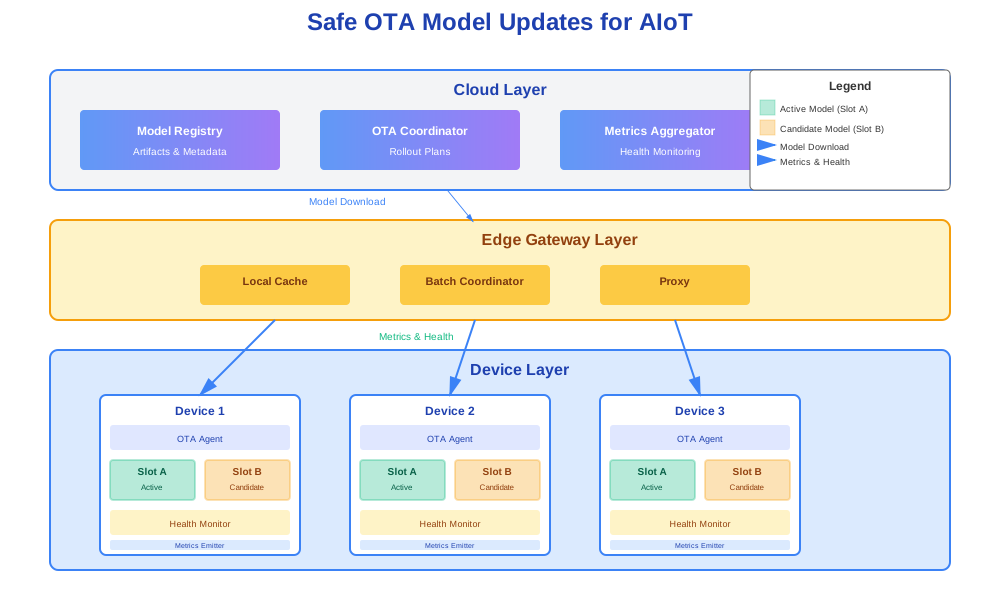
Safe OTA Model Updates for AIoT: A/B Slots, Canary Rollouts, and Real-World Constraints
You deploy an AI model to a thousand edge devices. The model works in testing. It works in staging. You push it to production.
A week later, half your devices are draining batteries. Some devices start missing detections. A few devices crash. You can’t roll back fast enough.
Updating AI models on edge devices is harder than updating firmware. Models are bigger. They’re more fragile. They fail in ways that don’t crash the device. They just make wrong decisions.
This article shows how to update AI models safely on edge devices. A/B slots. Canary rollouts. Health checks. Rollback strategies. Real patterns that work in production.
Why Updating AI Models is Harder Than Updating Firmware
Firmware updates are mostly binary. The device works or it doesn’t. Model updates are different.
Models Need Frequent Updates
You update firmware maybe once a quarter. Models need updates more often.
New training data arrives. Edge cases appear. Performance degrades. You need to ship fixes fast.
But each update is risky. A bad firmware update might brick a device. A bad model update might make it silently fail.
Devices Sit Behind Poor Networks
Your devices aren’t in data centers. They’re in factories. Parking lots. Customer homes.
Networks are flaky. NATs block connections. SIM cards have data limits. Downloads get interrupted.
A 50MB model download over a 2G connection takes time. If it fails halfway, you need to resume. If it corrupts, you need to detect it.
Bad Models Don’t Crash Devices
A bad firmware update crashes the device. You know immediately.
A bad model update doesn’t crash anything. The device keeps running. It just makes wrong predictions.
A camera model that suddenly doubles CPU usage doesn’t crash. It just drains the battery. A detection model that misses a class doesn’t crash. It just fails silently.
You might not notice for days. By then, thousands of devices are affected.
Real Stories
Story 1: The CPU Spike
A team updated a camera model. The new model was more accurate. It also used twice the CPU.
Devices started overheating. Batteries drained in hours instead of days. Some devices shut down from thermal protection.
The model worked. It just used too many resources. The team had to roll back and optimize.
Story 2: The Missing Class
A detection model got updated. The new model was better at most classes. But it started missing one class entirely.
The missing class was rare. It only appeared in 1% of cases. The team didn’t notice for a week.
By then, critical detections were missed. The team rolled back, but damage was done.
Story 3: The Network Timeout
A team pushed a model update to 10,000 devices. The model was 80MB. Devices were on cellular networks.
Half the downloads timed out. Devices retried. Networks got congested. More timeouts.
The rollout took days. Some devices never got the update. The team had to redesign the download process.
These aren’t edge cases. They’re common. You need patterns to handle them.
The AIoT Model Lifecycle, End-to-End
Model updates aren’t one-time events. They’re part of a continuous loop.
The Loop
1. Devices collect data and logs.
Devices run models. They collect sensor data. They log predictions. They track errors.
This data flows back to the cloud. Sometimes continuously. Sometimes in batches. Sometimes only on errors.
2. Cloud aggregates and labels samples.
The cloud receives data from thousands of devices. It aggregates metrics. It identifies edge cases. It labels problematic samples.
Some samples get labeled automatically. Some need human review. The goal is to find what the model struggles with.
3. Models are trained and evaluated centrally.
New models get trained on the aggregated data. They’re evaluated on test sets. They’re compared to current models.
Evaluation happens in the cloud. Not on devices. You need compute and data that devices don’t have.
4. Candidate model is packaged and signed.
A candidate model gets packaged. It includes the model file. Metadata. Version info. Signatures.
The package gets signed with your private key. Devices verify signatures before loading.
5. OTA service rolls it out to the fleet.
The OTA service manages rollouts. It tracks which devices get which versions. It controls rollout speed. It monitors health.
Rollouts start small. Canary groups first. Then gradual expansion. If health degrades, rollout pauses or rolls back.
6. Devices send back metrics and drift signals.
Devices report back. Model performance. Resource usage. Error rates. Anomaly scores.
The cloud analyzes these signals. It detects drift. It identifies problems. It triggers new training cycles.
The loop repeats.
Clear Versioning
You need clear versioning. Not just model versions. Data versions. Code versions. Everything.
Model ID: Unique identifier for the model type. Example: object_detector_v2.
Model version: Specific version of the model. Example: 2.1.3.
Data version: Version of training data used. Example: data_v1.5.
Code version: Version of inference code. Example: inference_v3.2.
Firmware version: Version of device firmware. Example: fw_1.8.0.
A device might run: object_detector_v2:2.1.3 with data_v1.5, inference_v3.2, and fw_1.8.0.
You need all of these. Compatibility depends on all of them.
Model Registry
Store models in a registry. Not just the files. Metadata too.
Artifacts:
- Model file (TensorFlow Lite, ONNX, etc.)
- Preprocessing code
- Postprocessing code
- Example inputs/outputs
Metadata:
- Model ID and version
- Training data version
- Performance metrics
- Resource requirements (CPU, RAM, latency)
- Compatible firmware versions
- Allowed device groups
Signatures:
- Model file hash (SHA256)
- Package signature
- Certificate chain
The registry is the source of truth. Devices query it. OTA services read from it. Training pipelines write to it.
Training World vs Production World
Training happens in the cloud. Production happens on devices. They’re different worlds.
Training world:
- Powerful GPUs
- Lots of RAM
- Fast networks
- Perfect data
- Controlled environment
Production world:
- Weak CPUs
- Limited RAM
- Slow networks
- Real data
- Uncontrolled environment
Models that work in training might fail in production. You need to bridge the gap.
Quantization: Convert models to lower precision. FP32 → INT8. Reduces size and latency. Might reduce accuracy.
Pruning: Remove unnecessary weights. Reduces size. Might reduce accuracy.
Optimization: Use device-specific optimizations. TensorFlow Lite for ARM. ONNX Runtime for x86. Each has different performance.
Testing: Test on real devices. Not just emulators. Real devices have real constraints.
The model that trains in the cloud isn’t the model that runs on devices. You need both.
OTA Architecture for AI Models: Cloud → Edge Gateway → Device
OTA updates flow through layers. Each layer has a role.
Cloud Layer
Model registry: Stores model artifacts and metadata. Versioned. Signed. Queryable.
OTA coordinator: Manages rollouts. Tracks device cohorts. Controls rollout speed. Monitors health.
Metrics aggregator: Collects device metrics. Analyzes performance. Detects anomalies. Triggers alerts.
The cloud is the control plane. It decides what to deploy. It monitors how it goes.
Edge Gateway Layer
Local cache: Caches models for nearby devices. Reduces bandwidth. Speeds up downloads.
Batch coordinator: Batches downloads from multiple devices. Reduces cloud load. Saves bandwidth.
Proxy: Proxies device requests. Handles authentication. Manages connections.
Gateways sit between devices and cloud. They’re optional but useful. They reduce cloud load. They improve reliability.
Device Layer
OTA agent: Polls for updates. Downloads models. Verifies signatures. Applies updates.
Model slots: A/B slots for models. Current model in slot A. Candidate model in slot B.
Health monitor: Monitors model performance. Tracks resource usage. Detects errors.
Metrics emitter: Sends metrics to cloud. Periodically. Or on events.
Devices are the execution plane. They run models. They report back.
How a Single OTA Request Becomes Dozens of Downloads
You push a model update. One request. But it triggers many downloads.
Initial request:
- OTA coordinator creates rollout plan
- Plan targets 1000 devices
- Rollout starts with 1% (10 devices)
First wave:
- 10 devices poll for updates
- Each downloads 50MB model
- Each verifies signature
- Each applies to slot B
- Each reports success/failure
Second wave (if first succeeds):
- Rollout expands to 5% (50 devices)
- 50 more downloads
- 50 more verifications
- 50 more applications
Gradual expansion:
- 5% → 10% → 25% → 50% → 100%
- Each wave triggers more downloads
- Each download is independent
- Each device reports back
If problems appear:
- Rollout pauses
- Affected devices roll back
- New model gets fixed
- Process repeats
One request. Hundreds of downloads. Thousands of verifications. All coordinated. All monitored.
A/B Slots and Safe Activation on the Device
Devices need safe activation. Not just download and apply. Verify. Test. Confirm.
Two Slots
Slot A: Active model. Currently running. Serving predictions.
Slot B: Candidate model. Downloaded. Verified. Ready to test.
Slots are separate. They don’t interfere. You can switch between them atomically.
Update Flow
1. Download into slot B.
OTA agent downloads new model. Stores it in slot B. Doesn’t touch slot A.
Download might be interrupted. Network might fail. Device might reboot. That’s okay. Resume on next poll.
2. Verify signature and checksum.
Before loading, verify:
- Signature matches trusted public key
- Checksum matches metadata
- Version is allowed
- Device is in allowed group
If verification fails, reject. Don’t load. Don’t apply. Keep slot A active.
3. Switch pointer to slot B.
If verification passes, switch the “current model” pointer to slot B.
This is atomic. One pointer update. No partial state. Either slot A or slot B is active. Never both. Never neither.
4. Run health checks for warm-up period.
After switching, monitor health. For a period (e.g., 1 hour). Or for a number of inferences (e.g., 1000).
Track:
- Runtime errors
- CPU usage
- RAM usage
- Latency
- Application metrics
5. If all good, mark B as stable; A becomes backup.
If health checks pass, mark slot B as stable. Slot A becomes backup.
Future updates go to slot A. Slot B stays as backup. You always have a rollback path.
6. If bad, roll back to A automatically.
If health checks fail, roll back. Switch pointer back to slot A. Mark slot B as failed.
Log the failure. Report to cloud. Don’t try slot B again for this version.
What Counts as “Bad”
Health checks need clear thresholds. Not subjective. Measurable.
Too many runtime errors:
- Model crashes during inference
- Memory allocation failures
- Invalid input/output shapes
- Threshold: > 1% error rate
Exceeds resource thresholds:
- CPU usage > 80% for > 5 minutes
- RAM usage > 90%
- Latency > 2x baseline
- Temperature > safe limit
Application-level metrics:
- Too many “unknown” detections (> 10% of predictions)
- Prediction confidence drops significantly
- Anomaly scores spike
- User-reported issues
Different models have different thresholds. A camera model might care about latency. A sensor model might care about accuracy. Tune thresholds per model.
Handling Interrupted Updates
Updates get interrupted. Networks fail. Devices reboot. Batteries die.
Resumable downloads:
- Use HTTP range requests
- Store partial downloads
- Resume from last byte
- Verify checksum on completion
Atomic switches:
- Switch pointer atomically
- Never leave device in broken state
- Always have working model active
Rollback on interruption:
- If download fails, keep slot A
- If verification fails, keep slot A
- If health check fails, roll back to slot A
Interruptions are normal. Handle them gracefully.
Rollout Strategies: Canary, Cohorting, and Shadow Mode
You don’t roll out to all devices at once. You roll out gradually. You manage risk.
Canary Groups
Start small. Roll out to 1-5% of devices first.
Per site:
- One factory gets the update
- Other factories wait
- If factory A succeeds, expand to factory B
Per region:
- US devices get the update
- EU devices wait
- If US succeeds, expand to EU
Per hardware type:
- Rev 2 devices get the update
- Rev 1 devices wait
- If Rev 2 succeeds, expand to Rev 1
Canary groups catch problems early. Before they affect the whole fleet.
Cohorting
Group devices by characteristics. Roll out to similar groups together.
By hardware:
- Same CPU, same RAM, same sensors
- Models behave similarly
- Problems appear together
By customer:
- Enterprise customers first
- Consumer devices later
- Different SLAs, different risk tolerance
By environment:
- Factory devices first
- Office devices later
- Different network conditions, different reliability
Cohorting reduces variables. If a cohort fails, you know why. Hardware issue. Customer issue. Environment issue.
Shadow Mode
Run new model in parallel. Don’t use its predictions. Just log them.
Parallel execution:
- Current model makes predictions (used)
- New model makes predictions (logged)
- Compare offline
Offline comparison:
- Compare predictions
- Compare performance
- Compare resource usage
- Identify differences
Promote if better:
- If new model is better, promote it
- Switch from shadow to active
- Old model becomes backup
Shadow mode is safest. No risk to production. But it uses more resources. Two models running. Double the CPU. Double the RAM.
Use shadow mode for critical models. Or for models with high risk.
Tying to Best Practices
Gradual rollouts are standard. Not just for models. For firmware. For software. For everything.
Monitoring:
- Watch metrics closely during rollout
- Set up alerts for anomalies
- Have rollback plan ready
Communication:
- Notify stakeholders of rollouts
- Share progress updates
- Report issues quickly
Documentation:
- Document rollout process
- Document rollback procedures
- Document lessons learned
These aren’t new ideas. They’re proven patterns. Apply them to models.
Monitoring and Feedback Loops from the Edge
You need visibility. What’s happening on devices? Is the model working? Are devices healthy?
Technical Health
Download success/failure:
- How many devices downloaded successfully?
- How many failed?
- What were failure reasons?
- Network errors? Signature failures? Storage full?
Apply success/failure:
- How many devices applied successfully?
- How many failed?
- What were failure reasons?
- Verification failures? Resource constraints? Corrupted files?
Resource usage:
- CPU usage over time
- RAM usage over time
- Latency percentiles
- Temperature readings
Errors:
- Runtime errors
- Memory errors
- Network errors
- Application errors
Technical health tells you if the update process works. Not if the model works. That’s different.
Behavioral Health
Prediction distributions:
- Class frequencies
- Confidence distributions
- Prediction patterns
- Changes from baseline
Proxy metrics:
- Alerts per hour
- Anomaly scores
- User actions triggered
- System events triggered
Accuracy (if you have labels):
- True positives
- False positives
- False negatives
- Precision, recall, F1
Behavioral health tells you if the model works. Not just if it runs. If it makes good predictions.
Data for Retraining
Collect data for future training. Not everything. Samples.
Sampled windows:
- Random samples of inputs
- Representative samples
- Edge case samples
- Error case samples
Logged misclassifications:
- Cases where model was wrong
- Cases where confidence was low
- Cases where user corrected
- Cases where system flagged
Embeddings:
- Model embeddings (not raw data)
- Lower dimensional
- Privacy preserving
- Useful for clustering
You don’t need all data. You need good data. Representative. Diverse. Labeled when possible.
Simple Dashboard Idea
Model version → Fleet health → Anomaly flags
Top level:
- Model versions deployed
- Device counts per version
- Overall health score
Drill down:
- Per-version metrics
- Per-cohort metrics
- Per-device metrics (if needed)
Anomaly detection:
- Automatic flagging
- Threshold violations
- Pattern changes
- Regression detection
Dashboards don’t need to be complex. They need to be useful. Show what matters. Hide what doesn’t.
Handling Schema Drift and Mixed Firmware/Model Updates
Models and firmware evolve together. Sometimes out of sync. You need compatibility.
Schema Drift
New model expects new features. Old firmware doesn’t compute them yet.
Example:
- New model expects 5 sensor inputs
- Old firmware only provides 3
- Model fails or produces garbage
Solution:
- Update firmware first
- Firmware computes both old and new features
- Then enable new model that uses new features
Mixed Rollouts
Firmware and models update independently. But they need to be compatible.
Compatibility matrix:
| Firmware Version | Supported Model Versions |
|---|---|
| 1.0.0 | 1.0.0, 1.0.1, 1.0.2 |
| 1.1.0 | 1.0.0, 1.0.1, 1.0.2, 1.1.0, 1.1.1 |
| 1.2.0 | 1.1.0, 1.1.1, 1.2.0, 1.2.1 |
Devices check compatibility before applying updates. If incompatible, reject.
Update order:
- Update firmware to version that supports both old and new models
- Wait for firmware rollout to complete
- Update models to new versions
- Old firmware keeps old models. New firmware gets new models.
Backward compatibility:
- New firmware supports old models
- Old firmware doesn’t support new models
- Always maintain one version back
Ready to Ship Checklist
Before shipping an update, check:
Is there a rollback path?
- Can devices roll back?
- Is rollback tested?
- Are rollback procedures documented?
Is the model compatible with current firmware?
- Check compatibility matrix
- Test on target firmware versions
- Verify feature availability
Are metrics and alerts in place?
- Health monitoring configured
- Alerts set up
- Dashboards ready
- On-call rotation aware
Is the rollout plan ready?
- Canary groups identified
- Cohorts defined
- Rollout schedule planned
- Communication sent
Checklists prevent mistakes. Use them.
Code Samples
Here are practical code samples for the patterns we discussed.
OTA Deployment Manifest (Cloud-Side)
This manifest defines what to deploy and where.
# deployment-manifest.yaml
model_id: "object_detector_v2"
version: "2.1.3"
data_version: "data_v1.5"
artifact_url: "https://models.example.com/object_detector_v2/2.1.3/model.tflite"
sha256: "a1b2c3d4e5f6..."
signature_url: "https://models.example.com/object_detector_v2/2.1.3/model.sig"

target_cohort: "region:eu-west AND hw:rev2"
rollout_percentage: 5
start_time: "2025-11-23T10:00:00Z"
end_time: "2025-11-23T18:00:00Z"

compatibility:
  min_firmware: "1.8.0"
  max_firmware: "2.0.0"

health_checks:
  max_cpu_percent: 80
  max_ram_percent: 90
  max_latency_ms: 200
  max_error_rate: 0.01
  warmup_inferences: 1000
JSON version:
{
  "model_id": "object_detector_v2",
  "version": "2.1.3",
  "data_version": "data_v1.5",
  "artifact_url": "https://models.example.com/object_detector_v2/2.1.3/model.tflite",
  "sha256": "a1b2c3d4e5f6...",
  "signature_url": "https://models.example.com/object_detector_v2/2.1.3/model.sig",
  "target_cohort": "region:eu-west AND hw:rev2",
  "rollout_percentage": 5,
  "start_time": "2025-11-23T10:00:00Z",
  "end_time": "2025-11-23T18:00:00Z",
  "compatibility": {
    "min_firmware": "1.8.0",
    "max_firmware": "2.0.0"
  },
  "health_checks": {
    "max_cpu_percent": 80,
    "max_ram_percent": 90,
    "max_latency_ms": 200,
    "max_error_rate": 0.01,
    "warmup_inferences": 1000
  }
}
The manifest is the contract. Cloud creates it. Devices read it. Both sides follow it.
On-Device Update Agent Pseudocode
This shows the device-side update logic.
import hashlib
import json
import time
from pathlib import Path
from typing import Optional

class OTAAgent:
    def __init__(self, device_id: str, ota_service_url: str):
        self.device_id = device_id
        self.ota_service_url = ota_service_url
        self.slot_a_path = Path("/models/slot_a")
        self.slot_b_path = Path("/models/slot_b")
        self.current_slot = "A"
        self.health_monitor = HealthMonitor()

    def poll_for_updates(self):
        """Poll OTA service for available updates."""
        try:
            response = requests.get(
                f"{self.ota_service_url}/devices/{self.device_id}/updates",
                timeout=30
            )
            if response.status_code == 200:
                manifest = response.json()
                if self.should_update(manifest):
                    return manifest
        except Exception as e:
            print(f"Poll failed: {e}")
        return None

    def should_update(self, manifest: dict) -> bool:
        """Check if device should update based on manifest."""
        # Check cohort
        if not self.matches_cohort(manifest.get("target_cohort")):
            return False

        # Check compatibility
        if not self.is_compatible(manifest.get("compatibility")):
            return False

        # Check if already have this version
        current_version = self.get_current_version()
        if current_version == manifest["version"]:
            return False

        return True

    def download_to_slot_b(self, manifest: dict) -> bool:
        """Download model to slot B with resume support."""
        target_path = self.slot_b_path / "model.tflite"
        artifact_url = manifest["artifact_url"]

        try:
            # Check for partial download
            if target_path.exists():
                # Resume download
                existing_size = target_path.stat().st_size
                headers = {"Range": f"bytes={existing_size}-"}
            else:
                headers = {}
                target_path.parent.mkdir(parents=True, exist_ok=True)

            response = requests.get(
                artifact_url,
                headers=headers,
                stream=True,
                timeout=300
            )

            mode = "ab" if existing_size > 0 else "wb"
            with open(target_path, mode) as f:
                for chunk in response.iter_content(chunk_size=8192):
                    f.write(chunk)

            # Verify checksum
            computed_hash = self.compute_sha256(target_path)
            if computed_hash != manifest["sha256"]:
                target_path.unlink()
                return False

            return True
        except Exception as e:
            print(f"Download failed: {e}")
            return False

    def verify_signature(self, manifest: dict) -> bool:
        """Verify model signature."""
        model_path = self.slot_b_path / "model.tflite"
        signature_url = manifest["signature_url"]

        try:
            # Download signature
            sig_response = requests.get(signature_url, timeout=30)
            signature = sig_response.content

            # Load trusted public key
            with open("/etc/device/trusted_keys/model_signing_key.pem", "rb") as f:
                public_key = serialization.load_pem_public_key(f.read())

            # Verify signature
            with open(model_path, "rb") as f:
                model_data = f.read()

            public_key.verify(
                signature,
                model_data,
                ec.ECDSA(hashes.SHA256())
            )
            return True
        except Exception as e:
            print(f"Signature verification failed: {e}")
            return False

    def switch_to_slot_b(self):
        """Atomically switch current model pointer to slot B."""
        # Update pointer file atomically
        pointer_path = Path("/models/current_slot")
        temp_path = pointer_path.with_suffix(".tmp")

        with open(temp_path, "w") as f:
            f.write("B")

        temp_path.replace(pointer_path)
        self.current_slot = "B"

    def rollback_to_slot_a(self):
        """Roll back to slot A."""
        pointer_path = Path("/models/current_slot")
        temp_path = pointer_path.with_suffix(".tmp")

        with open(temp_path, "w") as f:
            f.write("A")

        temp_path.replace(pointer_path)
        self.current_slot = "A"

    def run_health_checks(self, manifest: dict, duration_seconds: int = 3600) -> bool:
        """Run health checks for warm-up period."""
        health_checks = manifest.get("health_checks", {})
        start_time = time.time()
        inference_count = 0

        while time.time() - start_time < duration_seconds:
            # Get current metrics
            metrics = self.health_monitor.get_current_metrics()

            # Check CPU
            if metrics["cpu_percent"] > health_checks.get("max_cpu_percent", 100):
                return False

            # Check RAM
            if metrics["ram_percent"] > health_checks.get("max_ram_percent", 100):
                return False

            # Check latency
            if metrics["avg_latency_ms"] > health_checks.get("max_latency_ms", 1000):
                return False

            # Check error rate
            if metrics["error_rate"] > health_checks.get("max_error_rate", 1.0):
                return False

            # Check inference count
            inference_count += 1
            if inference_count >= health_checks.get("warmup_inferences", 0):
                break

            time.sleep(1)

        return True

    def apply_update(self, manifest: dict) -> bool:
        """Apply update: download, verify, switch, health check."""
        # Download to slot B
        if not self.download_to_slot_b(manifest):
            return False

        # Verify signature
        if not self.verify_signature(manifest):
            return False

        # Switch to slot B
        self.switch_to_slot_b()

        # Run health checks
        if not self.run_health_checks(manifest):
            # Roll back if health checks fail
            self.rollback_to_slot_a()
            return False

        # Mark slot B as stable
        self.mark_slot_stable("B")
        return True

    def mark_slot_stable(self, slot: str):
        """Mark slot as stable, other becomes backup."""
        stable_path = Path(f"/models/slot_{slot.lower()}/stable")
        stable_path.touch()

    def compute_sha256(self, file_path: Path) -> str:
        """Compute SHA256 hash of file."""
        sha256_hash = hashlib.sha256()
        with open(file_path, "rb") as f:
            for chunk in iter(lambda: f.read(4096), b""):
                sha256_hash.update(chunk)
        return sha256_hash.hexdigest()

    def get_current_version(self) -> Optional[str]:
        """Get version of currently active model."""
        # Read from model metadata
        metadata_path = Path(f"/models/slot_{self.current_slot.lower()}/metadata.json")
        if metadata_path.exists():
            with open(metadata_path, "r") as f:
                metadata = json.load(f)
                return metadata.get("version")
        return None

    def matches_cohort(self, cohort_query: str) -> bool:
        """Check if device matches cohort query."""
        # Simple implementation - parse query and check device attributes
        device_attrs = self.get_device_attributes()
        # Parse "region:eu-west AND hw:rev2"
        # Check against device_attrs
        return True  # Simplified

    def is_compatible(self, compatibility: dict) -> bool:
        """Check if model is compatible with current firmware."""
        current_fw = self.get_firmware_version()
        min_fw = compatibility.get("min_firmware")
        max_fw = compatibility.get("max_firmware")

        # Version comparison logic
        return self.version_in_range(current_fw, min_fw, max_fw)

    def get_device_attributes(self) -> dict:
        """Get device attributes for cohort matching."""
        return {
            "region": "eu-west",
            "hw": "rev2",
            "customer": "enterprise-a"
        }

    def get_firmware_version(self) -> str:
        """Get current firmware version."""
        # Read from system
        return "1.8.5"

    def version_in_range(self, version: str, min_version: str, max_version: str) -> bool:
        """Check if version is in range."""
        # Simplified version comparison
        return True

# Main loop
def main():
    agent = OTAAgent(
        device_id=os.environ.get("DEVICE_ID", "device-001"),
        ota_service_url=os.environ.get("OTA_SERVICE_URL", "https://ota.example.com")
    )

    while True:
        manifest = agent.poll_for_updates()
        if manifest:
            success = agent.apply_update(manifest)
            if success:
                print(f"Update applied: {manifest['version']}")
            else:
                print(f"Update failed: {manifest['version']}")

        time.sleep(300)  # Poll every 5 minutes

if __name__ == "__main__":
    main()
This is pseudocode. Real implementations need error handling. Retry logic. Better logging. But the flow is clear.
Simple Metrics Emit from Device
Devices send metrics periodically. Here’s a simple version.
import json
import time
import paho.mqtt.client as mqtt
from datetime import datetime

class MetricsEmitter:
    def __init__(self, device_id: str, mqtt_client: mqtt.Client):
        self.device_id = device_id
        self.mqtt_client = mqtt_client
        self.inference_count = 0
        self.error_count = 0
        self.latency_sum = 0.0
        self.start_time = time.time()

    def record_inference(self, latency_ms: float, success: bool):
        """Record a single inference."""
        self.inference_count += 1
        if success:
            self.latency_sum += latency_ms
        else:
            self.error_count += 1

    def emit_metrics(self):
        """Emit metrics to cloud via MQTT."""
        elapsed = time.time() - self.start_time

        metrics = {
            "device_id": self.device_id,
            "timestamp": datetime.utcnow().isoformat(),
            "model_version": self.get_current_model_version(),
            "avg_latency_ms": self.latency_sum / max(self.inference_count - self.error_count, 1),
            "num_inferences": self.inference_count,
            "num_errors": self.error_count,
            "error_rate": self.error_count / max(self.inference_count, 1),
            "cpu_percent": self.get_cpu_usage(),
            "ram_percent": self.get_ram_usage(),
            "uptime_seconds": elapsed
        }

        topic = f"devices/{self.device_id}/metrics"
        payload = json.dumps(metrics)

        self.mqtt_client.publish(topic, payload, qos=1)

        # Reset counters
        self.inference_count = 0
        self.error_count = 0
        self.latency_sum = 0.0
        self.start_time = time.time()

    def get_current_model_version(self) -> str:
        """Get current model version."""
        # Read from model metadata
        return "2.1.3"

    def get_cpu_usage(self) -> float:
        """Get current CPU usage percentage."""
        # Read from system
        import psutil
        return psutil.cpu_percent(interval=1)

    def get_ram_usage(self) -> float:
        """Get current RAM usage percentage."""
        # Read from system
        import psutil
        return psutil.virtual_memory().percent

# Usage
def main():
    device_id = os.environ.get("DEVICE_ID", "device-001")

    # Create MQTT client (with mTLS as shown earlier)
    mqtt_client = create_mqtt_client(device_id)
    mqtt_client.connect("iot.example.com", 8883)
    mqtt_client.loop_start()

    emitter = MetricsEmitter(device_id, mqtt_client)

    # Emit metrics every 5 minutes
    while True:
        time.sleep(300)
        emitter.emit_metrics()

if __name__ == "__main__":
    main()
HTTP version:
import requests
import json
import time

def emit_metrics_http(device_id: str, metrics_service_url: str, metrics: dict):
    """Emit metrics via HTTP POST."""
    url = f"{metrics_service_url}/devices/{device_id}/metrics"

    try:
        response = requests.post(
            url,
            json=metrics,
            timeout=10,
            headers={"Content-Type": "application/json"}
        )
        if response.status_code == 200:
            return True
        else:
            print(f"Metrics emit failed: {response.status_code}")
            return False
    except Exception as e:
        print(f"Metrics emit error: {e}")
        return False

# Usage
metrics = {
    "model_version": "2.1.3",
    "avg_latency_ms": 45.2,
    "num_inferences": 1000,
    "num_errors": 2,
    "cpu_percent": 65.0,
    "ram_percent": 72.0
}

emit_metrics_http("device-001", "https://metrics.example.com", metrics)
MQTT is better for high-frequency updates. HTTP is simpler. Choose based on your needs.
Conclusion
Updating AI models on edge devices is hard. But it’s doable.
Use A/B slots. Verify signatures. Run health checks. Roll out gradually. Monitor closely. Roll back when needed.
Start simple. Add complexity as you need it. Not every device needs shadow mode. Not every rollout needs canary groups. But every device needs safe activation. Every rollout needs monitoring.
The patterns here work. They’re used in production. They handle real constraints. Flaky networks. Limited resources. Mixed versions. They work.
Your devices will thank you. Your users will thank you. Your on-call rotation will thank you.
Discussion
Loading comments...