Practical Zero-Trust Patterns for AIoT Edge Devices
You build an AIoT device. It runs a model on the edge. It sends data to the cloud. It receives updates. It works in testing.
Then you deploy it. The device sits in a factory. Or a parking lot. Or someone’s home. The network is untrusted. The device is exposed. Someone could steal it. Someone could tamper with it. Someone could intercept its traffic.
Classic IoT security isn’t enough. You’re not just protecting data. You’re protecting models. You’re protecting inference results that control physical processes. You’re protecting against attacks that didn’t exist five years ago.
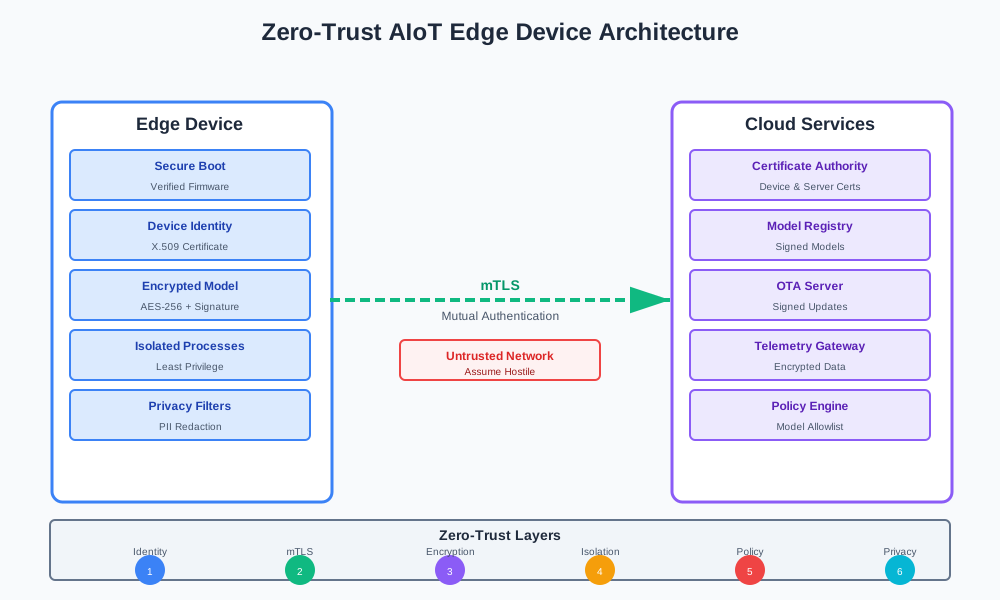
This article shows how to apply zero-trust principles to AIoT edge devices. Not just network security. Not just device identity. Everything. Every component. Every request. Every model load.
AIoT is Not Just “IoT + a Model”
Most people think AIoT means adding a model to an IoT device. That’s not wrong, but it misses what changes.
What Makes AIoT Different
Classic IoT:
- Sends sensor data to the cloud
- Receives commands from the cloud
- Simple logic on device
- Data flows one way mostly
AIoT:
- Runs models locally
- Makes predictions on device
- Sends model outputs, not just raw data
- Has feedback loops: model output affects behavior, behavior affects data collection
- Models are assets worth stealing
The difference isn’t just technical. It’s about what you’re protecting.
New Assets to Protect
Raw sensor data:
- Video feeds with faces, license plates, locations
- Audio with conversations
- Location data that reveals patterns
- Health data from wearables
This data has privacy risk. If it leaks, you have GDPR problems. Or worse.
The model file itself:
- Intellectual property
- Training data might be extractable
- Model architecture is valuable
- Attack surface: a poisoned model can break your system
Models aren’t just code. They’re secrets. They’re attack vectors. They’re business assets.
Model outputs:
- Control signals for physical processes
- Decisions that affect safety
- Classifications that trigger actions
- Predictions that drive automation
If an attacker controls model outputs, they control your system. A misclassified image could disable an alarm. A wrong prediction could cause a crash.
Why Perimeter Thinking Fails
Old IoT security assumes a trusted network. You put devices behind a firewall. You use VPNs. You assume the network is safe.
That doesn’t work for edge devices.
Devices are in the field:
- Public Wi-Fi
- Cellular networks
- Customer networks you don’t control
- Networks that change constantly
Devices are exposed:
- Physical access is possible
- Flash memory can be dumped
- Firmware can be extracted
- Hardware can be cloned
Operators are unknown:
- Devices might be managed by customers
- Updates might come from third parties
- Configuration might be changed by users
- You can’t trust the environment
You need to assume the network is hostile. You need to assume the device might be compromised. You need to verify everything, every time.
Threat Model for an AIoT Edge Node
Let’s walk through threats for a typical device: a camera with a small CPU running a local model.
Remote Network Attacker
What they want:
- Steal the model file
- Inject a poisoned model
- Intercept sensor data
- Manipulate model outputs
- Disable the device
How they attack:
- Man-in-the-middle on network traffic
- Exploit unencrypted connections
- Replay old commands
- Inject malicious updates
- DDoS to disable device
Why AI makes it worse:
- Models are valuable targets
- Model theft is easier than code theft (just copy the file)
- Poisoned models are hard to detect
- Model outputs can be manipulated without touching code
Physical Attacker
What they want:
- Clone the device
- Extract the model
- Bypass security checks
- Modify firmware
- Steal device credentials
How they attack:
- Open the device
- Dump flash memory
- Extract firmware
- Clone device identity
- Replace secure boot keys
Why AI makes it worse:
- Models are large files stored in flash
- Model extraction is straightforward (just copy bytes)
- No obfuscation like compiled code
- Model files are portable between devices
Insider or Supply Chain Attacker
What they want:
- Insert backdoors in models
- Compromise OTA updates
- Steal fleet credentials
- Access device data
- Disable security features
How they attack:
- Trojan in pre-trained models
- Compromised CI/CD pipeline
- Malicious OTA server
- Leaked signing keys
- Insider with access to model training
Why AI makes it worse:
- Models are black boxes (hard to audit)
- Poisoned models look normal
- Model updates are frequent (more attack surface)
- Supply chain is complex (many parties involved)
Threat Summary Table
| Threat | What They Want | Why AI Makes It Worse |
|---|---|---|
| Remote network attacker | Steal model, inject poisoned model, intercept data | Models are valuable, easy to steal, hard to detect if poisoned |
| Physical attacker | Clone device, extract model, bypass security | Models stored in flash, easy to extract, portable between devices |
| Insider/supply chain | Backdoor in models, compromise OTA | Models are black boxes, hard to audit, frequent updates |
Zero-Trust Baseline on Constrained Hardware
Zero-trust means: verify everything, trust nothing. Every request. Every component. Every time.
On a small device with limited CPU and memory, this feels impossible. It’s not. You just need the right patterns.
Strong Device Identity
Every device needs a unique identity. Not a shared password. Not a hardcoded key. A real identity that can’t be cloned.
Use per-device keys:
- Generate unique key pair at manufacturing
- Store in secure element or TPM if available
- Use hardware security module (HSM) for key generation
- Never store private keys in firmware
X.509 certificates:
- Device certificate signed by your CA
- Certificate includes device ID, fleet ID, capabilities
- Certificate chain validates back to root CA
- Lightweight crypto: ECDSA P-256 or Ed25519
On small devices:
- Use hardware security modules when possible
- Software-based keys as fallback (less secure but better than nothing)
- Store keys in protected memory regions
- Use key derivation from device-unique hardware ID
Without device identity, you can’t verify anything. You can’t know if a request is from a real device or a clone.
Mutual TLS for All Upstream Calls
The device calls your cloud. Your cloud calls the device. Both need to verify each other.
Device authenticates server:
- Device has root CA certificate
- Server presents certificate
- Device verifies certificate chain
- Device checks certificate revocation list (CRL) or OCSP
Server authenticates device:
- Device presents device certificate
- Server verifies certificate chain
- Server checks device is in allowed fleet
- Server checks device isn’t revoked
No bare HTTP:
- All connections use TLS 1.2 or higher
- No shared API keys in firmware
- No username/password authentication
- Certificate-based only
On constrained devices:
- Use TLS libraries optimized for embedded (mbedTLS, wolfSSL)
- Pre-share CA certificates in firmware
- Use session resumption to reduce handshake overhead
- Consider DTLS for UDP-based protocols
If you use HTTP without TLS, anyone on the network can intercept traffic. If you use shared API keys, anyone with the key can impersonate devices.
Least Privilege at the Edge
Separate processes or containers for different functions. Each has narrow permissions.
Separate components:
- Networking process: only handles network I/O
- Inference process: only loads and runs models
- Management process: only handles updates and config
- Sensor process: only reads sensors
Narrow scopes:
- Telemetry process can’t load models
- Inference process can’t send network traffic
- Management process can’t access sensor data
- Each process runs with minimal privileges
On Linux-class devices:
- Use containers or systemd services
- Use Linux capabilities to drop root
- Use namespaces to isolate network/filesystem
- Use seccomp to restrict syscalls
On MCU devices:
- Separate tasks with RTOS
- Memory protection units (MPU) to isolate tasks
- Hardware-based isolation if available
- Minimal shared memory between tasks
If everything runs as root in one process, one vulnerability compromises everything. If components are isolated, an attack is contained.
Before and After: Flat vs Zero-Trust
Before (flat architecture):
- Single process does everything
- Shared API key for authentication
- HTTP without TLS
- Model stored in plain text
- No verification of updates
After (zero-trust architecture):
- Separate processes for each function
- Device certificates for authentication
- mTLS for all connections
- Encrypted models with integrity checks
- Signed updates with verification
Moving incrementally:
- Start with device identity (certificates)
- Add mTLS to existing connections
- Separate critical processes
- Encrypt models
- Add update signing
You don’t need to do everything at once. But you need to start.
Protecting Models at Rest and at Load Time
Models are secrets. Treat them like secrets.
Model Encryption at Rest
Models should be encrypted on disk. Even if someone dumps flash memory, they can’t use the model.
Symmetric encryption:
- AES-256-GCM for encryption and authentication
- Key per device or per fleet
- Key derived from device identity when possible
- Key stored in secure element or TPM
Key derivation:
- Device-unique hardware ID → device key
- Fleet key + device ID → per-device model key
- Use HKDF or similar for key derivation
- Never store derived keys in plain text
On small devices:
- Hardware AES acceleration if available
- Software AES as fallback
- Stream decryption (don’t load entire model into memory)
- Cache decrypted model in protected memory
If models are stored in plain text, anyone with physical access can extract them. If models are encrypted but keys are shared, one leak compromises the fleet.
Integrity Checks Before Loading
Before loading a model, verify it hasn’t been tampered with.
Sign models when publishing:
- Sign model file with your private key
- Include signature and metadata in model package
- Use ECDSA or Ed25519 for signatures
- Include model version, hash, and allowed device groups
Device verifies before loading:
- Load model package
- Extract signature and metadata
- Verify signature with your public key (stored in device)
- Verify model hash matches metadata
- Check model version is allowed
- Check device is in allowed group
If verification fails:
- Don’t load the model
- Log the failure
- Alert management system
- Fall back to previous model version if available
If you skip integrity checks, an attacker can swap your model with a poisoned one. The device will load it. The device will use it. You won’t know until it’s too late.
Binding Model to Device or Fleet
Don’t allow one leaked model to run anywhere. Bind models to specific devices or fleets.
Basic scheme:
- Model package includes allowed device groups
- Model package includes signing issuer
- Device checks its group matches model’s allowed groups
- Device checks model issuer matches trusted issuers
Implementation:
- Model metadata:
{"allowed_groups": ["fleet-a", "fleet-b"], "issuer": "your-ca"} - Device checks:
device.group in model.allowed_groups and model.issuer in trusted_issuers - Reject if checks fail
What happens if you skip this:
- Attacker steals model from device A
- Attacker loads model on device B (different fleet)
- Device B accepts model (no binding check)
- Attacker now controls device B with stolen model
Binding prevents model reuse. Even if a model leaks, it can’t be used on unauthorized devices.
Privacy-Aware Telemetry and Model Outputs
Don’t send raw data to the cloud. Send what you need, when you need it.
Minimize Raw Data Upload
Prefer aggregated metrics over raw sensor data.
Instead of raw video:
- Send anomaly scores
- Send object detection results (bounding boxes, classes)
- Send embeddings (not raw pixels)
- Send only frames with detected events
Instead of raw audio:
- Send transcriptions
- Send speaker diarization results
- Send embeddings
- Send only segments with keywords
Instead of raw location:
- Send geofence events (entered/left zone)
- Send aggregated movement patterns
- Send anonymized location data
- Send only when location changes significantly
Raw data is large. It’s expensive to transmit. It’s risky to store. It’s unnecessary for most use cases.
Redaction at the Edge
Remove PII before sending to cloud.
For video:
- Face detection and blurring
- License plate detection and blurring
- Text detection and redaction
- Region-of-interest extraction (crop to relevant area)
For audio:
- Speaker identification and anonymization
- Keyword filtering (remove names, addresses)
- Noise injection for privacy
- Segment removal for sensitive content
For location:
- Geofencing (only send zone, not exact coordinates)
- Time-based obfuscation (round to nearest hour)
- Spatial obfuscation (round to nearest 100m)
- Differential privacy techniques
Do redaction on device. Don’t send raw data and redact in cloud. Once data leaves the device, you’ve lost control.
On-Device Privacy Filters
Basic rules for what to send and when.
Time-boxed access:
- Cloud can request raw data with short-lived token
- Token expires after N minutes
- Token includes scope (which sensors, which time range)
- Device logs all raw data requests
Never-send rules:
- Never send raw frames unless explicitly requested
- Never send audio with detected speech unless anomaly detected
- Never send location unless geofence event
- Never send health data unless user consent
User controls:
- Allow users to disable specific sensors
- Allow users to set privacy levels
- Allow users to see what data is sent
- Allow users to delete collected data
Tie this to regulatory requirements (GDPR, CCPA) without going into legal detail. The point is: users own their data. Devices should respect that.
Zero-Trust OTA Path
Over-the-air updates are necessary. They’re also a major attack vector.
Signed Firmware and Model Artifacts
Everything that updates the device must be signed.
Signing process:
- CI/CD pipeline signs artifacts before release
- Use code signing certificate
- Include artifact hash in signature
- Include version and metadata in signature
Device verification:
- Download update package
- Verify signature with trusted public key
- Verify hash matches signature
- Verify version is newer than current
- Verify device is in allowed update group
If verification fails:
- Reject update
- Log failure
- Alert management system
- Continue with current version
If updates aren’t signed, an attacker can push malicious firmware. If updates aren’t verified, the device will install anything.
Rollback Safety
Rollback is useful. But rolling back to a vulnerable version is dangerous.
Rollback policy:
- Device maintains list of known-vulnerable versions
- Device refuses to roll back to vulnerable versions
- Policy updated via secure channel
- Policy checked before rollback
Implementation:
- Policy file:
{"vulnerable_versions": ["1.2.3", "1.3.0"], "min_safe_version": "1.3.1"} - Before rollback: check target version not in vulnerable list
- Before rollback: check target version >= min_safe_version
- Reject rollback if checks fail
Emergency rollback:
- Allow rollback to vulnerable version only with emergency token
- Token signed by emergency key (stored offline)
- Token includes time limit (expires after N hours)
- Log all emergency rollbacks
Rollback is a safety feature. But it can’t compromise security. You need both.
Tiny Incident Playbook for AIoT Teams
When something goes wrong, you need to act fast. Here’s a small checklist.
”Model Key is Suspected Leaked”
What to do:
- Revoke the key immediately (update CRL, notify devices)
- Rotate to new key for affected fleet
- Push new model encrypted with new key
- Log all devices that fail to decrypt (might be using leaked key)
- Investigate how key leaked (audit logs, access controls)
What to log:
- Key rotation events
- Devices that fail decryption
- Devices that successfully decrypt with new key
- Time between leak detection and key rotation
What to patch first:
- Key rotation mechanism (if broken)
- Key storage (if keys were stored insecurely)
- Access controls (if unauthorized access occurred)
“We See Strange Spikes from a Subset of Devices”
What to do:
- Identify affected devices (device IDs, groups, locations)
- Check if devices are sending unexpected data (raw video, excessive telemetry)
- Check if model outputs are anomalous (wrong classifications, unexpected predictions)
- Check if devices are responding to commands (might be compromised)
- Isolate affected devices (revoke certificates, block network access)
What to log:
- Device IDs and groups
- Telemetry patterns (what changed, when)
- Model output patterns (anomalies, errors)
- Network traffic patterns (unusual connections, data volume)
What to patch first:
- Telemetry filtering (if devices sending too much)
- Model validation (if outputs are wrong)
- Network monitoring (if attacks are ongoing)
“OTA Signing Key is Rotated”
What to do:
- Push new root CA certificate to all devices (signed with old key)
- Wait for devices to acknowledge new certificate
- Sign next update with new key
- Monitor devices that fail to verify updates
- Have rollback plan (keep old key for emergency)
What to log:
- Certificate distribution events
- Device acknowledgments
- Update verification failures
- Devices that don’t acknowledge new certificate
What to patch first:
- Certificate distribution mechanism (if broken)
- Update verification (if devices reject valid updates)
- Rollback mechanism (if needed)
This isn’t comprehensive. But it’s a start. Adapt it to your system.
Code Samples
Here are small, focused code samples for the patterns we discussed.
Model Signature Verification (Edge Device)
This shows how to verify a model signature before loading. Works on Linux-class edge devices.
C++ version (for MCU):
#include <mbedtls/pk.h>
#include <mbedtls/sha256.h>
#include <mbedtls/base64.h>
#include <stdio.h>
#include <string.h>

#define PUBLIC_KEY_PEM \
"-----BEGIN PUBLIC KEY-----\n" \
"... your public key ...\n" \
"-----END PUBLIC KEY-----\n"

typedef struct {
    uint8_t* model_data;
    size_t model_size;
    uint8_t* signature;
    size_t signature_size;
    char* model_id;
    char* model_version;
} model_package_t;

int verify_model_signature(model_package_t* package) {
    mbedtls_pk_context pk;
    mbedtls_sha256_context sha256;
    unsigned char hash[32];
    int ret;

    // Initialize
    mbedtls_pk_init(&pk);
    mbedtls_sha256_init(&sha256);

    // Parse public key
    ret = mbedtls_pk_parse_public_key(&pk,
        (const unsigned char*)PUBLIC_KEY_PEM,
        strlen(PUBLIC_KEY_PEM) + 1);
    if (ret != 0) {
        printf("Failed to parse public key: %d\n", ret);
        goto cleanup;
    }

    // Hash model data
    ret = mbedtls_sha256_starts_ret(&sha256, 0);
    if (ret != 0) goto cleanup;

    ret = mbedtls_sha256_update_ret(&sha256,
        package->model_data,
        package->model_size);
    if (ret != 0) goto cleanup;

    ret = mbedtls_sha256_finish_ret(&sha256, hash);
    if (ret != 0) goto cleanup;

    // Verify signature
    ret = mbedtls_pk_verify(&pk, MBEDTLS_MD_SHA256,
        hash, 32,
        package->signature, package->signature_size);

    if (ret == 0) {
        printf("Model signature verified: %s v%s\n",
            package->model_id, package->model_version);
    } else {
        printf("Model signature verification failed: %d\n", ret);
    }

cleanup:
    mbedtls_pk_free(&pk);
    mbedtls_sha256_free(&sha256);
    return ret;
}

int load_model_safely(model_package_t* package) {
    // Verify signature first
    int ret = verify_model_signature(package);
    if (ret != 0) {
        return -1; // Refuse to load
    }

    // Verify checksum
    // ... checksum verification code ...

    // Load model
    // ... model loading code ...

    return 0;
}
Python version (for Linux-class devices):
from cryptography.hazmat.primitives import hashes, serialization
from cryptography.hazmat.primitives.asymmetric import ec
from cryptography.hazmat.backends import default_backend
import json

# Load public key (stored in device)
with open('/etc/device/trusted_keys/model_signing_key.pem', 'rb') as f:
    public_key = serialization.load_pem_public_key(
        f.read(), backend=default_backend()
    )

def verify_model_signature(model_path, signature_path, metadata_path):
    """Verify model signature before loading."""
    # Load model data
    with open(model_path, 'rb') as f:
        model_data = f.read()

    # Load signature
    with open(signature_path, 'rb') as f:
        signature = f.read()

    # Load metadata
    with open(metadata_path, 'r') as f:
        metadata = json.load(f)

    # Verify signature
    try:
        public_key.verify(
            signature,
            model_data,
            ec.ECDSA(hashes.SHA256())
        )
        print(f"Model signature verified: {metadata['model_id']} v{metadata['version']}")
    except Exception as e:
        print(f"Model signature verification failed: {e}")
        return False

    # Verify checksum
    import hashlib
    computed_hash = hashlib.sha256(model_data).hexdigest()
    if computed_hash != metadata['sha256']:
        print(f"Model checksum mismatch: expected {metadata['sha256']}, got {computed_hash}")
        return False

    # Check model version is allowed
    allowed_versions = metadata.get('allowed_versions', [])
    if metadata['version'] not in allowed_versions:
        print(f"Model version {metadata['version']} not in allowed list")
        return False

    return True

def load_model_safely(model_path, signature_path, metadata_path):
    """Load model only if signature and checksum verify."""
    if not verify_model_signature(model_path, signature_path, metadata_path):
        raise ValueError("Model verification failed, refusing to load")

    # Load model (example for TensorFlow Lite)
    import tflite_runtime.interpreter as tflite
    interpreter = tflite.Interpreter(model_path=model_path)
    interpreter.allocate_tensors()
    return interpreter
Mutual TLS MQTT Connection
This shows how to connect to an MQTT broker using client certificates (mTLS).
Python version:
import paho.mqtt.client as mqtt
import ssl
import os

# Device certificate paths (from secure storage)
DEVICE_CERT = '/etc/device/certs/device.crt'
DEVICE_KEY = '/etc/device/certs/device.key'
CA_CERT = '/etc/device/certs/ca.crt'

# MQTT broker settings
BROKER_HOST = 'iot.example.com'
BROKER_PORT = 8883  # TLS port

def create_mqtt_client(client_id):
    """Create MQTT client with mTLS."""
    client = mqtt.Client(client_id=client_id)

    # Configure TLS
    context = ssl.create_default_context(
        cafile=CA_CERT,
        capath=None,
        cadata=None
    )

    # Load client certificate and key
    context.load_cert_chain(DEVICE_CERT, DEVICE_KEY)

    # Require TLS 1.2 or higher
    context.minimum_version = ssl.TLSVersion.TLSv1_2

    # Set TLS context
    client.tls_set_context(context)

    return client

def on_connect(client, userdata, flags, rc):
    """Callback for when client connects."""
    if rc == 0:
        print("Connected to MQTT broker")
        # Subscribe to device-specific topic
        client.subscribe(f"devices/{client._client_id.decode()}/commands")
    else:
        print(f"Connection failed: {rc}")

def on_message(client, userdata, msg):
    """Callback for when message is received."""
    print(f"Received message on {msg.topic}: {msg.payload.decode()}")

def on_disconnect(client, userdata, rc):
    """Callback for when client disconnects."""
    print(f"Disconnected: {rc}")
    # Reconnect logic would go here

def connect_with_retry(client, max_retries=5):
    """Connect to broker with retry logic."""
    for attempt in range(max_retries):
        try:
            client.connect(BROKER_HOST, BROKER_PORT, keepalive=60)
            client.loop_start()
            return True
        except Exception as e:
            print(f"Connection attempt {attempt + 1} failed: {e}")
            if attempt < max_retries - 1:
                time.sleep(2 ** attempt)  # Exponential backoff
            else:
                return False
    return False

# Usage
if __name__ == '__main__':
    import time

    device_id = os.environ.get('DEVICE_ID', 'device-001')
    client = create_mqtt_client(device_id)

    client.on_connect = on_connect
    client.on_message = on_message
    client.on_disconnect = on_disconnect

    if connect_with_retry(client):
        try:
            # Publish telemetry
            while True:
                client.publish(
                    f"devices/{device_id}/telemetry",
                    '{"temperature": 25.5, "humidity": 60}'
                )
                time.sleep(60)
        except KeyboardInterrupt:
            client.loop_stop()
            client.disconnect()
    else:
        print("Failed to connect after retries")
Node.js version:
const mqtt = require('mqtt');
const fs = require('fs');

// Device certificate paths
const deviceCert = fs.readFileSync('/etc/device/certs/device.crt');
const deviceKey = fs.readFileSync('/etc/device/certs/device.key');
const caCert = fs.readFileSync('/etc/device/certs/ca.crt');

// MQTT broker settings
const brokerUrl = 'mqtts://iot.example.com:8883';
const deviceId = process.env.DEVICE_ID || 'device-001';

// Create client with mTLS
const client = mqtt.connect(brokerUrl, {
  clientId: deviceId,
  cert: deviceCert,
  key: deviceKey,
  ca: caCert,
  rejectUnauthorized: true, // Verify server certificate
  protocolVersion: 4,
  protocol: 'mqtts',
  reconnectPeriod: 5000,
  connectTimeout: 30000,
});

client.on('connect', () => {
  console.log('Connected to MQTT broker');
  // Subscribe to device-specific topic
  client.subscribe(`devices/${deviceId}/commands`);
});

client.on('message', (topic, message) => {
  console.log(`Received message on ${topic}: ${message.toString()}`);
});

client.on('error', (error) => {
  console.error('MQTT error:', error);
});

client.on('close', () => {
  console.log('Disconnected from MQTT broker');
});

// Publish telemetry periodically
setInterval(() => {
  const telemetry = JSON.stringify({
    temperature: 25.5,
    humidity: 60,
    timestamp: Date.now(),
  });

  client.publish(`devices/${deviceId}/telemetry`, telemetry, (err) => {
    if (err) {
      console.error('Publish error:', err);
    }
  });
}, 60000);
Minimal Policy for Model Version Allowlist
This shows a simple policy file and device-side checking.
Policy file (YAML):
# model_policy.yaml
allowed_models:
  - model_id: "object_detector_v2"
    allowed_versions: ["2.1.0", "2.1.1", "2.2.0"]
    allowed_device_groups: ["fleet-a", "fleet-b"]
    issuer: "your-ca"
    min_safe_version: "2.1.0"

  - model_id: "anomaly_detector_v1"
    allowed_versions: ["1.0.0", "1.0.1"]
    allowed_device_groups: ["fleet-a"]
    issuer: "your-ca"
    min_safe_version: "1.0.0"

vulnerable_versions:
  - "object_detector_v2:2.0.0"
  - "object_detector_v2:2.0.1"
  - "anomaly_detector_v1:0.9.0"

trusted_issuers:
  - "your-ca"
  - "partner-ca"
Device-side policy checker (Python):
import yaml
import hashlib

class ModelPolicyChecker:
    def __init__(self, policy_path):
        with open(policy_path, 'r') as f:
            self.policy = yaml.safe_load(f)

    def is_model_allowed(self, model_id, model_version, device_group):
        """Check if model is allowed for this device."""
        # Find model in policy
        model_config = None
        for model in self.policy['allowed_models']:
            if model['model_id'] == model_id:
                model_config = model
                break

        if not model_config:
            return False, "Model not in policy"

        # Check version is allowed
        if model_version not in model_config['allowed_versions']:
            return False, f"Version {model_version} not in allowed list"

        # Check device group is allowed
        if device_group not in model_config['allowed_device_groups']:
            return False, f"Device group {device_group} not allowed for this model"

        # Check version is not vulnerable
        vulnerable_key = f"{model_id}:{model_version}"
        if vulnerable_key in self.policy.get('vulnerable_versions', []):
            return False, f"Version {model_version} is marked as vulnerable"

        # Check version meets minimum safe version
        min_safe = model_config.get('min_safe_version')
        if min_safe and self._version_compare(model_version, min_safe) < 0:
            return False, f"Version {model_version} is below minimum safe version {min_safe}"

        return True, "Model allowed"

    def is_issuer_trusted(self, issuer):
        """Check if issuer is trusted."""
        return issuer in self.policy.get('trusted_issuers', [])

    def _version_compare(self, v1, v2):
        """Compare version strings (simplified, assumes semantic versioning)."""
        v1_parts = [int(x) for x in v1.split('.')]
        v2_parts = [int(x) for x in v2.split('.')]

        for i in range(max(len(v1_parts), len(v2_parts))):
            v1_val = v1_parts[i] if i < len(v1_parts) else 0
            v2_val = v2_parts[i] if i < len(v2_parts) else 0

            if v1_val < v2_val:
                return -1
            elif v1_val > v2_val:
                return 1

        return 0

# Usage
def check_model_before_loading(model_id, model_version, device_group, issuer, policy_path):
    """Check model against policy before loading."""
    checker = ModelPolicyChecker(policy_path)

    # Check issuer is trusted
    if not checker.is_issuer_trusted(issuer):
        raise ValueError(f"Issuer {issuer} is not trusted")

    # Check model is allowed
    allowed, reason = checker.is_model_allowed(model_id, model_version, device_group)
    if not allowed:
        raise ValueError(f"Model not allowed: {reason}")

    print(f"Model {model_id} v{model_version} is allowed for device group {device_group}")
    return True

# Example
if __name__ == '__main__':
    device_group = 'fleet-a'
    model_id = 'object_detector_v2'
    model_version = '2.1.1'
    issuer = 'your-ca'

    try:
        check_model_before_loading(
            model_id, model_version, device_group, issuer,
            '/etc/device/model_policy.yaml'
        )
        # Proceed with model loading
    except ValueError as e:
        print(f"Policy check failed: {e}")
        # Refuse to load model
Conclusion
Zero-trust for AIoT isn’t optional. It’s necessary.
You’re not just protecting data. You’re protecting models. You’re protecting inference results. You’re protecting physical processes.
Start with device identity. Add mTLS. Separate processes. Encrypt models. Sign updates. Check policies.
You don’t need to do everything at once. But you need to start. Every device you deploy without zero-trust is a risk. Every model you don’t protect is a target.
Assume nothing is trusted. Verify everything. That’s zero-trust. That’s how you build AIoT devices that survive in the field.
Discussion
Loading comments...