Cell-Based Architectures for SaaS: Designing for Blast Radius, Not Just Scale
Most SaaS systems start simple. One database. Horizontally scaled services. Everything shared. It works fine until it doesn’t.
Then you hit the real problems. One tenant’s bad query slows everyone down. Your database hits hard limits. An incident takes down all customers at once.
This article shows you how to move to a cell-based architecture. Multiple self-contained cells that each serve a subset of tenants. The goal isn’t just scale. It’s limiting blast radius.
The Real Problem: One Big Cluster Hurts
You probably started here:
- One shared database
- Horizontally scaled stateless services
- All tenants in the same pool
This works for a while. Then you notice problems.
Noisy Neighbors
One tenant runs a report that scans millions of rows. Your database CPU spikes. Every other tenant’s queries slow down. Response times jump from 50ms to 2 seconds.
You can’t tell that tenant to stop. They’re paying customers. You can’t predict which tenant will cause problems next.
Hard Limits on Database Scaling
Your database can only get so big. Vertical scaling hits hardware limits. Read replicas help, but writes still bottleneck. Sharding helps, but it’s complex and risky.
At some point, you can’t scale the database anymore. You’re stuck.
Incidents Affect Everyone
A bug in your code affects all tenants. A database connection pool exhaustion takes down the whole system. A deployment issue impacts every customer.
One bad tenant can take down the whole system. I’ve seen it happen. A tenant’s integration started making 10,000 requests per minute. Our API gateway couldn’t handle it. The whole platform went down.
The Shared Everything Trap
Everything is shared. Databases. Caches. Queues. Services. When one thing breaks, everything breaks. When one tenant misbehaves, everyone suffers.
You need isolation. Not just logical isolation. Physical isolation.
What Is a Cell-Based Architecture?
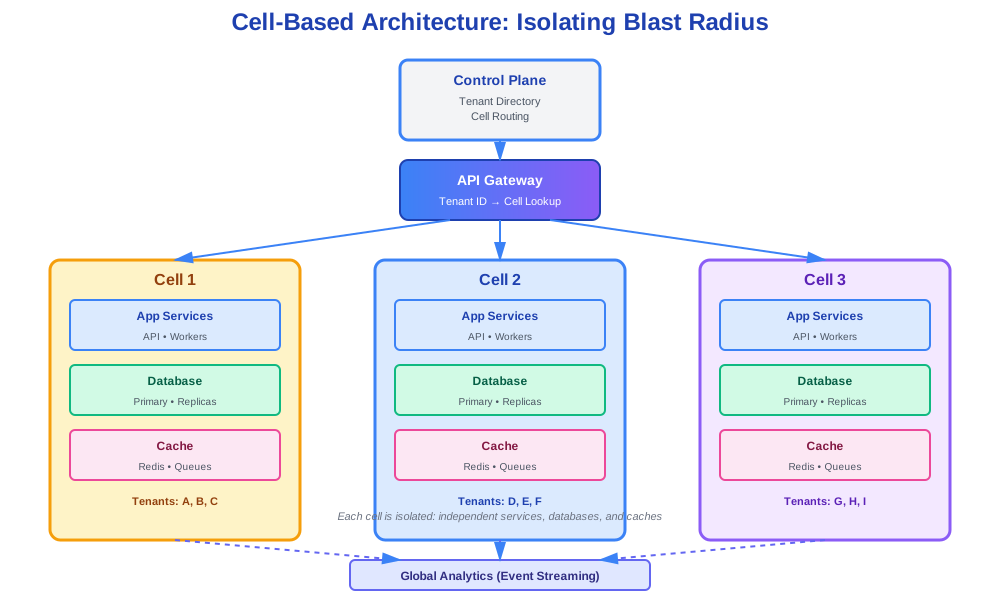
A cell is a full stack slice. Services. Storage. Infrastructure. Everything needed to serve a subset of tenants.
Each cell is self-contained. It has its own database. Its own caches. Its own queues. Its own services.
Tenants are mapped to cells. Tenant A goes to Cell 1. Tenant B goes to Cell 2. Each cell operates independently.
Compare to Other Approaches
Classic sharding:
Sharding splits data across databases. But services are still shared. A service failure still affects everyone. Cell-based architecture isolates everything.
Multi-region architectures:
Multi-region gives you geographic distribution. But regions are still shared within themselves. Cells give you isolation within a region.
The core idea:
Limit blast radius more than you chase infinite scale. When Cell 1 has a problem, only tenants in Cell 1 are affected. The rest keep running.
Key Design Questions
Before you build, answer these questions.
How Do You Map Tenants to Cells?
You have two main options:
Hash-based mapping:
Hash the tenant ID. Use modulo to pick a cell. Simple. Predictable. But hard to move specific tenants.
function getCellForTenant(tenantId: string, totalCells: number): string {
  const hash = hashString(tenantId);
  const cellIndex = hash % totalCells;
  return `cell-${cellIndex}`;
}
Rules-based mapping:
Use rules. VIP tenants get their own cell. Enterprise customers go to dedicated cells. Free tier goes to shared cells.
function getCellForTenant(tenantId: string, tenantTier: string): string {
  if (tenantTier === 'enterprise') {
    return `cell-enterprise-${hashString(tenantId) % 10}`;
  }
  if (tenantTier === 'vip') {
    return `cell-vip-${tenantId}`;
  }
  return `cell-shared-${hashString(tenantId) % 100}`;
}
Handling outliers:
Some tenants are huge. They need their own cell. Some tenants are tiny. They can share cells.
Plan for growth. When a tenant outgrows a shared cell, move them to a dedicated cell.
What Lives Inside a Cell?
Each cell needs:
- App services: Your business logic. API servers. Workers. Everything that processes requests.
- Databases: Primary database. Read replicas if needed. Each cell owns its data.
- Caches: Redis or Memcached. Isolated per cell.
- Messaging/queues: Message queues. Task queues. Isolated per cell.
Everything is self-contained. A cell can run independently of other cells.
What Is Shared Globally?
Some things must be shared:
- Authentication: User identity. JWT validation. OAuth flows.
- Identity and tenant directory: Which tenant exists. Which cell serves them.
- Observability: Metrics. Logs. Tracing. Aggregated across cells.
- Control plane: The system that manages cells. Routing. Provisioning.
Keep the shared layer small. Make it highly available. It’s a single point of failure if you’re not careful.
Control Plane vs Data Plane
Split your system into two planes.
Data Plane
The data plane handles actual requests:
- Request routing: Which cell gets this request?
- Business services: Your actual application logic.
- Data storage: Databases. Caches. Queues.
The data plane is where cells live. Each cell is part of the data plane.
Control Plane
The control plane manages the system:
- Tenant directory: Where to send each tenant’s traffic.
- Config store: Tenant to cell mappings. Cell health. Capacity.
- Orchestration: Provisioning new cells. Rebalancing tenants. Health checks.
The control plane is shared. But it’s read-heavy. You can make it highly available with caching and replication.
Keeping Them Loosely Coupled
The control plane tells the data plane where to route. The data plane doesn’t need to know about other cells.
Use events for coordination. When a tenant moves cells, emit an event. Data plane components react to the event.
Keep dependencies minimal. The data plane should work even if the control plane is slow.
Routing Strategies
How do requests find the right cell?
Edge / API Gateway
Your API gateway does the routing:
- Tenant identification: Extract tenant ID from JWT, subdomain, or header.
- Cell lookup: Query the control plane (with caching).
- Route request: Forward to the correct cell.
- Handle errors: If cell is down, fall back gracefully.
async function routeRequest(request: Request): Promise<Response> {
  // Extract tenant ID
  const tenantId = extractTenantId(request);

  // Look up cell (with caching)
  const cellUrl = await getCellForTenant(tenantId);

  if (!cellUrl) {
    return new Response('Tenant not found', { status: 404 });
  }

  // Forward request
  try {
    return await forwardToCell(request, cellUrl);
  } catch (error) {
    // Handle cell unavailable
    return handleCellUnavailable(tenantId, error);
  }
}
Cell Lookup with Caching
The cell directory service maps tenants to cells:
class CellDirectory {
  private cache: Map<string, { cell: string; expires: number }>;
  private ttl = 300000; // 5 minutes

  async getCellForTenant(tenantId: string): Promise<string> {
    // Check cache
    const cached = this.cache.get(tenantId);
    if (cached && cached.expires > Date.now()) {
      return cached.cell;
    }

    // Query control plane
    const cell = await this.controlPlane.getCell(tenantId);

    // Cache result
    this.cache.set(tenantId, {
      cell,
      expires: Date.now() + this.ttl
    });

    return cell;
  }
}
Fallback Behavior
What if the cell is down?
Fail-closed:
Return an error. Better to fail fast than route to the wrong place.
async function handleCellUnavailable(tenantId: string, error: Error): Promise<Response> {
  // Log the error
  logger.error('Cell unavailable', { tenantId, error });

  // Return 503 Service Unavailable
  return new Response('Service temporarily unavailable', {
    status: 503,
    headers: { 'Retry-After': '60' }
  });
}
Read-only fallback:
For read operations, route to a read replica or another cell with cached data.
async function handleCellUnavailable(tenantId: string, error: Error, method: string): Promise<Response> {
  if (method === 'GET') {
    // Try read replica or cached data
    const fallbackData = await getCachedData(tenantId);
    if (fallbackData) {
      return new Response(JSON.stringify(fallbackData), {
        headers: { 'X-Data-Source': 'cache' }
      });
    }
  }

  return new Response('Service temporarily unavailable', { status: 503 });
}
Maintenance pages:
If a cell is in maintenance, show a maintenance page instead of an error.
Data and Schema Concerns
Each cell owns its data. This creates new challenges.
Independent Schema Migrations
Each cell can migrate independently. But you need coordination.
Strategy 1: Forward-compatible migrations
Make migrations forward-compatible. Old code works with new schema. New code works with old schema. Migrate cells one at a time.
-- Forward-compatible: add nullable column
ALTER TABLE users ADD COLUMN new_field VARCHAR(255) NULL;

-- Deploy new code that uses new_field

-- Backfill data
UPDATE users SET new_field = compute_value(id) WHERE new_field IS NULL;

-- Make column non-nullable (after all cells migrated)
ALTER TABLE users ALTER COLUMN new_field SET NOT NULL;
Strategy 2: Feature flags
Use feature flags to control which cells use new schema. Gradually roll out.
Strategy 3: Blue-green per cell
Each cell has blue and green databases. Migrate green. Switch traffic. Migrate blue.
Independent Performance Tuning
Each cell can tune independently. Cell 1 might need more read replicas. Cell 2 might need different indexes.
You can optimize per tenant pattern. High-read tenants get more replicas. High-write tenants get optimized write paths.
Global Reporting
But you still need global reports. How do you aggregate across cells?
Event streaming:
Each cell publishes events to a global stream:
async function publishEvent(event: TenantEvent) {
  await globalEventStream.publish({
    ...event,
    cellId: this.cellId,
    tenantId: event.tenantId,
    timestamp: Date.now()
  });
}

// Example: Order created
await publishEvent({
  type: 'OrderCreated',
  tenantId: 'tenant-123',
  orderId: 'order-456',
  amount: 99.99
});
Global analytics store:
Consume events into a global analytics database:
async function consumeEvents() {
  for await (const event of globalEventStream.consume()) {
    await analyticsDb.insert({
      event_type: event.type,
      tenant_id: event.tenantId,
      cell_id: event.cellId,
      data: event.data,
      timestamp: event.timestamp
    });
  }
}
Trade-offs:
- Real-time: More complex. Higher latency. More infrastructure.
- Delayed aggregation: Simpler. Batch processing. Slight delay in reports.
Choose based on your needs. Most SaaS can tolerate a few minutes of delay in analytics.
Failure Modes and Blast Radius
The whole point is limiting blast radius. Let’s see how it works.
How Incidents Stay Contained
Single cell offline:
Cell 1 goes down. Tenants in Cell 1 are affected. Tenants in Cell 2, 3, 4 keep running.
You’ve isolated the failure. Only 10% of tenants are down instead of 100%.
Database issues:
Cell 1’s database has problems. Other cells aren’t affected. You can fix Cell 1 without touching other cells.
Deployment issues:
You deploy bad code to Cell 1. Only Cell 1 breaks. Other cells keep running. You can roll back Cell 1 independently.
Common Failure Patterns
Mis-routed traffic:
A bug routes Tenant A to the wrong cell. Tenant A’s data isn’t there. Requests fail.
Fix: Validate routing. Add checksums. Monitor for routing errors.
Control plane outages:
The control plane goes down. New routing lookups fail. But cached routes still work.
Fix: Long TTLs on routing cache. Fallback to last known good routing.
Health checks:
Cells report health to the control plane. Unhealthy cells are marked. Routing avoids them.
class CellHealthChecker {
  async checkHealth(cellId: string): Promise<boolean> {
    try {
      const response = await fetch(`${cellUrl}/health`, {
        timeout: 5000
      });
      return response.ok;
    } catch (error) {
      return false;
    }
  }

  async updateRouting() {
    const cells = await this.getAllCells();
    for (const cell of cells) {
      const healthy = await this.checkHealth(cell.id);
      await this.controlPlane.updateCellHealth(cell.id, healthy);
    }
  }
}
Fail-closed vs fail-open:
- Fail-closed: If routing is uncertain, return an error. Safer. But more false failures.
- Fail-open: If routing is uncertain, try best guess. Riskier. But fewer false failures.
Most systems use fail-closed for writes, fail-open for reads.
Migration Path from Shared Architecture
You can’t flip a switch. You need a gradual migration.
Phase 1: Introduce Tenant Directory and Routing (Still 1 Cell)
Start with routing infrastructure. But route everything to one cell.
// All tenants go to cell-1 for now
async function getCellForTenant(tenantId: string): Promise<string> {
  return 'cell-1';
}
This gives you:
- Routing code in place
- Tenant identification working
- Control plane ready
No behavior change. But infrastructure is ready.
Phase 2: Carve Out 2-3 Cells
Pick a subset of tenants. Move them to a new cell.
Good candidates:
- New tenants (no migration needed)
- Low-traffic tenants (easier to move)
- Specific region or tier
async function getCellForTenant(tenantId: string): Promise<string> {
  // New tenants go to cell-2
  if (isNewTenant(tenantId)) {
    return 'cell-2';
  }

  // Enterprise tenants go to cell-3
  if (getTenantTier(tenantId) === 'enterprise') {
    return 'cell-3';
  }

  // Everyone else stays in cell-1
  return 'cell-1';
}
Migrate data. Update routing. Monitor closely.
Phase 3: Automate Cell Creation and Rebalancing
Once you have multiple cells working, automate:
- Auto-create cells: When a cell gets full, create a new one.
- Auto-rebalance: Move tenants to balance load.
- Auto-healing: If a cell has problems, move tenants away.
class CellOrchestrator {
  async rebalanceCells() {
    const cells = await this.getAllCells();
    const load = await this.getCellLoads();

    // Find overloaded cells
    const overloaded = cells.filter(cell => load[cell.id] > 0.8);

    for (const cell of overloaded) {
      // Move some tenants to underloaded cells
      const tenants = await this.getTenantsInCell(cell.id);
      const toMove = tenants.slice(0, Math.floor(tenants.length * 0.2));

      for (const tenant of toMove) {
        await this.moveTenant(tenant, findUnderloadedCell(cells, load));
      }
    }
  }
}
Practical Tips
Shadow-routing and mirroring:
Before moving a tenant, shadow their traffic to the new cell. Compare results. Verify correctness.
async function shadowRoute(tenantId: string, newCell: string) {
  const request = await getRequest(tenantId);

  // Send to both cells
  const [oldResult, newResult] = await Promise.all([
    forwardToCell(request, 'cell-1'),
    forwardToCell(request, newCell)
  ]);

  // Compare results
  if (resultsMatch(oldResult, newResult)) {
    logger.info('Shadow routing successful', { tenantId });
  } else {
    logger.error('Shadow routing mismatch', { tenantId, oldResult, newResult });
  }
}
Canary cell:
Create a canary cell. Route a small percentage of traffic to it. Test new infrastructure. Gradually increase.
async function routeWithCanary(tenantId: string): Promise<string> {
  // 5% of traffic goes to canary
  if (Math.random() < 0.05) {
    return 'cell-canary';
  }

  return await getCellForTenant(tenantId);
}
Cost and Team Structure
Cell-based architecture has costs. But also benefits.
Cost Model
More infrastructure overhead:
Each cell needs its own infrastructure. Databases. Caches. Services. More servers. More cost.
But:
- You can use smaller, cheaper instances per cell
- You can scale cells independently
- You can use different instance types per cell
Fewer large outages:
When something breaks, only one cell breaks. You don’t lose all customers. Revenue protection often outweighs infrastructure cost.
Better capacity planning:
You know exactly how many tenants per cell. You can plan capacity better. Less over-provisioning.
Team Ownership
Teams own specific cells:
Team A owns Cell 1 and Cell 2. Team B owns Cell 3 and Cell 4. Clear ownership. Clear responsibility.
Teams can:
- Deploy independently
- Tune independently
- Debug independently
Platform team owns control plane:
One team owns routing. Orchestration. Cell provisioning. They make sure the system works as a whole.
Clear boundaries:
Data plane teams focus on their cells. Platform team focuses on the system. Clear separation of concerns.
Checklist and Guardrails
Before you build, check these.
When Is a Cell-Based Design Worth It?
You need it if:
- You have noisy neighbor problems
- Database scaling is hitting limits
- Incidents affect too many customers
- You have tenants with very different needs
You don’t need it if:
- You’re early stage (under 100 tenants)
- All tenants have similar patterns
- You don’t have scaling problems yet
- Your team is too small to operate it
Start simple. Add cells when you need them.
Minimal Viable Cell Design
Start with the minimum:
- 2-3 cells
- Simple hash-based routing
- Manual cell provisioning
- Basic health checks
Don’t over-engineer. Get it working. Then add complexity.
Pitfalls to Avoid
Too many cells too fast:
Start with 2-3 cells. Learn. Then add more. Don’t create 50 cells on day one.
Complex routing logic:
Keep routing simple. Hash-based or simple rules. Don’t build a complex routing engine until you need it.
Shared state between cells:
Cells should be independent. Don’t share databases. Don’t share caches. If you need shared state, use events.
Ignoring the control plane:
The control plane is critical. Make it highly available. Monitor it closely. Cache aggressively.
Moving tenants too often:
Moving tenants is expensive. Do it carefully. Batch moves. Verify after each move.
Code Examples
Here are working examples you can use.
Tenant to Cell Lookup
interface TenantInfo {
  id: string;
  tier: string;
  createdAt: Date;
}

class CellDirectory {
  private cache: Map<string, { cell: string; expires: number }>;
  private controlPlane: ControlPlaneClient;
  private ttl = 300000; // 5 minutes

  constructor(controlPlane: ControlPlaneClient) {
    this.cache = new Map();
    this.controlPlane = controlPlane;
  }

  async getCellForTenant(tenantId: string): Promise<string> {
    // Check cache first
    const cached = this.cache.get(tenantId);
    if (cached && cached.expires > Date.now()) {
      return cached.cell;
    }

    // Get tenant info
    const tenant = await this.controlPlane.getTenant(tenantId);

    // Determine cell
    const cell = this.determineCell(tenant);

    // Cache result
    this.cache.set(tenantId, {
      cell,
      expires: Date.now() + this.ttl
    });

    return cell;
  }

  private determineCell(tenant: TenantInfo): string {
    // VIP tenants get dedicated cells
    if (tenant.tier === 'vip') {
      return `cell-vip-${hashString(tenant.id) % 10}`;
    }

    // Enterprise tenants get shared enterprise cells
    if (tenant.tier === 'enterprise') {
      return `cell-enterprise-${hashString(tenant.id) % 20}`;
    }

    // Regular tenants use hash-based routing
    return `cell-shared-${hashString(tenant.id) % 100}`;
  }

  private hashString(str: string): number {
    let hash = 0;
    for (let i = 0; i < str.length; i++) {
      const char = str.charCodeAt(i);
      hash = ((hash << 5) - hash) + char;
      hash = hash & hash; // Convert to 32-bit integer
    }
    return Math.abs(hash);
  }

  invalidateCache(tenantId: string): void {
    this.cache.delete(tenantId);
  }
}
Cell Routing Middleware
interface Request {
  headers: Record<string, string>;
  method: string;
  url: string;
  body?: any;
}

class CellRouter {
  private directory: CellDirectory;
  private cellBaseUrls: Map<string, string>;

  constructor(directory: CellDirectory, cellBaseUrls: Map<string, string>) {
    this.directory = directory;
    this.cellBaseUrls = cellBaseUrls;
  }

  async route(request: Request): Promise<Response> {
    // Extract tenant ID
    const tenantId = this.extractTenantId(request);
    if (!tenantId) {
      return new Response('Tenant ID required', { status: 400 });
    }

    // Get cell for tenant
    let cellId: string;
    try {
      cellId = await this.directory.getCellForTenant(tenantId);
    } catch (error) {
      logger.error('Failed to get cell for tenant', { tenantId, error });
      return new Response('Service unavailable', { status: 503 });
    }

    // Get cell base URL
    const cellBaseUrl = this.cellBaseUrls.get(cellId);
    if (!cellBaseUrl) {
      logger.error('Cell base URL not found', { cellId });
      return new Response('Service unavailable', { status: 503 });
    }

    // Forward request to cell
    try {
      return await this.forwardToCell(request, cellBaseUrl);
    } catch (error) {
      return this.handleCellError(tenantId, cellId, error, request.method);
    }
  }

  private extractTenantId(request: Request): string | null {
    // Try JWT token
    const authHeader = request.headers['authorization'];
    if (authHeader) {
      const token = authHeader.replace('Bearer ', '');
      const payload = this.decodeJWT(token);
      if (payload?.tenantId) {
        return payload.tenantId;
      }
    }

    // Try header
    if (request.headers['x-tenant-id']) {
      return request.headers['x-tenant-id'];
    }

    // Try subdomain
    const host = request.headers['host'];
    if (host) {
      const parts = host.split('.');
      if (parts.length > 2) {
        return parts[0]; // tenant.example.com
      }
    }

    return null;
  }

  private decodeJWT(token: string): any {
    try {
      const parts = token.split('.');
      const payload = JSON.parse(Buffer.from(parts[1], 'base64').toString());
      return payload;
    } catch (error) {
      return null;
    }
  }

  private async forwardToCell(request: Request, cellBaseUrl: string): Promise<Response> {
    const url = new URL(request.url);
    const targetUrl = `${cellBaseUrl}${url.pathname}${url.search}`;

    const response = await fetch(targetUrl, {
      method: request.method,
      headers: request.headers,
      body: request.body ? JSON.stringify(request.body) : undefined
    });

    return response;
  }

  private handleCellError(
    tenantId: string,
    cellId: string,
    error: Error,
    method: string
  ): Response {
    logger.error('Cell request failed', { tenantId, cellId, error, method });

    // For read operations, try cache
    if (method === 'GET') {
      // Could try cached data here
    }

    return new Response('Service temporarily unavailable', {
      status: 503,
      headers: { 'Retry-After': '60' }
    });
  }
}
Control Plane API
interface Cell {
  id: string;
  status: 'active' | 'provisioning' | 'maintenance' | 'degraded';
  capacity: number;
  currentTenants: number;
  createdAt: Date;
}

class ControlPlaneAPI {
  private cells: Map<string, Cell>;
  private eventEmitter: EventEmitter;

  constructor() {
    this.cells = new Map();
    this.eventEmitter = new EventEmitter();
  }

  async createCell(request: CreateCellRequest): Promise<Cell> {
    // Validate
    if (!request.id || !request.id.match(/^[a-z0-9-]+$/)) {
      throw new Error('Invalid cell ID');
    }

    if (this.cells.has(request.id)) {
      throw new Error('Cell already exists');
    }

    // Check capacity
    const totalCapacity = Array.from(this.cells.values())
      .reduce((sum, cell) => sum + cell.capacity, 0);

    if (totalCapacity + request.capacity > 10000) {
      throw new Error('Total capacity limit exceeded');
    }

    // Create cell
    const cell: Cell = {
      id: request.id,
      status: 'provisioning',
      capacity: request.capacity,
      currentTenants: 0,
      createdAt: new Date()
    };

    this.cells.set(cell.id, cell);

    // Emit event for infrastructure provisioning
    this.eventEmitter.emit('cell:provision', {
      cellId: cell.id,
      capacity: cell.capacity
    });

    // In real implementation, this would trigger:
    // - Database provisioning
    // - Cache provisioning
    // - Service deployment
    // - Health check setup

    return cell;
  }

  async getCell(cellId: string): Promise<Cell | null> {
    return this.cells.get(cellId) || null;
  }

  async getAllCells(): Promise<Cell[]> {
    return Array.from(this.cells.values());
  }

  async updateCellStatus(cellId: string, status: Cell['status']): Promise<void> {
    const cell = this.cells.get(cellId);
    if (!cell) {
      throw new Error('Cell not found');
    }

    cell.status = status;
    this.eventEmitter.emit('cell:status-change', { cellId, status });
  }

  async assignTenantToCell(tenantId: string, cellId: string): Promise<void> {
    const cell = this.cells.get(cellId);
    if (!cell) {
      throw new Error('Cell not found');
    }

    if (cell.status !== 'active') {
      throw new Error('Cell is not active');
    }

    if (cell.currentTenants >= cell.capacity) {
      throw new Error('Cell is at capacity');
    }

    // In real implementation, this would:
    // - Update tenant directory
    // - Trigger data migration
    // - Update routing

    cell.currentTenants++;
    this.eventEmitter.emit('tenant:assigned', { tenantId, cellId });
  }
}
Event Streaming to Global Analytics
interface TenantEvent {
  type: string;
  tenantId: string;
  cellId: string;
  data: any;
  timestamp: number;
}

class EventPublisher {
  private cellId: string;
  private globalStream: EventStream;

  constructor(cellId: string, globalStream: EventStream) {
    this.cellId = cellId;
    this.globalStream = globalStream;
  }

  async publishEvent(type: string, tenantId: string, data: any): Promise<void> {
    const event: TenantEvent = {
      type,
      tenantId,
      cellId: this.cellId,
      data,
      timestamp: Date.now()
    };

    await this.globalStream.publish('tenant-events', event);
  }
}

// Usage in your application
class OrderService {
  constructor(private eventPublisher: EventPublisher) {}

  async createOrder(tenantId: string, orderData: any): Promise<Order> {
    // Create order in local database
    const order = await this.db.orders.create({
      ...orderData,
      tenantId
    });

    // Publish event to global stream
    await this.eventPublisher.publishEvent('OrderCreated', tenantId, {
      orderId: order.id,
      amount: order.amount,
      items: order.items
    });

    return order;
  }
}

// Consumer for global analytics
class AnalyticsConsumer {
  private analyticsDb: AnalyticsDatabase;

  constructor(analyticsDb: AnalyticsDatabase) {
    this.analyticsDb = analyticsDb;
  }

  async start(): Promise<void> {
    const stream = new EventStream('tenant-events');

    for await (const event of stream.consume()) {
      await this.processEvent(event);
    }
  }

  private async processEvent(event: TenantEvent): Promise<void> {
    // Store in analytics database
    await this.analyticsDb.insert({
      event_type: event.type,
      tenant_id: event.tenantId,
      cell_id: event.cellId,
      data: event.data,
      timestamp: new Date(event.timestamp)
    });

    // Update aggregates
    if (event.type === 'OrderCreated') {
      await this.analyticsDb.increment('daily_orders', {
        tenant_id: event.tenantId,
        date: new Date(event.timestamp).toISOString().split('T')[0]
      });
    }
  }
}
Simple Rebalancing Flow
class TenantRebalancer {
  private controlPlane: ControlPlaneAPI;
  private directory: CellDirectory;
  private dataMigrator: DataMigrator;

  async rebalanceTenant(tenantId: string, targetCellId: string): Promise<void> {
    // Step 1: Mark tenant as moving
    await this.controlPlane.markTenantMoving(tenantId);

    // Step 2: Get current cell
    const currentCellId = await this.directory.getCellForTenant(tenantId);
    if (currentCellId === targetCellId) {
      throw new Error('Tenant already in target cell');
    }

    // Step 3: Backfill data to target cell
    await this.dataMigrator.migrateTenantData(tenantId, currentCellId, targetCellId);

    // Step 4: Verify data integrity
    const verified = await this.verifyDataIntegrity(tenantId, currentCellId, targetCellId);
    if (!verified) {
      throw new Error('Data integrity check failed');
    }

    // Step 5: Flip routing
    await this.controlPlane.assignTenantToCell(tenantId, targetCellId);
    this.directory.invalidateCache(tenantId);

    // Step 6: Wait for traffic to drain from old cell
    await this.waitForTrafficDrain(tenantId, currentCellId);

    // Step 7: Clean up old cell data (optional, can be delayed)
    // await this.dataMigrator.cleanupOldData(tenantId, currentCellId);
  }

  private async verifyDataIntegrity(
    tenantId: string,
    sourceCell: string,
    targetCell: string
  ): Promise<boolean> {
    // Compare record counts
    const sourceCount = await this.getRecordCount(tenantId, sourceCell);
    const targetCount = await this.getRecordCount(tenantId, targetCell);

    if (sourceCount !== targetCount) {
      return false;
    }

    // Sample records and compare
    const sample = await this.getSampleRecords(tenantId, sourceCell);
    for (const record of sample) {
      const targetRecord = await this.getRecord(record.id, targetCell);
      if (!this.recordsMatch(record, targetRecord)) {
        return false;
      }
    }

    return true;
  }

  private async waitForTrafficDrain(tenantId: string, cellId: string): Promise<void> {
    // Wait until no active requests for this tenant in the old cell
    let attempts = 0;
    while (attempts < 60) {
      const activeRequests = await this.getActiveRequestCount(tenantId, cellId);
      if (activeRequests === 0) {
        return;
      }
      await sleep(1000);
      attempts++;
    }

    throw new Error('Traffic drain timeout');
  }
}
Summary
Cell-based architecture isn’t about infinite scale. It’s about limiting blast radius.
When one cell has problems, other cells keep running. When one tenant misbehaves, other tenants aren’t affected. When you need to scale, you add cells instead of scaling one giant system.
Start simple. Two or three cells. Hash-based routing. Manual provisioning. Get it working.
Then add complexity as you need it. Rules-based routing. Automated rebalancing. More cells.
The code examples above give you a foundation. Adapt them to your needs. Keep it simple. Add complexity only when you need it.
Most importantly: cells are about isolation. Keep them independent. Keep the shared layer small. Make the control plane highly available.
When done right, cell-based architecture gives you the isolation you need without the complexity you don’t.
Discussion
Loading comments...