Ephemeral Environments Done Right: Practical Patterns for PR-Based Testing on Kubernetes
Most teams still rely on one shared staging cluster. It’s noisy, slow, and hard to trust.
This article shows how to create short-lived, per-PR environments on Kubernetes. Each pull request gets its own namespace. It gets a unique URL. It gets destroyed when the PR closes. All wired into your CI pipeline.
Why Shared Staging Holds You Back
You’ve seen this before. Someone says “it works on staging” but no one knows what’s actually deployed. Two developers push conflicting branches. Tests fail because the data is broken. You wait in a queue just to get a slot.
Here’s what breaks:
“It works on staging” but no one knows what’s deployed.
You check staging. It’s running code from three different branches. One service is on main. Another is on a feature branch. The database has test data from last week. You can’t tell what’s actually running.
Conflicting branches break each other.
Developer A pushes a branch that changes the API. Developer B pushes a branch that expects the old API. Both deploy to staging. Tests fail. You spend hours figuring out which branch broke what.
Broken data makes tests flaky.
Someone ran a migration script. Someone else deleted test users. The database is in a weird state. Tests pass sometimes. They fail other times. You can’t trust the results.
Long queues slow everything down.
Only one person can test on staging at a time. Everyone waits. Feedback loops stretch from minutes to hours. Developers context-switch. Bugs slip through.
This slows feedback loops. It hurts reliability. It wastes time.
What Are Ephemeral Environments?
An ephemeral environment is created per PR or branch. It gets destroyed after merge or close.
Think of it like this: every PR gets its own staging environment. It’s isolated. It’s predictable. It’s temporary.
Scope Options
You can create different scopes:
Full stack per PR means frontend, backend, and database. Everything runs in one namespace. Good for integration testing. More expensive.
Partial stack means only the services that changed. If you change the frontend, only the frontend gets deployed. Faster. Cheaper. Less complete.
Most teams start with full stack. Then optimize to partial stack once they understand their patterns.
Types
Namespace-per-PR on a shared cluster is the most common. You create a namespace for each PR. All resources live in that namespace. Simple. Works with any Kubernetes cluster.
Lightweight clusters per PR using k3s or kind is less common in production. You spin up a whole cluster for each PR. More isolation. More overhead. Usually overkill.
We’ll focus on namespace-per-PR. It’s practical. It works in production.
Core Building Blocks on Kubernetes
You need a few pieces to make this work.
Git Provider as Event Source
GitHub, GitLab, or Bitbucket sends events when PRs open, update, or close. Your CI pipeline listens to these events.
GitHub sends webhooks. GitLab sends webhooks. Bitbucket sends webhooks. They all work the same way: PR opened, PR updated, PR closed.
CI Pipeline That Builds and Deploys
Your pipeline needs to:
- Build a Docker image with a branch tag
- Apply Helm or Kustomize manifest with PR-specific values
- Expose a unique URL (ingress with per-PR host)
- Clean up when the PR closes
Let’s break this down.
Build Docker image with branch tag:
# Build image tagged with PR number
docker build -t myapp:pr-1234 .
docker push myapp:pr-1234
The tag includes the PR number. That way you know exactly what’s deployed.
Apply Helm/Kustomize with PR-specific values:
# Helm values for PR 1234
namespace: pr-1234
image: myapp:pr-1234
host: pr-1234.myapp.dev
Each PR gets its own namespace name. Each PR gets its own hostname. Everything is isolated.
Expose unique URL:
# Ingress for PR 1234
host: pr-1234.myapp.dev
Users can access the environment at that URL. It’s predictable. It’s shareable.
Cleanup on PR close:
When the PR closes, delete the namespace. Delete the image. Free up resources.
Naming Conventions
Use consistent names:
- Namespace:
pr-{number}orpr-{repo}-{number} - Image tag:
pr-{number}orpr-{number}-{sha} - Hostname:
pr-{number}.myapp.dev
The PR number is the key. Everything ties back to it.
Dealing with Databases
This is the tricky part. You have three options:
Shared database means all PR environments use the same database. Simple. Fast. But data conflicts happen. One PR’s tests can break another PR’s tests.
Per-PR database means each PR gets its own database. Isolated. Safe. But expensive. Slow to provision.
Seeded test data means you seed the database with known data before each test run. Fast. Cheap. But you need to reset between runs.
Most teams start with seeded test data. Then move to per-PR databases if they need more isolation.
Cost and Quota Controls
Set limits:
- Max active PR environments (e.g., 10 at a time)
- TTL for idle namespaces (e.g., delete after 7 days of inactivity)
- Resource quotas per namespace (e.g., max 2 CPU, 4GB RAM)
This prevents runaway costs. It keeps the cluster healthy.
Designing a Practical Workflow
Here’s how it works end to end.
Triggering on Events
Your CI pipeline triggers on:
pull_request.opened- Create the environmentpull_request.synchronize- Update the environment (new commits)pull_request.closed- Delete the environment
Each event does something different.
PR opened:
- Build Docker image
- Create namespace
- Deploy application
- Create ingress
- Post comment with preview URL
PR updated (new commits):
- Build new Docker image
- Update deployment (rolling update)
- Update comment with new status
PR closed:
- Delete namespace
- Delete old images (optional)
- Update comment with cleanup status
Idempotent Deploys
Make deploys idempotent. If you run the same deploy twice, it should work the same way.
Reuse same namespace name per PR:
namespace: pr-1234 # Always the same for PR 1234If the namespace exists, use it. If it doesn’t, create it.
Safe helm upgrades:
helm upgrade --install pr-1234 ./chart \
  --namespace pr-1234 \
  --create-namespace \
  --set image.tag=pr-1234
--install means create if missing, update if exists. Idempotent.
Safe kubectl apply:
kubectl apply -f manifests/ -n pr-1234Kubectl apply is idempotent by default. Safe to run multiple times.
Observability
Tag everything with PR metadata:
Automatic annotations:
metadata:
  annotations:
    pr-number: "1234"
    pr-author: "yusuf"
    pr-branch: "feature/new-ui"
    pr-url: "https://github.com/org/repo/pull/1234"
You can query by PR number. You can see who created what. You can link back to the PR.
Label resources:
metadata:
  labels:
    env: pr-1234
    app: myapp
    managed-by: pr-env-controller
Labels make it easy to find all resources for a PR. Easy to clean up.
Concrete Scenarios
Frontend engineer pushes UI change:
- PR opened
- Environment created at
pr-1234.myapp.dev - Comment posted: “Preview: https://pr-1234.myapp.dev”
- Engineer tests the UI
- PR merged
- Environment deleted
Backend change needs QA sign-off:
- PR opened
- Environment created with seeded test data
- Comment posted with preview URL
- QA tests the API
- QA approves
- PR merged
- Environment deleted
The workflow is the same. The use case is different.
Guardrails and Failure Modes
Things will break. Plan for it.
Quotas
Max active PR environments:
# Limit to 10 active PR environments
maxActiveEnvironments: 10
If you hit the limit, queue new PRs. Or delete the oldest inactive environment.
TTL for idle namespaces:
# Delete namespaces after 7 days of inactivity
namespaceTTL: 7d
If a PR sits open for a week, clean it up. Free up resources.
Resource quotas per namespace:
apiVersion: v1
kind: ResourceQuota
metadata:
  name: pr-quota
  namespace: pr-1234
spec:
  hard:
    requests.cpu: "2"
    requests.memory: 4Gi
    limits.cpu: "4"
    limits.memory: 8Gi
This prevents one PR from consuming all resources.
Handling Broken Manifests
Fail fast in CI:
# Validate manifests before deploying
kubectl apply --dry-run=client -f manifests/
helm template ./chart | kubectl apply --dry-run=client -f -
If the manifest is broken, fail in CI. Don’t touch the cluster.
Keep logs visible in PR:
# Post deployment logs as PR comment
- name: Post deployment status
  uses: actions/github-script@v6
  with:
    script: |
      github.rest.issues.createComment({
        issue_number: context.issue.number,
        owner: context.repo.owner,
        repo: context.repo.repo,
        body: 'Deployment logs:\n```\n' + deploymentLogs + '\n```'
      })
If something fails, the logs are right there in the PR. No need to dig through CI logs.
Security Basics
No access to prod data:
PR environments should never touch production data. Use test databases. Use mock services. Keep them isolated.
Least privilege service accounts:
apiVersion: v1
kind: ServiceAccount
metadata:
  name: pr-app
  namespace: pr-1234
---
apiVersion: rbac.authorization.k8s.io/v1
kind: Role
metadata:
  name: pr-app-role
  namespace: pr-1234
rules:
- apiGroups: [""]
  resources: ["pods"]
  verbs: ["get", "list"]
Give each PR environment only the permissions it needs. Nothing more.
Network policies for isolation:
apiVersion: networking.k8s.io/v1
kind: NetworkPolicy
metadata:
  name: pr-isolation
  namespace: pr-1234
spec:
  podSelector: {}
  policyTypes:
  - Ingress
  - Egress
  ingress:
  - from:
    - namespaceSelector:
        matchLabels:
          name: ingress-nginx
  egress:
  - to:
    - namespaceSelector:
        matchLabels:
          name: shared-services
PR environments can only talk to what they need. They can’t talk to each other.
Measuring Success
Track these metrics:
Lead time before and after:
Before: PR opened → manual staging deploy → testing → merge. Maybe 2-4 hours.
After: PR opened → automatic environment → testing → merge. Maybe 10-30 minutes.
Measure it. See the improvement.
Number of bugs caught pre-merge:
Before: Bugs found in staging after merge. Maybe 20% of bugs.
After: Bugs found in PR environments before merge. Maybe 80% of bugs.
Track bug discovery time. Earlier is better.
Staging usage drop:
Before: Staging used constantly. Everyone queues up.
After: Staging used rarely. Maybe only for final integration tests.
If staging usage drops, ephemeral environments are working.
Step-by-Step Minimal Reference Implementation
Let’s build a complete example. We’ll use GitHub Actions, Docker, and Kubernetes.
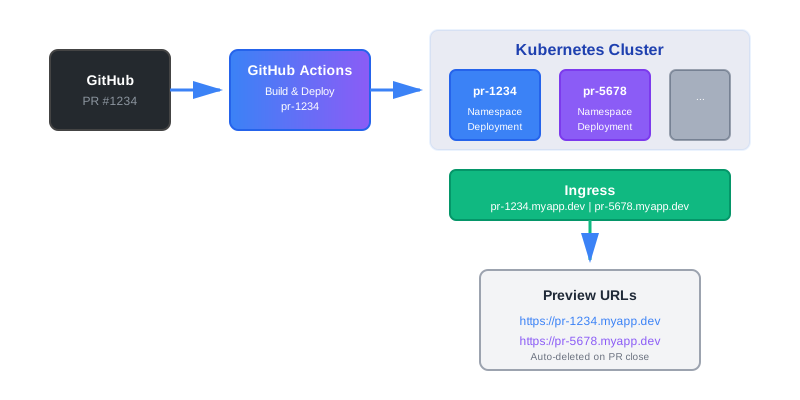
Architecture Overview
┌─────────────┐
│   GitHub    │
│     PR      │
└──────┬──────┘
       │
       │ Webhook
       ▼
┌─────────────────┐
│ GitHub Actions  │
│   Workflow      │
└──────┬──────────┘
       │
       ├─► Build Docker Image
       │   Tag: pr-1234
       │
       ├─► Deploy to K8s
       │   Namespace: pr-1234
       │   Host: pr-1234.myapp.dev
       │
       └─► Post PR Comment
           Preview URL
GitHub Actions Workflow
Create .github/workflows/pr-env.yml:
name: PR Environment

on:
  pull_request:
    types: [opened, synchronize, closed]

env:
  REGISTRY: ghcr.io
  IMAGE_NAME: ${{ github.repository }}

jobs:
  deploy:
    if: github.event.action != 'closed'
    runs-on: ubuntu-latest

    steps:
    - name: Checkout
      uses: actions/checkout@v4

    - name: Set up Docker Buildx
      uses: docker/setup-buildx-action@v3

    - name: Log in to Container Registry
      uses: docker/login-action@v3
      with:
        registry: ${{ env.REGISTRY }}
        username: ${{ github.actor }}
        password: ${{ secrets.GITHUB_TOKEN }}

    - name: Build and push image
      uses: docker/build-push-action@v5
      with:
        context: .
        push: true
        tags: |
          ${{ env.REGISTRY }}/${{ env.IMAGE_NAME }}:pr-${{ github.event.pull_request.number }}
          ${{ env.REGISTRY }}/${{ env.IMAGE_NAME }}:pr-${{ github.event.pull_request.number }}-${{ github.sha }}
        cache-from: type=gha
        cache-to: type=gha,mode=max

    - name: Set up kubectl
      uses: azure/setup-kubectl@v3

    - name: Configure kubectl
      run: |
        echo "${{ secrets.KUBECONFIG }}" | base64 -d > kubeconfig
        export KUBECONFIG=$(pwd)/kubeconfig

    - name: Deploy to Kubernetes
      run: |
        export KUBECONFIG=$(pwd)/kubeconfig
        export PR_NUMBER=${{ github.event.pull_request.number }}
        export NAMESPACE=pr-$PR_NUMBER
        export IMAGE_TAG=pr-$PR_NUMBER

        # Create namespace if it doesn't exist
        kubectl create namespace $NAMESPACE --dry-run=client -o yaml | kubectl apply -f -

        # Apply manifests
        envsubst < k8s/deployment.yaml | kubectl apply -f -
        envsubst < k8s/service.yaml | kubectl apply -f -
        envsubst < k8s/ingress.yaml | kubectl apply -f -

    - name: Wait for deployment
      run: |
        export KUBECONFIG=$(pwd)/kubeconfig
        export NAMESPACE=pr-${{ github.event.pull_request.number }}
        kubectl wait --for=condition=available --timeout=300s deployment/myapp -n $NAMESPACE

    - name: Post PR comment
      uses: actions/github-script@v7
      with:
        script: |
          const prNumber = context.payload.pull_request.number;
          const previewUrl = `https://pr-${prNumber}.myapp.dev`;

          // Check if comment already exists
          const comments = await github.rest.issues.listComments({
            owner: context.repo.owner,
            repo: context.repo.repo,
            issue_number: prNumber,
          });

          const existingComment = comments.data.find(
            c => c.user.type === 'Bot' && c.body.includes('Preview environment')
          );

          const body = `## Preview Environment

          🚀 **Preview URL:** ${previewUrl}

          **Namespace:** \`pr-${prNumber}\`
          **Image:** \`${{ env.REGISTRY }}/${{ env.IMAGE_NAME }}:pr-${prNumber}\`

          This environment will be automatically deleted when the PR is closed.`;

          if (existingComment) {
            await github.rest.issues.updateComment({
              owner: context.repo.owner,
              repo: context.repo.repo,
              comment_id: existingComment.id,
              body: body,
            });
          } else {
            await github.rest.issues.createComment({
              owner: context.repo.owner,
              repo: context.repo.repo,
              issue_number: prNumber,
              body: body,
            });
          }

  cleanup:
    if: github.event.action == 'closed'
    runs-on: ubuntu-latest

    steps:
    - name: Set up kubectl
      uses: azure/setup-kubectl@v3

    - name: Configure kubectl
      run: |
        echo "${{ secrets.KUBECONFIG }}" | base64 -d > kubeconfig
        export KUBECONFIG=$(pwd)/kubeconfig

    - name: Delete namespace
      run: |
        export KUBECONFIG=$(pwd)/kubeconfig
        export NAMESPACE=pr-${{ github.event.pull_request.number }}
        kubectl delete namespace $NAMESPACE --ignore-not-found=true

    - name: Post cleanup comment
      uses: actions/github-script@v7
      with:
        script: |
          await github.rest.issues.createComment({
            owner: context.repo.owner,
            repo: context.repo.repo,
            issue_number: context.payload.pull_request.number,
            body: '🧹 Preview environment has been cleaned up.',
          });
Kubernetes Manifests
Create k8s/deployment.yaml:
apiVersion: apps/v1
kind: Deployment
metadata:
  name: myapp
  namespace: ${NAMESPACE}
  labels:
    app: myapp
    env: pr-${PR_NUMBER}
    managed-by: pr-env
  annotations:
    pr-number: "${PR_NUMBER}"
    pr-branch: "${GITHUB_REF_NAME}"
spec:
  replicas: 1
  selector:
    matchLabels:
      app: myapp
  template:
    metadata:
      labels:
        app: myapp
        env: pr-${PR_NUMBER}
    spec:
      containers:
      - name: myapp
        image: ${REGISTRY}/${IMAGE_NAME}:${IMAGE_TAG}
        ports:
        - containerPort: 8080
        env:
        - name: ENV
          value: "pr-${PR_NUMBER}"
        resources:
          requests:
            cpu: 100m
            memory: 128Mi
          limits:
            cpu: 500m
            memory: 512Mi
---
apiVersion: v1
kind: Service
metadata:
  name: myapp
  namespace: ${NAMESPACE}
  labels:
    app: myapp
    env: pr-${PR_NUMBER}
spec:
  selector:
    app: myapp
  ports:
  - port: 80
    targetPort: 8080
---
apiVersion: networking.k8s.io/v1
kind: Ingress
metadata:
  name: myapp
  namespace: ${NAMESPACE}
  labels:
    app: myapp
    env: pr-${PR_NUMBER}
  annotations:
    cert-manager.io/cluster-issuer: letsencrypt-prod
    nginx.ingress.kubernetes.io/ssl-redirect: "true"
spec:
  ingressClassName: nginx
  rules:
  - host: pr-${PR_NUMBER}.myapp.dev
    http:
      paths:
      - path: /
        pathType: Prefix
        backend:
          service:
            name: myapp
            port:
              number: 80
  tls:
  - hosts:
    - pr-${PR_NUMBER}.myapp.dev
    secretName: pr-${PR_NUMBER}-tls
Using Helm Instead
If you prefer Helm, create helm/values-pr.yaml:
namespace: pr-1234
image:
  repository: ghcr.io/org/myapp
  tag: pr-1234

ingress:
  enabled: true
  host: pr-1234.myapp.dev
  annotations:
    cert-manager.io/cluster-issuer: letsencrypt-prod

resources:
  requests:
    cpu: 100m
    memory: 128Mi
  limits:
    cpu: 500m
    memory: 512Mi
Then in your workflow:
- name: Deploy with Helm
  run: |
    export KUBECONFIG=$(pwd)/kubeconfig
    export PR_NUMBER=${{ github.event.pull_request.number }}

    helm upgrade --install pr-$PR_NUMBER ./helm \
      --namespace pr-$PR_NUMBER \
      --create-namespace \
      --set image.tag=pr-$PR_NUMBER \
      --set ingress.host=pr-$PR_NUMBER.myapp.dev \
      --set namespace=pr-$PR_NUMBER
Optional Helper Script
Create scripts/cleanup-pr.sh for local debugging:
#!/bin/bash
set -e

PR_NUMBER=$1

if [ -z "$PR_NUMBER" ]; then
  echo "Usage: ./cleanup-pr.sh <PR_NUMBER>"
  exit 1
fi

NAMESPACE="pr-$PR_NUMBER"

echo "Cleaning up PR environment: $NAMESPACE"

# Delete namespace (this deletes all resources)
kubectl delete namespace $NAMESPACE --ignore-not-found=true

# Optionally delete images
# docker rmi myapp:pr-$PR_NUMBER || true

echo "Cleanup complete for PR $PR_NUMBER"
Make it executable:
chmod +x scripts/cleanup-pr.shWhat You Get
After setting this up, every PR gets:
- Automatic environment - Created when PR opens
- Unique URL -
pr-1234.myapp.dev - Isolated namespace - No conflicts with other PRs
- Automatic cleanup - Deleted when PR closes
- PR comment - Preview URL posted automatically
Developers can test their changes immediately. No waiting. No conflicts. No manual steps.
Common Issues and Fixes
Namespace already exists:
This happens if a previous deploy failed partway through. The namespace exists but resources are missing.
Fix: Make your deploy idempotent. Use kubectl apply or helm upgrade --install. They handle existing resources.
Image pull errors:
The image doesn’t exist or registry auth failed.
Fix: Check registry credentials. Verify image was pushed. Check image pull secrets in namespace.
Ingress not working:
The URL doesn’t resolve or returns 404.
Fix: Check ingress controller is running. Verify DNS points to ingress controller. Check ingress annotations.
Resources exhausted:
Too many PR environments running at once.
Fix: Set quotas. Delete old environments. Limit max active PRs.
Next Steps
Start simple. Get one PR environment working. Then add:
- Database per PR (if needed)
- Resource quotas
- Cost monitoring
- Automatic TTL cleanup
- Integration with your existing CI
The pattern is the same. The details depend on your setup.
Conclusion
Ephemeral environments solve the staging problem. Each PR gets its own environment. It’s isolated. It’s predictable. It’s automatic.
You don’t need complex tooling. GitHub Actions, Kubernetes, and a few manifests are enough. Start simple. Iterate based on what you need.
Most teams see results quickly. Lead time drops. Bugs are caught earlier. Staging becomes less critical.
The question isn’t whether ephemeral environments help. It’s when you’ll start using them.
Discussion
Loading comments...