Build Pipelines You Can Trust: SBOMs, Signing, and Policy as Code in Everyday CI/CD
Supply chain attacks are no longer rare. People talk about SBOMs and signing, but many teams don’t know how to add them without breaking their pipeline.
This article shows how to add SBOM generation, image signing, and policy checks to a normal CI/CD setup. Step by step. Without the hype.
Why Supply Chain Security is Now a DevOps Concern
Recent incidents show the problem. The SolarWinds attack. The Log4j vulnerability. The npm package hijacking. These aren’t theoretical. They happen.
The old approach doesn’t work. “We scan images sometimes” isn’t enough. You need to know what’s in your images. You need to prove they came from your pipeline. You need automated rules that block bad deployments.
This is a shared responsibility. Dev writes the code. Ops runs the pipeline. Security sets the rules. But everyone needs to understand how it fits together.
Minimal Mental Model: What You Actually Need
Three core ideas matter:
SBOM (Software Bill of Materials) is a list of what’s inside your image or binary. It’s like an ingredients list. You know every package, every version, every dependency. When a vulnerability hits, you can find which apps use it.
Signing proves an artifact really came from your pipeline. You sign the image with a key. Anyone can verify it. If someone pushes a malicious image manually, it won’t have your signature. The cluster rejects it.
Policy as code means automated rules that gate deployments. Instead of manual checks, you write policies. “Only signed images from registry X can run.” “Images must have SBOM attached.” “Deny images with high-severity CVEs above threshold.” The cluster enforces these automatically.
For most teams, a good baseline is:
- SBOM per build
- Signed container images
- Basic policies in CI or admission controller
That’s enough to start. You can add more later.
Extending a Normal CI/CD Pipeline
Start from a simple pipeline:
- Build Docker image
- Push to registry
- Deploy to Kubernetes
Then add three steps:
- Generate SBOM
- Sign the image
- Check policies
Let’s see where each step fits.
SBOM generation happens during build. After you build the image, you scan it. You get a list of packages. You store that list somewhere.
Signing happens after push. You sign the image in the registry. The signature is attached to the image. Anyone pulling the image can verify it.
Policy checks happen in two places. In CI, before deploy. In the cluster, at admission time. CI checks are fast feedback. Cluster checks are the final gate.
Tool choices matter, but don’t overthink it. Syft or Trivy for SBOMs. Cosign for signing. OPA or Kyverno for policies. They all work. Pick one and start.
SBOMs in Practice
Here’s how to generate an SBOM during build.
You build a Docker image. Then you run a tool that scans it. The tool outputs a file in SPDX or CycloneDX format. That file lists every package, every version, every dependency.
# Build the image
docker build -t myapp:v1.0.0 .

# Generate SBOM with Syft
syft myapp:v1.0.0 -o spdx-json > sbom.spdx.json

# Or with Trivy
trivy image --format spdx-json --output sbom.spdx.json myapp:v1.0.0
The output looks like this (truncated):
{
  "SPDXID": "SPDXRef-DOCUMENT",
  "spdxVersion": "SPDX-2.3",
  "name": "myapp:v1.0.0",
  "packages": [
    {
      "SPDXID": "SPDXRef-Package-libc6",
      "name": "libc6",
      "versionInfo": "2.31-0ubuntu9.2",
      "downloadLocation": "NOASSERTION"
    },
    {
      "SPDXID": "SPDXRef-Package-openssl",
      "name": "openssl",
      "versionInfo": "1.1.1f-1ubuntu2",
      "downloadLocation": "NOASSERTION"
    }
  ]
}
Now you need to store it somewhere.
Option 1: Attach as OCI artifact in registry
Most registries support OCI artifacts. You can attach the SBOM to the image. When someone pulls the image, they can pull the SBOM too.
# Attach SBOM to image in registry
oras push myregistry.io/myapp:v1.0.0-sbom \
  sbom.spdx.json:application/spdx+json
Option 2: Upload to S3 or GCS
Store SBOMs in object storage. Tag them with the image digest. When you need to check what’s in an image, you fetch the SBOM by digest.
# Upload to S3
aws s3 cp sbom.spdx.json \
  s3://my-sbom-bucket/myapp/v1.0.0-sbom.spdx.json
Using SBOMs:
Once you have SBOMs, you can do useful things.
Basic CVE checks: Scan the SBOM for known vulnerabilities. If critical CVEs are found, fail the build.
# Check SBOM for CVEs
trivy sbom sbom.spdx.json --severity HIGH,CRITICAL
Inventory queries: Find which apps use a specific package. When Log4j was vulnerable, teams needed to know which services used it. SBOMs make that easy.
# Search SBOMs for a package
grep -r "log4j" sbom-storage/
Compliance reporting: Some regulations require knowing what’s in your software. SBOMs provide that audit trail.
Signing Artifacts
What to sign: container images. Optionally manifests or release bundles. But start with images.
Where keys live:
You have two options. Keyless signing with OIDC is easier for most teams. Or KMS-backed keys for more control.
Keyless signing uses your CI provider’s identity. GitHub Actions signs with GitHub’s OIDC. No keys to manage. Simple.
KMS-backed keys use a key management service. AWS KMS, Google Cloud KMS, Azure Key Vault. More control. More setup.
We’ll show keyless first. It’s the easiest path.
Signing in CI:
# Sign image with Cosign (keyless)
cosign sign myregistry.io/myapp:v1.0.0
That’s it. Cosign uses OIDC to get a certificate. It signs the image. The signature is attached to the image in the registry.
Verifying signatures:
You verify in two places. In CI before deploy. In the cluster at admission time.
CI verification:
# Verify signature before deploy
cosign verify myregistry.io/myapp:v1.0.0 \
  --certificate-identity-regexp ".*" \
  --certificate-oidc-issuer "https://token.actions.githubusercontent.com"
If verification fails, the deploy stops.
Cluster verification:
Use an admission controller. Kyverno or OPA Gatekeeper. When a pod is created, the controller checks the image signature. If it’s not signed, the pod is rejected.
This protects against:
-
Pushing untrusted images: Someone pushes a malicious image to your registry. It doesn’t have your signature. The cluster rejects it.
-
Manual pushes that bypass CI: A developer pushes an image manually. It doesn’t have the CI signature. The cluster rejects it.
The signature proves the image came from your trusted pipeline.
Policy as Code to Enforce Trust
Simple policies work. Start with these:
“Only signed images from registry X can run.”
This ensures all images are signed and from your registry.
“Images must have SBOM attached.”
This ensures you have visibility into what’s deployed.
“Deny images with high-severity CVEs above threshold.”
This blocks vulnerable images automatically.
Where to run policies:
In CI (pre-deploy checks): Fast feedback. Developers see failures immediately. But it’s not the final gate. Someone could bypass CI.
In cluster (OPA Gatekeeper / Kyverno): Final gate. Even if CI is bypassed, the cluster blocks bad deployments. This is where you enforce hard rules.
Starting soft, then hard:
Start with observability-only mode. Log violations. Don’t block. See what would be blocked.
# Kyverno policy in audit mode
apiVersion: kyverno.io/v1
kind: ClusterPolicy
metadata:
  name: require-signed-images
spec:
  validationFailureAction: audit  # Log only, don't block
  rules:
  - name: check-image-signature
    match:
      resources:
        kinds:
        - Pod
    validate:
      message: "Image must be signed"
      pattern:
        spec:
          containers:
          - name: "*"
            image: "myregistry.io/*"
Then move to hard enforcement on a subset of namespaces. Test in non-prod first.
# Same policy, but enforce
spec:
  validationFailureAction: enforce  # Block violations
  rules:
  - name: check-image-signature
    match:
      resources:
        kinds:
        - Pod
        namespaces:
        - production  # Only enforce in prod
Once you’re confident, roll out to all namespaces.
Communicating with developers:
When a policy blocks a deploy, show developers what broke and how to fix it.
# Policy with clear error message
validate:
  message: "Image myregistry.io/myapp:v1.0.0 is not signed. Run 'cosign sign' in your CI pipeline."
  pattern:
    # ... policy rules
Metrics to track:
- % of images with SBOM
- % of signed images
- Number of policy violations over time
Track these in your monitoring system. Set alerts if numbers drop.
Rolling This Out Without Blocking the Team
Start with observability-only mode. Log violations. Don’t block. See what would be blocked.
Use limited scope. Non-prod namespaces first. Or specific teams. Learn what breaks before enforcing everywhere.
Communicate clearly. Show developers what broke and how to fix it. Make it easy to fix.
Metrics help:
Track % of images with SBOM. Track % of signed images. Track policy violations over time. If numbers drop, investigate.
Set up dashboards. Share them with the team. Make progress visible.
Reference Implementation Walkthrough
Let’s build a complete example. We’ll use:
- GitHub Actions for CI
- Cosign for signing (keyless)
- Syft for SBOM generation
- Kyverno for Kubernetes policy
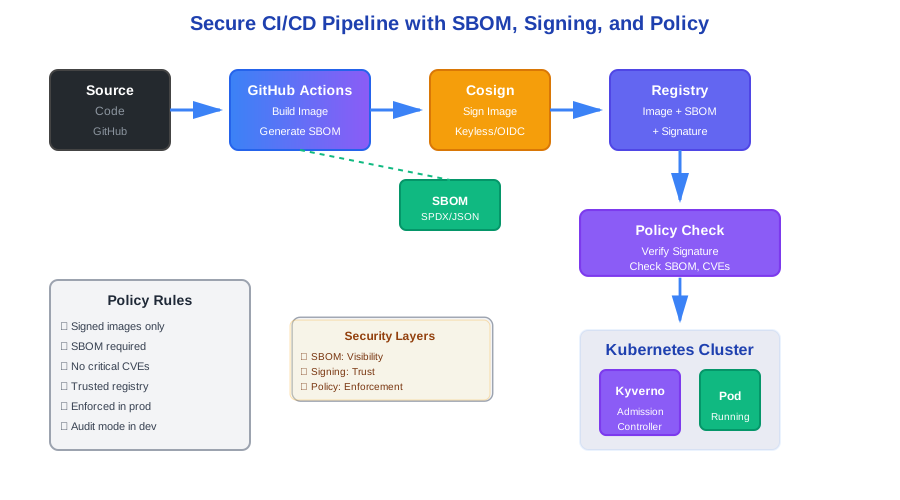
Here’s a simple pipeline from commit to deploy with all steps wired.
GitHub Actions Workflow
Create .github/workflows/build-and-deploy.yml:
name: Build, Sign, and Deploy

on:
  push:
    branches: [main]
  pull_request:
    branches: [main]

env:
  REGISTRY: ghcr.io
  IMAGE_NAME: ${{ github.repository }}

jobs:
  build:
    runs-on: ubuntu-latest
    permissions:
      contents: read
      id-token: write  # Required for keyless signing
      packages: write  # Required to push images

    steps:
    - name: Checkout
      uses: actions/checkout@v4

    - name: Set up Docker Buildx
      uses: docker/setup-buildx-action@v3

    - name: Log in to Container Registry
      uses: docker/login-action@v3
      with:
        registry: ${{ env.REGISTRY }}
        username: ${{ github.actor }}
        password: ${{ secrets.GITHUB_TOKEN }}

    - name: Build and push image
      uses: docker/build-push-action@v5
      with:
        context: .
        push: true
        tags: |
          ${{ env.REGISTRY }}/${{ env.IMAGE_NAME }}:${{ github.sha }}
          ${{ env.REGISTRY }}/${{ env.IMAGE_NAME }}:latest
        cache-from: type=gha
        cache-to: type=gha,mode=max

    - name: Install Syft
      run: |
        curl -sSfL https://raw.githubusercontent.com/anchore/syft/main/install.sh | sh -s -- -b /usr/local/bin

    - name: Generate SBOM
      run: |
        syft ${{ env.REGISTRY }}/${{ env.IMAGE_NAME }}:${{ github.sha }} \
          -o spdx-json > sbom.spdx.json

    - name: Attach SBOM to image
      run: |
        oras push ${{ env.REGISTRY }}/${{ env.IMAGE_NAME }}:${{ github.sha }}-sbom \
          sbom.spdx.json:application/spdx+json \
          --username ${{ github.actor }} \
          --password ${{ secrets.GITHUB_TOKEN }}

    - name: Install Cosign
      uses: sigstore/cosign-installer@v3

    - name: Sign image
      run: |
        cosign sign ${{ env.REGISTRY }}/${{ env.IMAGE_NAME }}:${{ github.sha }}
      env:
        COSIGN_EXPERIMENTAL: 1  # Enable keyless signing

    - name: Verify signature
      run: |
        cosign verify ${{ env.REGISTRY }}/${{ env.IMAGE_NAME }}:${{ github.sha }} \
          --certificate-identity-regexp ".*" \
          --certificate-oidc-issuer "https://token.actions.githubusercontent.com"

    - name: Check SBOM for critical CVEs
      run: |
        trivy sbom sbom.spdx.json --severity HIGH,CRITICAL --exit-code 1 || true
      continue-on-error: true  # Don't fail build, just warn

    - name: Deploy to Kubernetes
      if: github.ref == 'refs/heads/main'
      run: |
        # Your deploy logic here
        echo "Deploying ${{ env.REGISTRY }}/${{ env.IMAGE_NAME }}:${{ github.sha }}"
This workflow:
- Builds the Docker image
- Generates SBOM with Syft
- Attaches SBOM to image as OCI artifact
- Signs image with Cosign (keyless)
- Verifies signature
- Checks SBOM for critical CVEs (warns, doesn’t fail)
- Deploys to Kubernetes
SBOM Generation Command
The SBOM generation is straightforward:
# Generate SBOM
syft myregistry.io/myapp:v1.0.0 -o spdx-json > sbom.spdx.json

# View contents
cat sbom.spdx.json | jq '.packages[0:5]'
The output includes all packages, versions, and dependencies.
Cosign Signing and Verification
Signing in CI:
# Sign image (keyless)
cosign sign myregistry.io/myapp:v1.0.0
Cosign uses OIDC to authenticate. No keys to manage.
Verification as pre-deploy step:
# Verify before deploy
cosign verify myregistry.io/myapp:v1.0.0 \
  --certificate-identity-regexp ".*" \
  --certificate-oidc-issuer "https://token.actions.githubusercontent.com"
If verification fails, the script exits with error. Deploy stops.
Verification in admission controller:
Use Kyverno to verify at cluster level. See policy example below.
Policy as Code Snippet
Create a Kyverno policy that enforces signed images:
apiVersion: kyverno.io/v1
kind: ClusterPolicy
metadata:
  name: require-signed-images
spec:
  validationFailureAction: enforce
  background: false
  rules:
  - name: check-image-signature
    match:
      resources:
        kinds:
        - Pod
        namespaces:
        - production  # Start with prod only
    validate:
      message: "Image must be signed and from trusted registry"
      pattern:
        spec:
          containers:
          - name: "*"
            image: "ghcr.io/*"  # Only allow images from GitHub Container Registry
    verifyImages:
    - image: "ghcr.io/*"
      attestors:
      - count: 1
        entries:
        - keyless:
            issuer: "https://token.actions.githubusercontent.com"
            subject: ".*"  # Allow any GitHub Actions workflow
This policy:
- Only allows images from
ghcr.io/* - Requires signature verification
- Accepts signatures from GitHub Actions (keyless)
- Enforces in production namespace only
Tie it back to CI:
The CI workflow signs images. The cluster policy verifies them. If someone pushes an unsigned image manually, the cluster rejects it.
Kubernetes Admission Config
Install Kyverno:
kubectl apply -f https://github.com/kyverno/kyverno/releases/latest/download/install.yamlApply the policy:
kubectl apply -f kyverno-policy.yamlTest it:
# Try to deploy unsigned image
kubectl run test --image=myregistry.io/myapp:unsigned -n production

# Should fail with:
# Error from server: admission webhook "validate.kyverno.svc" denied the request:
# policy require-signed-images: check-image-signature: Image must be signed
The cluster blocks unsigned images automatically.
What You Get
After setting this up, you have:
- SBOM for every build - You know what’s in every image
- Signed images - You can verify images came from your pipeline
- Policy enforcement - The cluster blocks bad deployments automatically
- CVE visibility - You see vulnerabilities before they reach production
This doesn’t solve everything. But it’s a solid foundation. You can add more policies. You can add more checks. Start here.
Common Issues and Fixes
SBOM generation fails:
The image might not exist locally. Pull it first, or use remote scanning:
# Remote scanning
syft registry:myregistry.io/myapp:v1.0.0 -o spdx-json > sbom.spdx.json
Signing fails with OIDC error:
Make sure GitHub Actions has the right permissions:
permissions:
  id-token: write  # Required for keyless signing
Policy blocks all images:
Check the policy regex. It might be too strict:
image: "ghcr.io/*" # Make sure this matches your imagesVerification fails in cluster:
Check the OIDC issuer matches your CI provider:
issuer: "https://token.actions.githubusercontent.com" # For GitHub ActionsNext Steps
Start simple. Get SBOM generation working. Then add signing. Then add policies. One step at a time.
Once it’s working, you can add:
- More granular policies (by namespace, by team)
- CVE scanning with automatic blocking
- SBOM storage in a dedicated system
- Policy testing in CI before deploy
- Metrics and alerting
The pattern is the same. The details depend on your setup.
Conclusion
Supply chain security isn’t optional anymore. SBOMs, signing, and policy as code are the basics.
You don’t need complex tooling. GitHub Actions, Cosign, Syft, and Kyverno are enough. Start simple. Iterate based on what you need.
Most teams see results quickly. Visibility improves. Trust increases. Bad deployments get blocked automatically.
The question isn’t whether this helps. It’s when you’ll start using it.
Discussion
Loading comments...