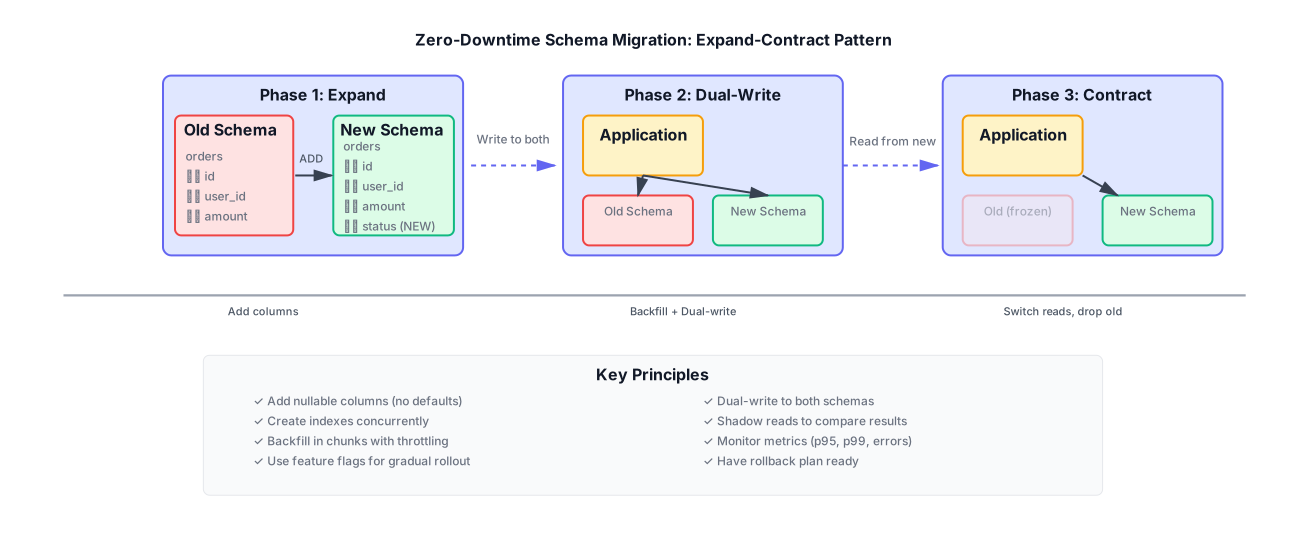
Zero-Downtime Schema Migrations: Expand-Contract with Dual-Write Cutovers
Most outages in mature systems are caused by migrations. You can avoid them with safe steps and the right guardrails.
This guide covers the expand-contract pattern. It’s a way to change your database schema without downtime. You add new columns, switch reads and writes, then remove old columns. Each step is reversible.
Why This Matters
Schema changes are risky. They can lock tables, break queries, or cause data loss. The expand-contract pattern reduces that risk.
Here’s what can go wrong:
Locks: Adding a column with a default value can lock the table. In PostgreSQL, ALTER TABLE ... ADD COLUMN ... DEFAULT rewrites the table. That locks everything.
Long scans: Backfilling data can scan millions of rows. That slows down queries.
Hot tables: Popular tables get hit hard during migrations. One slow query can cascade.
ORMs issuing dangerous queries: Some ORMs generate queries that don’t work with your new schema. They might reference columns that don’t exist yet.
Rolling deploys vs. schema drift: You deploy code that expects the new schema. But some servers still have the old code. That mismatch causes errors.
The expand-contract pattern fixes these problems. You make changes in safe steps. Each step can be rolled back.
The Failure Modes
Before we get into the solution, let’s look at what breaks.
Table Locks
PostgreSQL locks tables during certain operations. ALTER TABLE ... ADD COLUMN ... DEFAULT rewrites the table. That means:
- All writes block
- Reads might block
- The operation can take hours on large tables
Example of a dangerous migration:
-- DON'T DO THIS
ALTER TABLE orders ADD COLUMN status VARCHAR(50) DEFAULT 'pending';
This locks the table. On a table with 100 million rows, that’s hours of downtime.
Long Scans
Backfilling data often means scanning the entire table:
-- This scans every row
UPDATE orders SET status = 'pending' WHERE status IS NULL;
If you have 100 million rows, that’s slow. It also creates WAL (Write-Ahead Log) entries. That can fill up disk.
Hot Tables
Popular tables get hit hard. During a migration:
- Reads slow down
- Writes queue up
- Replication lag increases
One slow query can cascade. Users see timeouts. The system degrades.
ORM Mismatches
ORMs generate queries based on your models. If you deploy new code before the schema is ready:
# New code expects 'status' column
order = Order.objects.get(id=123)
print(order.status)  # Column doesn't exist yet!
That breaks. You need to coordinate code and schema changes.
Rolling Deploys
You deploy code in stages. Some servers have new code. Some have old code. If the schema is in between states, you get errors.
Expand-Contract in Practice
The expand-contract pattern has three phases:
- Expand: Add new columns, tables, indexes. Write adapters. Plan backfill.
- Dual-write: Write to old and new shapes.
- Contract: Switch reads, freeze old path, drop old columns.
Let’s walk through each phase.
Phase 1: Expand
Add new columns as nullable. Don’t add defaults yet.
-- Safe: nullable column, no default
ALTER TABLE orders ADD COLUMN status VARCHAR(50);

-- Create index concurrently (doesn't lock)
CREATE INDEX CONCURRENTLY idx_orders_status ON orders(status);
Why nullable? Because existing rows don’t have values yet. You’ll backfill later.
Why no default? Because adding a default locks the table. We’ll set values during backfill.
Write adapters: Your code should handle both old and new shapes. Write a function that reads from both:
// Adapter that reads from old or new column
function getOrderStatus(order) {
  // New column takes precedence
  if (order.status !== null && order.status !== undefined) {
    return order.status;
  }
  // Fall back to old column
  return order.old_status || 'pending';
}
Backfill plan: Decide how to populate the new column. We’ll cover this later.
Phase 2: Dual-Write
Write to both old and new shapes. This ensures both are in sync.
async function createOrder(orderData) {
  const client = await pool.connect();

  try {
    await client.query('BEGIN');

    // Write to new shape
    await client.query(
      `INSERT INTO orders (id, user_id, amount, status, created_at)
       VALUES ($1, $2, $3, $4, $5)`,
      [orderData.id, orderData.userId, orderData.amount, orderData.status, new Date()]
    );

    // Also write to old shape (if it exists)
    // This ensures backward compatibility
    await client.query(
      `UPDATE orders SET old_status = $1 WHERE id = $2`,
      [orderData.status, orderData.id]
    );

    await client.query('COMMIT');
  } catch (error) {
    await client.query('ROLLBACK');
    throw error;
  } finally {
    client.release();
  }
}
Dual-write means:
- New code writes to both
- Old code still works
- Both shapes stay in sync
Read-path fan-out: Read from both, compare results. This helps catch bugs:
async function getOrder(id) {
  const [newResult, oldResult] = await Promise.all([
    pool.query('SELECT * FROM orders WHERE id = $1', [id]),
    pool.query('SELECT * FROM orders_old WHERE id = $1', [id])
  ]);

  // Compare for debugging
  if (JSON.stringify(newResult.rows[0]) !== JSON.stringify(oldResult.rows[0])) {
    logger.warn('Data mismatch', { id, new: newResult.rows[0], old: oldResult.rows[0] });
  }

  return newResult.rows[0];
}
Read-preference flag: Use a feature flag to switch reads:
const READ_FROM_NEW = process.env.READ_FROM_NEW === 'true';

async function getOrder(id) {
  if (READ_FROM_NEW) {
    return await pool.query('SELECT * FROM orders WHERE id = $1', [id]);
  } else {
    return await pool.query('SELECT * FROM orders_old WHERE id = $1', [id]);
  }
}
Start with the flag off. Turn it on gradually. Monitor for errors.
Phase 3: Contract
Switch reads to the new path. Freeze the old path. Drop old columns.
Switch reads: Turn on the read-preference flag. All reads go to the new schema.
Freeze old path: Stop writing to old columns. Keep them for a while in case you need to roll back.
// Stop writing to old columns
async function createOrder(orderData) {
  // Only write to new shape now
  await pool.query(
    `INSERT INTO orders (id, user_id, amount, status, created_at)
     VALUES ($1, $2, $3, $4, $5)`,
    [orderData.id, orderData.userId, orderData.amount, orderData.status, new Date()]
  );
  // No more old_status writes
}
Drop old columns: After a few days, if everything looks good, drop old columns:
-- Wait a few days, then:
ALTER TABLE orders DROP COLUMN old_status;
This is the point of no return. Make sure you’re confident.
Backfills Without Pain
Backfilling data is tricky. You need to update millions of rows without locking the table.
Chunking
Process rows in chunks. Use primary key ranges or time windows.
Primary key ranges:
async function backfillOrders() {
  const BATCH_SIZE = 1000;
  let lastId = 0;

  while (true) {
    const rows = await pool.query(
      `SELECT id, old_status FROM orders
       WHERE id > $1 AND status IS NULL
       ORDER BY id
       LIMIT $2`,
      [lastId, BATCH_SIZE]
    );

    if (rows.rows.length === 0) {
      break; // Done
    }

    for (const row of rows.rows) {
      await pool.query(
        'UPDATE orders SET status = $1 WHERE id = $2',
        [row.old_status || 'pending', row.id]
      );
    }

    lastId = rows.rows[rows.rows.length - 1].id;

    // Throttle to avoid overwhelming the database
    await sleep(100); // 100ms between batches
  }
}
Time windows:
async function backfillOrdersByTime() {
  const BATCH_SIZE = 1000;
  let startTime = new Date('2024-01-01');
  const endTime = new Date();

  while (startTime < endTime) {
    const windowEnd = new Date(startTime.getTime() + 24 * 60 * 60 * 1000); // 1 day

    const rows = await pool.query(
      `SELECT id, old_status FROM orders
       WHERE created_at >= $1 AND created_at < $2 AND status IS NULL
       LIMIT $3`,
      [startTime, windowEnd, BATCH_SIZE]
    );

    for (const row of rows.rows) {
      await pool.query(
        'UPDATE orders SET status = $1 WHERE id = $2',
        [row.old_status || 'pending', row.id]
      );
    }

    startTime = windowEnd;
    await sleep(100);
  }
}
Throttling and Vacuums
Throttle updates to avoid overwhelming the database. Also run VACUUM periodically to reclaim space.
// Throttle updates
await sleep(100); // Wait 100ms between batches

// Run VACUUM periodically (in a separate job)
await pool.query('VACUUM ANALYZE orders');
Idempotent Backfill Jobs
Make backfills idempotent. If they fail, you can resume.
async function backfillOrdersWithResume() {
  const RESUME_TOKEN_KEY = 'backfill_orders_resume_token';
  let lastId = await getResumeToken(RESUME_TOKEN_KEY) || 0;
  const BATCH_SIZE = 1000;

  try {
    while (true) {
      const rows = await pool.query(
        `SELECT id, old_status FROM orders
         WHERE id > $1 AND status IS NULL
         ORDER BY id
         LIMIT $2`,
        [lastId, BATCH_SIZE]
      );

      if (rows.rows.length === 0) {
        break;
      }

      for (const row of rows.rows) {
        // Idempotent: only update if status is still NULL
        await pool.query(
          `UPDATE orders SET status = $1
           WHERE id = $2 AND status IS NULL`,
          [row.old_status || 'pending', row.id]
        );
      }

      lastId = rows.rows[rows.rows.length - 1].id;
      await saveResumeToken(RESUME_TOKEN_KEY, lastId);

      await sleep(100);
    }

    // Clear resume token when done
    await clearResumeToken(RESUME_TOKEN_KEY);
  } catch (error) {
    logger.error('Backfill failed', { error, lastId });
    // Resume token is saved, can resume later
    throw error;
  }
}
Resume markers: Store progress in a separate table:
CREATE TABLE backfill_progress (
  job_name VARCHAR(255) PRIMARY KEY,
  last_processed_id BIGINT,
  updated_at TIMESTAMP DEFAULT NOW()
);
Indexing Safely
Creating indexes can lock tables. Use concurrent indexes when possible.
PostgreSQL: Concurrent Indexes
PostgreSQL supports CREATE INDEX CONCURRENTLY. It doesn’t lock the table:
-- Safe: doesn't lock table
CREATE INDEX CONCURRENTLY idx_orders_status ON orders(status);

-- Dangerous: locks table
CREATE INDEX idx_orders_status ON orders(status);
Concurrent indexes take longer, but they don’t block writes.
MySQL: Online DDL
MySQL 5.6+ supports online DDL for some operations:
-- Online DDL (doesn't lock)
ALTER TABLE orders ADD INDEX idx_status (status), ALGORITHM=INPLACE, LOCK=NONE;
Check your MySQL version. Older versions lock the table.
Strong vs. Weak Indexes
Strong indexes: Unique constraints, foreign keys. These validate data. They can slow down writes.
Weak indexes: Regular indexes for queries. These are safer to add.
Add weak indexes first. Add strong indexes later if needed.
Avoiding Full Table Locks
Some operations always lock:
- Adding a column with a default (in PostgreSQL)
- Changing column types
- Adding foreign keys (can lock)
Avoid these during peak hours. Use the expand-contract pattern instead.
Operational Controls
Use feature flags and toggles to control the migration.
Feature Flags
Use feature flags to switch between old and new paths:
const flags = {
  readFromNew: process.env.READ_FROM_NEW === 'true',
  writeToNew: process.env.WRITE_TO_NEW === 'true',
  enableBackfill: process.env.ENABLE_BACKFILL === 'true'
};

async function getOrder(id) {
  if (flags.readFromNew) {
    return await getOrderFromNew(id);
  } else {
    return await getOrderFromOld(id);
  }
}
Turn flags on gradually. Monitor for errors.
Safe Rollback Plan
Have a rollback plan:
- Turn off read-from-new flag
- Turn off write-to-new flag
- Keep old columns for a few days
- Monitor for issues
If something breaks, roll back immediately.
Blast Radius Limits
Limit the impact of failures:
- Use circuit breakers
- Set timeouts
- Monitor error rates
- Have alerts
If error rates spike, roll back automatically.
Testing and Observability
Test migrations before running them in production.
Shadow Reads and Diffing
Read from both old and new paths. Compare results:
async function shadowRead(id) {
  const [oldResult, newResult] = await Promise.all([
    getOrderFromOld(id),
    getOrderFromNew(id)
  ]);

  if (JSON.stringify(oldResult) !== JSON.stringify(newResult)) {
    logger.warn('Shadow read mismatch', { id, old: oldResult, new: newResult });
    metrics.increment('shadow_read.mismatch');
  }

  return oldResult; // Return old result to user
}
Run shadow reads for a few days. If there are no mismatches, switch to new path.
Query Plans and Regressions
Check query plans before and after:
-- Before migration
EXPLAIN ANALYZE SELECT * FROM orders WHERE status = 'pending';

-- After migration
EXPLAIN ANALYZE SELECT * FROM orders WHERE status = 'pending';
Compare execution times. If queries slow down, investigate.
Error Budgets for Migration Speed
Set error budgets. If errors exceed the budget, slow down or roll back:
const ERROR_BUDGET = 0.01; // 1% error rate
let errorCount = 0;
let totalRequests = 0;

function checkErrorBudget() {
  const errorRate = errorCount / totalRequests;
  if (errorRate > ERROR_BUDGET) {
    logger.error('Error budget exceeded', { errorRate, budget: ERROR_BUDGET });
    // Roll back or slow down
    process.env.READ_FROM_NEW = 'false';
  }
}
Real Example: Splitting a Wide Table
Let’s walk through a real example: splitting orders into orders + order_items.
The Problem
You have a wide orders table:
CREATE TABLE orders (
  id BIGSERIAL PRIMARY KEY,
  user_id BIGINT,
  item_1_name VARCHAR(255),
  item_1_price DECIMAL(10,2),
  item_2_name VARCHAR(255),
  item_2_price DECIMAL(10,2),
  -- ... more items
  created_at TIMESTAMP
);
This is hard to query. You want to normalize it:
CREATE TABLE orders (
  id BIGSERIAL PRIMARY KEY,
  user_id BIGINT,
  created_at TIMESTAMP
);

CREATE TABLE order_items (
  id BIGSERIAL PRIMARY KEY,
  order_id BIGINT REFERENCES orders(id),
  name VARCHAR(255),
  price DECIMAL(10,2)
);
The Solution
Step 1: Expand
Create the new tables. Keep the old table:
-- Create new tables
CREATE TABLE orders_new (
  id BIGSERIAL PRIMARY KEY,
  user_id BIGINT,
  created_at TIMESTAMP
);

CREATE TABLE order_items_new (
  id BIGSERIAL PRIMARY KEY,
  order_id BIGINT REFERENCES orders_new(id),
  name VARCHAR(255),
  price DECIMAL(10,2)
);

-- Add foreign key index
CREATE INDEX CONCURRENTLY idx_order_items_order_id ON order_items_new(order_id);
Step 2: Dual-Write
Write to both old and new:
async function createOrder(orderData) {
  const client = await pool.connect();

  try {
    await client.query('BEGIN');

    // Write to old table
    await client.query(
      `INSERT INTO orders (user_id, item_1_name, item_1_price, item_2_name, item_2_price, created_at)
       VALUES ($1, $2, $3, $4, $5, $6)`,
      [orderData.userId, orderData.items[0].name, orderData.items[0].price,
       orderData.items[1].name, orderData.items[1].price, new Date()]
    );

    // Write to new tables
    const orderResult = await client.query(
      `INSERT INTO orders_new (user_id, created_at) VALUES ($1, $2) RETURNING id`,
      [orderData.userId, new Date()]
    );
    const orderId = orderResult.rows[0].id;

    for (const item of orderData.items) {
      await client.query(
        `INSERT INTO order_items_new (order_id, name, price) VALUES ($1, $2, $3)`,
        [orderId, item.name, item.price]
      );
    }

    await client.query('COMMIT');
  } catch (error) {
    await client.query('ROLLBACK');
    throw error;
  } finally {
    client.release();
  }
}
Step 3: Backfill
Backfill existing orders:
async function backfillOrders() {
  const BATCH_SIZE = 100;
  let lastId = 0;

  while (true) {
    const orders = await pool.query(
      `SELECT * FROM orders WHERE id > $1 ORDER BY id LIMIT $2`,
      [lastId, BATCH_SIZE]
    );

    if (orders.rows.length === 0) {
      break;
    }

    for (const order of orders.rows) {
      // Insert into new tables
      const orderResult = await pool.query(
        `INSERT INTO orders_new (id, user_id, created_at) VALUES ($1, $2, $3) RETURNING id`,
        [order.id, order.user_id, order.created_at]
      );

      // Insert items
      for (let i = 1; i <= 10; i++) {
        const itemName = order[`item_${i}_name`];
        const itemPrice = order[`item_${i}_price`];

        if (itemName) {
          await pool.query(
            `INSERT INTO order_items_new (order_id, name, price) VALUES ($1, $2, $3)`,
            [order.id, itemName, itemPrice]
          );
        }
      }
    }

    lastId = orders.rows[orders.rows.length - 1].id;
    await sleep(100);
  }
}
Step 4: Contract
Switch reads to new tables. Drop old table:
-- Rename tables
ALTER TABLE orders RENAME TO orders_old;
ALTER TABLE orders_new RENAME TO orders;
ALTER TABLE order_items_new RENAME TO order_items;

-- After a few days, drop old table
DROP TABLE orders_old;
Contract phase with cascade deletes: If you have foreign keys, handle cascade deletes:
-- Add cascade delete
ALTER TABLE order_items
  DROP CONSTRAINT order_items_order_id_fkey,
  ADD CONSTRAINT order_items_order_id_fkey
    FOREIGN KEY (order_id) REFERENCES orders(id) ON DELETE CASCADE;
This ensures referential integrity.
Code Requirements
Here are the concrete code snippets you need.
Safe Migration SQL (PostgreSQL)
-- Step 1: Add nullable column (no default, no lock)
ALTER TABLE orders ADD COLUMN status VARCHAR(50);

-- Step 2: Create index concurrently (no lock)
CREATE INDEX CONCURRENTLY idx_orders_status ON orders(status);

-- Step 3: Backfill data (in application code, not SQL)

-- Step 4: After backfill, add NOT NULL constraint (locks briefly)
ALTER TABLE orders ALTER COLUMN status SET NOT NULL;

-- Step 5: After contract phase, drop old column
ALTER TABLE orders DROP COLUMN old_status;
Dual-Write in Service Code (Node.js)
const { Pool } = require('pg');

const pool = new Pool({
  connectionString: process.env.DATABASE_URL
});

async function createOrder(orderData) {
  const client = await pool.connect();

  try {
    await client.query('BEGIN');

    // Write to new shape
    const result = await client.query(
      `INSERT INTO orders (user_id, amount, status, created_at)
       VALUES ($1, $2, $3, $4)
       RETURNING id`,
      [orderData.userId, orderData.amount, orderData.status || 'pending', new Date()]
    );

    const orderId = result.rows[0].id;

    // Also write to old shape for backward compatibility
    if (orderData.oldStatus) {
      await client.query(
        `UPDATE orders SET old_status = $1 WHERE id = $2`,
        [orderData.oldStatus, orderId]
      );
    }

    await client.query('COMMIT');
    return { id: orderId };
  } catch (error) {
    await client.query('ROLLBACK');
    throw error;
  } finally {
    client.release();
  }
}

// With retries
async function createOrderWithRetry(orderData, maxRetries = 3) {
  for (let i = 0; i < maxRetries; i++) {
    try {
      return await createOrder(orderData);
    } catch (error) {
      if (i === maxRetries - 1) {
        throw error;
      }
      await sleep(1000 * (i + 1)); // Exponential backoff
    }
  }
}
Backfill Worker
const { Pool } = require('pg');
const { Pool: MetricsPool } = require('pg');

const pool = new Pool({
  connectionString: process.env.DATABASE_URL
});

class BackfillWorker {
  constructor(config) {
    this.batchSize = config.batchSize || 1000;
    this.throttleMs = config.throttleMs || 100;
    this.resumeTokenKey = config.resumeTokenKey;
    this.metrics = {
      rowsProcessed: 0,
      rowsPerSecond: 0,
      lag: 0,
      startTime: Date.now()
    };
  }

  async getResumeToken() {
    const result = await pool.query(
      'SELECT last_processed_id FROM backfill_progress WHERE job_name = $1',
      [this.resumeTokenKey]
    );
    return result.rows[0]?.last_processed_id || 0;
  }

  async saveResumeToken(lastId) {
    await pool.query(
      `INSERT INTO backfill_progress (job_name, last_processed_id, updated_at)
       VALUES ($1, $2, NOW())
       ON CONFLICT (job_name)
       DO UPDATE SET last_processed_id = $2, updated_at = NOW()`,
      [this.resumeTokenKey, lastId]
    );
  }

  async processBatch() {
    const lastId = await this.getResumeToken();

    const rows = await pool.query(
      `SELECT id, old_status FROM orders
       WHERE id > $1 AND status IS NULL
       ORDER BY id
       LIMIT $2`,
      [lastId, this.batchSize]
    );

    if (rows.rows.length === 0) {
      return false; // Done
    }

    for (const row of rows.rows) {
      // Idempotent update
      await pool.query(
        `UPDATE orders SET status = $1 WHERE id = $2 AND status IS NULL`,
        [row.old_status || 'pending', row.id]
      );
    }

    const newLastId = rows.rows[rows.rows.length - 1].id;
    await this.saveResumeToken(newLastId);

    // Update metrics
    this.metrics.rowsProcessed += rows.rows.length;
    const elapsed = (Date.now() - this.metrics.startTime) / 1000;
    this.metrics.rowsPerSecond = this.metrics.rowsProcessed / elapsed;
    this.metrics.lag = newLastId;

    // Log progress
    console.log(`Processed ${this.metrics.rowsProcessed} rows, ${this.metrics.rowsPerSecond.toFixed(2)} rows/sec, lag: ${this.metrics.lag}`);

    return true; // More to process
  }

  async shadowReadCompare(orderId) {
    const [oldResult, newResult] = await Promise.all([
      pool.query('SELECT * FROM orders_old WHERE id = $1', [orderId]),
      pool.query('SELECT * FROM orders WHERE id = $1', [orderId])
    ]);

    if (JSON.stringify(oldResult.rows[0]) !== JSON.stringify(newResult.rows[0])) {
      console.warn('Shadow read mismatch', { orderId, old: oldResult.rows[0], new: newResult.rows[0] });
      return false;
    }

    return true;
  }

  async run() {
    console.log('Starting backfill...');

    try {
      while (await this.processBatch()) {
        await sleep(this.throttleMs);
      }

      console.log('Backfill complete!', this.metrics);
    } catch (error) {
      console.error('Backfill failed', { error, metrics: this.metrics });
      throw error;
    }
  }
}

function sleep(ms) {
  return new Promise(resolve => setTimeout(resolve, ms));
}

// Usage
const worker = new BackfillWorker({
  batchSize: 1000,
  throttleMs: 100,
  resumeTokenKey: 'backfill_orders_status'
});

worker.run().catch(console.error);
Load Test Script (k6)
import http from 'k6/http';
import { check, sleep } from 'k6';
import { Rate } from 'k6/metrics';

const errorRate = new Rate('errors');

export const options = {
  stages: [
    { duration: '2m', target: 100 }, // Ramp up
    { duration: '5m', target: 100 }, // Stay at 100 users
    { duration: '2m', target: 0 },   // Ramp down
  ],
  thresholds: {
    'http_req_duration': ['p95<500', 'p99<1000'],
    'errors': ['rate<0.01'],
  },
};

export default function () {
  const idempotencyKey = `test-${__VU}-${__ITER}`;
  const payload = JSON.stringify({
    userId: `user-${Math.floor(Math.random() * 1000)}`,
    amount: Math.floor(Math.random() * 1000),
    status: 'pending'
  });

  const params = {
    headers: {
      'Content-Type': 'application/json',
      'Idempotency-Key': idempotencyKey,
    },
  };

  const res = http.post('http://localhost:3000/orders', payload, params);

  const success = check(res, {
    'status is 200 or 201': (r) => r.status === 200 || r.status === 201,
    'response time < 500ms': (r) => r.timings.duration < 500,
  });

  errorRate.add(!success);

  // Retry with same idempotency key
  if (Math.random() < 0.1) { // 10% retry rate
    sleep(1);
    const retryRes = http.post('http://localhost:3000/orders', payload, params);
    check(retryRes, {
      'retry returns same result': (r) => {
        const body = JSON.parse(r.body);
        return body.id === JSON.parse(res.body).id;
      },
    });
  }

  sleep(1);
}
Metrics to Watch (Grafana/Prometheus)
Monitor these metrics during migrations:
Latency:
http_request_duration_seconds{p95, p99}database_query_duration_seconds{p95, p99}
Errors:
http_requests_total{status=~"5.."}database_errors_total
Locks:
postgres_locks_totalpostgres_lock_wait_time_seconds
Replication lag:
postgres_replication_lag_seconds
Backfill progress:
backfill_rows_processed_totalbackfill_rows_per_secondbackfill_lag
Deadlocks:
postgres_deadlocks_total
Set up alerts for:
- P95 latency > 500ms
- Error rate > 1%
- Lock wait time > 1s
- Replication lag > 10s
Conclusion
Zero-downtime schema migrations are possible. The expand-contract pattern makes them safe.
Remember:
- Expand: Add nullable columns, create indexes concurrently
- Dual-write: Write to both old and new shapes
- Contract: Switch reads, freeze old path, drop old columns
Use feature flags. Monitor metrics. Have a rollback plan. Test in staging first.
Most outages are caused by migrations. With the right approach, you can avoid them.
Discussion
Loading comments...