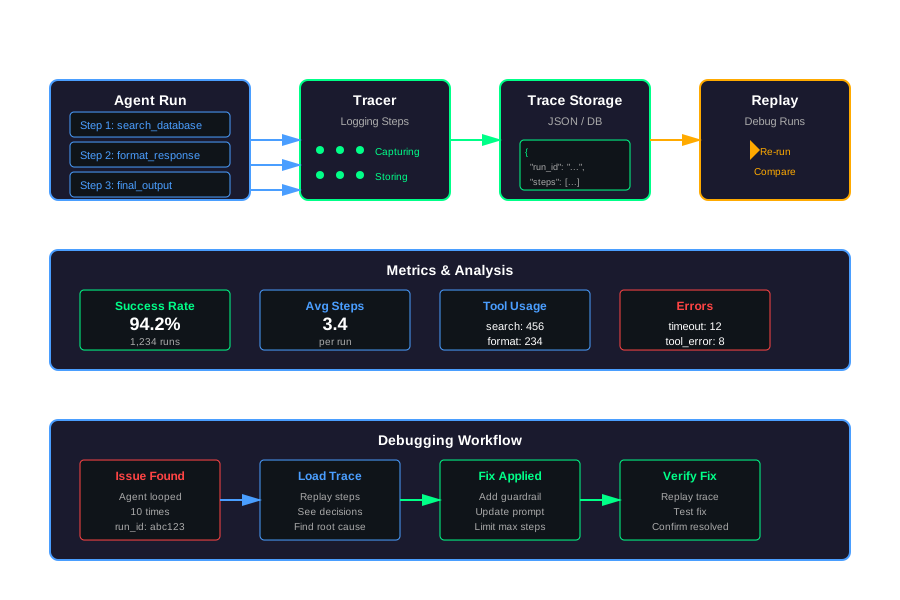
Tracing AI Agents: Logging, Replay, and Debugging for Tool-Using Workflows
Your agent did something weird. It called the wrong tool. It got stuck in a loop. It ignored important context. You want to know why.
Traditional logging doesn’t help much. You see the final output, maybe some errors. But you don’t see the decisions. You don’t see the tool calls. You don’t see where it went wrong.
Agent observability is different. You need to trace the entire workflow. Every step. Every tool call. Every decision point. Then you need to replay it. Compare versions. Debug it like normal software.
This article shows you how.
Why Observability for Agents is Different
Traditional logs show you what happened. Agent traces show you why it happened.
Traditional Logs vs Agent Traces
A traditional log entry might look like this:
[2025-11-14 10:23:45] INFO: Request completed. User: user_123, Response: "Here's your answer"That tells you the result. It doesn’t tell you how the agent got there.
An agent trace shows you the path:
Step 1: Agent decided to call "search_database"
Step 2: Tool input: {"query": "user question"}
Step 3: Tool output: {"results": [...]}
Step 4: Agent decided to call "format_response"
Step 5: Tool input: {"data": [...]}
Step 6: Final output: "Here's your answer"
Now you can see the decisions. You can see where it went wrong.
Agents Are Opaque
Agents make decisions you can’t see:
Hidden chain-of-thought: The model thinks through steps internally. You only see the final tool call, not the reasoning.
Implicit decisions: The agent picks tools based on context you might not have. It might skip steps. It might retry. You don’t know why.
Non-deterministic outputs: Same input, different results. Temperature settings, model updates, context changes. Without traces, you’re guessing.
Without Traces, Debugging is Just Guessing
You see an error: “Agent called wrong tool.” Why? Was it the prompt? The context? The model? You don’t know.
You see a loop: “Agent called the same tool 10 times.” Why? What was it trying to do? You don’t know.
You see a failure: “Agent didn’t use important context.” Why? Did it see the context? Did it ignore it? You don’t know.
Traces answer these questions. They show you the exact sequence of decisions. They show you where it diverged from what you expected.
Goal: Treat an Agent Run Like a Traceable Workflow
Think of an agent run like a distributed system trace. Each step is a span. Each tool call is an operation. You want to see the full timeline. You want to replay it. You want to compare runs.
That’s what agent tracing gives you.
What to Log for Each Agent Run
You need to capture enough to reconstruct the run. Not too much. Not too little.
Core Fields Per Run
Every run needs metadata:
- run_id: Unique identifier for this run
- user_id: Who triggered it (hashed for privacy)
- tenant: Multi-tenant isolation
- timestamps: Start time, end time, step timestamps
- model name and version: Which model, which version
- config: Temperature, max tokens, other settings
Example:
{
    "run_id": "run_20251114_102345_abc123",
    "user_id_hash": "a1b2c3d4",
    "tenant": "acme_corp",
    "start_time": "2025-11-14T10:23:45Z",
    "model": "gpt-4",
    "model_version": "2025-10-01",
    "config": {
        "temperature": 0.7,
        "max_tokens": 2000
    }
}
Per Step
For each step, log:
- Tool selected: Which tool the agent chose
- Tool input: What it passed to the tool
- Tool output: What the tool returned
- System + user messages: The conversation at that point (summarized if long)
Example:
{
    "step_id": 1,
    "timestamp": "2025-11-14T10:23:46Z",
    "tool_name": "search_database",
    "tool_input": {"query": "user question"},
    "tool_output": {"results": [...]},
    "messages": [
        {"role": "system", "content": "You are a helpful assistant..."},
        {"role": "user", "content": "user question"},
        {"role": "assistant", "content": "I'll search the database..."}
    ]
}
How to Keep Logs Safe
Logs contain sensitive data. Protect them.
Masking PII: Remove or mask names, emails, phone numbers, credit cards. Use regex patterns or PII detection libraries.
def mask_pii(text: str) -> str:
    # Remove emails
    text = re.sub(r'\b[A-Za-z0-9._%+-]+@[A-Za-z0-9.-]+\.[A-Z|a-z]{2,}\b', '[EMAIL]', text)
    # Remove phone numbers
    text = re.sub(r'\b\d{3}-\d{3}-\d{4}\b', '[PHONE]', text)
return textSampling: Don’t log everything. Log 100% of errors. Log 10-20% of successful runs. Log 100% of runs with explicit feedback.
Retention: Delete logs after 30-90 days. Keep only what you need.
Access control: Limit who can see logs. Use encryption at rest. Use secure transmission.
Designing an “Agent Trace” Schema
A trace is a structured record of one agent run. Keep it simple.
Simple JSON Structure
Here’s a minimal structure:
{
    "metadata": {
        "run_id": "run_123",
        "user_id_hash": "abc123",
        "tenant": "acme",
        "start_time": "2025-11-14T10:23:45Z",
        "end_time": "2025-11-14T10:23:50Z",
        "model": "gpt-4",
        "config": {...}
    },
    "messages": [
        {"role": "system", "content": "..."},
        {"role": "user", "content": "..."}
    ],
    "steps": [
        {
            "step_id": 1,
            "timestamp": "2025-11-14T10:23:46Z",
            "tool_name": "search",
            "tool_input": {...},
            "tool_output": {...},
            "messages_at_step": [...]
        }
    ],
    "final_output": "Here's your answer",
    "status": "success" | "error" | "timeout"
}
This gives you everything you need to reconstruct the run.
How to Store It
You have options:
Document store (MongoDB, CouchDB): Store each trace as a document. Easy to query. Good for ad-hoc analysis.
# MongoDB example
traces_collection.insert_one({
    "run_id": "run_123",
    "metadata": {...},
    "steps": [...]
})
Log pipeline (Elasticsearch, OpenSearch, ClickHouse): Stream traces as JSON logs. Good for search and aggregation.
# Elasticsearch example
es.index(
    index="agent-traces",
    document={
        "run_id": "run_123",
        "metadata": {...},
        "steps": [...]
    }
)
Time-series DB (InfluxDB, TimescaleDB): If you care about metrics over time.
Trade-offs:
- Rich logs = more storage = higher cost
- Simple logs = less detail = harder debugging
- Find the balance for your use case
Start simple. Add detail as you need it.
Replay: Turning Logs Back into a Run
Replay lets you re-run a past trace. Useful for debugging and testing.
The Idea
Given a saved trace, reconstruct the agent run. You can:
- See exactly what happened
- Test fixes without new runs
- Compare different prompts on the same input
Patterns
Full dry run: Use recorded tool outputs. Don’t call real tools. Just replay the decisions.
def replay_dry_run(trace: dict):
    """Replay using recorded tool outputs"""
    for step in trace["steps"]:
        print(f"Step {step['step_id']}: {step['tool_name']}")
        print(f"  Input: {step['tool_input']}")
        print(f"  Output: {step['tool_output']}")
Partial replay: Re-run the model calls but keep tool outputs fixed. Test if a new prompt would make different decisions.
def replay_partial(trace: dict, new_prompt: str):
    """Re-run model calls with new prompt, keep tool outputs"""
    for step in trace["steps"]:
        # Re-run model with new prompt
        decision = call_model(new_prompt, step["messages_at_step"])

        # But use recorded tool output
        tool_output = step["tool_output"]

        # Compare decisions
        if decision != step["tool_name"]:
            print(f"Different decision: {decision} vs {step['tool_name']}")
Shadow runs: Re-run with a new prompt or model and compare outputs. Don’t affect production.
def shadow_replay(trace: dict, new_prompt: str):
    """Re-run with new prompt, compare results"""
    original_output = trace["final_output"]

    # Re-run with new prompt
    new_output = run_agent_with_prompt(
        trace["messages"][0]["content"],  # user input
        new_prompt
    )

    # Compare
    comparison = compare_outputs(original_output, new_output)
    return comparison
How Replay Helps
Fixing bugs: Find the bug in the trace. Fix the prompt or code. Replay to verify the fix.
Explaining incidents: User reports a problem. Load their trace. See exactly what happened. Explain it.
Testing new prompts safely: Test new prompts on real past inputs. Compare results. Deploy only if better.
Debugging Workflow Examples
Here are common issues and how traces help.
Agent Picks the Wrong Tool
Problem: Agent calls send_email when it should call search_database.
How to debug:
- Load the trace for that run
- Look at the step where it picked
send_email - Check the messages at that step. What context did it have?
- Check the tool input. What did it think it was doing?
- Find the issue: Maybe the prompt is ambiguous. Maybe the context is missing.
Fix: Update the prompt to be more specific. Add guardrails. Replay to verify.
Agent Loops Between Tools
Problem: Agent calls search_database → format_result → search_database → format_result (repeats).
How to debug:
- Load the trace
- Look at the steps. See the pattern
- Check tool outputs. Is
format_resultreturning something that triggers another search? - Check the messages. Is the agent confused about what to do next?
Fix: Add a loop detector. Limit max steps. Update the prompt to be more decisive. Replay to verify.
Agent Ignores Important Context
Problem: Agent has user preferences in context but doesn’t use them.
How to debug:
- Load the trace
- Check the messages. Was the context in the messages?
- Check each step. Did the agent see the context?
- Check the final output. Did it use the context?
Fix: Make the context more prominent in the prompt. Add explicit instructions to use it. Replay to verify.
Using Traces to Add Guardrails
You find a pattern in traces: Agent always fails when X happens.
Add a guardrail:
def check_guardrail(step: dict) -> bool:
    """Check if step violates guardrail"""
    if step["tool_name"] == "send_email" and not step["tool_input"].get("recipient"):
        return False  # Violation
    return True

# In agent loop
if not check_guardrail(step):
    log_error("Guardrail violation", step)
    return error_response()
Replay past traces to test the guardrail.
Metrics and Simple Dashboards
Metrics tell you how agents are performing. Dashboards help you spot issues.
Per-Agent Metrics
Track these per agent:
- Steps per run: Average number of steps. High might mean loops or inefficiency.
- Tool calls per run: Which tools are used most. Are some tools never used?
- Success / failure rate: What percentage succeed? What percentage fail?
- Average tokens per run: Cost tracking. Are some runs expensive?
- Average latency: How long do runs take? Are some slow?
Example calculation:
def calculate_metrics(traces: list) -> dict:
    """Calculate metrics from traces"""
    total_runs = len(traces)
    successful = sum(1 for t in traces if t["status"] == "success")

    total_steps = sum(len(t["steps"]) for t in traces)
    avg_steps = total_steps / total_runs if total_runs > 0 else 0

    total_tokens = sum(
        t["metadata"].get("total_tokens", 0) for t in traces
    )
    avg_tokens = total_tokens / total_runs if total_runs > 0 else 0

    return {
        "success_rate": successful / total_runs if total_runs > 0 else 0,
        "avg_steps_per_run": avg_steps,
        "avg_tokens_per_run": avg_tokens
    }
Simple Dashboards
You don’t need fancy tools. Start with simple reports.
Top error types: Group errors by type. See what fails most.
def error_summary(traces: list) -> dict:
    """Summarize errors"""
    errors = {}
    for trace in traces:
        if trace["status"] == "error":
            error_type = trace.get("error_type", "unknown")
            errors[error_type] = errors.get(error_type, 0) + 1
    return errors
Example traces for failures: Show a few example traces for each error type. Helps debugging.
Time series of success rate: Plot success rate over time. See if it’s improving or degrading.
def success_rate_over_time(traces: list) -> list:
    """Calculate success rate by day"""
    by_day = {}
    for trace in traces:
        day = trace["metadata"]["start_time"][:10]  # YYYY-MM-DD
        if day not in by_day:
            by_day[day] = {"success": 0, "total": 0}

        by_day[day]["total"] += 1
        if trace["status"] == "success":
            by_day[day]["success"] += 1

    return [
        {
            "date": day,
            "success_rate": data["success"] / data["total"]
        }
        for day, data in sorted(by_day.items())
    ]
A Small Observability Layer for Agents
You need a simple abstraction for tracing. Here’s a minimal one.
The “Tracer” Abstraction
A Tracer has these methods:
start_run(metadata): Start a new runlog_step(step): Log a steplog_error(error): Log an errorend_run(final_output): End the run
Example:
tracer = Tracer()

# Start run
run_id = tracer.start_run({
    "user_id": "user_123",
    "model": "gpt-4"
})

# Log steps
tracer.log_step({
    "step_id": 1,
    "tool_name": "search",
    "tool_input": {...},
    "tool_output": {...}
})

# End run
tracer.end_run(run_id, "Final answer")
Where to Call It in the Agent Loop
Instrument your agent loop:
def run_agent(user_input: str, tools: list):
    tracer = Tracer()
    run_id = tracer.start_run({"user_input": user_input})

    try:
        messages = [{"role": "user", "content": user_input}]
        step_id = 0

        while step_id < MAX_STEPS:
            # Agent decides which tool to call
            decision = agent_decide(messages, tools)

            # Call tool
            tool_output = call_tool(decision["tool_name"], decision["tool_input"])

            # Log step
            step_id += 1
            tracer.log_step({
                "step_id": step_id,
                "tool_name": decision["tool_name"],
                "tool_input": decision["tool_input"],
                "tool_output": tool_output,
                "messages_at_step": messages
            })

            # Update messages
            messages.append({
                "role": "assistant",
                "content": f"Called {decision['tool_name']}"
            })
            messages.append({
                "role": "tool",
                "content": str(tool_output)
            })

            # Check if done
            if decision.get("done"):
                break

        final_output = format_final_answer(messages)
        tracer.end_run(run_id, final_output)
        return final_output

    except Exception as e:
        tracer.log_error(run_id, str(e))
        raise
How to Plug in Different Backends
Make the Tracer backend-agnostic:
class Tracer:
    def __init__(self, backend=None):
        self.backend = backend or InMemoryBackend()

    def start_run(self, metadata):
        return self.backend.start_run(metadata)

    def log_step(self, step):
        return self.backend.log_step(step)

    # ... etc
Implement different backends:
class InMemoryBackend:
    def __init__(self):
        self.runs = {}

    def start_run(self, metadata):
        run_id = f"run_{int(time.time())}"
        self.runs[run_id] = {
            "metadata": metadata,
            "steps": []
        }
        return run_id

class FileBackend:
    def __init__(self, filepath):
        self.filepath = filepath

    def start_run(self, metadata):
        # Write to file
        pass

class DatabaseBackend:
    def __init__(self, connection):
        self.conn = connection

    def start_run(self, metadata):
        # Write to database
        pass
This lets you switch backends without changing your agent code.
Practical Rollout Tips
Start small. Expand as needed.
Start with High-Value Workflows Only
Don’t instrument everything at once. Pick the workflows that matter most. The ones that fail often. The ones that are expensive. The ones that users care about.
Instrument those first. Learn from them. Then expand.
Keep Logs Minimal, Then Expand
Start with the basics:
- Run ID
- User ID (hashed)
- Steps (tool name, input, output)
- Final output
- Status
That’s enough to start debugging. Add more fields as you find you need them.
Use Traces in Weekly Reviews
Review traces weekly. Look for patterns:
- Common failure modes
- Tools that are never used
- Steps that always fail
- Prompts that need improvement
Use these insights to drive changes. Update prompts. Add guardrails. Fix bugs.
Code Examples
Here’s a complete, minimal implementation.
Agent Run Representation
from dataclasses import dataclass, field
from typing import List, Dict, Any, Optional
from datetime import datetime

@dataclass
class AgentStep:
    """Represents one step in an agent run"""
    step_id: int
    timestamp: str
    tool_name: str
    tool_input: Dict[str, Any]
    tool_output: Dict[str, Any]
    messages_at_step: List[Dict[str, str]] = field(default_factory=list)

@dataclass
class AgentRun:
    """Represents one complete agent run"""
    run_id: str
    metadata: Dict[str, Any]
    steps: List[AgentStep] = field(default_factory=list)
    final_output: Optional[str] = None
    status: str = "running"  # running, success, error, timeout
    error: Optional[str] = None
    start_time: str = field(default_factory=lambda: datetime.utcnow().isoformat())
    end_time: Optional[str] = None

    def to_dict(self) -> Dict[str, Any]:
        """Convert to dictionary for serialization"""
        return {
            "run_id": self.run_id,
            "metadata": self.metadata,
            "steps": [
                {
                    "step_id": s.step_id,
                    "timestamp": s.timestamp,
                    "tool_name": s.tool_name,
                    "tool_input": s.tool_input,
                    "tool_output": s.tool_output,
                    "messages_at_step": s.messages_at_step
                }
                for s in self.steps
            ],
            "final_output": self.final_output,
            "status": self.status,
            "error": self.error,
            "start_time": self.start_time,
            "end_time": self.end_time
        }
Tracer Class
import json
import time
from typing import Dict, Any, Optional, List
from datetime import datetime

class Tracer:
    """Simple tracer for agent runs"""

    def __init__(self, backend=None):
        self.backend = backend or InMemoryBackend()
        self.current_runs: Dict[str, AgentRun] = {}

    def start_run(self, metadata: Dict[str, Any]) -> str:
        """Start a new agent run"""
        run_id = f"run_{int(time.time() * 1000)}"

        run = AgentRun(
            run_id=run_id,
            metadata=metadata,
            start_time=datetime.utcnow().isoformat()
        )

        self.current_runs[run_id] = run
        self.backend.start_run(run)

        return run_id

    def log_step(self, run_id: str, step: Dict[str, Any]) -> None:
        """Log a step in the run"""
        if run_id not in self.current_runs:
            raise ValueError(f"Run {run_id} not found")

        agent_step = AgentStep(
            step_id=step.get("step_id", len(self.current_runs[run_id].steps) + 1),
            timestamp=step.get("timestamp", datetime.utcnow().isoformat()),
            tool_name=step["tool_name"],
            tool_input=step["tool_input"],
            tool_output=step["tool_output"],
            messages_at_step=step.get("messages_at_step", [])
        )

        self.current_runs[run_id].steps.append(agent_step)
        self.backend.log_step(run_id, agent_step)

    def log_error(self, run_id: str, error: str) -> None:
        """Log an error in the run"""
        if run_id not in self.current_runs:
            raise ValueError(f"Run {run_id} not found")

        run = self.current_runs[run_id]
        run.status = "error"
        run.error = error
        run.end_time = datetime.utcnow().isoformat()

        self.backend.log_error(run_id, error)

    def end_run(self, run_id: str, final_output: str) -> None:
        """End a run with final output"""
        if run_id not in self.current_runs:
            raise ValueError(f"Run {run_id} not found")

        run = self.current_runs[run_id]
        run.final_output = final_output
        run.status = "success"
        run.end_time = datetime.utcnow().isoformat()

        self.backend.end_run(run_id, final_output)

        # Optionally remove from current_runs to save memory
        # del self.current_runs[run_id]

    def get_run(self, run_id: str) -> Optional[AgentRun]:
        """Get a run by ID"""
        return self.current_runs.get(run_id) or self.backend.get_run(run_id)

class InMemoryBackend:
    """In-memory backend for testing"""

    def __init__(self):
        self.runs: Dict[str, AgentRun] = {}

    def start_run(self, run: AgentRun) -> None:
        self.runs[run.run_id] = run

    def log_step(self, run_id: str, step: AgentStep) -> None:
        if run_id in self.runs:
            self.runs[run_id].steps.append(step)

    def log_error(self, run_id: str, error: str) -> None:
        if run_id in self.runs:
            self.runs[run_id].status = "error"
            self.runs[run_id].error = error

    def end_run(self, run_id: str, final_output: str) -> None:
        if run_id in self.runs:
            self.runs[run_id].final_output = final_output
            self.runs[run_id].status = "success"

    def get_run(self, run_id: str) -> Optional[AgentRun]:
        return self.runs.get(run_id)

class FileBackend:
    """File-based backend that saves to JSON"""

    def __init__(self, filepath: str):
        self.filepath = filepath
        self.runs: Dict[str, AgentRun] = {}
        self._load()

    def _load(self) -> None:
        """Load runs from file"""
        try:
            with open(self.filepath, 'r') as f:
                data = json.load(f)
                for run_data in data:
                    run = self._dict_to_run(run_data)
                    self.runs[run.run_id] = run
        except FileNotFoundError:
            pass

    def _save(self) -> None:
        """Save runs to file"""
        with open(self.filepath, 'w') as f:
            json.dump([run.to_dict() for run in self.runs.values()], f, indent=2)

    def _dict_to_run(self, data: Dict[str, Any]) -> AgentRun:
        """Convert dict to AgentRun"""
        steps = [
            AgentStep(
                step_id=s["step_id"],
                timestamp=s["timestamp"],
                tool_name=s["tool_name"],
                tool_input=s["tool_input"],
                tool_output=s["tool_output"],
                messages_at_step=s.get("messages_at_step", [])
            )
            for s in data.get("steps", [])
        ]

        return AgentRun(
            run_id=data["run_id"],
            metadata=data["metadata"],
            steps=steps,
            final_output=data.get("final_output"),
            status=data.get("status", "success"),
            error=data.get("error"),
            start_time=data.get("start_time"),
            end_time=data.get("end_time")
        )

    def start_run(self, run: AgentRun) -> None:
        self.runs[run.run_id] = run
        self._save()

    def log_step(self, run_id: str, step: AgentStep) -> None:
        if run_id in self.runs:
            self.runs[run_id].steps.append(step)
            self._save()

    def log_error(self, run_id: str, error: str) -> None:
        if run_id in self.runs:
            self.runs[run_id].status = "error"
            self.runs[run_id].error = error
            self._save()

    def end_run(self, run_id: str, final_output: str) -> None:
        if run_id in self.runs:
            self.runs[run_id].final_output = final_output
            self.runs[run_id].status = "success"
            self.runs[run_id].end_time = datetime.utcnow().isoformat()
            self._save()

    def get_run(self, run_id: str) -> Optional[AgentRun]:
        return self.runs.get(run_id)
Instrumented Agent Loop
def run_agent_with_tracing(user_input: str, tools: List[Dict[str, Any]], tracer: Tracer) -> str:
    """Run an agent with tracing enabled"""

    # Start run
    run_id = tracer.start_run({
        "user_input": user_input,
        "tools": [t["name"] for t in tools],
        "model": "gpt-4"
    })

    try:
        messages = [
            {"role": "system", "content": "You are a helpful assistant. Use tools when needed."},
            {"role": "user", "content": user_input}
        ]

        step_id = 0
        MAX_STEPS = 10

        while step_id < MAX_STEPS:
            # Simulate agent decision (in real code, call your LLM here)
            # For demo, we'll use a simple pattern
            if step_id == 0:
                tool_name = "search"
                tool_input = {"query": user_input}
            elif step_id == 1:
                tool_name = "format"
                tool_input = {"data": "search results"}
            else:
                break  # Done

            # Simulate tool call
            tool_output = call_tool(tool_name, tool_input, tools)

            # Log step
            step_id += 1
            tracer.log_step(run_id, {
                "step_id": step_id,
                "tool_name": tool_name,
                "tool_input": tool_input,
                "tool_output": tool_output,
                "messages_at_step": messages.copy()
            })

            # Update messages
            messages.append({
                "role": "assistant",
                "content": f"I'll use {tool_name} to help you."
            })
            messages.append({
                "role": "tool",
                "content": str(tool_output)
            })

            # Check if done
            if step_id >= 2:
                break

        # Format final answer
        final_output = f"Based on the search and formatting, here's your answer: {user_input}"

        tracer.end_run(run_id, final_output)
        return final_output

    except Exception as e:
        tracer.log_error(run_id, str(e))
        raise

def call_tool(tool_name: str, tool_input: Dict[str, Any], tools: List[Dict[str, Any]]) -> Dict[str, Any]:
    """Simulate calling a tool"""
    tool = next((t for t in tools if t["name"] == tool_name), None)
    if not tool:
        raise ValueError(f"Tool {tool_name} not found")

    # Simulate tool execution
    if tool_name == "search":
        return {"results": ["result1", "result2", "result3"]}
    elif tool_name == "format":
        return {"formatted": f"Formatted: {tool_input.get('data', '')}"}
    else:
        return {"output": "tool output"}

# Example usage
if __name__ == "__main__":
    tracer = Tracer(backend=FileBackend("traces.json"))

    tools = [
        {"name": "search", "description": "Search for information"},
        {"name": "format", "description": "Format data"}
    ]

    result = run_agent_with_tracing(
        "What is the weather today?",
        tools,
        tracer
    )

    print(f"Result: {result}")
    print(f"Trace saved to traces.json")
Replay Script
import json
from typing import Dict, Any, Optional

def load_trace(filepath: str, run_id: Optional[str] = None) -> Dict[str, Any]:
    """Load a trace from JSON file"""
    with open(filepath, 'r') as f:
        traces = json.load(f)

        if run_id:
            trace = next((t for t in traces if t["run_id"] == run_id), None)
            if not trace:
                raise ValueError(f"Run {run_id} not found")
            return trace
        else:
            # Return most recent
            return traces[-1] if traces else None

def replay_trace(trace: Dict[str, Any], verbose: bool = True) -> None:
    """Replay a trace and print steps"""
    print(f"\nReplaying run: {trace['run_id']}")
    print(f"Status: {trace['status']}")
    print(f"Start time: {trace['start_time']}")
    print(f"End time: {trace.get('end_time', 'N/A')}")
    print(f"\nUser input: {trace['metadata'].get('user_input', 'N/A')}")
    print(f"\nSteps:")

    for step in trace["steps"]:
        print(f"\n  Step {step['step_id']} ({step['timestamp']}):")
        print(f"    Tool: {step['tool_name']}")
        print(f"    Input: {step['tool_input']}")
        if verbose:
            print(f"    Output: {step['tool_output']}")

    print(f"\nFinal output: {trace.get('final_output', 'N/A')}")
    if trace.get('error'):
        print(f"Error: {trace['error']}")

def compare_replay(trace: Dict[str, Any], new_prompt: str) -> Dict[str, Any]:
    """Re-run with new prompt and compare"""
    print(f"\nComparing replay with new prompt...")
    print(f"Original prompt: {trace['metadata'].get('prompt', 'N/A')}")
    print(f"New prompt: {new_prompt}")

    # In real implementation, you would:
    # 1. Re-run the agent with new_prompt
    # 2. Compare outputs
    # 3. Return comparison

    # For demo, just return a placeholder
    return {
        "original_output": trace.get("final_output"),
        "new_output": "New output would go here",
        "differences": ["Would show differences here"]
    }

# Example usage
if __name__ == "__main__":
    # Load trace
    trace = load_trace("traces.json")

    # Replay
    replay_trace(trace, verbose=True)

    # Compare with new prompt
    comparison = compare_replay(trace, "You are a concise assistant.")
    print(f"\nComparison: {comparison}")
Simple Metrics Aggregation
import json
from typing import List, Dict, Any
from collections import defaultdict

def load_all_traces(filepath: str) -> List[Dict[str, Any]]:
    """Load all traces from JSON file"""
    with open(filepath, 'r') as f:
        return json.load(f)

def calculate_metrics(traces: List[Dict[str, Any]]) -> Dict[str, Any]:
    """Calculate metrics from traces"""
    if not traces:
        return {}

    total_runs = len(traces)
    successful = sum(1 for t in traces if t.get("status") == "success")
    failed = sum(1 for t in traces if t.get("status") == "error")

    total_steps = sum(len(t.get("steps", [])) for t in traces)
    avg_steps = total_steps / total_runs if total_runs > 0 else 0

    # Tool usage
    tool_usage = defaultdict(int)
    for trace in traces:
        for step in trace.get("steps", []):
            tool_usage[step.get("tool_name", "unknown")] += 1

    # Error types
    error_types = defaultdict(int)
    for trace in traces:
        if trace.get("status") == "error":
            error_msg = trace.get("error", "unknown")
            # Simple error categorization
            if "timeout" in error_msg.lower():
                error_types["timeout"] += 1
            elif "tool" in error_msg.lower():
                error_types["tool_error"] += 1
            else:
                error_types["other"] += 1

    return {
        "total_runs": total_runs,
        "successful_runs": successful,
        "failed_runs": failed,
        "success_rate": successful / total_runs if total_runs > 0 else 0,
        "avg_steps_per_run": avg_steps,
        "tool_usage": dict(tool_usage),
        "error_types": dict(error_types)
    }

def print_metrics_report(metrics: Dict[str, Any]) -> None:
    """Print a simple text report"""
    print("\n" + "="*50)
    print("Agent Metrics Report")
    print("="*50)

    print(f"\nTotal runs: {metrics.get('total_runs', 0)}")
    print(f"Successful: {metrics.get('successful_runs', 0)}")
    print(f"Failed: {metrics.get('failed_runs', 0)}")
    print(f"Success rate: {metrics.get('success_rate', 0):.2%}")
    print(f"Avg steps per run: {metrics.get('avg_steps_per_run', 0):.2f}")

    print(f"\nTool usage:")
    for tool, count in metrics.get("tool_usage", {}).items():
        print(f"  {tool}: {count}")

    print(f"\nError types:")
    for error_type, count in metrics.get("error_types", {}).items():
        print(f"  {error_type}: {count}")

    print("\n" + "="*50)

# Example usage
if __name__ == "__main__":
    traces = load_all_traces("traces.json")
    metrics = calculate_metrics(traces)
    print_metrics_report(metrics)
Conclusion
Agent observability isn’t optional. You need to see what your agents are doing. You need to debug them. You need to improve them.
Start simple:
- Log the basics: Run ID, steps, tool calls, final output
- Store traces: Use JSON files or a simple database
- Replay runs: Debug issues by replaying traces
- Calculate metrics: Track success rates, tool usage, errors
- Iterate: Use insights to improve prompts and code
You don’t need perfect observability on day one. Start with the Tracer class. Add it to your agent loop. See what you learn. Expand as you need.
The goal is simple: when an agent does something weird, you should be able to see why. Traces give you that visibility.
Discussion
Loading comments...