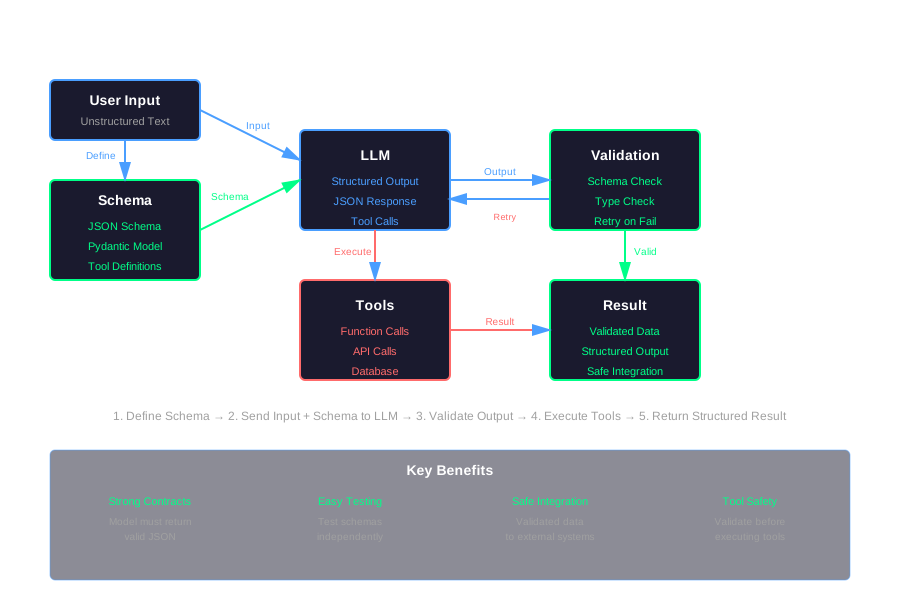
Schema-First LLM Apps: Designing JSON and Tool Calls Before Prompts
Most teams send a big string to the model and try to parse whatever comes back. That’s brittle. It breaks on edge cases. It fails silently. It’s hard to test.
Modern best practice is the opposite: start with schemas and tools, then write prompts around them. This article shows how.
Free-Form Text vs Structured Contracts
Here’s the old way. You send text. You get text back. You parse it.
response = llm.generate("Extract the user's name and email from: 'Contact John at john@example.com'")
# Response: "Name: John, Email: john@example.com"
# Now parse this string... hope it's always in this format
Problems with this approach:
- Brittle parsing: Regex breaks on edge cases. “Contact John Smith at john.smith@example.com” might not match.
- Silent failures: The model returns “I couldn’t find an email” and your parser doesn’t know what to do.
- Odd edge cases: Sometimes you get “Name: John\nEmail: john@example.com”, sometimes you get a bullet list, sometimes you get nothing.
Schema-first design fixes this. You define what you want first. Then you ask the model to match it.
Benefits:
- Stronger contracts: The model must return valid JSON matching your schema. If it doesn’t, you know immediately.
- Easier testing: You can test schemas independently. You can validate outputs before using them.
- Safer integration: External systems get structured data, not free-form text.
What “Schema-First” Means in Practice
Schema-first means starting from the expected output shape, not from prose.
Instead of asking “extract the name and email,” you define:
{
  "name": "string",
  "email": "string"
}
Then you ask the model to fill it in.
You use JSON schemas, function calling, or tool calling to:
- Route tasks: “Which tool should I use?” →
{"route": "billing" | "tech_support" | "other"} - Extract fields: “Pull out these specific fields” → Structured JSON
- Trigger actions: “Call this function with these parameters” → Validated function calls
Here’s a simple example:
Task: Classify a support ticket and extract intent, priority, and tags.
Old way: Send text, get text, parse text.
Schema-first way: Start with a JSON schema:
from pydantic import BaseModel, Field
from typing import Literal

class TicketClassification(BaseModel):
    intent: Literal["billing", "technical", "feature_request", "other"] = Field(
        description="The primary intent of the ticket"
    )
    priority: Literal["low", "medium", "high", "urgent"] = Field(
        description="Priority level based on urgency and impact"
    )
    tags: list[str] = Field(
        description="Relevant tags for categorization",
        default_factory=list
    )
Then your prompt becomes: “Classify this ticket according to this schema.” The model returns JSON. You validate it. Done.
Designing JSON Schemas for LLM Outputs
Keep schemas small and focused. One schema per task.
Use Enums Instead of Free Text
Bad:
priority: str # Could be "high", "HIGH", "urgent", "critical", etc.Good:
priority: Literal["low", "medium", "high", "urgent"]Enums constrain the model. It can’t invent new values. Your code handles a fixed set.
Use Nullable Fields for “Unknown”
Don’t force the model to guess. If it doesn’t know, let it say so.
from typing import Optional

class ExtractionResult(BaseModel):
    name: Optional[str] = Field(None, description="Extracted name, or null if not found")
    email: Optional[str] = Field(None, description="Extracted email, or null if not found")
    confidence: float = Field(description="Confidence score 0.0-1.0")
If the model can’t find an email, it returns null. Your code handles that explicitly.
Add Short Descriptions
Descriptions guide the model. They’re like inline documentation.
class RouterOutput(BaseModel):
    route: Literal["billing", "tech_support", "other"] = Field(
        description="Route to billing for payment issues, tech_support for technical problems, other for everything else"
    )
    confidence: float = Field(
        description="Confidence in routing decision, 0.0 to 1.0"
    )
The model reads these descriptions. They help it make better decisions.
Example Schema
Here’s a complete schema for a ticket router:
from pydantic import BaseModel, Field
from typing import Literal, Optional
from datetime import datetime

class TicketRouter(BaseModel):
    """Routes support tickets to the appropriate team."""

    route: Literal["billing", "tech_support", "sales", "other"] = Field(
        description="Which team should handle this ticket"
    )
    priority: Literal["low", "medium", "high", "urgent"] = Field(
        description="Ticket priority based on urgency and business impact"
    )
    requires_escalation: bool = Field(
        description="True if this ticket needs immediate human review"
    )
    estimated_resolution_time: Optional[int] = Field(
        None,
        description="Estimated resolution time in minutes, or null if unknown"
    )
    tags: list[str] = Field(
        default_factory=list,
        description="Tags for categorization and filtering"
    )
This schema is:
- Small and focused (one task: routing)
- Uses enums (route, priority)
- Has nullable fields (estimated_resolution_time)
- Includes descriptions (every field)
Robust Extraction Patterns
Here are reusable patterns you’ll use again and again.
Extractor Pattern
Input: Unstructured text
Output: JSON with specific fields
Use this when you need to pull structured data from text.
from pydantic import BaseModel
from typing import Optional
from openai import OpenAI

client = OpenAI()

class EntityExtraction(BaseModel):
    """Extract entities from text."""
    entities: list[dict] = Field(
        description="List of entities with type, value, and confidence"
    )
    dates: list[str] = Field(
        description="Extracted dates in ISO format"
    )
    decisions: list[str] = Field(
        description="Key decisions or action items mentioned"
    )

def extract_entities(text: str) -> EntityExtraction:
    """Extract structured entities from unstructured text."""
    response = client.chat.completions.create(
        model="gpt-4",
        messages=[
            {
                "role": "system",
                "content": "Extract entities, dates, and decisions from the following text. Return valid JSON matching the schema."
            },
            {
                "role": "user",
                "content": text
            }
        ],
        response_format={"type": "json_object"}
    )

    result = json.loads(response.choices[0].message.content)
    return EntityExtraction(**result)
Router Pattern
Input: User message or request
Output: Which tool or flow to use next
Use this to route requests to different handlers.
class RouterOutput(BaseModel):
    """Routes requests to appropriate handlers."""
    route: Literal["billing", "tech_support", "sales", "other"] = Field(
        description="Route to billing for payment/refund issues, tech_support for technical problems, sales for product questions, other for everything else"
    )
    confidence: float = Field(
        ge=0.0,
        le=1.0,
        description="Confidence in routing decision"
    )
    reasoning: str = Field(
        description="Brief explanation of routing decision"
    )

def route_request(user_message: str) -> RouterOutput:
    """Route user request to appropriate handler."""
    response = client.chat.completions.create(
        model="gpt-4",
        messages=[
            {
                "role": "system",
                "content": "Route this user request to the appropriate team. Return valid JSON matching the schema."
            },
            {
                "role": "user",
                "content": user_message
            }
        ],
        response_format={"type": "json_object"}
    )

    result = json.loads(response.choices[0].message.content)
    return RouterOutput(**result)
Summarizer with Structure
Input: Long text or document
Output: Fixed fields like title, summary, risks, next_actions
Use this when you need consistent summaries.
class StructuredSummary(BaseModel):
    """Structured summary of a document or conversation."""
    title: str = Field(description="Concise title summarizing the content")
    summary: str = Field(description="2-3 sentence summary of key points")
    risks: list[str] = Field(
        default_factory=list,
        description="List of identified risks or concerns"
    )
    next_actions: list[str] = Field(
        default_factory=list,
        description="Recommended next actions or follow-ups"
    )
    key_entities: list[str] = Field(
        default_factory=list,
        description="Important people, places, or concepts mentioned"
    )

def summarize_structured(text: str) -> StructuredSummary:
    """Generate structured summary of text."""
    response = client.chat.completions.create(
        model="gpt-4",
        messages=[
            {
                "role": "system",
                "content": "Summarize the following text. Return valid JSON matching the schema."
            },
            {
                "role": "user",
                "content": text
            }
        ],
        response_format={"type": "json_object"}
    )

    result = json.loads(response.choices[0].message.content)
    return StructuredSummary(**result)
These patterns reduce downstream complexity. Your code always knows what shape the data will be. No parsing. No guessing. Just validation.
Handling Invalid or Partial JSON
Always validate responses against the schema. If validation fails, handle it gracefully.
Validation with Retry
Here’s a retry loop that asks the LLM to fix its own JSON:
from pydantic import ValidationError
import json
from typing import TypeVar, Type

T = TypeVar('T', bound=BaseModel)

def call_llm_with_schema(
    prompt: str,
    schema_class: Type[T],
    max_retries: int = 3
) -> T:
    """Call LLM and validate response against schema, with retry on failure."""

    for attempt in range(max_retries):
        try:
            response = client.chat.completions.create(
                model="gpt-4",
                messages=[
                    {
                        "role": "system",
                        "content": f"Return valid JSON matching this schema: {schema_class.model_json_schema()}. Do not include any text outside the JSON."
                    },
                    {
                        "role": "user",
                        "content": prompt
                    }
                ],
                response_format={"type": "json_object"}
            )

            # Parse JSON
            raw_output = response.choices[0].message.content
            parsed = json.loads(raw_output)

            # Validate against schema
            return schema_class(**parsed)

        except (json.JSONDecodeError, ValidationError) as e:
            if attempt == max_retries - 1:
                # Last attempt failed, escalate
                raise ValueError(f"Failed to get valid response after {max_retries} attempts: {e}")

            # Retry with error feedback
            error_feedback = f"Previous response was invalid: {str(e)}. Please return valid JSON matching the schema."
            prompt = f"{prompt}\n\nError: {error_feedback}"

    raise ValueError("Unexpected error in retry loop")
When to Retry, Fall Back, or Escalate
Decide based on the error type:
- JSON parse error: Retry. The model might have added extra text.
- Validation error (missing field): Retry. The model might have forgotten a required field.
- Validation error (wrong type): Retry once, then fall back. The model might be confused about the schema.
- Multiple retries failed: Escalate to human or use a simpler fallback.
def safe_extract(
    text: str,
    schema_class: Type[T],
    fallback: Optional[T] = None
) -> T:
    """Extract with schema, fallback on failure."""
    try:
        return call_llm_with_schema(text, schema_class)
    except ValueError as e:
        if fallback:
            # Log the error and return fallback
            print(f"Extraction failed, using fallback: {e}")
            return fallback
        else:
            # Escalate to human
            escalate_to_human(text, str(e))
            raise
The key: trust but verify. Always validate. Always have a plan for when validation fails.
Tool / Function Calling as a Control Layer
Function calling (or tool calling) lets you define a small set of tools with clear parameters. The model chooses which tool to call and with what arguments.
Defining Tools
Here’s how to define tools:
from openai import OpenAI

client = OpenAI()

tools = [
    {
        "type": "function",
        "function": {
            "name": "get_user_info",
            "description": "Get user information by user ID",
            "parameters": {
                "type": "object",
                "properties": {
                    "user_id": {
                        "type": "string",
                        "description": "The user ID to look up"
                    }
                },
                "required": ["user_id"]
            }
        }
    },
    {
        "type": "function",
        "function": {
            "name": "update_ticket_status",
            "description": "Update the status of a support ticket",
            "parameters": {
                "type": "object",
                "properties": {
                    "ticket_id": {
                        "type": "string",
                        "description": "The ticket ID to update"
                    },
                    "status": {
                        "type": "string",
                        "enum": ["open", "in_progress", "resolved", "closed"],
                        "description": "New status for the ticket"
                    }
                },
                "required": ["ticket_id", "status"]
            }
        }
    },
    {
        "type": "function",
        "function": {
            "name": "send_notification",
            "description": "Send a notification to a user",
            "parameters": {
                "type": "object",
                "properties": {
                    "user_id": {
                        "type": "string",
                        "description": "User ID to notify"
                    },
                    "message": {
                        "type": "string",
                        "description": "Notification message"
                    },
                    "priority": {
                        "type": "string",
                        "enum": ["low", "medium", "high"],
                        "description": "Notification priority"
                    }
                },
                "required": ["user_id", "message"]
            }
        }
    }
]
Validating Arguments Before Execution
Always validate tool arguments before running the tool. Check types, ranges, and permissions.
from pydantic import BaseModel, Field, validator
from typing import Literal

class GetUserInfoArgs(BaseModel):
    user_id: str = Field(description="User ID to look up")

    @validator('user_id')
    def validate_user_id(cls, v):
        if not v or len(v) < 1:
            raise ValueError('user_id must be non-empty')
        return v

class UpdateTicketStatusArgs(BaseModel):
    ticket_id: str = Field(description="Ticket ID to update")
    status: Literal["open", "in_progress", "resolved", "closed"] = Field(
        description="New status"
    )

    @validator('ticket_id')
    def validate_ticket_id(cls, v):
        if not v.startswith('TICKET-'):
            raise ValueError('ticket_id must start with TICKET-')
        return v

class SendNotificationArgs(BaseModel):
    user_id: str = Field(description="User ID to notify")
    message: str = Field(description="Notification message")
    priority: Literal["low", "medium", "high"] = Field(
        default="medium",
        description="Notification priority"
    )

    @validator('message')
    def validate_message(cls, v):
        if len(v) > 500:
            raise ValueError('message must be 500 characters or less')
        return v

def execute_tool_safely(tool_name: str, arguments: dict) -> dict:
    """Execute a tool with validated arguments."""

    # Validate arguments based on tool
    if tool_name == "get_user_info":
        args = GetUserInfoArgs(**arguments)
        # Check permissions
        if not has_permission("read_user", args.user_id):
            raise PermissionError("No permission to read user info")
        return get_user_info(args.user_id)

    elif tool_name == "update_ticket_status":
        args = UpdateTicketStatusArgs(**arguments)
        # Check permissions
        if not has_permission("update_ticket", args.ticket_id):
            raise PermissionError("No permission to update ticket")
        return update_ticket_status(args.ticket_id, args.status)

    elif tool_name == "send_notification":
        args = SendNotificationArgs(**arguments)
        # Check permissions
        if not has_permission("send_notification", args.user_id):
            raise PermissionError("No permission to send notification")
        return send_notification(args.user_id, args.message, args.priority)

    else:
        raise ValueError(f"Unknown tool: {tool_name}")
Tool Execution Wrapper
Here’s a complete wrapper that validates and executes tools:
import logging
from typing import Callable, Dict, Any

logger = logging.getLogger(__name__)

def tool_execution_wrapper(
    tool_name: str,
    arguments: dict,
    tool_function: Callable,
    validator: Optional[BaseModel] = None
) -> dict:
    """Wrapper that validates arguments before calling tool function."""

    # Log tool call
    logger.info(f"Tool call: {tool_name} with args: {arguments}")

    try:
        # Validate arguments if validator provided
        if validator:
            validated_args = validator(**arguments)
            # Convert to dict for function call
            args_dict = validated_args.model_dump()
        else:
            args_dict = arguments

        # Execute tool
        result = tool_function(**args_dict)

        # Log result
        logger.info(f"Tool {tool_name} succeeded: {result}")

        return {
            "success": True,
            "result": result
        }

    except ValidationError as e:
        logger.error(f"Tool {tool_name} validation failed: {e}")
        return {
            "success": False,
            "error": f"Invalid arguments: {str(e)}"
        }

    except PermissionError as e:
        logger.error(f"Tool {tool_name} permission denied: {e}")
        return {
            "success": False,
            "error": f"Permission denied: {str(e)}"
        }

    except Exception as e:
        logger.error(f"Tool {tool_name} execution failed: {e}")
        return {
            "success": False,
            "error": f"Execution failed: {str(e)}"
        }
Tools act as a boundary between the LLM and critical systems. The LLM suggests what to do. Your code decides if it’s safe to do it.
Testing and Monitoring Schema-Based Flows
Test schemas with a small set of inputs and expected outputs. Use these as regression tests.
Snapshot Testing
Create test cases with inputs and expected JSON outputs:
import pytest
from pydantic import ValidationError

test_cases = [
    {
        "input": "I need help with my billing issue",
        "expected": {
            "route": "billing",
            "priority": "medium",
            "requires_escalation": False,
            "tags": ["billing", "payment"]
        }
    },
    {
        "input": "My app crashed and I lost data",
        "expected": {
            "route": "tech_support",
            "priority": "urgent",
            "requires_escalation": True,
            "tags": ["bug", "data-loss"]
        }
    }
]

@pytest.mark.parametrize("test_case", test_cases)
def test_router(test_case):
    """Test router with snapshot cases."""
    result = route_request(test_case["input"])

    # Validate against schema
    assert isinstance(result, RouterOutput)

    # Check expected fields
    assert result.route == test_case["expected"]["route"]
    assert result.priority == test_case["expected"]["priority"]
    assert result.requires_escalation == test_case["expected"]["requires_escalation"]
    assert set(result.tags) == set(test_case["expected"]["tags"])
Run these tests whenever you:
- Change prompts
- Change models
- Change schemas
Logging Validation Failures
Track validation failures over time:
import logging
from datetime import datetime
from collections import defaultdict

logger = logging.getLogger(__name__)

validation_failures = defaultdict(int)
field_failures = defaultdict(int)

def log_validation_failure(
    schema_name: str,
    error: ValidationError,
    input_text: str
):
    """Log validation failure for monitoring."""
    validation_failures[schema_name] += 1

    # Track which fields fail most
    for error_detail in error.errors():
        field_name = error_detail.get("loc", ["unknown"])[0]
        field_failures[f"{schema_name}.{field_name}"] += 1

    logger.warning(
        f"Validation failed for {schema_name}: {error}. "
        f"Input: {input_text[:100]}"
    )

def get_failure_metrics() -> dict:
    """Get validation failure metrics."""
    return {
        "total_failures": sum(validation_failures.values()),
        "failures_by_schema": dict(validation_failures),
        "failures_by_field": dict(field_failures)
    }
Monitor:
- Failure rate over time: Is it increasing? That might indicate a model change or prompt drift.
- Which fields fail most: Focus validation improvements there.
- Failure patterns: Do certain inputs always fail? Add them to test cases.
This connects back to reliability and observability. You know when schemas break. You know which parts break most. You can fix them.
Putting It Together: Reference Architecture
Here’s a simple end-to-end flow that uses schema-first design:
from fastapi import FastAPI, HTTPException
from pydantic import BaseModel, ValidationError
import json

app = FastAPI()

# Step 1: HTTP API receives user message
@app.post("/api/process")
async def process_request(request: dict):
    user_message = request.get("message", "")
    user_id = request.get("user_id", "anonymous")

    try:
        # Step 2: Orchestrator calls LLM with router schema
        route_result = route_request(user_message)

        # Step 3: Based on route, call the right tool or extractor
        if route_result.route == "billing":
            # Use billing extractor schema
            extraction = extract_billing_info(user_message)
            # Call billing service
            result = call_billing_service(extraction)

        elif route_result.route == "tech_support":
            # Use tech support extractor schema
            extraction = extract_tech_support_info(user_message)
            # Call tech support service
            result = call_tech_support_service(extraction)

        else:
            # Use generic extractor schema
            extraction = extract_generic_info(user_message)
            # Call generic handler
            result = call_generic_handler(extraction)

        # Step 4: Validate JSON output
        # (Already validated by Pydantic models)

        # Step 5: Return result or escalate
        return {
            "success": True,
            "result": result,
            "route": route_result.route
        }

    except ValidationError as e:
        # Step 6: Fall back or escalate if validation fails
        logger.error(f"Validation failed: {e}")

        # Try simpler fallback
        try:
            fallback_result = handle_with_fallback(user_message)
            return {
                "success": True,
                "result": fallback_result,
                "route": "fallback"
            }
        except Exception as fallback_error:
            # Escalate to human
            escalate_to_human(user_message, str(e))
            raise HTTPException(
                status_code=500,
                detail="Request could not be processed. Escalated to human support."
            )

    except Exception as e:
        logger.error(f"Unexpected error: {e}")
        raise HTTPException(status_code=500, detail=str(e))
This flow:
- Receives a user message
- Routes it using a schema
- Extracts structured data using schemas
- Validates all outputs
- Calls downstream services with validated data
- Falls back or escalates on failure
Every step uses schemas. Every step validates. Every step has a fallback.
Conclusion
Schema-first design treats LLMs as structured components, not text generators. You define what you want first. Then you ask the model to match it.
Start with schemas. Use enums. Make fields nullable when appropriate. Add descriptions. Validate everything. Have fallbacks.
This approach is more reliable. It’s easier to test. It’s safer to integrate. It scales better.
The old way: send text, get text, parse text, hope it works.
The new way: define schema, get JSON, validate, use it.
Try it on your next LLM feature. Start with the output shape. Work backwards to the prompt. You’ll find it’s simpler and more reliable.
Discussion
Loading comments...