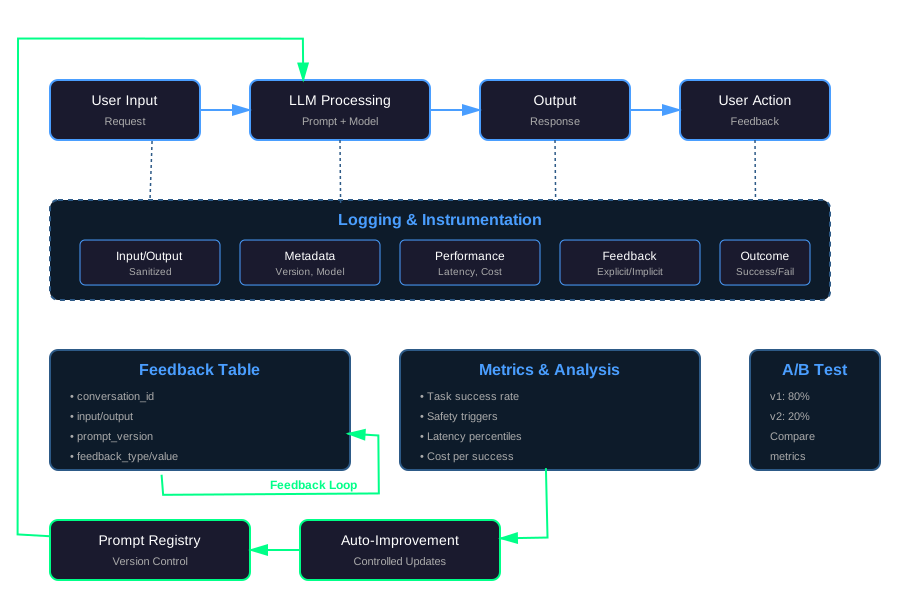
Closing the Loop: Building Practical Feedback Loops for LLM Apps in Production
You ship an LLM app. It works. Users interact with it. Then what?
Most teams stop at “we shipped the prompt.” They deploy. They monitor errors. They fix bugs. But they don’t improve. The prompt stays the same. The model stays the same. The tools stay the same.
Very few teams have a clear loop from user actions to feedback to metrics to controlled changes. This article focuses on that loop.
LLM Apps Are Never “Done”
LLM behavior drifts. Prompts change. Models update. Users adapt. What worked yesterday might not work tomorrow.
Manual prompt tweaking doesn’t scale. You can’t manually review every interaction. You can’t manually adjust every prompt. You need automation.
Feedback loops turn messy usage into structured improvement. They capture what users do. They measure what works. They guide what to change.
This isn’t about building the perfect prompt. It’s about building a system that gets better over time.
What “Feedback” Actually Means for LLM Apps
Feedback isn’t just a rating widget. It’s any signal that tells you whether the system worked.
Explicit Feedback
Users tell you directly:
- Star ratings: 1-5 stars
- Thumbs up/down: Simple binary feedback
- Free-text comments: “This answer was wrong” or “This helped me solve my problem”
Example: A support bot gets a thumbs down. The user adds a comment: “The answer didn’t address my question about refunds.”
Implicit Feedback
Users show you through their actions:
- Heavy editing: User edits the answer significantly before using it
- Abandonment: User starts a flow but doesn’t complete it
- Retry patterns: User asks the same question multiple times
- Time to completion: User takes much longer than expected
Example: A code generation tool produces output. The user deletes 80% of it and rewrites. That’s implicit feedback: the output wasn’t useful.
Outcome-Based Feedback
Real-world results tell you if it worked:
- Ticket resolved vs reopened: Support ticket closed and stayed closed
- Task succeeded vs failed: Code compiled, test passed, deployment succeeded
- Business metrics: Conversion rate, time saved, user satisfaction
Example: A triage bot routes tickets. If tickets get reopened, the routing was wrong. That’s outcome-based feedback.
The point: Feedback is everywhere. You just need to capture it.
Instrumentation and Logging Basics
You can’t improve what you don’t measure. Start with logging.
What to Log for Each Request
For every LLM interaction, log:
Input data:
- User input (sanitized, PII removed)
- System prompt version
- Tools used
- Model name and parameters
Output data:
- Generated response
- Tokens used (input and output)
- Latency (time to first token, total time)
- Cost estimate
Context:
- User or session ID (hashed or anonymized)
- Timestamp
- Request ID for tracing
Example logging middleware:
from fastapi import FastAPI, Request
from datetime import datetime
import hashlib
import json
import time

app = FastAPI()

def sanitize_input(text: str) -> str:
    # Remove PII, sensitive data
    # In production, use proper PII detection
    return text

def hash_user_id(user_id: str) -> str:
    return hashlib.sha256(user_id.encode()).hexdigest()[:16]

@app.middleware("http")
async def log_llm_request(request: Request, call_next):
    if "/api/llm" not in str(request.url):
        return await call_next(request)

    start_time = time.time()
    request_id = f"req_{int(time.time() * 1000)}"

    # Log request
    body = await request.body()
    try:
        data = json.loads(body)
        user_input = sanitize_input(data.get("input", ""))
        prompt_version = data.get("prompt_version", "v1")
        model = data.get("model", "gpt-4")

        log_entry = {
            "request_id": request_id,
            "timestamp": datetime.utcnow().isoformat(),
            "user_id_hash": hash_user_id(data.get("user_id", "anonymous")),
            "input": user_input,
            "prompt_version": prompt_version,
            "model": model,
            "tools": data.get("tools", [])
        }

        # Store log (in production, use proper logging service)
        print(f"LOG: {json.dumps(log_entry)}")

    except Exception as e:
        print(f"Error logging request: {e}")

    # Process request
    response = await call_next(request)

    # Log response
    elapsed = time.time() - start_time
    response_body = b""
    async for chunk in response.body_iterator:
        response_body += chunk

    try:
        response_data = json.loads(response_body)
        response_log = {
            "request_id": request_id,
            "output": response_data.get("output", ""),
            "tokens_input": response_data.get("tokens", {}).get("input", 0),
            "tokens_output": response_data.get("tokens", {}).get("output", 0),
            "latency_ms": elapsed * 1000,
            "cost_estimate": response_data.get("cost_estimate", 0)
        }
        print(f"LOG: {json.dumps(response_log)}")
    except Exception as e:
        print(f"Error logging response: {e}")

    return response
Sampling
You don’t need to log everything. Sample intelligently:
- Log 100% of errors
- Log 10-20% of successful requests
- Log 100% of requests with explicit feedback
- Log 100% of requests from new users (first 10 interactions)
This reduces storage costs while keeping signal.
Privacy Checklist
Before logging, ask:
- Do we need this data? If not, don’t log it.
- Is PII removed? Names, emails, phone numbers should be redacted.
- Is user data hashed? User IDs should be hashed, not stored in plain text.
- Can we justify this? If you can’t explain why you need it, don’t log it.
- Is retention set? Delete logs after a reasonable period (30-90 days).
Minimally Useful Logging
At minimum, log:
- Request ID (for tracing)
- Timestamp
- Input (sanitized)
- Output
- Prompt version
- Model used
- Latency
- Error status
That’s enough to start. Add more as you need it.
Turning Raw Logs into Label-Ready Data
Raw logs are messy. You need structured data for analysis.
Building a Feedback Table
Create a simple feedback table:
CREATE TABLE feedback (
    id SERIAL PRIMARY KEY,
    conversation_id VARCHAR(255) NOT NULL,
    turn_id INTEGER NOT NULL,
    request_id VARCHAR(255) UNIQUE NOT NULL,
    input TEXT NOT NULL,
    output TEXT NOT NULL,
    prompt_version VARCHAR(50) NOT NULL,
    model VARCHAR(50) NOT NULL,
    feedback_type VARCHAR(50), -- 'explicit', 'implicit', 'outcome'
    feedback_value JSONB, -- Flexible structure for different feedback types
    timestamp TIMESTAMP NOT NULL DEFAULT NOW(),
    user_id_hash VARCHAR(64),
    metadata JSONB -- Additional context
);

CREATE INDEX idx_feedback_conversation ON feedback(conversation_id, turn_id);
CREATE INDEX idx_feedback_prompt_version ON feedback(prompt_version);
CREATE INDEX idx_feedback_timestamp ON feedback(timestamp);
Example insert:
import psycopg2
from datetime import datetime

def insert_feedback(
    conversation_id: str,
    turn_id: int,
    request_id: str,
    input_text: str,
    output_text: str,
    prompt_version: str,
    model: str,
    feedback_type: str = None,
    feedback_value: dict = None
):
    conn = psycopg2.connect("postgresql://user:pass@localhost/db")
    cur = conn.cursor()

    cur.execute("""
        INSERT INTO feedback (
            conversation_id, turn_id, request_id,
            input, output, prompt_version, model,
            feedback_type, feedback_value, timestamp
        ) VALUES (%s, %s, %s, %s, %s, %s, %s, %s, %s, %s)
    """, (
        conversation_id, turn_id, request_id,
        input_text, output_text, prompt_version, model,
        feedback_type, json.dumps(feedback_value) if feedback_value else None,
        datetime.utcnow()
    ))

    conn.commit()
    cur.close()
    conn.close()
Using LLMs to Pre-Tag Outputs
You can use an LLM to pre-tag outputs before human review:
from openai import OpenAI

client = OpenAI()

def pre_tag_output(input_text: str, output_text: str) -> dict:
    """Use LLM to classify output quality"""
    prompt = f"""Classify this LLM interaction:

Input: {input_text}
Output: {output_text}

Classify as one of:
- helpful: Output directly addresses the input
- unhelpful: Output doesn't address the input
- harmful: Output contains incorrect or dangerous information
- off-topic: Output is unrelated to the input

Return JSON: {{"classification": "...", "confidence": 0.0-1.0, "reason": "..."}}
"""

    response = client.chat.completions.create(
        model="gpt-4",
        messages=[{"role": "user", "content": prompt}],
        response_format={"type": "json_object"}
    )

    result = json.loads(response.choices[0].message.content)

    # Flag for human review if confidence is low or classification is harmful
    needs_review = (
        result["confidence"] < 0.7 or
        result["classification"] == "harmful"
    )

    return {
        "classification": result["classification"],
        "confidence": result["confidence"],
        "reason": result["reason"],
        "needs_review": needs_review
    }
This reduces the labeling burden. Humans review only the uncertain or problematic cases.
Picking a Representative Sample
You can’t label everything. Pick a sample:
- Stratified sampling: Sample from each prompt version, each model, each time period
- Active learning: Sample cases where the model is uncertain
- Error-focused: Over-sample errors and edge cases
Aim for 100-1000 labeled examples per prompt version. That’s usually enough to detect significant differences.
Defining Metrics That Actually Matter
Metrics tell you if changes help. Pick metrics that connect to your goals.
Quality Metrics
Task success rate:
- Binary: Did the task succeed or fail?
- Example: Code compiled, test passed, ticket resolved
def calculate_task_success_rate(feedback_data: list) -> float:
    """Calculate percentage of successful tasks"""
    successful = sum(1 for f in feedback_data if f.get("task_succeeded", False))
    total = len(feedback_data)
    return successful / total if total > 0 else 0.0
“Needs human help” rate:
- How often does the system fail and require human intervention?
- Lower is better
def calculate_human_help_rate(feedback_data: list) -> float:
    """Calculate percentage of cases needing human help"""
    needed_help = sum(1 for f in feedback_data if f.get("needed_human_help", False))
    total = len(feedback_data)
    return needed_help / total if total > 0 else 0.0
Safety Metrics
Safety filter triggers:
- How many outputs triggered safety filters?
- Track by severity level
def calculate_safety_trigger_rate(feedback_data: list) -> dict:
    """Calculate safety filter trigger rates"""
    triggers = {"high": 0, "medium": 0, "low": 0}
    total = len(feedback_data)

    for f in feedback_data:
        safety_level = f.get("safety_filter_level")
        if safety_level:
            triggers[safety_level] = triggers.get(safety_level, 0) + 1

    return {
        level: count / total if total > 0 else 0.0
        for level, count in triggers.items()
    }
Escalation rate:
- How many cases escalated to human review?
- Lower is better (unless you want more human oversight)
Experience and Cost Metrics
Latency percentiles:
- P50, P95, P99 latency
- Users care about P95 and P99
def calculate_latency_percentiles(feedback_data: list) -> dict:
    """Calculate latency percentiles"""
    latencies = [f.get("latency_ms", 0) for f in feedback_data if f.get("latency_ms")]
    latencies.sort()

    n = len(latencies)
    if n == 0:
        return {}

    return {
        "p50": latencies[int(n * 0.50)],
        "p95": latencies[int(n * 0.95)],
        "p99": latencies[int(n * 0.99)]
    }
Cost per successful task:
- Total cost divided by successful tasks
- Lower is better
def calculate_cost_per_success(feedback_data: list) -> float:
    """Calculate average cost per successful task"""
    total_cost = sum(f.get("cost", 0) for f in feedback_data)
    successful_tasks = sum(1 for f in feedback_data if f.get("task_succeeded", False))
    return total_cost / successful_tasks if successful_tasks > 0 else 0.0
Connecting Metrics to Prompt Versions
Track metrics by prompt version:
def compare_prompt_versions(feedback_data: list) -> dict:
    """Compare metrics across prompt versions"""
    versions = {}

    for f in feedback_data:
        version = f.get("prompt_version", "unknown")
        if version not in versions:
            versions[version] = []
        versions[version].append(f)

    results = {}
    for version, data in versions.items():
        results[version] = {
            "task_success_rate": calculate_task_success_rate(data),
            "human_help_rate": calculate_human_help_rate(data),
            "avg_latency_p95": calculate_latency_percentiles(data).get("p95", 0),
            "cost_per_success": calculate_cost_per_success(data),
            "sample_size": len(data)
        }

    return results
This shows which prompt versions perform better.
Running A/B Tests and Shadow Runs
You need controlled experiments to test changes.
A/B Tests
Split traffic between versions:
import random
import hashlib

def route_to_variant(user_id: str, variants: dict) -> str:
    """Route user to A/B test variant based on consistent hashing"""
    # Use consistent hashing so same user always gets same variant
    hash_value = int(hashlib.md5(user_id.encode()).hexdigest(), 16)
    total_weight = sum(variants.values())
    random.seed(hash_value)
    rand = random.random() * total_weight

    cumulative = 0
    for variant, weight in variants.items():
        cumulative += weight
        if rand <= cumulative:
            return variant

    return list(variants.keys())[0]  # Fallback

# Example: 80% to v1, 20% to v2
variants = {"v1": 0.8, "v2": 0.2}
prompt_version = route_to_variant(user_id, variants)
Log which variant was used:
def log_ab_test(request_id: str, user_id: str, variant: str, result: dict):
    """Log A/B test assignment and result"""
    log_entry = {
        "request_id": request_id,
        "user_id_hash": hash_user_id(user_id),
        "ab_test": "prompt_version",
        "variant": variant,
        "result": result,
        "timestamp": datetime.utcnow().isoformat()
    }
    # Store in database or logging service
    insert_feedback(
        conversation_id=request_id,
        turn_id=1,
        request_id=request_id,
        input_text=result.get("input", ""),
        output_text=result.get("output", ""),
        prompt_version=variant,
        model=result.get("model", "gpt-4")
    )
Compare metrics after collecting enough data (usually 1000+ samples per variant).
Shadow Runs
Run a new version in the background without showing it to users:
async def shadow_run(input_text: str, prompt_v1: str, prompt_v2: str):
    """Run both versions, log both, but only return v1"""
    # Run production version
    result_v1 = await call_llm(input_text, prompt_v1)

    # Run shadow version (don't wait, run in background)
    result_v2 = await call_llm(input_text, prompt_v2)

    # Log both
    log_shadow_comparison(
        input_text=input_text,
        result_v1=result_v1,
        result_v2=result_v2
    )

    # Return only v1 to user
    return result_v1
Shadow runs let you test new versions safely. You compare results offline. If the new version is better, you can promote it to A/B test, then to production.
When to Use Which
- A/B test: When you’re confident the new version is safe and you want real user feedback
- Shadow run: When you’re uncertain or want to test on real inputs without risk
Start with shadow runs. Move to A/B tests when you have confidence.
Safe Auto-Improvement Patterns
Automation helps, but you need guardrails.
Config-Driven Prompt Registry
Store prompts in a registry (YAML or database):
# prompts.yaml
prompts:
  - id: v1
    version: "1.0.0"
    content: "You are a helpful assistant..."
    status: "production"
    traffic_percentage: 100

  - id: v2
    version: "1.1.0"
    content: "You are a helpful assistant. Always be concise..."
    status: "testing"
    traffic_percentage: 20

  - id: v3
    version: "1.2.0"
    content: "You are a helpful assistant..."
    status: "shadow"
    traffic_percentage: 0
Load and route based on config:
import yaml

def load_prompt_registry(path: str) -> dict:
    with open(path, 'r') as f:
        return yaml.safe_load(f)

def get_prompt_for_request(user_id: str, registry: dict) -> str:
    """Get prompt based on A/B test routing"""
    prompts = registry["prompts"]
    active_prompts = [p for p in prompts if p["status"] in ["production", "testing"]]

    if not active_prompts:
        # Fallback to production
        active_prompts = [p for p in prompts if p["status"] == "production"]

    # Route based on traffic percentage
    variants = {p["id"]: p["traffic_percentage"] / 100.0 for p in active_prompts}
    variant = route_to_variant(user_id, variants)

    prompt = next(p for p in prompts if p["id"] == variant)
    return prompt["content"]
Improvement Pipeline
A simple pipeline:
- Generate candidates: Use an LLM or human to generate new prompt candidates
- Test on historical data: Run candidates on past interactions
- Compare metrics: See which performs better
- Require approval: Human reviews before promotion
- Gradually roll out: Start with shadow, then small A/B test, then full rollout
def evaluate_prompt_candidate(candidate_prompt: str, historical_data: list) -> dict:
    """Evaluate a prompt candidate on historical data"""
    results = []

    for interaction in historical_data:
        # Run candidate prompt on historical input
        result = call_llm(interaction["input"], candidate_prompt)

        # Compare to original result
        comparison = compare_outputs(
            original=interaction["output"],
            candidate=result["output"],
            ground_truth=interaction.get("expected_output")
        )
        results.append(comparison)

    # Aggregate metrics
    return {
        "avg_quality_score": sum(r["quality_score"] for r in results) / len(results),
        "improvement_rate": sum(1 for r in results if r["improved"]) / len(results),
        "regression_rate": sum(1 for r in results if r["regressed"]) / len(results)
    }

def promote_prompt_if_better(candidate: dict, current: dict, threshold: float = 0.05):
    """Promote candidate if it's significantly better"""
    improvement = candidate["avg_quality_score"] - current["avg_quality_score"]

    if improvement > threshold and candidate["regression_rate"] < 0.1:
        # Requires human approval in production
        return "approve_for_shadow"
    elif improvement < -threshold:
        return "reject"
    else:
        return "needs_more_data"
Don’t Let Models Rewrite Their Own Prompts
This is important: Don’t let the LLM rewrite its own prompt in production without human oversight. Use models to suggest improvements, but require human approval before deployment.
The risk: Models can optimize for metrics that don’t matter, or introduce subtle bugs that humans would catch.
Case Study: Support Triage Bot
Here’s how one team improved their support triage bot.
The Problem
A support triage bot routes tickets to the right team. It was working, but tickets kept getting reopened. The reopen rate was 25%. That meant 1 in 4 tickets was routed incorrectly.
The Solution
They built a feedback loop:
- Added logging: Logged every routing decision, the ticket content, and the outcome
- Built feedback table: Stored routing decisions and whether tickets were reopened
- Analyzed patterns: Found that tickets with certain keywords were being misrouted
- Created new prompt: Refined the prompt to handle those cases better
- Ran A/B test: Split traffic 80/20 between old and new prompt
- Measured results: New prompt reduced reopen rate from 25% to 12%
The Implementation
# Log routing decision
def route_ticket(ticket_content: str, user_id: str):
    prompt_v1 = "Route this ticket to the appropriate team..."
    prompt_v2 = "Route this ticket to the appropriate team. Pay special attention to..."

    # A/B test routing
    variant = route_to_variant(user_id, {"v1": 0.8, "v2": 0.2})
    prompt = prompt_v1 if variant == "v1" else prompt_v2

    routing = call_llm(ticket_content, prompt)

    # Log decision
    log_routing_decision(
        ticket_id=generate_id(),
        content=ticket_content,
        routing=routing,
        prompt_version=variant
    )

    return routing

# Later, check if ticket was reopened
def check_ticket_outcome(ticket_id: str):
    # Query ticket system
    ticket = get_ticket(ticket_id)
    was_reopened = ticket.get("reopen_count", 0) > 0

    # Update feedback
    update_feedback(
        ticket_id=ticket_id,
        outcome="reopened" if was_reopened else "resolved"
    )

# Analyze results
def analyze_routing_performance():
    feedback = get_feedback_by_prompt_version()

    for version, data in feedback.items():
        reopen_rate = sum(1 for d in data if d["outcome"] == "reopened") / len(data)
        print(f"{version}: {reopen_rate:.2%} reopen rate")
The Results
After 2 weeks of A/B testing with 2000 tickets:
- v1 (old): 25% reopen rate
- v2 (new): 12% reopen rate
The new prompt was significantly better. They promoted it to 100% traffic. The reopen rate stayed at 12%.
Key Takeaways
- Log outcomes, not just outputs: They logged whether tickets were reopened, not just the routing decision
- Test on real data: A/B testing on real tickets gave them confidence
- Measure what matters: Reopen rate was the metric that mattered, not user satisfaction scores
- Iterate quickly: They ran the A/B test for 2 weeks, then promoted the winner
Offline Evaluation Script
Here’s a script to evaluate prompts offline:
from openai import OpenAI
import json
from typing import List, Dict

client = OpenAI()

def evaluate_output_with_llm_judge(
    input_text: str,
    output_text: str,
    criteria: str = "clarity and usefulness"
) -> Dict:
    """Use an LLM as a judge to score output quality"""
    prompt = f"""Evaluate this LLM interaction:

Input: {input_text}
Output: {output_text}

Criteria: {criteria}

Rate the output on a scale of 1-10 for:
1. Clarity: Is the output clear and easy to understand?
2. Usefulness: Does the output help solve the problem?
3. Accuracy: Is the output factually correct?

Return JSON: {{
    "clarity": 1-10,
    "usefulness": 1-10,
    "accuracy": 1-10,
    "overall": 1-10,
    "reason": "brief explanation"
}}
"""

    response = client.chat.completions.create(
        model="gpt-4",
        messages=[{"role": "user", "content": prompt}],
        response_format={"type": "json_object"},
        temperature=0
    )

    return json.loads(response.choices[0].message.content)

def evaluate_prompt_version(
    logged_interactions: List[Dict],
    prompt_version: str
) -> Dict:
    """Evaluate all interactions for a prompt version"""
    version_interactions = [
        i for i in logged_interactions
        if i.get("prompt_version") == prompt_version
    ]

    scores = []
    for interaction in version_interactions:
        score = evaluate_output_with_llm_judge(
            input_text=interaction["input"],
            output_text=interaction["output"]
        )
        scores.append(score)

    if not scores:
        return {}

    return {
        "prompt_version": prompt_version,
        "sample_size": len(scores),
        "avg_clarity": sum(s["clarity"] for s in scores) / len(scores),
        "avg_usefulness": sum(s["usefulness"] for s in scores) / len(scores),
        "avg_accuracy": sum(s["accuracy"] for s in scores) / len(scores),
        "avg_overall": sum(s["overall"] for s in scores) / len(scores)
    }

def compare_prompt_versions(logged_interactions: List[Dict]) -> Dict:
    """Compare multiple prompt versions"""
    versions = set(i.get("prompt_version") for i in logged_interactions)

    results = {}
    for version in versions:
        results[version] = evaluate_prompt_version(logged_interactions, version)

    return results

# Usage
if __name__ == "__main__":
    # Load logged interactions (from database or file)
    interactions = load_logged_interactions()

    # Compare versions
    comparison = compare_prompt_versions(interactions)

    # Print results
    for version, metrics in comparison.items():
        print(f"\n{version}:")
        print(f"  Sample size: {metrics['sample_size']}")
        print(f"  Avg clarity: {metrics['avg_clarity']:.2f}")
        print(f"  Avg usefulness: {metrics['avg_usefulness']:.2f}")
        print(f"  Avg accuracy: {metrics['avg_accuracy']:.2f}")
        print(f"  Avg overall: {metrics['avg_overall']:.2f}")
This script helps you evaluate prompts offline before deploying them.
Conclusion
Feedback loops turn LLM apps from static systems into improving systems. They capture what users do. They measure what works. They guide what to change.
Start simple:
- Log the basics: Input, output, prompt version, outcome
- Build a feedback table: Structure your data
- Define metrics: Pick 2-3 metrics that matter
- Run experiments: A/B tests or shadow runs
- Iterate: Use results to improve
You don’t need perfect instrumentation on day one. Start with minimal logging. Add more as you learn what matters.
The loop closes when you see improvement. When metrics get better. When users have better experiences. When the system gets smarter over time.
That’s the goal: not a perfect prompt, but a system that gets better.
Discussion
Loading comments...