Efficient Context-Window Management: Best Practices for Long-Form Retrieval-Augmented LLM Applications
You’re building an LLM app that needs to work with long documents. Technical manuals. Legal contracts. Research papers. Internal knowledge bases.
You retrieve relevant chunks. You stuff them into the context window. You call the model. It works, but it’s expensive. It’s slow. Sometimes it hits token limits. Sometimes the retrieved context isn’t relevant enough.
Context windows are finite. Every token costs money. Every token adds latency. You need to use them efficiently.
This article shows you how to manage context windows in retrieval-augmented LLM applications. We’ll cover chunking strategies, context budgeting, retrieval optimization, caching, and measuring what actually works.
Introduction
Most LLM applications start simple. You have a question. You call the model. You get an answer.
Then you need context. You add retrieval. You fetch relevant documents. You put them in the prompt. Suddenly you’re managing context windows, token budgets, and retrieval quality.
The problem is straightforward: LLMs have limited context windows. GPT-4 has 128k tokens. Claude has 200k. But that’s not infinite. And every token costs money. Every token adds latency.
When you’re working with long documents or large knowledge bases, you can’t just dump everything into the context. You need to:
- Split documents intelligently
- Retrieve only what’s relevant
- Budget your context window
- Cache what you can
- Measure what works
This article covers these practices.
Why This Matters
Context window management affects three things: cost, latency, and quality.
Cost: Every token you send to the model costs money. More context means higher costs. If you’re sending 50k tokens per request and making 1000 requests per day, that’s expensive.
Latency: More tokens mean longer processing times. The model has to process everything you send. Longer context means slower responses.
Quality: But here’s the catch. More context can improve quality. If you retrieve the right documents, the model has better information. If you retrieve too much or the wrong things, quality degrades.
The challenge is finding the balance. Enough context for quality. Not so much that cost and latency explode.
Fundamentals of Context Windows and RAG
Before diving into optimization, let’s clarify what we’re working with.
What is a Context Window?
A context window is the maximum number of tokens an LLM can process in a single request. Tokens are pieces of text. Roughly, one token equals 3-4 characters in English. A 1000-word document might be 1300-1500 tokens.
Models have different limits:
- GPT-4: 128,000 tokens
- Claude 3 Opus: 200,000 tokens
- GPT-3.5 Turbo: 16,000 tokens
- Llama 2: 4,000 tokens
These limits include everything: system prompts, user messages, retrieved context, and the model’s response.
What is RAG?
Retrieval-Augmented Generation (RAG) combines retrieval with generation. You retrieve relevant documents from a knowledge base. You add them to the prompt. The model generates a response using that context.
The basic flow:
- User asks a question
- System retrieves relevant documents (usually via vector search)
- System constructs a prompt with the question and retrieved context
- Model generates a response
- System returns the response
RAG lets you work with knowledge bases larger than the context window. You don’t need to fit everything into one prompt. You retrieve what’s relevant for each query.
The RAG Pipeline
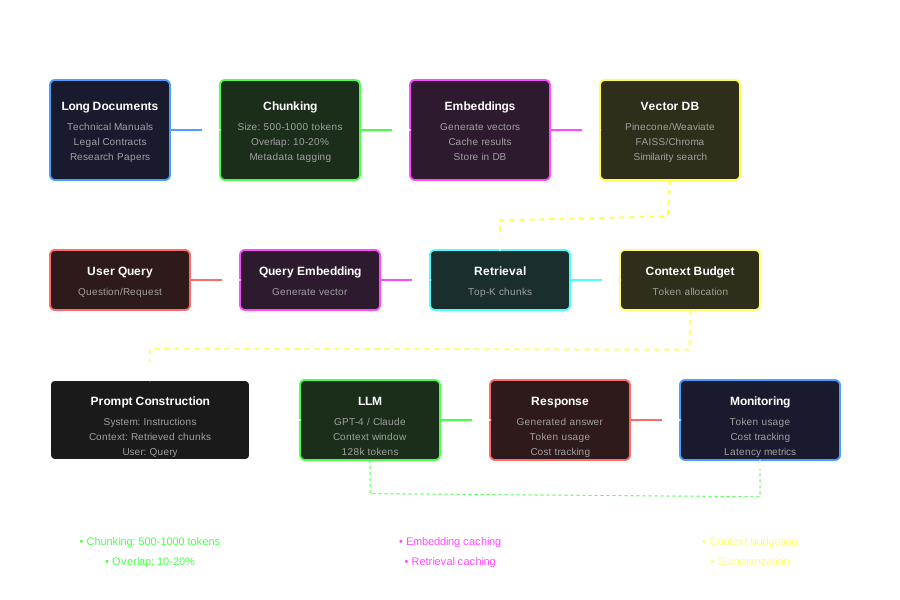
A typical RAG pipeline has these steps:
Indexing:
- Load documents
- Split into chunks
- Generate embeddings
- Store in vector database
Querying:
- User asks a question
- Generate query embedding
- Search vector database for similar chunks
- Retrieve top-k chunks
- Build prompt with chunks
- Call LLM
- Return response
Each step has optimization opportunities.
Key Challenges
Working with long documents and large knowledge bases creates several challenges.
Oversized Context
The most obvious problem: you try to fit too much into the context window.
Symptoms:
- Requests hit token limits
- High costs
- Slow responses
- Timeouts
Causes:
- Retrieving too many chunks
- Chunks are too large
- Not filtering retrieved content
- Including irrelevant context
Irrelevant Context
Even if you stay under token limits, irrelevant context hurts quality.
The model gets confused. It focuses on the wrong information. It generates answers based on irrelevant chunks.
This happens when:
- Retrieval returns poor matches
- Chunks don’t have enough context
- Chunk boundaries split important information
- No filtering or ranking
Retrieval Errors
Retrieval isn’t perfect. Sometimes it misses relevant documents. Sometimes it returns irrelevant ones.
Common issues:
- Embeddings don’t capture semantic meaning well
- Query doesn’t match document language
- Chunk boundaries break semantic units
- Vector search doesn’t consider metadata
Stale Knowledge
Knowledge bases change. Documents get updated. New information arrives. But your index might be stale.
If you’re caching embeddings or retrieved chunks, you might serve outdated information.
Context Drift
Context drift happens when retrieved chunks don’t align with the query. The chunks are semantically similar but not actually relevant.
Example: Query is about “Python error handling.” Retrieval returns chunks about “Python syntax” because they share words. But they don’t answer the question.
Best Practices for Chunking & Segmentation
How you split documents matters. Good chunking improves retrieval quality. Bad chunking hurts it.
Chunk Size
Chunk size affects retrieval quality and context usage.
Too small: Chunks lose context. A sentence about “error handling” without surrounding context might not be useful. You also retrieve more chunks to get enough information.
Too large: Chunks include irrelevant information. A 2000-token chunk about “Python” might only have 200 tokens relevant to “error handling.” You waste context on irrelevant text.
Sweet spot: Most applications use 500-1000 tokens per chunk. This balances context preservation with precision.
But it depends on your documents:
- Technical documentation: 500-800 tokens
- Legal documents: 800-1200 tokens (to preserve clause context)
- Research papers: 600-1000 tokens
- Code: 400-600 tokens (preserve function boundaries)
Overlap Strategy
When you split documents, adjacent chunks should overlap. This prevents important information from being split across chunk boundaries.
Example: Chunk 1 ends with “The error occurs when…” Chunk 2 starts with “…the function is called.” Without overlap, you lose the connection.
Overlap size: 10-20% of chunk size is common. For 500-token chunks, use 50-100 tokens of overlap.
Overlap method: Simple sliding window works. But you can be smarter:
- Overlap at sentence boundaries
- Overlap at paragraph boundaries
- Overlap at semantic boundaries (if you have a semantic parser)
Metadata Tagging
Each chunk should have metadata. This helps with filtering and ranking.
Essential metadata:
- Source document: Which document this chunk came from
- Chunk index: Position in the document
- Document type: Technical doc, legal doc, code, etc.
- Creation date: When the document was created
- Last updated: When it was last modified
- Section: Which section of the document
- Keywords: Important terms in the chunk
You can use metadata to:
- Filter chunks by document type
- Prioritize recent documents
- Group chunks from the same document
- Rank chunks by relevance
Chunking Implementation
Here’s a basic chunking implementation:
from typing import List, Dict
import tiktoken

def chunk_text(
    text: str,
    chunk_size: int = 500,
    overlap: int = 50,
    encoding_name: str = "cl100k_base"
) -> List[Dict[str, any]]:
    """
    Split text into chunks with overlap.

    Args:
        text: Text to chunk
        chunk_size: Target chunk size in tokens
        overlap: Overlap size in tokens
        encoding_name: Tokenizer encoding

    Returns:
        List of chunks with metadata
    """
    encoding = tiktoken.get_encoding(encoding_name)
    tokens = encoding.encode(text)

    chunks = []
    start = 0

    while start < len(tokens):
        end = start + chunk_size
        chunk_tokens = tokens[start:end]
        chunk_text = encoding.decode(chunk_tokens)

        chunks.append({
            "text": chunk_text,
            "start_token": start,
            "end_token": end,
            "token_count": len(chunk_tokens)
        })

        # Move start forward, accounting for overlap
        start = end - overlap

    return chunks
This is basic. You can improve it:
- Split at sentence boundaries
- Split at paragraph boundaries
- Preserve document structure
- Handle code blocks specially
Semantic Chunking
Instead of fixed-size chunks, you can chunk by semantic units. This preserves meaning better.
Approaches:
- Sentence-based: Group related sentences
- Paragraph-based: Use paragraphs as chunks
- Topic-based: Use topic modeling to find boundaries
- Embedding-based: Split where embedding similarity drops
Semantic chunking is more complex but often produces better results.
Embedding Generation and Indexing
Once you have chunks, you need to index them for retrieval.
Embedding Models
Embeddings convert text into vectors. Similar texts have similar vectors. You can find similar chunks by comparing vectors.
Popular embedding models:
- OpenAI text-embedding-3-small: Fast, cheap, good quality
- OpenAI text-embedding-3-large: Better quality, more expensive
- Cohere embed-english-v3.0: Good for long documents
- Sentence-BERT: Open source, good quality
Choose based on:
- Quality: How well it captures semantic meaning
- Speed: How fast it generates embeddings
- Cost: API costs or compute costs
- Dimension: Vector size affects storage and search speed
Generating Embeddings
Here’s how to generate embeddings for chunks:
from openai import OpenAI
from typing import List, Dict

def generate_embeddings(
    chunks: List[Dict[str, any]],
    model: str = "text-embedding-3-small",
    batch_size: int = 100
) -> List[List[float]]:
    """
    Generate embeddings for text chunks.

    Args:
        chunks: List of chunk dictionaries with 'text' field
        model: Embedding model name
        batch_size: Number of chunks to process at once

    Returns:
        List of embedding vectors
    """
    client = OpenAI()
    embeddings = []

    # Process in batches
    for i in range(0, len(chunks), batch_size):
        batch = chunks[i:i + batch_size]
        texts = [chunk["text"] for chunk in batch]

        response = client.embeddings.create(
            model=model,
            input=texts
        )

        batch_embeddings = [item.embedding for item in response.data]
        embeddings.extend(batch_embeddings)

    return embeddings
Vector Database
Store embeddings in a vector database. Popular options:
- Pinecone: Managed, easy to use
- Weaviate: Open source, feature-rich
- Chroma: Lightweight, good for prototyping
- Qdrant: Fast, good performance
- FAISS: Facebook’s library, good for large-scale
For this example, we’ll use a simple in-memory approach. In production, use a proper vector database.
import numpy as np
from typing import List, Tuple

class SimpleVectorStore:
    def __init__(self):
        self.embeddings = []
        self.chunks = []
        self.metadata = []

    def add_chunks(
        self,
        chunks: List[Dict],
        embeddings: List[List[float]]
    ):
        """Add chunks and embeddings to the store."""
        self.chunks.extend(chunks)
        self.embeddings.extend(embeddings)
        self.metadata.extend([chunk.get("metadata", {}) for chunk in chunks])

    def search(
        self,
        query_embedding: List[float],
        top_k: int = 5,
        filter_metadata: Dict = None
    ) -> List[Tuple[Dict, float]]:
        """
        Search for similar chunks.

        Args:
            query_embedding: Query embedding vector
            top_k: Number of results to return
            filter_metadata: Optional metadata filters

        Returns:
            List of (chunk, similarity_score) tuples
        """
        if not self.embeddings:
            return []

        # Convert to numpy array for efficient computation
        embeddings_array = np.array(self.embeddings)
        query_array = np.array(query_embedding)

        # Compute cosine similarity
        similarities = np.dot(embeddings_array, query_array) / (
            np.linalg.norm(embeddings_array, axis=1) * np.linalg.norm(query_array)
        )

        # Apply metadata filters if provided
        indices = list(range(len(self.chunks)))
        if filter_metadata:
            indices = [
                i for i in indices
                if all(
                    self.metadata[i].get(k) == v
                    for k, v in filter_metadata.items()
                )
            ]

        # Get top-k results
        top_indices = np.argsort(similarities[indices])[-top_k:][::-1]

        results = [
            (self.chunks[indices[i]], float(similarities[indices[i]]))
            for i in top_indices
        ]

        return results
Retrieval Ranking and Filtering
Not all retrieved chunks are equal. Some are more relevant. Some should be filtered out.
Ranking Strategies
Similarity score: Use the embedding similarity score. Higher is better. But similarity doesn’t always mean relevance.
Hybrid search: Combine vector search with keyword search. Vector search finds semantically similar chunks. Keyword search finds exact matches. Combine the scores.
Re-ranking: Use a cross-encoder model to re-rank results. Cross-encoders are slower but more accurate. They consider query and chunk together.
Metadata boosting: Boost chunks that match metadata filters. Recent documents. Preferred sources. Specific document types.
Filtering
Filter chunks before adding them to context:
- Relevance threshold: Only include chunks above a similarity threshold
- Metadata filters: Only include chunks matching criteria
- Deduplication: Remove duplicate or near-duplicate chunks
- Recency: Prefer recent documents
- Source diversity: Include chunks from different documents
Implementation
def retrieve_and_rank(
    vector_store: SimpleVectorStore,
    query: str,
    query_embedding: List[float],
    top_k: int = 10,
    min_similarity: float = 0.5,
    filter_metadata: Dict = None
) -> List[Dict]:
    """
    Retrieve and rank chunks for a query.

    Args:
        vector_store: Vector store to search
        query: Query text
        query_embedding: Query embedding
        top_k: Number of chunks to retrieve
        min_similarity: Minimum similarity threshold
        filter_metadata: Metadata filters

    Returns:
        List of ranked chunks
    """
    # Retrieve chunks
    results = vector_store.search(
        query_embedding,
        top_k=top_k * 2,  # Retrieve more for filtering
        filter_metadata=filter_metadata
    )

    # Filter by similarity
    filtered = [
        (chunk, score) for chunk, score in results
        if score >= min_similarity
    ]

    # Deduplicate (simple approach: by text hash)
    seen = set()
    deduplicated = []
    for chunk, score in filtered:
        text_hash = hash(chunk["text"])
        if text_hash not in seen:
            seen.add(text_hash)
            deduplicated.append((chunk, score))

    # Return top-k
    return [chunk for chunk, score in deduplicated[:top_k]]
Budgeting Context and Prompt Design
You have a limited context window. You need to budget it carefully.
Context Window Budget
Break down your context window:
- System prompt: Instructions for the model (500-2000 tokens)
- Retrieved context: Documents you retrieved (varies)
- User query: The user’s question (50-500 tokens)
- Response space: Leave room for the model’s response (1000-4000 tokens)
Example for GPT-4 (128k tokens):
- System prompt: 1000 tokens
- User query: 200 tokens
- Response space: 2000 tokens
- Available for context: 124,800 tokens
But you probably don’t want to use all of it. More context means:
- Higher cost
- Slower responses
- Diminishing returns on quality
A common budget: Use 20-30% of context window for retrieved documents. For 128k tokens, that’s 25,000-38,000 tokens.
Prompt Design
Structure your prompt clearly:
System: [Your instructions]

Context:
[Retrieved chunk 1]
---
[Retrieved chunk 2]
---
[Retrieved chunk 3]

User: [User's question]
This structure helps the model:
- Understand what’s context vs. instructions
- Process chunks separately
- Focus on relevant information
Summarization and Compression
If retrieved chunks are too large, summarize them:
def summarize_chunks(
    chunks: List[Dict],
    max_tokens: int,
    model: str = "gpt-4"
) -> str:
    """
    Summarize chunks to fit within token budget.

    Args:
        chunks: List of chunks to summarize
        max_tokens: Maximum tokens for summary
        model: Model to use for summarization

    Returns:
        Summarized text
    """
    client = OpenAI()

    # Combine chunks
    combined_text = "\n\n---\n\n".join([chunk["text"] for chunk in chunks])

    # Summarize
    prompt = f"""Summarize the following text, preserving key information and facts:

{combined_text}

Summary:"""

    response = client.chat.completions.create(
        model=model,
        messages=[{"role": "user", "content": prompt}],
        max_tokens=max_tokens
    )

    return response.choices[0].message.content
This reduces tokens but might lose detail. Use it when chunks are too large or when you need to fit more chunks.
Incremental Retrieval
Instead of retrieving everything at once, retrieve incrementally:
- Retrieve initial chunks
- Generate partial response
- If confidence is low, retrieve more chunks
- Regenerate response
This uses context more efficiently but adds latency.
Caching, Reuse & Cost Optimization
Caching reduces costs and improves latency.
Embedding Caching
Generate embeddings once. Reuse them.
import hashlib
import json
from typing import Optional

class EmbeddingCache:
    def __init__(self):
        self.cache = {}

    def get_cache_key(self, text: str) -> str:
        """Generate cache key for text."""
        return hashlib.md5(text.encode()).hexdigest()

    def get(self, text: str) -> Optional[List[float]]:
        """Get cached embedding."""
        key = self.get_cache_key(text)
        return self.cache.get(key)

    def set(self, text: str, embedding: List[float]):
        """Cache embedding."""
        key = self.get_cache_key(text)
        self.cache[key] = embedding
Retrieval Caching
Cache retrieval results for common queries:
class RetrievalCache:
    def __init__(self, ttl: int = 3600):
        self.cache = {}
        self.ttl = ttl  # Time to live in seconds

    def get(self, query: str) -> Optional[List[Dict]]:
        """Get cached retrieval results."""
        key = self.get_cache_key(query)
        if key in self.cache:
            result, timestamp = self.cache[key]
            if time.time() - timestamp < self.ttl:
                return result
        return None

    def set(self, query: str, results: List[Dict]):
        """Cache retrieval results."""
        key = self.get_cache_key(query)
        self.cache[key] = (results, time.time())
Monitoring Token Usage
Track token usage to understand costs:
def count_tokens(text: str, encoding_name: str = "cl100k_base") -> int:
    """Count tokens in text."""
    encoding = tiktoken.get_encoding(encoding_name)
    return len(encoding.encode(text))

def estimate_cost(
    prompt_tokens: int,
    completion_tokens: int,
    model: str = "gpt-4"
) -> float:
    """
    Estimate cost for API call.

    Pricing (as of 2024, adjust for current rates):
    - GPT-4: $0.03/1k prompt tokens, $0.06/1k completion tokens
    - GPT-3.5 Turbo: $0.0015/1k prompt tokens, $0.002/1k completion tokens
    """
    pricing = {
        "gpt-4": {"prompt": 0.03, "completion": 0.06},
        "gpt-3.5-turbo": {"prompt": 0.0015, "completion": 0.002}
    }

    if model not in pricing:
        return 0.0

    cost = (
        (prompt_tokens / 1000) * pricing[model]["prompt"] +
        (completion_tokens / 1000) * pricing[model]["completion"]
    )

    return cost
Asynchronous Retrieval
Retrieve chunks asynchronously to reduce latency:
import asyncio
from openai import AsyncOpenAI

async def retrieve_async(
    vector_store: SimpleVectorStore,
    query_embedding: List[float],
    top_k: int = 5
) -> List[Dict]:
    """Retrieve chunks asynchronously."""
    # In a real implementation, this would be async
    # For now, just return sync result
    return vector_store.search(query_embedding, top_k=top_k)
Performance Trade-offs and Measurement
You need to measure what works. Different strategies have different trade-offs.
Latency vs. Quality
More context can improve quality but increases latency. You need to find the balance.
Measure:
- Response time: End-to-end latency
- Time to first token: How long until generation starts
- Quality metrics: Accuracy, relevance, user satisfaction
Cost vs. Quality
More context costs more. But it might improve quality.
Measure:
- Cost per request: Total API cost
- Cost per quality point: Cost divided by quality score
- ROI: Return on investment (quality improvement vs. cost increase)
Measuring Quality
Quality is hard to measure automatically. Options:
- Human evaluation: Have humans rate responses
- Automated metrics: BLEU, ROUGE, semantic similarity
- User feedback: Track user satisfaction
- A/B testing: Compare different strategies
Logging and Monitoring
Log everything:
- Query text
- Retrieved chunks
- Token counts
- Costs
- Latency
- Quality scores (if available)
import logging
import json
from datetime import datetime

class RAGLogger:
    def __init__(self, log_file: str = "rag_logs.jsonl"):
        self.log_file = log_file

    def log_request(
        self,
        query: str,
        retrieved_chunks: List[Dict],
        response: str,
        token_counts: Dict[str, int],
        cost: float,
        latency: float,
        metadata: Dict = None
    ):
        """Log a RAG request."""
        log_entry = {
            "timestamp": datetime.utcnow().isoformat(),
            "query": query,
            "num_chunks": len(retrieved_chunks),
            "chunk_tokens": sum(count_tokens(chunk["text"]) for chunk in retrieved_chunks),
            "response_tokens": token_counts.get("completion_tokens", 0),
            "total_tokens": token_counts.get("total_tokens", 0),
            "cost": cost,
            "latency_ms": latency * 1000,
            "metadata": metadata or {}
        }

        with open(self.log_file, "a") as f:
            f.write(json.dumps(log_entry) + "\n")
A/B Testing
Test different strategies:
- Different chunk sizes
- Different retrieval counts
- Different summarization approaches
- Different models
def ab_test_chunk_size(
    queries: List[str],
    chunk_sizes: List[int],
    vector_stores: Dict[int, SimpleVectorStore]
) -> Dict[int, Dict]:
    """
    A/B test different chunk sizes.

    Returns:
        Dictionary mapping chunk size to metrics
    """
    results = {}

    for chunk_size in chunk_sizes:
        store = vector_stores[chunk_size]
        metrics = {
            "avg_latency": [],
            "avg_cost": [],
            "avg_tokens": []
        }

        for query in queries:
            # Run retrieval and generation
            # Collect metrics
            pass

        results[chunk_size] = {
            "avg_latency": np.mean(metrics["avg_latency"]),
            "avg_cost": np.mean(metrics["avg_cost"]),
            "avg_tokens": np.mean(metrics["avg_tokens"])
        }

    return results
Complete RAG Pipeline Example
Here’s a complete example that puts it all together:
from openai import OpenAI
import tiktoken
from typing import List, Dict
import time

class RAGPipeline:
    def __init__(
        self,
        vector_store: SimpleVectorStore,
        embedding_cache: EmbeddingCache = None,
        model: str = "gpt-4",
        max_context_tokens: int = 30000
    ):
        self.vector_store = vector_store
        self.embedding_cache = embedding_cache or EmbeddingCache()
        self.client = OpenAI()
        self.model = model
        self.max_context_tokens = max_context_tokens
        self.encoding = tiktoken.get_encoding("cl100k_base")

    def generate_embedding(self, text: str) -> List[float]:
        """Generate embedding with caching."""
        cached = self.embedding_cache.get(text)
        if cached:
            return cached

        response = self.client.embeddings.create(
            model="text-embedding-3-small",
            input=text
        )
        embedding = response.data[0].embedding
        self.embedding_cache.set(text, embedding)
        return embedding

    def retrieve_chunks(
        self,
        query: str,
        top_k: int = 5,
        min_similarity: float = 0.5
    ) -> List[Dict]:
        """Retrieve relevant chunks."""
        query_embedding = self.generate_embedding(query)
        results = self.vector_store.search(query_embedding, top_k=top_k * 2)

        # Filter by similarity
        filtered = [
            chunk for chunk, score in results
            if score >= min_similarity
        ]

        return filtered[:top_k]

    def build_prompt(
        self,
        query: str,
        chunks: List[Dict],
        system_prompt: str = "You are a helpful assistant."
    ) -> str:
        """Build prompt with context budgeting."""
        # Count system prompt tokens
        system_tokens = len(self.encoding.encode(system_prompt))
        query_tokens = len(self.encoding.encode(query))

        # Reserve space for response (estimate 2000 tokens)
        reserved_tokens = 2000
        available_tokens = self.max_context_tokens - system_tokens - query_tokens - reserved_tokens

        # Add chunks until we hit the limit
        context_parts = []
        current_tokens = 0

        for chunk in chunks:
            chunk_text = chunk["text"]
            chunk_tokens = len(self.encoding.encode(chunk_text))

            if current_tokens + chunk_tokens > available_tokens:
                break

            context_parts.append(chunk_text)
            current_tokens += chunk_tokens

        context = "\n\n---\n\n".join(context_parts)

        prompt = f"""{system_prompt}

Context:
{context}

Question: {query}

Answer:"""

        return prompt

    def generate(
        self,
        query: str,
        top_k: int = 5
    ) -> Dict:
        """Generate response using RAG."""
        start_time = time.time()

        # Retrieve chunks
        chunks = self.retrieve_chunks(query, top_k=top_k)

        # Build prompt
        prompt = self.build_prompt(query, chunks)

        # Call LLM
        response = self.client.chat.completions.create(
            model=self.model,
            messages=[{"role": "user", "content": prompt}],
            temperature=0.7
        )

        answer = response.choices[0].message.content
        latency = time.time() - start_time

        # Calculate tokens and cost
        prompt_tokens = response.usage.prompt_tokens
        completion_tokens = response.usage.completion_tokens
        total_tokens = response.usage.total_tokens

        cost = estimate_cost(prompt_tokens, completion_tokens, self.model)

        return {
            "answer": answer,
            "chunks_used": len(chunks),
            "prompt_tokens": prompt_tokens,
            "completion_tokens": completion_tokens,
            "total_tokens": total_tokens,
            "cost": cost,
            "latency": latency
        }
Improved Version with Summarization
Here’s a version that summarizes chunks when they’re too large:
class SummarizingRAGPipeline(RAGPipeline):
    def build_prompt(
        self,
        query: str,
        chunks: List[Dict],
        system_prompt: str = "You are a helpful assistant."
    ) -> str:
        """Build prompt with summarization if needed."""
        system_tokens = len(self.encoding.encode(system_prompt))
        query_tokens = len(self.encoding.encode(query))
        reserved_tokens = 2000
        available_tokens = self.max_context_tokens - system_tokens - query_tokens - reserved_tokens

        # Try to fit chunks
        context_parts = []
        current_tokens = 0

        for chunk in chunks:
            chunk_text = chunk["text"]
            chunk_tokens = len(self.encoding.encode(chunk_text))

            if current_tokens + chunk_tokens <= available_tokens:
                context_parts.append(chunk_text)
                current_tokens += chunk_tokens
            else:
                # Summarize this chunk
                summary = self.summarize_chunk(chunk_text, max_tokens=500)
                summary_tokens = len(self.encoding.encode(summary))

                if current_tokens + summary_tokens <= available_tokens:
                    context_parts.append(f"[Summary] {summary}")
                    current_tokens += summary_tokens

        context = "\n\n---\n\n".join(context_parts)

        prompt = f"""{system_prompt}

Context:
{context}

Question: {query}

Answer:"""

        return prompt

    def summarize_chunk(self, text: str, max_tokens: int = 500) -> str:
        """Summarize a chunk to fit token budget."""
        prompt = f"""Summarize the following text, preserving key facts and information:

{text}

Concise summary:"""

        response = self.client.chat.completions.create(
            model="gpt-3.5-turbo",  # Use cheaper model for summarization
            messages=[{"role": "user", "content": prompt}],
            max_tokens=max_tokens,
            temperature=0.3
        )

        return response.choices[0].message.content
Conclusion
Context window management is about balance. Enough context for quality. Not so much that cost and latency explode.
Practical Checklist
Here’s a checklist for building efficient RAG systems:
Chunking:
- Chunk size: 500-1000 tokens (adjust for document type)
- Overlap: 10-20% of chunk size
- Preserve semantic boundaries when possible
- Add metadata to chunks (source, date, type, etc.)
Retrieval:
- Use appropriate embedding model
- Filter by similarity threshold (0.5-0.7)
- Deduplicate retrieved chunks
- Consider hybrid search (vector + keyword)
- Re-rank if quality is critical
Context Budgeting:
- Allocate 20-30% of context window for retrieved context
- Reserve space for system prompt and response
- Use summarization when chunks are too large
- Monitor token usage per request
Caching:
- Cache embeddings (they don’t change)
- Cache retrieval results for common queries
- Set appropriate TTLs for cached data
Monitoring:
- Log token usage and costs
- Track latency metrics
- Measure quality (human eval or automated)
- A/B test different strategies
Optimization:
- Start with simple approach
- Measure baseline metrics
- Test improvements incrementally
- Monitor for regressions
Key Takeaways
-
Chunk size matters: Too small loses context. Too large wastes tokens. 500-1000 tokens is a good starting point.
-
Overlap prevents information loss: 10-20% overlap between chunks preserves connections.
-
Budget your context window: Don’t use it all. Reserve space for prompts and responses.
-
Cache what you can: Embeddings and common retrievals can be cached.
-
Measure everything: Token usage, costs, latency, quality. You can’t optimize what you don’t measure.
-
Start simple, iterate: Begin with basic chunking and retrieval. Add complexity as needed.
Context window management isn’t one-size-fits-all. Your documents, queries, and requirements are unique. Use these practices as a starting point. Measure what works for your use case. Iterate based on data.
The goal isn’t perfection. It’s finding the balance that works for your application.
Discussion
Loading comments...