From Prompt-Chaining to Prompt-Graph: Next-gen Workflow Design for LLM-Powered Pipelines
Most LLM workflows start simple. You write a prompt. You get a response. You move on.
Then it gets complicated. You need to chain prompts together. You add retrieval. You call tools. You handle errors. You branch based on conditions. Suddenly your simple chain becomes a mess.
Prompt-chaining works for basic flows. But real workflows need more. They need branching. They need error recovery. They need observability. They need reuse.
This is where prompt-graphs come in. Instead of a linear chain, you model your workflow as a directed graph. Nodes are prompts, tools, or memory operations. Edges are data flows and control branches. This gives you flexibility, reliability, and visibility.
This article shows you how to design and implement prompt-graph workflows.
Introduction
Early LLM applications were straightforward. Single prompt. Single response. Done.
Then developers started chaining prompts. First prompt extracts information. Second prompt processes it. Third prompt formats the output. This works for simple cases.
But real applications are messier. You need to:
- Branch based on conditions
- Handle errors gracefully
- Reuse components across workflows
- Track what happened for debugging
- Recover from failures
- Version and test changes
Linear chains break down here. You can’t easily branch. Error handling becomes awkward. Reuse is hard. Observability is limited.
Prompt-graphs solve this. They model workflows as graphs where:
- Nodes are operations: prompts, tool calls, retrieval, memory, decisions
- Edges are flows: data passing between nodes, control branches, error paths
This isn’t just theoretical. It’s how production systems work. Airflow uses DAGs. Prefect uses flows. Dagster uses assets. The same pattern applies to LLM workflows.
Why Chains Fall Short
Chains work when your flow is always linear. But real workflows aren’t linear.
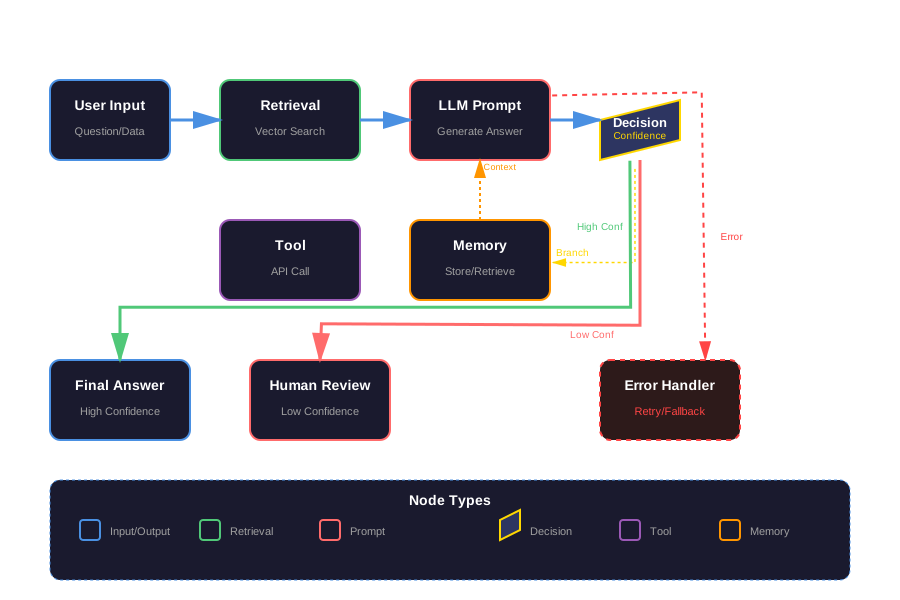
Consider a customer support bot. User asks a question. You retrieve context. You generate an answer. But what if confidence is low? You need to branch to human review. What if retrieval fails? You need an error path. What if the question needs tool use? You need another branch.
In a chain, you’d write:
prompt1 → prompt2 → if condition → prompt3 else → prompt4This gets messy fast. Error handling is scattered. Branching logic is embedded in prompts. You can’t easily see the full flow. Testing is hard.
In a graph, you model this clearly:
[User Input] → [Retrieval] → [LLM Prompt] → [Decision Node]
                                          ↓
                    [Confidence < threshold] → [Human Review]
                    [Confidence >= threshold] → [Final Answer]
Each node has a clear purpose. Edges show data flow. Branching is explicit. Error handling is a first-class concept.
What You’ll Learn
This article covers:
- What prompt-graphs are and why they matter
- How to design graph workflows
- Implementation patterns and code
- Observability and logging
- Cost and performance considerations
- A complete case study
By the end, you’ll know how to build production-ready LLM workflows using graph architecture.
What is a Prompt-Graph?
A prompt-graph is a directed graph that models an LLM workflow. Nodes represent operations. Edges represent data and control flow.
Graph Structure
Nodes can be:
- Prompt nodes: Invoke an LLM with a prompt template
- Tool nodes: Execute external tools or APIs
- Retrieval nodes: Fetch context from vector stores or databases
- Memory nodes: Store or retrieve information from memory
- Decision nodes: Branch based on conditions
- Transform nodes: Process data between steps
Edges can be:
- Data flow edges: Pass output from one node to another
- Control branch edges: Route execution based on conditions
- Error edges: Handle failures and retries
This is similar to workflow engines like Airflow or Prefect. The difference is that nodes are LLM-specific operations.
Comparison with Prompt-Chains
Chains are simple. They’re a sequence: A → B → C. Each step runs after the previous one completes.
Graphs are flexible. They support:
- Parallel execution: Run multiple nodes at once
- Conditional branching: Choose paths based on data
- Error recovery: Retry or fallback paths
- Reuse: Share nodes across workflows
- Visibility: See the full workflow structure
Here’s a simple example. A chain might be:
Extract → Process → FormatA graph might be:
[Extract] → [Process] → [Decision: needs_formatting?]
                        ↓ yes                    ↓ no
                   [Format]                    [Validate]
                        ↓                         ↓
                    [Final Output]
The graph shows all paths. The chain hides branching logic.
Benefits
Reusability: Define nodes once, use in multiple workflows. A “summarize” node can appear in different graphs.
Branching: Model conditional logic explicitly. No hidden if-statements in prompts.
Recovery: Design error paths. If retrieval fails, route to a fallback node.
Observability: Track execution through the graph. See which nodes ran, which branches were taken, where errors occurred.
Testing: Test individual nodes. Test graph paths. Mock dependencies easily.
Versioning: Version nodes independently. Update a prompt node without changing the graph structure.
Auditing: Track which prompt version produced which output. Essential for compliance.
Designing the Prompt-Graph: Best Practices
Designing a good prompt-graph requires thinking about node types, edge types, granularity, and organization.
Node Types
Prompt Node: Invokes an LLM with a prompt template. Takes inputs, applies template, calls LLM, returns response.
PromptNode(
    id="extract_entities",
    prompt_template="Extract entities from: {text}",
    inputs=["text"],
    outputs=["entities"]
)
Retrieval Node: Fetches context from external sources. Vector search, database queries, API calls.
RetrievalNode(
    id="fetch_context",
    source="vector_store",
    query_field="user_question",
    outputs=["context"]
)
Tool Invocation Node: Calls external tools or functions. Calculator, API clients, custom functions.
ToolNode(
    id="calculate_total",
    tool="calculator",
    inputs=["items"],
    outputs=["total"]
)
Memory Node: Stores or retrieves information. Conversation history, user preferences, session data.
MemoryNode(
    id="store_conversation",
    operation="write",
    key="conversation_id",
    inputs=["messages"]
)
Decision Node: Branches execution based on conditions. Confidence thresholds, content type, error states.
DecisionNode(
    id="check_confidence",
    condition="confidence < 0.7",
    true_branch="human_review",
    false_branch="final_answer"
)
Transform Node: Processes data between steps. Format conversion, filtering, aggregation.
TransformNode(
    id="format_response",
    function="format_json",
    inputs=["raw_response"],
    outputs=["formatted"]
)
Edge Types
Data Flow Edge: Passes output from one node to another. Most common edge type.
Edge(
    from_node="extract_entities",
    to_node="process_entities",
    data_mapping={"entities": "input_entities"}
)
Control Branch Edge: Routes execution based on decision node output.
Edge(
    from_node="check_confidence",
    to_node="human_review",
    condition="confidence < 0.7"
)
Error Edge: Handles failures. Routes to retry or fallback nodes.
Edge(
    from_node="retrieve_context",
    to_node="fallback_context",
    condition="error_occurred"
)
Graph Granularity
How fine-grained should nodes be? Too fine, and you have overhead. Too coarse, and you lose flexibility.
Fine-grained: Each operation is a node. More flexibility, more overhead.
Coarse-grained: Multiple operations per node. Less overhead, less flexibility.
Sweet spot: One logical operation per node. A “retrieve and summarize” node makes sense if you always do both together. But if you sometimes retrieve without summarizing, split them.
Rule of thumb: If you might want to reuse it separately, make it a separate node. If it’s always used together, combine them.
Naming and Labeling
Use clear, descriptive names. extract_entities is better than node1. Include the operation type in the name when helpful: prompt_classify, tool_calculate, retrieve_context.
Label edges with their purpose. high_confidence_path is better than edge1.
Modularization
Break large graphs into subgraphs. A “document processing” subgraph can be reused across workflows.
Subgraph(
    id="document_processing",
    nodes=[...],
    inputs=["document"],
    outputs=["summary", "entities"]
)
Versioning
Version nodes independently. A prompt node can be v1, v2, v3. The graph references a version.
PromptNode(
    id="extract_entities",
    version="v2",
    prompt_template="..."
)
This lets you:
- Test new versions without changing graphs
- Roll back if a version degrades
- Track which version produced which output
Example Workflows
Customer Support Bot:
[User Question] → [Retrieve FAQ] → [LLM Answer] → [Check Confidence]
                                                          ↓
                                    [Confidence < 0.7] → [Human Escalation]
                                    [Confidence >= 0.7] → [Format Response] → [Send]
Data Pipeline:
[Input Data] → [Extract] → [Validate] → [Transform] → [LLM Enrich] → [Store]
                    ↓ error
              [Error Handler] → [Log] → [Notify]
Summarization with Human Loop:
[Document] → [Extract] → [Summarize] → [Check Quality]
                                    ↓
                    [Quality < threshold] → [Human Review] → [Revise]
                    [Quality >= threshold] → [Publish]
Each workflow shows clear paths. Branching is explicit. Error handling is visible.
Implementing the Prompt-Graph in Code
Let’s build a prompt-graph system. We’ll use Python with a lightweight orchestration approach. You can adapt this to Airflow, Prefect, or Dagster.
Framework Choice
For this example, we’ll build a custom lightweight system. In production, consider:
- Airflow: Mature, widely used, good for scheduled workflows
- Prefect: Modern, Python-native, good for dynamic workflows
- Dagster: Asset-centric, good for data pipelines
- LangGraph: LLM-specific, built for agent workflows
Our custom system will be simple but demonstrate the concepts.
Core Components
Node Base Class:
from abc import ABC, abstractmethod
from typing import Dict, Any, List, Optional
from dataclasses import dataclass
from enum import Enum

class NodeStatus(Enum):
    PENDING = "pending"
    RUNNING = "running"
    SUCCESS = "success"
    FAILED = "failed"
    SKIPPED = "skipped"

@dataclass
class NodeResult:
    status: NodeStatus
    output: Dict[str, Any]
    error: Optional[str] = None
    metadata: Dict[str, Any] = None

class Node(ABC):
    def __init__(
        self,
        node_id: str,
        inputs: List[str],
        outputs: List[str],
        version: str = "v1"
    ):
        self.node_id = node_id
        self.inputs = inputs
        self.outputs = outputs
        self.version = version
        self.status = NodeStatus.PENDING
        self.result: Optional[NodeResult] = None

    @abstractmethod
    def execute(self, inputs: Dict[str, Any]) -> NodeResult:
        """Execute the node with given inputs."""
        pass

    def validate_inputs(self, inputs: Dict[str, Any]) -> bool:
        """Validate that required inputs are present."""
        for input_key in self.inputs:
            if input_key not in inputs:
                return False
        return True
Prompt Node:
from openai import OpenAI
import json

class PromptNode(Node):
    def __init__(
        self,
        node_id: str,
        prompt_template: str,
        model: str = "gpt-4",
        temperature: float = 0.7,
        inputs: List[str] = None,
        outputs: List[str] = None,
        version: str = "v1"
    ):
        super().__init__(node_id, inputs or [], outputs or ["response"], version)
        self.prompt_template = prompt_template
        self.model = model
        self.temperature = temperature
        self.client = OpenAI()

    def execute(self, inputs: Dict[str, Any]) -> NodeResult:
        try:
            # Format prompt template with inputs
            prompt = self.prompt_template.format(**inputs)

            # Call LLM
            response = self.client.chat.completions.create(
                model=self.model,
                messages=[{"role": "user", "content": prompt}],
                temperature=self.temperature
            )

            content = response.choices[0].message.content

            # Parse output if needed
            output = {"response": content}

            # Extract structured data if outputs are specified
            if len(self.outputs) > 1:
                try:
                    parsed = json.loads(content)
                    output.update(parsed)
                except:
                    pass

            return NodeResult(
                status=NodeStatus.SUCCESS,
                output=output,
                metadata={
                    "model": self.model,
                    "tokens_used": response.usage.total_tokens,
                    "prompt_version": self.version
                }
            )
        except Exception as e:
            return NodeResult(
                status=NodeStatus.FAILED,
                output={},
                error=str(e)
            )
Retrieval Node:
from langchain.vectorstores import FAISS
from langchain.embeddings import OpenAIEmbeddings

class RetrievalNode(Node):
    def __init__(
        self,
        node_id: str,
        vector_store: FAISS,
        query_field: str = "query",
        top_k: int = 5,
        inputs: List[str] = None,
        outputs: List[str] = None,
        version: str = "v1"
    ):
        super().__init__(node_id, inputs or [query_field], outputs or ["context"], version)
        self.vector_store = vector_store
        self.query_field = query_field
        self.top_k = top_k

    def execute(self, inputs: Dict[str, Any]) -> NodeResult:
        try:
            query = inputs[self.query_field]

            # Similarity search
            docs = self.vector_store.similarity_search(query, k=self.top_k)

            # Combine into context
            context = "\n\n".join([doc.page_content for doc in docs])

            return NodeResult(
                status=NodeStatus.SUCCESS,
                output={"context": context, "documents": [doc.page_content for doc in docs]},
                metadata={
                    "top_k": self.top_k,
                    "results_found": len(docs)
                }
            )
        except Exception as e:
            return NodeResult(
                status=NodeStatus.FAILED,
                output={},
                error=str(e)
            )
Decision Node:
class DecisionNode(Node):
    def __init__(
        self,
        node_id: str,
        condition: str,  # Python expression like "confidence < 0.7"
        true_branch: str,
        false_branch: str,
        inputs: List[str] = None,
        outputs: List[str] = None,
        version: str = "v1"
    ):
        super().__init__(node_id, inputs or [], outputs or ["branch"], version)
        self.condition = condition
        self.true_branch = true_branch
        self.false_branch = false_branch

    def execute(self, inputs: Dict[str, Any]) -> NodeResult:
        try:
            # Evaluate condition with inputs as context
            result = eval(self.condition, {"__builtins__": {}}, inputs)

            branch = self.true_branch if result else self.false_branch

            return NodeResult(
                status=NodeStatus.SUCCESS,
                output={"branch": branch, "condition_result": result},
                metadata={"condition": self.condition}
            )
        except Exception as e:
            return NodeResult(
                status=NodeStatus.FAILED,
                output={},
                error=str(e)
            )
Tool Node:
class ToolNode(Node):
    def __init__(
        self,
        node_id: str,
        tool_function: callable,
        inputs: List[str],
        outputs: List[str] = None,
        version: str = "v1"
    ):
        super().__init__(node_id, inputs, outputs or ["result"], version)
        self.tool_function = tool_function

    def execute(self, inputs: Dict[str, Any]) -> NodeResult:
        try:
            # Extract inputs in order
            args = [inputs[key] for key in self.inputs]

            # Call tool
            result = self.tool_function(*args)

            return NodeResult(
                status=NodeStatus.SUCCESS,
                output={"result": result},
                metadata={"tool": self.tool_function.__name__}
            )
        except Exception as e:
            return NodeResult(
                status=NodeStatus.FAILED,
                output={},
                error=str(e)
            )
Graph Definition
Graph Class:
from typing import Dict, List, Tuple
import networkx as nx

class PromptGraph:
    def __init__(self, graph_id: str):
        self.graph_id = graph_id
        self.nodes: Dict[str, Node] = {}
        self.edges: List[Tuple[str, str, Dict]] = []
        self.graph = nx.DiGraph()
        self.execution_log: List[Dict] = []

    def add_node(self, node: Node):
        """Add a node to the graph."""
        self.nodes[node.node_id] = node
        self.graph.add_node(node.node_id)

    def add_edge(
        self,
        from_node: str,
        to_node: str,
        data_mapping: Dict[str, str] = None,
        condition: str = None
    ):
        """Add an edge between nodes."""
        edge_data = {
            "data_mapping": data_mapping or {},
            "condition": condition
        }
        self.edges.append((from_node, to_node, edge_data))
        self.graph.add_edge(from_node, to_node, **edge_data)

    def get_entry_nodes(self) -> List[str]:
        """Find nodes with no incoming edges."""
        return [n for n in self.graph.nodes() if self.graph.in_degree(n) == 0]

    def get_next_nodes(self, node_id: str, context: Dict[str, Any] = None) -> List[str]:
        """Get nodes that should execute after this one."""
        next_nodes = []
        for from_n, to_n, edge_data in self.edges:
            if from_n == node_id:
                # Check condition if present
                if edge_data.get("condition"):
                    try:
                        if not eval(edge_data["condition"], {"__builtins__": {}}, context or {}):
                            continue
                    except:
                        continue
                next_nodes.append(to_n)
        return next_nodes
Execution Engine
Executor:
from collections import deque
import time

class GraphExecutor:
    def __init__(self, graph: PromptGraph, logger=None):
        self.graph = graph
        self.logger = logger
        self.execution_state: Dict[str, Any] = {}
        self.node_results: Dict[str, NodeResult] = {}

    def execute(self, initial_inputs: Dict[str, Any]) -> Dict[str, Any]:
        """Execute the graph starting from entry nodes."""
        self.execution_state = initial_inputs.copy()
        self.node_results = {}

        # Find entry nodes
        entry_nodes = self.graph.get_entry_nodes()
        if not entry_nodes:
            raise ValueError("No entry nodes found in graph")

        # Queue of nodes to execute
        queue = deque(entry_nodes)
        executed = set()

        while queue:
            node_id = queue.popleft()

            if node_id in executed:
                continue

            # Check if dependencies are ready
            if not self._dependencies_ready(node_id):
                continue

            # Execute node
            node = self.graph.nodes[node_id]
            inputs = self._prepare_inputs(node, node_id)

            self._log_execution_start(node_id, inputs)

            start_time = time.time()
            result = node.execute(inputs)
            duration = time.time() - start_time

            self.node_results[node_id] = result

            # Update execution state with outputs
            for output_key, output_value in result.output.items():
                self.execution_state[output_key] = output_value

            self._log_execution_end(node_id, result, duration)

            executed.add(node_id)

            # Handle errors
            if result.status == NodeStatus.FAILED:
                # Find error edges
                error_nodes = self.graph.get_next_nodes(node_id, {"error_occurred": True})
                for error_node in error_nodes:
                    if error_node not in executed:
                        queue.append(error_node)
                continue

            # Get next nodes
            next_nodes = self.graph.get_next_nodes(node_id, self.execution_state)
            for next_node in next_nodes:
                if next_node not in executed and next_node not in queue:
                    queue.append(next_node)

        return self.execution_state

    def _dependencies_ready(self, node_id: str) -> bool:
        """Check if all dependencies for a node have executed."""
        predecessors = list(self.graph.graph.predecessors(node_id))
        if not predecessors:
            return True

        for pred in predecessors:
            if pred not in self.node_results:
                return False
            if self.node_results[pred].status == NodeStatus.FAILED:
                # Check if there's an error path
                error_paths = self.graph.get_next_nodes(pred, {"error_occurred": True})
                if node_id not in error_paths:
                    return False
        return True

    def _prepare_inputs(self, node: Node, node_id: str) -> Dict[str, Any]:
        """Prepare inputs for a node based on incoming edges."""
        inputs = {}

        # Find incoming edges
        for from_n, to_n, edge_data in self.graph.edges:
            if to_n == node_id:
                data_mapping = edge_data.get("data_mapping", {})
                for from_key, to_key in data_mapping.items():
                    if from_key in self.execution_state:
                        inputs[to_key] = self.execution_state[from_key]
                # If no mapping, pass all outputs
                if not data_mapping:
                    pred_result = self.node_results.get(from_n)
                    if pred_result:
                        inputs.update(pred_result.output)

        return inputs

    def _log_execution_start(self, node_id: str, inputs: Dict[str, Any]):
        """Log node execution start."""
        if self.logger:
            self.logger.info(f"Executing node: {node_id}", extra={
                "node_id": node_id,
                "inputs": inputs,
                "timestamp": time.time()
            })

    def _log_execution_end(self, node_id: str, result: NodeResult, duration: float):
        """Log node execution end."""
        if self.logger:
            self.logger.info(f"Node completed: {node_id}", extra={
                "node_id": node_id,
                "status": result.status.value,
                "duration": duration,
                "metadata": result.metadata,
                "error": result.error
            })
Example Workflow
Customer Support Bot:
# Create graph
graph = PromptGraph("customer_support_bot")

# Define nodes
retrieve_node = RetrievalNode(
    node_id="retrieve_faq",
    vector_store=faiss_store,
    query_field="user_question",
    top_k=5
)

prompt_node = PromptNode(
    node_id="generate_answer",
    prompt_template="Context: {context}\n\nQuestion: {user_question}\n\nAnswer:",
    inputs=["context", "user_question"],
    outputs=["answer", "confidence"]
)

decision_node = DecisionNode(
    node_id="check_confidence",
    condition="confidence < 0.7",
    true_branch="human_review",
    false_branch="format_response",
    inputs=["confidence"]
)

format_node = PromptNode(
    node_id="format_response",
    prompt_template="Format this answer nicely: {answer}",
    inputs=["answer"],
    outputs=["formatted_answer"]
)

human_node = ToolNode(
    node_id="human_review",
    tool_function=escalate_to_human,
    inputs=["user_question", "answer"]
)

# Add nodes
graph.add_node(retrieve_node)
graph.add_node(prompt_node)
graph.add_node(decision_node)
graph.add_node(format_node)
graph.add_node(human_node)

# Add edges
graph.add_edge("retrieve_faq", "generate_answer", {
    "context": "context",
    "user_question": "user_question"
})

graph.add_edge("generate_answer", "check_confidence", {
    "confidence": "confidence"
})

graph.add_edge("check_confidence", "format_response", condition="confidence >= 0.7")
graph.add_edge("check_confidence", "human_review", condition="confidence < 0.7")

# Execute
executor = GraphExecutor(graph, logger)
result = executor.execute({
    "user_question": "How do I reset my password?"
})

print(result["formatted_answer"] or result.get("escalated"))
Error Handling and Retries
Add retry logic to nodes:
class RetryableNode(Node):
    def __init__(self, base_node: Node, max_retries: int = 3, backoff: float = 1.0):
        self.base_node = base_node
        self.max_retries = max_retries
        self.backoff = backoff
        super().__init__(
            base_node.node_id,
            base_node.inputs,
            base_node.outputs,
            base_node.version
        )

    def execute(self, inputs: Dict[str, Any]) -> NodeResult:
        for attempt in range(self.max_retries):
            result = self.base_node.execute(inputs)
            if result.status == NodeStatus.SUCCESS:
                return result

            if attempt < self.max_retries - 1:
                time.sleep(self.backoff * (2 ** attempt))

        return result
Prompt Versioning
Store prompts separately and reference versions:
class PromptStore:
    def __init__(self):
        self.prompts: Dict[str, Dict[str, str]] = {}

    def register(self, prompt_id: str, version: str, template: str):
        if prompt_id not in self.prompts:
            self.prompts[prompt_id] = {}
        self.prompts[prompt_id][version] = template

    def get(self, prompt_id: str, version: str = "latest") -> str:
        if version == "latest":
            versions = self.prompts[prompt_id]
            version = max(versions.keys())
        return self.prompts[prompt_id][version]

# Usage
prompt_store = PromptStore()
prompt_store.register("extract_entities", "v1", "Extract entities: {text}")
prompt_store.register("extract_entities", "v2", "Extract all entities from: {text}")

node = PromptNode(
    node_id="extract",
    prompt_template=prompt_store.get("extract_entities", "v2")
)
Observability, Logging, and Auditing
Production workflows need visibility. You need to know what ran, what failed, and why.
Instrumenting Nodes
Each node should log:
- Execution metadata: Timestamp, duration, node version
- Inputs and outputs: What data flowed through
- LLM calls: Prompt used, tokens consumed, model version
- Errors: Full error traces
- Branch decisions: Which paths were taken
import logging
from datetime import datetime

class ObservabilityLogger:
    def __init__(self):
        self.logger = logging.getLogger("prompt_graph")
        self.events: List[Dict] = []

    def log_node_execution(
        self,
        node_id: str,
        node_version: str,
        inputs: Dict[str, Any],
        outputs: Dict[str, Any],
        status: NodeStatus,
        duration: float,
        metadata: Dict[str, Any] = None,
        error: str = None
    ):
        event = {
            "timestamp": datetime.utcnow().isoformat(),
            "node_id": node_id,
            "node_version": node_version,
            "status": status.value,
            "duration_ms": duration * 1000,
            "inputs": self._sanitize(inputs),
            "outputs": self._sanitize(outputs),
            "metadata": metadata or {},
            "error": error
        }

        self.events.append(event)
        self.logger.info(f"Node execution: {node_id}", extra=event)

    def log_branch_decision(
        self,
        from_node: str,
        to_node: str,
        condition: str,
        result: bool,
        context: Dict[str, Any]
    ):
        event = {
            "timestamp": datetime.utcnow().isoformat(),
            "type": "branch_decision",
            "from_node": from_node,
            "to_node": to_node,
            "condition": condition,
            "result": result,
            "context": self._sanitize(context)
        }

        self.events.append(event)
        self.logger.info(f"Branch: {from_node} → {to_node}", extra=event)

    def _sanitize(self, data: Dict[str, Any]) -> Dict[str, Any]:
        """Remove sensitive data and truncate large values."""
        sanitized = {}
        for key, value in data.items():
            if key in ["password", "api_key", "token"]:
                sanitized[key] = "***"
            elif isinstance(value, str) and len(value) > 1000:
                sanitized[key] = value[:1000] + "..."
            else:
                sanitized[key] = value
        return sanitized

    def get_execution_trace(self, execution_id: str) -> List[Dict]:
        """Get full execution trace for an execution."""
        return [e for e in self.events if e.get("execution_id") == execution_id]
Visualizing the Graph
Visualize graph structure and execution:
import matplotlib.pyplot as plt
import networkx as nx

class GraphVisualizer:
    def __init__(self, graph: PromptGraph):
        self.graph = graph

    def visualize_structure(self, filepath: str = None):
        """Visualize graph structure."""
        pos = nx.spring_layout(self.graph.graph)

        plt.figure(figsize=(12, 8))

        # Draw nodes
        nx.draw_networkx_nodes(
            self.graph.graph,
            pos,
            node_color="lightblue",
            node_size=2000,
            alpha=0.9
        )

        # Draw edges
        nx.draw_networkx_edges(
            self.graph.graph,
            pos,
            edge_color="gray",
            arrows=True,
            arrowsize=20
        )

        # Draw labels
        nx.draw_networkx_labels(
            self.graph.graph,
            pos,
            font_size=10
        )

        plt.title("Prompt Graph Structure")
        plt.axis("off")

        if filepath:
            plt.savefig(filepath)
        else:
            plt.show()

    def visualize_execution(
        self,
        executor: GraphExecutor,
        filepath: str = None
    ):
        """Visualize graph with execution status."""
        pos = nx.spring_layout(self.graph.graph)

        plt.figure(figsize=(12, 8))

        # Color nodes by status
        node_colors = []
        for node_id in self.graph.graph.nodes():
            result = executor.node_results.get(node_id)
            if not result:
                node_colors.append("gray")  # Not executed
            elif result.status == NodeStatus.SUCCESS:
                node_colors.append("green")
            elif result.status == NodeStatus.FAILED:
                node_colors.append("red")
            else:
                node_colors.append("yellow")

        nx.draw_networkx_nodes(
            self.graph.graph,
            pos,
            node_color=node_colors,
            node_size=2000,
            alpha=0.9
        )

        nx.draw_networkx_edges(
            self.graph.graph,
            pos,
            edge_color="gray",
            arrows=True
        )

        nx.draw_networkx_labels(
            self.graph.graph,
            pos,
            font_size=10
        )

        plt.title("Prompt Graph Execution")
        plt.axis("off")

        if filepath:
            plt.savefig(filepath)
        else:
            plt.show()
Data Lineage
Track which prompt version produced which output:
class LineageTracker:
    def __init__(self):
        self.lineage: Dict[str, Dict] = {}

    def track_execution(
        self,
        execution_id: str,
        graph_version: str,
        node_versions: Dict[str, str],
        inputs: Dict[str, Any],
        outputs: Dict[str, Any]
    ):
        """Track full execution lineage."""
        self.lineage[execution_id] = {
            "graph_version": graph_version,
            "node_versions": node_versions,
            "inputs": inputs,
            "outputs": outputs,
            "timestamp": datetime.utcnow().isoformat()
        }

    def get_lineage(self, execution_id: str) -> Dict:
        """Get lineage for an execution."""
        return self.lineage.get(execution_id)

    def find_by_output(self, output_key: str, output_value: Any) -> List[str]:
        """Find executions that produced a specific output."""
        matches = []
        for exec_id, data in self.lineage.items():
            if data["outputs"].get(output_key) == output_value:
                matches.append(exec_id)
        return matches
Integration with Monitoring Tools
Export metrics to Prometheus, Datadog, or similar:
from prometheus_client import Counter, Histogram, Gauge

# Metrics
node_executions = Counter(
    "prompt_graph_node_executions_total",
    "Total node executions",
    ["node_id", "status"]
)

node_duration = Histogram(
    "prompt_graph_node_duration_seconds",
    "Node execution duration",
    ["node_id"]
)

graph_executions = Counter(
    "prompt_graph_executions_total",
    "Total graph executions",
    ["graph_id", "status"]
)

class MetricsExporter:
    def record_node_execution(self, node_id: str, status: NodeStatus, duration: float):
        node_executions.labels(node_id=node_id, status=status.value).inc()
        node_duration.labels(node_id=node_id).observe(duration)

    def record_graph_execution(self, graph_id: str, status: str):
        graph_executions.labels(graph_id=graph_id, status=status).inc()
Performance, Cost and Maintenance Considerations
Graph workflows have different cost and performance characteristics than chains.
Cost Aspects
Multiple LLM Calls: Graphs often make more LLM calls than chains. A chain might call the LLM once. A graph might call it multiple times across nodes.
Branch Combinatorics: If you have many branches, you might execute more nodes than a linear chain. But you can also skip unnecessary nodes.
Tool Invocations: Tool nodes add cost. API calls, database queries, external services.
Optimization Strategies:
- Cache LLM responses for identical inputs
- Use cheaper models for simple nodes
- Batch operations when possible
- Skip branches early when conditions are clear
class CachingNode(Node):
    def __init__(self, base_node: Node, cache: Dict = None):
        self.base_node = base_node
        self.cache = cache or {}
        super().__init__(
            base_node.node_id,
            base_node.inputs,
            base_node.outputs,
            base_node.version
        )

    def execute(self, inputs: Dict[str, Any]) -> NodeResult:
        # Create cache key from inputs
        cache_key = str(sorted(inputs.items()))

        if cache_key in self.cache:
            return self.cache[cache_key]

        result = self.base_node.execute(inputs)
        self.cache[cache_key] = result
        return result
Maintenance
Versioning Nodes: Version nodes independently. Update a prompt without changing the graph.
Deprecation: Mark nodes as deprecated. Log warnings when deprecated nodes are used.
class DeprecatedNode(Node):
    def __init__(self, base_node: Node, deprecation_date: str, replacement: str):
        self.base_node = base_node
        self.deprecation_date = deprecation_date
        self.replacement = replacement
        super().__init__(
            base_node.node_id,
            base_node.inputs,
            base_node.outputs,
            base_node.version
        )

    def execute(self, inputs: Dict[str, Any]) -> NodeResult:
        import warnings
        warnings.warn(
            f"Node {self.node_id} is deprecated since {self.deprecation_date}. "
            f"Use {self.replacement} instead.",
            DeprecationWarning
        )
        return self.base_node.execute(inputs)
Testing Graph Changes: Test individual nodes. Test graph paths. Test error handling.
def test_node(node: Node, test_inputs: Dict[str, Any], expected_outputs: Dict[str, Any]):
    """Test a single node."""
    result = node.execute(test_inputs)
    assert result.status == NodeStatus.SUCCESS
    for key, value in expected_outputs.items():
        assert result.output[key] == value

def test_graph_path(graph: PromptGraph, path: List[str], initial_inputs: Dict[str, Any]):
    """Test a specific path through the graph."""
    executor = GraphExecutor(graph)
    result = executor.execute(initial_inputs)

    # Verify all nodes in path executed
    for node_id in path:
        assert node_id in executor.node_results
        assert executor.node_results[node_id].status == NodeStatus.SUCCESS
Monitoring Drift
Prompt performance can degrade over time. Monitor:
- Response quality scores
- Error rates
- User feedback
- A/B test results
class DriftMonitor:
    def __init__(self):
        self.quality_scores: Dict[str, List[float]] = {}

    def record_quality(self, node_id: str, score: float):
        if node_id not in self.quality_scores:
            self.quality_scores[node_id] = []
        self.quality_scores[node_id].append(score)

    def check_drift(self, node_id: str, threshold: float = 0.1) -> bool:
        """Check if quality has drifted significantly."""
        scores = self.quality_scores.get(node_id, [])
        if len(scores) < 10:
            return False

        recent_avg = sum(scores[-10:]) / 10
        historical_avg = sum(scores[:-10]) / max(1, len(scores) - 10)

        drift = abs(recent_avg - historical_avg)
        return drift > threshold
Case Study: Enterprise Legal Document Assistant
Let’s walk through a realistic scenario. An enterprise legal team needs an assistant that processes documents, extracts key information, summarizes content, and routes complex cases to human lawyers.
Workflow Requirements
- User uploads a legal document
- System extracts metadata (date, parties, document type)
- System retrieves similar past cases
- System generates a summary
- System checks confidence and complexity
- If low confidence or high complexity, route to human review
- If approved, format and store the result
Graph Design
[Document Upload] → [Extract Metadata] → [Retrieve Similar Cases]
                                              ↓
[Generate Summary] ← [Context] ← [Similar Cases]
        ↓
[Check Confidence] → [Decision: Low Confidence?]
        ↓ yes                    ↓ no
[Human Review]              [Check Complexity]
                                ↓
                        [Decision: High Complexity?]
                        ↓ yes            ↓ no
                    [Human Review]   [Format Response]
                                            ↓
                                    [Store Result]
Implementation
# Create graph
legal_graph = PromptGraph("legal_document_assistant")

# Nodes
extract_metadata = PromptNode(
    node_id="extract_metadata",
    prompt_template="""
    Extract metadata from this legal document:
    {document}

    Return JSON with: date, parties, document_type, jurisdiction
    """,
    inputs=["document"],
    outputs=["metadata"]
)

retrieve_cases = RetrievalNode(
    node_id="retrieve_similar_cases",
    vector_store=legal_cases_store,
    query_field="document",
    top_k=10
)

generate_summary = PromptNode(
    node_id="generate_summary",
    prompt_template="""
    Document: {document}
    Similar Cases: {similar_cases}
    Metadata: {metadata}

    Generate a comprehensive summary focusing on:
    - Key legal issues
    - Relevant precedents
    - Risk assessment
    - Recommended actions
    """,
    inputs=["document", "similar_cases", "metadata"],
    outputs=["summary", "confidence", "complexity_score"]
)

check_confidence = DecisionNode(
    node_id="check_confidence",
    condition="confidence < 0.7",
    true_branch="human_review",
    false_branch="check_complexity",
    inputs=["confidence"]
)

check_complexity = DecisionNode(
    node_id="check_complexity",
    condition="complexity_score > 0.8",
    true_branch="human_review",
    false_branch="format_response",
    inputs=["complexity_score"]
)

format_response = PromptNode(
    node_id="format_response",
    prompt_template="Format this legal summary for storage: {summary}",
    inputs=["summary"],
    outputs=["formatted_summary"]
)

store_result = ToolNode(
    node_id="store_result",
    tool_function=store_legal_summary,
    inputs=["formatted_summary", "metadata"]
)

human_review = ToolNode(
    node_id="human_review",
    tool_function=escalate_to_lawyer,
    inputs=["document", "summary", "metadata"]
)

# Add nodes
for node in [extract_metadata, retrieve_cases, generate_summary,
             check_confidence, check_complexity, format_response,
             store_result, human_review]:
    legal_graph.add_node(node)

# Add edges
legal_graph.add_edge("extract_metadata", "retrieve_similar_cases", {
    "document": "document"
})

legal_graph.add_edge("retrieve_similar_cases", "generate_summary", {
    "similar_cases": "similar_cases",
    "document": "document"
})

legal_graph.add_edge("extract_metadata", "generate_summary", {
    "metadata": "metadata"
})

legal_graph.add_edge("generate_summary", "check_confidence", {
    "confidence": "confidence"
})

legal_graph.add_edge("check_confidence", "check_complexity",
                     condition="confidence >= 0.7")

legal_graph.add_edge("check_confidence", "human_review",
                     condition="confidence < 0.7")

legal_graph.add_edge("check_complexity", "format_response",
                     condition="complexity_score <= 0.8")

legal_graph.add_edge("check_complexity", "human_review",
                     condition="complexity_score > 0.8")

legal_graph.add_edge("format_response", "store_result", {
    "formatted_summary": "formatted_summary",
    "metadata": "metadata"
})

legal_graph.add_edge("generate_summary", "human_review", {
    "document": "document",
    "summary": "summary",
    "metadata": "metadata"
}, condition="routed_to_human")
Execution and Observability
# Execute
executor = GraphExecutor(legal_graph, logger=observability_logger)

result = executor.execute({
    "document": uploaded_document_text
})

# Check what happened
if "formatted_summary" in result:
    print("Summary generated and stored")
    print(result["formatted_summary"])
elif "escalated" in result:
    print("Case escalated to human review")
    print(f"Review ID: {result['review_id']}")

# View execution trace
trace = observability_logger.get_execution_trace(execution_id)
for event in trace:
    print(f"{event['node_id']}: {event['status']} ({event['duration_ms']}ms)")
Evolution Over Time
As the system runs, you notice:
- Low confidence on contract reviews
- High complexity on merger documents
- Retrieval sometimes returns irrelevant cases
You update the graph:
- Add a node to filter retrieved cases by relevance
- Adjust confidence thresholds based on document type
- Add a specialized node for contract analysis
The graph structure makes these changes clear. You can test new nodes before deploying. You can A/B test different paths.
Conclusion
Prompt-chains work for simple workflows. But production systems need more. They need branching, error handling, reuse, and observability.
Prompt-graphs provide this. They model workflows as graphs where nodes are operations and edges are flows. This gives you flexibility, reliability, and visibility.
Key Takeaways
-
Graphs beat chains for complex workflows. They make branching explicit, error handling clear, and reuse easy.
-
Design nodes carefully. One logical operation per node. Clear inputs and outputs. Version independently.
-
Instrument everything. Log node executions, branch decisions, errors. Track lineage. Monitor performance.
-
Plan for maintenance. Version nodes. Test changes. Monitor drift. Deprecate gracefully.
-
Start simple, evolve. Begin with a basic graph. Add nodes as needs emerge. Refactor when patterns appear.
Next Steps
- Dynamic graph generation: Generate graphs at runtime based on input
- Adaptive branching: Learn which branches work best and adjust automatically
- Graph learning: Optimize graph structure based on execution data
- Multi-agent graphs: Coordinate multiple agents through graph workflows
The future of LLM workflows is graph-based. Start building with graphs now, and you’ll be ready for what comes next.
Appendix: Code Repository
Full implementation available at: https://github.com/appropri8/sample-code/tree/main/11/11/prompt-graph-workflow-design
Quick Start
git clone https://github.com/appropri8/sample-code.git
cd sample-code/11/11/prompt-graph-workflow-design
pip install -r requirements.txt
python examples/customer_support_bot.py
Requirements
See requirements.txt for full list. Key dependencies:
- openai
- networkx
- pydantic
- pytest
- langchain (for retrieval nodes)
Adapting for Your Workflows
- Define your nodes (prompt, retrieval, tool, decision)
- Create a graph and add nodes
- Connect nodes with edges
- Execute with GraphExecutor
- Add observability and monitoring
The code is designed to be extended. Add new node types. Integrate with your tools. Customize execution logic.
Discussion
Loading comments...