Observability & MLOps for LLMs: From Metrics to Anomaly Detection in Production
You deploy an LLM workflow. It works in testing. Users start using it. Then things break. Token costs spike. Latency increases. Responses drift. You don’t know why.
This happens because LLMs in production are different from traditional software. They have long context windows. They branch based on conditions. They call tools. They make multi-step decisions. Standard monitoring doesn’t capture this.
You need observability built for LLMs. You need to track prompts, tokens, branches, tool calls, and drift. You need dashboards that show what’s happening. You need alerts that catch problems before they become expensive.
This article shows you how to build observability for LLM workflows in production.
Introduction
Most teams start with simple LLM deployments. One prompt. One response. Basic error handling. It works.
Then complexity grows. You add retrieval. You add tool calls. You add branching logic. You add human-in-the-loop steps. Suddenly you have a system that’s hard to understand and harder to debug.
Traditional monitoring tools track CPU, memory, request rates. They don’t track prompt versions, token consumption, branching decisions, or hallucination rates. They don’t understand LLM-specific failures.
This creates blind spots. You don’t see when a prompt update doubles token usage. You don’t notice when retrieval starts failing silently. You don’t catch drift until users complain. You don’t realize costs are climbing until the bill arrives.
Observability for LLMs means tracking everything that matters:
- Which prompts are running and their versions
- How many tokens each call consumes
- Which branches are taken and why
- When tools fail or time out
- How response quality changes over time
- What costs are accumulating
Without this, you’re flying blind. You can’t optimize. You can’t debug. You can’t prevent problems.
The Risk of Missing Observability
Missing observability leads to real problems:
Cost blow-ups: A prompt change increases context length. Token usage doubles. Your monthly bill triples. You don’t notice until the invoice arrives.
Silent failures: Retrieval starts failing. The system falls back to direct LLM calls. Quality degrades. Users notice. You don’t.
Drift: Model behavior changes over time. Responses become less accurate. Confidence scores shift. You don’t see it until metrics drop.
Hallucination spikes: A new prompt version increases hallucinations. Users lose trust. You don’t know which version caused it.
Tool failures: External APIs start timing out. The system retries. Latency increases. Users experience delays. You don’t see the pattern.
These problems compound. Without observability, you can’t diagnose them. You can’t fix them. You can’t prevent them.
Why LLMs Need Different Observability
LLMs aren’t like traditional APIs. They have unique characteristics:
Long context windows: A single request can consume thousands of tokens. You need to track token usage per request, not just request count.
Branching logic: Workflows branch based on confidence, complexity, or conditions. You need to track which branches are taken and why.
Tool calls: LLMs invoke external tools. You need to track tool success rates, latencies, and failures.
Multi-step reasoning: Workflows make multiple LLM calls in sequence. You need to trace the full execution path.
Prompt versioning: Prompts change frequently. You need to track which version produced which output.
Human-in-the-loop: Some workflows route to humans. You need to track routing decisions and human response times.
Standard monitoring doesn’t handle this. You need observability built for LLMs.
Defining Observability for LLMs
Observability means understanding what’s happening inside your system. For LLMs, this means tracking prompts, tokens, branches, tools, and quality.
Differences from Classical ML/MLOps
Classical ML observability focuses on:
- Model accuracy metrics
- Training data quality
- Feature drift
- Prediction latency
LLM observability adds:
- Prompt logs and versions
- Token usage and costs
- Branching frequency and decisions
- Tool invocation success rates
- Retrieval quality
- Human-in-the-loop transitions
- Hallucination detection
These are different problems. Classical ML monitors model performance. LLM observability monitors workflow execution.
Metric Categories
You need to track several categories of metrics:
Latency metrics:
- Time to first token (TTFT)
- Time per request
- Time per step in multi-step workflows
- Tool call latency
- End-to-end latency
Token metrics:
- Tokens consumed per request
- Input tokens vs output tokens
- Tokens per prompt version
- Token cost per request
- Cumulative token usage
Cost metrics:
- Cost per request
- Cost per prompt version
- Cost per branch path
- Daily/weekly/monthly costs
- Cost trends over time
Branching metrics:
- Branch frequency (which branches are taken)
- Branch decision reasons
- Human review rate
- Auto-approval rate
- Branch latency differences
Error metrics:
- LLM API errors
- Tool invocation failures
- Retrieval failures
- Timeout rates
- Rate limit hits
Quality metrics:
- Hallucination rate
- Confidence score distribution
- User feedback scores
- A/B test results
- Output quality trends
Usage metrics:
- Model version usage
- Prompt version usage
- Tool usage frequency
- Branch path popularity
- Request patterns over time
Each metric tells you something different. Together, they give you a complete picture.
Logging and Tracing
Metrics show trends. Logs show details. Traces show execution paths.
Node-level logging: Log each step in your workflow. What prompt was used? What tokens were consumed? What was the output? What errors occurred?
Prompt-version logging: Track which prompt version was used for each request. This lets you correlate changes with outcomes.
User-session logging: Group related requests by user session. See the full conversation flow. Understand context.
Decision-branch logging: Log every branching decision. What condition was evaluated? What was the result? Which path was taken?
Tool-call logging: Log every tool invocation. What tool was called? What were the inputs? What was the result? How long did it take?
Error logging: Log all errors with full context. What was the input? What prompt was used? What was the error? What was the stack trace?
Logs should be structured. Use JSON. Include timestamps, request IDs, user IDs, prompt versions, and all relevant context.
Traces connect logs across a workflow. A trace shows the full execution path: which nodes ran, which branches were taken, which tools were called, how long each step took.
Storage Considerations
You’ll generate a lot of data. Plan your storage:
Time-series database: For metrics. Prometheus, InfluxDB, or TimescaleDB. Stores metrics with timestamps. Good for dashboards and alerting.
Structured logs: For detailed logs. Elasticsearch, Loki, or cloud logging services. Searchable. Good for debugging.
Metadata store: For prompt versions, model versions, configuration. PostgreSQL or similar. Tracks what changed when.
Object storage: For large payloads. S3 or similar. Store full prompts, responses, and context. Reference from logs.
Choose based on volume, query patterns, and retention needs.
Architecting the Observability Pipeline
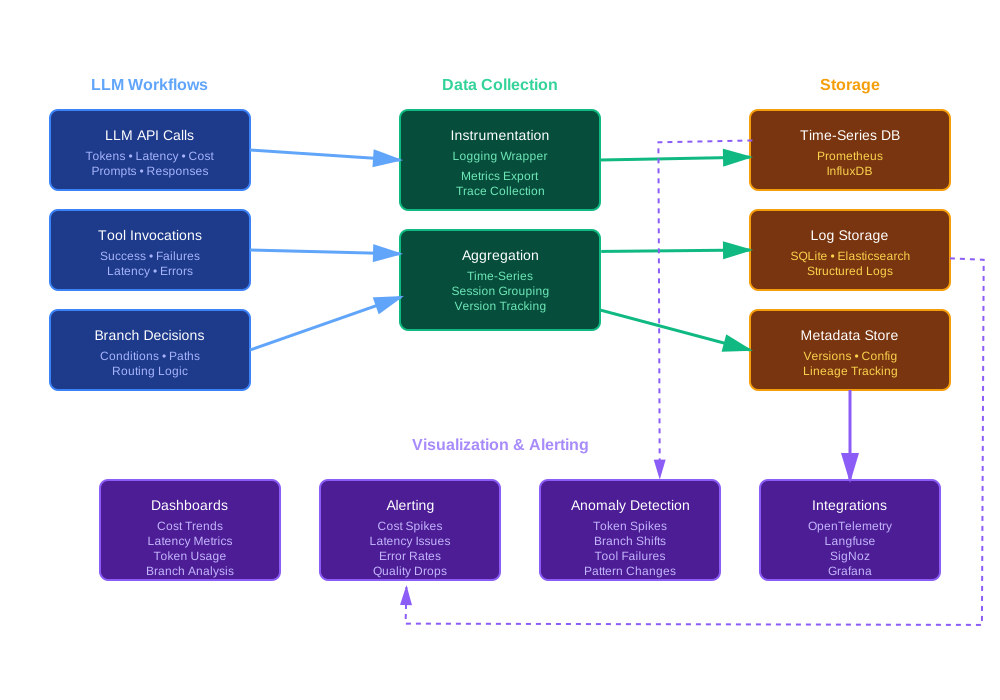
Building observability means collecting data, storing it, visualizing it, and alerting on it.
Data Ingestion
You need to collect data from your LLM workflows. This happens at multiple points:
LLM API responses: Wrap your LLM calls. Log the request (prompt, model, parameters). Log the response (tokens, latency, content). Extract metrics.
Tool calls: Instrument tool invocations. Log inputs, outputs, latency, errors. Track success rates.
Routing decisions: Log every branching decision. What condition was checked? What was the result? Which path was taken?
User interactions: Track user inputs, system responses, feedback. Build session traces.
Retrieval operations: Log vector searches, database queries, API calls. Track what was retrieved and how relevant it was.
Instrumentation should be lightweight. Don’t slow down your workflows. Use async logging. Batch writes. Sample if needed.
Aggregation and Storage
Raw logs are too detailed for dashboards. Aggregate them:
Time-series aggregation: Sum tokens per minute. Average latency per hour. Count errors per day. Store in time-series database.
Session aggregation: Group requests by session. Calculate session-level metrics. Track user journeys.
Prompt-version aggregation: Group by prompt version. Compare performance across versions. Track adoption.
Branch aggregation: Count branch decisions. Calculate branch percentages. Track branch performance.
Cost aggregation: Sum costs by time period, prompt version, branch path. Track trends.
Store aggregated metrics in your time-series database. Keep raw logs for debugging. Set retention policies. Archive old data.
Dashboarding and Alerting
Dashboards show what’s happening. Alerts notify you when things go wrong.
Cost dashboard: Show cost trends. Cost per prompt version. Cost per branch. Daily/weekly/monthly totals. Alerts when costs spike.
Latency dashboard: Show latency percentiles. Latency by prompt version. Latency by branch. Alerts when latency increases.
Error dashboard: Show error rates. Error types. Error trends. Alerts when error rates spike.
Branch dashboard: Show branch frequency. Branch performance. Branch trends. Alerts when branch distribution changes unexpectedly.
Quality dashboard: Show hallucination rates. Confidence scores. User feedback. Alerts when quality degrades.
Usage dashboard: Show request volume. Model usage. Prompt version adoption. Tool usage. Alerts when usage patterns change.
Dashboards should be real-time. Update every few seconds. Show trends over multiple time ranges (1 hour, 24 hours, 7 days, 30 days).
Alerts should be actionable. Don’t alert on every spike. Use thresholds. Use rate-of-change. Group related alerts. Include context in alerts.
Anomaly Detection
Anomaly detection finds unusual patterns automatically. This catches problems you might miss.
Token spike detection: Detect sudden increases in token usage. Could indicate a prompt change or context leak.
Branching shift detection: Detect changes in branch distribution. Could indicate a logic error or model drift.
Tool failure increase: Detect increases in tool failure rates. Could indicate an external service issue.
Latency anomaly: Detect unusual latency patterns. Could indicate performance degradation.
Cost anomaly: Detect unexpected cost increases. Could indicate a bug or abuse.
Quality anomaly: Detect drops in quality metrics. Could indicate model drift or prompt issues.
Anomaly detection can use simple rules (thresholds, rate-of-change) or machine learning (statistical models, time-series forecasting).
Start with rules. They’re easier to understand and tune. Add ML-based detection later if needed.
Integrations
You don’t need to build everything from scratch. Use existing tools:
OpenTelemetry: Standard for observability. Collects traces, metrics, logs. Exports to many backends. Good for instrumentation.
Prometheus: Time-series database. Collects metrics. Good for dashboards and alerting. Widely used.
Grafana: Visualization platform. Works with Prometheus and others. Good for dashboards.
SigNoz: Open-source observability platform. Combines traces, metrics, logs. Good alternative to commercial tools.
Langfuse: LLM-specific observability. Tracks prompts, tokens, costs, quality. Good for LLM workflows.
Elasticsearch/Loki: Log aggregation and search. Good for log analysis.
Datadog/New Relic: Commercial observability platforms. Full-featured but expensive.
Choose based on your needs, budget, and team expertise. Start simple. Add complexity as needed.
Code Walk-through: Instrumenting an LLM Workflow for Observability
Let’s build observability into an LLM workflow. We’ll create a Python system that logs everything, exports metrics, and detects anomalies.
Basic Setup
First, set up dependencies:
# requirements.txt
openai>=1.0.0
prometheus-client>=0.19.0
sqlite3  # Built-in, but listed for clarity
pandas>=2.0.0
streamlit>=1.28.0  # For dashboard
python-json-logger>=2.0.0
Logging Wrapper
Wrap LLM calls to capture everything:
import json
import time
import sqlite3
from datetime import datetime
from typing import Dict, Any, Optional
from dataclasses import dataclass, asdict
from openai import OpenAI
from prometheus_client import Counter, Histogram, Gauge

# Prometheus metrics
llm_requests_total = Counter(
    'llm_requests_total',
    'Total LLM requests',
    ['model', 'prompt_version', 'status']
)

llm_tokens_total = Counter(
    'llm_tokens_total',
    'Total tokens consumed',
    ['model', 'prompt_version', 'type']  # type: input or output
)

llm_latency_seconds = Histogram(
    'llm_latency_seconds',
    'LLM request latency',
    ['model', 'prompt_version'],
    buckets=[0.1, 0.5, 1.0, 2.0, 5.0, 10.0, 30.0]
)

llm_cost_usd = Counter(
    'llm_cost_usd',
    'LLM cost in USD',
    ['model', 'prompt_version']
)

@dataclass
class LLMCallLog:
    timestamp: str
    request_id: str
    prompt_version: str
    model: str
    prompt: str
    response: str
    input_tokens: int
    output_tokens: int
    total_tokens: int
    latency_ms: float
    cost_usd: float
    status: str
    error: Optional[str] = None
    metadata: Dict[str, Any] = None

class ObservabilityLogger:
    def __init__(self, db_path: str = "observability.db"):
        self.db_path = db_path
        self._init_db()
        self.client = OpenAI()

    def _init_db(self):
        conn = sqlite3.connect(self.db_path)
        cursor = conn.cursor()
        cursor.execute("""
            CREATE TABLE IF NOT EXISTS llm_calls (
                id INTEGER PRIMARY KEY AUTOINCREMENT,
                timestamp TEXT,
                request_id TEXT,
                prompt_version TEXT,
                model TEXT,
                prompt TEXT,
                response TEXT,
                input_tokens INTEGER,
                output_tokens INTEGER,
                total_tokens INTEGER,
                latency_ms REAL,
                cost_usd REAL,
                status TEXT,
                error TEXT,
                metadata TEXT
            )
        """)
        conn.commit()
        conn.close()

    def _calculate_cost(self, model: str, input_tokens: int, output_tokens: int) -> float:
        # Pricing as of 2024 (adjust for current rates)
        pricing = {
            "gpt-4": {"input": 0.03 / 1000, "output": 0.06 / 1000},
            "gpt-4-turbo": {"input": 0.01 / 1000, "output": 0.03 / 1000},
            "gpt-3.5-turbo": {"input": 0.0015 / 1000, "output": 0.002 / 1000},
        }
        model_pricing = pricing.get(model, pricing["gpt-3.5-turbo"])
        return (input_tokens * model_pricing["input"]) + (output_tokens * model_pricing["output"])

    def log_llm_call(
        self,
        request_id: str,
        prompt_version: str,
        model: str,
        prompt: str,
        response: str,
        usage: Dict[str, int],
        latency_ms: float,
        status: str = "success",
        error: Optional[str] = None,
        metadata: Optional[Dict[str, Any]] = None
    ):
        input_tokens = usage.get("prompt_tokens", 0)
        output_tokens = usage.get("completion_tokens", 0)
        total_tokens = usage.get("total_tokens", 0)
        cost_usd = self._calculate_cost(model, input_tokens, output_tokens)

        log_entry = LLMCallLog(
            timestamp=datetime.utcnow().isoformat(),
            request_id=request_id,
            prompt_version=prompt_version,
            model=model,
            prompt=prompt,
            response=response,
            input_tokens=input_tokens,
            output_tokens=output_tokens,
            total_tokens=total_tokens,
            latency_ms=latency_ms,
            cost_usd=cost_usd,
            status=status,
            error=error,
            metadata=metadata or {}
        )

        # Store in database
        conn = sqlite3.connect(self.db_path)
        cursor = conn.cursor()
        cursor.execute("""
            INSERT INTO llm_calls (
                timestamp, request_id, prompt_version, model, prompt, response,
                input_tokens, output_tokens, total_tokens, latency_ms, cost_usd,
                status, error, metadata
            ) VALUES (?, ?, ?, ?, ?, ?, ?, ?, ?, ?, ?, ?, ?, ?)
        """, (
            log_entry.timestamp,
            log_entry.request_id,
            log_entry.prompt_version,
            log_entry.model,
            log_entry.prompt,
            log_entry.response,
            log_entry.input_tokens,
            log_entry.output_tokens,
            log_entry.total_tokens,
            log_entry.latency_ms,
            log_entry.cost_usd,
            log_entry.status,
            log_entry.error,
            json.dumps(log_entry.metadata)
        ))
        conn.commit()
        conn.close()

        # Export to Prometheus
        llm_requests_total.labels(
            model=model,
            prompt_version=prompt_version,
            status=status
        ).inc()

        llm_tokens_total.labels(
            model=model,
            prompt_version=prompt_version,
            type="input"
        ).inc(input_tokens)

        llm_tokens_total.labels(
            model=model,
            prompt_version=prompt_version,
            type="output"
        ).inc(output_tokens)

        llm_latency_seconds.labels(
            model=model,
            prompt_version=prompt_version
        ).observe(latency_ms / 1000.0)

        llm_cost_usd.labels(
            model=model,
            prompt_version=prompt_version
        ).inc(cost_usd)

        return log_entry
Instrumented LLM Wrapper
Wrap your LLM calls with observability:
import uuid
from functools import wraps

class InstrumentedLLM:
    def __init__(self, logger: ObservabilityLogger):
        self.logger = logger
        self.client = OpenAI()

    def call(
        self,
        prompt: str,
        model: str = "gpt-3.5-turbo",
        prompt_version: str = "v1",
        **kwargs
    ) -> Dict[str, Any]:
        request_id = str(uuid.uuid4())
        start_time = time.time()

        try:
            response = self.client.chat.completions.create(
                model=model,
                messages=[{"role": "user", "content": prompt}],
                **kwargs
            )

            latency_ms = (time.time() - start_time) * 1000
            content = response.choices[0].message.content
            usage = {
                "prompt_tokens": response.usage.prompt_tokens,
                "completion_tokens": response.usage.completion_tokens,
                "total_tokens": response.usage.total_tokens
            }

            self.logger.log_llm_call(
                request_id=request_id,
                prompt_version=prompt_version,
                model=model,
                prompt=prompt,
                response=content,
                usage=usage,
                latency_ms=latency_ms,
                status="success"
            )

            return {
                "content": content,
                "request_id": request_id,
                "usage": usage,
                "latency_ms": latency_ms
            }

        except Exception as e:
            latency_ms = (time.time() - start_time) * 1000
            self.logger.log_llm_call(
                request_id=request_id,
                prompt_version=prompt_version,
                model=model,
                prompt=prompt,
                response="",
                usage={"prompt_tokens": 0, "completion_tokens": 0, "total_tokens": 0},
                latency_ms=latency_ms,
                status="error",
                error=str(e)
            )
            raise
Branching and Tool Call Tracking
Track branching decisions and tool calls:
@dataclass
class BranchDecisionLog:
    timestamp: str
    request_id: str
    from_node: str
    to_node: str
    condition: str
    condition_result: bool
    context: Dict[str, Any]

@dataclass
class ToolCallLog:
    timestamp: str
    request_id: str
    tool_name: str
    inputs: Dict[str, Any]
    output: Any
    latency_ms: float
    status: str
    error: Optional[str] = None

class WorkflowLogger:
    def __init__(self, db_path: str = "observability.db"):
        self.db_path = db_path
        self._init_db()

    def _init_db(self):
        conn = sqlite3.connect(self.db_path)
        cursor = conn.cursor()

        cursor.execute("""
            CREATE TABLE IF NOT EXISTS branch_decisions (
                id INTEGER PRIMARY KEY AUTOINCREMENT,
                timestamp TEXT,
                request_id TEXT,
                from_node TEXT,
                to_node TEXT,
                condition TEXT,
                condition_result INTEGER,
                context TEXT
            )
        """)

        cursor.execute("""
            CREATE TABLE IF NOT EXISTS tool_calls (
                id INTEGER PRIMARY KEY AUTOINCREMENT,
                timestamp TEXT,
                request_id TEXT,
                tool_name TEXT,
                inputs TEXT,
                output TEXT,
                latency_ms REAL,
                status TEXT,
                error TEXT
            )
        """)

        conn.commit()
        conn.close()

    def log_branch_decision(
        self,
        request_id: str,
        from_node: str,
        to_node: str,
        condition: str,
        condition_result: bool,
        context: Dict[str, Any]
    ):
        conn = sqlite3.connect(self.db_path)
        cursor = conn.cursor()
        cursor.execute("""
            INSERT INTO branch_decisions (
                timestamp, request_id, from_node, to_node,
                condition, condition_result, context
            ) VALUES (?, ?, ?, ?, ?, ?, ?)
        """, (
            datetime.utcnow().isoformat(),
            request_id,
            from_node,
            to_node,
            condition,
            1 if condition_result else 0,
            json.dumps(context)
        ))
        conn.commit()
        conn.close()

    def log_tool_call(
        self,
        request_id: str,
        tool_name: str,
        inputs: Dict[str, Any],
        output: Any,
        latency_ms: float,
        status: str = "success",
        error: Optional[str] = None
    ):
        conn = sqlite3.connect(self.db_path)
        cursor = conn.cursor()
        cursor.execute("""
            INSERT INTO tool_calls (
                timestamp, request_id, tool_name, inputs, output,
                latency_ms, status, error
            ) VALUES (?, ?, ?, ?, ?, ?, ?, ?)
        """, (
            datetime.utcnow().isoformat(),
            request_id,
            tool_name,
            json.dumps(inputs),
            json.dumps(output) if output else None,
            latency_ms,
            status,
            error
        ))
        conn.commit()
        conn.close()
Example Workflow with Observability
Here’s a complete example:
class ObservabilityWorkflow:
    def __init__(self):
        self.llm_logger = ObservabilityLogger()
        self.workflow_logger = WorkflowLogger()
        self.llm = InstrumentedLLM(self.llm_logger)

    def process_request(self, user_input: str, confidence_threshold: float = 0.7):
        request_id = str(uuid.uuid4())

        # Step 1: Generate response
        result = self.llm.call(
            prompt=f"Answer this question: {user_input}",
            model="gpt-3.5-turbo",
            prompt_version="v1"
        )

        response = result["content"]

        # Step 2: Check confidence (simplified - in practice, extract from response)
        confidence = 0.8  # Would come from LLM response

        # Step 3: Branch decision
        needs_human_review = confidence < confidence_threshold

        self.workflow_logger.log_branch_decision(
            request_id=request_id,
            from_node="generate_response",
            to_node="human_review" if needs_human_review else "final_response",
            condition=f"confidence < {confidence_threshold}",
            condition_result=needs_human_review,
            context={"confidence": confidence, "threshold": confidence_threshold}
        )

        if needs_human_review:
            # Tool call: escalate to human
            start_time = time.time()
            try:
                # Simulate human review tool
                review_result = self._escalate_to_human(user_input, response)
                latency_ms = (time.time() - start_time) * 1000

                self.workflow_logger.log_tool_call(
                    request_id=request_id,
                    tool_name="human_review",
                    inputs={"user_input": user_input, "response": response},
                    output=review_result,
                    latency_ms=latency_ms,
                    status="success"
                )

                return {"response": review_result, "reviewed": True}

            except Exception as e:
                latency_ms = (time.time() - start_time) * 1000
                self.workflow_logger.log_tool_call(
                    request_id=request_id,
                    tool_name="human_review",
                    inputs={"user_input": user_input, "response": response},
                    output=None,
                    latency_ms=latency_ms,
                    status="error",
                    error=str(e)
                )
                raise

        return {"response": response, "reviewed": False}

    def _escalate_to_human(self, user_input: str, response: str):
        # Simulate human review
        return f"Human-reviewed: {response}"
Anomaly Detection
Add simple anomaly detection:
class AnomalyDetector:
    def __init__(self, db_path: str = "observability.db"):
        self.db_path = db_path

    def check_anomalies(self) -> List[Dict[str, Any]]:
        anomalies = []
        conn = sqlite3.connect(self.db_path)

        # Check for token spike
        cursor = conn.cursor()
        cursor.execute("""
            SELECT prompt_version, AVG(total_tokens) as avg_tokens
            FROM llm_calls
            WHERE timestamp > datetime('now', '-1 hour')
            GROUP BY prompt_version
        """)
        recent_avgs = {row[0]: row[1] for row in cursor.fetchall()}

        cursor.execute("""
            SELECT prompt_version, AVG(total_tokens) as avg_tokens
            FROM llm_calls
            WHERE timestamp > datetime('now', '-24 hours')
              AND timestamp < datetime('now', '-1 hour')
            GROUP BY prompt_version
        """)
        historical_avgs = {row[0]: row[1] for row in cursor.fetchall()}

        for version, recent_avg in recent_avgs.items():
            historical_avg = historical_avgs.get(version, recent_avg)
            if recent_avg > historical_avg * 1.5:  # 50% increase
                anomalies.append({
                    "type": "token_spike",
                    "prompt_version": version,
                    "recent_avg": recent_avg,
                    "historical_avg": historical_avg,
                    "increase_percent": ((recent_avg - historical_avg) / historical_avg) * 100
                })

        # Check for cost spike
        cursor.execute("""
            SELECT SUM(cost_usd) as total_cost
            FROM llm_calls
            WHERE timestamp > datetime('now', '-1 hour')
        """)
        recent_cost = cursor.fetchone()[0] or 0

        cursor.execute("""
            SELECT SUM(cost_usd) as total_cost
            FROM llm_calls
            WHERE timestamp > datetime('now', '-24 hours')
              AND timestamp < datetime('now', '-1 hour')
        """)
        historical_hourly_cost = (cursor.fetchone()[0] or 0) / 23  # Average per hour

        if recent_cost > historical_hourly_cost * 2:  # 2x increase
            anomalies.append({
                "type": "cost_spike",
                "recent_cost": recent_cost,
                "historical_avg": historical_hourly_cost,
                "increase_percent": ((recent_cost - historical_hourly_cost) / historical_hourly_cost) * 100
            })

        # Check for latency increase
        cursor.execute("""
            SELECT AVG(latency_ms) as avg_latency
            FROM llm_calls
            WHERE timestamp > datetime('now', '-1 hour')
        """)
        recent_latency = cursor.fetchone()[0] or 0

        cursor.execute("""
            SELECT AVG(latency_ms) as avg_latency
            FROM llm_calls
            WHERE timestamp > datetime('now', '-24 hours')
              AND timestamp < datetime('now', '-1 hour')
        """)
        historical_latency = cursor.fetchone()[0] or 0

        if recent_latency > historical_latency * 1.5:  # 50% increase
            anomalies.append({
                "type": "latency_spike",
                "recent_latency": recent_latency,
                "historical_latency": historical_latency,
                "increase_percent": ((recent_latency - historical_latency) / historical_latency) * 100
            })

        # Check for branch rate change
        cursor.execute("""
            SELECT
                SUM(CASE WHEN condition_result = 1 THEN 1 ELSE 0 END) * 1.0 / COUNT(*) as human_review_rate
            FROM branch_decisions
            WHERE timestamp > datetime('now', '-1 hour')
              AND condition LIKE '%confidence%'
        """)
        recent_human_rate = cursor.fetchone()[0] or 0

        cursor.execute("""
            SELECT
                SUM(CASE WHEN condition_result = 1 THEN 1 ELSE 0 END) * 1.0 / COUNT(*) as human_review_rate
            FROM branch_decisions
            WHERE timestamp > datetime('now', '-24 hours')
              AND timestamp < datetime('now', '-1 hour')
              AND condition LIKE '%confidence%'
        """)
        historical_human_rate = cursor.fetchone()[0] or 0

        if abs(recent_human_rate - historical_human_rate) > 0.2:  # 20% change
            anomalies.append({
                "type": "branch_rate_change",
                "recent_rate": recent_human_rate,
                "historical_rate": historical_human_rate,
                "change": recent_human_rate - historical_human_rate
            })

        conn.close()
        return anomalies

    def alert(self, anomalies: List[Dict[str, Any]]):
        if not anomalies:
            return

        print("ALERT: Anomalies detected!")
        for anomaly in anomalies:
            print(f"  - {anomaly['type']}: {anomaly}")

        # In production, send email, Slack message, etc.
Simple Dashboard
Create a Streamlit dashboard:
# dashboard.py
import streamlit as st
import sqlite3
import pandas as pd
from datetime import datetime, timedelta

st.set_page_config(page_title="LLM Observability Dashboard", layout="wide")

db_path = "observability.db"

@st.cache_data(ttl=60)
def get_metrics():
    conn = sqlite3.connect(db_path)

    # Cost metrics
    cost_df = pd.read_sql_query("""
        SELECT
            DATE(timestamp) as date,
            SUM(cost_usd) as total_cost,
            prompt_version
        FROM llm_calls
        WHERE timestamp > datetime('now', '-7 days')
        GROUP BY DATE(timestamp), prompt_version
        ORDER BY date
    """, conn)

    # Token metrics
    token_df = pd.read_sql_query("""
        SELECT
            prompt_version,
            AVG(total_tokens) as avg_tokens,
            SUM(total_tokens) as total_tokens
        FROM llm_calls
        WHERE timestamp > datetime('now', '-24 hours')
        GROUP BY prompt_version
    """, conn)

    # Latency metrics
    latency_df = pd.read_sql_query("""
        SELECT
            prompt_version,
            AVG(latency_ms) as avg_latency,
            MIN(latency_ms) as min_latency,
            MAX(latency_ms) as max_latency
        FROM llm_calls
        WHERE timestamp > datetime('now', '-24 hours')
        GROUP BY prompt_version
    """, conn)

    # Branch metrics
    branch_df = pd.read_sql_query("""
        SELECT
            to_node,
            COUNT(*) as count,
            SUM(CASE WHEN condition_result = 1 THEN 1 ELSE 0 END) * 1.0 / COUNT(*) as rate
        FROM branch_decisions
        WHERE timestamp > datetime('now', '-24 hours')
        GROUP BY to_node
    """, conn)

    conn.close()

    return cost_df, token_df, latency_df, branch_df

st.title("LLM Observability Dashboard")

cost_df, token_df, latency_df, branch_df = get_metrics()

col1, col2, col3, col4 = st.columns(4)

with col1:
    total_cost = cost_df['total_cost'].sum() if not cost_df.empty else 0
    st.metric("Total Cost (7d)", f"${total_cost:.2f}")

with col2:
    total_tokens = token_df['total_tokens'].sum() if not token_df.empty else 0
    st.metric("Total Tokens (24h)", f"{total_tokens:,}")

with col3:
    avg_latency = latency_df['avg_latency'].mean() if not latency_df.empty else 0
    st.metric("Avg Latency (24h)", f"{avg_latency:.0f}ms")

with col4:
    total_requests = len(cost_df) if not cost_df.empty else 0
    st.metric("Total Requests", f"{total_requests:,}")

st.subheader("Cost Trends")
if not cost_df.empty:
    st.line_chart(cost_df.set_index('date')['total_cost'])

st.subheader("Token Usage by Prompt Version")
if not token_df.empty:
    st.bar_chart(token_df.set_index('prompt_version')['avg_tokens'])

st.subheader("Latency by Prompt Version")
if not latency_df.empty:
    st.bar_chart(latency_df.set_index('prompt_version')['avg_latency'])

st.subheader("Branch Distribution")
if not branch_df.empty:
    st.bar_chart(branch_df.set_index('to_node')['count'])
Run the dashboard:
streamlit run dashboard.pyThis gives you a basic observability system. It logs everything, exports metrics, detects anomalies, and provides a dashboard.
Case Study: Health-Check and Alerts in Production
Let’s see how observability helps in a real scenario.
Scenario
An enterprise deploys a customer support assistant. It uses an LLM with retrieval and tool calls. It routes complex cases to human agents. It’s working well in testing.
After deployment, the team updates a prompt to improve response quality. The update seems successful. Response quality improves slightly.
A week later, the monthly bill arrives. It’s three times higher than expected. The team investigates.
What Observability Reveals
The observability pipeline shows:
Token usage doubled: Average tokens per request increased from 500 to 1000. This happened right after the prompt update.
Human review rate increased: The rate of cases routed to human review rose from 10% to 25%. This also started after the prompt update.
Cost per request increased: From $0.002 to $0.004 per request. With 100,000 requests per month, this adds up.
Branch analysis: The confidence threshold branch shows more cases going to human review. The new prompt produces lower confidence scores.
Root Cause Analysis
The team digs into the logs:
-
Prompt change: The new prompt includes more context. This increases input tokens.
-
Confidence drift: The new prompt produces different confidence scores. More cases fall below the threshold. More cases route to human review.
-
Cascading effect: More human reviews mean more tool calls. Tool calls add latency. Latency increases overall costs.
The prompt update improved quality but increased costs. Without observability, the team wouldn’t have known until the bill arrived.
How Alerting Helped
The observability system had alerts configured:
-
Cost spike alert: Triggered when hourly cost exceeded 2x the 24-hour average. This fired the day after the prompt update.
-
Token spike alert: Triggered when average tokens increased by 50%. This also fired.
-
Branch rate alert: Triggered when human review rate changed by more than 20%. This fired too.
The team received alerts within hours of the prompt update. They could have rolled back immediately. Instead, they investigated and found the root cause.
Resolution
The team had options:
-
Roll back: Revert to the old prompt. Costs return to normal. Quality returns to previous level.
-
Adjust threshold: Lower the confidence threshold. Fewer cases route to human review. Costs decrease. But quality might suffer.
-
Optimize prompt: Keep the new prompt but reduce context. Maintain quality while reducing tokens.
-
Accept trade-off: Keep the new prompt and higher costs. Quality improvement is worth it.
They chose option 3. They optimized the prompt to reduce token usage while maintaining quality. They also adjusted the confidence threshold based on the new prompt’s behavior.
Lessons Learned
This case shows why observability matters:
-
Catch problems early: Alerts notified the team within hours, not weeks.
-
Understand root causes: Logs showed exactly what changed and why.
-
Make informed decisions: Data showed the trade-offs. The team could choose the best option.
-
Prevent future issues: The team now monitors prompt updates more closely. They test token usage before deploying.
Without observability, this would have been a surprise bill and a scramble to fix it. With observability, it was a controlled investigation and a data-driven decision.
Challenges, Future Directions & Best Practices
Building observability for LLMs isn’t easy. Here are the challenges and how to handle them.
Challenges
Telemetry overhead: Logging everything adds latency and cost. Each log write takes time. Storing logs costs money. You need to balance detail with performance.
Solution: Use async logging. Batch writes. Sample high-volume endpoints. Store summaries, not full payloads. Set retention policies.
Privacy and data sensitivity: Logs contain user data, prompts, and responses. This is sensitive. You need to protect it.
Solution: Sanitize logs. Remove PII. Hash user IDs. Encrypt sensitive fields. Set access controls. Comply with regulations (GDPR, etc.).
Real-time anomaly detection: Detecting anomalies in real-time is hard. You need to process streams of data quickly.
Solution: Use streaming analytics. Pre-aggregate data. Use time-windowed analysis. Start with simple rules. Add ML later.
Evolving model versions: Models change. Prompts change. You need to track which version produced which output.
Solution: Version everything. Tag all logs with versions. Compare performance across versions. A/B test changes.
Multimodal LLMs: Some LLMs handle images, audio, video. These are harder to log and analyze.
Solution: Log metadata (file size, type, dimensions). Store references, not full files. Use embeddings for similarity search.
Best Practices
Version your prompts: Every prompt should have a version. Track which version is used when. Compare performance across versions.
Version your models: Track which model version is used. Compare costs and quality across versions.
Version your tools: Tool implementations change. Track tool versions. Correlate tool changes with outcomes.
Define SLIs and SLAs: Service Level Indicators (SLIs) measure what matters. Service Level Agreements (SLAs) define targets. For LLMs, SLIs might include:
- Latency (p50, p95, p99)
- Cost per request
- Error rate
- Quality score
- Human review rate
Set SLAs based on business needs. Monitor SLIs continuously. Alert when SLAs are at risk.
Build dashboards early: Don’t wait until you need them. Build basic dashboards from day one. Add detail as you learn what matters.
Inject chaos: Test your observability. Simulate failures. Verify alerts fire. Test recovery procedures.
Monitor cost explicitly: Cost is a first-class metric for LLMs. Track it prominently. Alert on spikes. Set budgets.
Test tool failures: Tools fail. APIs timeout. Databases go down. Test how your system handles this. Verify observability captures it.
Track quality metrics: Don’t just track technical metrics. Track quality. User feedback. Hallucination rates. Relevance scores.
Correlate across systems: LLM workflows touch many systems. Correlate logs across systems. Build end-to-end traces.
Future Directions
Observability for LLMs is evolving. Here’s where it’s heading:
Graph-based observability: LLM workflows are graphs. Observability should reflect this. Track node-level metrics. Visualize execution graphs. Show which paths are taken.
Adaptive alerting: Use LLMs to detect anomalies. LLMs can understand context better than rules. They can detect subtle patterns.
Self-healing workflows: When anomalies are detected, automatically adjust. Lower confidence thresholds. Switch prompt versions. Route to fallbacks.
Predictive cost management: Predict costs based on usage patterns. Alert before budgets are exceeded. Suggest optimizations.
Quality-aware observability: Integrate quality metrics into observability. Track hallucination rates. Monitor relevance. Alert on quality degradation.
Multi-tenant observability: When serving multiple customers, track metrics per tenant. Isolate issues. Provide tenant-specific dashboards.
Real-time streaming: Process observability data in real-time. Detect anomalies as they happen. React immediately.
Integration with MLOps: Connect LLM observability with MLOps pipelines. Use observability data to retrain models. Improve prompts based on production data.
These are directions, not requirements. Start simple. Add complexity as needed.
Conclusion
Observability for LLMs isn’t optional. It’s essential. Without it, you’re flying blind. You can’t optimize. You can’t debug. You can’t prevent problems.
LLMs in production are complex. They have long context windows. They branch. They call tools. They make multi-step decisions. Standard monitoring doesn’t capture this.
You need observability built for LLMs. Track prompts, tokens, branches, tools, and quality. Build dashboards. Set up alerts. Detect anomalies.
Start simple. Log LLM calls. Track tokens and costs. Export to Prometheus. Build a basic dashboard. Add complexity as you learn what matters.
The observability pipeline should be a first-class citizen. Don’t add it as an afterthought. Build it from the start. It will pay for itself when problems arise.
Key Takeaways
-
LLMs need different observability: Standard monitoring doesn’t capture prompt versions, token usage, branching, or tool calls.
-
Track what matters: Latency, tokens, cost, branching, errors, quality. Each tells you something different.
-
Build dashboards early: Don’t wait until you need them. Start with basic metrics. Add detail over time.
-
Set up alerts: Catch problems before they become expensive. Alert on cost spikes, latency increases, error rates.
-
Detect anomalies: Use rules or ML to find unusual patterns. Token spikes, branch shifts, quality drops.
-
Version everything: Prompts, models, tools. Track which version produced which output. Compare performance.
-
Start simple, evolve: Begin with basic logging and metrics. Add complexity as you learn what matters.
Next Steps
-
Instrument your workflows: Add logging to LLM calls, tool invocations, and branching decisions.
-
Export metrics: Use Prometheus or similar. Make metrics available for dashboards and alerting.
-
Build dashboards: Start with cost, latency, and error rates. Add detail as needed.
-
Set up alerts: Configure alerts for cost spikes, latency increases, and error rates.
-
Test your observability: Simulate failures. Verify alerts fire. Test recovery.
Observability is an investment. It takes time to build. It takes effort to maintain. But it pays off when problems arise. You’ll catch issues early. You’ll understand root causes. You’ll make informed decisions.
Start today. Add basic observability to one workflow. See what you learn. Then expand.
Appendix: Code Repository
Full implementation available at: https://github.com/appropri8/sample-code/tree/main/11/11/observability-mlops-llms
Quick Start
git clone https://github.com/appropri8/sample-code.git
cd sample-code/11/11/observability-mlops-llms
pip install -r requirements.txt

# Run example workflow
python examples/basic_workflow.py

# Start dashboard
streamlit run dashboard.py

# Check for anomalies
python anomaly_detector.py
Requirements
See requirements.txt for full list. Key dependencies:
- openai
- prometheus-client
- streamlit
- pandas
- sqlite3
Project Structure
observability-mlops-llms/
├── src/
│   ├── logger.py          # Observability logger
│   ├── llm_wrapper.py      # Instrumented LLM wrapper
│   ├── workflow_logger.py  # Workflow and branch logging
│   └── anomaly_detector.py # Anomaly detection
├── examples/
│   ├── basic_workflow.py   # Simple workflow example
│   └── advanced_workflow.py # Multi-step workflow
├── dashboard.py            # Streamlit dashboard
├── tests/
│   ├── test_logger.py
│   └── test_anomaly_detector.py
├── requirements.txt
└── README.md
Extending the System
The code is designed to be extended:
-
Add new metrics: Extend the logger to track additional metrics.
-
Integrate with tools: Add instrumentation for your specific tools and APIs.
-
Custom dashboards: Build dashboards tailored to your needs.
-
Advanced anomaly detection: Add ML-based anomaly detection.
-
Export to other systems: Add exporters for Datadog, New Relic, etc.
Start with the basics. Add complexity as you learn what matters for your workflows.
Discussion
Loading comments...