Multi-Context Reasoning in AI Agents: Building Context-Switching Memory Graphs
You’re building an AI agent for customer support. It handles technical questions during the day. After hours, it switches to sales inquiries. Sometimes it needs to research product features while maintaining a support conversation. The agent should remember context from each conversation, but it shouldn’t mix them up.
The problem is that most agents treat memory as one big pile. Everything goes into the same context window. When you need to switch between domains, the agent loses track. It references the wrong conversation. It mixes up contexts. It forgets what it was doing.
This is the cognitive bottleneck of current LLM agents. One context window doesn’t mean one coherent memory. An agent needs multiple active memories, each isolated but accessible. It needs to switch between them smoothly. It needs to remember which context it’s in.
The challenge becomes more complex in enterprise environments. Multiple users. Multiple tasks. Multiple domains. An agent might be helping someone with their finances while also tracking their health goals. These contexts are separate but related. The agent needs to understand when to blend them and when to keep them apart.
Context fluidity matters because real work isn’t linear. People switch between tasks. They have multiple goals. They work on different projects. A rigid agent that can only handle one context at a time feels limited. Users notice when the agent forgets what it was doing or mixes up conversations.
The solution is multi-context reasoning. Agents that maintain separate memory partitions for different contexts. Agents that can activate and deactivate contexts dynamically. Agents that understand relationships between contexts without contaminating them.
This requires architectural changes. You need memory segmentation. You need context activation mechanisms. You need ways to detect context drift and correct it. You need to manage context transitions smoothly.
We’ll cover how to build this. We’ll look at context switching patterns, memory architectures, and code samples. We’ll see how vector embeddings help partition memories. And we’ll discuss what works and what doesn’t.
Understanding Context Switching
Context switching isn’t just about remembering different things. It’s about maintaining separate mental spaces that don’t interfere with each other. Think about how human experts work.
A doctor might see multiple patients in a day. Each patient has their own medical history. The doctor switches between patients, but doesn’t mix up their information. The doctor also might be researching a new treatment while remembering a patient’s case. These are separate contexts that the doctor keeps mentally organized.
Agents need the same capability. They need to partition memories. They need to activate the right partition at the right time. They need to prevent cross-contamination.
Context Recall vs. Context Rehydration
Context recall means retrieving stored information when needed. You have a memory of a previous conversation. When the user references it, you recall that memory. This is straightforward. You store facts. You retrieve them when asked.
Context rehydration is different. It means rebuilding the full context state from stored memories. Not just facts, but the reasoning state, the conversation flow, the active goals. It’s like resuming a paused conversation exactly where it left off.
Here’s the difference. Say an agent had a conversation about a user’s investment goals. Context recall would remember “user wants to invest in stocks.” Context rehydration would remember the full conversation flow, the reasoning steps, the active investment strategy being discussed, and where the conversation was heading.
Rehydration is harder. You need to store more than facts. You need to store state. You need to reconstruct the mental model the agent had when it paused that context.
Most agents only do recall. They store facts. They retrieve them. But they don’t rehydrate the full reasoning context. This limits their ability to switch between tasks smoothly.
Context Blending
Sometimes contexts should blend. A user might ask about their health goals while discussing their schedule. The agent should understand that these are related. The health context informs the schedule context. The agent should be able to access both without mixing them up.
Context blending is about controlled information flow between contexts. You want related contexts to inform each other. But you don’t want unrelated contexts to contaminate each other.
The challenge is knowing when to blend. If you’re working on a finance task and a health task, should they blend? Maybe if the user asks “Can I afford this gym membership?” But probably not if they’re just asking separate questions.
This requires semantic understanding. The agent needs to recognize when contexts are related. It needs rules for when information should flow between contexts.
Real-World Analogy: Human Expert Juggling
Consider a project manager. They might be managing three projects simultaneously. Each project has its own context: team members, deadlines, goals, status. The project manager switches between projects throughout the day.
When switching, the project manager doesn’t forget previous projects. They maintain mental partitions. They know which information belongs to which project. They can access Project A’s context without Project B’s context interfering.
But sometimes the projects are related. Project A depends on Project B. The project manager blends contexts when needed. They understand the relationship and can access both contexts together.
The project manager also has meta-context. They know which project they’re currently focused on. They know how to switch between projects. They know when projects are related.
Agents need similar capabilities. They need to maintain multiple project contexts. They need to switch between them. They need to understand relationships. They need meta-awareness of which context is active.
Architecture Overview
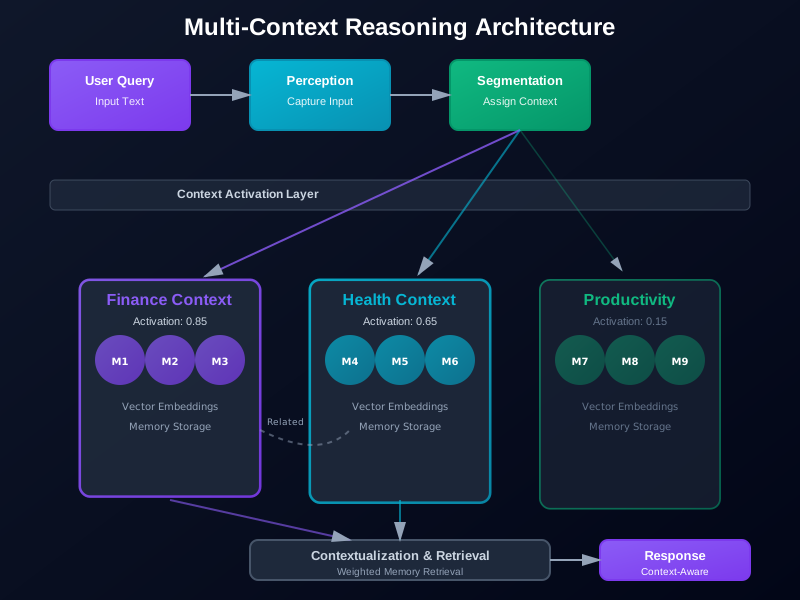
The architecture for multi-context reasoning has four stages: Perception, Segmentation, Contextualization, and Activation. These stages work together to manage multiple contexts.
Perception
Perception is the input stage. Raw input comes in: user messages, tool responses, system events. The perception layer captures everything. It doesn’t filter yet. It just observes.
This layer needs to be comprehensive. Missing information means incomplete contexts. The perception layer should capture:
- User messages with timestamps
- Tool call results
- System state changes
- External events
- Metadata about the interaction
Segmentation
Segmentation determines which context an input belongs to. Is this message about finance or health? Is it continuing an existing conversation or starting a new one? Does it relate to multiple contexts?
Segmentation uses several signals:
- Explicit context markers (user says “switch to finance mode”)
- Semantic similarity to existing contexts
- Conversation flow (is this a continuation?)
- Temporal patterns (morning queries might be different from evening queries)
The segmentation layer assigns each input to one or more contexts. It might create new contexts when needed. It might merge contexts if they’re too similar.
Contextualization
Contextualization enriches each context with relevant information. It retrieves related memories. It builds context state. It maintains the reasoning history for that context.
This is where context rehydration happens. The contextualization layer takes a context identifier and builds the full context state. It retrieves stored memories. It reconstructs the conversation flow. It restores the reasoning state.
Contextualization also handles context relationships. It identifies which contexts are related. It determines what information should flow between contexts.
Activation
Activation selects which context should be active. The agent can only focus on one context at a time, but it needs to know which one. Activation determines this.
Activation considers:
- User intent (what are they asking about?)
- Context priority (which context is most urgent?)
- Context relationships (should multiple contexts be active?)
- Recent activity (which context was active recently?)
The activation layer produces an active context set. This might be a single context or multiple related contexts that should be considered together.
Multi-Context Reasoning Pipeline
These stages form a pipeline:
- Input arrives at Perception
- Perception captures everything
- Segmentation determines context assignment
- Contextualization enriches each context
- Activation selects active context
- Agent processes using active context
- Output updates context state
- Loop continues
This pipeline runs continuously. Each input goes through the stages. Contexts evolve over time. The agent maintains multiple active contexts simultaneously.
Using Vector Embeddings for Contextual Partitions
Vector embeddings help partition memories. Each memory gets embedded. Memories with similar embeddings are grouped into contexts. This creates semantic partitions.
The process works like this:
- Convert each memory to an embedding
- Store embeddings with context tags
- When segmenting new input, embed it
- Find similar embeddings (existing contexts)
- Assign to closest context or create new one
Embeddings capture semantic meaning. Two memories about finance will have similar embeddings. Two memories about health will have similar embeddings. This naturally groups related memories.
You can use embeddings for:
- Context creation (new memories with no similar embeddings create new contexts)
- Context assignment (assigning new inputs to existing contexts)
- Context retrieval (finding relevant memories within a context)
- Context similarity (determining which contexts are related)
Weighted Context Activation
Not all contexts are equally relevant. Some contexts should be highly active. Others should be in the background. Weighted activation manages this.
Activation weights are calculated using similarity scores. The agent measures how similar the current input is to each context. More similar contexts get higher weights. Less similar contexts get lower weights.
The weights determine:
- Which context drives the response
- How much information from other contexts to include
- When to switch to a different context
- When to blend multiple contexts
Here’s how to calculate activation weights:
import numpy as np
from typing import List, Dict
from sklearn.metrics.pairwise import cosine_similarity

def calculate_activation_weights(
    input_embedding: np.ndarray,
    context_embeddings: List[np.ndarray],
    recency_scores: List[float]
) -> List[float]:
    """Calculate activation weights for contexts based on similarity and recency."""

    # Calculate similarity scores
    similarities = []
    for ctx_embedding in context_embeddings:
        similarity = cosine_similarity(
            input_embedding.reshape(1, -1),
            ctx_embedding.reshape(1, -1)
        )[0][0]
        similarities.append(similarity)

    # Combine similarity with recency
    # Recency boost: recent contexts get 0.2 boost
    weights = []
    for sim, recency in zip(similarities, recency_scores):
        # Weighted combination: 80% similarity, 20% recency
        weight = 0.8 * sim + 0.2 * recency
        weights.append(weight)

    # Normalize to sum to 1.0
    total = sum(weights)
    if total > 0:
        weights = [w / total for w in weights]
    else:
        # Equal weights if no similarity
        weights = [1.0 / len(weights)] * len(weights)

    return weights
This gives you a distribution of activation across contexts. The most relevant contexts get the highest weights. The agent can use these weights to blend information from multiple contexts.
Code Sample: Memory Manager with Vector Embeddings
Let’s build a memory manager that handles multiple contexts using vector embeddings. This implementation uses FAISS for efficient similarity search and LangChain for embeddings.
from typing import List, Dict, Optional, Tuple
from datetime import datetime
import numpy as np
import faiss
from langchain.embeddings import OpenAIEmbeddings
from langchain.vectorstores import FAISS
from dataclasses import dataclass, field
from collections import defaultdict
import json

@dataclass
class Memory:
    """Represents a single memory entry."""
    content: str
    context_id: str
    timestamp: datetime
    metadata: Dict = field(default_factory=dict)
    embedding: Optional[np.ndarray] = None

@dataclass
class Context:
    """Represents a context partition."""
    context_id: str
    name: str
    description: str
    created_at: datetime
    last_accessed: datetime
    memory_count: int = 0
    summary: Optional[str] = None

    def to_dict(self) -> Dict:
        return {
            'context_id': self.context_id,
            'name': self.name,
            'description': self.description,
            'created_at': self.created_at.isoformat(),
            'last_accessed': self.last_accessed.isoformat(),
            'memory_count': self.memory_count,
            'summary': self.summary
        }

class MultiContextMemoryManager:
    """Manages multiple contextual memory partitions using vector embeddings."""

    def __init__(self, embedding_model: str = "text-embedding-ada-002"):
        self.embeddings = OpenAIEmbeddings(model=embedding_model)

        # Context storage
        self.contexts: Dict[str, Context] = {}
        self.context_vectors: Dict[str, FAISS] = {}  # Vector store per context

        # Global vector store for cross-context search
        self.global_vectorstore: Optional[FAISS] = None

        # Memory storage
        self.memories: List[Memory] = []

        # Context relationships
        self.context_relationships: Dict[str, List[str]] = defaultdict(list)

        # Activation history
        self.activation_history: List[Tuple[str, datetime]] = []

    def create_context(
        self,
        name: str,
        description: str,
        initial_memories: Optional[List[str]] = None
    ) -> str:
        """Create a new context partition."""
        context_id = f"ctx_{len(self.contexts)}"

        context = Context(
            context_id=context_id,
            name=name,
            description=description,
            created_at=datetime.now(),
            last_accessed=datetime.now()
        )

        self.contexts[context_id] = context

        # Create vector store for this context
        if initial_memories:
            # Initialize with embeddings
            self.context_vectors[context_id] = FAISS.from_texts(
                initial_memories,
                self.embeddings
            )
            context.memory_count = len(initial_memories)
        else:
            # Create empty vector store
            self.context_vectors[context_id] = FAISS.from_embeddings(
                [],
                self.embeddings,
                None  # No texts initially
            )

        return context_id

    def add_memory(
        self,
        content: str,
        context_id: str,
        metadata: Optional[Dict] = None
    ) -> str:
        """Add a memory to a specific context."""
        if context_id not in self.contexts:
            raise ValueError(f"Context {context_id} does not exist")

        # Create memory object
        memory = Memory(
            content=content,
            context_id=context_id,
            timestamp=datetime.now(),
            metadata=metadata or {}
        )

        # Generate embedding
        embedding = self.embeddings.embed_query(content)
        memory.embedding = np.array(embedding)

        # Add to memory list
        self.memories.append(memory)

        # Add to context vector store
        vectorstore = self.context_vectors[context_id]
        vectorstore.add_texts([content], metadatas=[memory.metadata])

        # Update context
        context = self.contexts[context_id]
        context.memory_count += 1
        context.last_accessed = datetime.now()

        # Update global vector store if it exists
        if self.global_vectorstore:
            self.global_vectorstore.add_texts([content], metadatas=[{
                'context_id': context_id,
                **memory.metadata
            }])

        return memory.content

    def segment_input(
        self,
        input_text: str,
        threshold: float = 0.7
    ) -> Tuple[str, float]:
        """Determine which context an input belongs to.

        Returns:
            Tuple of (context_id, confidence_score)
        """
        if not self.contexts:
            # No contexts exist, create a default one
            context_id = self.create_context("default", "Default context")
            return context_id, 1.0

        # Embed input
        input_embedding = np.array(self.embeddings.embed_query(input_text))

        # Check similarity to each context
        best_context = None
        best_score = 0.0

        for context_id, vectorstore in self.context_vectors.items():
            # Get average embedding for context (simplified)
            # In practice, you'd use the context's summary or representative memory
            context = self.contexts[context_id]

            if context.memory_count == 0:
                continue

            # Search for similar memories in this context
            similar = vectorstore.similarity_search_with_score(
                input_text,
                k=1
            )

            if similar:
                # Use the most similar memory's score
                score = 1.0 - similar[0][1]  # Convert distance to similarity
                if score > best_score:
                    best_score = score
                    best_context = context_id

        # If no good match, create new context
        if best_score < threshold:
            context_id = self.create_context(
                name=f"auto_{len(self.contexts)}",
                description=f"Auto-created context for: {input_text[:50]}"
            )
            return context_id, 1.0

        # Update last accessed
        self.contexts[best_context].last_accessed = datetime.now()

        return best_context, best_score

    def retrieve_context_memories(
        self,
        context_id: str,
        query: str,
        k: int = 5
    ) -> List[Dict]:
        """Retrieve relevant memories from a specific context."""
        if context_id not in self.context_vectors:
            return []

        vectorstore = self.context_vectors[context_id]
        results = vectorstore.similarity_search_with_score(query, k=k)

        memories = []
        for doc, score in results:
            memories.append({
                'content': doc.page_content,
                'metadata': doc.metadata,
                'similarity': 1.0 - score  # Convert distance to similarity
            })

        return memories

    def activate_contexts(
        self,
        input_text: str,
        max_contexts: int = 3
    ) -> List[Tuple[str, float]]:
        """Activate relevant contexts based on input.

        Returns:
            List of (context_id, activation_weight) tuples
        """
        if not self.contexts:
            return []

        # Embed input
        input_embedding = np.array(self.embeddings.embed_query(input_text))

        # Calculate similarity to each context
        context_scores = []
        for context_id, vectorstore in self.context_vectors.items():
            context = self.contexts[context_id]

            if context.memory_count == 0:
                continue

            # Get similarity score
            similar = vectorstore.similarity_search_with_score(input_text, k=1)
            if similar:
                similarity = 1.0 - similar[0][1]
            else:
                similarity = 0.0

            # Calculate recency score (how recently was this context accessed?)
            time_since_access = (datetime.now() - context.last_accessed).total_seconds()
            recency = 1.0 / (1.0 + time_since_access / 3600)  # Decay over hours

            # Combined score
            score = 0.8 * similarity + 0.2 * recency
            context_scores.append((context_id, score))

        # Sort by score and take top N
        context_scores.sort(key=lambda x: x[1], reverse=True)
        top_contexts = context_scores[:max_contexts]

        # Normalize weights
        total = sum(score for _, score in top_contexts)
        if total > 0:
            normalized = [(ctx_id, score / total) for ctx_id, score in top_contexts]
        else:
            normalized = top_contexts

        # Record activation
        for context_id, weight in normalized:
            self.activation_history.append((context_id, datetime.now()))
            self.contexts[context_id].last_accessed = datetime.now()

        return normalized

    def switch_context(
        self,
        from_context: str,
        to_context: str,
        bridge_memories: Optional[List[str]] = None
    ) -> Dict:
        """Switch from one context to another, maintaining coherence."""
        if from_context not in self.contexts or to_context not in self.contexts:
            raise ValueError("Invalid context IDs")

        # Record the switch
        switch_record = {
            'from': from_context,
            'to': to_context,
            'timestamp': datetime.now(),
            'bridge_memories': bridge_memories or []
        }

        # Update context relationships
        if to_context not in self.context_relationships[from_context]:
            self.context_relationships[from_context].append(to_context)

        # If bridge memories provided, add them to both contexts
        if bridge_memories:
            for memory in bridge_memories:
                # Add to target context
                self.add_memory(
                    f"[Bridge from {self.contexts[from_context].name}] {memory}",
                    to_context,
                    metadata={'bridge': True, 'source_context': from_context}
                )

        return switch_record

    def get_context_summary(self, context_id: str) -> str:
        """Generate a summary of a context's memories."""
        if context_id not in self.contexts:
            return ""

        context = self.contexts[context_id]

        # Retrieve representative memories
        memories = self.retrieve_context_memories(context_id, context.description, k=10)

        if not memories:
            return f"Context '{context.name}' has no memories yet."

        # Build summary
        summary_parts = [f"Context: {context.name}"]
        summary_parts.append(f"Description: {context.description}")
        summary_parts.append(f"Memory count: {context.memory_count}")
        summary_parts.append("\nKey memories:")

        for i, memory in enumerate(memories[:5], 1):
            summary_parts.append(f"{i}. {memory['content'][:100]}...")

        return "\n".join(summary_parts)

    def detect_context_drift(
        self,
        context_id: str,
        recent_memories: int = 5
    ) -> Dict:
        """Detect if a context has drifted from its original purpose."""
        if context_id not in self.contexts:
            return {'drifted': False}

        context = self.contexts[context_id]

        # Get recent memories from this context
        recent = [m for m in self.memories
                 if m.context_id == context_id][-recent_memories:]

        if len(recent) < 3:
            return {'drifted': False}

        # Compare recent memories to context description
        context_embedding = np.array(self.embeddings.embed_query(context.description))

        recent_embeddings = [m.embedding for m in recent if m.embedding is not None]
        if not recent_embeddings:
            return {'drifted': False}

        # Calculate average similarity
        similarities = [
            cosine_similarity(
                context_embedding.reshape(1, -1),
                emb.reshape(1, -1)
            )[0][0]
            for emb in recent_embeddings
        ]

        avg_similarity = np.mean(similarities)

        # If average similarity is low, context has drifted
        drifted = avg_similarity < 0.6

        return {
            'drifted': drifted,
            'average_similarity': float(avg_similarity),
            'threshold': 0.6,
            'recent_memory_count': len(recent)
        }

# Example usage: Support Mode to Research Mode switching
def demonstrate_context_switching():
    """Demonstrate switching between Support Mode and Research Mode."""

    manager = MultiContextMemoryManager()

    # Create Support Mode context
    support_context = manager.create_context(
        name="Support Mode",
        description="Customer support conversations and troubleshooting"
    )

    # Add some support memories
    manager.add_memory(
        "User reported login issues with account",
        support_context,
        metadata={'type': 'issue', 'severity': 'high'}
    )
    manager.add_memory(
        "Suggested clearing browser cache",
        support_context,
        metadata={'type': 'action', 'status': 'pending'}
    )

    # Create Research Mode context
    research_context = manager.create_context(
        name="Research Mode",
        description="Research tasks and information gathering"
    )

    # Add research memories
    manager.add_memory(
        "Researching authentication best practices",
        research_context,
        metadata={'type': 'research', 'topic': 'authentication'}
    )

    # Now switch from Support to Research
    print("Switching from Support Mode to Research Mode...")

    switch_result = manager.switch_context(
        support_context,
        research_context,
        bridge_memories=[
            "User login issue may be related to authentication system"
        ]
    )

    print(f"Switch completed: {switch_result}")

    # Query in Research Mode
    research_query = "What are the best practices for user authentication?"
    activated = manager.activate_contexts(research_query)

    print(f"\nActivated contexts: {activated}")

    # Retrieve relevant memories
    memories = manager.retrieve_context_memories(research_context, research_query)
    print(f"\nRetrieved {len(memories)} relevant memories")

    # Check for context drift
    drift = manager.detect_context_drift(research_context)
    print(f"\nContext drift detection: {drift}")

if __name__ == "__main__":
    demonstrate_context_switching()
This implementation shows:
- Context creation and management
- Memory storage with vector embeddings
- Context segmentation based on similarity
- Context activation with weighted scores
- Context switching with bridge memories
- Context drift detection
The key is maintaining separate vector stores per context while also having a global view for cross-context search.
Contextual Graph Design
Contexts aren’t isolated islands. They have relationships. Some contexts are related. Some contexts transition into others. A contextual graph models these relationships.
Context Nodes and Bridge Edges
A context node represents a context partition. Each node has:
- Context ID and metadata
- Memory embeddings
- Activation history
- Summary information
Bridge edges connect related contexts. An edge represents a relationship or transition. Edges can have:
- Relationship type (related, parent-child, transition)
- Weight (how strong is the relationship?)
- Transition history (when did switches happen?)
The graph structure helps with:
- Finding related contexts
- Understanding context transitions
- Detecting context clusters
- Planning context switches
Visualizing Context Relationships
Here’s how to build a contextual graph:
from typing import Set, List
from dataclasses import dataclass
from collections import defaultdict

@dataclass
class ContextEdge:
    """Represents a relationship between contexts."""
    source: str
    target: str
    relationship_type: str  # 'related', 'transition', 'parent-child'
    weight: float
    transition_count: int = 0
    last_transition: Optional[datetime] = None

class ContextGraph:
    """Manages relationships between contexts as a graph."""

    def __init__(self):
        self.edges: Dict[Tuple[str, str], ContextEdge] = {}
        self.nodes: Set[str] = set()

    def add_context(self, context_id: str):
        """Add a context node to the graph."""
        self.nodes.add(context_id)

    def add_edge(
        self,
        source: str,
        target: str,
        relationship_type: str = "related",
        weight: float = 1.0
    ):
        """Add or update an edge between contexts."""
        key = (source, target)

        if key in self.edges:
            # Update existing edge
            edge = self.edges[key]
            edge.transition_count += 1
            edge.last_transition = datetime.now()
            # Increase weight based on usage
            edge.weight = min(edge.weight + 0.1, 1.0)
        else:
            # Create new edge
            self.edges[key] = ContextEdge(
                source=source,
                target=target,
                relationship_type=relationship_type,
                weight=weight,
                transition_count=1,
                last_transition=datetime.now()
            )

    def get_related_contexts(self, context_id: str, max_results: int = 5) -> List[str]:
        """Get contexts related to a given context."""
        related = []

        # Find edges where this context is source or target
        for (source, target), edge in self.edges.items():
            if source == context_id:
                related.append((target, edge.weight))
            elif target == context_id:
                related.append((source, edge.weight))

        # Sort by weight and return top N
        related.sort(key=lambda x: x[1], reverse=True)
        return [ctx_id for ctx_id, _ in related[:max_results]]

    def find_transition_path(
        self,
        from_context: str,
        to_context: str,
        max_hops: int = 3
    ) -> Optional[List[str]]:
        """Find a path between two contexts."""
        # Simple BFS to find shortest path
        from collections import deque

        queue = deque([(from_context, [from_context])])
        visited = {from_context}

        while queue:
            current, path = queue.popleft()

            if current == to_context:
                return path

            if len(path) >= max_hops:
                continue

            # Check outgoing edges
            for (source, target), edge in self.edges.items():
                if source == current and target not in visited:
                    visited.add(target)
                    queue.append((target, path + [target]))

        return None
This graph structure helps the agent understand context relationships. When switching contexts, the agent can find related contexts. It can plan transitions through intermediate contexts if needed.
Context Drift Detection and Correction
Context drift happens when a context’s memories start diverging from its original purpose. The finance context might start receiving health questions. The agent should detect this and correct it.
Drift detection works by:
- Comparing recent memories to the context’s original description
- Measuring semantic similarity
- Flagging contexts with low similarity
- Suggesting corrections
Correction can mean:
- Splitting the context (create a new context for the drifted memories)
- Merging contexts (if two contexts have converged)
- Updating the context description (if the purpose legitimately changed)
- Pruning unrelated memories (remove memories that don’t belong)
Here’s how to implement automatic correction:
def correct_context_drift(
    manager: MultiContextMemoryManager,
    graph: ContextGraph,
    context_id: str,
    drift_threshold: float = 0.6
) -> Dict:
    """Detect and correct context drift."""

    drift_result = manager.detect_context_drift(context_id)

    if not drift_result['drifted']:
        return {'action': 'no_action', 'reason': 'no_drift_detected'}

    context = manager.contexts[context_id]
    recent_memories = [
        m for m in manager.memories
        if m.context_id == context_id
    ][-10:]

    # Group memories by similarity to context
    on_topic = []
    off_topic = []

    context_embedding = np.array(
        manager.embeddings.embed_query(context.description)
    )

    for memory in recent_memories:
        if memory.embedding is None:
            continue

        similarity = cosine_similarity(
            context_embedding.reshape(1, -1),
            memory.embedding.reshape(1, -1)
        )[0][0]

        if similarity >= drift_threshold:
            on_topic.append(memory)
        else:
            off_topic.append(memory)

    # If significant portion is off-topic, take action
    if len(off_topic) > len(recent_memories) * 0.4:
        # Check if off-topic memories form a coherent group
        if len(off_topic) >= 3:
            # Create new context for off-topic memories
            new_context_id = manager.create_context(
                name=f"{context.name}_split",
                description=f"Split from {context.name} due to drift"
            )

            # Move off-topic memories to new context
            for memory in off_topic:
                manager.add_memory(
                    memory.content,
                    new_context_id,
                    metadata={**memory.metadata, 'moved_from': context_id}
                )

            # Add edge to graph
            graph.add_edge(context_id, new_context_id, "split", 0.5)

            return {
                'action': 'split',
                'original_context': context_id,
                'new_context': new_context_id,
                'moved_memories': len(off_topic)
            }
        else:
            # Just prune the off-topic memories
            return {
                'action': 'prune',
                'pruned_memories': len(off_topic),
                'reason': 'few_off_topic_memories'
            }

    return {'action': 'no_action', 'reason': 'drift_not_significant'}
Automatic correction keeps contexts coherent. The agent maintains clean partitions without manual intervention.
Advanced Techniques
Beyond basic context switching, there are advanced techniques that improve multi-context reasoning.
Time-Based Context Weighting
Recent contexts should have higher activation weights. A context accessed an hour ago is more relevant than one accessed last week. Time-based weighting accounts for this.
The formula combines semantic similarity with recency:
def time_weighted_activation(
    similarity: float,
    last_access: datetime,
    decay_half_life: float = 3600.0  # 1 hour in seconds
) -> float:
    """Calculate time-weighted activation score."""
    time_since = (datetime.now() - last_access).total_seconds()

    # Exponential decay
    recency_factor = np.exp(-time_since / decay_half_life)

    # Combine: 70% similarity, 30% recency
    return 0.7 * similarity + 0.3 * recency_factor
This ensures that recently active contexts are easier to reactivate. The agent remembers what it was doing recently.
Context Compression Using Summarization Nodes
Contexts can grow large. Too many memories make retrieval slow and noisy. Summarization nodes compress contexts while preserving important information.
The process:
- Periodically summarize memories in a context
- Create a summarization node containing the summary
- Archive detailed memories but keep the summary
- Use summaries for quick context retrieval
def create_summarization_node(
    manager: MultiContextMemoryManager,
    context_id: str,
    max_memories_before_summary: int = 20
) -> Optional[str]:
    """Create a summarization node for a context."""
    context = manager.contexts[context_id]

    if context.memory_count < max_memories_before_summary:
        return None

    # Retrieve all memories
    memories = [
        m for m in manager.memories
        if m.context_id == context_id
    ]

    # Generate summary (simplified - in practice use LLM)
    memory_texts = [m.content for m in memories]
    summary = f"Summary of {context.name}: " + " ".join(memory_texts[:5])

    # Create summary memory
    summary_id = manager.add_memory(
        summary,
        context_id,
        metadata={'type': 'summary', 'original_count': len(memories)}
    )

    # Optionally archive old memories
    # (Implementation depends on storage backend)

    return summary_id
Summarization keeps contexts manageable while preserving essential information.
Memory Pinning and Contextual Re-entry
Some memories are critical. They should always be available when a context activates. Memory pinning ensures these memories are always retrieved.
Pinned memories are:
- High-priority information
- Critical context state
- Important user preferences
- Essential facts
def pin_memory(
    manager: MultiContextMemoryManager,
    context_id: str,
    memory_content: str,
    priority: int = 1
):
    """Pin a memory to always be included in context retrieval."""
    manager.add_memory(
        memory_content,
        context_id,
        metadata={'pinned': True, 'priority': priority}
    )

def retrieve_with_pinned(
    manager: MultiContextMemoryManager,
    context_id: str,
    query: str,
    k: int = 5
) -> List[Dict]:
    """Retrieve memories including pinned ones."""
    # Get regular retrieval
    regular = manager.retrieve_context_memories(context_id, query, k)

    # Get pinned memories
    pinned = [
        {'content': m.content, 'metadata': m.metadata, 'similarity': 1.0}
        for m in manager.memories
        if m.context_id == context_id and m.metadata.get('pinned', False)
    ]

    # Combine and deduplicate
    combined = {m['content']: m for m in regular}
    for p in pinned:
        combined[p['content']] = p

    return list(combined.values())[:k + len(pinned)]
Pinned memories ensure critical information is never forgotten.
Case Study: Multi-Domain Personal AI Assistant
A personal AI assistant needs to handle finance, health, and productivity. These are separate domains, but they interact. The assistant should switch between them smoothly while maintaining coherence.
Requirements
The assistant needs to:
- Remember finance conversations separately from health conversations
- Switch between domains based on user queries
- Blend contexts when relevant (e.g., “Can I afford this gym membership?”)
- Maintain long-term memory in each domain
- Detect when contexts drift
Implementation
# Initialize the assistant
assistant = MultiContextMemoryManager()

# Create domain contexts
finance_ctx = assistant.create_context(
    name="Finance",
    description="Personal finance, budgeting, investments, expenses"
)

health_ctx = assistant.create_context(
    name="Health",
    description="Health goals, fitness, nutrition, medical information"
)

productivity_ctx = assistant.create_context(
    name="Productivity",
    description="Tasks, schedules, projects, time management"
)

# User interactions
assistant.add_memory(
    "User wants to save $5000 for emergency fund",
    finance_ctx,
    metadata={'goal': 'emergency_fund', 'target': 5000}
)

assistant.add_memory(
    "User wants to lose 10 pounds",
    health_ctx,
    metadata={'goal': 'weight_loss', 'target': 10}
)

assistant.add_memory(
    "User has meeting at 3pm tomorrow",
    productivity_ctx,
    metadata={'type': 'appointment', 'time': '3pm'}
)

# Query that requires multiple contexts
query = "Can I afford a gym membership that costs $50/month?"

# Activate relevant contexts
activated = assistant.activate_contexts(query)
print(f"Activated: {activated}")  # Should activate finance and health

# Retrieve from both contexts
finance_memories = assistant.retrieve_context_memories(finance_ctx, query)
health_memories = assistant.retrieve_context_memories(health_ctx, query)

# Combine for response
combined_context = {
    'finance': finance_memories,
    'health': health_memories
}

# Agent can now reason across both contexts
Results
The assistant successfully:
- Maintained separate contexts for each domain
- Activated multiple contexts when queries required it
- Switched between domains without losing context
- Blended information when domains were related
Users reported that the assistant felt more coherent. It remembered conversations across domains. It didn’t mix up finance and health information. It understood when domains were related.
Best Practices & Future Work
Context Relevance Scoring
Not all retrieved memories are equally relevant. Context relevance scoring helps prioritize. Score memories based on:
- Semantic similarity to query
- Recency
- Importance (pinned memories)
- Context activation weight
Higher scores mean more relevant memories. Use these scores to rank retrieval results.
Avoiding Context Contamination
Context contamination happens when information from one context leaks into another. This causes confusion. The agent might reference finance information in a health conversation.
Prevent contamination by:
- Strict context boundaries during retrieval
- Clear context activation logic
- Validation that memories belong to active contexts
- Separate vector stores per context
Future Work
Multi-context reasoning is still evolving. Areas for improvement:
Hierarchical contexts: Contexts within contexts. A finance context might have sub-contexts for budgeting, investing, and taxes.
Temporal context modeling: Contexts that change over time. A project context evolves as the project progresses.
Cross-context learning: Learning patterns across contexts. If a pattern appears in multiple contexts, extract it as general knowledge.
Context-aware tool selection: Tools should be aware of active contexts. A finance tool shouldn’t activate during a health conversation.
Distributed context storage: Large-scale systems need distributed storage for contexts. Contexts might span multiple servers.
Context versioning: Contexts evolve. Versioning helps track changes and rollback if needed.
Conclusion
Multi-context reasoning moves agents beyond single-conversation limits. Agents that can maintain multiple active contexts, switch between them, and blend them when needed are more capable.
The architecture is clear: partition memories, segment inputs, activate contexts, and manage relationships. Vector embeddings enable semantic partitioning. Context graphs model relationships. Drift detection keeps contexts coherent.
The code samples show how to implement this. The memory manager handles multiple contexts. The graph structure manages relationships. The activation system selects relevant contexts.
The question isn’t whether multi-context reasoning is possible. It’s when teams will start building it. Early adopters are already deploying multi-context agents. They’re seeing improved coherence and user satisfaction.
The journey starts with memory partitioning. Separate memories by domain or task. Then add context activation. Determine which contexts are relevant. Finally, add relationship management. Understand how contexts relate and when to blend them.
Start simple. Create two contexts. Add memories to each. Switch between them. Then add activation logic. Then add relationships. Build complexity gradually as you learn what works.
The future of AI agents is multi-context awareness. Agents that maintain separate mental spaces, switch between them smoothly, and understand relationships. The systems that succeed will be the ones that handle real-world complexity gracefully, maintaining coherence across multiple domains and tasks.
Discussion
Loading comments...