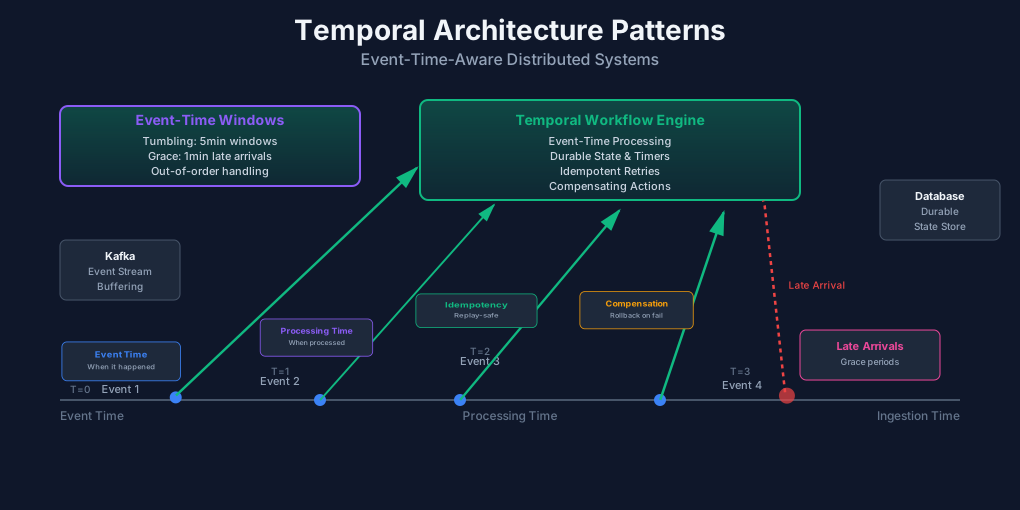
Temporal Architecture Patterns: Designing for Time Consistency in Distributed Systems
Your event stream processes orders correctly. Until you replay it. Then duplicate charges appear. The same events, processed again, produce different results.
The problem isn’t the data. It’s time. Your system doesn’t understand when events actually happened. It only knows when it received them.
This article covers how to build systems that treat time as a first-class concern. We’ll look at event time vs processing time, why it matters, and how to design workflows that handle replays correctly.
Why Time Matters in Distributed Systems
Time isn’t straightforward in distributed systems. Three different clocks matter:
Event time is when something actually happened. A user clicks a button at 2:00 PM. That’s the event time. Even if the event arrives at your system at 2:05 PM.
Processing time is when your system handles the event. The event might arrive at 2:05 PM, but processing starts at 2:06 PM. That’s processing time.
Ingestion time sits in between. It’s when the event entered your pipeline, before processing started.
The difference between these times causes problems. Especially when events arrive out of order or late.
Consider an e-commerce system. A user adds an item to their cart at 2:00 PM. Then removes it at 2:01 PM. But due to network delays, the remove event arrives first at 2:05 PM. The add event arrives at 2:06 PM.
If you process by arrival time, you see: remove, then add. The cart ends up with the item. Wrong result.
If you process by event time, you see: add at 2:00 PM, remove at 2:01 PM. The cart ends up empty. Correct result.
Event time processing is essential for correctness. But it’s harder to implement. You need to buffer events, wait for late arrivals, and handle out-of-order data.
The Problem with Time Drift
Clock drift makes things worse. Different servers have different clocks. Even if they’re synchronized, they drift apart over time.
You might have two servers processing events. Server A’s clock is 5 seconds ahead. Server B’s clock is 3 seconds behind. Events timestamped by each server will be inconsistent.
This causes problems when:
- Events arrive late and need to be reprocessed
- Systems replay event streams for debugging
- Consumers lag behind and catch up later
- Multiple services process the same events independently
Your system needs to handle these scenarios without breaking. That requires time-aware design.
The Evolution Toward Temporal Architectures
Traditional event-driven systems treat events as stateless messages. You publish an event. A consumer processes it. If it fails, you retry. But there’s no memory of what happened before.
This breaks down when you need:
- Correct ordering across replays
- Idempotent processing
- Compensating actions for failures
- Time-based triggers and windows
Workflow engines solve this. They maintain state across events. They track what happened, what’s pending, and what needs to happen next.
Temporal.io is one example. It provides durable workflows that survive failures. Workflows can wait for time, retry operations, and handle compensations.
Apache Flink is another. It processes streams with event-time semantics. It handles late arrivals, out-of-order data, and windowing.
Both systems treat time as a first-class concern. They’re designed for correctness, not just throughput.
Core Temporal Architecture Pattern
Temporal workflows differ from pure pub/sub. In pub/sub, events are fire-and-forget. A consumer processes an event, then forgets about it.
In temporal workflows, state persists. The workflow remembers what happened. It can retry failed steps, wait for conditions, and handle timeouts.
Workflows vs Pure Pub/Sub
Here’s a simple order processing example. In pure pub/sub:
// Consumer processes event, then forgets
async function processOrder(event: OrderEvent) {
  await chargeCustomer(event.orderId);
  await updateInventory(event.items);
  await sendConfirmation(event.email);
}
If chargeCustomer succeeds but updateInventory fails, you’re stuck. The customer was charged, but inventory wasn’t updated. You can’t easily undo the charge.
In a temporal workflow:
import { proxyActivities, sleep } from '@temporalio/workflow';
import type * as activities from './activities';

const { chargeCustomer, updateInventory, sendConfirmation, refundCustomer } =
  proxyActivities<typeof activities>({
    startToCloseTimeout: '30s',
    retry: {
      maximumAttempts: 3,
    },
  });

export async function processOrderWorkflow(orderId: string, items: Item[], email: string) {
  try {
    // Step 1: Charge customer
    await chargeCustomer(orderId);

    // Step 2: Update inventory
    await updateInventory(items);

    // Step 3: Send confirmation
    await sendConfirmation(email);

    return { status: 'completed' };
  } catch (error) {
    // If anything fails after charging, refund
    await refundCustomer(orderId);
    throw error;
  }
}
The workflow is durable. If it crashes after charging the customer, it resumes and continues. If inventory update fails, it automatically refunds.
Durable Timers and State
Temporal workflows can wait for time. Not just sleep, but durable waits that survive restarts.
import { sleep } from '@temporalio/workflow';

export async function paymentWorkflow(orderId: string, paymentDeadline: Date) {
  // Wait until payment deadline
  const now = Date.now();
  const deadlineMs = paymentDeadline.getTime();
  const waitTime = deadlineMs - now;

  if (waitTime > 0) {
    await sleep(waitTime);
  }

  // Check if payment was received
  const paymentStatus = await checkPaymentStatus(orderId);

  if (!paymentStatus.paid) {
    await cancelOrder(orderId);
  }
}
If the workflow crashes while waiting, it resumes and continues waiting. The timer is durable.
This is different from regular sleep. Regular sleep is lost if the process crashes. Durable timers persist.
Handling Compensations
Compensations undo work when something fails. If you charge a customer but then can’t fulfill the order, you refund.
export async function orderWorkflow(orderId: string, items: Item[]) {
  const compensations: (() => Promise<void>)[] = [];

  try {
    // Charge customer
    await chargeCustomer(orderId);
    compensations.push(() => refundCustomer(orderId));

    // Reserve inventory
    await reserveInventory(items);
    compensations.push(() => releaseInventory(items));

    // Process payment
    await processPayment(orderId);
    // No compensation needed - payment succeeded

    // All steps succeeded, clear compensations
    compensations.length = 0;

  } catch (error) {
    // Execute compensations in reverse order
    for (const compensate of compensations.reverse()) {
      try {
        await compensate();
      } catch (compError) {
        // Log but continue with other compensations
        console.error('Compensation failed:', compError);
      }
    }
    throw error;
  }
}
Each step that modifies state has a corresponding compensation. If any step fails, all previous steps are compensated.
Idempotency with Event Time
Idempotency means processing the same event multiple times produces the same result. This is crucial for replays.
import { condition } from '@temporalio/workflow';

export async function idempotentOrderWorkflow(orderId: string, eventTime: number) {
  // Check if this order was already processed
  const existingOrder = await getOrder(orderId);

  if (existingOrder && existingOrder.processedAt >= eventTime) {
    // Already processed with same or newer event time
    return existingOrder;
  }

  // Process order
  const order = await processOrder(orderId, eventTime);

  // Store with event time
  await saveOrder(order, eventTime);

  return order;
}
The key is using event time for idempotency checks. If you process an event with event time T, and later see the same event with event time T, you skip it. But if you see it with event time T+1, you process it again.
Event time makes idempotency possible. Processing time doesn’t work because the same event can arrive at different processing times.
Time-Bounded Data Consistency
Systems need to handle late arrivals. Events can arrive minutes or hours after they occurred. Your system needs to process them correctly.
Event-Time Windowing
Windowing groups events by time. Tumbling windows are fixed-size, non-overlapping. Sliding windows move forward continuously.
// Kafka Streams example with event-time windows
import { StreamsBuilder } from 'kafka-streams';

const builder = new StreamsBuilder();

builder
  .stream('events')
  .groupByKey()
  .windowedBy(
    TimeWindows.of(Duration.ofMinutes(5))
      .grace(Duration.ofMinutes(1)) // Wait 1 minute for late arrivals
  )
  .aggregate(
    () => ({ count: 0, total: 0 }),
    (key, event, agg) => ({
      count: agg.count + 1,
      total: agg.total + event.value,
    }),
    {
      materialized: 'event-counts-store',
    }
  )
  .toStream()
  .to('aggregated-events');
The grace period waits for late arrivals. Events arriving within the grace period are included. Events arriving after are discarded.
This ensures correctness. Even if events arrive late, they’re processed in the correct window.
Handling Late Arrivals
Late arrivals need special handling. You can’t wait forever. You need a cutoff.
export async function processEventWindow(
  events: Event[],
  windowStart: number,
  windowEnd: number,
  maxLatency: number
) {
  const now = Date.now();
  const cutoffTime = now - maxLatency;

  // Filter events by event time
  const windowEvents = events.filter(event =>
    event.eventTime >= windowStart &&
    event.eventTime < windowEnd
  );

  // Separate on-time and late events
  const onTimeEvents = windowEvents.filter(e => e.eventTime >= cutoffTime);
  const lateEvents = windowEvents.filter(e => e.eventTime < cutoffTime);

  // Process on-time events normally
  for (const event of onTimeEvents) {
    await processEvent(event);
  }

  // Handle late events separately
  if (lateEvents.length > 0) {
    await handleLateArrivals(lateEvents, windowStart, windowEnd);
  }
}
Late events are processed differently. Maybe they update historical aggregates. Maybe they trigger alerts. The important part is they don’t break correctness.
Clock Skew and Cross-Region Synchronization
Different regions have different clocks. Even with NTP synchronization, clocks drift. You need to account for this.
class EventTimeProcessor {
  private clockSkew: Map<string, number> = new Map();

  adjustEventTime(region: string, eventTime: number): number {
    // Get known clock skew for this region
    const skew = this.clockSkew.get(region) || 0;

    // Adjust event time by skew
    return eventTime + skew;
  }

  updateClockSkew(region: string, serverTime: number, clientTime: number) {
    // Calculate skew: positive means server is ahead
    const skew = serverTime - clientTime;
    this.clockSkew.set(region, skew);
  }
}
You track clock skew per region. When processing events, you adjust for known skew. This keeps event times consistent across regions.
Best Practices
Using Logical Clocks
Logical clocks avoid physical clock problems. Instead of timestamps, you use sequence numbers or vector clocks.
Vector clocks track causality. Each process maintains a vector of counters, one per process. When events happen, you increment your counter. When you send a message, you include your vector. When you receive a message, you update your vector.
class VectorClock {
  private clocks: Map<string, number> = new Map();

  tick(nodeId: string) {
    const current = this.clocks.get(nodeId) || 0;
    this.clocks.set(nodeId, current + 1);
  }

  update(other: VectorClock) {
    for (const [nodeId, count] of other.clocks.entries()) {
      const current = this.clocks.get(nodeId) || 0;
      this.clocks.set(nodeId, Math.max(current, count));
    }
  }

  happensBefore(other: VectorClock): boolean {
    let strictlyLess = false;

    for (const [nodeId, count] of this.clocks.entries()) {
      const otherCount = other.clocks.get(nodeId) || 0;
      if (count > otherCount) return false;
      if (count < otherCount) strictlyLess = true;
    }

    return strictlyLess;
  }
}
Vector clocks tell you if one event happened before another. They work even with clock skew. But they’re more complex than timestamps.
Choosing Event-Time vs Processing-Time
When should you use event time? When correctness matters more than latency.
Use event time for:
- Financial transactions
- Order processing
- Audit logs
- Analytics that need historical accuracy
Use processing time for:
- Real-time dashboards
- Alerting
- Monitoring metrics
- Anything that needs immediate results
Sometimes you need both. Process with event time for correctness, but also track processing time for monitoring.
Testing Temporal Workflows
Testing workflows is tricky. They’re stateful and time-dependent. You need to test:
- Normal execution
- Failures and retries
- Timeouts
- Compensations
- Replays
import { TestWorkflowEnvironment } from '@temporalio/testing';
import { Worker } from '@temporalio/worker';

test('order workflow handles inventory failure', async () => {
  const testEnv = await TestWorkflowEnvironment.createTimeSkipping();

  const worker = await Worker.create({
    connection: testEnv.nativeConnection,
    taskQueue: 'test',
    workflowsPath: require.resolve('./workflows'),
    activities: mockActivities,
  });

  // Mock activities
  const mockActivities = {
    chargeCustomer: vi.fn().mockResolvedValue({ success: true }),
    updateInventory: vi.fn().mockRejectedValue(new Error('Out of stock')),
    refundCustomer: vi.fn().mockResolvedValue({ success: true }),
  };

  // Execute workflow
  const client = testEnv.workflowClient;
  const handle = await client.start(processOrderWorkflow, {
    args: ['order-123', [], 'test@example.com'],
    taskQueue: 'test',
  });

  // Wait for completion
  await handle.result();

  // Verify refund was called
  expect(mockActivities.refundCustomer).toHaveBeenCalledWith('order-123');
});
Time-skipping test environments let you test time-based logic without waiting. You can advance time and verify workflows behave correctly.
Debugging Temporal Workflows
Workflows are deterministic. Given the same inputs and history, they produce the same outputs. This makes debugging easier.
Temporal provides a web UI for viewing workflow history. You can see:
- What activities ran
- What failed and retried
- How long things took
- The complete execution graph
This visibility is crucial. You can replay workflows step-by-step to understand what happened.
Code Samples
Temporal.io Workflow Example
Here’s a complete example of a payment processing workflow with retries and durable state:
import { proxyActivities, sleep, condition } from '@temporalio/workflow';
import type * as activities from './activities';

const {
  chargeCustomer,
  verifyPayment,
  sendReceipt,
  refundCustomer,
  notifyFailure,
} = proxyActivities<typeof activities>({
  startToCloseTimeout: '1m',
  retry: {
    initialInterval: '1s',
    maximumInterval: '30s',
    backoffCoefficient: 2,
    maximumAttempts: 5,
  },
});

export async function paymentWorkflow(
  orderId: string,
  amount: number,
  customerId: string,
  eventTime: number
): Promise<{ status: string; transactionId?: string }> {
  // Check if already processed (idempotency)
  const existing = await getPaymentStatus(orderId, eventTime);
  if (existing) {
    return existing;
  }

  try {
    // Charge customer with retries
    const chargeResult = await chargeCustomer({
      orderId,
      amount,
      customerId,
      eventTime,
    });

    // Wait for payment verification (up to 5 minutes)
    const verificationDeadline = Date.now() + 5 * 60 * 1000;
    let verified = false;

    while (Date.now() < verificationDeadline && !verified) {
      verified = await verifyPayment(chargeResult.transactionId);

      if (!verified) {
        // Wait 30 seconds before checking again
        await sleep(30 * 1000);
      }
    }

    if (!verified) {
      // Payment not verified, refund
      await refundCustomer(chargeResult.transactionId);
      await notifyFailure(orderId, 'Payment verification timeout');
      return { status: 'failed', transactionId: chargeResult.transactionId };
    }

    // Payment successful, send receipt
    await sendReceipt(customerId, chargeResult.transactionId);

    // Store result for idempotency
    await savePaymentStatus(orderId, eventTime, {
      status: 'completed',
      transactionId: chargeResult.transactionId,
    });

    return {
      status: 'completed',
      transactionId: chargeResult.transactionId,
    };

  } catch (error) {
    // Any failure triggers refund
    await refundCustomer(orderId).catch(() => {
      // Log but don't fail workflow if refund fails
    });

    await notifyFailure(orderId, error.message);
    throw error;
  }
}

// Helper function to check idempotency
async function getPaymentStatus(
  orderId: string,
  eventTime: number
): Promise<{ status: string; transactionId?: string } | null> {
  // In practice, this would query a durable store
  // For now, return null (not implemented)
  return null;
}

async function savePaymentStatus(
  orderId: string,
  eventTime: number,
  status: { status: string; transactionId?: string }
): Promise<void> {
  // In practice, this would save to a durable store
  // Implementation omitted
}
This workflow:
- Handles retries automatically
- Waits for payment verification with a timeout
- Refunds on failure
- Uses event time for idempotency
- Persists state durably
Kafka Streams Event-Time Windowing
Here’s a Kafka Streams example that processes events with event-time windows:
import org.apache.kafka.streams.*;
import org.apache.kafka.streams.kstream.*;
import java.time.Duration;

public class EventTimeWindowProcessor {

    public static void main(String[] args) {
        StreamsBuilder builder = new StreamsBuilder();

        // Read from events topic
        KStream<String, Event> events = builder.stream("events");

        // Extract event time from events
        KStream<String, Event> timedEvents = events.selectKey((key, event) -> {
            return event.getUserId();
        });

        // Group by user and window by event time
        KGroupedStream<String, Event> grouped = timedEvents.groupByKey();

        // Create 5-minute tumbling windows with 1-minute grace period
        TimeWindows window = TimeWindows
            .ofSizeAndGrace(Duration.ofMinutes(5), Duration.ofMinutes(1));

        // Aggregate events in each window
        KTable<Windowed<String>, EventAggregate> aggregated = grouped
            .windowedBy(window)
            .aggregate(
                () -> new EventAggregate(0, 0.0), // Initializer
                (key, event, aggregate) -> {      // Aggregator
                    aggregate.addEvent(event);
                    return aggregate;
                },
                Materialized.as("event-aggregates-store")
            );

        // Convert back to stream and process
        aggregated.toStream()
            .foreach((windowedKey, aggregate) -> {
                String userId = windowedKey.key();
                long windowStart = windowedKey.window().start();
                long windowEnd = windowedKey.window().end();

                System.out.println(
                    String.format(
                        "User %s: %d events, total value %.2f in window [%d, %d)",
                        userId,
                        aggregate.getCount(),
                        aggregate.getTotal(),
                        windowStart,
                        windowEnd
                    )
                );

                // Process aggregate (e.g., send to downstream system)
                processAggregate(userId, aggregate, windowStart, windowEnd);
            });

        // Build and start the topology
        Topology topology = builder.build();
        KafkaStreams streams = new KafkaStreams(
            topology,
            getStreamsConfig()
        );

        streams.start();
    }

    private static void processAggregate(
        String userId,
        EventAggregate aggregate,
        long windowStart,
        long windowEnd
    ) {
        // Process the aggregated window
        // This could send to a database, another Kafka topic, etc.
    }

    private static StreamsConfig getStreamsConfig() {
        Properties props = new Properties();
        props.put(StreamsConfig.APPLICATION_ID_CONFIG, "event-time-processor");
        props.put(StreamsConfig.BOOTSTRAP_SERVERS_CONFIG, "localhost:9092");
        props.put(StreamsConfig.DEFAULT_KEY_SERDE_CLASS_CONFIG, Serdes.String().getClass());
        props.put(StreamsConfig.DEFAULT_VALUE_SERDE_CLASS_CONFIG, EventSerde.class);

        // Enable event-time processing
        props.put(StreamsConfig.DEFAULT_TIMESTAMP_EXTRACTOR_CLASS_CONFIG,
                  EventTimeExtractor.class);

        return new StreamsConfig(props);
    }
}

// Event time extractor
class EventTimeExtractor implements TimestampExtractor {
    @Override
    public long extract(ConsumerRecord<Object, Object> record, long partitionTime) {
        Event event = (Event) record.value();

        // Use event time if available, otherwise fall back to partition time
        if (event != null && event.getEventTime() > 0) {
            return event.getEventTime();
        }

        return partitionTime;
    }
}

// Event aggregate class
class EventAggregate {
    private int count;
    private double total;

    public EventAggregate(int count, double total) {
        this.count = count;
        this.total = total;
    }

    public void addEvent(Event event) {
        this.count++;
        this.total += event.getValue();
    }

    public int getCount() { return count; }
    public double getTotal() { return total; }
}
This example:
- Extracts event time from events
- Groups events by user
- Creates 5-minute windows with 1-minute grace period
- Aggregates events within each window
- Handles late arrivals correctly
The grace period allows events arriving up to 1 minute late to be included in the correct window.
Conclusion
Time-aware design prevents subtle bugs. Events processed by arrival time produce wrong results. Events processed by event time produce correct results, even when they arrive late or out of order.
The key principles:
Use event time for correctness. Processing time is simpler, but it breaks on replays and late arrivals. Event time is harder, but it’s correct.
Design for idempotency. Same event, same result. Use event time as part of your idempotency key. This makes replays safe.
Handle late arrivals gracefully. Set grace periods for windows. Process late events separately. Don’t break correctness for them.
Use durable workflows for complex operations. Simple pub/sub works for simple cases. But when you need retries, compensations, or time-based logic, use workflows.
Account for clock skew. Different regions have different clocks. Track skew and adjust event times accordingly. Or use logical clocks.
Test with time. Use time-skipping test environments. Test normal cases, failures, and timeouts. Verify workflows handle replays correctly.
Common pitfalls:
Clock dependency. Don’t assume clocks are synchronized. They drift. Use event time, not server time.
Retry storms. Infinite retries can overwhelm systems. Set maximum retry limits. Use exponential backoff.
Ignoring late arrivals. Late arrivals are real. Design for them. Set grace periods. Handle them separately if needed.
Missing idempotency. Same event processed twice should produce the same result. Use event time in idempotency checks.
The future is time-aware. AI-orchestrated systems will need even more sophisticated time semantics. Agents that coordinate across time, workflows that adapt to temporal patterns, systems that learn from event-time relationships.
Start building time-aware systems now. The patterns are proven. The tools exist. The question is whether you’ll design for time from the start, or retrofit it later. Earlier is easier.
Discussion
Loading comments...