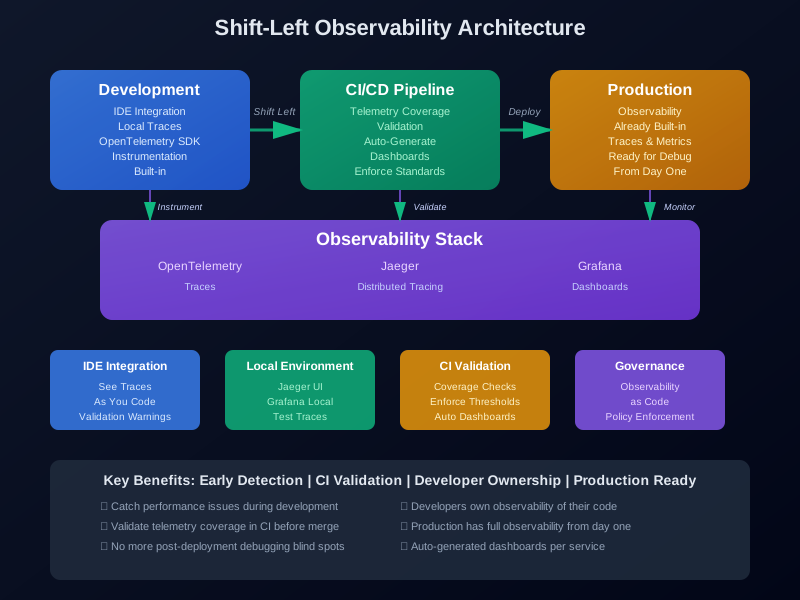
Shift-Left Observability: Embedding Metrics and Tracing in the Dev Lifecycle
Your service crashes in production. You check the logs. Nothing useful. You check the metrics. They don’t tell you why it failed. You look for traces. They’re missing. Now you’re debugging blind, hoping something appears.
This happens when observability is an afterthought. Teams add metrics and logs after deployment. By then, it’s too late. The service is already running. The important context is gone.
Shift-left observability fixes this. Instead of adding telemetry post-deployment, you build it into development. Developers write code with observability from day one. CI pipelines check for telemetry coverage. Local environments show traces and metrics. Teams catch problems before production.
This article covers how to make this shift. We’ll look at why traditional observability fails, what shift-left observability means in practice, and how to build it into your workflow.
Introduction: From Shift-Left Testing to Shift-Left Observability
Shift-left started with testing. The idea was simple: test earlier. Find bugs during development, not in production. It worked. Teams that wrote tests alongside code shipped fewer bugs.
The same logic applies to observability. If you add metrics after deployment, you’re debugging in the dark. Production issues are harder to reproduce. Context gets lost. Teams spend hours digging through logs trying to understand what happened.
Shift-left observability moves telemetry earlier. Developers instrument code during development. They see traces in their IDE. They validate metrics in CI. They catch performance issues before merge.
This isn’t just about tools. It’s about responsibility. Developers own the observability of their code. They can’t ship something that can’t be monitored. Just like you can’t merge code without tests, you can’t deploy without telemetry.
The evolution happened gradually. First came test-driven development. Then came shift-left security. Now observability is shifting left too. The pattern is clear: catch problems earlier, own quality throughout the lifecycle.
Here’s why it matters. Production debugging is expensive. It requires context switching. It disrupts workflows. It leads to incidents. Early observability catches issues when they’re cheap to fix. A slow query shows up during development. A missing span appears in local testing. A metric gap fails CI.
The goal isn’t perfect observability. It’s observability that’s good enough to debug issues quickly. That means metrics for key operations. Traces for request flows. Logs with useful context. All available from day one.
Why Traditional Observability Fails
Traditional observability comes too late. Teams deploy services first. Then they add monitoring. By then, the service is already running. The development context is gone.
The gap shows up in different ways. Developers write code without thinking about observability. They focus on features. Monitoring feels like someone else’s job. Operations teams add dashboards after deployment. They don’t know what to measure. They end up with generic metrics that don’t help.
Late feedback creates blind spots. You deploy a service. It runs fine for a week. Then something breaks. You check the logs. They don’t have the information you need. The metrics don’t show the problem. The traces are incomplete. You’re stuck guessing.
Production issues are also harder to debug. You can’t easily reproduce them locally. The environment is different. The load is different. The data is different. You end up adding logging and hoping to catch it next time. But the issue might not happen again for weeks.
Another problem is ownership. When observability happens post-deployment, nobody owns it. Developers think operations handles it. Operations thinks developers should have added it. The result is gaps. Important metrics are missing. Critical traces aren’t captured. Logs don’t have context.
Traditional observability also treats telemetry as separate from code. It’s a configuration step. You add a monitoring agent. You configure dashboards. You set up alerts. But it’s not part of the codebase. It’s not versioned. It’s not tested. It breaks when infrastructure changes.
The feedback loop is slow. You deploy. You wait. You see issues in production. You add more observability. You deploy again. It takes days or weeks. Meanwhile, issues keep happening. Users see errors. Teams stay up late debugging.
All of this creates reliability blind spots. You think you’re monitoring everything. But you’re missing the signals that matter. Performance degradation happens slowly. Memory leaks build up over time. Race conditions only show up under load. Without early observability, you miss these patterns.
Shift-left observability fixes this by making telemetry part of development. Developers see observability in their IDE. CI checks for telemetry coverage. Local environments show traces. Teams catch problems before merge.
What “Shift-Left Observability” Means
Shift-left observability means adding telemetry during development, not after deployment. It means developers instrument code as they write it. It means CI validates telemetry coverage. It means local environments show traces and metrics.
Here’s what it looks like in practice.
Integrating Metrics, Traces, and Logs Before Deployment
You write code. You add instrumentation. You see traces in your local environment. CI checks that you have enough telemetry. You merge. The observability is already there.
This starts with instrumentation. Developers add OpenTelemetry SDKs to their code. They create spans for important operations. They emit metrics for key events. They log with structured data. All of this happens during development.
The code looks like this:
from opentelemetry import trace
from opentelemetry.exporter.jaeger import JaegerExporter
from opentelemetry.sdk.trace import TracerProvider
from opentelemetry.sdk.trace.export import BatchSpanProcessor
from opentelemetry import metrics
from opentelemetry.sdk.metrics import MeterProvider

# Setup tracer
trace.set_tracer_provider(TracerProvider())
tracer = trace.get_tracer(__name__)

# Setup metrics
metrics.set_meter_provider(MeterProvider())
meter = metrics.get_meter(__name__)

# Create metrics
request_count = meter.create_counter(
    "http_requests_total",
    description="Total number of HTTP requests"
)
request_duration = meter.create_histogram(
    "http_request_duration_seconds",
    description="Duration of HTTP requests in seconds"
)

def handle_request(request):
    with tracer.start_as_current_span("handle_request") as span:
        span.set_attribute("http.method", request.method)
        span.set_attribute("http.path", request.path)

        request_count.add(1, {"method": request.method})

        start_time = time.time()
        try:
            result = process_request(request)
            span.set_status(trace.Status(trace.StatusCode.OK))
            return result
        except Exception as e:
            span.record_exception(e)
            span.set_status(trace.Status(trace.StatusCode.ERROR))
            raise
        finally:
            duration = time.time() - start_time
            request_duration.record(duration)
This code has instrumentation built in. It creates spans for each request. It emits metrics for request count and duration. It records exceptions. All of this happens during development.
IDE-Integrated Observability Tools
Some teams use IDE plugins that show observability as they code. You write a function. The plugin shows you if it has tracing. It suggests where to add spans. It highlights missing metrics.
For example, VS Code extensions can validate OpenTelemetry instrumentation. They check for span creation. They verify metric emission. They warn if functions lack observability.
This makes observability visible during development. Developers see gaps immediately. They fix them before commit.
Mock Tracing in Local Environments
Local development environments should show traces. You run your service locally. You make a request. You see the trace in a local Jaeger UI. You see spans for each operation. You see timing. You see errors.
This requires running observability tools locally. You might use Docker Compose to run Jaeger and Prometheus. Or you might use cloud services in development mode.
The setup looks like this:
# docker-compose.yml for local development
version: '3.8'
services:
  jaeger:
    image: jaegertracing/all-in-one:latest
    ports:
      - "16686:16686"
      - "14268:14268"
    environment:
      - COLLECTOR_ZIPKIN_HTTP_PORT=9411

  prometheus:
    image: prom/prometheus:latest
    ports:
      - "9090:9090"
    volumes:
      - ./prometheus.yml:/etc/prometheus/prometheus.yml

  grafana:
    image: grafana/grafana:latest
    ports:
      - "3000:3000"
    environment:
      - GF_AUTH_ANONYMOUS_ENABLED=true
Developers start these services. They configure their code to send traces and metrics. They see observability data as they develop.
The benefit is immediate feedback. You add a new endpoint. You test it locally. You see the trace. You notice a slow database query. You fix it before merging.
The Developer Experience
Shift-left observability changes the developer experience. Observability isn’t something you add later. It’s part of writing code. You think about what to measure as you build features.
This creates a shift in mindset. Developers ask: what metrics do I need? What traces will help debugging? What logs provide context? They answer these questions during development.
The result is better observability. Developers know their code. They know what’s important. They instrument the right places. Operations teams don’t have to guess what to monitor.
Designing Shift-Left Pipelines
CI pipelines are where shift-left observability pays off. They validate telemetry coverage. They generate dashboards. They enforce observability standards.
Adding Observability Validation to CI
CI should check for telemetry coverage. It should verify that services have instrumentation. It should validate that metrics exist. It should ensure traces are created.
This works like test coverage. You set a threshold. CI fails if coverage is too low. But instead of tests, you’re checking observability.
Here’s a CI step that validates OpenTelemetry instrumentation:
# .github/workflows/ci.yml
name: CI

on:
  pull_request:
    branches: [main]
  push:
    branches: [main]

jobs:
  validate-observability:
    runs-on: ubuntu-latest
    steps:
      - uses: actions/checkout@v3

      - name: Setup Python
        uses: actions/setup-python@v4
        with:
          python-version: '3.11'

      - name: Install dependencies
        run: |
          pip install opentelemetry-api opentelemetry-sdk
          pip install pytest pytest-opentelemetry

      - name: Validate telemetry coverage
        run: |
          python scripts/check_telemetry_coverage.py
          # This script checks:
          # - All endpoints have spans
          # - Critical paths have metrics
          # - Errors are logged with context

      - name: Run instrumented tests
        run: |
          pytest --opentelemetry \
            --opentelemetry-endpoint=http://localhost:14268/api/traces \
            --opentelemetry-service-name=my-service
        env:
          OTEL_EXPORTER_JAEGER_ENDPOINT: http://localhost:14268/api/traces

      - name: Check trace generation
        run: |
          python scripts/verify_traces.py
          # Verifies that tests generated traces
This workflow validates observability. It checks telemetry coverage. It runs tests with instrumentation. It verifies traces are generated.
The coverage checker might look like this:
# scripts/check_telemetry_coverage.py
import ast
import sys
from pathlib import Path

def check_function_has_span(func_node):
    """Check if function has span creation"""
    for node in ast.walk(func_node):
        if isinstance(node, ast.Call):
            if isinstance(node.func, ast.Attribute):
                if node.func.attr == "start_as_current_span":
                    return True
    return False

def check_endpoint_instrumentation(file_path):
    """Check if endpoint handlers have instrumentation"""
    with open(file_path) as f:
        tree = ast.parse(f.read())

    issues = []
    for node in ast.walk(tree):
        if isinstance(node, ast.FunctionDef):
            # Check route handlers
            if any(decorator.id == 'route' for decorator in node.decorator_list
                   if isinstance(decorator, ast.Name)):
                if not check_function_has_span(node):
                    issues.append(f"{file_path}:{node.lineno} - Missing span in {node.name}")

    return issues

def main():
    issues = []
    for path in Path("src").rglob("*.py"):
        issues.extend(check_endpoint_instrumentation(path))

    if issues:
        print("Telemetry coverage issues found:")
        for issue in issues:
            print(f"  {issue}")
        sys.exit(1)
    else:
        print("Telemetry coverage OK")

if __name__ == "__main__":
    main()
This script checks that route handlers have spans. It fails CI if coverage is too low.
Auto-Generating Dashboards with Each New Service
CI can generate Grafana dashboards automatically. You create a new service. CI detects it. It creates a dashboard template. It provisions it in Grafana.
This ensures every service has a dashboard. It also standardizes the format. All services show the same metrics. Teams know where to look.
Here’s how it works. CI detects new services by checking for OpenTelemetry instrumentation. It reads the service name. It generates a dashboard JSON. It uses Grafana’s API to provision it.
# scripts/generate_dashboard.py
import json
import requests
from pathlib import Path

def generate_dashboard_json(service_name):
    """Generate Grafana dashboard JSON for a service"""
    return {
        "dashboard": {
            "title": f"{service_name} Dashboard",
            "panels": [
                {
                    "title": "Request Rate",
                    "targets": [
                        {
                            "expr": f'rate(http_requests_total{{service="{service_name}"}}[5m])'
                        }
                    ]
                },
                {
                    "title": "Request Duration",
                    "targets": [
                        {
                            "expr": f'histogram_quantile(0.95, rate(http_request_duration_seconds_bucket{{service="{service_name}"}}[5m]))'
                        }
                    ]
                },
                {
                    "title": "Error Rate",
                    "targets": [
                        {
                            "expr": f'rate(http_requests_total{{service="{service_name}",status="error"}}[5m])'
                        }
                    ]
                }
            ]
        },
        "overwrite": False
    }

def provision_dashboard(service_name, grafana_url, api_key):
    """Provision dashboard in Grafana"""
    dashboard = generate_dashboard_json(service_name)

    response = requests.post(
        f"{grafana_url}/api/dashboards/db",
        json=dashboard,
        headers={"Authorization": f"Bearer {api_key}"}
    )

    if response.status_code == 200:
        print(f"Dashboard created for {service_name}")
    else:
        print(f"Failed to create dashboard: {response.text}")

if __name__ == "__main__":
    import sys
    service_name = sys.argv[1]
    grafana_url = sys.argv[2]
    api_key = sys.argv[3]
    provision_dashboard(service_name, grafana_url, api_key)
CI calls this script when it detects a new service. The dashboard is created automatically.
Enforcing Telemetry Coverage
Telemetry coverage enforcement works like test coverage. You set thresholds. CI fails if coverage is too low. But instead of tests, you’re measuring observability.
Coverage can mean different things:
- Percentage of endpoints with spans
- Percentage of critical paths with metrics
- Percentage of errors with structured logging
- Percentage of database queries with timing
You define what matters for your services. Then you enforce it in CI.
Here’s a coverage report:
# CI output example
Telemetry Coverage Report
========================
Total endpoints: 42
Endpoints with spans: 38 (90%)
Critical paths with metrics: 35 (83%)
Errors with structured logs: 40 (95%)

Threshold: 85%
Status: PASS
If coverage drops below the threshold, CI fails. Developers must add instrumentation before merging.
This creates a feedback loop. Developers see coverage reports. They know what to instrument. They add telemetry to meet thresholds. Coverage improves over time.
The key is making thresholds realistic. Start low. Increase gradually. Focus on critical paths first. Don’t require instrumentation for every function. Just the ones that matter.
Implementation Example
Let’s build a complete example. We’ll create a service with OpenTelemetry instrumentation. We’ll set up CI validation. We’ll generate a Grafana dashboard.
Sample Service Instrumented with OpenTelemetry
Here’s a Python service with full instrumentation:
# src/main.py
from flask import Flask, request, jsonify
from opentelemetry import trace, metrics
from opentelemetry.exporter.otlp.proto.grpc.trace_exporter import OTLPSpanExporter
from opentelemetry.exporter.otlp.proto.grpc.metric_exporter import OTLPMetricExporter
from opentelemetry.sdk.trace import TracerProvider
from opentelemetry.sdk.trace.export import BatchSpanProcessor
from opentelemetry.sdk.metrics import MeterProvider
from opentelemetry.sdk.metrics.export import PeriodicExportingMetricReader
from opentelemetry.sdk.resources import Resource
from opentelemetry.instrumentation.flask import FlaskInstrumentor
from opentelemetry.instrumentation.requests import RequestsInstrumentor
import time
import logging

# Configure resource
resource = Resource.create({
    "service.name": "user-service",
    "service.version": "1.0.0",
    "deployment.environment": "production"
})

# Setup tracing
trace.set_tracer_provider(
    TracerProvider(resource=resource)
)
tracer = trace.get_tracer(__name__)

# Setup metrics
metrics.set_meter_provider(
    MeterProvider(
        resource=resource,
        metric_readers=[
            PeriodicExportingMetricReader(
                OTLPMetricExporter(endpoint="http://collector:4317")
            )
        ]
    )
)
meter = metrics.get_meter(__name__)

# Create metrics
request_count = meter.create_counter(
    "http_requests_total",
    description="Total number of HTTP requests",
    unit="1"
)

request_duration = meter.create_histogram(
    "http_request_duration_seconds",
    description="Duration of HTTP requests",
    unit="s"
)

database_queries = meter.create_counter(
    "database_queries_total",
    description="Total database queries",
    unit="1"
)

# Setup Flask
app = Flask(__name__)
FlaskInstrumentor().instrument_app(app)
RequestsInstrumentor().instrument()

# Structured logging
logging.basicConfig(level=logging.INFO)
logger = logging.getLogger(__name__)

def get_user(user_id):
    """Get user from database"""
    with tracer.start_as_current_span("get_user") as span:
        span.set_attribute("user.id", user_id)
        database_queries.add(1, {"operation": "select"})

        # Simulate database query
        time.sleep(0.1)

        span.set_attribute("user.found", True)
        return {"id": user_id, "name": f"User {user_id}"}

@app.route("/users/<int:user_id>", methods=["GET"])
def get_user_endpoint(user_id):
    start_time = time.time()

    with tracer.start_as_current_span("handle_get_user") as span:
        span.set_attribute("http.method", "GET")
        span.set_attribute("http.route", "/users/:id")
        span.set_attribute("http.user_id", user_id)

        request_count.add(1, {"method": "GET", "endpoint": "/users"})

        try:
            user = get_user(user_id)

            duration = time.time() - start_time
            request_duration.record(duration, {"method": "GET", "status": "200"})

            span.set_status(trace.Status(trace.StatusCode.OK))
            logger.info("User retrieved", extra={
                "user_id": user_id,
                "duration_seconds": duration
            })

            return jsonify(user), 200

        except Exception as e:
            duration = time.time() - start_time
            request_duration.record(duration, {"method": "GET", "status": "500"})

            span.record_exception(e)
            span.set_status(trace.Status(trace.StatusCode.ERROR, str(e)))
            logger.error("Failed to get user", extra={
                "user_id": user_id,
                "error": str(e),
                "duration_seconds": duration
            }, exc_info=True)

            return jsonify({"error": "Internal server error"}), 500

if __name__ == "__main__":
    # Setup OTLP exporter for traces
    otlp_exporter = OTLPSpanExporter(endpoint="http://collector:4317", insecure=True)
    span_processor = BatchSpanProcessor(otlp_exporter)
    trace.get_tracer_provider().add_span_processor(span_processor)

    app.run(host="0.0.0.0", port=5000)
This service has:
- OpenTelemetry tracing with spans
- Metrics for requests, duration, and database queries
- Structured logging with context
- Error recording in traces
- Resource attributes for service identification
CI Integration That Rejects Builds Missing Telemetry
Here’s a GitHub Actions workflow that validates telemetry:
# .github/workflows/observability-check.yml
name: Observability Validation

on:
  pull_request:
    branches: [main]

jobs:
  validate-telemetry:
    runs-on: ubuntu-latest

    services:
      jaeger:
        image: jaegertracing/all-in-one:latest
        ports:
          - 16686:16686
          - 14268:14268

      prometheus:
        image: prom/prometheus:latest
        ports:
          - 9090:9090

      otel-collector:
        image: otel/opentelemetry-collector:latest
        ports:
          - 4317:4317
        volumes:
          - ./otel-collector-config.yml:/etc/otel-collector-config.yml
        command: ["--config=/etc/otel-collector-config.yml"]

    steps:
      - uses: actions/checkout@v3

      - name: Setup Python
        uses: actions/setup-python@v4
        with:
          python-version: '3.11'

      - name: Install dependencies
        run: |
          pip install -r requirements.txt
          pip install opentelemetry-api opentelemetry-sdk
          pip install opentelemetry-instrumentation-flask
          pip install opentelemetry-exporter-otlp

      - name: Check telemetry coverage
        run: |
          python scripts/check_telemetry_coverage.py
          # Must have:
          # - 85% of endpoints with spans
          # - 80% of critical paths with metrics
          # - 90% of errors with structured logs
        continue-on-error: false

      - name: Run service with instrumentation
        run: |
          export OTEL_SERVICE_NAME=user-service
          export OTEL_EXPORTER_OTLP_ENDPOINT=http://localhost:4317
          python src/main.py &
          SERVICE_PID=$!
          sleep 5

      - name: Generate test traffic
        run: |
          for i in {1..10}; do
            curl http://localhost:5000/users/$i
            sleep 0.5
          done

      - name: Verify traces generated
        run: |
          python scripts/verify_traces.py \
            --jaeger-url=http://localhost:16686 \
            --service-name=user-service \
            --min-spans=20
          # Verifies that traces exist in Jaeger

      - name: Verify metrics exported
        run: |
          python scripts/verify_metrics.py \
            --prometheus-url=http://localhost:9090 \
            --required-metrics=http_requests_total,http_request_duration_seconds
          # Verifies that metrics are in Prometheus

      - name: Generate observability report
        run: |
          python scripts/generate_observability_report.py > observability-report.md

      - name: Comment PR with report
        uses: actions/github-script@v6
        with:
          script: |
            const fs = require('fs');
            const report = fs.readFileSync('observability-report.md', 'utf8');
            github.rest.issues.createComment({
              issue_number: context.issue.number,
              owner: context.repo.owner,
              repo: context.repo.repo,
              body: `## Observability Report\n\n${report}`
            });

      - name: Fail if coverage below threshold
        run: |
          COVERAGE=$(python scripts/get_coverage_percentage.py)
          THRESHOLD=85
          if [ "$COVERAGE" -lt "$THRESHOLD" ]; then
            echo "Telemetry coverage $COVERAGE% is below threshold $THRESHOLD%"
            exit 1
          fi
This workflow:
- Runs Jaeger, Prometheus, and OTLP collector
- Checks telemetry coverage
- Runs the service with instrumentation
- Generates test traffic
- Verifies traces and metrics exist
- Comments on the PR with a report
- Fails if coverage is too low
Example Grafana Dashboards Generated Per Pull Request
Here’s a script that generates a Grafana dashboard:
# scripts/generate_grafana_dashboard.py
import json
import requests
import sys

def create_dashboard(service_name):
    """Create Grafana dashboard JSON"""
    return {
        "dashboard": {
            "title": f"{service_name} Observability Dashboard",
            "tags": ["observability", "shift-left", service_name],
            "timezone": "browser",
            "panels": [
                {
                    "id": 1,
                    "title": "Request Rate",
                    "type": "graph",
                    "gridPos": {"x": 0, "y": 0, "w": 12, "h": 8},
                    "targets": [
                        {
                            "expr": f'rate(http_requests_total{{service="{service_name}"}}[5m])',
                            "legendFormat": "{{method}} {{endpoint}}"
                        }
                    ]
                },
                {
                    "id": 2,
                    "title": "Request Duration (p95)",
                    "type": "graph",
                    "gridPos": {"x": 12, "y": 0, "w": 12, "h": 8},
                    "targets": [
                        {
                            "expr": f'histogram_quantile(0.95, rate(http_request_duration_seconds_bucket{{service="{service_name}"}}[5m]))',
                            "legendFormat": "p95"
                        },
                        {
                            "expr": f'histogram_quantile(0.99, rate(http_request_duration_seconds_bucket{{service="{service_name}"}}[5m]))',
                            "legendFormat": "p99"
                        }
                    ]
                },
                {
                    "id": 3,
                    "title": "Error Rate",
                    "type": "graph",
                    "gridPos": {"x": 0, "y": 8, "w": 12, "h": 8},
                    "targets": [
                        {
                            "expr": f'rate(http_requests_total{{service="{service_name}",status="error"}}[5m])',
                            "legendFormat": "Errors"
                        }
                    ]
                },
                {
                    "id": 4,
                    "title": "Database Queries",
                    "type": "graph",
                    "gridPos": {"x": 12, "y": 8, "w": 12, "h": 8},
                    "targets": [
                        {
                            "expr": f'rate(database_queries_total{{service="{service_name}"}}[5m])',
                            "legendFormat": "{{operation}}"
                        }
                    ]
                }
            ],
            "refresh": "30s",
            "schemaVersion": 27,
            "version": 1
        },
        "overwrite": False
    }

def provision_dashboard(service_name, grafana_url, api_key):
    """Provision dashboard in Grafana"""
    dashboard = create_dashboard(service_name)

    response = requests.post(
        f"{grafana_url}/api/dashboards/db",
        json=dashboard,
        headers={
            "Authorization": f"Bearer {api_key}",
            "Content-Type": "application/json"
        }
    )

    if response.status_code == 200:
        result = response.json()
        print(f"Dashboard created: {result.get('url', 'N/A')}")
        return result.get('url')
    else:
        print(f"Failed to create dashboard: {response.status_code}")
        print(response.text)
        sys.exit(1)

if __name__ == "__main__":
    service_name = sys.argv[1]
    grafana_url = sys.argv[2]
    api_key = sys.argv[3]
    provision_dashboard(service_name, grafana_url, api_key)
CI calls this script when it detects a new service. The dashboard is created automatically. Developers see their service’s metrics immediately after deployment.
Here’s the Grafana provisioning configuration:
{
  "dashboard": {
    "title": "User Service Observability Dashboard",
    "panels": [
      {
        "title": "Request Rate",
        "targets": [
          {
            "expr": "rate(http_requests_total{service=\"user-service\"}[5m])"
          }
        ]
      },
      {
        "title": "Request Duration (p95)",
        "targets": [
          {
            "expr": "histogram_quantile(0.95, rate(http_request_duration_seconds_bucket{service=\"user-service\"}[5m]))"
          }
        ]
      },
      {
        "title": "Error Rate",
        "targets": [
          {
            "expr": "rate(http_requests_total{service=\"user-service\",status=\"error\"}[5m])"
          }
        ]
      }
    ]
  }
}
This JSON can be used with Grafana’s provisioning API or stored in version control.
Governance and Culture
Shift-left observability requires changes in governance and culture. It’s not just about tools. It’s about how teams work.
Defining “Observability as Code” Policies
Observability should be code. Dashboards, alerts, and instrumentation should be versioned. They should be reviewed like code. They should be tested.
This means storing observability artifacts in git. Grafana dashboards as JSON. Prometheus alerts as YAML. OpenTelemetry instrumentation in code. All versioned and reviewed.
Teams define policies for what’s required:
- All endpoints must have spans
- Critical paths must have metrics
- Errors must have structured logs
- Services must have dashboards
These policies are enforced in CI. They’re documented in runbooks. They’re reviewed in code review.
Here’s an example policy file:
# observability-policy.yml
observability_policy:
  version: "1.0"

  instrumentation:
    required_spans:
      - endpoint_handlers
      - database_queries
      - external_api_calls
    required_metrics:
      - request_count
      - request_duration
      - error_count
    required_logs:
      - structured_logging: true
      - log_levels: [INFO, WARN, ERROR]

  coverage_thresholds:
    endpoint_spans: 85
    critical_metrics: 80
    error_logging: 90

  dashboard_requirements:
    auto_generate: true
    required_panels:
      - request_rate
      - request_duration
      - error_rate

  ci_validation:
    enforce_coverage: true
    fail_on_missing_instrumentation: true
    generate_reports: true
CI reads this policy. It enforces the requirements. It fails builds that don’t meet standards.
Aligning SRE and Dev Teams
Shift-left observability requires alignment between SRE and development teams. Both groups need to agree on what to measure. They need to define standards together.
SRE teams define what observability means for production. They identify critical metrics. They set SLIs and SLOs. They determine what alerts are needed.
Development teams implement the instrumentation. They add spans and metrics. They write structured logs. They ensure coverage meets thresholds.
The alignment happens in planning. Teams discuss observability requirements during design. They agree on metrics and traces. They define what success looks like.
Regular reviews help. Teams review observability coverage quarterly. They adjust thresholds. They add new requirements as services evolve.
Communication is key. SRE teams explain why certain metrics matter. Development teams explain implementation constraints. Both groups work toward shared goals.
The result is observability that works for everyone. SRE gets the signals they need. Developers understand what to instrument. Both groups own the outcome.
Closing Thoughts
Shift-left observability is about moving telemetry earlier in the lifecycle. It’s about making developers responsible for observability. It’s about catching issues before production.
The benefits are clear. Teams catch performance issues during development. They validate observability in CI. They deploy with instrumentation already in place. Production debugging becomes easier.
But it requires changes. Developers need to think about observability as they code. Teams need to enforce coverage. CI needs to validate telemetry. Culture needs to shift.
Start small. Pick one service. Add instrumentation. Set up CI validation. Generate a dashboard. See how it works. Then expand to other services.
Measure observability maturity. Track coverage percentages. Monitor how often production issues are caught early. Adjust thresholds based on what you learn.
The goal isn’t perfect observability. It’s observability that’s good enough to debug issues quickly. That means metrics for key operations. Traces for request flows. Logs with useful context. All available from day one.
Just like test coverage, observability coverage improves over time. Start with critical paths. Expand gradually. Focus on what matters most. Don’t try to instrument everything at once.
Shift-left observability isn’t a one-time effort. It’s a practice. Teams keep improving. Standards evolve. Tools get better. But the core idea remains: catch problems earlier, own quality throughout the lifecycle.
Discussion
Loading comments...