Self-Healing CI/CD Pipelines: Designing Autonomous Build and Deploy Systems
Your build fails at 2 AM. The deployment pipeline stalls because a test dependency is down. A flaky integration test breaks production deployments. These failures happen daily in large systems. The question isn’t whether they’ll occur—it’s whether your pipeline can handle them without human intervention.
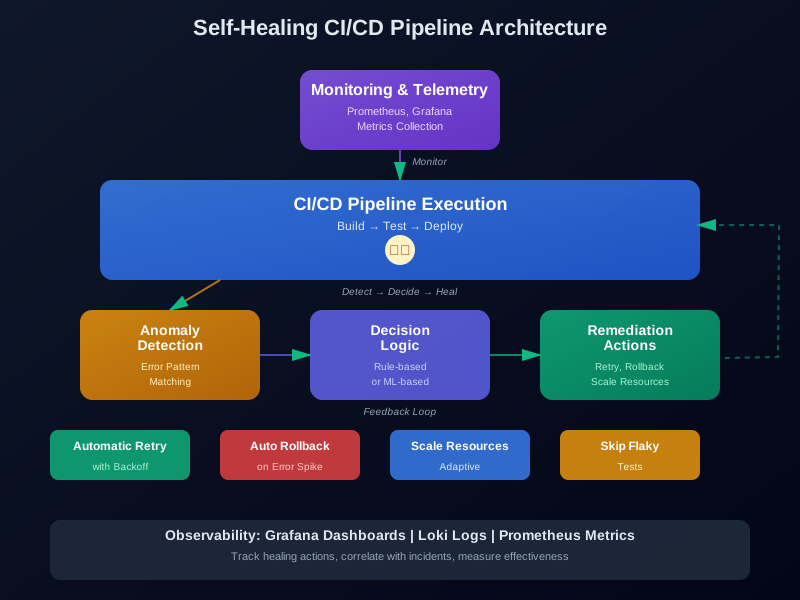
Self-healing CI/CD pipelines fix themselves. They detect problems, understand what went wrong, and take corrective action automatically. Instead of waking up an on-call engineer, the pipeline retries with backoff, rolls back a bad deployment, or skips a known flaky test.
This article covers how to build these systems. We’ll look at detection mechanisms, healing strategies, and the architecture that makes it all work together.
Introduction: From Static Builds to Intelligent Orchestration
CI/CD pipelines started simple. You wrote a script, ran it on commit, and deployed if it passed. This worked for small teams and simple applications. But as systems grew, pipelines became complex. They now orchestrate hundreds of steps across multiple environments.
The evolution happened in stages. First came parameterized builds. Then came pipeline-as-code. Now we’re moving toward cognitive DevOps—systems that reason about failures and adapt automatically.
The shift matters because manual intervention doesn’t scale. A team managing 50 microservices can’t manually investigate every pipeline failure. At scale, you need automation that thinks like an engineer.
Self-healing is the next step. It’s not just about retrying failed steps. It’s about understanding context, learning from patterns, and making intelligent decisions. A pipeline that detects a memory leak and automatically increases resource limits. A system that recognizes a flaky test and retries it separately. Infrastructure that rolls back when error rates spike.
This requires combining event-driven architecture, telemetry collection, and decision logic—either rule-based or ML-powered. The result is pipelines that get smarter over time.
What Makes a Pipeline Self-Healing
A self-healing pipeline needs three capabilities: detection, diagnosis, and remediation.
Detection: Knowing Something Is Wrong
Detection means identifying when the pipeline isn’t healthy. This goes beyond checking exit codes. You need to understand context.
Traditional pipelines fail when a step returns non-zero. Self-healing pipelines look at multiple signals:
- Exit codes from commands
- Error rates from deployed services
- Performance degradation
- Resource exhaustion
- Dependency failures
- Timeout patterns
A build might exit successfully but deploy a version that causes 500 errors. Or tests might pass but take three times longer than normal. These are failures that need healing, even if the pipeline reports success.
Diagnosis: Understanding the Problem
Once you detect an issue, you need to figure out what’s wrong. This is where diagnosis comes in.
Rule-based systems use pattern matching. They look for known error messages, stack traces, or metric patterns. When they match, they trigger predefined actions.
ML-based systems learn from history. They analyze past failures and identify patterns humans might miss. They can correlate multiple signals—maybe CPU spikes predict test failures, or network latency correlates with deployment issues.
Both approaches work. Rule-based is faster to implement and easier to understand. ML-based adapts to new failure modes automatically.
Remediation: Fixing the Issue
Remediation is taking action. This could mean:
- Retrying with exponential backoff
- Rolling back a deployment
- Scaling up resources
- Skipping known flaky tests
- Triggering alternative deployment paths
- Notifying humans when automation fails
The key is choosing the right action for the problem. You don’t want to retry a memory leak forever, or roll back when a retry would work.
Core Capabilities
Self-healing pipelines share these capabilities:
Automatic retry orchestration: When a step fails, the pipeline doesn’t give up. It retries with smart backoff, adapts based on error type, and learns which failures are temporary.
Anomaly detection: The system monitors metrics during pipeline execution. Unusual patterns—slow builds, high memory usage, error spikes—trigger investigation.
Automatic rollback: When deployments cause problems, the pipeline rolls back automatically. It doesn’t wait for human approval if error rates exceed thresholds.
Error pattern matching: Known error patterns map to specific fixes. A database connection error might trigger a connection pool reset. A timeout might increase resource limits.
Dependency health checking: Before starting, the pipeline checks if dependencies are healthy. It skips steps that depend on unavailable services, or waits for them to recover.
Adaptive resource allocation: The pipeline adjusts resources based on load. Large diffs get more CPU. Heavy tests get more memory.
These capabilities work together. Detection identifies issues. Diagnosis determines cause. Remediation applies fixes. The pipeline learns from each cycle.
Architecture Components
Self-healing pipelines need specific architecture components. Let’s break down what’s required.
Event-Driven Pipeline Orchestration
Traditional pipelines are linear. Step 1 runs, then step 2, then step 3. If step 2 fails, the pipeline stops.
Event-driven pipelines are different. Each step publishes events. Other components subscribe and react. This makes healing easier because you can inject healing logic between steps without modifying the pipeline itself.
# GitHub Actions example with event-driven healing
name: Self-Healing Deployment Pipeline

on:
  push:
    branches: [main]
  workflow_dispatch:

jobs:
  detect-anomalies:
    runs-on: ubuntu-latest
    steps:
      - name: Monitor deployment metrics
        uses: prometheus/query-action@v1
        with:
          query: 'rate(http_requests_total{status=~"5.."}[5m])'
          threshold: 0.05  # 5% error rate triggers healing

      - name: Trigger healing if needed
        if: failure()
        run: |
          curl -X POST ${{ secrets.HEALING_WEBHOOK_URL }} \
            -d '{"action": "rollback", "reason": "high_error_rate"}'

  deploy:
    needs: detect-anomalies
    runs-on: ubuntu-latest
    steps:
      - uses: actions/checkout@v3

      - name: Deploy to production
        run: ./deploy.sh

      - name: Post-deploy health check
        run: |
          sleep 30
          HEALTH_STATUS=$(curl -f https://api.example.com/health || echo "unhealthy")
          if [ "$HEALTH_STATUS" = "unhealthy" ]; then
            echo "Deployment unhealthy, triggering rollback"
            curl -X POST ${{ secrets.ROLLBACK_WEBHOOK_URL }}
            exit 1
          fi
Events flow through the system. Each component reacts independently. This makes the system more resilient.
Telemetry Collection and Feedback Loops
You can’t heal what you can’t see. Telemetry collection is critical.
Self-healing pipelines collect metrics at multiple levels:
- Pipeline metrics: Build duration, success rate, step durations
- Application metrics: Error rates, latency, throughput
- Infrastructure metrics: CPU, memory, disk, network
- Test metrics: Test duration, flakiness rate, failure patterns
Prometheus is common for collection. It scrapes metrics from various sources and stores them as time series. You query Prometheus to detect anomalies.
# Prometheus alert configuration for CI/CD healing
groups:
  - name: cicd_healing
    interval: 30s
    rules:
      # Detect slow builds
      - alert: SlowBuild
        expr: cicd_build_duration_seconds > 600
        for: 5m
        annotations:
          summary: "Build taking longer than expected"
          action: "Scale up build resources or investigate bottleneck"

      # Detect high failure rate
      - alert: HighPipelineFailureRate
        expr: rate(cicd_build_failures_total[10m]) > 0.2
        for: 5m
        annotations:
          summary: "Pipeline failure rate above threshold"
          action: "Investigate root cause or trigger healing"

      # Detect deployment errors
      - alert: DeploymentErrorSpike
        expr: rate(http_requests_total{status=~"5..",deployment="production"}[5m]) > 0.1
        for: 2m
        annotations:
          summary: "Error rate spike after deployment"
          action: "Trigger automatic rollback"
Feedback loops close the cycle. When healing actions happen, they generate new metrics. The system learns what works and what doesn’t.
Decision Logic: ML-Based vs Rule-Based
Healing decisions come from two places: rules or machine learning.
Rule-based systems use if-then logic. They’re fast to implement and easy to understand.
class RuleBasedHealer:
    """Rule-based healing logic for CI/CD pipelines."""

    def __init__(self):
        self.rules = [
            {
                "pattern": r"connection.*timeout",
                "action": "retry_with_backoff",
                "max_retries": 3,
                "backoff": "exponential"
            },
            {
                "pattern": r"memory.*exhausted",
                "action": "scale_resources",
                "resource": "memory",
                "multiplier": 1.5
            },
            {
                "pattern": r"test.*flaky.*known",
                "action": "skip_and_notify",
                "notify_channel": "#flaky-tests"
            },
            {
                "pattern": r"deployment.*error.*rate.*high",
                "action": "rollback",
                "immediate": True
            }
        ]

    def decide_action(self, error_log: str, metrics: dict) -> dict:
        """Decide healing action based on rules."""

        # Check rules in order
        for rule in self.rules:
            if re.search(rule["pattern"], error_log, re.IGNORECASE):
                return {
                    "action": rule["action"],
                    "parameters": {
                        k: v for k, v in rule.items()
                        if k not in ["pattern", "action"]
                    },
                    "confidence": 0.9  # High confidence for rule matches
                }

        # Check metrics-based rules
        if metrics.get("error_rate", 0) > 0.1:
            return {
                "action": "rollback",
                "parameters": {"immediate": True},
                "confidence": 0.8
            }

        if metrics.get("memory_usage", 0) > 0.9:
            return {
                "action": "scale_resources",
                "parameters": {"resource": "memory", "multiplier": 1.5},
                "confidence": 0.85
            }

        # Default: retry once
        return {
            "action": "retry",
            "parameters": {"max_retries": 1},
            "confidence": 0.5
        }
ML-based systems learn from data. They identify patterns humans might miss.
import numpy as np
import pandas as pd
from sklearn.ensemble import RandomForestClassifier
from sklearn.preprocessing import StandardScaler
import joblib

class MLBasedHealer:
    """ML-based healing logic for CI/CD pipelines."""

    def __init__(self, model_path: str = None):
        self.scaler = StandardScaler()
        if model_path and os.path.exists(model_path):
            self.model = joblib.load(model_path)
            self.scaler = joblib.load(model_path.replace('.pkl', '_scaler.pkl'))
        else:
            self.model = RandomForestClassifier(n_estimators=100, random_state=42)
            self.trained = False

    def train(self, historical_data: pd.DataFrame):
        """Train on historical failure data.

        Expected columns:
        - error_type: categorical
        - error_message: text (will be vectorized)
        - cpu_usage: float
        - memory_usage: float
        - network_latency: float
        - error_rate: float
        - build_duration: float
        - successful_action: categorical (retry, rollback, scale, skip, etc.)
        """
        # Feature engineering
        features = self._engineer_features(historical_data)

        # Scale features
        features_scaled = self.scaler.fit_transform(features)

        # Train model
        self.model.fit(features_scaled, historical_data['successful_action'])
        self.trained = True

        # Save model
        joblib.dump(self.model, 'healing_model.pkl')
        joblib.dump(self.scaler, 'healing_scaler.pkl')

    def _engineer_features(self, data: pd.DataFrame) -> np.ndarray:
        """Engineer features from raw data."""
        features = []

        for _, row in data.iterrows():
            # Extract numeric features
            feature_vector = [
                row.get('cpu_usage', 0),
                row.get('memory_usage', 0),
                row.get('network_latency', 0),
                row.get('error_rate', 0),
                row.get('build_duration', 0),
            ]

            # Add error type encoding (simplified)
            error_types = ['timeout', 'memory', 'network', 'test', 'deployment', 'other']
            error_type_vec = [1 if row.get('error_type') == et else 0 for et in error_types]
            feature_vector.extend(error_type_vec)

            # Add error message length (proxy for complexity)
            error_msg_len = len(str(row.get('error_message', '')))
            feature_vector.append(error_msg_len)

            features.append(feature_vector)

        return np.array(features)

    def decide_action(self, current_error: dict, metrics: dict) -> dict:
        """Decide healing action using ML model."""
        if not self.trained:
            # Fallback to default if not trained
            return {
                "action": "retry",
                "parameters": {"max_retries": 1},
                "confidence": 0.3
            }

        # Prepare features
        feature_vector = [
            metrics.get('cpu_usage', 0),
            metrics.get('memory_usage', 0),
            metrics.get('network_latency', 0),
            metrics.get('error_rate', 0),
            metrics.get('build_duration', 0),
        ]

        # Error type encoding
        error_type = current_error.get('type', 'other')
        error_types = ['timeout', 'memory', 'network', 'test', 'deployment', 'other']
        error_type_vec = [1 if error_type == et else 0 for et in error_types]
        feature_vector.extend(error_type_vec)

        # Error message length
        error_msg_len = len(str(current_error.get('message', '')))
        feature_vector.append(error_msg_len)

        # Scale and predict
        feature_array = np.array([feature_vector])
        feature_scaled = self.scaler.transform(feature_array)

        prediction = self.model.predict(feature_scaled)[0]
        probabilities = self.model.predict_proba(feature_scaled)[0]
        confidence = max(probabilities)

        # Map prediction to action
        action_map = {
            0: "retry",
            1: "rollback",
            2: "scale_resources",
            3: "skip",
            4: "notify_human"
        }

        return {
            "action": action_map.get(prediction, "retry"),
            "parameters": self._get_action_parameters(prediction, metrics),
            "confidence": float(confidence)
        }

    def _get_action_parameters(self, action_id: int, metrics: dict) -> dict:
        """Get parameters for specific action."""
        if action_id == 0:  # retry
            return {"max_retries": 3, "backoff": "exponential"}
        elif action_id == 1:  # rollback
            return {"immediate": True}
        elif action_id == 2:  # scale_resources
            return {"resource": "memory", "multiplier": 1.5}
        elif action_id == 3:  # skip
            return {"notify": True}
        else:
            return {}
Both approaches have trade-offs. Rules are transparent and predictable. ML adapts to new patterns but can be harder to debug. Many systems combine both: use rules for known patterns, ML for everything else.
Integration Points with Kubernetes and GitOps Tools
Self-healing pipelines integrate with Kubernetes and GitOps tools like ArgoCD.
Kubernetes integration enables automatic scaling, rolling updates, and health checks. The pipeline can query Kubernetes to understand cluster state.
Argo Rollouts provides advanced deployment strategies. You can use canary or blue-green deployments, then automatically rollback if metrics degrade.
# Argo Rollouts with automatic rollback
apiVersion: argoproj.io/v1alpha1
kind: Rollout
metadata:
  name: web-application
spec:
  replicas: 5
  strategy:
    canary:
      steps:
      - setWeight: 20
      - pause: {}
      - setWeight: 40
      - pause: {duration: 10}
      - setWeight: 60
      - pause: {duration: 10}
      - setWeight: 80
      - pause: {duration: 10}
      analysis:
        templates:
        - templateName: error-rate-analysis
        args:
        - name: service-name
          value: web-application
  template:
    metadata:
      labels:
        app: web-application
    spec:
      containers:
      - name: web-app
        image: web-app:v2
        resources:
          requests:
            memory: "128Mi"
            cpu: "100m"
---
apiVersion: argoproj.io/v1alpha1
kind: AnalysisTemplate
metadata:
  name: error-rate-analysis
spec:
  metrics:
  - name: error-rate
    interval: 30s
    count: 5
    successCondition: result[0] <= 0.05
    failureCondition: result[0] >= 0.1
    provider:
      prometheus:
        address: http://prometheus:9090
        query: |
          rate(http_requests_total{
            service="{{args.service-name}}",
            status=~"5.."
          }[1m])
This configuration automatically rolls back if error rates exceed 10% during the canary deployment.
Implementation Walkthrough
Let’s build a complete example using GitHub Actions, Prometheus, and Argo Rollouts.
Automated Rollback Workflow
This workflow deploys and automatically rolls back if health checks fail.
name: Self-Healing Deployment

on:
  push:
    branches: [main]

env:
  REGISTRY: ghcr.io
  IMAGE_NAME: ${{ github.repository }}

jobs:
  build-and-test:
    runs-on: ubuntu-latest
    steps:
      - uses: actions/checkout@v3

      - name: Run tests
        run: |
          npm test
          pytest --cov=src tests/

      - name: Build image
        run: |
          docker build -t ${{ env.REGISTRY }}/${{ env.IMAGE_NAME }}:${{ github.sha }} .
          docker push ${{ env.REGISTRY }}/${{ env.IMAGE_NAME }}:${{ github.sha }}

  deploy-with-healing:
    needs: build-and-test
    runs-on: ubuntu-latest
    environment: production
    steps:
      - name: Deploy to Kubernetes
        run: |
          kubectl set image deployment/web-app \
            web-app=${{ env.REGISTRY }}/${{ env.IMAGE_NAME }}:${{ github.sha }} \
            -n production

          kubectl rollout status deployment/web-app -n production --timeout=5m

      - name: Wait for deployment to stabilize
        run: sleep 60

      - name: Health check with automatic rollback
        id: health_check
        run: |
          MAX_RETRIES=5
          RETRY_COUNT=0

          while [ $RETRY_COUNT -lt $MAX_RETRIES ]; do
            HEALTH=$(curl -sf https://api.example.com/health || echo "unhealthy")

            if [ "$HEALTH" = "healthy" ]; then
              ERROR_RATE=$(curl -s http://prometheus:9090/api/v1/query?query='rate(http_requests_total{status=~"5.."}[5m])' | jq -r '.data.result[0].value[1]')

              if (( $(echo "$ERROR_RATE < 0.05" | bc -l) )); then
                echo "Deployment healthy"
                exit 0
              else
                echo "Error rate too high: $ERROR_RATE"
                RETRY_COUNT=$((RETRY_COUNT + 1))
                sleep 10
              fi
            else
              echo "Health check failed"
              RETRY_COUNT=$((RETRY_COUNT + 1))
              sleep 10
            fi
          done

          # If we get here, rollback
          echo "Triggering automatic rollback"
          kubectl rollout undo deployment/web-app -n production
          exit 1

      - name: Notify on rollback
        if: failure() && steps.health_check.outcome == 'failure'
        run: |
          curl -X POST ${{ secrets.SLACK_WEBHOOK }} \
            -H 'Content-Type: application/json' \
            -d '{
              "text": "Deployment rolled back automatically due to health check failures",
              "channel": "#deployments"
            }'
This workflow deploys, waits for stabilization, then checks health. If health checks fail or error rates spike, it automatically rolls back.
Alert-Based Retry Triggers Using Webhook Listeners
Webhook listeners enable event-driven healing. Other systems can trigger healing actions by sending webhooks.
from flask import Flask, request, jsonify
import subprocess
import logging
import json
from prometheus_client import Counter, Histogram
import requests

app = Flask(__name__)
logger = logging.getLogger(__name__)

# Prometheus metrics
healing_actions = Counter('healing_actions_total', 'Total healing actions', ['action_type'])
healing_duration = Histogram('healing_action_duration_seconds', 'Healing action duration', ['action_type'])

class HealingWebhookListener:
    """Webhook listener for triggering healing actions."""

    def __init__(self):
        self.prometheus_url = "http://prometheus:9090"
        self.github_token = os.getenv("GITHUB_TOKEN")

    def handle_webhook(self, payload: dict):
        """Handle incoming webhook and trigger appropriate healing action."""
        event_type = payload.get("event_type")
        pipeline_id = payload.get("pipeline_id")
        error_details = payload.get("error", {})

        logger.info(f"Received webhook: {event_type} for pipeline {pipeline_id}")

        # Determine healing action
        action = self._determine_action(event_type, error_details)

        # Execute healing action
        with healing_duration.labels(action_type=action["type"]).time():
            result = self._execute_action(action, pipeline_id)
            healing_actions.labels(action_type=action["type"]).inc()

        return {
            "success": result["success"],
            "action_taken": action["type"],
            "message": result.get("message", "")
        }

    def _determine_action(self, event_type: str, error_details: dict) -> dict:
        """Determine what healing action to take."""
        error_message = error_details.get("message", "").lower()
        error_type = error_details.get("type", "unknown")

        # Check metrics if available
        metrics = self._get_current_metrics()

        # Rule-based decision logic
        if "timeout" in error_message or error_type == "timeout":
            return {
                "type": "retry_with_backoff",
                "parameters": {
                    "max_retries": 3,
                    "initial_delay": 10,
                    "backoff_multiplier": 2
                }
            }

        if "memory" in error_message or "oom" in error_message:
            return {
                "type": "scale_resources",
                "parameters": {
                    "resource": "memory",
                    "multiplier": 1.5
                }
            }

        if metrics.get("error_rate", 0) > 0.1:
            return {
                "type": "rollback",
                "parameters": {
                    "immediate": True
                }
            }

        # Default: retry once
        return {
            "type": "retry",
            "parameters": {
                "max_retries": 1
            }
        }

    def _execute_action(self, action: dict, pipeline_id: str) -> dict:
        """Execute the healing action."""
        action_type = action["type"]
        params = action["parameters"]

        if action_type == "retry" or action_type == "retry_with_backoff":
            return self._retry_pipeline(pipeline_id, params)
        elif action_type == "rollback":
            return self._rollback_deployment(pipeline_id, params)
        elif action_type == "scale_resources":
            return self._scale_resources(params)
        else:
            return {"success": False, "message": f"Unknown action type: {action_type}"}

    def _retry_pipeline(self, pipeline_id: str, params: dict) -> dict:
        """Retry a failed pipeline."""
        max_retries = params.get("max_retries", 1)

        # In production, this would trigger GitHub Actions workflow rerun
        # For now, simulate
        try:
            # Use GitHub API to rerun workflow
            response = requests.post(
                f"https://api.github.com/repos/{os.getenv('GITHUB_REPO')}/actions/runs/{pipeline_id}/rerun",
                headers={"Authorization": f"token {self.github_token}"}
            )

            if response.status_code == 201:
                return {"success": True, "message": f"Pipeline {pipeline_id} retry triggered"}
            else:
                return {"success": False, "message": f"Failed to retry: {response.text}"}
        except Exception as e:
            logger.error(f"Error retrying pipeline: {e}")
            return {"success": False, "message": str(e)}

    def _rollback_deployment(self, pipeline_id: str, params: dict) -> dict:
        """Rollback a deployment."""
        try:
            result = subprocess.run(
                ["kubectl", "rollout", "undo", "deployment/web-app", "-n", "production"],
                capture_output=True,
                text=True,
                timeout=30
            )

            if result.returncode == 0:
                return {"success": True, "message": "Deployment rolled back successfully"}
            else:
                return {"success": False, "message": result.stderr}
        except Exception as e:
            logger.error(f"Error rolling back: {e}")
            return {"success": False, "message": str(e)}

    def _scale_resources(self, params: dict) -> dict:
        """Scale resources for a deployment."""
        resource = params.get("resource")
        multiplier = params.get("multiplier", 1.5)

        try:
            # Get current resources
            result = subprocess.run(
                ["kubectl", "get", "deployment", "web-app", "-n", "production", "-o", "json"],
                capture_output=True,
                text=True
            )

            deployment = json.loads(result.stdout)
            current_memory = deployment["spec"]["template"]["spec"]["containers"][0]["resources"]["requests"]["memory"]

            # Calculate new memory (simplified - in production use proper parsing)
            # For now, just patch
            subprocess.run(
                ["kubectl", "patch", "deployment", "web-app", "-n", "production",
                 "-p", '{"spec":{"template":{"spec":{"containers":[{"name":"web-app","resources":{"requests":{"memory":"256Mi"}}}]}}}}'],
                timeout=30
            )

            return {"success": True, "message": f"Scaled {resource} by {multiplier}x"}
        except Exception as e:
            logger.error(f"Error scaling resources: {e}")
            return {"success": False, "message": str(e)}

    def _get_current_metrics(self) -> dict:
        """Get current metrics from Prometheus."""
        try:
            response = requests.get(
                f"{self.prometheus_url}/api/v1/query",
                params={"query": 'rate(http_requests_total{status=~"5.."}[5m])'}
            )

            if response.status_code == 200:
                data = response.json()
                if data["data"]["result"]:
                    error_rate = float(data["data"]["result"][0]["value"][1])
                    return {"error_rate": error_rate}
        except Exception as e:
            logger.error(f"Error fetching metrics: {e}")

        return {}

listener = HealingWebhookListener()

@app.route('/webhook/healing', methods=['POST'])
def healing_webhook():
    """Webhook endpoint for healing actions."""
    try:
        payload = request.json
        result = listener.handle_webhook(payload)
        return jsonify(result), 200 if result["success"] else 500
    except Exception as e:
        logger.error(f"Error handling webhook: {e}")
        return jsonify({"success": False, "message": str(e)}), 500

@app.route('/health', methods=['GET'])
def health():
    """Health check endpoint."""
    return jsonify({"status": "healthy"}), 200

if __name__ == '__main__':
    app.run(host='0.0.0.0', port=5000)
This webhook listener receives events from Prometheus alerts or other systems. It decides on a healing action and executes it.
Self-Healing Logic with Error Pattern Matching
Error pattern matching maps known errors to fixes. This makes healing faster and more reliable.
import re
import json
from typing import Dict, List, Optional
from dataclasses import dataclass
from enum import Enum

class HealingAction(Enum):
    RETRY = "retry"
    RETRY_WITH_BACKOFF = "retry_with_backoff"
    ROLLBACK = "rollback"
    SCALE_RESOURCES = "scale_resources"
    SKIP_TEST = "skip_test"
    NOTIFY_HUMAN = "notify_human"

@dataclass
class ErrorPattern:
    """Pattern for matching errors and determining healing actions."""
    pattern: str
    regex: bool
    action: HealingAction
    parameters: dict
    confidence: float
    description: str

class ErrorPatternMatcher:
    """Match errors to healing actions using patterns."""

    def __init__(self):
        self.patterns = self._load_patterns()

    def _load_patterns(self) -> List[ErrorPattern]:
        """Load error patterns from configuration."""
        return [
            ErrorPattern(
                pattern=r"connection.*timeout|timeout.*connection",
                regex=True,
                action=HealingAction.RETRY_WITH_BACKOFF,
                parameters={"max_retries": 3, "initial_delay": 5, "backoff": 2},
                confidence=0.9,
                description="Network timeout - likely temporary"
            ),
            ErrorPattern(
                pattern=r"memory.*exhausted|out of memory|OOM",
                regex=True,
                action=HealingAction.SCALE_RESOURCES,
                parameters={"resource": "memory", "multiplier": 1.5},
                confidence=0.85,
                description="Memory exhaustion - increase resources"
            ),
            ErrorPattern(
                pattern=r"test.*flaky|intermittent.*test|test.*timeout",
                regex=True,
                action=HealingAction.SKIP_TEST,
                parameters={"notify": True, "channel": "#flaky-tests"},
                confidence=0.7,
                description="Flaky test - skip and notify"
            ),
            ErrorPattern(
                pattern=r"database.*connection.*failed|DB connection error",
                regex=True,
                action=HealingAction.RETRY_WITH_BACKOFF,
                parameters={"max_retries": 5, "initial_delay": 10, "backoff": 2},
                confidence=0.8,
                description="Database connection failure - retry with longer backoff"
            ),
            ErrorPattern(
                pattern=r"deployment.*error.*rate|high.*error.*rate|error.*spike",
                regex=True,
                action=HealingAction.ROLLBACK,
                parameters={"immediate": True, "verify": True},
                confidence=0.95,
                description="Error rate spike after deployment - rollback immediately"
            ),
            ErrorPattern(
                pattern=r"image.*pull.*error|registry.*unavailable",
                regex=True,
                action=HealingAction.NOTIFY_HUMAN,
                parameters={"urgency": "high", "team": "platform"},
                confidence=0.9,
                description="Image registry issue - requires human intervention"
            ),
        ]

    def match_error(self, error_message: str, error_type: str = None,
                   metrics: Dict = None) -> Optional[Dict]:
        """Match an error to a healing action.

        Returns:
            Dict with action, parameters, confidence, and description
        """
        # Combine error message and type for matching
        full_text = f"{error_type or ''} {error_message}".lower()

        # Try to match patterns
        best_match = None
        best_confidence = 0.0

        for pattern in self.patterns:
            if pattern.regex:
                match = re.search(pattern.pattern, full_text, re.IGNORECASE)
            else:
                match = pattern.pattern.lower() in full_text

            if match and pattern.confidence > best_confidence:
                best_match = pattern
                best_confidence = pattern.confidence

        # If we have metrics, enhance decision
        if metrics:
            enhanced_action = self._enhance_with_metrics(best_match, metrics)
            if enhanced_action:
                return enhanced_action

        if best_match:
            return {
                "action": best_match.action.value,
                "parameters": best_match.parameters,
                "confidence": best_match.confidence,
                "description": best_match.description
            }

        # Default fallback
        return {
            "action": HealingAction.RETRY.value,
            "parameters": {"max_retries": 1},
            "confidence": 0.5,
            "description": "Unknown error - retry once"
        }

    def _enhance_with_metrics(self, pattern: Optional[ErrorPattern],
                             metrics: Dict) -> Optional[Dict]:
        """Enhance healing action based on metrics."""
        if not pattern:
            return None

        # If error rate is high and we matched a deployment error, increase confidence
        if pattern.action == HealingAction.ROLLBACK:
            error_rate = metrics.get("error_rate", 0)
            if error_rate > 0.1:
                return {
                    "action": pattern.action.value,
                    "parameters": {**pattern.parameters, "immediate": True},
                    "confidence": min(0.99, pattern.confidence + 0.1),
                    "description": pattern.description + " (confirmed by metrics)"
                }

        # If memory usage is high and we matched memory error, increase confidence
        if pattern.action == HealingAction.SCALE_RESOURCES:
            memory_usage = metrics.get("memory_usage", 0)
            if memory_usage > 0.9:
                multiplier = 2.0 if memory_usage > 0.95 else 1.5
                return {
                    "action": pattern.action.value,
                    "parameters": {**pattern.parameters, "multiplier": multiplier},
                    "confidence": min(0.99, pattern.confidence + 0.1),
                    "description": pattern.description + " (confirmed by metrics)"
                }

        return None

# Example usage
matcher = ErrorPatternMatcher()

# Match an error
error = {
    "message": "Connection timeout after 30 seconds",
    "type": "network_error"
}

result = matcher.match_error(error["message"], error["type"])
print(json.dumps(result, indent=2))
# {
#   "action": "retry_with_backoff",
#   "parameters": {
#     "max_retries": 3,
#     "initial_delay": 5,
#     "backoff": 2
#   },
#   "confidence": 0.9,
#   "description": "Network timeout - likely temporary"
# }
This pattern matcher provides fast, predictable healing for known error types.
Observability Layer
Self-healing pipelines need observability. You need to see what’s happening, why healing actions triggered, and whether they worked.
Integrating with Grafana and Loki
Grafana visualizes metrics. Loki aggregates logs. Together, they give you visibility into pipeline behavior.
# Grafana dashboard configuration for self-healing pipelines
apiVersion: v1
kind: ConfigMap
metadata:
  name: cicd-healing-dashboard
  namespace: monitoring
data:
  dashboard.json: |
    {
      "dashboard": {
        "title": "Self-Healing CI/CD Pipeline",
        "panels": [
          {
            "title": "Pipeline Success Rate",
            "targets": [
              {
                "expr": "rate(cicd_build_success_total[5m]) / rate(cicd_build_total[5m])",
                "legendFormat": "Success Rate"
              }
            ]
          },
          {
            "title": "Healing Actions Triggered",
            "targets": [
              {
                "expr": "rate(healing_actions_total[5m])",
                "legendFormat": "{{action_type}}"
              }
            ]
          },
          {
            "title": "Error Rate After Deployment",
            "targets": [
              {
                "expr": "rate(http_requests_total{status=~\"5..\"}[5m])",
                "legendFormat": "Error Rate"
              }
            ]
          },
          {
            "title": "Healing Action Duration",
            "targets": [
              {
                "expr": "histogram_quantile(0.95, rate(healing_action_duration_seconds_bucket[5m]))",
                "legendFormat": "95th percentile"
              }
            ]
          }
        ]
      }
    }
Loki aggregates logs from pipeline runs. You can query logs to understand why healing actions triggered.
# Query Loki for healing-related logs
import requests

def query_loki_for_healing_events(pipeline_id: str, time_range: str = "1h"):
    """Query Loki for healing events related to a pipeline."""
    loki_url = "http://loki:3100"

    query = f'{{pipeline_id="{pipeline_id}"}} |~ "healing|rollback|retry"'

    response = requests.get(
        f"{loki_url}/loki/api/v1/query_range",
        params={
            "query": query,
            "start": f"now()-{time_range}",
            "end": "now()"
        }
    )

    if response.status_code == 200:
        return response.json()["data"]["result"]
    return []

# Correlate healing actions with incidents
def correlate_healing_with_incidents():
    """Correlate healing actions with incidents."""
    # Get all healing actions from Prometheus
    healing_actions = query_prometheus('rate(healing_actions_total[1h])')

    # Get incidents from Loki
    incidents = query_loki('{level="error"} |~ "incident|outage"')

    # Correlate by timestamp
    correlations = []
    for action in healing_actions:
        for incident in incidents:
            time_diff = abs(action["timestamp"] - incident["timestamp"])
            if time_diff < 300:  # Within 5 minutes
                correlations.append({
                    "healing_action": action,
                    "incident": incident,
                    "time_diff": time_diff
                })

    return correlations
This gives you visibility into what healing actions happened and why.
Visualizing Healing Actions and Incident Correlation
Dashboards help you understand healing effectiveness. You want to see:
- How often healing actions trigger
- Which actions are most common
- Whether actions succeed or fail
- Correlation between actions and incidents
# Generate healing effectiveness report
def generate_healing_report(start_time: str, end_time: str) -> dict:
    """Generate a report on healing effectiveness."""

    # Query Prometheus for metrics
    healing_actions = query_prometheus(
        f'sum(rate(healing_actions_total[{start_time}:{end_time}])) by (action_type)'
    )

    healing_success = query_prometheus(
        f'sum(rate(healing_actions_success_total[{start_time}:{end_time}])) by (action_type)'
    )

    # Calculate effectiveness
    effectiveness = {}
    for action_type in healing_actions:
        total = healing_actions[action_type]
        success = healing_success.get(action_type, 0)
        effectiveness[action_type] = {
            "total": total,
            "successful": success,
            "success_rate": success / total if total > 0 else 0
        }

    return {
        "time_range": f"{start_time} to {end_time}",
        "effectiveness": effectiveness,
        "summary": {
            "total_actions": sum(healing_actions.values()),
            "total_successful": sum(healing_success.values()),
            "overall_success_rate": sum(healing_success.values()) / sum(healing_actions.values()) if sum(healing_actions.values()) > 0 else 0
        }
    }
These reports help you tune healing logic over time.
Best Practices and Anti-Patterns
Self-healing pipelines can go wrong. Here’s what to avoid.
Anti-Patterns
Masking real issues: If your pipeline always retries and eventually succeeds, you might never notice underlying problems. Retries should have limits, and persistent failures should surface to humans.
Over-automation: Not everything should heal automatically. Critical deployments might need human approval. Don’t automate decisions you can’t reverse.
Infinite retry loops: A pipeline that retries forever wastes resources. Always set retry limits and exponential backoff.
Ignoring root causes: Healing fixes symptoms, not causes. Use healing to maintain availability while you fix underlying issues.
No feedback loop: If healing actions don’t work, the system should learn. Track success rates and adjust logic.
Best Practices
Start with rules, add ML later: Rules are easier to understand and debug. Add ML once you have enough data.
Set confidence thresholds: Don’t act on low-confidence predictions. Require high confidence for critical actions.
Maintain human oversight: Critical systems should notify humans even when healing succeeds. Use automation for routine issues, humans for edge cases.
Test healing logic: Healing logic is code. Test it like any other code. Use chaos engineering to verify it works under failure.
Monitor healing effectiveness: Track how often healing triggers and whether it succeeds. Use this data to improve logic.
Document decisions: When healing actions trigger, log why. This helps debug issues and understand system behavior.
Gradual rollout: Don’t enable full automation immediately. Start with recommendations, then move to actions for non-critical systems.
Conclusion
Self-healing CI/CD pipelines represent the next evolution in DevOps. They move from reactive to proactive, from manual to autonomous.
The journey starts with detection—knowing when something is wrong. Then diagnosis—understanding what’s wrong. Finally, remediation—fixing it automatically.
This requires combining event-driven architecture, telemetry collection, and decision logic. The result is pipelines that get smarter over time, learning from each failure and success.
But self-healing isn’t a silver bullet. It requires careful design to avoid masking issues or over-automating. Start simple with rule-based systems, then add ML as you collect data. Always maintain human oversight for critical decisions.
The maturity curve is clear: manual DevOps → automated DevOps → cognitive DevOps → autonomous DevOps. Self-healing pipelines are a step toward autonomy. They handle routine failures automatically, letting humans focus on strategic problems.
As systems scale, this becomes essential. You can’t manually investigate every failure when you have hundreds of deployments per day. Automation that thinks like an engineer becomes necessary.
The future of CI/CD is intelligent, adaptive, and autonomous. Start building these capabilities now. Begin with detection and simple healing rules. Add complexity as you learn. The systems that succeed will be the ones that handle real-world failures gracefully, learning and adapting with each cycle.
Discussion
Loading comments...