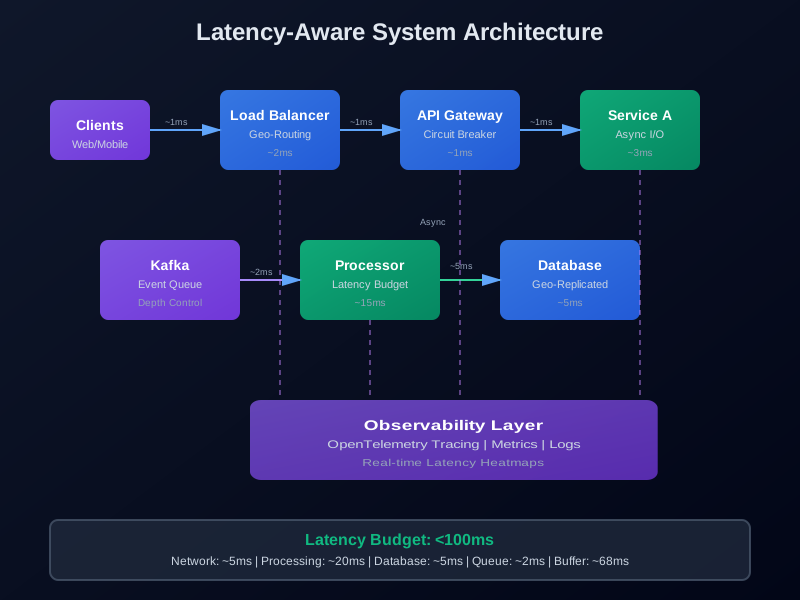
Latency-Aware System Design: Architecting for Sub-100ms Responses at Scale
Your API responds in 50 milliseconds most of the time. But every now and then it takes three seconds. Users notice. They complain. Your monitoring dashboard shows everything looks fine.
The problem isn’t average performance. It’s what happens at the tail. The 1% of requests that take forever. Those are the ones that break user trust.
This article covers how to build systems that stay fast under unpredictable load. We’ll look at what causes latency spikes, how to measure them properly, and design patterns that keep response times low even when traffic surges.
Why Latency is the New Scalability
Throughput used to be the main concern. How many requests per second can your system handle? That metric still matters, but it’s not enough anymore.
Modern applications need low latency. AI inference, real-time collaboration tools, trading systems — they all need responses in milliseconds. Users expect instant feedback. When your system takes a second to respond, users assume it’s broken.
The shift happened because:
- AI inference needs to feel interactive. If your LLM API takes two seconds per request, users abandon it.
- Real-time collaboration breaks without sub-100ms updates. Multiple users editing a document need instant synchronization.
- IoT platforms collect sensor data continuously. Processing delays mean missed events or stale decisions.
- Trading systems live or die by latency. A 10ms advantage can mean millions in profit.
Throughput and latency aren’t the same thing. You can handle 10,000 requests per second, but if each one takes five seconds, users won’t wait. Better to handle 1,000 requests per second at 50ms each.
Breaking Down Latency Contributors
Latency isn’t one thing. It’s the sum of many delays. Understanding where time goes is the first step to fixing it.
Network Hops
Each network hop adds latency. Cross-region calls add 50-200ms. Even same-datacenter calls add 1-5ms. If your request hits five services, that’s five network hops.
Request → Load Balancer → API Gateway → Service A → Service B → Database
  1ms          2ms            1ms          3ms          3ms        5ms
Total: 15ms just for network overhead. Not including actual processing time.
Queue Delays
Requests wait in queues. Your service might process requests in 5ms, but if there are 100 requests ahead of you, you wait longer.
Queue depth matters. A queue with 100 pending requests at 10ms each adds a full second of delay. That’s before your request even starts processing.
Serialization Overhead
Converting data formats takes time. JSON parsing, protobuf encoding, database serialization — each step adds milliseconds.
A large JSON response (100KB) might take 10-20ms to parse. Protobuf is faster, but still adds 2-5ms. These costs compound across multiple services.
Database Query Time
Database queries are often the bottleneck. A simple query might take 5ms, but joins, aggregations, or missing indexes can push it to 100ms+.
Connection pooling helps, but won’t fix slow queries. You need proper indexing and query optimization.
The p50 vs p99 Problem
Most teams track average latency or p50 (median). That’s useful, but it misses tail latency.
Consider these two services:
- Service A: p50 = 50ms, p99 = 500ms
- Service B: p50 = 60ms, p99 = 80ms
Service A looks better on average. But Service B is more consistent. Users experience Service A as slow because 1% of requests take 500ms.
p99 matters more than p50 for user experience. One slow request ruins the experience, even if 99 others are fast.
Latency-Aware Design Principles
Latency-aware design means making latency a primary constraint from day one. It’s not something you add later. It’s built into every decision.
Partitioning by Locality
Keep related data close together. If User A’s data is in region US-East, route their requests there. Don’t bounce across regions.
Geo-partitioning does this automatically. Users in Europe hit EU servers. Users in Asia hit Asia servers. Network latency stays low.
class GeoRouter:
    def __init__(self):
        self.region_map = {
            'us-east': ['us-east-1', 'us-east-2'],
            'eu-west': ['eu-west-1', 'eu-west-2'],
            'ap-south': ['ap-south-1', 'ap-south-2']
        }

    def route_request(self, user_id: str, endpoint: str) -> str:
        user_region = self.get_user_region(user_id)
        available_regions = self.region_map.get(user_region, ['us-east-1'])

        # Route to closest healthy region
        region = self.select_healthy_region(available_regions)
        return f"https://{region}.api.example.com{endpoint}"

    def get_user_region(self, user_id: str) -> str:
        # In practice, this would query a user-region mapping
        # For now, hash-based assignment
        hash_val = hash(user_id) % 3
        return list(self.region_map.keys())[hash_val]
The key is consistency. Once you assign a user to a region, keep them there. Changing regions mid-session adds unnecessary latency.
Async I/O and Queue Depth Control
Blocking I/O kills latency. One slow database query blocks the entire request thread. Use async I/O instead.
Async I/O lets your service handle other requests while waiting for I/O. Instead of blocking, you yield control back to the event loop.
But async alone isn’t enough. You need to control queue depth. If your service can process 100 requests/second and you receive 1,000/second, you’ll queue up 900 requests. Each queued request adds latency.
from fastapi import FastAPI, HTTPException
from asyncio import Semaphore
import asyncio

app = FastAPI()

class LatencyAwareRequestHandler:
    def __init__(self, max_concurrent=100):
        # Semaphore limits concurrent requests
        self.semaphore = Semaphore(max_concurrent)
        self.queue_depth = 0

    async def handle_request(self, request_data: dict):
        # Reject if queue is too deep
        if self.queue_depth > 200:
            raise HTTPException(status_code=503, detail="Service overloaded")

        async with self.semaphore:
            self.queue_depth += 1
            try:
                result = await self.process_request(request_data)
                return result
            finally:
                self.queue_depth -= 1

    async def process_request(self, request_data: dict):
        # Your actual request processing
        await asyncio.sleep(0.01)  # Simulate work
        return {"status": "ok"}

handler = LatencyAwareRequestHandler(max_concurrent=100)

@app.post("/api/process")
async def process_endpoint(request_data: dict):
    return await handler.handle_request(request_data)
The semaphore limits how many requests process simultaneously. Once you hit the limit, new requests wait. But we also check queue depth. If too many requests are waiting, we reject new ones immediately. Better to fail fast than queue forever.
Replica Zoning (Geo-Partitioning)
Replicas are copies of your data. Instead of one database, you have multiple. Reads go to any replica. Writes go to the primary, then replicate.
But replicas can be far away. If your primary is in US-East and your replica is in EU-West, reads take 50-100ms longer.
Geo-partitioning solves this. Keep replicas close to users. Users in Europe read from EU replicas. Users in the US read from US replicas.
class GeoPartitionedDatabase:
    def __init__(self):
        self.primaries = {
            'us-east': 'primary-us-east.rds.amazonaws.com',
            'eu-west': 'primary-eu-west.rds.amazonaws.com',
            'ap-south': 'primary-ap-south.rds.amazonaws.com'
        }
        self.replicas = {
            'us-east': ['replica-us-east-1.rds.amazonaws.com'],
            'eu-west': ['replica-eu-west-1.rds.amazonaws.com'],
            'ap-south': ['replica-ap-south-1.rds.amazonaws.com']
        }

    async def read(self, user_id: str, query: str):
        region = self.get_user_region(user_id)
        replica = self.replicas[region][0]  # Round-robin in practice

        # Read from local replica
        return await self.execute_query(replica, query)

    async def write(self, user_id: str, data: dict):
        region = self.get_user_region(user_id)
        primary = self.primaries[region]

        # Write to local primary
        await self.execute_write(primary, data)

        # Replicate to other regions asynchronously
        asyncio.create_task(self.replicate_to_others(region, data))
Writes stay local. Reads stay local. Replication happens in the background. Latency stays low.
Circuit Breakers for Tail Latency
Circuit breakers stop cascading failures. When a downstream service is slow, stop calling it. Fail fast instead of waiting for timeouts.
The classic circuit breaker has three states:
- Closed: Normal operation, requests go through
- Open: Service is failing, reject requests immediately
- Half-Open: Testing if service recovered, allow limited requests
For latency, we care about slow requests, not just failures. A service that takes five seconds to respond is effectively broken, even if it eventually succeeds.
from enum import Enum
from time import time
from collections import deque

class CircuitState(Enum):
    CLOSED = "closed"
    OPEN = "open"
    HALF_OPEN = "half_open"

class LatencyCircuitBreaker:
    def __init__(
        self,
        latency_threshold_ms=100,
        failure_threshold=5,
        timeout_seconds=30,
        half_open_max_requests=3
    ):
        self.latency_threshold_ms = latency_threshold_ms
        self.failure_threshold = failure_threshold
        self.timeout_seconds = timeout_seconds
        self.half_open_max_requests = half_open_max_requests

        self.state = CircuitState.CLOSED
        self.failures = deque(maxlen=10)  # Track recent failures
        self.last_failure_time = None
        self.half_open_requests = 0

    async def call(self, func, *args, **kwargs):
        if self.state == CircuitState.OPEN:
            # Check if timeout expired
            if time() - self.last_failure_time > self.timeout_seconds:
                self.state = CircuitState.HALF_OPEN
                self.half_open_requests = 0
            else:
                raise Exception("Circuit breaker is OPEN")

        start_time = time()
        try:
            result = await func(*args, **kwargs)
            latency_ms = (time() - start_time) * 1000

            # Check latency threshold
            if latency_ms > self.latency_threshold_ms:
                self._record_failure()
                raise Exception(f"Latency {latency_ms}ms exceeds threshold")

            # Request succeeded
            if self.state == CircuitState.HALF_OPEN:
                self.half_open_requests += 1
                if self.half_open_requests >= self.half_open_max_requests:
                    self.state = CircuitState.CLOSED
                    self.failures.clear()

            return result

        except Exception as e:
            self._record_failure()
            raise

    def _record_failure(self):
        self.failures.append(time())
        self.last_failure_time = time()

        # Count recent failures
        recent_failures = [
            f for f in self.failures
            if time() - f < 60  # Last minute
        ]

        if len(recent_failures) >= self.failure_threshold:
            self.state = CircuitState.OPEN

# Usage
breaker = LatencyCircuitBreaker(latency_threshold_ms=100)

async def call_downstream_service():
    return await breaker.call(
        http_client.get,
        "https://api.downstream.com/data"
    )
The breaker tracks both failures and latency. If requests take longer than 100ms, they count as failures. After five failures, the circuit opens. Requests fail immediately instead of waiting for timeouts.
Designing with Observability in Mind
You can’t fix what you can’t see. Observability means understanding what’s happening inside your system in real-time.
Three pillars of observability:
- Metrics: Numbers over time (request rate, latency, error rate)
- Logs: Discrete events (request received, error occurred)
- Traces: Request flows through services (which service, how long)
For latency, traces are the most valuable. They show exactly where time is spent.
Distributed Tracing with OpenTelemetry
OpenTelemetry is an open standard for observability. It works with Prometheus, Jaeger, and other tools.
The idea is simple: add instrumentation to your code. Each service creates spans for operations. Spans connect to form traces that follow requests across services.
from opentelemetry import trace
from opentelemetry.sdk.trace import TracerProvider
from opentelemetry.sdk.trace.export import BatchSpanProcessor
from opentelemetry.exporter.otlp.proto.grpc.trace_exporter import OTLPSpanExporter
from opentelemetry.instrumentation.fastapi import FastAPIInstrumentor
from opentelemetry.instrumentation.httpx import HTTPXClientInstrumentor

# Setup
trace.set_tracer_provider(TracerProvider())
tracer = trace.get_tracer(__name__)

# Export to collector (Jaeger, Tempo, etc.)
otlp_exporter = OTLPSpanExporter(endpoint="http://jaeger:4317", insecure=True)
span_processor = BatchSpanProcessor(otlp_exporter)
trace.get_tracer_provider().add_span_processor(span_processor)

# Instrument FastAPI
app = FastAPI()
FastAPIInstrumentor.instrument_app(app)
HTTPXClientInstrumentor.instrument()

@app.post("/api/process")
async def process_request(request_data: dict):
    with tracer.start_as_current_span("process_request") as span:
        span.set_attribute("user_id", request_data.get("user_id"))

        # Database query
        with tracer.start_as_current_span("db_query") as db_span:
            result = await database.query(request_data["query"])
            db_span.set_attribute("db.query", request_data["query"])
            db_span.set_attribute("db.rows", len(result))

        # External API call
        with tracer.start_as_current_span("external_api") as api_span:
            response = await http_client.get(f"https://api.external.com/{result.id}")
            api_span.set_attribute("http.status_code", response.status_code)

        return {"status": "ok"}
Each operation creates a span. Spans include timing and metadata. When you view traces in Jaeger, you see exactly where time is spent.
Real-Time Latency Heatmaps and Budgets
Latency heatmaps show where latency happens. They’re visual representations of latency distributions across services or endpoints.
A heatmap might show:
- Most requests to
/api/userstake 20ms - But 5% take 200ms
- The slow ones all happen between 2-3 PM
That pattern suggests a specific bottleneck. Maybe a scheduled job runs at 2 PM and slows everything down.
Latency budgets work differently. Instead of measuring after the fact, you set targets upfront. Then you monitor whether you’re meeting them.
class LatencyBudget:
    def __init__(self, budget_ms=100):
        self.budget_ms = budget_ms
        self.spent_ms = {}

    def start_operation(self, operation_name: str):
        self.spent_ms[operation_name] = time.time() * 1000

    def end_operation(self, operation_name: str) -> float:
        elapsed = (time.time() * 1000) - self.spent_ms.get(operation_name, 0)
        return elapsed

    def check_budget(self, operation_times: dict) -> dict:
        total = sum(operation_times.values())
        remaining = self.budget_ms - total

        return {
            "total_ms": total,
            "budget_ms": self.budget_ms,
            "remaining_ms": remaining,
            "within_budget": remaining >= 0,
            "breakdown": operation_times
        }

# Usage
budget = LatencyBudget(budget_ms=100)

with tracer.start_as_current_span("process_request"):
    db_time = time.time()
    await database.query(...)
    db_elapsed = (time.time() - db_time) * 1000

    api_time = time.time()
    await http_client.get(...)
    api_elapsed = (time.time() - api_time) * 1000

    result = budget.check_budget({
        "database": db_elapsed,
        "external_api": api_elapsed,
        "processing": 10  # Estimated
    })

    if not result["within_budget"]:
        logger.warning(f"Latency budget exceeded: {result}")
If you exceed the budget, you know immediately. You can log it, alert on it, or adjust your request processing.
Case Study: Sub-100ms Event Pipeline
Let’s build a real system. We need to ingest events, process them, and respond in under 100ms. Events arrive at unpredictable rates. Sometimes 100/second, sometimes 10,000/second.
Architecture Overview
Clients → Load Balancer → Kafka → Processing Service → Database
                                    ↓
                              Response Service
Events arrive via HTTP. They hit a load balancer, then go to Kafka for buffering. A processing service consumes from Kafka, does work, writes to the database. A response service reads from the database and responds to clients.
The key is keeping everything async. No blocking operations. No long-running computations in the request path.
FastAPI Async Request Pattern
The ingestion endpoint receives events and publishes to Kafka immediately. No processing happens here. Just validate and forward.
from fastapi import FastAPI, HTTPException
from aiokafka import AIOKafkaProducer
import asyncio
from datetime import datetime
import json

app = FastAPI()

# Kafka producer (reused across requests)
kafka_producer = None

async def get_producer():
    global kafka_producer
    if kafka_producer is None:
        kafka_producer = AIOKafkaProducer(
            bootstrap_servers='localhost:9092',
            value_serializer=lambda v: json.dumps(v).encode()
        )
        await kafka_producer.start()
    return kafka_producer

@app.post("/api/events")
async def ingest_event(event: dict):
    start_time = time.time()

    # Quick validation
    if not event.get("user_id") or not event.get("event_type"):
        raise HTTPException(status_code=400, detail="Invalid event")

    # Add metadata
    event["timestamp"] = datetime.utcnow().isoformat()
    event["ingestion_time_ms"] = (time.time() - start_time) * 1000

    # Publish to Kafka (non-blocking)
    producer = await get_producer()
    await producer.send_and_wait("events", event)

    # Return immediately
    return {
        "status": "accepted",
        "event_id": event.get("id"),
        "ingestion_latency_ms": (time.time() - start_time) * 1000
    }
The endpoint returns immediately after publishing to Kafka. Actual processing happens asynchronously. Users get a response in under 10ms, even if processing takes longer.
Kafka Consumer with Latency Budget Enforcement
The processing service consumes from Kafka and processes events. But we enforce a latency budget. If processing takes too long, we skip or defer it.
from aiokafka import AIOKafkaConsumer
from opentelemetry import trace
import asyncio

tracer = trace.get_tracer(__name__)

class LatencyAwareConsumer:
    def __init__(self, budget_ms=80):
        self.budget_ms = budget_ms
        self.consumer = None

    async def start(self):
        self.consumer = AIOKafkaConsumer(
            'events',
            bootstrap_servers='localhost:9092',
            group_id='event-processors',
            value_deserializer=lambda m: json.loads(m.decode())
        )
        await self.consumer.start()

        async for message in self.consumer:
            await self.process_with_budget(message.value)

    async def process_with_budget(self, event: dict):
        start_time = time.time()

        with tracer.start_as_current_span("process_event") as span:
            span.set_attribute("event.type", event.get("event_type"))
            span.set_attribute("event.user_id", event.get("user_id"))

            try:
                # Check budget before expensive operations
                elapsed_ms = (time.time() - start_time) * 1000
                remaining_budget = self.budget_ms - elapsed_ms

                if remaining_budget < 20:  # Need at least 20ms for processing
                    span.set_attribute("budget.exceeded", True)
                    await self.defer_event(event)  # Process later
                    return

                # Process event
                result = await self.process_event(event)

                # Write to database
                with tracer.start_as_current_span("db_write") as db_span:
                    await self.write_to_database(result)

                # Check final budget
                total_ms = (time.time() - start_time) * 1000
                span.set_attribute("latency.total_ms", total_ms)

                if total_ms > self.budget_ms:
                    span.set_attribute("budget.violation", True)
                    logger.warning(f"Event processing exceeded budget: {total_ms}ms")

            except Exception as e:
                span.record_exception(e)
                await self.handle_error(event, e)

    async def process_event(self, event: dict) -> dict:
        # Your actual processing logic
        # Keep this fast - use the budget wisely
        await asyncio.sleep(0.01)  # Simulate work

        return {
            "event_id": event.get("id"),
            "processed_at": datetime.utcnow().isoformat(),
            "result": "success"
        }

    async def write_to_database(self, result: dict):
        # Use connection pooling, prepared statements, etc.
        await asyncio.sleep(0.005)  # Simulate DB write

    async def defer_event(self, event: dict):
        # Send to a "slow processing" queue
        # Process later when there's more budget available
        pass
The consumer checks the budget before expensive operations. If there’s not enough time left, it defers the event. Better to process it later than miss the latency target.
OpenTelemetry Instrumentation Example
We already showed OpenTelemetry in the code above. But let’s add more instrumentation for visibility.
from opentelemetry import metrics
from opentelemetry.sdk.metrics import MeterProvider
from opentelemetry.sdk.metrics.export import PeriodicExportingMetricReader
from opentelemetry.exporter.prometheus import PrometheusMetricReader

# Setup metrics
meter = metrics.get_meter(__name__)

# Create custom metrics
latency_histogram = meter.create_histogram(
    "request_latency_ms",
    description="Request latency in milliseconds",
    unit="ms"
)

queue_depth_gauge = meter.create_up_down_counter(
    "queue_depth",
    description="Current queue depth"
)

budget_violations_counter = meter.create_counter(
    "budget_violations_total",
    description="Total latency budget violations"
)

# In your request handler
@app.post("/api/events")
async def ingest_event(event: dict):
    start_time = time.time()
    queue_depth_gauge.add(1)

    try:
        # ... process request ...

        latency_ms = (time.time() - start_time) * 1000
        latency_histogram.record(latency_ms, {"endpoint": "/api/events"})

        if latency_ms > 100:
            budget_violations_counter.add(1, {"endpoint": "/api/events"})

    finally:
        queue_depth_gauge.add(-1)
Metrics expose to Prometheus. You can graph latency distributions, track queue depth over time, and alert on budget violations.
Real-World Optimizations
Beyond architecture, small optimizations add up:
Connection Pooling: Reuse database connections instead of creating new ones. Saves 5-10ms per request.
Compression: Compress responses over the network. Reduces transfer time for large payloads.
Caching: Cache frequently accessed data. Memory reads are 100x faster than database reads.
Precomputation: Compute expensive results ahead of time. Serve from cache when requested.
Batching: Batch multiple operations together. One database roundtrip instead of ten.
Indexes: Database indexes make queries 10-100x faster. Missing indexes cause slow queries.
These aren’t revolutionary. But they’re necessary. Architecture patterns solve the big problems. Optimizations solve the small ones. You need both.
Conclusion
Latency should be a design input, not an afterthought. When you’re designing a system, ask: “What’s the latency budget?” Then work backwards from there.
The principles are straightforward:
- Keep data close to users (geo-partitioning)
- Use async I/O (don’t block threads)
- Control queue depth (reject when overloaded)
- Add circuit breakers (fail fast, not slow)
- Instrument everything (traces, metrics, logs)
The hard part is discipline. It’s easy to add a synchronous database call “just this once.” It’s easy to skip instrumentation “we’ll add it later.” But these shortcuts compound. One day you realize your p99 latency is 500ms and you don’t know why.
Start with observability. You can’t optimize what you can’t measure. Add distributed tracing. Track p50, p95, and p99 latency. Build latency heatmaps. Set budgets and monitor them.
Then apply the patterns. Use async I/O. Partition by locality. Add circuit breakers. Control queue depth.
Finally, tie it into SLOs. Define service level objectives based on latency. “95% of requests complete in under 100ms.” Then alert when you’re missing the target.
Adaptive autoscaling helps too. Scale up when latency increases. Scale down when traffic decreases. But autoscaling can’t fix architecture problems. If your system is fundamentally slow, more servers won’t help.
The tools exist. The patterns are proven. The question is whether you’ll build latency-aware systems from the start, or retrofit them later. The earlier you start, the easier it is.
Discussion
Loading comments...