Designing Event-Centric Backends with Transactional Outbox and Debezium
Building distributed systems that actually work is hard. One of the biggest challenges? Making sure your events get delivered when your database transaction succeeds. It sounds simple, but it’s not.
You’ve probably seen this before. Your service updates the database, then tries to publish an event. But what happens if the event publishing fails? Your data is updated, but other services never know about it. Or worse, the event gets published but the database rollback happens after. Now you have events floating around for data that doesn’t exist.
This is the dual-write problem, and it’s everywhere in microservices architectures. Today, I’ll show you how to solve it properly using the Transactional Outbox Pattern with Debezium.
The Problem with Dual Writes
Let’s say you’re building an e-commerce system. When someone places an order, you need to:
- Save the order to the database
- Send an “OrderCreated” event to notify other services
The naive approach looks like this:
@Transactional
public void createOrder(Order order) {
    orderRepository.save(order);
    eventPublisher.publish(new OrderCreatedEvent(order));
}
This works most of the time. But when it fails, you’re in trouble. If the database save succeeds but the event publishing fails, your order exists but no other service knows about it. If the event publishes but the database rollback happens, you have a phantom event.
The Transactional Outbox Pattern fixes this by making event publishing part of the database transaction itself.
How the Transactional Outbox Pattern Works
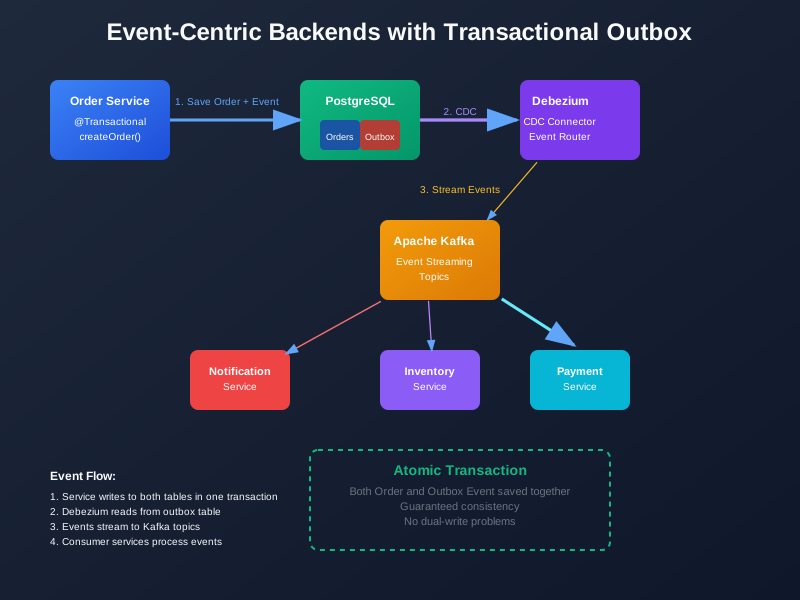
The idea is simple: instead of publishing events directly, you write them to a special table in the same database. Then a separate process reads from this table and publishes the events.
Here’s the flow:
- Your service starts a database transaction
- It saves the business data to the main table
- It also saves the event to an outbox table
- The transaction commits (both data and event are saved together)
- A separate process reads from the outbox table and publishes events
This guarantees that if the business data is saved, the event will eventually be published. And if the business data isn’t saved, no event gets published.
Setting Up the Outbox Table
First, let’s create the outbox table. I’ll use PostgreSQL, but this works with any database that supports transactions.
CREATE TABLE outbox_events (
    id UUID PRIMARY KEY DEFAULT gen_random_uuid(),
    aggregate_id VARCHAR(255) NOT NULL,
    aggregate_type VARCHAR(255) NOT NULL,
    event_type VARCHAR(255) NOT NULL,
    event_data JSONB NOT NULL,
    created_at TIMESTAMP WITH TIME ZONE DEFAULT NOW(),
    processed_at TIMESTAMP WITH TIME ZONE,
    version INTEGER NOT NULL DEFAULT 1
);

CREATE INDEX idx_outbox_events_unprocessed
ON outbox_events(created_at)
WHERE processed_at IS NULL;

CREATE INDEX idx_outbox_events_aggregate
ON outbox_events(aggregate_id, aggregate_type);
The key fields:
aggregate_idandaggregate_type: Identifies which business entity this event belongs toevent_type: The type of event (OrderCreated, PaymentProcessed, etc.)event_data: The actual event payload as JSONprocessed_at: When the event was successfully published (NULL means not processed yet)
Writing Events Transactionally
Now let’s see how to write events as part of your business logic. Here’s a Spring Boot example:
@Service
@Transactional
public class OrderService {

    @Autowired
    private OrderRepository orderRepository;

    @Autowired
    private OutboxEventRepository outboxEventRepository;

    public void createOrder(CreateOrderRequest request) {
        // Create the order
        Order order = new Order();
        order.setCustomerId(request.getCustomerId());
        order.setTotalAmount(request.getTotalAmount());
        order.setStatus(OrderStatus.PENDING);

        // Save the order
        Order savedOrder = orderRepository.save(order);

        // Create the event
        OrderCreatedEvent event = new OrderCreatedEvent(
            savedOrder.getId(),
            savedOrder.getCustomerId(),
            savedOrder.getTotalAmount(),
            savedOrder.getCreatedAt()
        );

        // Save the event to outbox in the same transaction
        OutboxEvent outboxEvent = new OutboxEvent();
        outboxEvent.setAggregateId(savedOrder.getId().toString());
        outboxEvent.setAggregateType("Order");
        outboxEvent.setEventType("OrderCreated");
        outboxEvent.setEventData(objectMapper.writeValueAsString(event));

        outboxEventRepository.save(outboxEvent);

        // Transaction commits here - both order and event are saved
    }
}
The magic happens in the @Transactional annotation. Both the order and the outbox event are saved in the same database transaction. If either fails, both get rolled back.
Reading Events with Debezium
Now we need something to read from the outbox table and publish events. This is where Debezium comes in.
Debezium is a change data capture (CDC) tool that reads database transaction logs and streams changes to Kafka. It’s perfect for this use case because it can detect new rows in the outbox table and publish them as events.
Here’s how to set it up:
1. Configure Debezium Connector
{
  "name": "outbox-connector",
  "config": {
    "connector.class": "io.debezium.connector.postgresql.PostgresConnector",
    "database.hostname": "localhost",
    "database.port": "5432",
    "database.user": "debezium",
    "database.password": "password",
    "database.dbname": "ecommerce",
    "database.server.name": "ecommerce-server",
    "table.include.list": "public.outbox_events",
    "transforms": "outbox",
    "transforms.outbox.type": "io.debezium.transforms.outbox.EventRouter",
    "transforms.outbox.route.by.field": "event_type",
    "transforms.outbox.table.field.event.id": "id",
    "transforms.outbox.table.field.event.key": "aggregate_id",
    "transforms.outbox.table.field.event.payload": "event_data",
    "transforms.outbox.table.field.event.timestamp": "created_at",
    "transforms.outbox.route.topic.replacement": "${routedByValue}.events"
  }
}
This configuration tells Debezium to:
- Connect to your PostgreSQL database
- Monitor only the
outbox_eventstable - Use the
EventRoutertransform to route events based on their type - Create topics like
OrderCreated.events,PaymentProcessed.events, etc.
2. Event Processing Service
You’ll need a service to consume these events and mark them as processed:
@KafkaListener(topics = "OrderCreated.events")
public void handleOrderCreated(OrderCreatedEvent event,
                             @Header("__op") String operation) {
    if ("c".equals(operation)) { // 'c' means create/insert
        // Process the event
        notificationService.sendOrderConfirmation(event.getCustomerId());
        inventoryService.reserveItems(event.getOrderId());

        // Mark as processed
        outboxEventRepository.markAsProcessed(event.getEventId());
    }
}
Handling Errors and Retries
Things will go wrong. Events might fail to process, or the outbox table might get backed up. Here’s how to handle it:
Dead Letter Topics
Configure Kafka to send failed events to a dead letter topic:
{
  "name": "outbox-connector",
  "config": {
    // ... other config
    "errors.tolerance": "all",
    "errors.log.enable": "true",
    "errors.log.include.messages": "true",
    "errors.deadletterqueue.topic.name": "outbox-events-dlq"
  }
}
Idempotency
Make sure your event handlers are idempotent. The same event might be processed multiple times:
@KafkaListener(topics = "OrderCreated.events")
public void handleOrderCreated(OrderCreatedEvent event) {
    // Check if we've already processed this event
    if (eventRepository.existsById(event.getOrderId())) {
        log.info("Order {} already exists, skipping", event.getOrderId());
        return;
    }

    // Process the event
    processOrder(event);
}
Monitoring and Observability
You need to know when things are working and when they’re not:
-- Check for unprocessed events
SELECT COUNT(*) as unprocessed_events,
       MIN(created_at) as oldest_unprocessed
FROM outbox_events
WHERE processed_at IS NULL;

-- Check processing lag
SELECT event_type,
       COUNT(*) as total_events,
       COUNT(processed_at) as processed_events,
       AVG(EXTRACT(EPOCH FROM (processed_at - created_at))) as avg_processing_time_seconds
FROM outbox_events
WHERE created_at > NOW() - INTERVAL '1 hour'
GROUP BY event_type;
Schema Evolution
As your system grows, your events will change. Debezium handles this well, but you need to plan for it:
- Additive changes only: Add new fields, don’t remove or rename existing ones
- Use JSON schemas: Store event schemas in a registry
- Version your events: Include version numbers in event types
public class OrderCreatedEvent {
    private String orderId;
    private String customerId;
    private BigDecimal totalAmount;
    private LocalDateTime createdAt;
    private String version = "1.0"; // Add versioning

    // New fields can be added as optional
    private String promotionCode; // Added in version 1.1
}
Best Practices
Here’s what I’ve learned from building these systems:
-
Keep events small: Don’t put entire entities in events. Just include the data other services need.
-
Use correlation IDs: Include a correlation ID in every event to trace requests across services.
-
Monitor everything: Set up alerts for processing lag, failed events, and dead letter queues.
-
Test failure scenarios: Your system will fail. Test what happens when Kafka is down, when the database is slow, when events are malformed.
-
Plan for scale: The outbox table will grow. Plan for archiving old events and partitioning.
The Architecture Checklist
Before you deploy this to production:
- Outbox table is properly indexed
- Debezium connector is configured correctly
- Event handlers are idempotent
- Dead letter queue is set up
- Monitoring and alerting are configured
- Schema evolution strategy is defined
- Error handling and retries are implemented
- Performance testing is done
Wrapping Up
The Transactional Outbox Pattern with Debezium solves the dual-write problem elegantly. It guarantees that events are published when data is saved, and it does it reliably at scale.
The setup isn’t trivial, but it’s worth it. You get:
- Guaranteed event delivery
- Data consistency
- Reliable error handling
- Good observability
And you avoid the nightmare of trying to debug why some events are missing or why your data is inconsistent.
Start simple. Get the basic pattern working with a single event type. Then add monitoring. Then add more event types. Then optimize for scale.
The key is to make it work first, then make it work well.
Discussion
Loading comments...