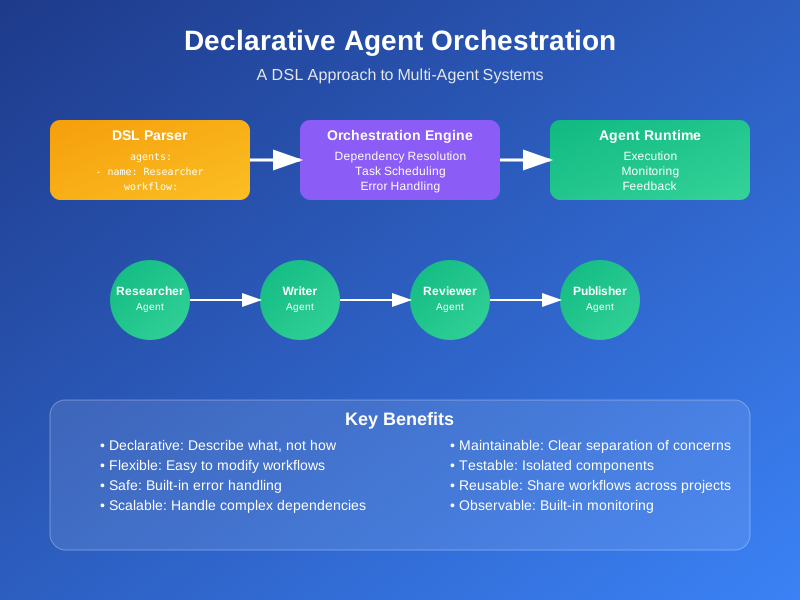
Declarative Agent Orchestration: A DSL Approach to Multi-Agent Systems
Multi-agent systems are everywhere now. AutoGen, CrewAI, LangGraph - these frameworks let you build complex AI workflows with multiple agents working together. But here’s the thing: most of them still use imperative programming. You write scripts that tell agents exactly how to do things, step by step.
This works for simple cases. But when you have complex workflows with dependencies, error handling, and dynamic routing, imperative code becomes a mess. You end up with tangled scripts that are hard to read, harder to modify, and nearly impossible to debug.
What if we could flip this? Instead of telling agents how to work, what if we just told the system what we want done? That’s declarative agent orchestration.
What Is Declarative Agent Orchestration?
Declarative orchestration means describing what you want, not how to get it. Think of it like the difference between giving someone directions versus telling them your destination.
With imperative orchestration, you write code like this:
def run_research_workflow():
    researcher = create_researcher_agent()
    writer = create_writer_agent()

    # Step 1: Research
    research_result = researcher.run("Find latest papers on vector databases")
    if not research_result.success:
        raise Exception("Research failed")

    # Step 2: Write
    draft = writer.run(f"Summarize: {research_result.content}")
    if not draft.success:
        raise Exception("Writing failed")

    return draft.content
This code is rigid. It’s hard to change the workflow, add new agents, or handle different scenarios. Every modification requires touching the core logic.
With declarative orchestration, you describe the workflow like this:
agents:
  - name: Researcher
    goal: "Find latest papers on vector databases"
    tools: ["web_search", "paper_parser"]
  - name: Writer
    goal: "Summarize findings into a blog draft"
    tools: ["text_processor", "markdown_generator"]

workflow:
  - Researcher -> Writer
  - Writer -> Publisher

constraints:
  - max_retries: 3
  - timeout: 300
The orchestration engine figures out how to execute this. It handles dependencies, retries, error recovery, and parallel execution automatically.
This approach has several benefits:
Abstraction: You focus on the business logic, not the plumbing.
Flexibility: Change workflows by editing configuration, not code.
Safety: Built-in error handling and retry logic.
Testability: Test individual agents and workflows separately.
Reusability: Share workflows across different projects.
Architecture Overview
A declarative orchestration system has three main layers:
1. DSL Parser
The parser takes your declarative specification and converts it into an internal representation. It validates the syntax, checks for circular dependencies, and builds a dependency graph.
class DSLParser:
    def parse(self, spec: str) -> WorkflowSpec:
        # Parse YAML/JSON specification
        data = yaml.safe_load(spec)

        # Validate structure
        self._validate_agents(data['agents'])
        self._validate_workflow(data['workflow'])

        # Build dependency graph
        graph = self._build_dependency_graph(data)

        return WorkflowSpec(
            agents=data['agents'],
            workflow=data['workflow'],
            constraints=data.get('constraints', {}),
            dependency_graph=graph
        )
2. Orchestration Engine
The engine takes the parsed specification and executes it. It handles task scheduling, dependency resolution, error handling, and monitoring.
class OrchestrationEngine:
    def __init__(self, agent_runtime: AgentRuntime):
        self.agent_runtime = agent_runtime
        self.task_queue = TaskQueue()
        self.dependency_resolver = DependencyResolver()

    async def execute(self, spec: WorkflowSpec) -> ExecutionResult:
        # Build execution plan
        plan = self._build_execution_plan(spec)

        # Execute tasks in dependency order
        results = {}
        for task in plan.tasks:
            try:
                result = await self._execute_task(task, results)
                results[task.id] = result
            except Exception as e:
                if task.retry_count < spec.constraints.get('max_retries', 3):
                    task.retry_count += 1
                    self.task_queue.add(task)
                else:
                    raise ExecutionError(f"Task {task.id} failed: {e}")

        return ExecutionResult(results)
3. Agent Runtime
The runtime manages individual agents, handles their lifecycle, and provides monitoring capabilities.
class AgentRuntime:
    def __init__(self):
        self.agents = {}
        self.monitor = AgentMonitor()

    async def create_agent(self, spec: AgentSpec) -> Agent:
        agent = Agent(
            name=spec.name,
            goal=spec.goal,
            tools=spec.tools,
            config=spec.config
        )

        self.agents[spec.name] = agent
        self.monitor.register(agent)

        return agent

    async def execute_agent(self, agent: Agent, input_data: Any) -> AgentResult:
        with self.monitor.track_execution(agent):
            result = await agent.run(input_data)
            return result
Implementation Blueprint
Let’s build a minimal declarative orchestration system. We’ll start with a simple DSL syntax and build up from there.
DSL Syntax Design
Our DSL will support agents, workflows, and constraints:
# agents.yaml
agents:
  - name: Researcher
    goal: "Find latest papers on vector databases"
    tools: ["web_search", "paper_parser"]
    config:
      max_results: 10
      timeout: 60

  - name: Writer
    goal: "Summarize findings into a blog draft"
    tools: ["text_processor", "markdown_generator"]
    config:
      max_length: 2000
      style: "technical"

  - name: Reviewer
    goal: "Review and improve the draft"
    tools: ["grammar_checker", "style_analyzer"]
    config:
      strict_mode: true

workflow:
  - Researcher -> Writer
  - Writer -> Reviewer
  - Reviewer -> Publisher

constraints:
  max_retries: 3
  timeout: 300
  parallel_execution: true
Parser Implementation
from dataclasses import dataclass
from typing import List, Dict, Any, Optional
import yaml
import networkx as nx

@dataclass
class AgentSpec:
    name: str
    goal: str
    tools: List[str]
    config: Dict[str, Any]

@dataclass
class WorkflowSpec:
    agents: List[AgentSpec]
    workflow: List[str]
    constraints: Dict[str, Any]
    dependency_graph: nx.DiGraph

class DSLParser:
    def parse(self, spec_content: str) -> WorkflowSpec:
        """Parse DSL specification into internal representation."""
        data = yaml.safe_load(spec_content)

        # Parse agents
        agents = []
        for agent_data in data['agents']:
            agent = AgentSpec(
                name=agent_data['name'],
                goal=agent_data['goal'],
                tools=agent_data.get('tools', []),
                config=agent_data.get('config', {})
            )
            agents.append(agent)

        # Parse workflow and build dependency graph
        workflow = data['workflow']
        graph = self._build_dependency_graph(workflow)

        # Validate no circular dependencies
        if not nx.is_directed_acyclic_graph(graph):
            raise ValueError("Workflow contains circular dependencies")

        return WorkflowSpec(
            agents=agents,
            workflow=workflow,
            constraints=data.get('constraints', {}),
            dependency_graph=graph
        )

    def _build_dependency_graph(self, workflow: List[str]) -> nx.DiGraph:
        """Build dependency graph from workflow specification."""
        graph = nx.DiGraph()

        for step in workflow:
            if ' -> ' in step:
                source, target = step.split(' -> ')
                graph.add_edge(source.strip(), target.strip())
            else:
                # Single agent step
                graph.add_node(step.strip())

        return graph
Orchestration Engine
import asyncio
from typing import Dict, Any, Optional
from dataclasses import dataclass
from enum import Enum

class TaskStatus(Enum):
    PENDING = "pending"
    RUNNING = "running"
    COMPLETED = "completed"
    FAILED = "failed"

@dataclass
class Task:
    id: str
    agent_name: str
    input_data: Any
    dependencies: List[str]
    status: TaskStatus = TaskStatus.PENDING
    retry_count: int = 0
    result: Optional[Any] = None

class OrchestrationEngine:
    def __init__(self, agent_runtime: 'AgentRuntime'):
        self.agent_runtime = agent_runtime
        self.tasks: Dict[str, Task] = {}
        self.results: Dict[str, Any] = {}

    async def execute(self, spec: WorkflowSpec) -> Dict[str, Any]:
        """Execute workflow specification."""
        # Create tasks from dependency graph
        tasks = self._create_tasks(spec)

        # Execute tasks in topological order
        execution_order = list(nx.topological_sort(spec.dependency_graph))

        for agent_name in execution_order:
            if agent_name in tasks:
                task = tasks[agent_name]
                await self._execute_task(task, spec.constraints)

        return self.results

    def _create_tasks(self, spec: WorkflowSpec) -> Dict[str, Task]:
        """Create tasks from workflow specification."""
        tasks = {}

        for agent_spec in spec.agents:
            # Find dependencies
            dependencies = list(spec.dependency_graph.predecessors(agent_spec.name))

            task = Task(
                id=agent_spec.name,
                agent_name=agent_spec.name,
                input_data=None,  # Will be set from previous results
                dependencies=dependencies
            )
            tasks[agent_spec.name] = task

        return tasks

    async def _execute_task(self, task: Task, constraints: Dict[str, Any]) -> None:
        """Execute a single task with retry logic."""
        max_retries = constraints.get('max_retries', 3)

        for attempt in range(max_retries + 1):
            try:
                # Prepare input data from dependencies
                input_data = self._prepare_input_data(task)

                # Execute agent
                agent = self.agent_runtime.get_agent(task.agent_name)
                result = await self.agent_runtime.execute_agent(agent, input_data)

                # Store result
                self.results[task.id] = result
                task.status = TaskStatus.COMPLETED
                task.result = result

                return

            except Exception as e:
                task.retry_count += 1
                if attempt < max_retries:
                    print(f"Task {task.id} failed, retrying... (attempt {attempt + 1})")
                    await asyncio.sleep(2 ** attempt)  # Exponential backoff
                else:
                    task.status = TaskStatus.FAILED
                    raise ExecutionError(f"Task {task.id} failed after {max_retries} retries: {e}")

    def _prepare_input_data(self, task: Task) -> Any:
        """Prepare input data from dependency results."""
        if not task.dependencies:
            return None

        # Combine results from all dependencies
        input_data = {}
        for dep in task.dependencies:
            if dep in self.results:
                input_data[dep] = self.results[dep]

        return input_data
Agent Runtime
import asyncio
from typing import Dict, Any, Optional
from dataclasses import dataclass

@dataclass
class AgentResult:
    success: bool
    content: Any
    metadata: Dict[str, Any]
    error: Optional[str] = None

class Agent:
    def __init__(self, name: str, goal: str, tools: List[str], config: Dict[str, Any]):
        self.name = name
        self.goal = goal
        self.tools = tools
        self.config = config

    async def run(self, input_data: Any) -> AgentResult:
        """Execute agent with given input data."""
        try:
            # Simulate agent execution
            # In a real implementation, this would call the actual agent
            result = await self._simulate_agent_execution(input_data)

            return AgentResult(
                success=True,
                content=result,
                metadata={"agent": self.name, "tools_used": self.tools}
            )
        except Exception as e:
            return AgentResult(
                success=False,
                content=None,
                metadata={"agent": self.name},
                error=str(e)
            )

    async def _simulate_agent_execution(self, input_data: Any) -> str:
        """Simulate agent execution for demo purposes."""
        await asyncio.sleep(1)  # Simulate processing time

        if self.name == "Researcher":
            return "Found 5 papers on vector databases: [paper1, paper2, ...]"
        elif self.name == "Writer":
            return "Blog draft: 'Vector databases are becoming essential...'"
        elif self.name == "Reviewer":
            return "Reviewed and improved draft with better structure"
        else:
            return f"Agent {self.name} completed task"

class AgentRuntime:
    def __init__(self):
        self.agents: Dict[str, Agent] = {}

    def create_agent(self, spec: AgentSpec) -> Agent:
        """Create and register an agent."""
        agent = Agent(
            name=spec.name,
            goal=spec.goal,
            tools=spec.tools,
            config=spec.config
        )
        self.agents[spec.name] = agent
        return agent

    def get_agent(self, name: str) -> Agent:
        """Get agent by name."""
        if name not in self.agents:
            raise ValueError(f"Agent {name} not found")
        return self.agents[name]

    async def execute_agent(self, agent: Agent, input_data: Any) -> AgentResult:
        """Execute an agent with input data."""
        return await agent.run(input_data)
Example Usage
Here’s how you’d use the complete system:
async def main():
    # Parse DSL specification
    with open('agents.yaml', 'r') as f:
        spec_content = f.read()

    parser = DSLParser()
    spec = parser.parse(spec_content)

    # Create agent runtime
    runtime = AgentRuntime()
    for agent_spec in spec.agents:
        runtime.create_agent(agent_spec)

    # Execute workflow
    engine = OrchestrationEngine(runtime)
    results = await engine.execute(spec)

    print("Workflow completed!")
    for agent_name, result in results.items():
        print(f"{agent_name}: {result.content}")

if __name__ == "__main__":
    asyncio.run(main())
Advanced Use Case: Autonomous Content Generation
Let’s look at a real-world scenario: an autonomous content generation pipeline for a technical blog.
# content-pipeline.yaml
agents:
  - name: TopicGenerator
    goal: "Generate trending technical topics"
    tools: ["trend_analyzer", "keyword_research"]
    config:
      topics_per_day: 3
      categories: ["ai", "cloud", "devops"]

  - name: Researcher
    goal: "Research topic and gather information"
    tools: ["web_search", "paper_parser", "github_scanner"]
    config:
      max_sources: 20
      min_credibility: 0.8

  - name: Writer
    goal: "Write comprehensive technical article"
    tools: ["markdown_generator", "code_formatter", "seo_optimizer"]
    config:
      target_length: 2000
      include_code_examples: true

  - name: Reviewer
    goal: "Review article for accuracy and quality"
    tools: ["fact_checker", "grammar_checker", "technical_validator"]
    config:
      strict_mode: true
      require_citations: true

  - name: Publisher
    goal: "Publish article to blog platform"
    tools: ["cms_api", "social_media", "newsletter"]
    config:
      auto_publish: false
      schedule_time: "09:00"

workflow:
  - TopicGenerator -> Researcher
  - Researcher -> Writer
  - Writer -> Reviewer
  - Reviewer -> Publisher

constraints:
  max_retries: 3
  timeout: 1800
  parallel_execution: false
  quality_threshold: 0.85
This pipeline runs automatically every day. The TopicGenerator finds trending topics, the Researcher gathers information, the Writer creates the article, the Reviewer ensures quality, and the Publisher handles distribution.
The declarative approach makes it easy to:
- Add new agents (like a FactChecker or SEOOptimizer)
- Modify the workflow (maybe add a SocialMediaPromoter)
- Change quality thresholds or retry logic
- A/B test different configurations
Future Outlook
Declarative agent orchestration is just getting started. Here’s where it’s heading:
Policy-Enforced Orchestration
Future DSLs will include policy definitions that enforce business rules:
policies:
  - name: "data_privacy"
    rule: "No PII in logs"
    enforcement: "strict"

  - name: "cost_control"
    rule: "Max $100 per workflow"
    enforcement: "warning"

  - name: "quality_gate"
    rule: "All outputs must pass quality check"
    enforcement: "blocking"
AI-as-Code Integration
The declarative approach fits perfectly with the AI-as-code trend. You’ll be able to version control your AI workflows, test them in CI/CD pipelines, and deploy them like any other infrastructure.
# ai-workflow.yaml
version: "1.0"
agents:
  - name: CodeReviewer
    model: "gpt-4"
    prompt: "Review code for security issues"

workflow:
  - CodeReviewer -> SecurityGate

deployment:
  environment: "production"
  scaling: "auto"
  monitoring: "enabled"
Visual Workflow Designers
Declarative specifications will enable visual workflow designers. You’ll drag and drop agents, connect them with arrows, and the system will generate the DSL automatically.
Multi-Cloud Orchestration
Future systems will orchestrate agents across different cloud providers, handling vendor lock-in and cost optimization automatically.
Getting Started
Want to try declarative agent orchestration? Here’s how to start:
-
Start Simple: Begin with a basic workflow using existing frameworks like LangGraph or CrewAI, but structure your code declaratively.
-
Build Your DSL: Create a simple YAML-based DSL for your specific use case. Don’t try to build a general-purpose system right away.
-
Focus on One Domain: Pick a specific domain (like content generation or data processing) and build a DSL that works well for that domain.
-
Iterate: Start with imperative code, then gradually extract the declarative parts. This helps you understand what needs to be configurable.
-
Share and Learn: The declarative approach works best when you can share workflows across teams. Build a library of reusable workflow templates.
The key is to start small and grow. Declarative orchestration isn’t about building the perfect system from day one. It’s about making your AI workflows more maintainable, testable, and reusable.
And that’s the real value. When you can describe what you want instead of how to get it, you spend less time debugging and more time building. Your workflows become easier to understand, modify, and share. That’s how you build AI systems that actually work in production.
The future of AI isn’t just about better models. It’s about better ways to orchestrate them. Declarative agent orchestration gives you that foundation.
Discussion
Loading comments...